Hide/Remove email box from list type fields
--
While working with fields of type list, you might encounter that these in some circumstances contain an email envelope. You could add email addresses here instead of selecting a reference. Though what if you don't want this email envelope to appear, how to hide/remove this?
Email envelope
The email envelope that we are referring to:
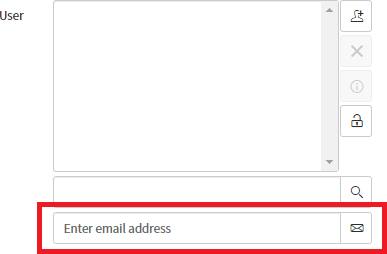
So why does this sometimes appear and why does this sometimes not appear? First, when the list type field has reference table User [sys_user], the email envelope is automatically shown. For other tables, the email envelope is not shown. So this only concerns the User table.
Dictionary Entry Attributes
In some cases, this email envelope will certainly be useful. Though what if you want to hide/remove this? DOM manipulation? No, there's just a dictionary entry attribute available for this: "No email".
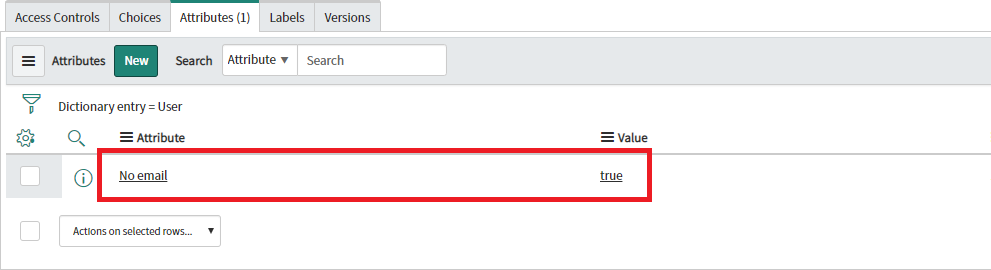
When opening the dictionary entry for the User list type field concerned (for example, right-mouse-click on the field label, select "Configure Dictionary"), amongst others there is a related list "Attributes". Add a new attribute here, "No email" with value "true".
Result
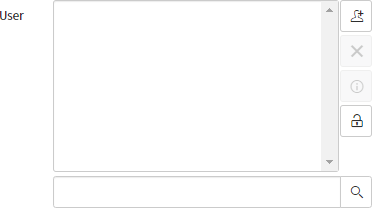
When opening your form again, the email envelope now will not be available anymore on your User list type field.
---

有“AI”的1024 = 2048,欢迎大家加入2048 AI社区
更多推荐


 3
3 0
0- 0


 已为社区贡献14条内容

所有评论(0)