Linux系统编程——进程终止与退出、进程(回调函数,进程空间回收函数)、exec族
进程的终止:
正常终止:1)main中return
2)exit() 作用:退进程
//属于C库函数,会执行io库的清理工作,关闭所有的流,以及所有打开的文件。
//已经清理函数(atexit)
3)_exit, _Exit 会关闭所有已经打开的文件,不执行清理函数
4)主线程退出
5)主线程调用pthread_exit
异常终止:6)abort()
7)signal kill pid(发信号)
8)线程被pthread_cancle(终止其他进程)
进程的退出 --- 僵尸进程 / 孤儿进程
僵尸进程:
父进程先消亡,就是僵尸进程。内存空间被释放,也不再被调度,但在进程表中pcb块(在内核空间)未回收,需要回收
孤儿进程:
孤儿进程是指父进程已经终止或退出,但子进程仍在运行的进程。当父进程先于子进程退出时,子进程就会成为孤儿进程。
回调函数:
头文件:#include <stdlib.h>
atexit()
原型: int atexit(void (*function)(void));
功能: 注册 进程退出前执行的函数
参数: @function 函数指针,指向void返回值void参数的函数指针
返回值 成功 返回0
失败 返回非0
当注册调用exit或者由main函数执行return时,所有用atexit注册的退出函数,将会由注册时顺序被调用
代码示例:
#include <dirent.h>
#include <stdio.h>
#include <stdlib.h>
#include <string.h>
#include <sys/types.h>
#include <unistd.h>

FILE* fp;
char* p;
void clean()
{
  printf("clean fun ,p is %s\n", p);
  fclose(fp);
  free(p);
}

int main(int argc, char** argv)

{
  atexit(clean);
  fp = fopen("1.txt", "r");
  p = malloc(50);
  strcpy(p, "hello");
  printf("process will end..\n");
  return 0;
}
进程空间的回收
头文件:#include <sys/wait.h>
wait() / waitpid()
原型: pit_t wait(int *status); //阻塞回收(等待子进程消亡再回收)
功能: 该函数可以阻塞等待任意子进程退出并回收该进程的状态(一次回收一个子进程)
//一般用于父进程回收子进程的状态
参数: @status 进程退出时候的状态
//如果不关心其退出状态一般用NULL表示
//如果要回收进程退出状态(正常退出 / 异常退出),则用WEXITSTATUS回收
返回值 成功 返回回收的子进程的pid
失败 返回-1
1)如果所有的子进程都在运行 ==》阻塞
2)如果一个子进程终止,正在等待的父进程则获得终止状态,获得子进程的状态后,立刻返回。
3)如果没有子进程,则立即出错退出。4)由父进程调用,回收子进程的pcb,会阻塞,父进程回收资源的时候,子进程没有退出。父进程就会等待子进程结束再回收!!!
waitpid(-1, status, 0) = wait(status)
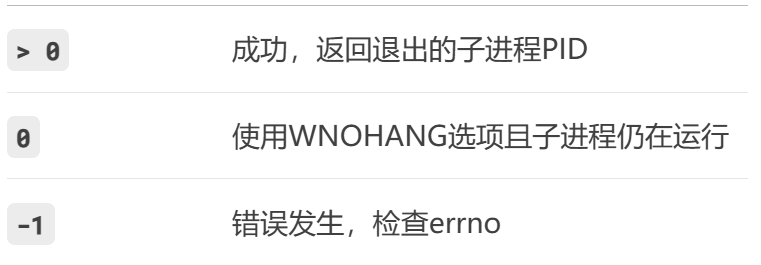
原型: pid_t waitpid(pid_t pid, int status, int options); //非阻塞回收
功能: 用于等待特定子进程的状态变化
参数: @pid 指定等待的子进程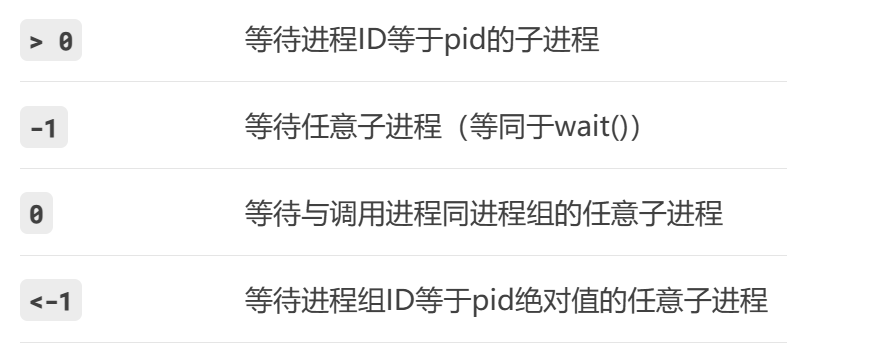
@status 用于存储子进程的退出状态
int status;
waitpid(pid, &status, 0);// 检查宏: //三组宏两两一组配合使用
WIFEXITED(status) // 子进程正常退出
WEXITSTATUS(status) // 获取退出状态码
WIFSIGNALED(status) // 子进程被信号终止
WTERMSIG(status) // 获取终止信号编号
WIFSTOPPED(status) // 子进程是否被暂停
WSTOPSIG(status) // 获取暂停信号编号
@options 控制等待行为的选项(可组合使用,用 | 连接)
WNOHANG:非阻塞模式。若没有子进程退出,立即返回 0,不阻塞。WUNTRACED:除了等待已退出的子进程,还等待被暂停(SIGSTOP信号)且未被报告过的子进程。WCONTINUED:等待被暂停后又恢复运行(SIGCONT信号)的子进程
返回值
代码示例:
//<1>完整使用示例
#include <stdio.h>
#include <stdlib.h>
#include <sys/types.h>
#include <sys/wait.h>
#include <unistd.h>

int main(int argc, char **argv)
{
  pid_t pid = fork();
  if (pid > 0)
  {
    printf("father pid:%d, child pid:%d\n", getpid(), pid);
    int status;
    while (1)
    {
        //非阻塞回收
      pid_t recycle_pid = waitpid(pid, &status, WNOHANG);
      if (pid == recycle_pid)
      {
        printf("recycle_pid:%d\n", recycle_pid);
        //子进程正常结束
        if (WIFEXITED(status))
        {
          printf("child ret value is %d\n", WEXITSTATUS(status));
        }
        else if (WIFSIGNALED(status))
        {
          printf("child unnormal,signal is %d\n", WTERMSIG(status));
        }
        break;
      }
      else if (0 == recycle_pid)  //子进程未结束
      {
        printf("子进程未结束...\n");
        usleep(1000*500);//0.5s
      }
      else
      {
        printf("waitpid error...\n");
        break;
      }
    }
  }
  else if (0 == pid)
  {
    int i = 10;
    while (i--)
    {
      printf("I'm processing....\n");
      sleep(1);
    }
    exit(20);
  }
  else
  {
    perror("fork error\n");
    return 1;
  }

  return 0;
}
//<2>非阻塞回收特定进程
#include <stdio.h>
#include <stdlib.h>
#include <sys/types.h>
#include <sys/wait.h>
#include <unistd.h>

int main(void)
{
  int id = 2;
  int n = 0;
  printf("n = :");
  scanf("%d", &n);
  pid_t pid[5] = {0};
  //创建5个子进程
  while (n--)
  {
    pid[n] = fork();
    if (pid[n] > 0)
    {
      continue;
    }
    else if (0 == pid[n])
    {
      printf("%d pid:%d\n",n, getpid());
      sleep(rand() % 5+1);
      exit(20);
    }
    else
    {
      perror("fork err...\n");
      return 1;
    }
  }

  //回收id = 2的进程
  while (1)
  {
    pid_t recycle_pid = waitpid(pid[id-1], NULL, WNOHANG);
    if(pid[id-1] == recycle_pid)    //回收成功,相当于recycle_pid > 0
    {
        printf("recycle_pid: %d success\n",recycle_pid);
        break;
    }
    else if(0 == recycle_pid)
    {

    }
    else    //recycle_pid<0,回收失败
    {
        printf("recycle_pid failure....\n");
    }
  }

  return 0;
}
exec族
功能:用fork创建子进程后执行的是和父进程相同的程序 (但有可能执行不同的代码分支)
子进程往往要调用一种exec函数以执行另一个程序。当进程调用一种exec函数时,该进程的
用户空间代码和数据完全被新程序替换,从新程序的启动例程开始执行。调用exec并不创建
新进程,所以调用exec前后该进程的id并未改变。
其实有六种以exec开头的函数,统称exec函数:
头文件:#include <unistd.h>
!!!调用非系统可执行程序,第一个参数都传路径+文件名
原型: int execl(const char *path, const char *arg, ...,/* (char *) NULL */); // l :list
参数: @path 可执行程序的路径
@arg 参数 [字符串的形式] 列表,可以有多个
@NULL 参数结束标志(不能省)
示例:execl("/bin/ls", "ls","-a","-l","--color == auto",NULL);
原型: int execlp(const char *file, const char *arg, ...,/* (char *) NULL */); //p: PATH
参数: @file 文件名(在系统路径$PATH 下可以找到) //命令:echo $PATH
@arg 参数 [字符串的形式] 列表,可以有多个
@NULL 参数结束标志(不能省)
示例:
PATH 系统环境变量 查看命令:echo $PATH
execlp("ls", "ls", "-a", "-l", "--color=auto", NULL);
原型: int execv(const char *path, char *const argv[],NULL); // v:vector(数组)
参数: @path 可执行程序的路径
@arg 参数 [字符串的形式] 列表,可以有多个
@NULL 参数结束标志(不能省)
示例:
char *const args[] = {"cp", "11exec.c", "cp.txt",NULL};
execv("/bin/cp", args);
原型: int execvp(const char *file, char *const argv[],NULL); // vp: vector path
参数: @file 文件名(在系统路径$PATH 下可以找到) //命令:echo $PATH
@arg 参数 [字符串的形式] 列表,可以有多个
@NULL 参数结束标志(不能省)
示例:
char *const args[] = {"cat","11exec.c",NULL};
execvp(args[0], args);

有“AI”的1024 = 2048,欢迎大家加入2048 AI社区
更多推荐


 18
18 0
0- 0


 已为社区贡献2条内容

所有评论(0)