Smarter Case Assignment Using Decision Tables + Flow Designer
Look, I know what you're thinking: "This girl really is obsessed with Decision Tables!" Yes, it's me again—back with another Decision Table article! - this time we're tackling a completely different b
Look, I know what you're thinking: "This girl really is obsessed with Decision Tables!"

Yes, it's me again—back with another Decision Table article! - this time we're tackling a completely different beast: case assignment for non-email sources with 200+ unique scenarios. And spoiler alert: Decision Tables saved the day again!

In my previous article, I shared how we simplified inbound email-based case creation using Decision Tables, optimizing 60+ email actions into just 6. This time, I want to share a related but completely different use case - focused on case assignment for non-email sources, using Flow Designer + Decision Tables, and only triggering when the assignment group is empty.

Note: The data and field names used here are sample and rough, just to illustrate the approach. Actual client logic was more detailed and customized.
🧩 The Challenge
Picture this: we're implementing a brand-new case management system from scratch, and the client needs to handle over 200 unique case assignment scenarios. The assignment logic depended on combinations of fields like Account Number,Product Group, Product ID,Case Type,Subcategory and others
Our state flow was straightforward: New → Assigned → Open
But here's the kicker—Assignment Rules are an option but creating those many felt like a challenge again and maintaining them is again difficult. We needed this logic only for non-email sources (multiple integrations), and only when the assignment group was empty.
The original plan? Build a custom table to store these 200+ mappings.
That's when I suggested a better approach...

Why Decision Tables Made Sense
When I heard "custom table," I knew there had to be a better way. This was actually going to be my first Decision Table implementation, but I could see the potential benefits:
Custom Table = Developer Dependency:
- Custom roles needed for access
- Developer required for new fields and logic updates
- Maintenance bottleneck
Decision Tables = Admin Freedom:
- decision_table_admin role for full Decision Table administration
- decision_rule_author role for editing decisions
- decision_result_editor role for editing Decision Table results
- Business users can manage rules based on their requirements
- Clean, visual interface
Suggestion was simple: "Why not let case admins manage this themselves with Decision Tables instead of making them dependent on developers?"
The answer was pretty obvious.


The Key Difference: Flow Designer + Conditional Logic
Unlike my previous email-based solution that used inbound actions, this case assignment needed more sophisticated timing control:
Flow Designer Setup
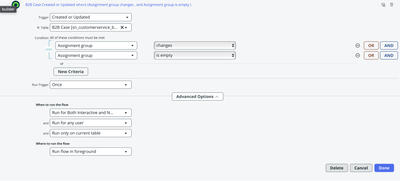
Trigger Configuration:
Flow Logic:
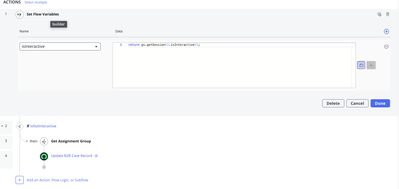
Get Assignment Group: Call Decision Table to determine assignment
Update Record: Set assignment group and move state to Assigned
Decision Table Structure
Input fields available: Account Number,Product Group, Product ID,Case Type,Subcategory and others
Decision Table fields used: Account Number, Product Group, Case Type
The 200+ scenarios had clear patterns, making Decision Tables perfect for this logic.
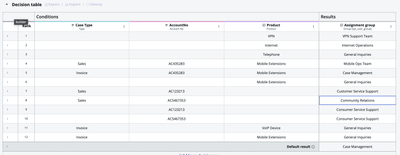
Smart Rule Hierarchy: Specific to Generic
The table follows a clear hierarchy of specific to generic rules, helping control how assignment is decided with minimal duplication:

Specific Rules (Rows 1-3): Specific field combinations
- Row 4: VPN → VPN Support Team
Mid-Level Rules (Rows 6-10): Partial combinations
- Row 7: Sales + AC123213 (any product) → Customer Service Support
Generic Fallbacks (Rows 11-13): Minimal conditions
- Row 11: Invoice + VoIP Device (any account) → General Inquiries
Default Result: Case Management (when no rules match)
This hierarchy ensures the most specific rule wins while providing sensible fallbacks!

Quick Results
- Testing: Smooth sailing!
- Client reaction: Super impressed with admin self-sufficiency
As expected, post-go-live the client wanted additional checks - those extra fields I've added made it seamless!

Deployment Gotcha

Don't do this: Do not Import the Decision Table file from non-prod. We had incomplete rows and field mismatches.
Do this instead:
- Move Decision Table structure first with sample rows
- Export the sheet from the ‘Export Feature’, Add the rows and use Decision Table import feature in production
Pro Tips

Check for Draft Versions: To find out if there's a draft version of your Decision Table, Navigate to Decision Tables, search with decision table name and you will see 2 records - one in Decision Table class and other in Delta Decision Table class.(like "Case Assignment Rules" and "Case Assignment Rules delta").


Add Extra Fields Upfront: Include all possible input fields - even unused ones. Future logic additions become much easier with no flow/table redesigns needed.

Use Export/Import Feature: Leverage the built-in export/import functionality for bulk import of decision rows.
Cleanup Warning: If cleanup is needed, you can delete from sys_decision_question table, but filter carefully - you might accidentally delete rows from other Decision Tables!
This was my first Decision Table implementation, and I've used them in multiple times since. When there's a pattern for condition checks with a set of fields resulting in outputs, Decision Tables are your friend.
Let's discuss your challenges in the comments!

有“AI”的1024 = 2048,欢迎大家加入2048 AI社区
更多推荐



 49
49 0
0- 0


 已为社区贡献14条内容

所有评论(0)