【AI Agent】Openai的function calling解读
·
函数调用 为 OpenAI 模型提供了一种强大而灵活的方式,通过在代码中使用function calling, 和本地服务或者外部服务进行交互。
获取天气
使用 get_weather 函数的函数调用示例
from openai import OpenAI

client = OpenAI()

tools = [{
    "type": "function",
    "name": "get_weather",
    "description": "获取指定位置的当前温度。",
    "parameters": {
        "type": "object",
        "properties": {
            "location": {
                "type": "string",
                "description": "城市和国家,例如:Bogotá, Colombia"
            }
        },
        "required": ["location"],
        "additionalProperties": False
    }
}]

response = client.responses.create(
    model="gpt-4.1",
    input=[{"role": "user", "content": "今天巴黎的天气怎么样?"}],
    tools=tools
)

print(response.output)
模型返回的函数调用示例:
[{
    "type": "function_call",
    "id": "fc_12345xyz",
    "call_id": "call_12345xyz",
    "name": "get_weather",
    "arguments": "{\"location\":\"Paris, France\"}"
}]
发送邮件
使用 send_email 函数的函数调用示例
from openai import OpenAI

client = OpenAI()

tools = [{
    "type": "function",
    "name": "send_email",
    "description": "向指定收件人发送邮件,包含主题和正文。",
    "parameters": {
        "type": "object",
        "properties": {
            "to": {
                "type": "string",
                "description": "收件人邮箱地址"
            },
            "subject": {
                "type": "string",
                "description": "邮件主题"
            },
            "body": {
                "type": "string",
                "description": "邮件正文内容"
            }
        },
        "required": ["to", "subject", "body"],
        "additionalProperties": False
    }
}]

response = client.responses.create(
    model="gpt-4.1",
    input=[{"role": "user", "content": "你能给 ilan@example.com 和 katia@example.com 发封邮件问好吗?"}],
    tools=tools
)

print(response.output)
模型返回的函数调用示例:
[
    {
        "type": "function_call",
        "id": "fc_12345xyz",
        "call_id": "call_9876abc",
        "name": "send_email",
        "arguments": "{\"to\":\"ilan@example.com\",\"subject\":\"你好!\",\"body\":\"只是想打个招呼\"}"
    },
    {
        "type": "function_call",
        "id": "fc_12345xyz",
        "call_id": "call_9876abc",
        "name": "send_email",
        "arguments": "{\"to\":\"katia@example.com\",\"subject\":\"你好!\",\"body\":\"只是想打个招呼\"}"
    }
]
功能概要
通过函数调用让模型访问您自定义的代码。根据系统提示和消息,模型可能会决定调用这些函数——而不是生成文本或音频。
调用相应的接口之后,执行函数代码,将结果发送回模型,模型会将这些结果整合到最终回复中。
函数调用的主要功能
| 用途 | 描述 |
|---|---|
| 获取数据 | 检索最新信息并将其整合到模型的回复中(RAG)。适用于搜索知识库以及从 API 获取特定数据(例如当前天气数据)。 |
| 执行操作 | 执行诸如提交表单、调用 API、修改应用程序状态(UI/前端或后端)或执行智能体工作流操作(例如转接对话)等操作。 |
函数调用步骤
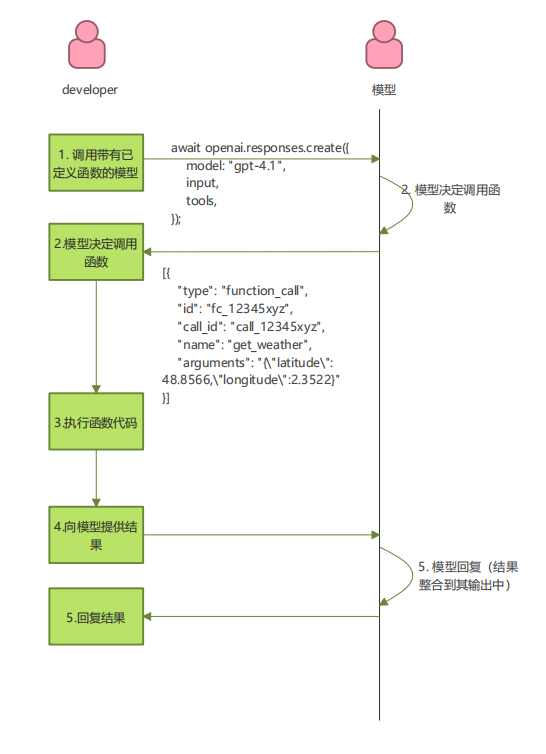
第 1 步:调用带有已定义函数的模型 —— 连同您的系统和用户消息。
from openai import OpenAI
import json

client = OpenAI()

tools = [{
    "type": "function",
    "name": "get_weather",
    "description": "获取提供的坐标的当前温度(摄氏度)。",
    "parameters": {
        "type": "object",
        "properties": {
            "latitude": {"type": "number"},
            "longitude": {"type": "number"}
        },
        "required": ["latitude", "longitude"],
        "additionalProperties": False
    },
    "strict": True
}]

input_messages = [{"role": "user", "content": "今天巴黎的天气怎么样?"}]

response = client.responses.create(
    model="gpt-4.1",
    input=input_messages,
    tools=tools,
)
第 2 步:模型决定调用函数 —— 模型返回 名称 和 输入参数。
[{
    "type": "function_call",
    "id": "fc_12345xyz",
    "call_id": "call_12345xyz",
    "name": "get_weather",
    "arguments": "{\"latitude\":48.8566,\"longitude\":2.3522}"
}]
第 3 步:执行函数代码 —— 解析模型的响应并处理函数调用。
tool_call = response.output[0]
args = json.loads(tool_call.arguments)

result = get_weather(args["latitude"], args["longitude"])
第 4 步:向模型提供结果 —— 以便它可以将结果整合到最终回复中。
input_messages.append(tool_call)  # 追加模型的函数调用消息
input_messages.append({           # 追加结果消息
    "type": "function_call_output",
    "call_id": tool_call.call_id,
    "output": str(result)
})

response_2 = client.responses.create(
    model="gpt-4.1",
    input=input_messages,
    tools=tools,
)
print(response_2.output_text)
第五步:模型回复 —— 将结果整合到其输出中。
“巴黎当前温度为 14°C (57.2°F)。”
定义函数
函数可以在每次 API 请求的 tools 参数中设置。
函数由其模式定义,该模式通知模型函数的作用以及它期望的输入参数。它包含以下字段:
| 字段 | 描述 |
|---|---|
| type | 应始终为 function |
| name | 函数的名称(例如 get_weather) |
| description | 何时以及如何使用该函数的详细信息 |
| parameters | 定义函数输入参数的 JSON 模式 |
| strict | 是否强制执行函数调用的严格模式 |
定义函数的实践(如何去定义函数)
- 编写清晰详细的函数名称、参数描述和说明。
明确描述函数的目的和每个参数(及其格式),以及输出代表什么。
使用系统提示描述何时(以及何时不)使用每个函数。请告诉模型 确切 要做什么。包括示例和边缘案例,特别是为了纠正任何重复出现的故障。(注意: 添加示例可能会损害推理模型的性能。) - 应用软件工程最佳实践。
使函数显而易见且直观。
使用枚举和对象结构。从而可以使的无效状态无法表示。(例如,toggle_light(on: bool, off: bool) 允许无效调用)
通过实习生测试。 实习生/人类能否仅凭您给模型的信息正确使用该函数?(如果不能,他们问您什么问题?将答案添加到提示中。) - 尽可能减轻模型的负担并使用代码。
不要让模型填写您已经知道的参数。 例如,如果您已经根据先前的菜单有 order_id,则不要设置 order_id 参数——而是设置无参数的 submit_refund(),并使用代码传递 order_id。
合并总是按顺序调用的函数。 例如,如果您总是在 query_location() 之后调用 mark_location(),只需将标记逻辑移至查询函数调用中即可。 - 保持函数数量较少以提高准确性。
用不同数量的函数评估您的性能。
目标是一次少于 20 个函数。 - 利用OpenAI 资源。
在 Playground 中生成和迭代函数模式。
Function calling 的工程意义
| 维度 | 价值 |
|---|---|
| 解耦 | 模型只负责要不要查,不负责怎么查 |
| 智能调度 | 实现多工具协同、条件判断、链式调用 |
| 易于扩展 | 新增工具无需修改逻辑、只需要注册 |
| 可观察性 | 追踪每一步决策和动作 |
| 安全性 | 可以在执行时检查tool_call参数 |
| 支持复杂流程 | 先查库存-计算价格-最后下单 |
参考链接
openai

有“AI”的1024 = 2048,欢迎大家加入2048 AI社区
更多推荐

 0
0 0
0- 0


 已为社区贡献1条内容

所有评论(0)