基于最小外接矩形及霍夫变换的图像倾斜矫正
文章目录一、基于图像内容最小外接矩形边框矫正二、基于霍夫变换的图像倾斜矫正一、基于图像内容最小外接矩形边框矫正前提: 图像有明显的轮廓,需要对图像进行降噪处理特点: 对于表格矫正效果很好缺点: 当图片边缘存在文字时,外接矩形的边框会将整张图片框住,导致计算出的旋转角为0而无法有效矫正图像,如下图。代码:# -*- coding: utf-8 -*-# @Author: ChenXin# @Time
·
一、基于图像内容最小外接矩形的图像倾斜矫正
前提: 图像有明显的轮廓,需要对图像进行降噪处理
特点: 对于表格矫正效果很好
缺点: 当图片边缘存在文字时,外接矩形的边框会将整张图片框住,导致计算出的旋转角为0而无法有效矫正图像,如下图。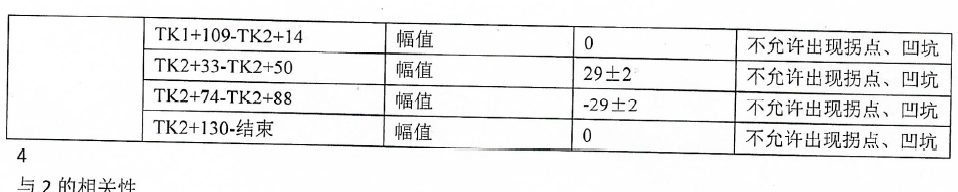
代码:
# -*- coding: utf-8 -*-
# @Author  : ChenXin
# @Time    : 2021/8/6 12:50
# @Function: 图像倾斜矫正

import cv2 as cv  # opencv-python==4.2.0.34
import numpy as np
import os
import os.path as osp
import time
import math


# 转为灰度图,并二值化
def binary(img):
    '''
    :param img: 原始图像
    :return: 二值化后的图像
    '''
    gray = cv.cvtColor(img, cv.COLOR_BGR2GRAY)  # cvtColor用于转换色彩空间,将图像转换为GRAY灰度图像
    #     gray = cv.medianBlur(gray,5)  # 中值滤波
    gray = cv.GaussianBlur(gray, (9, 9), 9)  # 高斯滤波
    ret, binary = cv.threshold(gray, 0, 255,
                               cv.THRESH_BINARY_INV | cv.THRESH_OTSU)  # 由于文本是黑底白字的,需要让背景是黑色的,所以在传入参数时需要使用cv.THRESH_BINARY_INV 加上_INV使二值图反转
    return binary


def Transformation(img, src, result, h, w):
    '''
    :param img: 二值化后的图像
    :param src: 原始图像
    :param result: 矫正图像保存路径
    :param h: 原始图像的高
    :param w: 原始图像的宽
    :return: 外接矩形的顶点
    '''
    coords = np.column_stack(np.where(img > 0))
    # print(coords)
    # print(coords.shape)
    angle = cv.minAreaRect(coords)[-1]  # 最小外接矩形旋转角
    pts = cv.boxPoints(cv.minAreaRect(coords))  # 外接矩形的顶点
    a, b, c = cv.minAreaRect(coords)
    print("矩形中心点:", (round(a[0], 2), round(a[1], 2)), "矩形长:{}  宽:{}".format(round(b[0], 2), round(b[1], 2)))
    print("原始矩形旋转角度:", angle)
    if -45 < angle < 45:
        angle = -angle
    else:
        angle = 0
    # if angle < -45:
    #     angle = -(90 + angle)
    # else:
    #     angle = -angle
    center = (w // 2, h // 2)
    M = cv.getRotationMatrix2D(center, angle, 1.0)  # 传入中心和角度,得到旋转矩形
    rotated = cv.warpAffine(src, M, (w, h), flags=cv.INTER_CUBIC, borderMode=cv.BORDER_REPLICATE)
    #         cv.putText(rotated,'Angle:{:.2f} degrees'.format(angle),(10,30),cv.FONT_HERSHEY_SIMPLEX,0.7,(0,0,255),2)  # 绘制文字
    #         pts = pts.reshape((-1, 1, 2))  # 顶点个数:4,矩阵变成4*1*2维
    cv.imwrite(result, rotated)
    return pts

def is_img(ext):
    ext = ext.lower()
    if ext in ['.jpg', '.png', '.jpeg', '.bmp']:
        return True
    else:
        return False


if __name__ == '__main__':
    filepath = 'image/'
    result_path = 'result/'
    start = time.time()
    for file in os.listdir(filepath):
        if is_img(osp.splitext(file)[1]):
            print(file)
            src = cv.imread(filepath + file)
            src = cv.copyMakeBorder(src, 50, 50, 50, 50, cv.BORDER_CONSTANT, value=[255, 255, 255])
            (h, w) = src.shape[:2]
            binary_ = binary(src)  # 二值化、滤波处理
            Transformation(binary_, src, result_path + file, h, w)  # 矩形矫正
    print("耗时:", time.time() - start)
二、基于霍夫变换的图像倾斜矫正
- 原理:
- 检测图片中的直线
- 将图片中所有横向直线的旋转角求平均值。
- 根据旋转角进行倾斜矫正。
相比之前的方法适用范围更广,对表格图像预处理基本没有要求,并且对于整张文档图片也可进行矫正。
- 效果:
画出图像中所有的直线: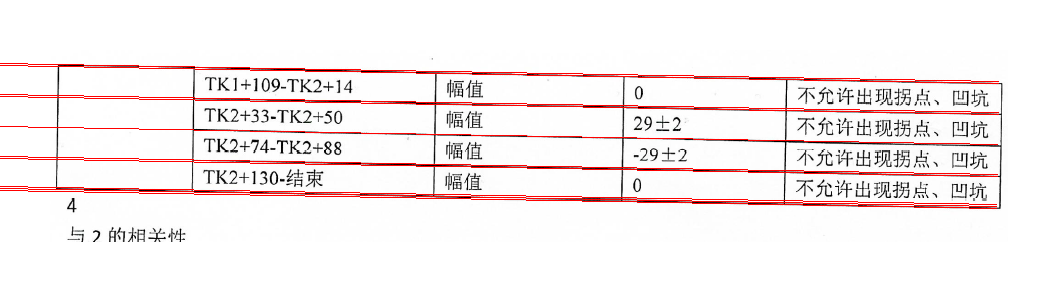
矫正结果: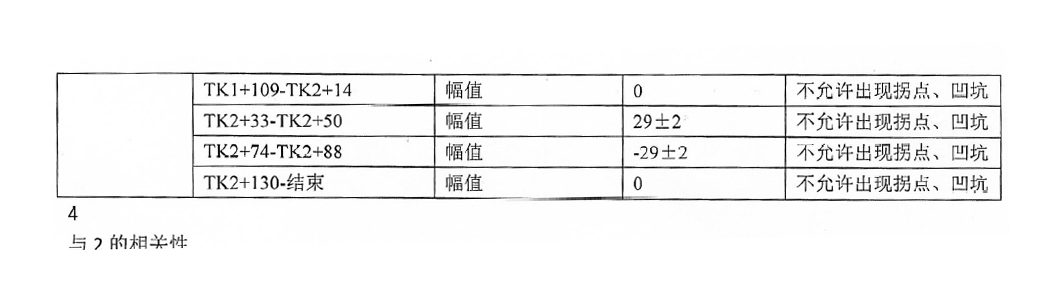
代码:
arg = 300
arg初始值设为300,数值越大,检测出的直线越少、越精确,代码中进行了arg值的自调节,如果检测不出直线,arg会以40递减,直到检测出直线。
其他用到的函数见一、中代码
def HoughTrans(img, src, result, h, w):
    '''
    :param img: 二值化后的图像
    :param src: 原始图像
    :param result: 矫正图像保存路径
    :param h: 原始图像的高
    :param w: 原始图像的宽
    :return: 霍夫变换的阈值、旋转角度
    '''
    edges = cv.Canny(img, 50, 200, apertureSize=3)  # 边缘检测
    arg = 300
    lines = cv.HoughLines(edges, 1, np.pi / 180, arg)  # 霍夫变换检测直线,返回数组:(rho,theta)。rho以像素为单位测量,theta以弧度为单位测量。
    while not isinstance(lines, np.ndarray):
        if arg <= 200:
            break
        arg -= 40
        lines = cv.HoughLines(edges, 1, np.pi / 180, arg)

    sum_theta = 0
    sum_0 = 0
    for line in lines:
        rho, theta = line[0]
        real_angel = -(theta * 180 / math.pi - 90)
        # 只计算真实角度在-45°到45°之间的直线,目的是为了去除竖向直线的影响
    	if -45 < real_angel < 45:
        	sum_theta += theta
   	 	else:
        	sum_0 += 1
        a = np.cos(theta)
        b = np.sin(theta)
        x0 = a * rho
        y0 = b * rho
        x1 = int(x0 + 1000 * (-b))
        y1 = int(y0 + 1000 * (a))
        x2 = int(x0 - 1000 * (-b))
        y2 = int(y0 - 1000 * (a))
        cv.line(src, (x1, y1), (x2, y2), (0, 0, 255), 1)
    # 将所有直线画出
    cv.imshow('table/23_1.jpg', src)
    cv.waitKey()
    cv.destroyAllWindows()
    average_theta = sum_theta / len(lines)
    angle = average_theta * 180 / math.pi - 90
    if -45 < angle < 45:
        angle = -angle
    else:
        angle = 0

    center = (w // 2, h // 2)  # 矩形中心
    M = cv.getRotationMatrix2D(center, -angle, 1.0)  # 传入中心和角度,得到旋转矩形
    rotated = cv.warpAffine(src, M, (w, h), flags=cv.INTER_CUBIC, borderMode=cv.BORDER_REPLICATE)  # 最后要换成原图
    cv.imwrite(result, rotated)
    return arg, angle

if __name__ == '__main__':
    filepath = 'image/'
    result_path = 'result/'
    start = time.time()
    for file in os.listdir(filepath):
        if is_img(osp.splitext(file)[1]):
            print(file)
            src = cv.imread(filepath + file)
            src = cv.copyMakeBorder(src, 50, 50, 50, 50, cv.BORDER_CONSTANT, value=[255, 255, 255])
            (h, w) = src.shape[:2]
            binary_ = binary(src)  # 二值化、滤波处理
            HoughTrans(binary_, src, result_path + file, h, w)  # 霍夫变换矫正
    print("耗时:", time.time() - start)

有“AI”的1024 = 2048,欢迎大家加入2048 AI社区
更多推荐



 2
2 0
0- 0


 已为社区贡献2条内容

所有评论(0)