Open manus报错(无法使用浏览器)
使用open manus的时候往往需要操作浏览器,这里使用到“playwright“这个工具如果没有安装,open manus则会一直循环进程,无法执行操作。
·
目录
1.介绍
使用open manus的时候往往需要操作浏览器,这里使用到“playwright“这个工具
如果没有安装,open manus则会一直循环进程,无法执行操作
2.报错提示
BrowserType.launch: Executable doesn't exist at /home/zucker/.cache/ms-playwright/chromium-1148/chrome-linux/chrome
╔════════════════════════════════════════════════════════════╗
║ Looks like Playwright was just installed or updated.       ║
║ Please run the following command to download new browsers: ║
║                                                            ║
║     playwright install                                     ║
║                                                            ║
║ <3 Playwright Team                                         ║
╚════════════════════════════════════════════════════════════╝
3.解决
在conda环境中安装
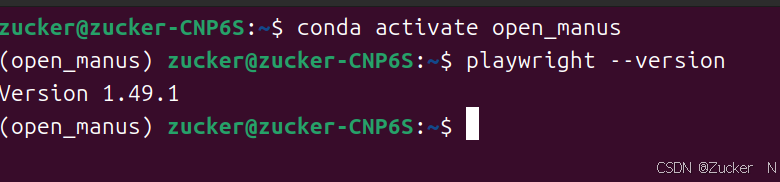
conda activate open_manus #启动conda环境安装playwright
playwright install 检查
playwright --version #查看安装的版本然后重新运行一下open manus应该就能顺利使用了。
有问题欢迎留言

有“AI”的1024 = 2048,欢迎大家加入2048 AI社区
更多推荐

 3
3 0
0- 0


 已为社区贡献5条内容

所有评论(0)