Anaconda安装TensorFlow2及在Jupyter Notebook使用
1.卸载原来的tensorflow环境
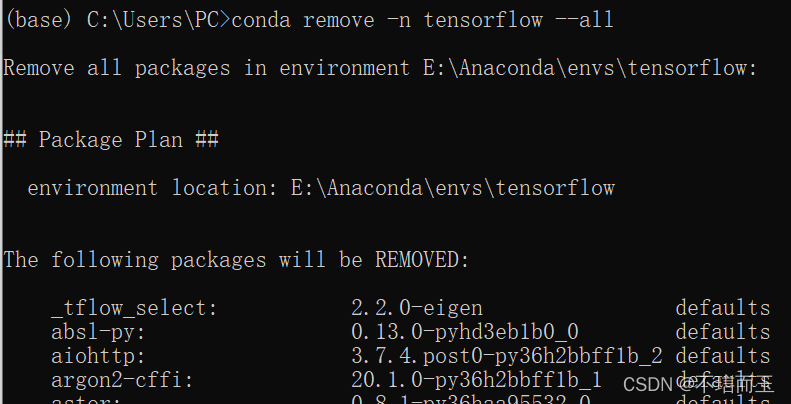
2.创建新的虚拟环境
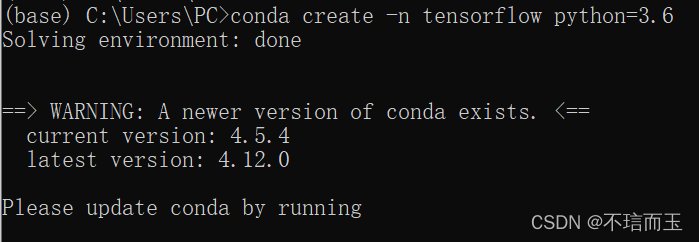
3.安装tensorflow并验证


4.安装ipython

5.安装jupyter

6.安装python kernel for Tensroflow

上面是错误示范(直接复制了别人的语句忘加自己的了),后面是自己的环境:
7.打开jupyter验证
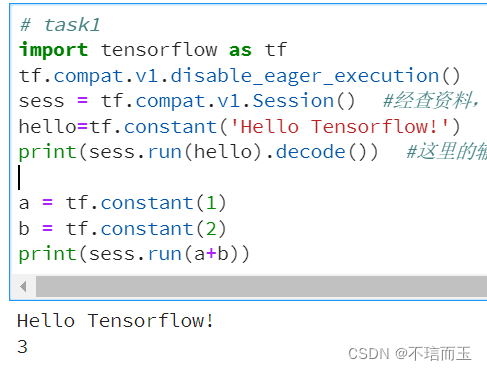
import tensorflow as tf
tf.compat.v1.disable_eager_execution()
sess = tf.compat.v1.Session()  #经查资料,安装的是tensorflow2,所以不能直接使用.session
hello=tf.constant('Hello Tensorflow!')
print(sess.run(hello).decode())  #这里的输出结果是一个字节字符串。要删除字符串引号和“b”(表示字节,byte)只保留单引号内的内容,可以使用 decode() 方法。

a = tf.constant(1)
b = tf.constant(2)
print(sess.run(a+b))
8.遇到的一些 问题
一个是,直接使用了以下的代码
import tensorflow as tf #定义一个常量 hello = tf.constant('hello,tensorflow') #建立一个session session = tf.Session() #通过session中的run函数运行hello这个变量 print(session.run(hello)) #注意如果单纯的使用 print(hello) 的话,是不会输出 hello,tensorflow 的 #关闭session session.close()会报:ERROR:root:Internal Python error in the inspect module. Below is the traceback from this internal error. ERROR:root:Internal Python error in the inspect module. Below is the traceback from this internal error. ERROR:root:Internal Python error in the inspect module. Below is the traceback from this internal error. Traceback (most recent call last): File "E:\Anaconda\envs\tensorflow\lib\site-packages\IPython\core\interactiveshell.py", line 3343, in run_code exec(code_obj, self.user_global_ns, self.user_ns) File "<ipython-input-1-1d20fdd37a67>", line 4, in <module> sess = tf.Session() AttributeError: module 'tensorflow' has no attribute 'Session'原因是TensorFlow2中已经取消了1中的sesison,用我上面7里的代码即可。
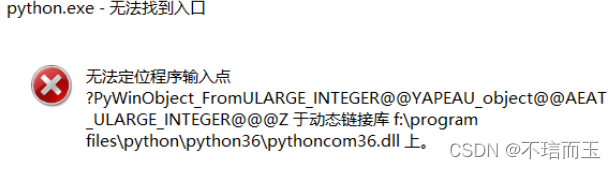
9.遇到的一些问题
有可能在安装时会报(别人的图,我没拍)
我的做法是把
虚拟环境里的E:\Anaconda\envs\tensorflow\Library\bin\pythoncom36.dll,用
E:\Anaconda\Library\bin\pythoncom36.dll替换掉了。如果这样不行,直接把这两个pythoncom36.dll都删掉,可以提前备份一份。
9.jupter使用
conda info --env
conda activate xxx
导到某个目录下
jupyter lab二编:
现在基本都用pytorch,以及环境重新配置了
用的miniconda,如何安装jupyter
Miniconda环境安装jupyter并集成入Pycharm_miniconda安装jupyter-CSDN博客
配置kernal:
jupyter notebook添加环境/添加内核(超详细)_jupyter notebook添加内核-CSDN博客【如何正确的安装jupyter——jupyter notebook的安装、位置更改及快速打开】_jupyter的安装路径-CSDN博客
参考:
Anaconda上安装Tensorflow并在jupyter上运行 - BMDACM - 博客园 (cnblogs.com)
(1条消息) 利用Anaconda搭建TensorFlow环境并在Jupyter Notebook使用_寻梦梦飞扬的博客-CSDN博客_jupyter使用tensorflow
tensorflow2.4中使用session和graph_Keras深度学习的博客-CSDN博客【Python】如何解决:无法定位程序输入点XXX于动态链接库D:Anaconda\ibrarnybin\pythoncom38.dll上_赶不上明天的博客-CSDN博客_python 无法定位程序输入点

有“AI”的1024 = 2048,欢迎大家加入2048 AI社区
更多推荐


 1
1 0
0- 0


 已为社区贡献2条内容

所有评论(0)