配置pytorch时添加清华镜像源
·
conda config --add channels https://mirrors.tuna.tsinghua.edu.cn/anaconda/pkgs/free/
conda config --add channels https://mirrors.tuna.tsinghua.edu.cn/anaconda/pkgs/main/
conda config --set show_channel_urls yes
conda config --add channels https://mirrors.tuna.tsinghua.edu.cn/anaconda/cloud/pytorch/
conda config --add channels https://mirrors.tuna.tsinghua.edu.cn/anaconda/cloud/pytorch/win-64
输入conda config --show channels查看已经加入的镜像源

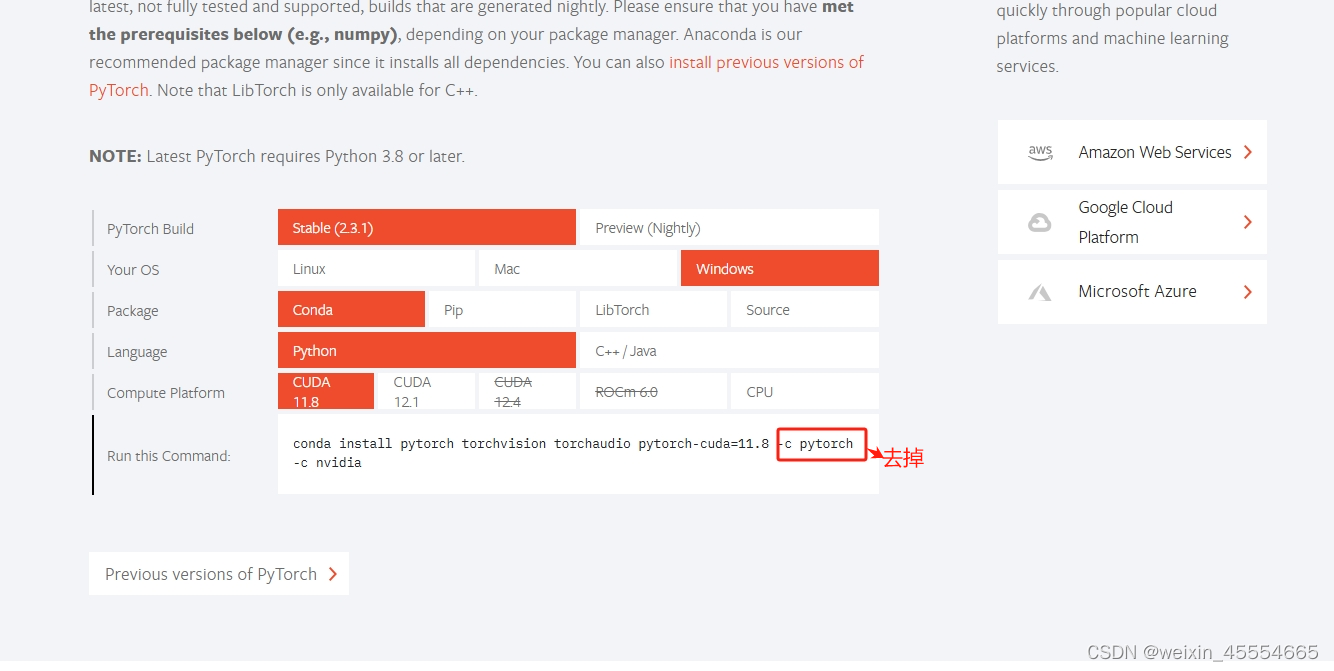
下载安装pytorch时记得去掉-c pytorch因为已经加入的清华镜像源了,所以就不需要这个pytorch
个人见解,或有错误,不喜勿喷

有“AI”的1024 = 2048,欢迎大家加入2048 AI社区
更多推荐



 6
6 0
0- 0


 已为社区贡献1条内容

所有评论(0)