LOL英雄联盟官方API调用
·
这是一篇关于LOL官方api的调用起步教程,语言为C#为主,以及python的部分代码示例,此篇会说明调用成功的必要点,以及难点部分。
一、概述
手动启动客户端,wegame启动也可。启动后,api的调用环境就达到要求了。
关键因素
大部分的API的的请求头(head)内容是一样的,解决head所需参数和 url的端口 是关键点。
1)head结构如下:
{
	"Accept":"application/json"
	"Content-Type":"application/json"
	"Authorization":"Basic xxxxxxxxxxx"
}
2)关于url
整体结构:固定前缀+“:”+端口+“/”+具体请求api。例如:https://127.0.0.1:54379/data-store/v1/install-dir
- 固定前缀:https://127.0.0.1
- 端口:xxx
- 具体请求api:不同的api此处不同,例如:data-store/v1/install-dir是用来获取客户端运行程序的安装地址的
3)总结:
- 关键需要的数据是token和port端口
- 客户端每次启动都会刷新这两个值
难点
1)https请求
需要对认证进行处理
2)获取端口和token时,需要获取管理员权限
二、开始请求
端口与token的获取
手动获取
必须以管理员权限打开CMD命令窗,输入以下内容获取基本数据
wmic PROCESS WHERE name='LeagueClientUx.exe' GET commandline
获取内容如下:
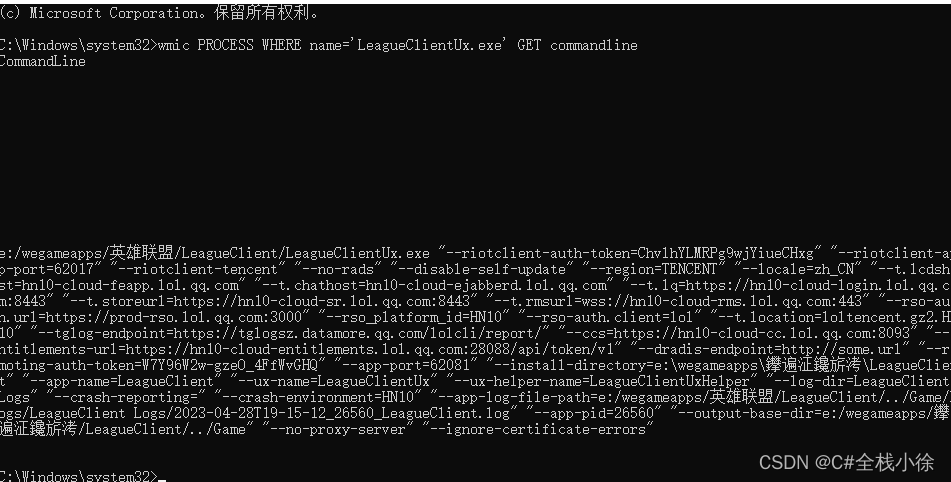
提取关键点:
//端口
--app-port=xxxx
//token
--remoting-auth-token=xxxxx
代码获取
此时就涉及到如何获取管理员权限了,无需密码的方式,使某些代码在管理员权限下进行运行。此处表现出来的就是CMD命令的管理员权限需求。
//此处贴核心代码块,有些自己习惯写法不写在此处
public const string API_FILENAME = "api_file.txt";
public const string COMMAND = "wmic PROCESS WHERE name='LeagueClientUx.exe' GET commandline";
....
public bool IsAdministrator()
{
    WindowsIdentity identity = WindowsIdentity.GetCurrent();
    WindowsPrincipal principal = new WindowsPrincipal(identity);
    return principal.IsInRole(System.Security.Principal.WindowsBuiltInRole.Administrator);
}
...
if (IsAdministrator())
 {
     var result = CMD(COMMAND);
     Console.WriteLine(result);
     //写入文件持久化,开启管理方式有异步操作
     using (StreamWriter sw = File.CreateText(API_FILENAME))
     {
         sw.WriteLine(result);
     }
 }
 else
 {
     using (StreamWriter sw = File.CreateText(API_FILENAME))
     {
     	//只是为了区分,写入txt
         sw.WriteLine("这是第一次写入,非管理员模式");
     }
     ProcessStartInfo startInfo = new ProcessStartInfo();
     startInfo.UseShellExecute = true;
     startInfo.WorkingDirectory = Environment.CurrentDirectory;
     startInfo.FileName = AppDomain.CurrentDomain.FriendlyName + ".exe";//指定管理员环境下运行的启动文件,也就是exe
     //设置启动动作,确保以管理员身份运行
     startInfo.Verb = "runas";
     Process? pro;
     try
     {
     	//此处进行异步操作,从指定的管理员环境下运行的启动文件开始再次运行
         pro = System.Diagnostics.Process.Start(startInfo);
     }
     catch
     {
         return;
     }
     //相当于让线程同步执行结束,等待第二次执行结束
     pro.WaitForExit();
     //后面就是正常操作即可,均为管理员环境
...
/// <summary>
/// 奇怪的是,如果是python -V就会出现问题
 /// </summary>
 /// <param name="command">命令</param>
 /// <returns></returns>
 public string CMD(string command)
 {
     Process pro = new Process();
     pro.StartInfo.FileName = "cmd.exe";             //cmd
     pro.StartInfo.UseShellExecute = false;          //不显示shell
     pro.StartInfo.CreateNoWindow = true;            //不创建窗口
     pro.StartInfo.RedirectStandardInput = true;     //打开流输入
     pro.StartInfo.RedirectStandardOutput = true;    //打开流输出
     pro.StartInfo.RedirectStandardError = true;     //打开错误流

     pro.Start();//执行
     pro.StandardInput.WriteLine(command + "&exit");      //&exit运行完立即退出
     pro.StandardInput.AutoFlush = true;             //清缓存

     var ll = pro.StandardOutput.ReadToEnd();            //读取输出
     pro.WaitForExit();                              //等待程序执行完退出进程
     pro.Close();//结束
     return ll;
 }
python中对管理员权限的获取使用方法如下:
def is_admin():
    try:
        return ctypes.windll.shell32.IsUserAnAdmin()
    except Exception as e:
        raise e
...
if is_admin():
            # 追加写入
            # 这里是第二次执行达到的管理员环境
            print('hello')
            time.sleep(3)

    else:
        if sys.version_info[0] == 3:#python 3
            # 追加写入
            # with open("text2.txt","a",encoding='utf8') as file:
            #     file.write("非管理员写入\n")
            #开启管理员权限,并指定再次执行的启动文件,__file__可以用方法替代,由于此处含义模糊不好理解
            #,所以放弃了python的实现
            ctypes.windll.shell32.ShellExecuteW(None, "runas", __file__, None, 1)
处理token
token需要进行处理,并不是直接放入head就行了,使用base64进行cover。
#python,注意空格
import base64

token = "kzfhMpoEimcomT12MmnQxg"
auth = base64.b64encode(("riot:" + token).encode("UTF-8")).decode("UTF-8")
authorization = "Basic " + auth
print(authorization)
//c#
var token = "kzfhMpoEimcomT12MmnQxg";
token="riot:"+token;
string token_64 = "Basic "+Convert.ToBase64String(Encoding.UTF8.GetBytes(token));
https处理
处理认证问题,也并不复杂
protected static bool CheckValidationResult(object sender, X509Certificate certificate, X509Chain chain, SslPolicyErrors errors)
{   // 总是接受
    return true;
}

/// <summary>
/// https的get方法
/// </summary>
/// <param name="url">url</param>
/// <param name="heads">请求头内容</param>
/// <returns></returns>
public string HttpsGet(string url,Dictionary<string,string> heads)
{
    //1.关于认证
    ServicePointManager.ServerCertificateValidationCallback = new RemoteCertificateValidationCallback(CheckValidationResult);

    //2.开始请求
    HttpWebRequest req = (HttpWebRequest)WebRequest.Create(url);
    req.Method = "GET";


    foreach (var head in heads)
    {
        req.Headers.Add(head.Key, head.Value);
    }


    HttpWebResponse res = (HttpWebResponse)req.GetResponse();
    Stream stream = res.GetResponseStream();
    StreamReader streamReader = new StreamReader(stream, Encoding.GetEncoding("utf-8"));
    string json = streamReader.ReadToEnd();

    streamReader.Close();
    stream.Close();
    res.Close();
    return json;
}
三、一些相关的api
1)url
port是动态的,需要提前准备
//获取客户端地址
get	https://127.0.0.1:port/data-store/v1/install-dir
//获取角色信息
get https://127.0.0.1:port/lol-summoner/v1/current-summoner
//开始匹配
get https://127.0.0.1:port/lol-gameflow/v1/gameflow-phase
//匹配成功检查
get https://127.0.0.1:port//lol-matchmaking/v1/ready-check
//接受对局
post https://127.0.0.1:port/lol-matchmaking/v1/ready-check/accept
//创建指定类型房间,有请求体
post https://127.0.0.1:port/lol-lobby/v2/lobby
请求体::{"queueId":ID }
ID如下:
420  召唤师峡谷·排位赛 单排/双排·征召
430  召唤师峡谷·匹配模式·自选
440  召唤师峡谷·排位赛 灵活排位·征召
450  嚎哭深渊·极地大乱斗·随机
700  召唤师峡谷·冠军杯赛·征召
830  召唤师峡谷·入门·自选
840  召唤师峡谷·新手·自选
850  召唤师峡谷·一般·自选
1090 云顶之奕(匹配模式)
1400 召唤师峡谷·终极魔典·自选
2000 召唤师峡谷·新手教程 第一部分·自选
2010 召唤师峡谷·新手教程 第二部分·自选
2020 召唤师峡谷·新手教程 第三部分·自选
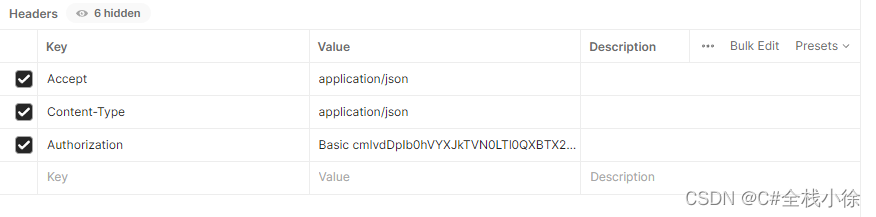
2)head
请求头固定,其中关键点Authorization

有“AI”的1024 = 2048,欢迎大家加入2048 AI社区
更多推荐


 12
12 0
0- 0


 已为社区贡献1条内容

所有评论(0)