Cesium 填坑之路
一、解决cesium widgets.css is not exported from package在版本1.9以上版本后,按照官方文档引入css 时会报错:cesium widgets.css is not exported from package解决方案:1.node_modules里找到cesium的package.json文件,在exports里增加导出widgets.css"./wi
目录
一、解决cesium widgets.css is not exported from package
二、加载Geoserver 发布的 wmts 服务 4326/3857
三、加载 tileset 数据 ,提示 ‘http://localhost:8080/ThirdParty/draco_decoder.wasm 404 ’
四、使用 BillboardCollection 或 LabelCollection 时报错:添加不了 heightReference
一、解决cesium widgets.css is not exported from package
在版本1.9以上版本后,按照官方文档引入css 时
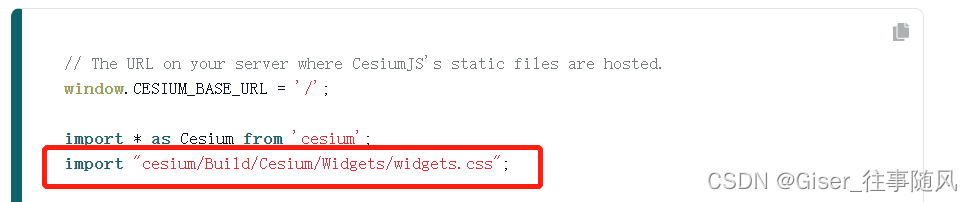
会报错:cesium widgets.css is not exported from package

解决方案:
1.node_modules里找到cesium的package.json文件,在exports里增加导出widgets.css
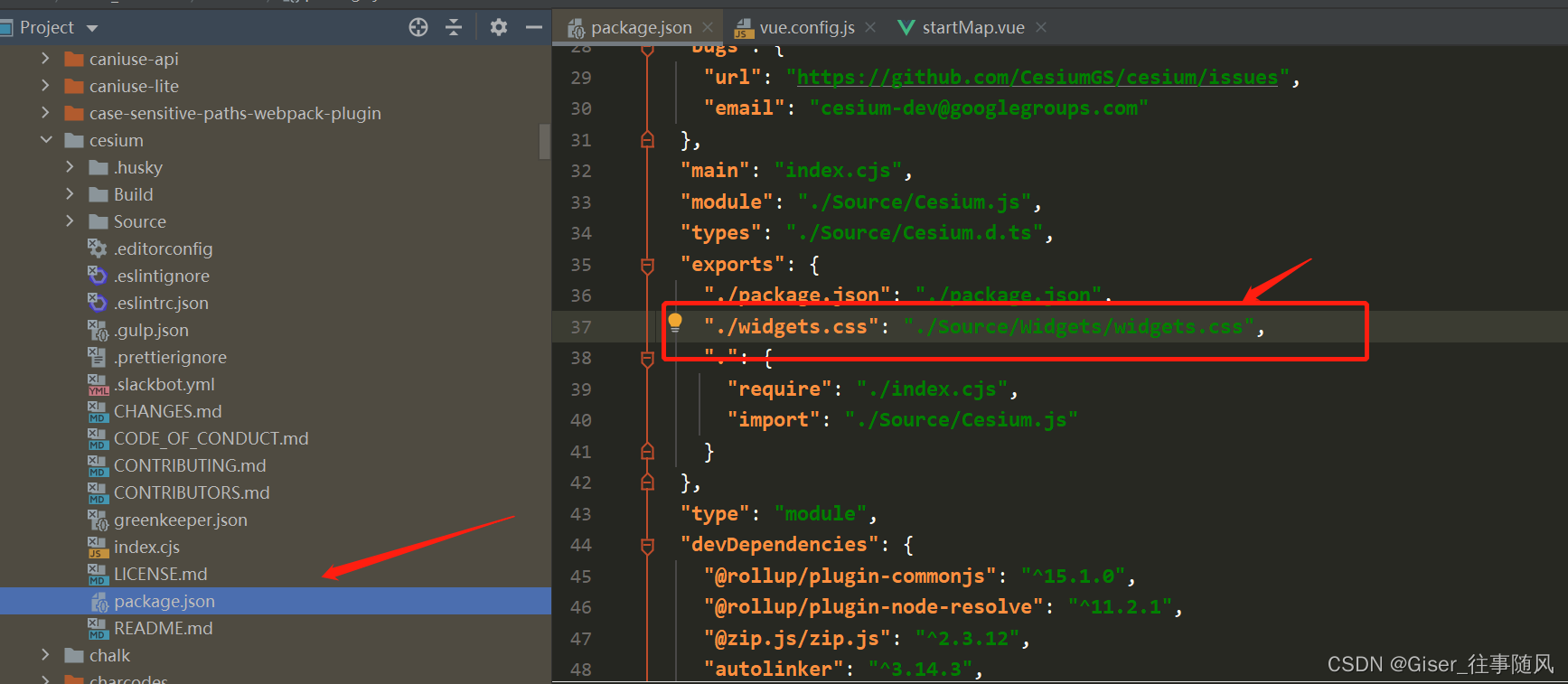
"./widgets.css": "./Source/Widgets/widgets.css",
2. 将 import "cesium/Build/Cesium/Widgets/widgets.css"; 改为 import "cesium/widgets.css";
二、加载Geoserver 发布的 wmts 服务 4326/3857
Cesium加载WMTS地图切片服务,通常有两种坐标系 EPSG 4326 和 EPSG 900913 (标准名为3857)
通常我们加载的是3857 投影的切片 :
  new Cesium.WebMapTileServiceImageryProvider({
              url : 'http://localhost:7777/geoserver/gwc/service/wmts/rest/testkh:anhuis/{style}/{TileMatrixSet}/{TileMatrixSet}:{TileMatrix}/{TileRow}/{TileCol}?format=image/png',
              layer:'testkh:anhuis',
              style: '',
              tileMatrixSetID : 'EPSG:900913',
            })
一旦我们切换到4326 坐标系下,就会报一个瓦片“列(或行)超出范围”的错误,不能正确加载显示瓦片图像。这是因为 WebMapTileServiceImageryProvider的切片方案tilingScheme默认使用EPSG:3875投影,即伪墨卡托网格访问切片,与EPSG:4326网格的切片方案存在较大差异
查阅资料可知:
TilingSchemee有两个子类,为WebMercatorTilingScheme和GeographicTilingScheme。其中WebMercatorTilingScheme对应于EPSG:3857切片方案,常见于谷歌地图、微软必应地图以及大多数的ArcGIS在线地图,也是Cesium中默认的切片方案。
GeographicTilingScheme对应于EPSG:4326切片方案,是一个简单的地理投影方案,可直接将经纬度映射为X和Y,这种投影通常被称为地理投影、等矩形投影、等距圆柱形投影等。
由于在X方向上,WebMercatorTilingScheme只有一个0级瓦片,而GeographicTilingScheme却有2个,这就导致了默认的EPSG:3857切片方案不能正确加载EPSG:4326切片方案的瓦片图像。
那怎么修改呢?
当想要加载EPSG:4326瓦片服务时,只需要创建一个GeographicTilingScheme对象
   new Cesium.WebMapTileServiceImageryProvider({
              url : 'http://localhost:7777/geoserver/gwc/service/wmts/rest/testkh:anhuis/{style}/{TileMatrixSet}/{TileMatrixSet}:{TileMatrix}/{TileRow}/{TileCol}?format=image/png',
              layer:'testkh:anhuis',
              style: '',
              tileMatrixSetID : 'EPSG:4326',
              tilingScheme: new Cesium.GeographicTilingScheme()
            })
三、加载 tileset 数据 ,提示 ‘http://localhost:8080/ThirdParty/draco_decoder.wasm 404 ’
- 首先找到
node_modules/cesium/ThirdParty目录 - 找到
draco_decoder.wasm文件。 - 在项目根目录下的
public目录下新建ThirdParty,将draco_decoder.wasm复制进去
清楚缓存,加载即可。。。
四、使用 BillboardCollection 或 LabelCollection 时报错:添加不了 heightReference

"Height reference is not supported without a scene and globe."
解决方法:
在实例化 BillboardCollection 的时候添加参数:
scene:viewer.scene

五、管理加载的Entity / Entities
管理单个的Entity,采用的方法是:
利用 entity collection 的getById ,创建的时候附上 id ,然后去找这个id ,没有就创建,有就先移除。进行管理
if (viewer.entities.getById('AAA')) {
        viewer.entities.remove(viewer.entities.getById('AAA'));
    }
    const e = viewer.entities.add({
        id: 'AAA',
        polyline: {
            positions :Cesium.Cartesian3.fromDegreesArray([
                extent[0],extent[1],
                extent[2],extent[1],
                extent[2],extent[3],
                extent[0],extent[3],
                extent[0],extent[1],
            ]),
            width: 10,
            material:Cesium.Color.RED,
            clampToGround: true
        },
    });
    viewer.zoomTo(e);
管理 多个 entity ,例如从接口取到一些 geojson 数据,地图上实时渲染,隐藏查询删除等,需要对一批 entities 进行管理,这里举例为加载的 geojson 数据,采用的方法是:
将geojson 数据 加载到 viewer.dataSources 即 Cesium.GeoJsonDataSource,创建的时候附上name 的值,利用 dataSource 的getByName方法,获取到对于的 dataSource即可。
 if (viewer.dataSources.getByName('BBB').length>0) {
        viewer.dataSources.remove(viewer.dataSources.getByName('BBB')[0]);
    }
    let d = Cesium.GeoJsonDataSource.load(
        data,
        {
            clampToGround:true,
        });
    d.then((dataSource) => {
          var entities = dataSource.entities.values;
          for (let i = 0; i < entities.length; i++) {
            let entity = entities[i];
              entity.polygon.fill = false;
              entity.polygon.outline = false;
              entity.polyline = {
                  positions: entity.polygon.hierarchy._value.positions,
                  width: 5,
                  material: Cesium.Color.RED,
                  clampToGround:true
              }
          }
        viewer.dataSources.add(dataSource);
        dataSource.name = 'BBB';
        g_config.globalviewer.flyTo(dataSource);
    })
有“AI”的1024 = 2048,欢迎大家加入2048 AI社区
更多推荐


 8
8 0
0- 0


 已为社区贡献4条内容

所有评论(0)