Spring Boot 中的自动配置(autoconfigure)
·
文中部分图片来源为 动力节点-王鹤老师的Spring Boot3.0 视频讲解中。
Spring Boot 中的自动配置(autoconfigure)
一、自动配置的原理
-
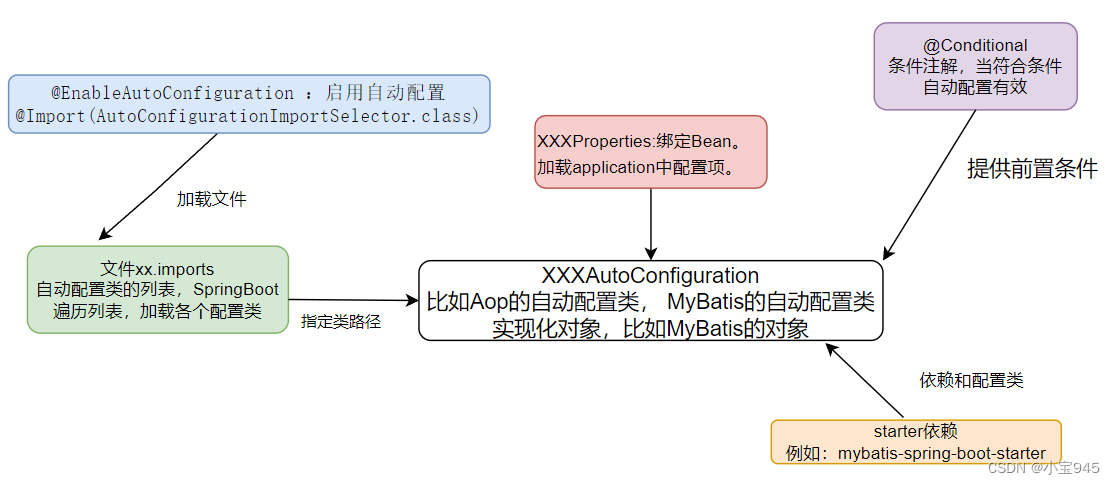
自动配置:从类路径中,搜索相关的 jar,根据 jar 的内容,尝试创建所需的对象。例如,如果有 MyBatis .jar,Spring Boot 会尝试创建 DataSource(根据配置文件中的url,username,password)连接数据库。还需要创建 SqlSessionFactory,Dao 接口的代理对象。这些内容不需要开发人员写一行代码,就能使用 MyBatis 框架了。
-
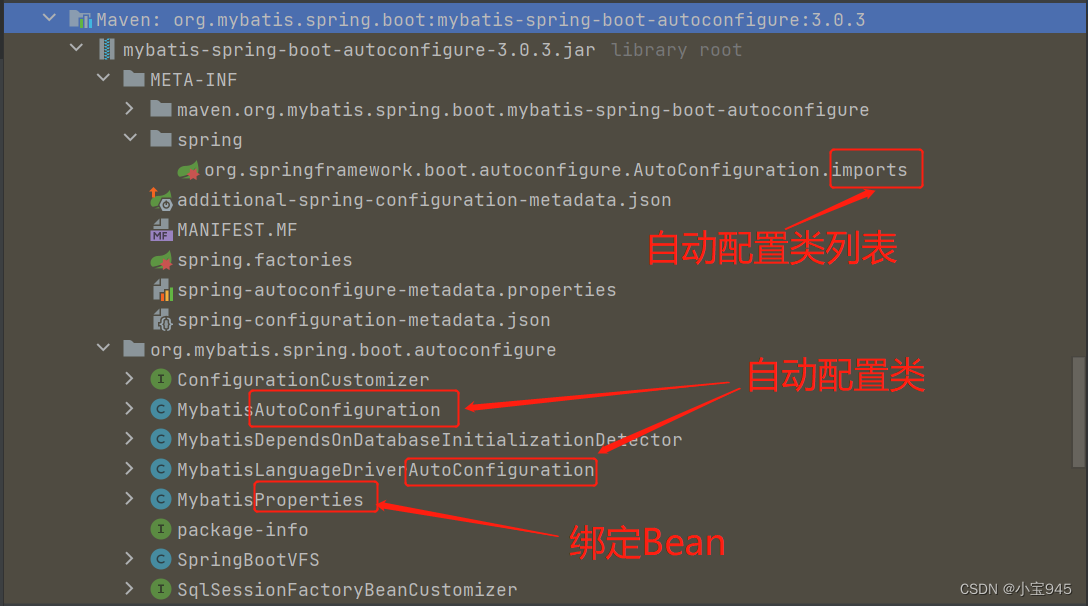
xxx.imports 文件是自动配置类列表。 ====> 说明有哪些自动配置类。
-
xxxAutoConfiguration 是自动配置类。====> @EnableConfigurationProperties({xxxProperties.class}) 将指定的绑定Bean注入到容器中。
-
xxxProperties 是绑定Bean。 ====> @ConfigurationProperties(prefix = “xxxx”) 说明该类是一个绑定Bean。
二、关键注解和类
1.@EnableAutoConfiguration 注解
@Target(ElementType.TYPE)
@Retention(RetentionPolicy.RUNTIME)
@Documented
@Inherited
@AutoConfigurationPackage
@Import(AutoConfigurationImportSelector.class)
public @interface EnableAutoConfiguration {
	String ENABLED_OVERRIDE_PROPERTY = "spring.boot.enableautoconfiguration";
	Class<?>[] exclude() default {};
	String[] excludeName() default {};
}
- 开启自动配置。将spring和第三方库中的对象创建好,注入到spring容器,避免写XML,去掉样例代码。需要使用的对象,由框架提供
- @EnableAutoConfiguration 通常由 @SpringBootApplication 注解带入。
2.@Import 注解
@Target({ElementType.TYPE})
@Retention(RetentionPolicy.RUNTIME)
@Documented
public @interface Import {
    Class<?>[] value();
}
- @Import:导入类,注册为Bean。@Import 相当于 xml 文件中的 。可以导入@Configuration 的类,实现了 ImportSelector 接口的类,ImportBeanDefinitionRegister 接口的类。
3.AutoConfigurationImportSelector 类
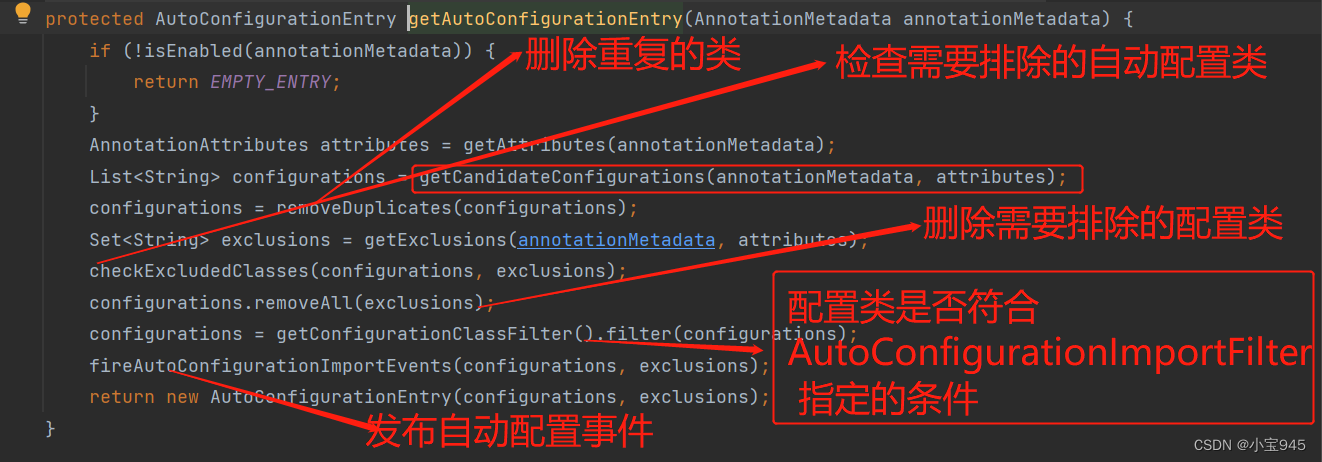
- AutoConfigurationImportSelector 间接实现了 ImportSelector 接口,导入自动配置类。
- 自动配置从 jar 的指定文件读取要加载的配置类列表(xxxx.imports 文件)。


4.@AutoConfiguration 注解
- 新的注解 @AutoConfiguration,用在自动配置类的上面。相当于增强的 @Configuration,专注自动配置类。
- @AutoConfiguration 还支持通过 after、afterNames、before 和 benamemes 属性进行自动配置排序,决定多个自动配置类执行的先后顺序。
5.其他相关的注解和类
- @Configuration
- @ConfigurationProperties
- @EnableConfigurationProperties
- @ConditionalXXXXX 条件注解

有“AI”的1024 = 2048,欢迎大家加入2048 AI社区
更多推荐

 34
34 0
0- 0


 已为社区贡献11条内容

所有评论(0)