adb shell dumpsys package
adb shell dumpsys pacakge
1 需求
- 获取手机中声明的所有权限
- perm[issions]: dump permissions
- 获取手机中申请指定权限的所有应用
- permission [name ...]: dump declaration and use of given permission
- 获取手机所有应用的provider
- prov[iders]: dump content providers
- 获取手机中共享指定UID的所有应用
- s[hared-users]: dump shared user IDs
- 获取指定应用的所有信息
- <package.name>: info about given package
- 判断应用是否获取指定权限
- check-permission <permission> <package> [<user>]: does pkg hold perm?
- 获取服务需要的权限
- service-permissions: dump permissions required by services
- 获取手机所有activity
- adb shell dumpsys package --all-components | findstr "Package.\[ activit"
- adb shell dumpsys package --all-components | findstr "\/.*activit"
注意三者区别:
- adb shell dumpsys package:默认值
- adb shell dumpsys package --all-components:包含四大组件
- adb shell dumpsys package -f --all-components:包含四大组件以及intent-filter
2 语法
Package manager dump options:
  [-h] [-f] [--checkin] [--all-components] [cmd] ...
    --checkin: dump for a checkin
    -f: print details of intent filters
    -h: print this help
    --all-components: include all component names in package dump
  cmd may be one of:
    apex: list active APEXes and APEX session state
    l[ibraries]: list known shared libraries
    f[eatures]: list device features
    k[eysets]: print known keysets
    r[esolvers] [activity|service|receiver|content]: dump intent resolvers
    perm[issions]: dump permissions
    permission [name ...]: dump declaration and use of given permission
    pref[erred]: print preferred package settings
    preferred-xml [--full]: print preferred package settings as xml
    prov[iders]: dump content providers
    p[ackages]: dump installed packages
    q[ueries]: dump app queryability calculations
    s[hared-users]: dump shared user IDs
    m[essages]: print collected runtime messages
    v[erifiers]: print package verifier info
    d[omain-preferred-apps]: print domains preferred apps
    i[ntent-filter-verifiers]|ifv: print intent filter verifier info
    version: print database version info
    write: write current settings now
    installs: details about install sessions
    check-permission <permission> <package> [<user>]: does pkg hold perm?
    dexopt: dump dexopt state
    compiler-stats: dump compiler statistics
    service-permissions: dump permissions required by services
    <package.name>: info about given package
3 示例:获取手机中拥有指定权限的所有应用列表
adb shell dumpsys package permission android.permission.QUERY_ALL_PACKAGES
- Packges:AndroidManifest.xml的uses-permission声明的权限
- Shared users:AndroidManifest.xml的sharedUserId获取的权限
Permissions:
Permission [android.permission.QUERY_ALL_PACKAGES] (409409c):
sourcePackage=android
uid=1000 gids=null type=0 prot=normal
perm=Permission{e483aa5 android.permission.QUERY_ALL_PACKAGES}Packages:
Package [com.hanweb.android.xazwfw.activity] (d9d1053):
userId=10316
pkg=Package{a0b6d90 com.hanweb.android.xazwfw.activity}
codePath=/data/app/~~0EAqfRY94-05y1IBQKIMKw==/com.hanweb.android.xazwfw.activity-_e3ijB3tmHEJBG8j1UA4fQ==
versionCode=120 minSdk=21 targetSdk=28
versionName=2.2.3
splits=[base]
apkSigningVersion=2
applicationInfo=ApplicationInfo{a0b6d90 com.hanweb.android.xazwfw.activity}
flags=[ HAS_CODE ALLOW_CLEAR_USER_DATA VM_SAFE_MODE ]
privateFlags=[ PRIVATE_FLAG_ACTIVITIES_RESIZE_MODE_RESIZEABLE PRIVATE_FLAG_REQUEST_LEGACY_EXTERNAL_STORAGE PARTIALLY_DIRECT_BOOT_AWARE PRIVATE_FLAG_ALLOW_NATIVE_HEAP_POINTER_TAGGING ]
forceQueryable=false
queriesPackages=[]
dataDir=/data/user/0/com.hanweb.android.xazwfw.activity
supportsScreens=[small, medium, large, xlarge, resizeable, anyDensity]
usesLibraries:
android.test.base
usesOptionalLibraries:
org.apache.http.legacy
usesLibraryFiles:
/system/framework/android.test.base.jar
/system/framework/org.apache.http.legacy.jar
timeStamp=2021-12-07 08:51:08
firstInstallTime=2021-12-07 08:51:14
lastUpdateTime=2021-12-07 08:51:14
installerPackageName=zte.com.market
signatures=PackageSignatures{f9fb689 version:2, signatures:[1916398], past signatures:[]}
installPermissionsFixed=true
pkgFlags=[ HAS_CODE ALLOW_CLEAR_USER_DATA VM_SAFE_MODE ]
declared permissions:
requested permissions:
android.permission.QUERY_ALL_PACKAGES
install permissions:
android.permission.QUERY_ALL_PACKAGES: granted=true
User 0: ceDataInode=682292 installed=true hidden=false suspended=false distractionFlags=0 stopped=true notLaunched=false enabled=0 instant=false virtual=false
overlay paths:
/product/overlay/NavigationBarMode3Button/NavigationBarMode3ButtonOverlay.apk
gids=[3003]
runtime permissions:Shared users:
SharedUser [android.uid.systemui] (83f0702):
userId=10109
Packages
PackageSetting{12c52e7 com.android.systemui/10109}
PackageSetting{5fce2e3 com.zte.cn.zteshare/10109}
install permissions:
android.permission.QUERY_ALL_PACKAGES: granted=true
User 0:
gids=[1077, 1065, 3002, 3003, 3001, 3006]
runtime permissions:
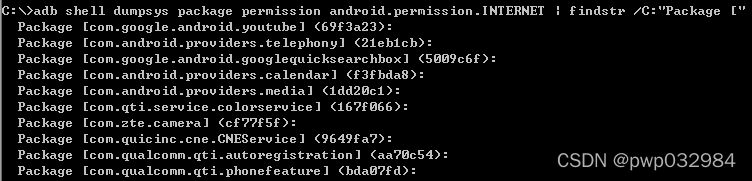
3.X 用途:获取手机中拥有指定权限的、且包名带android和qti的所有应用列表
adb shell dumpsys package permission android.permission.INTERNET | findstr /C:"Package [" | findstr "android qti"
3.X 用途三:获取某个应用所有权限列表
adb shell dumpsys package 包名
declared permissions :自定义权限
requested permissions :请求权限
install permissions :安装权限
runtime permissions : 运行时权限
参考资料:
(三十六) 从dumpsys package看Android权限_JT的专栏-CSDN博客_dumpsys package
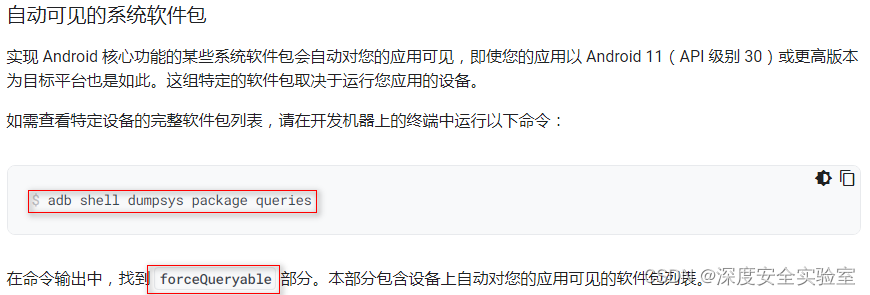
用途四:
adb shell dumpsys package queries
管理软件包可见性 | Android 开发者 | Android Developers
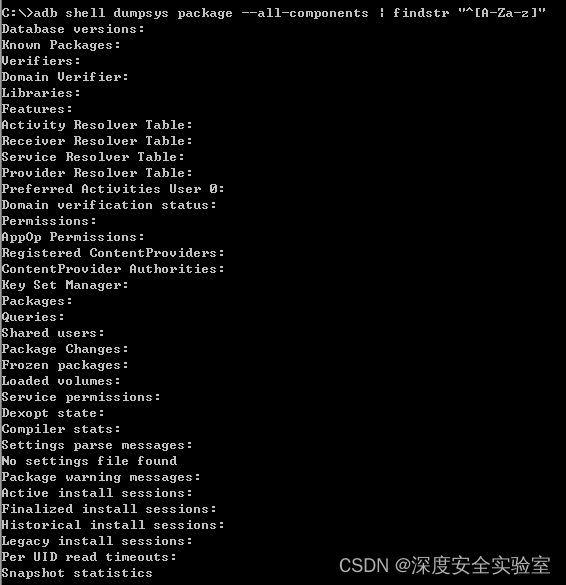
思路1:查所有应用
adb shell dumpsys package --all-components
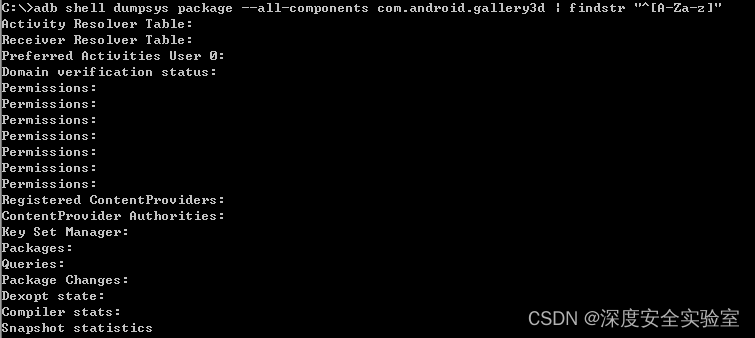
思路2:查指定应用
adb shell dumpsys package --all-components <package.name>
用途:获取手机所有activity
三者区别:
- adb shell dumpsys package --all-components:每个应用内容既包括权限,又包括四大组件
adb shell dumpsys package:默认设置,每个应用内容只有权限,没有四大组件adb shell dumpsys package --all-components packages:只包括已安装应用的权限和四大组件
正确命令:
adb shell dumpsys package --all-components | findstr "Package.\[ activit"

import java.io.*;
import java.util.ArrayList;

/**
 * 用途:自动获取手机所有应用的所有activity,并启动上述activity
 * <p>
 * 第一步,获取手机所有应用的所有组件:adb shell dumpsys package --all-components
 * 第二步,提取手机所有应用的所有activity
 * 第三步,依次启动手机所有应用所有activity:adb shell am start-activity
 */
public class Test {
    public static void main(String[] args) {
        ArrayList<String> arrayList = new ArrayList<String>();
        ArrayList<String> arrayList2 = new ArrayList<String>();

        // 第一步,获取手机所有应用的所有组件:adb shell dumpsys package --all-components
        try {
            BufferedWriter bw = new BufferedWriter(new FileWriter("D:/p2.txt"));

            InputStreamReader ir = new InputStreamReader(Runtime.getRuntime().exec("cmd /c adb shell dumpsys package --all-components").getInputStream(), "GBK");
            BufferedReader br = new BufferedReader(ir);
            String line = null;
            while ((line = br.readLine()) != null) {
                bw.write(line + "\r\n");
            }
            bw.flush();
            bw.close();
        } catch (IOException e) {
            e.printStackTrace();
        }

        // 第二步,提取手机所有应用的所有activity
        try {
            FileInputStream fileInputStream = new FileInputStream("D:/p2.txt");
            InputStreamReader inputStreamReader = new InputStreamReader(fileInputStream);
            BufferedReader bufferedReader = new BufferedReader(inputStreamReader);
            String line = null;
            while ((line = bufferedReader.readLine()) != null) {
                arrayList.add(line);
            }
        } catch (IOException e) {
            e.printStackTrace();
        }

        for (int i = 0; i < arrayList.size(); i++) {
            // activities:/services:/receivers:/providers:
            String keyword = "services:";
            if (arrayList.get(i).contains(keyword)) {
                // com.zte.heartyservice/.examination.ExamActivity 会导致退出开发者选项,adb口也会消失
                // android/com.android.internal.app.ShutdownActivity 设备关机
                // com.unisoc/.internal.app.ShutdownCountdownActivity 设备关机
                while (arrayList.get(i + 1).contains("/") && !arrayList.get(i + 1).contains("ExamActivity") && !arrayList.get(i + 1).contains("ShutdownActivity")) {
                    arrayList2.add(arrayList.get(i + 1));
                    // 单独调试,存在数组越界可能
                    i++;
                }
            }
        }

        // 第三步,依次启动手机所有应用所有activity:adb shell am start-activity
        for (String s : arrayList2) {
            // start-activity/start-service/broadcast
            String cmd = "cmd /c adb shell am start-service " + s;
            System.out.println(s);
            try {
                Runtime.getRuntime().exec(cmd);
                Thread.sleep(1000);
            } catch (IOException | InterruptedException e) {
                e.printStackTrace();
            }
        }
    }
}
4 参考资料

有“AI”的1024 = 2048,欢迎大家加入2048 AI社区
更多推荐


 1
1 0
0- 0


 已为社区贡献3条内容

所有评论(0)