python整数类型的输出格式_python基础_格式化输出(%用法和format用法)
%用法1、整数的输出%o —— oct 八进制%d —— dec 十进制%x —— hex 十六进制>>> print('%o' % 20)24>>> print('%d' % 20)20>>> print('%x' % 20)142、浮点数输出2.1 格式化输出%f ——保留小数点后面六位有效数字%.3f,保留3位小数位%e ——保留小数点后面六位有效数字,指数形式输出%.3e,保留3位小数位,
%用法
1、整数的输出
%o —— oct 八进制
%d —— dec 十进制
%x —— hex 十六进制
>>> print('%o' % 20)24
>>> print('%d' % 20)20
>>> print('%x' % 20)14
2、浮点数输出
2.1 格式化输出
%f ——保留小数点后面六位有效数字
%.3f,保留3位小数位
%e ——保留小数点后面六位有效数字,指数形式输出
%.3e,保留3位小数位,使用科学计数法
%g ——在保证六位有效数字的前提下,使用小数方式,否则使用科学计数法
%.3g,保留3位有效数字,使用小数或科学计数法
>>> print('%f' % 1.11) #默认保留6位小数
1.110000
>>> print('%.1f' % 1.11) #取1位小数
1.1
>>> print('%e' % 1.11) #默认6位小数,用科学计数法
1.110000e+00
>>> print('%.3e' % 1.11) #取3位小数,用科学计数法
1.110e+00
>>> print('%g' % 1111.1111) #默认6位有效数字
1111.11
>>> print('%.7g' % 1111.1111) #取7位有效数字
1111.111
>>> print('%.2g' % 1111.1111) #取2位有效数字,自动转换为科学计数法
1.1e+03
2.2 内置round()
round(number[, ndigits])
参数:
number-这是一个数字表达式。
ndigits-表示从小数点到最后四舍五入的位数。默认值为0。
返回值- 该方法返回x的小数点舍入为n位数后的值。
round()函数只有一个参数,不指定位数的时候,返回一个整数,而且是最靠近的整数,类似于四舍五入,当指定取舍的小数点位数的时候,一般情况也是使用四舍五入的规则,但是碰到.5的情况时,如果要取舍的位数前的小数是奇数,则直接舍弃,如果是偶数则向上取舍。
注:“.5”这个是一个“坑”,且python2和python3出来的接口有时候是不一样的,尽量避免使用round()函数吧
http://www.runoob.com/w3cnote/python-round-func-note.html ----具体解释,但是还是别用四舍五入了。
>>> round(1.1125) #四舍五入,不指定位数,取整
1
>>> round(1.1135,3) #取3位小数,由于3为奇数,则向下“舍”
1.113
>>> round(1.1125,3) #取3位小数,由于2为偶数,则向上“入”
1.113
>>> round(1.5) #无法理解,查阅一些资料是说python会对数据进行截断,没有深究
2
>>> round(2.5) #无法理解
2
>>> round(1.675,2) #无法理解
1.68
>>> round(2.675,2) #无法理解
2.67
>>>
3、字符串输出
%s
%10s——右对齐,占位符10位
%-10s——左对齐,占位符10位
%.2s——截取2位字符串
%10.2s——10位占位符,截取两位字符串
>>> print('%s' % 'hello world') #字符串输出
hello world>>> print('%20s' % 'hello world') #右对齐,取20位,不够则补位
hello world>>> print('%-20s' % 'hello world') #左对齐,取20位,不够则补位
hello world>>> print('%.2s' % 'hello world') #取2位
he>>> print('%10.2s' % 'hello world') #右对齐,取2位
he>>> print('%-10.2s' % 'hello world') #左对齐,取2位
he
4、有名字的占位符
#可用字典形式
print("%(u)s" % {'u':"sdads"})
5、 其他
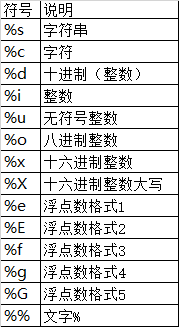
5.1 字符串格式代码
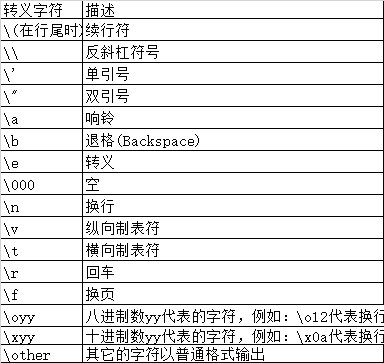
5.2 常用转义字符
format用法
相对基本格式化输出采用‘%’的方法,format()功能更强大,该函数把字符串当成一个模板,通过传入的参数进行格式化,并且使用大括号‘{}’作为特殊字符代替‘%’
位置匹配
1. 基础用法-位置匹配
(1)不带编号,即“{}”
(2)带数字编号,可调换顺序,即“{1}”、“{2}”
(3)带关键字,即“{a}”、“{tom}”
>>> print('{} {}'.format('hello','world')) #不带字段
hello world>>> print('{0} {1}'.format('hello','world')) #带数字编号
hello world>>> print('{0} {1} {0}'.format('hello','world')) #打乱顺序
hello world hello>>> print('{1} {1} {0}'.format('hello','world'))
world world hello>>> print('{a} {tom} {a}'.format(tom='hello',a='world')) #带关键字
world hello world
通过位置匹配
>>> '{0}, {1}, {2}'.format('a', 'b', 'c')'a, b, c'
>>> '{}, {}, {}'.format('a', 'b', 'c') #3.1+版本支持
'a, b, c'
>>> '{2}, {1}, {0}'.format('a', 'b', 'c')'c, b, a'
>>> '{2}, {1}, {0}'.format(*'abc') #可打乱顺序
'c, b, a'
>>> '{0}{1}{0}'.format('abra', 'cad') #可重复
'abracadabra'
通过名字匹配
>>> 'Coordinates: {latitude}, {longitude}'.format(latitude='37.24N', longitude='-115.81W')'Coordinates: 37.24N, -115.81W'
>>> coord = {'latitude': '37.24N', 'longitude': '-115.81W'}>>> 'Coordinates: {latitude}, {longitude}'.format(**coord)'Coordinates: 37.24N, -115.81W'
通过对象属性匹配
>>> c = 3-5j
>>> ('The complex number {0} is formed from the real part {0.real}'...'and the imaginary part {0.imag}.').format(c)'The complex number (3-5j) is formed from the real part 3.0 and the imaginary part -5.0.'
>>> classPoint:
...def __init__(self, x, y):
... self.x, self.y=x, y
...def __str__(self):
...return 'Point({self.x}, {self.y})'.format(self=self)
...>>> str(Point(4, 2))'Point(4, 2)'
通过下标或key匹配参数
>>>
>>> coord = (3, 5)>>> 'X: {0[0]}; Y: {0[1]}'.format(coord)'X: 3; Y: 5'
>>> a = {'a': 'test_a', 'b': 'test_b'}>>> 'X: {0[a]}; Y: {0[b]}'.format(a)'X: test_a; Y: test_b'
2.格式控制信息
format()方法中<模板字符串>的槽除了包括参数序号,还可以包括格式控制信息。此时,槽的内部样式如下:
{<参数序号>: <格式控制标记>}
其中,<格式控制标记>用来控制参数显示时的格式,包括:<填充><对齐><宽度>,<.精度><类型>6 个字段,这些字段都是可选的,可以组合使用,逐一介绍如下。

<宽度>
指当前槽的设定输出字符宽度,如果该槽对应的format()参数长度比<宽度>设定值大,则使用参数实际长度。如果该值的实际位数小于指定宽度,则位数将被默认以空格字符补充。
<对齐>
指参数在<宽度>内输出时的对齐方式,分别使用<、>和^三个符号表示左对齐、右对齐和居中对齐。
<填充>
指<宽度>内除了参数外的字符采用什么方式表示,默认采用空格,可以通过<填充>更换。
s = "PYTHON"
"{0:30}".format(s)
Out[17]: 'PYTHON'
"{0:>30}".format(s)
Out[18]: 'PYTHON'
"{0:*^30}".format(s)
Out[19]: '************PYTHON************'
"{0:-^30}".format(s)
Out[20]: '------------PYTHON------------'
"{0:3}".format(s)
Out[21]: 'PYTHON'
逗号(,)
<格式控制标记>中逗号(,)用于显示数字的千位分隔符,例如:
"{0:-^20,}".format(1234567890)
Out[24]: '---1,234,567,890----'
"{0:-^20}".format(1234567890) #对比输出
Out[25]: '-----1234567890-----'
"{0:-^20,}".format(12345.67890)
Out[26]: '----12,345.6789-----'
<.精度>
表示两个含义,由小数点(.)开头。对于浮点数,精度表示小数部分输出的有效位数。对于字符串,精度表示输出的最大长度。
"{0:.2f}".format(12345.67890)
Out[29]: '12345.68'
"{0:H^20.3f}".format(12345.67890)
Out[30]: 'HHHHH12345.679HHHHHH'
a = "{0:H^20,.3f}".format(12345.67890)
print(a)
"{0:.4}".format("PYTHON")
Out[31]: 'PYTH'
<类型>
表示输出整数和浮点数类型的格式规则。对于整数类型,输出格式包括6 种:
b: 输出整数的二进制方式;
c: 输出整数对应的 Unicode 字符;
d: 输出整数的十进制方式;
o: 输出整数的八进制方式;
x: 输出整数的小写十六进制方式;
X: 输出整数的大写十六进制方式;
"{0:b},{0:c},{0:d},{0:o},{0:x},{0:X}".format(425)
Out[32]: '110101001,Ʃ,425,651,1a9,1A9'
对于浮点数类型,输出格式包括4 种:
e: 输出浮点数对应的小写字母 e 的指数形式;
E: 输出浮点数对应的大写字母 E 的指数形式;
f: 输出浮点数的标准浮点形式;
%: 输出浮点数的百分形式。
浮点数输出时尽量使用<.精度>表示小数部分的宽度,有助于更好控制输出格式。
"{0:e},{0:E},{0:f},{0:%}".format(3.14)
Out[33]: '3.140000e+00,3.140000E+00,3.140000,314.000000%'
"{0:.2e},{0:.2E},{0:.2f},{0:.2%}".format(3.14)
Out[34]: '3.14e+00,3.14E+00,3.14,314.00%'
3. 进阶用法
3.1 进制转换
2进制、8进制、10进制、16进制
>>> #format also supports binary numbers
>>> "int: {0:d}; hex: {0:x}; oct: {0:o}; bin: {0:b}".format(42)'int: 42; hex: 2a; oct: 52; bin: 101010'
>>> #with 0x, 0o, or 0b as prefix:
>>> "int: {0:d}; hex: {0:#x}; oct: {0:#o}; bin: {0:#b}".format(42) #在前面加“#”,则带进制前缀
'int: 42; hex: 0x2a; oct: 0o52; bin: 0b101010'
3.2 左中右对齐及位数补全
(1)< (默认)左对齐、> 右对齐、^ 中间对齐、= (只用于数字)在小数点后进行补齐
(2)取位数“{:4s}”、"{:.2f}" 等
左中右对齐及位数补齐
>>> print('{} and {}'.format('hello','world')) #默认左对齐
hello andworld>>> print('{:10s} and {:>10s}'.format('hello','world')) #取10位左对齐,取10位右对齐
hello andworld>>> print('{:^10s} and {:^10s}'.format('hello','world')) #取10位中间对齐
hello andworld>>> print('{} is {:.2f}'.format(1.123,1.123)) #取2位小数
1.123 is 1.12
>>> print('{0} is {0:>10.2f}'.format(1.123)) #取2位小数,右对齐,取10位
1.123 is 1.12
>>> '{:<30}'.format('left aligned') #左对齐
'left aligned'
>>> '{:>30}'.format('right aligned') #右对齐
'right aligned'
>>> '{:^30}'.format('centered') #中间对齐
'centered'
>>> '{:*^30}'.format('centered') #使用“*”填充
'***********centered***********'
>>>'{:0=30}'.format(11) #还有“=”只能应用于数字,这种方法可用“>”代替
'000000000000000000000000000011'
3.3 正负符号显示
正负符号显示 %+f, %-f, 和 %f的用法>>> '{:+f}; {:+f}'.format(3.14, -3.14) #总是显示符号
'+3.140000; -3.140000'
>>> '{: f}; {: f}'.format(3.14, -3.14) #若是+数,则在前面留空格
'3.140000; -3.140000'
>>> '{:-f}; {:-f}'.format(3.14, -3.14) #-数时显示-,与'{:f}; {:f}'一致
'3.140000; -3.140000'
3.4 百分数%
>>> points = 19
>>> total = 22
>>> 'Correct answers: {:.2%}'.format(points/total)'Correct answers: 86.36%'
3.5 时间
>>> importdatetime>>> d = datetime.datetime(2010, 7, 4, 12, 15, 58)>>> '{:%Y-%m-%d %H:%M:%S}'.format(d)'2010-07-04 12:15:58'
3.6 逗号","分隔金钱,没以前进位
>>> '{:,}'.format(1234567890)'1,234,567,890'
3.7 占位符嵌套
>>> for align, text in zip('<^>', ['left', 'center', 'right']):
...'{0:{fill}{align}16}'.format(text, fill=align, align=align)
...'left<<<<<<<<<<<<'
'^^^^^center^^^^^'
'>>>>>>>>>>>right'
>>>
>>> octets = [192, 168, 0, 1]>>> '{:02X}{:02X}{:02X}{:02X}'.format(*octets)'C0A80001'
>>> int(_, 16) #官方文档给出来的,无法在IDLE复现
3232235521
>>>
>>> width = 5
>>> for num in range(5,12):
...for base in 'dXob':
...print('{0:{width}{base}}'.format(num, base=base, width=width), end=' ')
...print()
...5 5 5 101
6 6 6 110
7 7 7 111
8 8 10 1000
9 9 11 1001
10 A 12 1010
11 B 13 1011
3.8 占位符%s和%r
"""replacement_field ::= "{" [field_name] ["!" conversion] [":" format_spec] "}"
conversion ::= "r" | "s" | "a"
这里只有三个转换符号,用"!"开头。
"!r"对应 repr();"!s"对应 str(); "!a"对应ascii()。"""
>>> "repr() shows quotes: {!r}; str() doesn't: {!s}".format('test1', 'test2')"repr() shows quotes: 'test1'; str() doesn't: test2" #输出结果是一个带引号,一个不带
format的用法变形
#a.format(b)
>>> "{0} {1}".format("hello","world")'hello world'
#f"xxxx"#可在字符串前加f以达到格式化的目的,在{}里加入对象,此为format的另一种形式:
>>> a = "hello"
>>> b = "world"
>>> f"{a} {b}"
'hello world'name= 'jack'age= 18sex= 'man'job= "IT"salary= 9999.99
print(f'my name is {name.capitalize()}.')print(f'I am {age:*^10} years old.')print(f'I am a {sex}')print(f'My salary is {salary:10.3f}')#结果
my name isJack.
I am****18****years old.
I am a man
My salaryis 9999.990

有“AI”的1024 = 2048,欢迎大家加入2048 AI社区
更多推荐
 2
2 0
0- 0


 已为社区贡献1条内容

所有评论(0)