Web前端开发技术实验与实践(第3版)储久良编著实训9
实训9 JavaScript基础应用项目26 改变新闻网页中的字号页面效果截图代码截图项目27 计算任意区间内连续自然数的累加和页面效果截图项目28 消息对话框综合应用代码截图
·
实训9 JavaScript基础应用
项目26 改变新闻网页中的字号
页面效果截图


代码
<!--prj_9_1.html-->
<!DOCTYPE html>
<html>
	<head>
		<meta charset="utf-8">
		<title>江苏省人民政府</title>
		<style type="text/css">
			#div1 {
				text-align: center;
				font-size: 16px;
			}

			#content {
				font-size: 12px;
				line-height: 2em;
				padding: 10px;
				background-color: #c0c0c0;
				color: black;
				border: 2px groove#fcff57;
			}

			p {
				text-indent: 2em;
			}
		</style>
		<script type="text/javascript">
			function $(id) {
				return document.getElementById(id);
			}

			function setFont(size) {
				$("content").style.fontSize = size;
			}
		</script>
	</head>
	<body>
		<h2 align="center">JavaScript改变新闻网页中的字号</h2>
		<div id="div1">
			选择字号【
			<a href="javascript:setFont('12px')">小</a>
			<a href="#" onclick="javascript:setFont('18px')">中</a>
			<a href="#" onclick="javascript:setFont('24px')">大</a>
			】
		</div>
		<div id="content">
			<p>JavaScript是一种能让你的网页更加生动活泼的程式语言,也是目前网页中设计中最容易学又最方便的语言。你可以利用JavaScript轻易的做出亲切的欢迎讯息、漂亮的数字钟、有广告效果的跑马灯及简易的选举,还可以显示浏览器停留的时间。让这些特殊效果提高网页的可观性。</p>
		</div>
	</body>
</html>
项目27 计算任意区间内连续自然数的累加和
页面效果截图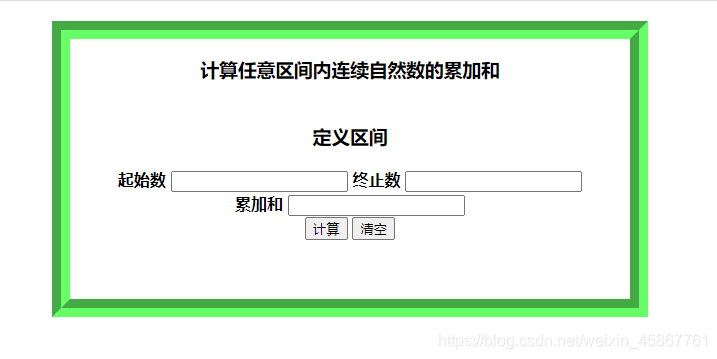
代码
<!--prj_9_2.html-->
<!DOCTYPE html>
<html>
	<head>
		<meta charset="utf-8">
		<title>计算任意区间内连续自然数的累加和</title>
		<style type="text/css">
			div {
				text-align: center;
				margin: 20px auto;
				line-height: 1.5em;
				border: 18px groove #66ff66;
				width: 560px;
				height: 260px;
				font-weight: bold;
			}

			form {
				margin: 20px auto;
				padding: 5px;
			}
		</style>
		<script type="text/javascript" src="../js/sum.js"></script>
	</head>
	<body>
		<div id="">
			<h3>计算任意区间内连续自然数的累加和</h3>
			<form action="" method="">
				<h3>定义区间</h3>
				<label>
					起始数
					<input type="text" id="start_num" value="" name="start_num" />
				</label>
				<label>
					终止数
					<input type="text" id="end_num" value="" name="end_num" />
				</label>
				<br>
				<label>
					累加和
					<input type="text" id="sum" value="" name="sum" readonly="readonly" />
				</label>
				<br>
				<input type="button" name="" id="" value="计算" onclick="show()" />
				<input type="reset" name="" id="" value="清空" />
			</form>
		</div>
	</body>
</html>
function $(id){
	return document.getElementById(id);
}
function sum(n1,n2){
	for(var i=n1,sum1=0;i<=n2;i++){
		sum1=sum1+i;
	}
	return sum1;
}
function show(){
	var n11=parseFloat($("start_num").value);
	var n22=parseFloat($("end_num").value);
	if(n11>0 && n22>0){
		if(n11>=n22){
			alert("起始数必须小于终止数,请重输!");
			$("start_num").value="";
			$("end_num").value="";
		}
		else{
			$("sum").value=sum(n11,n22);
		}
	}else{
		alert("请输入数据!");
		$("start_num").focus();
	}
}
项目28 消息对话框综合应用
页面效果截图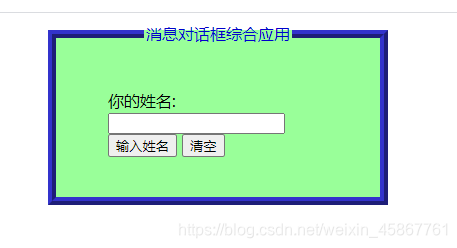
代码
<!--prj_9_3.html-->
<!DOCTYPE html>
<html>
	<head>
		<meta charset="utf-8">
		<title>消息对话框综合应用</title>
		<style type="text/css">
			fieldset {
				background-color: #99ff99;
				width: 300px;
				height: 150px;
				border: 8px ridge #3333cc;
				margin: 10px auto;
			}

			legend {
				color: #0000cc;
			}

			form {
				margin: 20px;
				padding: 20px;
			}
		</style>
		<script type="text/javascript">
			function $(id) {
				return document.getElementById(id);
			}

			function inputName() {
				var name = prompt("请输入你的姓名:", "你好!");
				if (name != null) {
					alert("你的名字是:" + name);
					$("name1").value = name;
				} else {
					alert("请你输入姓名!");
				}
			}
		</script>
	</head>
	<body>
		<fieldset id="">
			<legend align="center">消息对话框综合应用</legend>
			<form action="" method="">
				你的姓名:
				<input type="text" id="name1" value="" maxlength="10" readonly="readonly" />
				<br>
				<input type="button" name="" id="" value="输入姓名" onclick="inputName()" />
				<input type="reset" name="" id="" value="清空" />
			</form>
		</fieldset>
	</body>
</html>

有“AI”的1024 = 2048,欢迎大家加入2048 AI社区
更多推荐


 32
32 0
0- 0


 已为社区贡献5条内容

所有评论(0)