Echarts直方图
Echarts使用ecStat库制作直方图
·
这里主要对这个官网案例进行讲解:
https://echarts.apache.org/examples/en/editor.html?c=bar-histogram
<!DOCTYPE html>
<html>
<head>
    <meta charset="UTF-8"/>
    <title>bar histogram</title>
</head>
<script src="js/echarts.min.js"></script>
<script src="js/ecStat.min.js"></script>
<body>
<div id="histogram" style="width: 1400px;height:800px;"></div>
</body>

<script>
    var histogramChart = echarts.init(document.getElementById('histogram'));

    // 任意数据集
    var girth = [8.3, 8.6, 8.8, 10.5, 10.7, 10.8, 11.0, 11.0, 11.1, 11.2, 11.3, 11.4, 11.4, 11.7, 12.0, 12.9, 12.9, 13.3, 13.7, 13.8, 14.0, 14.2, 14.5, 16.0, 16.3, 17.3, 17.5, 17.9, 18.0, 18.0, 20.6];

    // See https://github.com/ecomfe/echarts-stat
    var bins = ecStat.histogram(girth);

    // 柱子间间隔的刻度
    var interval;

    var min = Infinity;
    var max = -Infinity;

    var data = echarts.util.map(bins.data, function (item, index) {
        // 左刻度
        var x0 = bins.bins[index].x0;
        // 右刻度
        var x1 = bins.bins[index].x1;
        interval = x1 - x0;
        // 获得数据集中最值
        min = Math.min(min, x0);
        max = Math.max(max, x1);
        // item[0]代表刻度的中间值,item[1]代表出现的次数
        return [x0, x1, item[1]];
    });

    // 自定义渲染效果
    function renderItem(params, api) {
        // 这个根据自己的需求适当调节
        var yValue = api.value(2);
        var start = api.coord([api.value(0), yValue]);
        var size = api.size([api.value(1) - api.value(0), yValue]);
        var style = api.style();

        return {
            // 矩形及配置
            type: 'rect',
            shape: {
                x: start[0] + 1,
                y: start[1],
                width: size[0] - 2,
                height: size[1]
            },
            style: style
        };
    }

    option = {
        title: {
            text: 'Girths of Black Cherry Trees',
            subtext: 'By ecStat.histogram',
            sublink: 'https://github.com/ecomfe/echarts-stat',
            left: 'center',
            top: 10
        },
        color: ['rgb(25, 183, 207)'],
        grid: {
            top: 80,
            containLabel: true
        },
        xAxis: [{
            type: 'value',
            min: min,
            max: max,
            interval: interval
        }],
        yAxis: [{
            type: 'value',
        }],
        series: [{
            name: 'height',
            type: 'custom',
            renderItem: renderItem,
            label: {
                show: true,
                position: 'insideTop'
            },
            encode: {
                // 表示将data中的data[0]和data[1]映射到x轴
                x: [0, 1],
                // 表示将data中的data[2]映射到y轴
                y: 2,
                // 表示将data中的data[2]映射到tooltip
                tooltip: 2,
                // 表示将data中的data[2]映射到label
                label: 2
            },
            data: data
        }]
    };
    histogramChart.setOption(option)
</script>
</html>
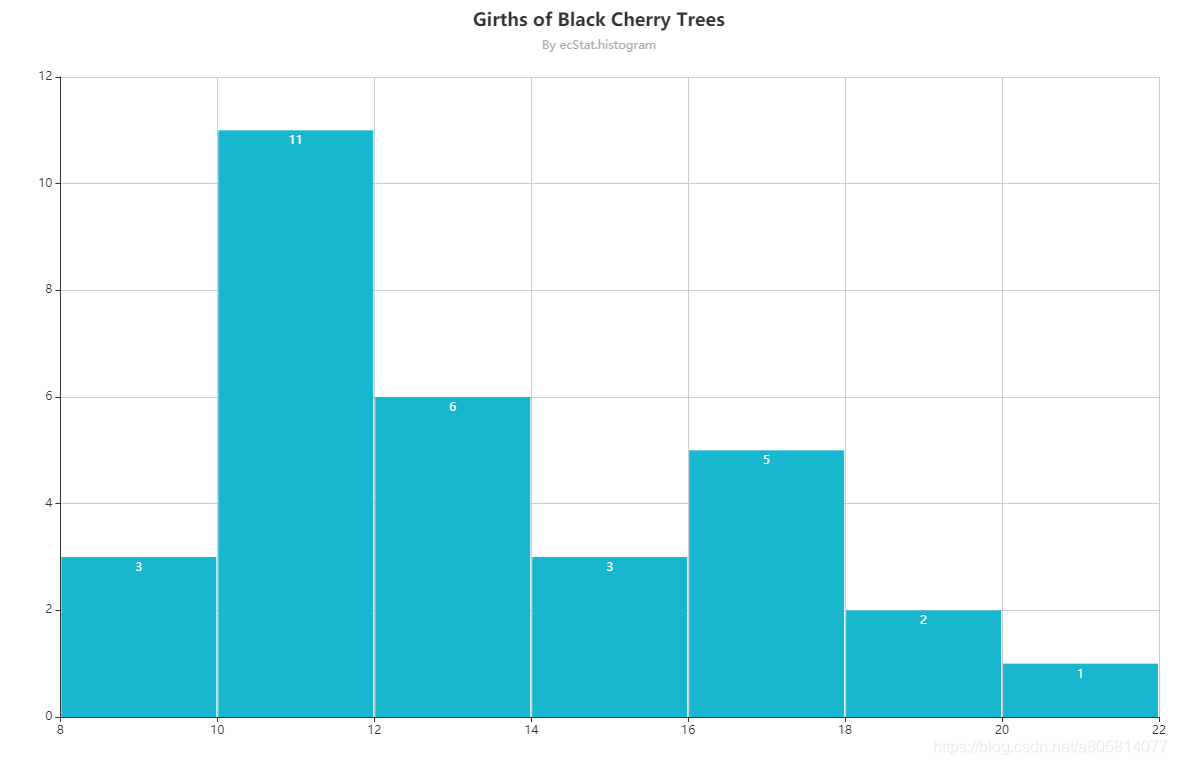
附上一张最后的效果图:

有“AI”的1024 = 2048,欢迎大家加入2048 AI社区
更多推荐


 3
3 0
0- 0


 已为社区贡献11条内容

所有评论(0)