GDPU Java 天码行空8 集合类
·
文章目录
(一)实验目的
1、掌握JAVA集合类中的Collection的特点及其应用情形;
3、掌握Collection、熟悉集合的特点及应用。
(二)实验内容和步骤
1、LinkedList 实现队列
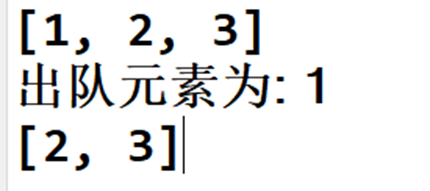
仿照课堂练习的MyStack示例,使用LinkedList集合类实现一个先进先出的队列数据结构,可以往该结构中压入数据push()以及弹出数据pop(),并遵循先进入先出队的规则。创建该结构,并使用该结构,调用其方法,实现数据存入和取出并显示。
实验记录和问题:
💖 MyQueueDemo.java
import java.util.LinkedList;
import java.util.Queue;

public class MyQueueDemo
{
	public static void main(String[] args)
	{
		MyQueue<Integer> myQueue = new MyQueue<Integer>();
		// 入队操作
		myQueue.push(1);
		myQueue.push(2);
		myQueue.push(3);

		// 打印队列元素
		myQueue.print(); // 输出: [1, 2, 3]

		// 出队操作
		int element = myQueue.pop();
		System.out.println("出队元素为: " + element); // 输出: 出队元素为: 1

		// 再次打印队列元素
		myQueue.print(); // 输出: [2, 3]
	}
}

class MyQueue<T>
{
	private LinkedList<T> storage = new LinkedList<T>();

	// 将指定的元素插入队尾
	public void push(T v)
	{
		storage.add(v);
	}

	// 检索并移除此队列的头,如果队列为空,则返回 null
	public T pop()
	{
		return storage.poll();
	}

	// 打印队列元素
	public void print()
	{
		System.out.println(storage.toString());
	}
}
💖 运行结果:
2、集合的嵌套遍历
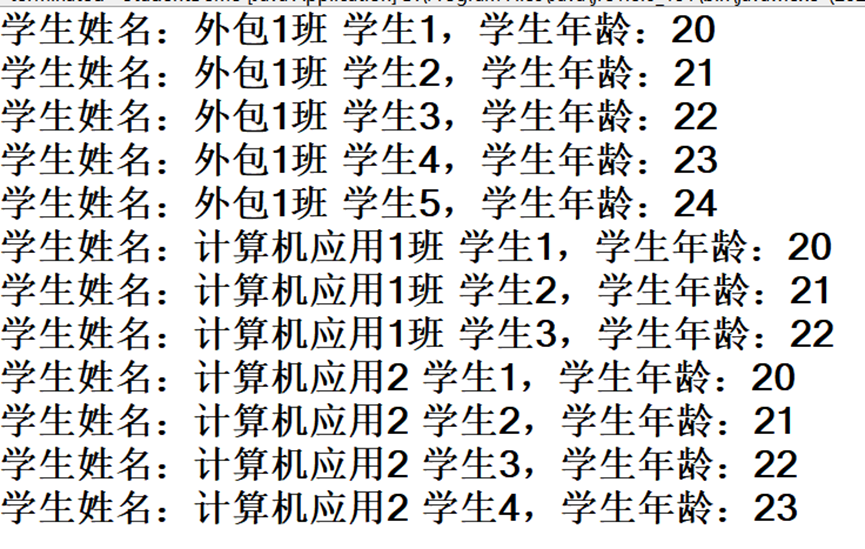
现在计算机科学与技术系2022届共有5个班级,2个外包班,3个应用班,每个班都有不同的学生,外包1班有5个学生,计算机应用1班有3个学生,计算机应用2班有4个学生.遍历打印年级学生信息。
分析:用集合去存储并且遍历每个学生。最终选择ArrayList去存储
💖 StudentDemo.java
import java.util.ArrayList;

class Student
{
	private String name;
	private int age;

	public Student(String name, int age)
	{
		this.name = name;
		this.age = age;
	}

	public String getName()
	{
		return name;
	}

	public int getAge()
	{
		return age;
	}
}

public class StudentDemo
{
	public static void main(String[] args)
	{
		ArrayList<Student> students = new ArrayList<Student>();

		// 外包1班的学生
		students.add(new Student("外包1班 学生1", 20));
		students.add(new Student("外包1班 学生2", 21));
		students.add(new Student("外包1班 学生3", 22));
		students.add(new Student("外包1班 学生4", 23));
		students.add(new Student("外包1班 学生5", 24));

		// 计算机应用1班的学生
		students.add(new Student("计算机应用1班 学生1", 20));
		students.add(new Student("计算机应用1班 学生2", 21));
		students.add(new Student("计算机应用1班 学生3", 22));

		// 计算机应用2班的学生
		students.add(new Student("计算机应用2 学生1", 20));
		students.add(new Student("计算机应用2 学生2", 21));
		students.add(new Student("计算机应用2 学生3", 22));
		students.add(new Student("计算机应用2 学生4", 23));

		// 遍历打印学生信息
		for (Student student : students)
		{
			System.out.println("学生姓名:" + student.getName() + ",学生年龄:" + student.getAge());
		}
	}
}
💖 运行结果:
3、类型转换 + 排序
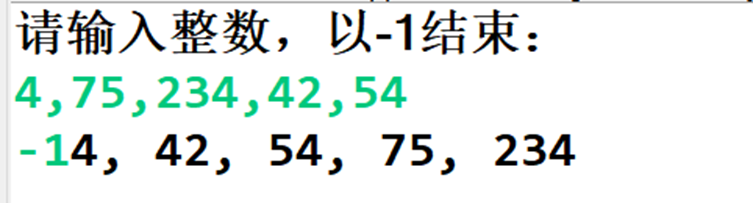
键盘录入多个整型数据,以-1结束,按格式输出排序后的数据,输入格式要求如下:以逗号分隔整数,如:4,75,234,42,54. 输出排序后的结果为:4, 42, 54, 75, 234 。
- 用正则表达式分割字符串,得到字符串数组: split()方法
- 转换为整型集合:for循环将字符串数组中的元素遍历取出,加入到集合中
- 使用Collections工具类对集合进行排序
- 输出排序后的集合元素
💖 Main.java
import java.util.ArrayList;
import java.util.Collections;
import java.util.Scanner;

public class Main
{
	public static void main(String[] args)
	{
		Scanner scanner = new Scanner(System.in);
		ArrayList<Integer> list = new ArrayList<Integer>();
		System.out.println("请输入整数,以-1结束:");
		while (true)
		{
			String input = scanner.nextLine();
			if (input.equals("-1"))
			{
				break;
			}
			String[] numbers = input.split(",");
			for (String number : numbers)
			{
				int num = Integer.parseInt(number.trim());
				list.add(num);
			}
			Collections.sort(list);
			for (int i = 0; i < list.size(); i++)
			{
				System.out.print(list.get(i));
				if (i < list.size() - 1)
				{
					System.out.print(", ");
				}
			}
		}
		scanner.close();
	}
}
💖 运行结果
4、TreeSet集合排序
存储自定义对象并遍历:如果对象的成员变量值相同即为同一个对象,按照年龄进行从大到小进行排序。分别用自然排序,实现接口Comparator类,内部类三种方法实现
💖 SortDemo.java
import java.util.Comparator;
import java.util.TreeSet;

class People
{
	private String name;
	private int age;

	public People(String name, int age)
	{
		this.name = name;
		this.age = age;
	}

	public String getName()
	{
		return name;
	}

	public int getAge()
	{
		return age;
	}

	@Override
	public boolean equals(Object o)
	{
		if (this == o)
			return true;
		if (o == null || getClass() != o.getClass())
			return false;
		People people = (People) o;
		return age == people.age;
	}

	@Override
	public int hashCode()
	{
		return age;
	}
}

// 自然排序
class StudentNaturalComparator implements Comparator<People>
{
	@Override
	public int compare(People s1, People s2)
	{
		return s2.getAge() - s1.getAge();
	}
}

public class SortDemo
{
	public static void main(String[] args)
	{
//		TreeSet<People> peoples = new TreeSet<People>(); // 报错 cannot be cast to java.lang.Comparable
		TreeSet<People> peoples = new TreeSet<People>((o1, o2) -> o1.getAge() - o2.getAge());
		// 添加学生对象
		peoples.add(new People("Alice", 20));
		peoples.add(new People("Bob", 22));
		peoples.add(new People("Charlie", 20));
		peoples.add(new People("David", 21));

		// 自然排序
		System.out.println("自然排序:");
		for (People people : peoples)
		{
			System.out.println(people.getName() + ", " + people.getAge());
		}

		// 实现Comparator接口
		TreeSet<People> peoplesComparator = new TreeSet<People>(new StudentNaturalComparator());
		peoplesComparator.add(new People("Alice", 20));
		peoplesComparator.add(new People("Bob", 22));
		peoplesComparator.add(new People("Charlie", 20));
		peoplesComparator.add(new People("David", 21));

		System.out.println("\n实现Comparator接口:");
		for (People people : peoplesComparator)
		{
			System.out.println(people.getName() + ", " + people.getAge());
		}

		// 内部类
		TreeSet<People> peoplesInnerClass = new TreeSet<People>(new Comparator<People>()
		{
			@Override
			public int compare(People s1, People s2)
			{
				return s2.getAge() - s1.getAge();
			}
		});
		peoplesInnerClass.add(new People("Alice", 20));
		peoplesInnerClass.add(new People("Bob", 22));
		peoplesInnerClass.add(new People("Charlie", 20));
		peoplesInnerClass.add(new People("David", 21));

		System.out.println("\n内部类:");
		for (People people : peoplesInnerClass)
		{
			System.out.println(people.getName() + ", " + people.getAge());
		}
	}
}
② 程序运行结果:
6、“aababcabcdabcde”,获取字符串中每一个字母出现的次数要求结果:a(5)b(4)c(3)d(2)e(1)
实验记录和问题:
① 撰写的程序代码为:CharacterStatisticsDemo.java
import java.util.*;

public class CharacterStatisticsDemo
{
	public static void main(String[] args)
	{
		Scanner scanner = new Scanner(System.in);
		System.out.println("请输入字符串:");
		String input = scanner.nextLine();
		scanner.close();

		// 使用HashMap存储字符及其出现次数
		Map<Character, Integer> charCountMap = new HashMap<>();
		for (char c : input.toCharArray())
		{
			if (charCountMap.containsKey(c))
			{
				charCountMap.put(c, charCountMap.get(c) + 1);
			} else
			{
				charCountMap.put(c, 1);
			}
		}

		// 按照要求格式输出结果
		for (Map.Entry<Character, Integer> entry : charCountMap.entrySet())
		{
			System.out.print(entry.getKey() + "(" + entry.getValue() + ")");
		}
	}
}
💖 运行结果


有“AI”的1024 = 2048,欢迎大家加入2048 AI社区
更多推荐



 22
22 0
0- 0


 已为社区贡献8条内容

所有评论(0)