Tomcat启动失败org.apache.catalina.core.StandardContext.startInternal One or more Filters failed to start
·
写在前面:大家好K。首先为你点进这篇有趣的文章点赞👍!文章在撰写过程中难免有疏漏和错误,欢迎你在下方留言指出文章的不足之处;如果觉得这篇文章对你有用,也欢迎你点赞和留下你的评论。更多内容请点进👉我的博客K。👈阅览。
问题描述
SSH框架项目编译“成功”,但是启动Tomcat时显示失败:
严重 [RMI TCP Connection(2)-127.0.0.1] org.apache.catalina.core.StandardContext.startInternal One or more Filters failed to start. Full details will be found in the appropriate container log file
严重 [RMI TCP Connection(2)-127.0.0.1] org.apache.catalina.core.StandardContext.startInternal Context [/helLo_war_exploded] startup failed due to previous errors
解决方案
实际上只有一个错误,第二个严重是由第一个严重引起的。但是第一个错误提示并不能给我们提供任何debug帮助,我们将借助logging.properties文件来显示更具体的错误信息。
三个步骤
-
在项目的
web/WEB-INF/新建classes目录
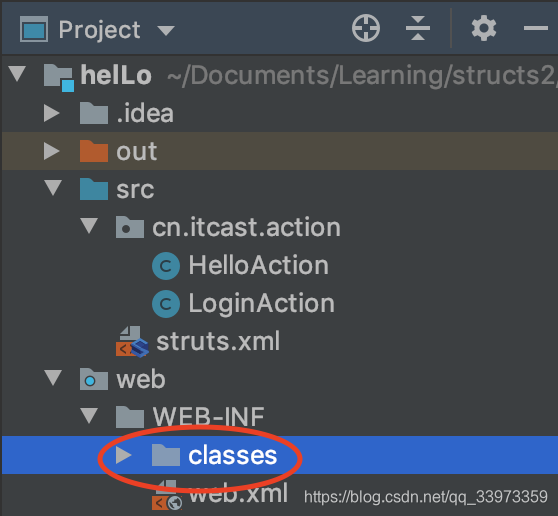
-
在该目录下创建
logging.properties文件 -
在
logging.properties文件中写一下文本org.apache.catalina.core.ContainerBase.[Catalina].level=INFO org.apache.catalina.core.ContainerBase.[Catalina].handlers=java.util.logging.ConsoleHandler
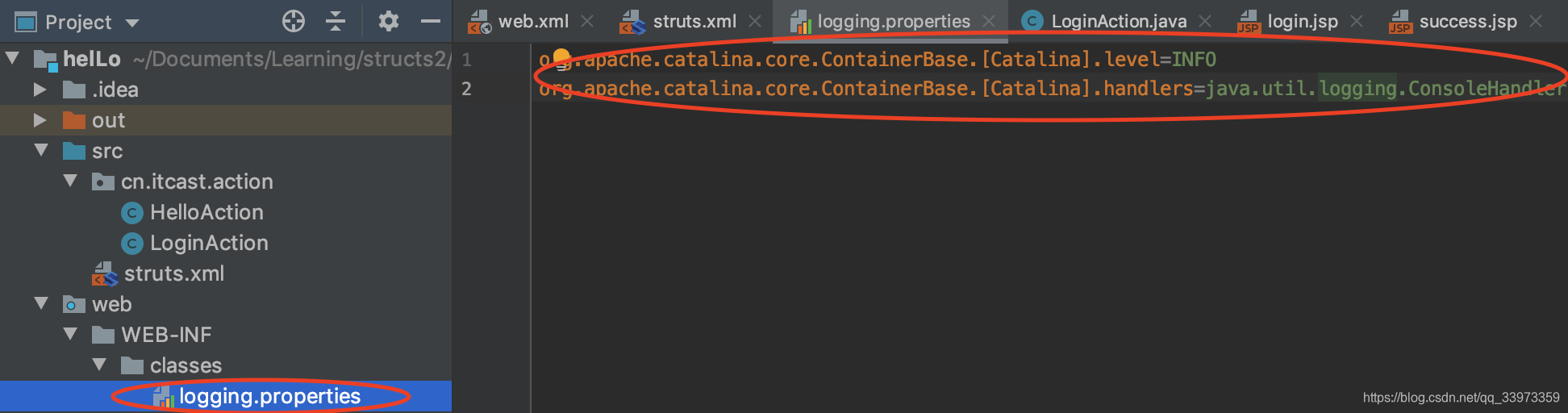
通过以上步骤,即打开了日志文件显示,我们可以从之后的提示获取更多信息。
原因分析
再重启项目,Tomcat显示了错误信息,出错的文件、行数列数等都显示出来了。

通过添加logging.properties文件,排查Bug时可以显示出更详细的信息。我的错误是字母打错了。天坑:(
改好错误,项目就跑起来了!

有“AI”的1024 = 2048,欢迎大家加入2048 AI社区
更多推荐

 15
15 0
0- 0


 已为社区贡献4条内容

所有评论(0)