vue列表一行显示几个后换行 v-for=”“ :key=“index“ v-if=‘index<6‘
参考下面博客:<template><div class="service-class p30"><div class="sc-list"><div class="sc-item"v-for="(img,index) in images" :key="img.id" v-if='index<9'><img class="img" v-bin
·
参考下面博客: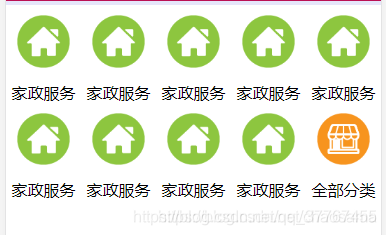
<template>
  <div class="service-class p30">
    <div class="sc-list">
      <div class="sc-item"  v-for="(img,index) in images" :key="img.id" v-if='index<9'>
        <img class="img" v-bind:src="img.goodsImage"/>
        <div class="text">{{ img.goodsCategoryName }}</div>
      </div>
      <div class="sc-item">
        <img class="img" src='http://img.tiantue.com:8080/images/2019-03-21/d78136c646564922b2e6164cd501e8ec1553155222132.png'/>
        <div class="font12 color-363636">全部分类</div>
      </div>
    </div>
  </div>
</template>

<script>
export default {
  name: 'Ico',
  data () {
    return {
      images: [{id: 1, goodsImage: 'http://img.tiantue.com:8080/images/2019-03-21/0eb27a13ab9d449fb21742a2c5cb94b21553155793305.png', goodsCategoryName: '家政服务'},
        {id: 2, goodsImage: 'http://img.tiantue.com:8080/images/2019-03-21/0eb27a13ab9d449fb21742a2c5cb94b21553155793305.png', goodsCategoryName: '家政服务'},
        {id: 3, goodsImage: 'http://img.tiantue.com:8080/images/2019-03-21/0eb27a13ab9d449fb21742a2c5cb94b21553155793305.png', goodsCategoryName: '家政服务'},
        {id: 4, goodsImage: 'http://img.tiantue.com:8080/images/2019-03-21/0eb27a13ab9d449fb21742a2c5cb94b21553155793305.png', goodsCategoryName: '家政服务'},
        {id: 5, goodsImage: 'http://img.tiantue.com:8080/images/2019-03-21/0eb27a13ab9d449fb21742a2c5cb94b21553155793305.png', goodsCategoryName: '家政服务'},
        {id: 6, goodsImage: 'http://img.tiantue.com:8080/images/2019-03-21/0eb27a13ab9d449fb21742a2c5cb94b21553155793305.png', goodsCategoryName: '家政服务'},
        {id: 7, goodsImage: 'http://img.tiantue.com:8080/images/2019-03-21/0eb27a13ab9d449fb21742a2c5cb94b21553155793305.png', goodsCategoryName: '家政服务'},
        {id: 8, goodsImage: 'http://img.tiantue.com:8080/images/2019-03-21/0eb27a13ab9d449fb21742a2c5cb94b21553155793305.png', goodsCategoryName: '家政服务'},
        {id: 9, goodsImage: 'http://img.tiantue.com:8080/images/2019-03-21/0eb27a13ab9d449fb21742a2c5cb94b21553155793305.png', goodsCategoryName: '家政服务'},
        {id: 10, goodsImage: 'http://img.tiantue.com:8080/images/2019-03-21/0eb27a13ab9d449fb21742a2c5cb94b21553155793305.png', goodsCategoryName: '家政服务'},
        {id: 11, goodsImage: 'http://img.tiantue.com:8080/images/2019-03-21/0eb27a13ab9d449fb21742a2c5cb94b21553155793305.png', goodsCategoryName: '家政服务'},
        {id: 12, goodsImage: 'http://img.tiantue.com:8080/images/2019-03-21/0eb27a13ab9d449fb21742a2c5cb94b21553155793305.png', goodsCategoryName: '家政服务'},
        {id: 13, goodsImage: 'http://img.tiantue.com:8080/images/2019-03-21/0eb27a13ab9d449fb21742a2c5cb94b21553155793305.png', goodsCategoryName: '家政服务'}]
    }
  }
}
</script>

<style scoped>
  .sc-item{
    width: 20%;
    text-align: center;
    margin-bottom: 10px;
    float: left;
  }
  .img{
    width: 70%;
    height: 70%;
    margin-bottom: 10px;
  }
  .service-class{
    background: #ffffff;
    margin-top: 10px;
    padding-bottom: 0;
  }
  .sc-list{
    flex-wrap: wrap;
    justify-content: space-between;
  }
</style>
下面 我实现的列表是这样:
<!--首页景区列表推荐-->
    <div class='sc-list' >

      <div  class="sc-item" style='background:#f6f6f6;width:32%' v-for="(spot,index) in spotsList" :key="index" v-if='index<6'>

        <img :src='`http://localhost/upload/spots/${spot.fmUrl}`'>
        <div style='font-weight: 400;
        font-size:20px;margin-left:10px;
        margin-top:10px;
        margin-bottom:10px'>{{spot.name}}</div>

      </div>

    </div>
    <!--首页景区推荐 end -->
 //首页获取6个景区
      getSomeSpots(){
        this.$store.dispatch('spots/getSomeSpots').then((data) => {
          this.spotsList =  data;
        })
          .catch((err) => {
            console.log('失败' + err)
          })
      },
.sc-item{
    text-align: center;
    float: left;
    margin-top:20px;
    margin-bottom:20px;

    img{
      width: 100%;
      height: 150px;
    }
  }
  .sc-list{
    flex-wrap: wrap;
    justify-content: space-between;
    margin-left:@lrwith;
    margin-right:@lrwith;
    display: flex;
  }

有“AI”的1024 = 2048,欢迎大家加入2048 AI社区
更多推荐

 3
3 0
0- 0


 已为社区贡献6条内容

所有评论(0)