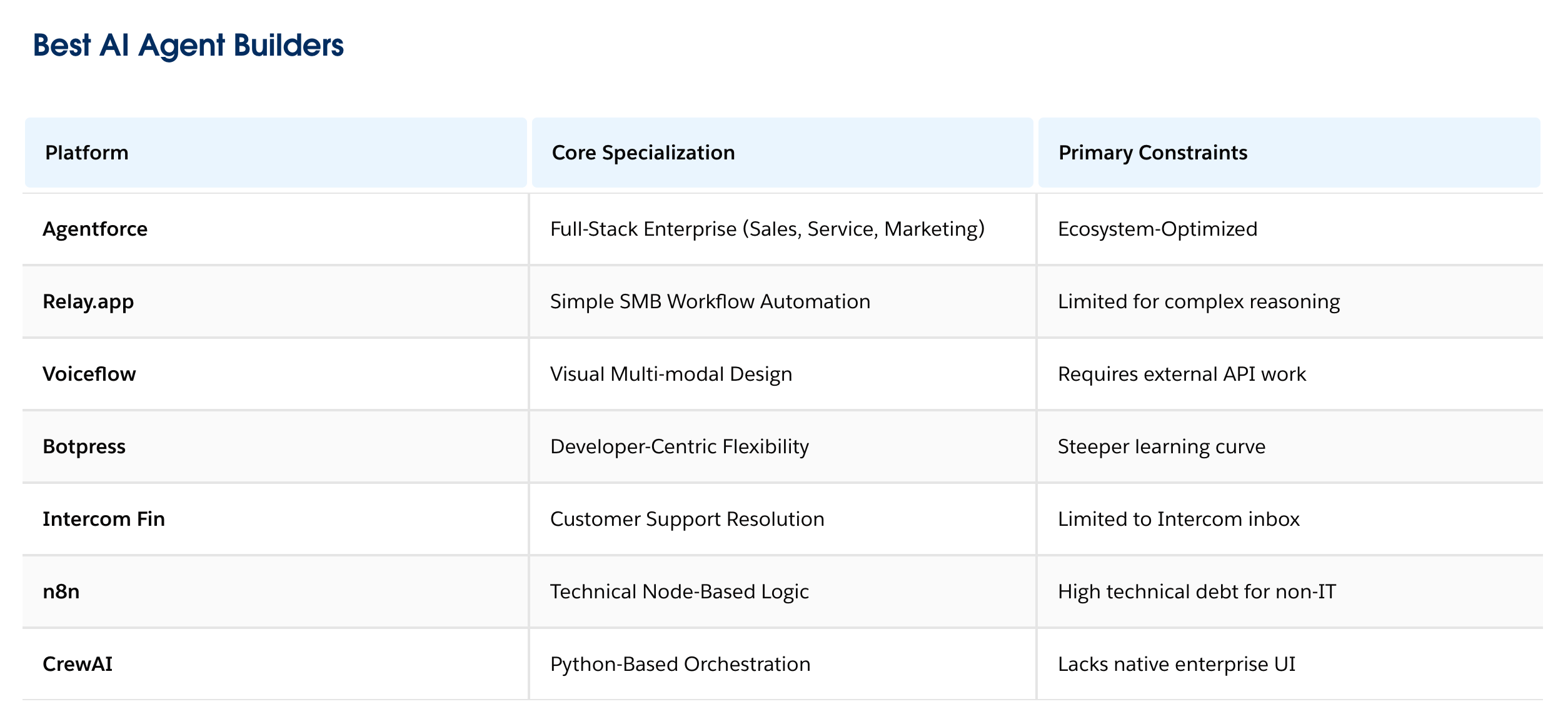
构建企业级 Agent ,Salesforce 提供了三层核心业务与数据能力,两层安全保护
Salesforce 处理 agent 本身是三层:
1.
AgentForce 是构建 企业级Agent 的生产环境,和运行时环境。#单独 谈这个很片面。
https://www.salesforce.com/agentforce/how-it-works/
2.
AIForce 是接口层,将代理扩展到实际工作发生的场所,如 Slack的 claude tags 等。
With AIforce, Salesforce is bringing all the enterprise knowledge inside Salesforce — the data, workflows, business logic, semantics, permissions, security, and governance that already run the business — to any AI interface. 是 AIForce 保证了 数据、流程、商业逻辑等 「 才有 AgentForce 」 的执行时。
https://www.salesforce.com/news/stories/aiforce-announcement/
3.
Koa / Fin ... 用27年数据喂出来的「独有AI模型」。
没有三层保证,但一个 AgentForce Runtime 怎么也不会搞定「稳定的企业服务」能力。
关于, Salesforce Guardian / Agent Fabric 等,
including the Einstein Trust Layer, Agentforce Guardrails, Trust Patterns, and accessibility standards.
这部分,自行了解吧。
如果真的学 Salesforce ,解决 AIForce这一层比 Runtime 有价值 。
人工智能代理正在通过提高效率、减少人工劳动以及创造更复杂、更具适应性的工作场所来彻底改变组织。
本指南将探讨Agentforce的核心要素,Agentforce 是 Salesforce 用于构建 AI 代理的平台。实践者利用上下文工程为 Agentforce 代理提供实现目标所需的特定信息、操作和指令。我们将研究Agentforce Script如何使用混合推理将生成式 AI 与确定性控制相结合。
我们知道开发者会在各种不同的环境中构建代理。我们支持这种灵活性,您可以根据自身需求选择合适的模型和环境。
无论你是在 Claude Code、Labs、Agentforce Studio还是其他地方进行构建,了解 Agentforce 如何在幕后管理逻辑和连接都是很有帮助的。
AI agents are revolutionizing organizations by increasing efficiency, reducing manual effort, and creating a more sophisticated and adaptive workplace.
This guide explores the core elements of Agentforce, the Salesforce platform for building AI agents. Practitioners use context engineering to provide Agentforce agents with the specific information, actions, and instructions needed to achieve goals. We’ll examine how Agentforce Script uses hybrid reasoning to blend generative AI with deterministic control.
We know that developers build agents in many different environments. We support this flexibility to choose your preferred model and environment for the job.
Whether you build in Claude Code, Labs, Agentforce Studio, or elsewhere, it’s helpful to understand how Agentforce manages the logic and connections behind the scenes.
智能体是一种利用生成式人工智能来决定下一步行动以及如何行动的软件。智能体可以理解问题(通常称为话语),自主推理以确定实现目标所需的行动,识别所需数据,然后采取行动,无论是否需要人工干预。
人工智能代理的关键能力
- 智能体是动态的,能够适应不同的情况、环境和信息。
- 智能体可以是自主的(无需人类干预即可行动),也可以被引导让人类参与其中。
- 智能体与其他生成式人工智能工具不同,因为它们可以进行计划、推理和行动。
Agentforce 智能体使用大型语言模型(LLM) 来处理自然语言和意图,同时还使用 Agentforce Script 来执行特定的业务逻辑。这种混合推理模型使智能体比传统自动化系统更具动态性,同时又保持了与硬编码软件一样的可靠性。
Agentforce Studio
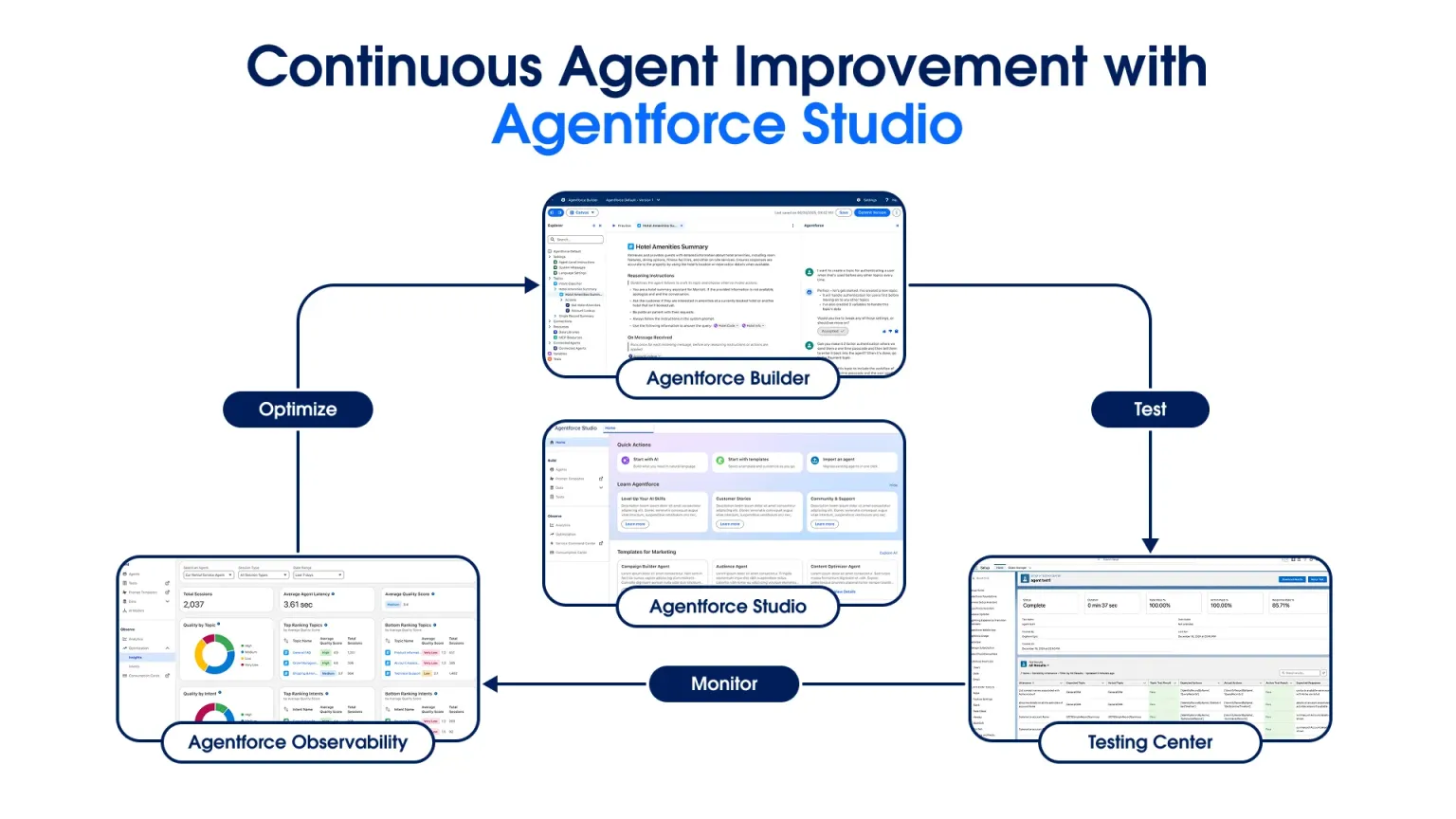
Agentforce Studio是我们面向整个代理生命周期的统一工作空间。
Agentforce Studio 整合了构建、测试和管理代理行为所需的所有操作。Agentforce Studio 的三个关键组件可帮助您管理代理开发生命周期:
- Agentforce Builder:使用 AI 原生构建器以简洁易懂的语言编写规则。使用Agentforce Script,这种语言通过统一配置、业务逻辑和指令来表达可靠的代理行为。
- 测试中心:部署前验证代理行为
- Agentforce 可观测性:监控和分析代理性能,以了解需要改进逻辑的地方。
An agent is a type of software that uses generative AI to make decisions about what to do next and how to do it. An agent can understand a question (often called an utterance), autonomously reason to determine what actions it needs to reach its goal, identify what data is needed, and then take action, with or without human intervention.
Key capabilities of AI agents
- Agents are dynamic, and can adapt to different situations, environments, and information.
- Agents can be autonomous (act without human intervention) or can be guided to involve a human in the loop.
- Agents are different from other generative AI tools because they can plan, reason, and act.
While agents use large language models (LLMs) to handle natural language and intent, Agentforce also uses Agentforce Script to follow specific business logic. This hybrid reasoning model makes agents more dynamic than traditional automation while remaining as reliable as hard-coded software.
Hybrid reasoning is Agentforce's approach to combining probabilistic LLM-based reasoning with deterministic, rules-based execution in the same engine.
This gives agents the flexibility of generative AI while maintaining the predictability, control, and auditability that enterprises require.
Deterministic automation and agentic AI don't have to be an either/or choice. With Agentforce, they work together.
Agentforce Studio
Agentforce Studio is our unified workspace for the entire agent lifecycle.
Agentforce Studio brings together every action you need to build, test, and manage agent behavior. Three key components of Agentforce Studio help you manage the agent development lifecycle:
- Agentforce Builder: Use the AI-native builder to draft rules in plain language. Use Agentforce Script, a language that expresses reliable agent behavior by unifying configuration, business logic, and instructions.
- Testing Center: Validate agent behaviors before you deploy
- Agentforce Observability: Monitor and analyze agent performance to see where to refine logic.
Agentforce Script是我们专为 Agentforce 开发的脚本语言,它作为构建和管理代理的文本基础。它采用统一的语言来表达代理的全部行为。这个单一的文件包含了配置、业务逻辑、动作和推理指令。实践者不再将自然语言和代码视为独立的元素,而是利用这个蓝图在一个地方管理整个代理架构。
Agentforce Script is our Agentforce-specific scripting language that serves as the text-based foundation for building and governing agents. It functions as a unified language that expresses the entire behavior of an agent. This single file brings together configuration, business logic, actions, and reasoning instructions. Rather than treating natural language and code as separate elements, practitioners use this blueprint to manage the entire agent architecture in one place.
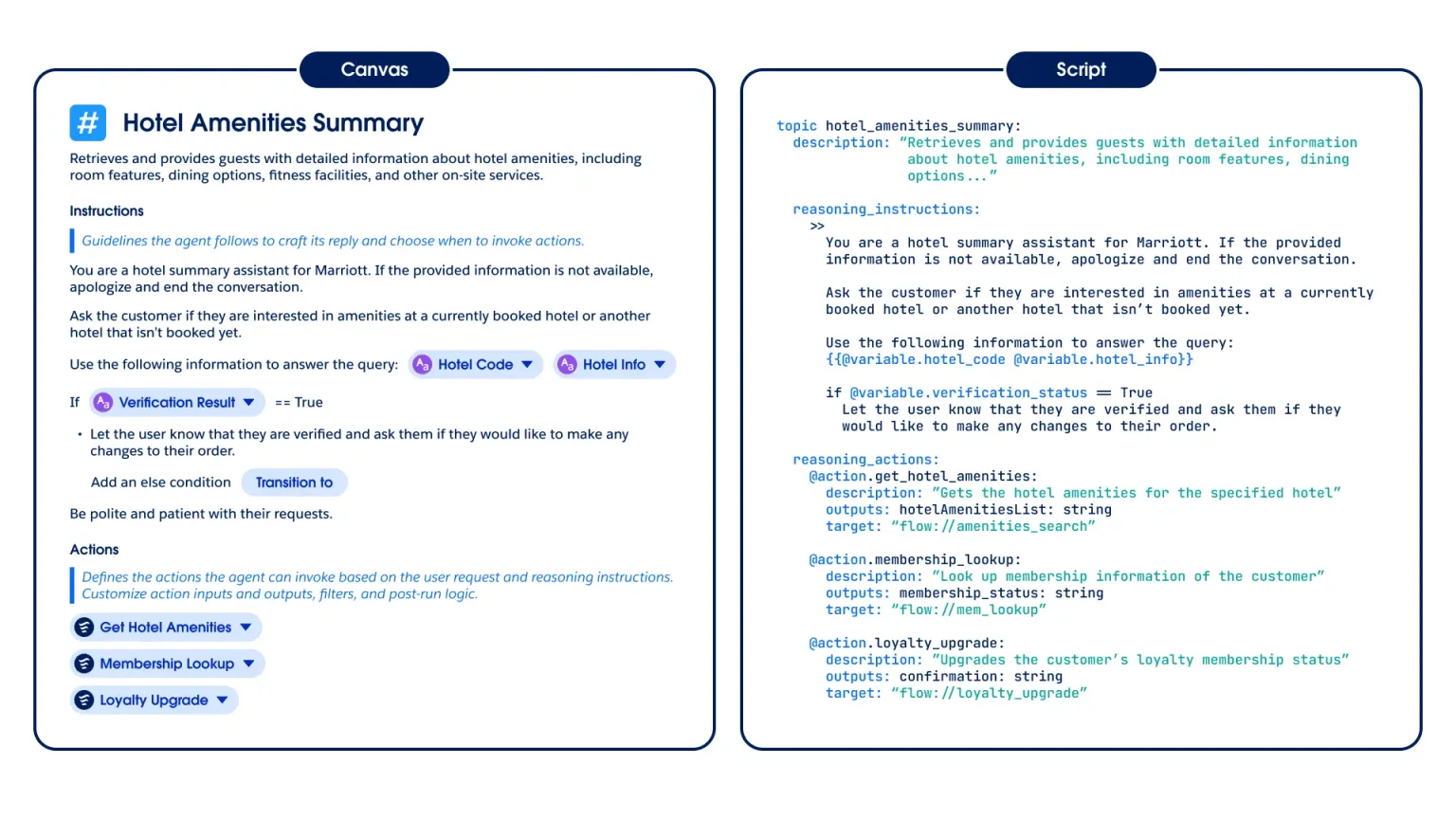
在仅使用生成式人工智能的 智能体操作中,用户依赖冗长的自然语言提示,这可能导致任务结果不一致且难以预测。Agentforce Script 改变了这一现状。Script 的混合推理将自然语言与确定性的、基于规则的指令相结合。
领导者们能够立即看到这种程度的控制带来的成效。Equitable Trust 的合伙人兼首席运营官 Scott Van Dusen 指出,Agentforce Script 的功能非常强大。他发现,相比仅使用 LLM(生命周期管理)的方法,Agentforce Script 对流程和操作的操控能力要强大得多。“我用它来控制流程和操作,效果显著,”Van Dusen 说。
Datasite 的 Agentforce 管理员 Grant Roberson 表示, 脚本比提示式代理“好得多”。
罗伯逊说:“我以前到处都写着重复的指令,试图强迫程序按预期运行。有了Script,就可以轻松去除这些冗余信息,并用条件逻辑取而代之,让你的代理能够完全按照你的意愿行事。”
脚本使您摆脱了繁琐的提示编写,转向可扩展的编排。由于它采用结构化的文本格式,您的团队可以像编写传统代码一样,对代理行为进行版本控制、审查和管理。
Agentforce 脚本语法和编排
Agentforce 脚本通过声明式语法组织代理功能。它将指令、动作和子代理视为模块化组件。这种结构为推理引擎提供了清晰的资源映射,同时设定了边界,确保代理在其预期范围内运行。这些脚本通过减少 LLM 调用和防止逻辑错误,将工作流程从概率推理转变为保证结果。
建筑与模块化
以下是按照模块化设计原则组织的结构最佳实践列表,旨在帮助您构建可维护和可预测的代理。
- 为身份验证等特定任务创建小型、独立的脚本。这样可以简化系统维护,因为当业务策略发生变化时,只需更新单个脚本,而不会影响代理的其他部分。您还可以将这些通用脚本应用于多个子代理,以确保用户体验的一致性。
- 根据脚本中各项操作的具体意图进行组织。为子代理和操作命名时,应清晰描述其功能,因为推理引擎会使用这些名称来选择最佳路径。
- 采用确定性的三明治式方法,由代码处理每次交互的开始和结束。中间部分则使用人工智能的自然语音,从而实现对对话的完全控制,包括对话的开始和结束。
数据和上下文管理
以下是按会话处理分类的数据管理技术列表,可帮助您减少延迟并提高个性化程度。
- 在脚本块的开头定义所需的数据输入,以便智能体在尝试执行操作之前收集上下文信息。为了提高速度,您应该在智能体开始执行主要任务之前获取所有必要数据。每次 LLM 调用都会增加交互时间,因此使用特定规则预先收集信息可以避免额外的调用。
- 将用户名或状态等信息存储在会话变量中,以便在聊天过程中管理数据。这些变量允许您在子代理之间传递信息,从而避免代理重复提问。此外,它还能确保代理拥有执行操作所需的数据,而无需额外的用户输入。
- 将变量直接作为合并字段插入到指令中。这有助于客服人员根据用户数据提供个性化答案并遵循特定逻辑。
逻辑与合规标准
以下是按执行逻辑组织的配置标准列表,可帮助您保持严格的合规性和可靠性。
- 使用指令来引导对话风格,而脚本则负责处理实际的业务逻辑。这种分离使得语言逻辑管理器 (LLM) 可以处理语言,而脚本则可以管理数据检查或强制性序列。这种确定性的方法消除了自然语言提示中常见的猜测成分。
- 运用条件判断逻辑引导客服人员执行特定操作。例如,您可以编写程序让客服人员在提供折扣前检查客户的会员等级。
- 设定明确的退出标准,以精确定义子代理何时应将对话交还给主代理或关闭会话。清晰的边界可确保代理以最高效率运行。
战略实施
以下是按工具选择分类的实施指南列表,以帮助您为您的用例选择正确的自动化路径。
- 避免将智能体设计成像简单的线性聊天机器人 那样运作。如果流程是静态的且永不改变,请使用流程构建器中的标准流程,而不是人工智能智能体。人工智能智能体仅用于处理混乱或不可预测的人工输入。
Agentforce Script - 在AgentExchange 上查找预构建的代理解决方案和可重用脚本,节省开发时间。该市场包含即用型 AI 操作和第三方集成,可帮助您快速实现常见业务任务的自动化。阅读这本电子书,了解 AgentExchange 的优势。
In agentic actions that use only generative AI , users rely on lengthy natural language prompts, which can lead to inconsistent and unpredictable task outcomes. Agentforce Script changes this. Hybrid reasoning with Script blends natural language with deterministic, rule-based instructions.
Leaders see immediate results with this level of control. Scott Van Dusen, Partner & COO at Equitable Trust, notes that Agentforce Script is incredibly powerful. He finds the ability to manipulate flows and actions much more robust than LLM-only methods. "I’m having a lot more success controlling it," says Van Dusen.
Grant Roberson, the Agentforce admin at Datasite said Script is "light years better" than prompt-engineered agents.
"I used to have paragraphs of repetitive instructions everywhere to try and force behavior, ” Roberson said. “With Script, it’s easy to remove that noise and replace it with conditional logic that lets you trust your agents to do exactly as you want them to."
Script moves you away from prompt crafting toward scalable orchestration. Because it uses a structured, text-based format, your team can version, review, and govern agent behavior just like traditional code.
Agentforce Script Syntax and Orchestration
Agentforce Script organizes agent capabilities through declarative syntax. It treats instructions, actions, and subagents as modular components. This structure gives the Reasoning Engine a clear map of resources while setting boundaries to keep the agent within its intended scope. These scripts move workflows from probabilistic reasoning to guaranteed results by reducing LLM calls and preventing logic errors.
Architecture and Modularity
The following is a list of structural best practices organized by modular design principles to help you build a maintainable and predictable agent.
- Create small, separate scripts for specific tasks like identity checks. This makes the system easier to maintain because you can update a single script when business policies change without impacting other parts of the agent. You can also apply these common scripts across multiple subagents to ensure a consistent experience.
- Organize actions within the script based on the specific intent they serve. Give subagents and actions names that clearly describe their function since the Reasoning Engine uses these names to select the best path.
- Adopt a deterministic sandwich approach where code handles the beginning and end of every interaction. Use the AI’s natural voice for the middle portion to provide total control over conversation entry and resolution.
Data and Context Management
The following is a list of data management techniques organized by session handling to help you reduce latency and improve personalization.
- Define required data inputs at the start of a script block so the agent gathers context before it tries to take action. You should fetch all necessary data before the agent begins its main task to increase speed. Every LLM call adds time to the interaction, so using specific rules to gather facts upfront avoids extra calls.
- Store facts like a user’s name or status in session variables to manage data during a chat. These variables let you pass info between subagents, which prevents the agent from repeating questions. It also ensures the agent has the data it needs to use actions without extra user input.
- Insert variables directly into instructions as merge fields. This helps the agent provide personalized answers and follow specific logic based on the user's data.
Logic and Compliance Standards
The following is a list of configuration standards organized by execution logic to help you maintain strict compliance and reliability.
- Use instructions to influence conversation style while the script handles the actual business logic. This separation lets the LLM handle the language while the script manages data checks or mandatory sequences. This deterministic approach removes the guesswork often found in natural language prompts.
- Apply if-then logic to guide an agent through specific paths. For example, you can program the agent to check a customer's loyalty status before it offers a discount.
- Set explicit exit criteria to define exactly when a subagent should hand the conversation back to the main agent or close the session. Clear boundaries ensure the agent operates at peak efficiency.
在继续之前,需要指出的是,代理并非Salesforce 平台上唯一可用的生成式 AI 工具。提示模板是构建使用生成式 AI应用程序的另一个强大工具。提示模板内置于提示构建器中,允许您定义一组结构化的、可重用的指令,引导生成式 AI 模型生成特定输出。它们可以通过预定义字段、数据图和上下文数据检索增强生成( RAG )来引用 Salesforce 数据。提示模板也具有高度安全性——所有提示都通过 Salesforce 的信任层进行路由——遵循权限原则,屏蔽敏感数据,并标记有害输出。提示模板是与 AI 的单轮交互,非常适合不需要记忆或多步骤推理的一次性任务。例如,当您需要改写句子或总结案例时,提示模板是理想之选,因为无需持续的上下文信息。在使用提示模板设计解决方案时,务必记住它们是无状态的(不会在回合之间保留记忆),并且不会做出决策或执行操作。提示模板会根据您在设计时提供的输入和逻辑生成响应。
何时使用代理
智能体是一种软件系统,它能够根据不断变化的环境自主决定做什么、按什么顺序以及如何做。智能体不只是执行单一指令,它们可以进行规划、推理、调用外部操作(例如 API 调用或数据库查询),并根据结果做出反应。它们可以根据过程中学习到的信息选择不同的路径或响应。智能体在以下情况下效果最佳:
- 环境或上下文可能会动态变化。
- 基于数据,可以做出多种决策或选择多个分支。
- 人工智能需要取代或辅助人类的判断来做出选择或采取行动。
人工智能代理应用案例:
- 对收到的支持案例进行分类和路由
- 通过检查外部系统和政策来解决预订问题
- 管理具有反馈回路的多步骤工作流程
- 根据客户问题的详细信息,撰写案例回复邮件,邮件中应包含可能的解决方案以及来自您面向客户的网站的相关知识文章。
- 根据服务代表的空闲时间和客户偏好安排预约
- 检测事件(例如软件更新问题),并主动生成故障排除任务或尝试通过触发 API 调用来远程解决问题。
原文阅读
https://www.salesforce.com/agentforce/guide/
了解推理引擎的底层运行机制是成功实现智能体的关键。在人工智能智能体发展的早期阶段,我们这些从业者经常谈论提示工程:即“引导”逻辑逻辑模型(LLM)做出相应行为的艺术。如今,我们已经升级到了上下文工程。
情境工程 是一种更全面的实践,远不止于编写一个好的提示。借助 Agentforce 混合推理,您可以设计一个系统,将自主的 LLM 推理与基于规则的逻辑相结合,从而实现确定性控制。
情境工程是提示工程的 后续发展。它涉及设计一个由子代理、指令、规则和动作组成的系统,为代理提供成功所需的确切信息和边界,而不是试图精心措辞,以期诱使语言学习模型(LLM)给出完全正确的答案。
情境工程的三大杠杆
从业人员使用 Agentforce Script 作为统一语言,以单一语言和文件表达子代理、指令、操作和规则。
- 次级代理人。这些定义了专业代理人及其专长。
- 说明。这些说明为对话流程、语气和意图提供指导。
- 操作和规则。这些操作和规则执行操作并强制执行必要的业务逻辑。
让我们仔细看看子代理、指令和操作,这三项重要的元数据是您每次使用 Agentforce 构建代理时都要定义的。
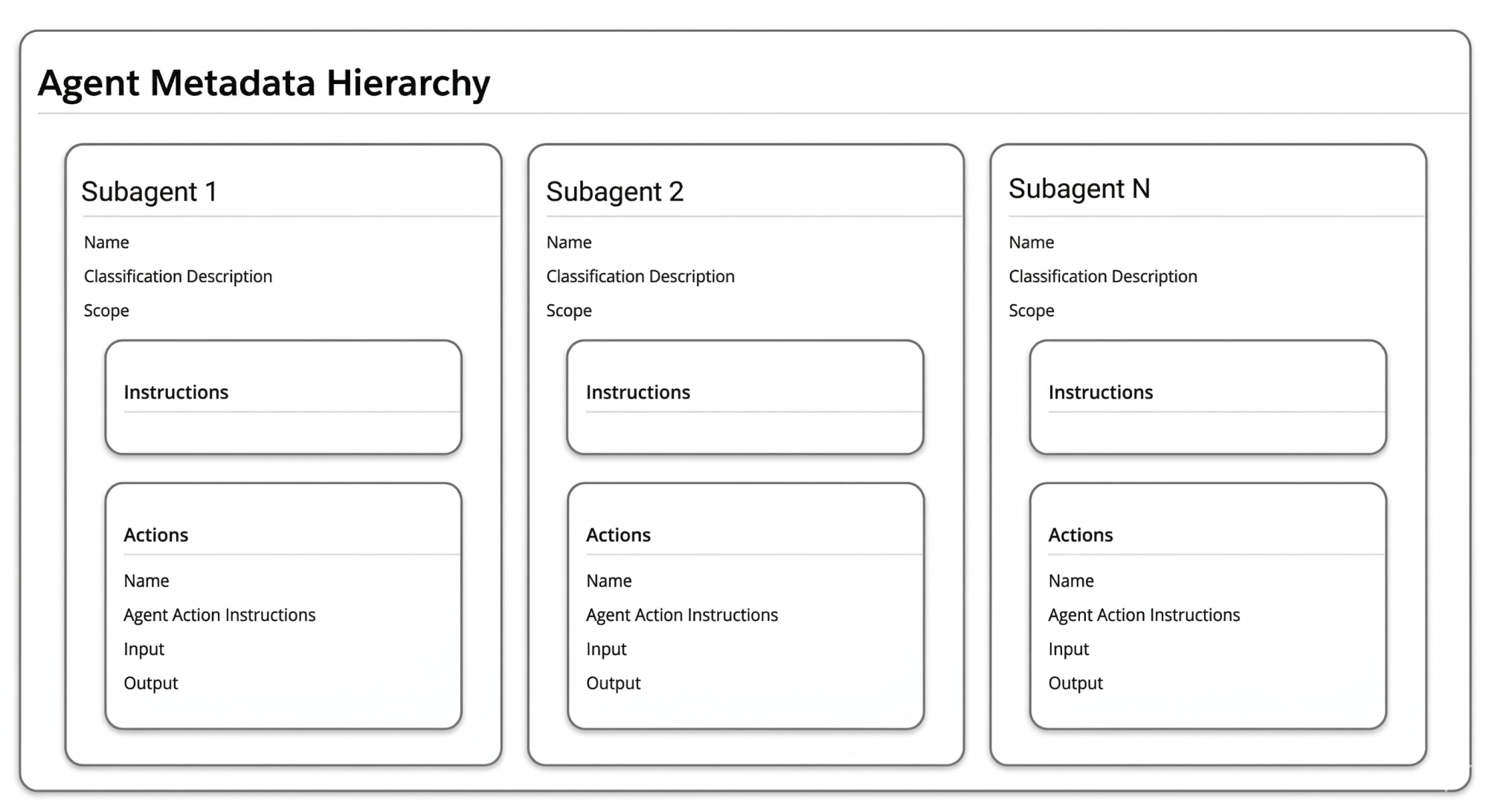
1. 子代理:定义待完成的任务
子代理是客服人员能力的基础,它定义了客服人员可以执行的操作以及可以处理的客户请求类型。您可以将它们视为拥有特定专业知识、执行流程和指令的专门部门。当客户发送消息时,您的客服人员首先会确定哪个“部门”(子代理)应该处理该请求,然后使用该子代理的定制指南和工具来帮助客户。
2. 说明:提供指南
指令是指导子代理如何处理对话的准则,它指导操作选择、设定对话模式并提供业务背景。清晰明确的子代理可以避免重叠,并确保推理引擎能够正确分类客户请求。指令应清晰、具体且可操作,以便有效地指导代理。
3. 行动:完成任务所需的工具
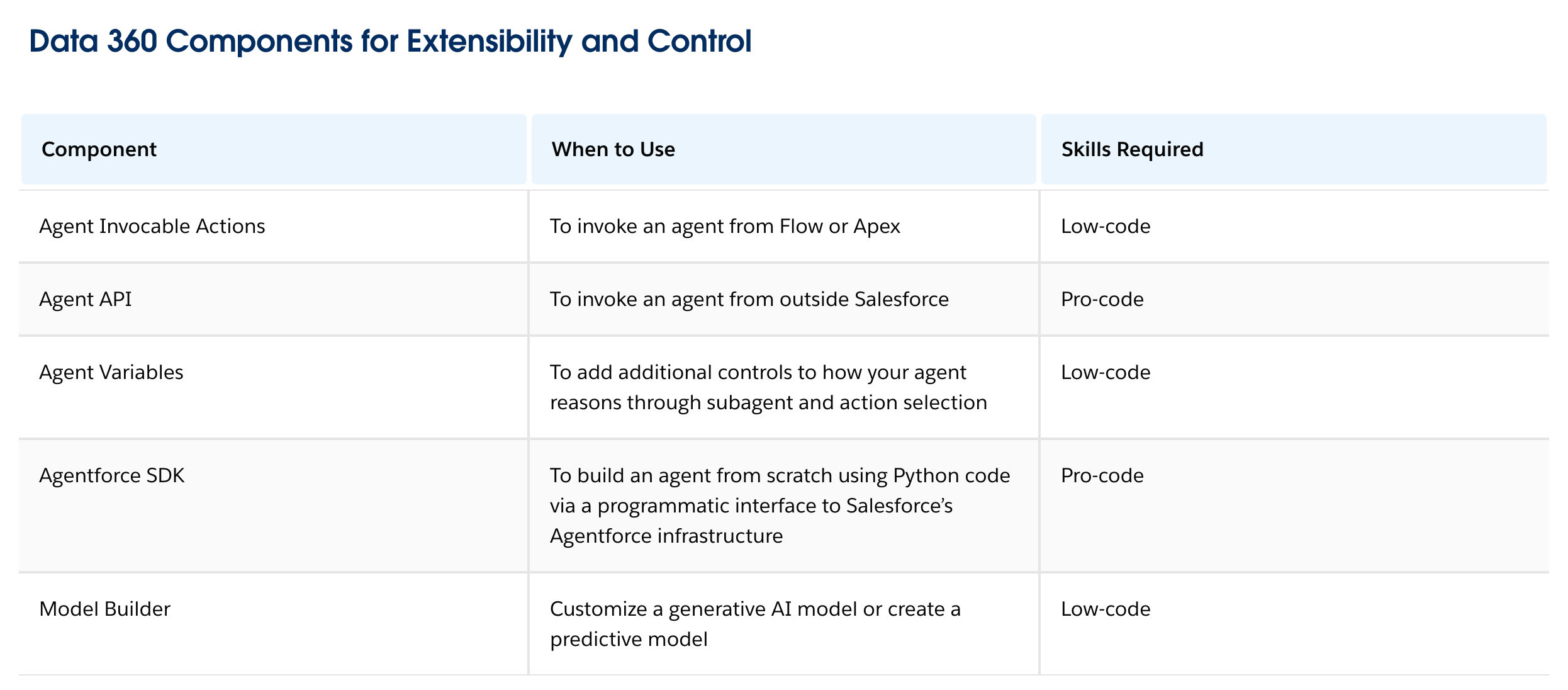
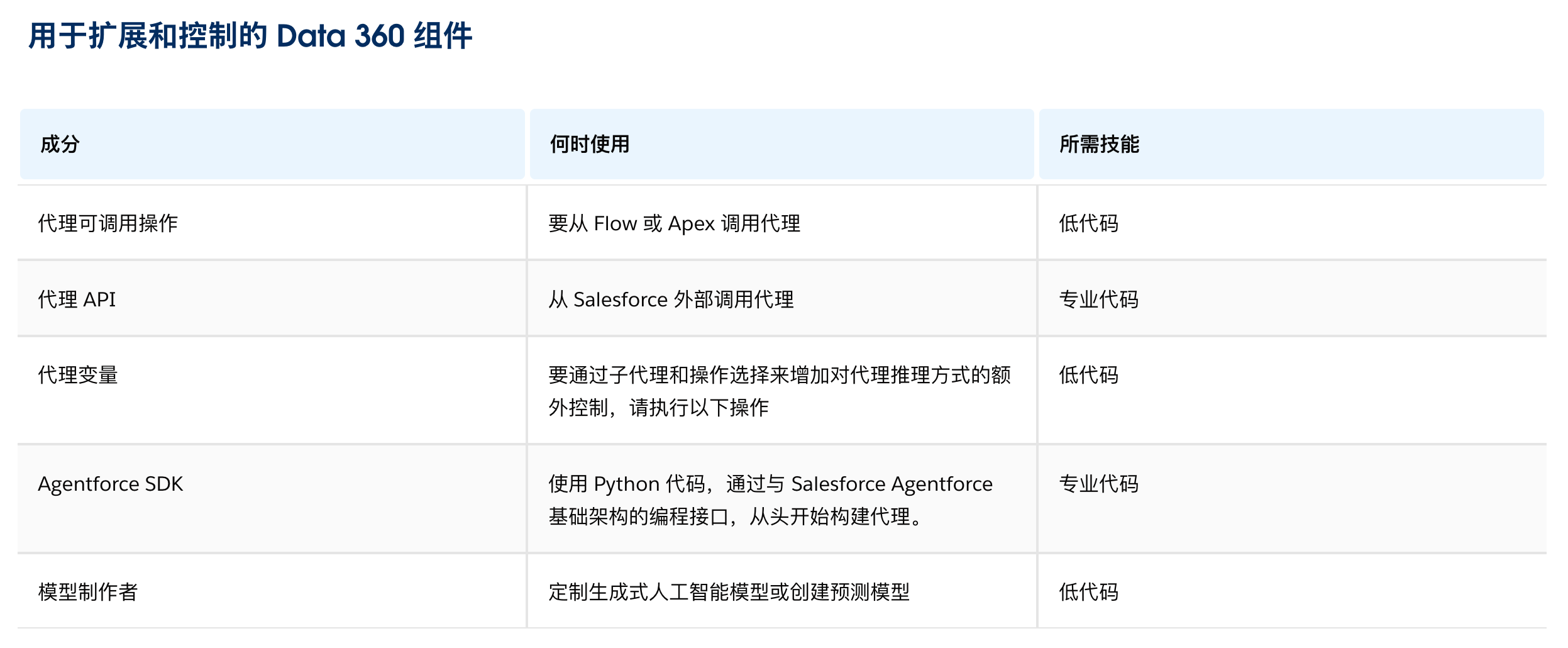
您的智能体使用动作来获取信息或执行任务。定义动作时,了解推理引擎如何处理这些动作至关重要。引擎会根据动作的名称、描述和输入,以及子智能体的指令和对话上下文来审查可用的动作。Agentforce 提供了一系列标准智能体动作,您还可以创建自定义智能体动作来进一步扩展您的实现。在创建自定义动作之前,请务必先检查是否可以使用标准动作。设计动作时应考虑可重用性,因为它们可以在多个子智能体中使用。以下列出了可用的自定义智能体动作及其使用场景。
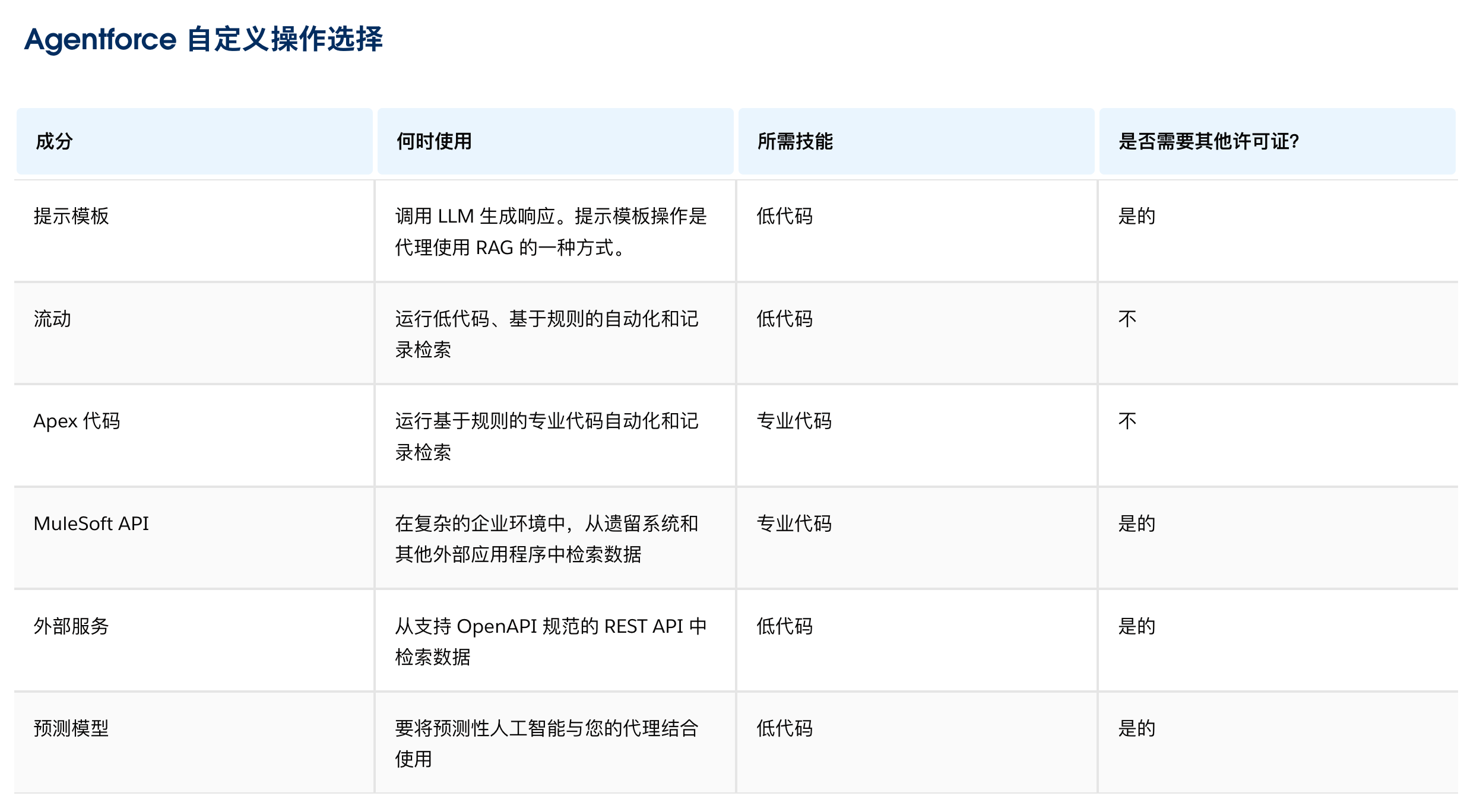
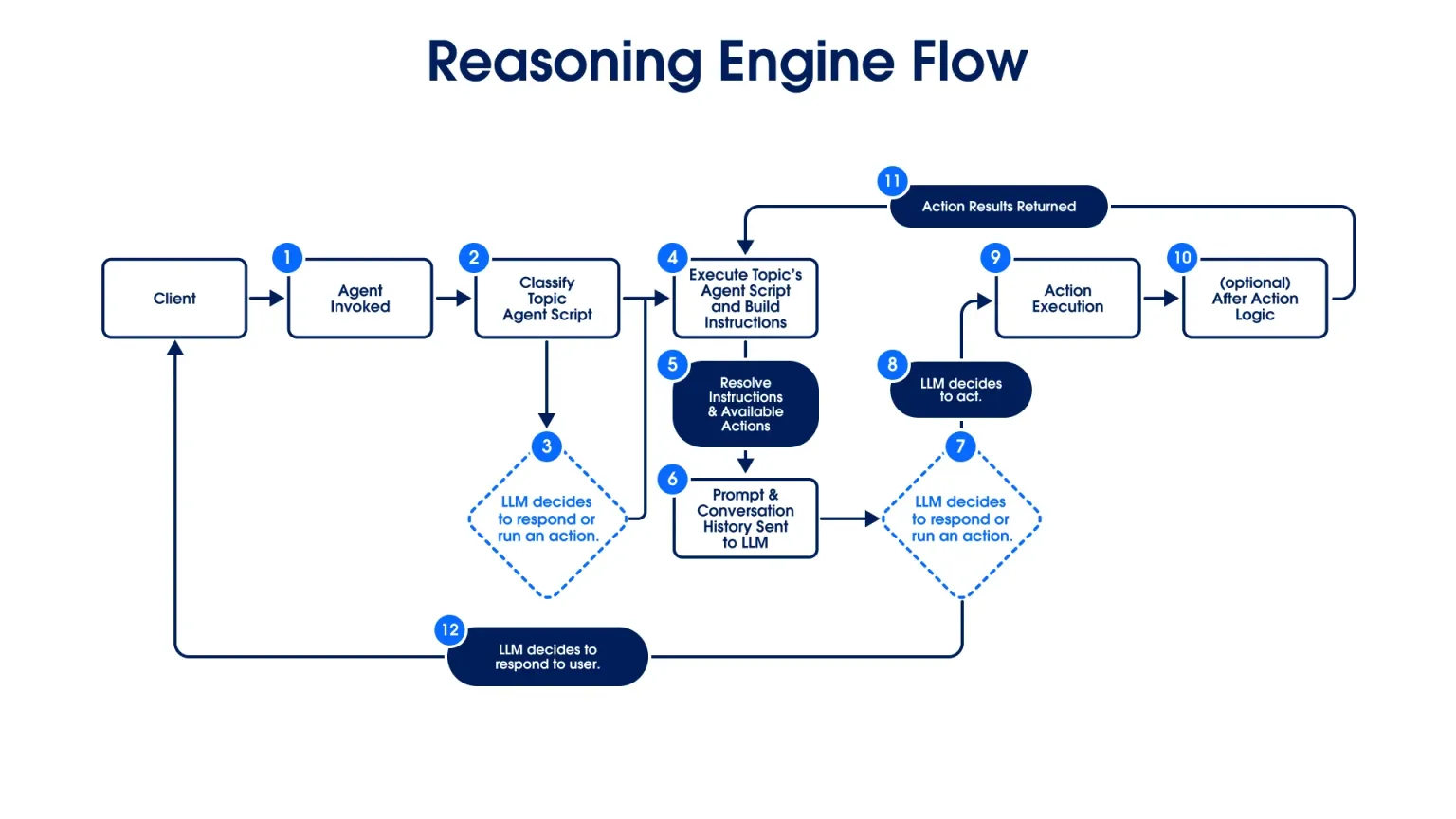
推理引擎使用子代理、指令、动作和规则来完成任务。由于 Agentforce Script 提供了代理的完整定义,因此它消除了概率路由的黑箱。简而言之,推理引擎将:
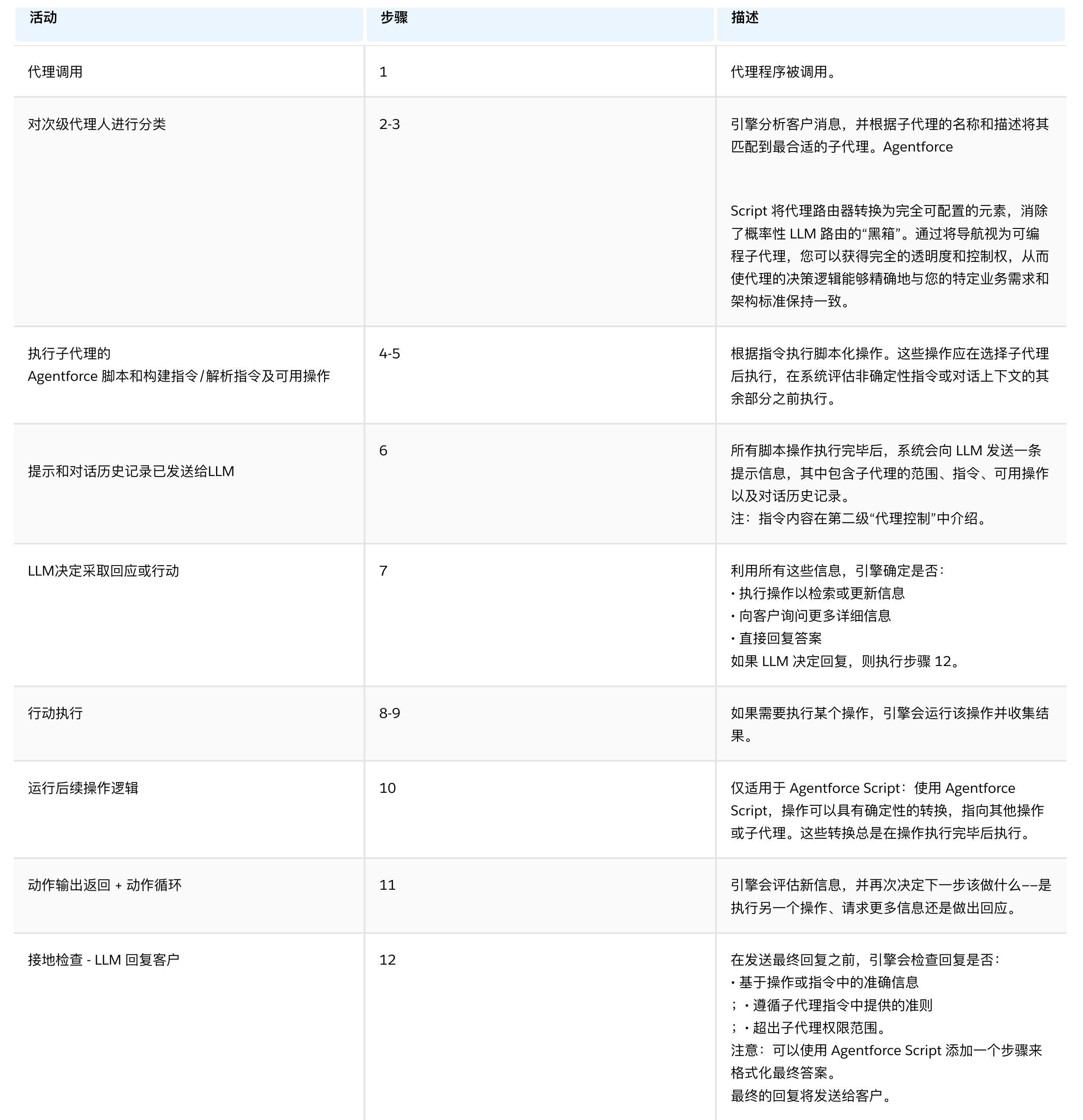
- 对子代理商进行分类:引擎根据子代理商的名称和描述,将客户消息与最合适的子代理商进行匹配。
- 执行脚本逻辑:引擎执行脚本中规定的指令和规则。这发生在系统评估非确定性指令之前。
- 应用操作:如果任务需要外部数据或更新,引擎将运行必要的操作并收集结果。
- 接地检查:在发送最终响应之前,引擎会确保答案基于操作或指令中的准确信息,并遵循脚本和指令中提供的准则。
以下是对每次调用代理时推理引擎内部发生情况的逐步分解。
可靠的智能体需要精心设计。实践者通过结合过滤器、脚本逻辑和引用来塑造它们,这些因素共同控制着智能体看到什么、做什么以及如何解释其答案。
筛选器和引用
实践者必须理解过滤和指令之间的区别,才能构建精准的智能体。过滤器 控制着语言学习模型(LLM)在对话的每个回合中能够看到什么以及可以做什么,并且过滤器在多个层面上发挥作用。过滤器可以应用于子智能体、动作和检索器,使实践者能够精细地控制哪些子智能体可用、这些子智能体可以做什么以及模型在每个步骤中检索的内容。
想象一下银行的虚拟助手。当客户咨询房贷时,一个专门负责房屋贷款的子代理就会介入。它的过滤器确保贷款管理经理 (LLM) 只能看到房贷文件,而不会看到信用卡数据或投资记录。但在同一对话中,查询客户当前利率的操作会使用更严格的过滤器,仅限于该客户的账户。客户会得到精准的答案,无关数据也不会干扰查询。
过滤器可以设置为静态(在设置时预先配置)或动态(在运行时从对话上下文或提示输入传递)。借助增强型检索器预过滤器,从业人员现在可以为每个检索器应用多达 10 个动态过滤器,并使用 AND/OR 逻辑将它们组合起来,以及使用 LIKE 运算符进行模式匹配。这可以减少检索噪声,并将上下文窗口聚焦于最相关的内容。例如,在软件开发工作流程中,从业人员可以应用特定于操作的上下文过滤器,使代理能够灵活地解释用户提示,同时严格遵守代码库的当前状态。
Agentforce Script 通过对代理执行的特定序列和规则进行编码,提供最高级别的确定性控制。这种方法可以避免出现“提示死循环”,即指令过长或过于复杂,导致 LLM 无法准确执行。
虽然过滤器和 Agentforce Script 提供了系统级控制,但从业人员还必须提供一种验证准确性的方法。引用功能为用户提供了清晰的每次回复审计跟踪,将客服人员使用的内部上下文与其提供的答案联系起来。
子代理、指令、脚本和动作如何协同工作
推理引擎协调这四个组件,以兼具灵活性和控制力的方式解决请求。例如,一位顾客说:“我昨天订购了一件红色毛衣,但我需要更改送货地址。”
- 子代理分类。引擎分析客户消息并执行子代理分类。由于名称和描述与任务相符,因此它将请求匹配到“变更订单”子代理。
- 上下文组装。引擎执行上下文组装以构建代理内存。它收集子代理指令、脚本和可用操作。
- Agentforce 脚本执行。引擎执行 Agentforce 脚本以执行确定性业务逻辑。该脚本检查红色毛衣的订单状态。如果订单仍在仓库中,脚本允许代理继续进行更改。
- 基于指令的推理。指令引导客服人员完成对话。它们定义了语气,并引导客服人员询问客户新的收货地址。
- 操作应用程序。代理选择并运行“更新订单发货”操作。它将订单 ID 和新地址传递给系统以完成更新。
- 最终确认回复。代理人向客户提供最终确认函。确认函会进行核实,并附上引用以验证信息来源。
---
- Hybrid reasoning drives Agentforce’s Reasoning Engine. This approach combines LLM flexibility with the deterministic reliability of Agentforce Script.
- Agentforce Script gives you full deterministic control over agent behavior, replacing overloaded system prompts with structured business logic.
- Data 360 provides an integral part of Agentforce. It powers indexing and chunking for retrieval augmented generation (RAG), Agent Analytics, and Digital Wallet.
混合推理是 Agentforce 的一种方法,它将基于概率的 LLM 推理与确定性的、基于规则的执行相结合,并集成到同一引擎中。
这赋予了智能体生成式 AI 的灵活性,同时保持了企业所需的预测性、可控性和可审计性。
确定性自动化和智能体 AI 并非非此即彼的选择。借助 Agentforce,它们可以协同工作。
https://developer.salesforce.com/blogs/2025/10/introducing-hybrid-reasoning-with-agent-script
Topics, actions, and handoffs
Agent Script 是一种编译型语言。当你编写代理时,它不会直接运行;相反,它会生成一个结构化规范——Agent Graph——由 Atlas 推理引擎消费。这正是我们确保你的代理能够按照你的定义执行反思循环、多主题或多代理协调的方式。
基础是 topic 块,它封装了特定任务的逻辑。你可以在这里定义代理的工作方式,包括条件、规则、交接等。
让我们看看如果不使用 Agent Script,你会如何设计一个“天气预报”主题。你需要为代理添加指令,并指定它能做什么、不能做什么。虽然你可以在指令中使用变量,但你必须在其操作输出中为它们赋值。你还需要指定该主题不会处理的内容,例如提供当前天气信息。而选择正确主题的任务则交由 LLM 处理。
Topics, actions, and handoffs
Agent Script is a compiled language. When you write your agent, it doesn’t run directly; instead, it generates a structured specification – the Agent Graph – which is consumed by the Atlas Reasoning Engine. This is how we ensure that your agent performs reflective loops, multi-topic, or multi-agent coordination exactly as you define it.
The foundation is the topic block, which encapsulates the logic for a specific task. This is where you define how your agent should work, including conditionals, rules, handoffs, and more.
Let’s take a look at how you would design a “Weather Forecast” topic without Agent Script. You would add instructions for your agent and specify what it can and can not do. While you can use variables today in your instructions, you would have to assign them in your action outputs. You also have to specify what this topic would not handle, like providing information about the current weather. The task to pick up the right topic would be delegated to the LLM.
AI Agent Builder: Agentforce | Salesforce
Agentforce Builder
每个团队都可以通过低代码 AI 代理构建器,构建可靠且强大的代理。使用自然语言和 Agent Optimizer 快速上手,然后应用高级逻辑和控制,交付你在生产环境中可以信赖的代理。
Agentforce Builder
Every team can build reliable, powerful agents with a low-code AI agent builder. Use natural language and Agent Optimizer to get started quickly, then apply advanced logic and controls to deliver agents you can trust in production.
Condense the build-test loop with an agent-first experience
在 Agentforce Builder 中,团队可以更快地为任何行业或用例构建和部署可靠的代理。连接你的数据、渠道以及现有的 Salesforce 资产,如 Flows、Apex、MuleSoft API 和提示模板。通过清晰的指令应用护栏,然后自信地进行测试和部署。凭借内置的可观测性和确定性,你可以交付可靠的代理,使其从简单任务扩展到复杂的多步骤工作流。借助 Agentforce Builder 中的 Agent Optimizer,你现在拥有一个统一的、以代理为先的构建体验,可以在部署前创建、优化、预览、测试和完善你的代理。
Condense the build-test loop with an agent-first experience
In Agentforce Builder, teams can build and deploy reliable agents faster for any industry or use case. Connect to your data, channels, and existing Salesforce assets like Flows, Apex, MuleSoft APIs, and prompt templates. Apply guardrails with clear instructions, then test and deploy with confidence. With built-in observability and determinism, you can deliver reliable agents that scale from simple tasks to sophisticated, multi-step workflows. And with Agent Optimizer in Agentforce Builder you now have a single, agent-first building experience to create, refine, preview, test and optimize your agents before deployment.
https://help.salesforce.com/s/articleView?id=platform.flow_builder.htm&type=5
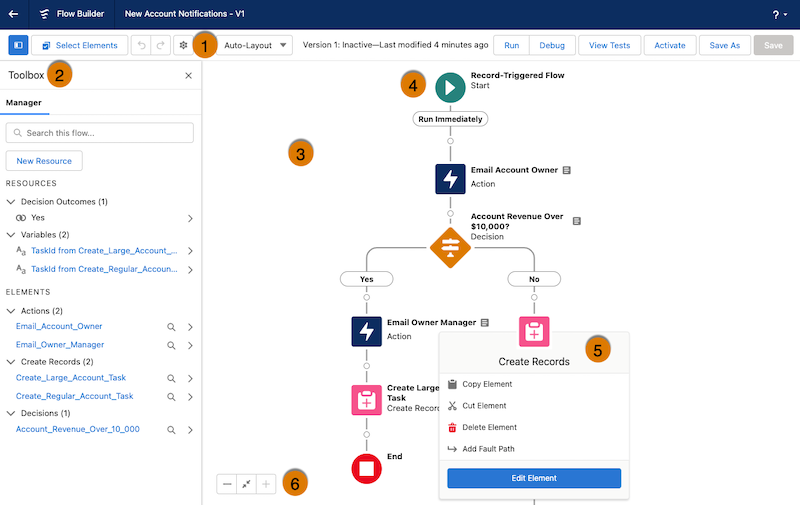
Button Bar (1): Manage a flow as you build it.
- To copy multiple elements in auto-layout, click Select Elements, then click on each element that you want to select. To copy all selected elements to the clipboard, click . To paste the elements you copied, click , and then select Paste Elements. The Paste Elements option displays the number of elements you copied. For example, Paste 3 Elements.
- To duplicate an element in free-form, select the element and click .
- To undo a change to your flow, click . To redo a change, click .
- To show or hide the Toolbox in auto-layout, click .
- To access the flow version’s properties, such as context and API version, click .
- Choose between Auto-Layout or Free-Form. Auto-Layout is the default for all new flows.
- If the flow has warnings or errors, the Show Warnings icon () or the Show Errors icon () appears. To see details, click the icon.
- To run the most recent save of the flow version that’s open, click Run. If the flow version contains Subflow elements, the active version of its referenced flow is run. If the referenced flow has no active version, then the Subflow element runs the latest version of its referenced flow.
- Next to the Run button, you can see the version’s active or inactive status and when it was last saved.
- To test the flow that’s open, click View Tests, and then click Create. Set test parameters and assertions.
- To debug the most recent save of the flow version that’s open, click Debug. Define values for input variables, roll back changes so debugging doesn’t impact data, view debug details about how the flow runs, and use those details to troubleshoot errors.
- To make the current flow version available to your users, click Activate. Only one version of each flow can be active at a time.
- To save your flow, click Save, or to save it as a new version or a new flow, click Save As. To choose which messaging and audience-selection assets to duplicate or link when you save an audience flow as a copy, see Audience Flows.
- To view a timeline of saves for the current flow version, click . Select a save instance to preview it, see what changed, or restore it as a new version or flow.
PDF 文档

有“AI”的1024 = 2048,欢迎大家加入2048 AI社区
更多推荐


 2
2 0
0- 0


 已为社区贡献70条内容

所有评论(0)