VSCode常用插件和快捷键总结
码字不易,转载请附原链,搬砖繁忙回复不及时见谅。
快捷键
- 切换打开的项目窗口:Ctrl + W
- 打开最近的项目:Ctrl + R
- 切换打开的文件:Ctrl + 数字键 / Ctrl + tab
- 左右切换打开的文件:Command + alt + 左/右
- format格式化代码:Ctrl + Shit + L
- 打开/关闭侧边栏:Command + B
- 打开终端等面板: Command + J
- 搜索配置、插件、编辑器相关:F1(command + t后,去掉#,改成>)
- 搜索:F1/command+T,带箭头搜索编辑器,去掉小箭头后搜索代码文件
- 跳转到指定行:Ctrl + G,输入框输入指定行数,自动跳转
- 代码追踪:command + 鼠标左键
- 跳转到实现:command + Shift + F12
- 查看实现:command + F12
- 代码追踪返回:Ctrl + -
- 代码追踪前进:Ctrl + shift + -
- 调整代码大小:command + -/+
- 打开快捷键配置:按下command + k后,再按command + s
- 关闭当前文件:command + w
- 选中代码左移动:command + [
- 选中代码右移:command + ]
- 下一行代码移动到当前行后面:Ctrl + J
- 全部折叠:command + k + command +0
- 全部打开:command + k + command + j
- 切换当前折叠:command + k + command + l
- 代码注释:command + / (更改后)
-
koroFileHeader文件注释:ctrl + command + i
-
koroFileHeader函数注释:ctrl + command + t
- 跳转顶/底部:command + ⬆️/⬇️
更改后快捷键
Command + k + s 打开快捷键配置
- Command + d 复制当前行:搜索 copy
扩展(部分功能依赖 Golang 工具包)
分为通用和不同语言
通用
- Settings Sync 配置和插件同步
- Chiness (Simplified) Language:编辑器中文(F1、 > 、搜素:configure display language)
- Visual Studio Intellicode:上下文智能代码提示
- Todo Tree:配置勾选Show Badges(文件图标类型区分), Show In Explorer(工作区显示),Show Counts In Tree(目录显示总数)
- TODO List
- Todo Highlight:代码中高亮显示
- 代码和背景:Flatland Monkai
- 目录图标:VSCode Icons Mac
-
Code Spell Checker:单词拼写检查
-
GitLens:显示每一行的提交人和对应commit,右上角的那个分支图标可以以不同样式显示当前文件修改记录
-
Git History:右键某个文件或某一行,看该文件或该行的历史提交
-
Git Blame:底部状态栏显示当前行的提交记录
-
注释:koroFileHeader
-
tabnine 代码历史提示
-
Code Runner:多种语言运行环境
-
远程开发套件:Remote - SSH,Remote Explorer,Remote Development,Remote - SSH: Editing Configuration Files,Remote - Tunnels
-
Markdown:Markdown Preview Enhanced、Markdown Inline Preview、markdownlint
GoLang
- Go(安装完 Go Tools 工具包,如果没有生效,需要 Command +T 输入"> Go:Install/Updates Tools",选中所有更新)
PHP
- PHP Extension Pack:(扩展)
- PHP IntelliSense:(变量和语法错误提示)
- PHP Intelephense:语法和未定义变量
-
PHP Tools for VS Code(php工具包)
-
php cs fixer(需要brew install php-cs-fixer)
-
PHP Formatter(格式化代码PSR2)
-
PHP Snippets 输入p. 联想php方法和变量等
- PHP Debug:PHP调试
- php-lint:PHP错误检测
前端
- Bun for Visual Studio Code(debug/test)
- JavaScript (ES6) code snippets:JS支持
- HTML CSS Support:HTML/CSS支持
- IntelliSense for CSS class names in HTML:CSS/HTML代码提示
Python
- Python
C/C++
- C/C++
Excel
- Excel Viewer
如果扩展自动安装失败,可以采取手动安装的方式:
Extensions for Visual Studio family of products | Visual Studio Marketplace
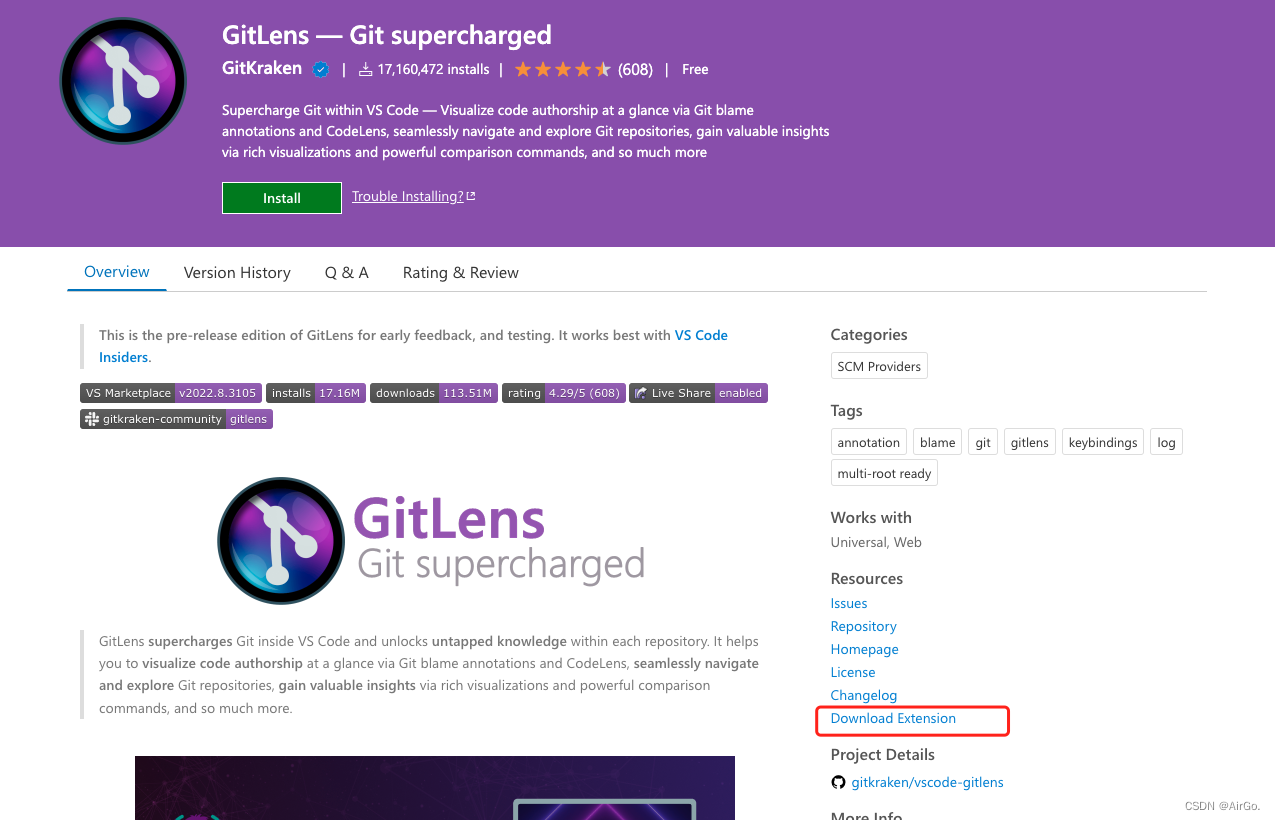
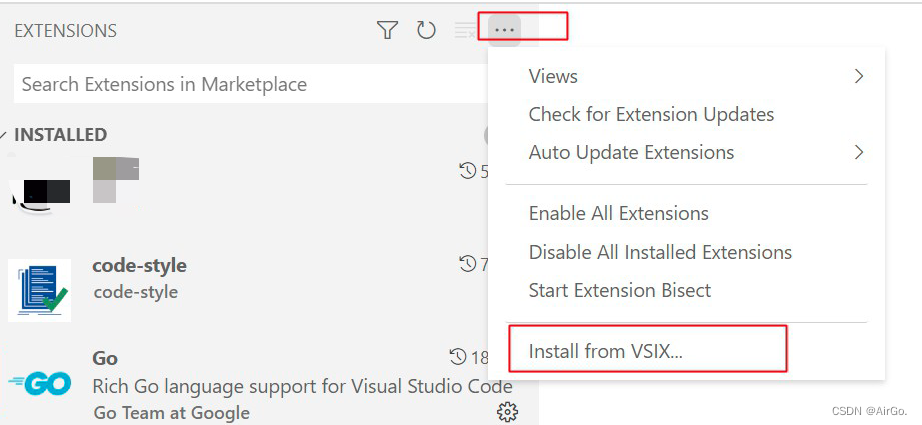
代码DEBUG配置举例
{
    // 使用 IntelliSense 了解相关属性。
    // 悬停以查看现有属性的描述。
    // 欲了解更多信息,请访问: https://go.microsoft.com/fwlink/?linkid=830387
    "version": "0.2.0",
    "configurations": [
        {
            "name": "Launch",
            "type": "go",
            "request": "launch",
            "mode": "auto",
            "program": "${workspaceRoot}/main.go",
            "env": {},
            "args": [
                "-conf", "conf_qa/app.toml",
            ],
            "dlvLoadConfig": {
                "followPointers": true,
                "maxVariableRecurse": 1,
                "maxStringLen": 1024, //字符串最大长度
                "maxArrayValues": 64,
                "maxStructFields": -1
            }
        }
    ]
}
settings
{
    "go.lintOnSave": "off",
    "sync.gist": "626aadebb9be89662fbc021ae5a269b8",
    "todo-tree.tree.showScanModeButton": false,
    "go.useLanguageServer": true,
    "workbench.iconTheme": "vscode-icons-mac",
    "workbench.colorTheme": "Flatland Monokai",
    "editor.suggestSelection": "first",
    "vsintellicode.modify.editor.suggestSelection": "automaticallyOverrodeDefaultValue",
    "explorer.autoReveal": "focusNoScroll",
    "window.openFilesInNewWindow": "on",
    "window.openFoldersInNewWindow": "on",
    "window.openWithoutArgumentsInNewWindow": "on",
    "editor.formatOnPaste": false,
    "editor.formatOnSave": false,
    "editor.formatOnType": true,
    "code-runner.runInTerminal": true,
    "editor.fontWeight": "300",
    "editor.parameterHints": true,
    "editor.quickSuggestions": {
        "other": true,
        "comments": true,
        "strings": true
    },
    "errorSquiggles": true,
    "workbench.editor.enablePreview": false, //关闭预览模式,打开新文件新开窗口
    "emmet.includeLanguages": {},
    "todo-tree.tree.showCountsInTree": true,
    "go.formatTool": "goimports",
    "[json]": {},
    "launch": {

    },
    "css.remoteStyleSheets": [],

    "php.validate.executablePath": "/usr/bin/php",
    "php.validate.enable": false,
    "php.executablePath": "/usr/bin/php",
    "phpformatter.pharPath": "/usr/local/bin/php-cs-fixer", //本机的php-cs-fixer执行文件路径
    "phpformatter.arguments": ["--rules=@PSR2"],

    //文件注释
    "fileheader.customMade": {
        //"Descripttion": "",
        "Author": "weihaoyu"
        //"CreatedTime": "Do not edit"
        //"LastEditTime": "Do not Edit"
    },
    //函数注释
    "fileheader.cursorMode": {
        //"description": "",
        //"param": "",
        "author": "weihaoyu"
        //"return": ""
    },
    //注释配置项
    "fileheader.configObj": {
        "autoAdd": false, // 检测文件没有头部注释,自动添加文件头部注释
        "autoAddLine": 100, // 文件超过多少行数 不再自动添加头部注释
        "autoAlready": true, // 只添加插件支持的语言以及用户通过`language`选项自定义的注释
        // 自动添加头部注释黑名单
        "prohibitAutoAdd": ["json"],
        "prohibitItemAutoAdd": [
        "项目的全称禁止项目自动添加头部注释, 使用快捷键自行添加"
        ],
        "wideSame": false, // 头部注释等宽设置
        "wideNum": 13, // 头部注释字段长度 默认为13
        // 头部注释第几行插入
        "headInsertLine": {
        "php": 2 // php文件 插入到第二行
        },
        "beforeAnnotation": {}, // 头部注释之前插入内容
        "afterAnnotation": {}, // 头部注释之后插入内容
        "specialOptions": {}, // 特殊字段自定义
        "switch": {
        "newlineAddAnnotation": true // 默认遇到换行符(\r\n \n \r)添加注释符号
        },
        "moveCursor": true, // 自动移动光标到Description所在行
        "dateFormat": "YYYY-MM-DD HH:mm:ss",
        "atSymbol": "@", // 更改所有文件的自定义注释中的@符号
        "atSymbolObj": {}, //  更改单独语言/文件的@
        "colon": ": ", // 更改所有文件的注释冒号
        "colonObj": {}, //  更改单独语言/文件的冒号
        "filePathColon": "路径分隔符替换", // 默认值: mac: / window是: \
        "showErrorMessage": false, // 是否显示插件错误通知 用于debugger
        "CheckFileChange": false, // 单个文件保存时进行diff检查
        "createHeader": true, // 新建文件自动添加头部注释
        "useWorker": false, // 是否使用工作区设置
        "designAddHead": false, // 添加注释图案时添加头部注释
        // 自定义语言注释符号,覆盖插件的注释格式
        "language": {
        "java": {
            "head": "/$$",
            "middle": " $ @",
            "end": " $/"
        },
        // 一次匹配多种文件后缀文件 不用重复设置
        "h/hpp/cpp": {
            "head": "/*** ", // 统一增加几个*号
            "middle": " * @",
            "end": " */"
        },
        // 针对有特殊要求的文件如:test.blade.php
        "blade.php": {
            "head": "<!--",
            "middle": " * @",
            "end": "-->"
        }
        },
        // 默认注释  没有匹配到注释符号的时候使用。
        "annotationStr": {
        "head": "/*",
        "middle": " * @",
        "end": " */",
        "use": false
        }
    },

    "C_Cpp.errorSquiggles": "Enabled",
    "breadcrumbs.enabled": true,
    "editor.renderWhitespace": "all",
    "editor.minimap.enabled": false,
    "editor.showUnused": true,
    "workbench.colorCustomizations": {
        "editorUnnecessaryCode.border": "#DCDCDC"
    },
    "[php]": {
        "editor.defaultFormatter": "Sophisticode.php-formatter"
    },
    "[go]": {
        "editor.snippetSuggestions": "none",
        "editor.formatOnSave": true,
        "editor.codeActionsOnSave": {
        "source.organizeImports": true
        }
    },
    "files.eol": "\n", // formatting only supports LF line endings
    "go.languageServerExperimentalFeatures": {
        "format": true,
        "autoComplete": true,
        "rename": true,
        "goToDefinition": true,
        "hover": true,
        "signatureHelp": true,
        "goToTypeDefinition": true,
        "goToImplementation": true,
        "documentSymbols": true,
        "workspaceSymbols": true,
        "findReferences": true,
        "diagnostics": false
    },
    "emmet.excludeLanguages": ["markdown"],
    "[jsonc]": {
        "editor.defaultFormatter": "esbenp.prettier-vscode"
    },
    "go.goroot": "/usr/local/go19",
    "go.buildFlags": [
        "-gcflags=-l",
        "-race"
    ],
    "tabnine.experimentalAutoImports": true,
    "gopls": {
        "formatting.gofumpt": true,
    },
    "go.lintFlags": [
        // "--fast"
    ],
    "go.lintTool": "golangci-lint",
    // "go.lintTool": "golint",
    "go.lintOnSave": "file",
    "git.mergeEditor": false //冲突高亮
}
有“AI”的1024 = 2048,欢迎大家加入2048 AI社区
更多推荐


 6
6 0
0- 0


 已为社区贡献1条内容

所有评论(0)