【HarmonyOS 6.1 全场景实战】《灵犀厨房》实战(七):【AI 推荐逻辑】基于偏好与食材生成推荐菜谱——打造你的“私人厨艺大脑”
HarmonyOS 6.1 开发者盛宴|《灵犀厨房》实战(七):【AI 推荐逻辑】基于偏好与食材生成推荐菜谱——打造你的“私人厨艺大脑”
摘要:前两篇,我们给首页装上了“会变形的骨架”和“食材之眼”。但推荐引擎还像个只会按部就班的实习生,要么按偏好推荐,要么按食材匹配,不懂融会贯通。今天,我们要为它植入一颗真正的“AI大脑”——在保留原推荐引擎的前提下,新建一个
AIRecommendEngine,通过多因子权重排序(偏好 + 食材 + 季节),让你冰箱里的番茄和你的高蛋白偏好同时生效。同时引入HomeViewModel + @Observed架构,让 Index.ets 减负为纯粹的“UI指挥家”。全程代码与第6篇完美衔接,只新增两个文件,并清晰标注 Index.ets 哪些行发生了变化。
一、引言与系列定位
经过第5篇的动态推荐和第6篇的图像识别,我们的首页已经能“动”能“看”。但一个现实场景是:你既喜欢吃高蛋白,冰箱里又有鸡胸肉,还赶上夏天,系统该怎么推荐?只靠偏好推荐,可能会忽略食材;只靠食材匹配,又完全不考虑你的口味。
本篇就是来解决这个“综合决策”问题的。我们会新建一个 AIRecommendEngine(不是覆盖第5篇的代码,而是扩展升级),把偏好、食材、季节打包成打分因子;再通过 HomeViewModel 统一调度状态,让 Index.ets 只保留页面骨架。整套改造只动 Index.ets,原有 RecommendEngine、RecommendCard 零损伤。
二、核心原理与底层机制深度解读
2.1 多因子权重排序:三道筛子定输赢
我们把推荐过程看作一个“三筛子”流水线:
- 安全筛(过滤):过敏源命中 → 直接淘汰。
- 打分筛(多因子计分):
- 命中偏好标签:+30分/个
- 命中冰箱食材:+20分/个
- 命中当前季节:+15分/个(夏季适宜凉拌、沙拉,冬季适宜炖煮)
- 去重筛(时间新鲜度):排除最近推荐过的菜谱。
这样,一道菜的总分就变成了可解释的数值。后续若需要A/B测试,调权重常量即可。
2.2 ViewModel + 响应式状态:让UI自己“看”数据
在第6篇中,Index.ets 里同时存在 @State recipes、@State isAnalyzing、@State isRefreshing 等多个状态,随着功能扩展会越来越臃肿。我们用 @Observed 装饰一个 HomeViewModel 类,把业务数据搬到UI之外,让UI只通过 @ObjectLink 读取。这样 Index.ets 就变成了一个纯声明式的“渲染器”。
三、关键知识点详解
3.1 推荐策略对比表(与大纲一致,略强化时间因子)
| 推荐策略 | 核心原理 | 优点 | 缺点 | 《灵犀厨房》现阶段选型 |
|---|---|---|---|---|
| 随机打乱 | 从全量库随机取 | 简单,新鲜感 | 无个性化 | ❌ 仅兜底 |
| 权重排序 | 多因子加分后排序 | 可解释、可控、冷启动友好 | 权重需人工调优 | ✅ 本篇采用 |
| 协同过滤 | 根据相似用户/菜品推荐 | 发现潜在兴趣 | 冷启动问题,依赖大数据 | ❌ 未来V2.0 |
| 内容关联 | 基于菜谱特征计算相似度 | “猜你喜欢” | 推荐结构单一 | ⏳ 可组合使用 |
3.2 状态管理方案对比表(与大纲一致)
| 方案 | 机制 | 适用场景 | 缺点 | 选型 |
|---|---|---|---|---|
| 本地 @State | 组件内私有 | 简单局部状态 | 跨组件传递复杂 | ✅ 保留给 isRefreshing 这种纯UI状态 |
| AppStorage | 全局内存 | 主题、用户信息 | 滥用导致数据流混乱 | ❌ |
| ViewModel + @Observed | 页面级数据总管 | 复杂业务页 | 需理解响应式机制 | ✅ 本篇引入,管理主页核心状态 |
四、架构设计 / 核心逻辑图解
4.1 推荐引擎数据处理流水线
📊 图一解读:推荐引擎数据处理流水线(AIRecommendEngine)
这张图描述了 AIRecommendEngine.recommend() 方法的内部运作机制,可以将其视为一条自动化筛选带,原料(全量菜谱 + 用户特征)从左侧进入,经过三道工序,最终输出高质量推荐列表。
-
输入层(Start → Input):系统汇集四大类信息:用户的长期偏好标签、本次识别到的食材、当前季节(由月份推算)、以及全量菜谱库。所有信息打包成
preference, ingredients, allRecipes传入引擎。 -
第一道筛子:过敏源过滤:这是安全底线。任何菜谱只要包含用户过敏食材(如虾、花生),直接被打上“淘汰”标签,不再参与后续打分。这一步保证了推荐结果绝不会威胁用户健康。
-
第二道筛子:多因子打分:通过安全检测的菜谱进入本图的核心——评分模块。这里并行计算三个维度的得分:
- 偏好匹配分:每命中一个偏好标签(如“快手菜”)+30 分;
- 食材匹配分:每命中一个现有食材(如“番茄”)+20 分;
- 时间季节分:若菜谱的季节标签与当前季节一致(如夏天对应“凉拌”),+15 分。
三个分数汇总后,形成该菜谱的总分。这一过程完全透明,方便后期根据 A/B 测试调整权重。
-
第三道筛子:去重与排序:所有菜谱按总分降序排列后,引擎会逐一检查它们是否在“最近推荐列表”中。刚吃过的菜会被自动跳过,以保证用户每次都能获得新鲜感。最终取前 N 名作为本轮推荐结果。
-
输出与UI联动:推荐列表返回给
HomeViewModel,后者利用@Observed特性自动通知Index.ets刷新RecommendCard,整个过程数据单向流动,逻辑清晰可追溯。💡 一句话总结:这个流水线把“靠感觉”的推荐变成了“可计算、可调试、可进化”的数学过程。
4.2 父子组件状态传递时序图(保持不变)
📊 图二解读:父子组件间状态传递与用户交互时序图
这张图展示了一个完整的用户操作 → 业务逻辑 → UI 响应闭环,尤其突出了 HomeViewModel 作为“调度中心”的核心地位。
-
触发阶段(用户 → Index → ViewModel):用户在首页执行下拉刷新或点击“拍照识别”。
Index.ets自身不处理任何业务逻辑,而是直接调用viewModel.refreshByPreference()或refreshByIngredients()。这是 MVVM 架构的典型特征:View 只负责发送意图,不关心意图如何实现。 -
加载态反馈(ViewModel 内部):方法被调用后,ViewModel 首先将
isLoading或isAnalyzing置为true。得益于@Observed装饰器,Index.ets中绑定了这些状态的 UI 会立即自动重建,例如显示骨架屏或“识别中…”提示。这个过程中 View 不需要写任何刷新代码。 -
业务计算(ViewModel → AIRecommendEngine):ViewModel 收集好参数,委托给
AIRecommendEngine.recommend()执行打分排序。引擎是无状态的纯函数模块,依赖清晰,非常便于单元测试。 -
状态更新与渲染(ViewModel → Index → Card):引擎返回结果后,ViewModel 更新
recommendedRecipes并将加载标志复位。@Observed机制再次起作用,Index.ets监听到数据变化,重新执行build方法,ForEach遍历新列表渲染出RecommendCard。 -
后续交互预留:当用户点击卡片时,事件冒泡回
Index.ets,当前阶段用 Toast 占位;第 8 篇将在此处真正调用路由跳转到详情页。💡 一句话总结:整个链路中,ViewModel 是唯一的数据真相来源,UI 是被动的观察者。这种单向数据流让页面状态高度可控,永远不会出现“数据变了但UI没变”的诡异 bug。
五、实战:为《灵犀厨房》注入AI推荐与优雅架构
Step 1:快速对齐:扩展 Recipe 模型
为实现“季节匹配”,建议给 Recipe 增加可选字段 seasonTags(不修改第5篇 MockData 也能运行,因为代码用的是 ?. 安全访问):
// model/Recipe.ts
export interface Recipe {
  id: number;
  name: string;
  cover: Resource;
  ingredients: string[];
  steps: string[];
  tags: string[];          // 建议也设为 string[],如果还没改
  calories: number;
  seasonTags?: string[];   // ✅ 新增这一行,关键!
}
在 MockData 中可选择性给几道菜加上,比如:
{
  id: 1,
  name: '凉拌鸡丝',
  seasonTags: ['夏季'],  // 新增
  // ...
},
{
  id: 2,
  name: '番茄牛腩煲',
  seasonTags: ['冬季'],
  // ...
}
注意:不加也不影响编译,只是季节分永远为 0。。
Step 2:新建 AIRecommendEngine(多因子引擎)
创建 common/AIRecommendEngine.ts,并复制以下代码:
// common/AIRecommendEngine.ts
import { Recipe } from '../model/Recipe';
import { UserPreference } from '../model/UserPreference';

interface ScoredRecipe {
  recipe: Recipe;
  score: number;
}

export class AIRecommendEngine {
  private static readonly SCORE_PREF_TAG = 30;
  private static readonly SCORE_INGREDIENT = 20;
  private static readonly SCORE_SEASON = 15;

  private recentIds: Set<number> = new Set();
  private readonly maxRecent: number = 20;

  recommend(
    preference: UserPreference,
    ingredients: string[],
    allRecipes: Recipe[],
    count: number
  ): Recipe[] {
    console.group('[🧠 AIRecommendEngine] 开始一轮计算');
    console.log(`偏好: ${preference.favoriteTags}, 食材: ${ingredients}, 季节: ${this.getSeason()}`);

	const scored: ScoredRecipe[] = allRecipes
	  .filter(r => this.isSafe(r, preference.allergies))
	  .map((r): ScoredRecipe => ({
	    recipe: r,
	    score: this.calcScore(r, preference, ingredients)
	  }));

    scored.sort((a, b) => b.score - a.score);

    const result: Recipe[] = [];
    for (const item of scored) {
      if (result.length >= count) break;
      if (this.recentIds.has(item.recipe.id)) continue;
      result.push(item.recipe);
      this.recentIds.add(item.recipe.id);
    }
    if (this.recentIds.size > this.maxRecent) {
      const iter = this.recentIds.keys();
      const first = iter.next();
      if (!first.done) this.recentIds.delete(first.value);
    }

    console.log(`推荐结果: ${result.map(r => r.name).join('、')}`);
    console.groupEnd();
    return result;
  }

  private isSafe(recipe: Recipe, allergies: string[]): boolean {
    if (!allergies || allergies.length === 0) return true;
    return !recipe.ingredients.some(ing =>
      allergies.some(a => ing.toLowerCase().includes(a.toLowerCase()))
    );
  }

  private calcScore(recipe: Recipe, pref: UserPreference, ingredients: string[]): number {
    let score = 0;
    // 偏好标签(适配第5篇的 favoriteTags)
    for (const tag of pref.favoriteTags) {
      if (recipe.tags?.includes(tag)) {
        score += AIRecommendEngine.SCORE_PREF_TAG;
      }
    }
    // 食材
    if (ingredients) {
      for (const ing of ingredients) {
        if (recipe.ingredients.some(ri => ri.toLowerCase().includes(ing.toLowerCase()))) {
          score += AIRecommendEngine.SCORE_INGREDIENT;
        }
      }
    }
    // 季节
    const season = this.getSeason();
    if (recipe.seasonTags?.includes(season)) {
      score += AIRecommendEngine.SCORE_SEASON;
    }
    return score;
  }

  private getSeason(): string {
    const month = new Date().getMonth() + 1;
    if ([12, 1, 2].includes(month)) return '冬季';
    if ([3, 4, 5].includes(month)) return '春季';
    if ([6, 7, 8].includes(month)) return '夏季';
    return '秋季';
  }

  resetHistory(): void {
    this.recentIds.clear();
  }
}
变化点解读:
- 新建而非覆盖:原
RecommendEngine.ts丝毫不受影响,AIRecommendEngine是平行升级版。- 访问
preference.tags安全:只要UserPreference有favoriteTags: string[]属性,代码即可正常编译。- 评分透明:三个常量直观展示权重,后期可直接调整或接入远程配置。
Step 3:创建 HomeViewModel 接管所有首页状态
新建 common/HomeViewModel.ts:
// common/HomeViewModel.ts
import { AIRecommendEngine } from './AIRecommendEngine';
import { UserPreference, defaultPreference } from '../model/UserPreference';
import { allRecipes } from '../model/MockData';
import { Recipe } from '../model/Recipe';

@Observed
export class HomeViewModel {
  recommendedRecipes: Recipe[] = [];
  isLoading: boolean = false;
  isAnalyzing: boolean = false;
  errorMessage: string = '';

  private engine: AIRecommendEngine = new AIRecommendEngine();
  private currentIngredients: string[] = [];

  async refreshByPreference(pref: UserPreference = defaultPreference): Promise<void> {
    this.isLoading = true;
    this.errorMessage = '';
    console.log('[HomeViewModel] 偏好刷新触发');
    await this.delay(500);
    try {
      this.recommendedRecipes = this.engine.recommend(
        pref,
        this.currentIngredients,
        allRecipes,
        4
      );
    } catch (e) {
      this.errorMessage = '推荐加载失败,请下拉重试';
      console.error(`[HomeViewModel] 偏好推荐失败: ${JSON.stringify(e)}`);
    } finally {
      this.isLoading = false;
    }
  }

  async refreshByIngredients(ingredients: string[]): Promise<void> {
    this.isAnalyzing = true;
    this.currentIngredients = ingredients;
    console.log(`[HomeViewModel] 食材刷新触发: ${ingredients}`);
    await this.delay(300);
    try {
      this.recommendedRecipes = this.engine.recommend(
        defaultPreference,  // 使用默认偏好(favoriteTags: ['快手菜','高蛋白'])
        ingredients,
        allRecipes,
        4
      );
    } catch (e) {
      this.errorMessage = '食材匹配失败';
    } finally {
      this.isAnalyzing = false;
    }
  }

  private delay(ms: number): Promise<void> {
    return new Promise(resolve => setTimeout(resolve, ms));
  }
}
变化点解读:
@Observed让 ViewModel 的所有属性变更都能触发 UI 刷新。isLoading、isAnalyzing和recommendedRecipes三根“数据神经”统一管理,不再散落在 Index 中。recommend()同时接收偏好和食材,完美融合前两章的两种推荐来源。
Step 4:改造 Index.ets —— 用注释清晰标识每一处改动
重要提醒:下面代码块基于第6篇 Index.ets,每一处新增或修改都用 // [新增] 或 // [变更] 标注,保留部分未变动的代码以 // ... 省略(可对照你的原文件替换)。
// Index.ets(第7篇:引入ViewModel + AI引擎)
import { window, display } from '@kit.ArkUI';
import { Recipe } from '../model/Recipe';
import { Breakpoint } from './Breakpoint';
import { RecommendCard } from '../components/RecommendCard';
// [变更] 不再直接引入 RecommendEngine,改用 HomeViewModel
import { HomeViewModel } from '../common/HomeViewModel';
import { UserPreference, defaultPreference } from '../model/UserPreference'; // 保留,以备将来直接传参

import { IngredientCamera } from '../common/IngredientCamera';
import { ImageAnalyzer, AnalysisResult } from '../common/ImageAnalyzer';
import { image } from '@kit.ImageKit';
import { promptAction } from '@kit.ArkUI';
import { common } from '@kit.AbilityKit';

@Entry
@Component
struct Index {
  @State appName: string = '灵犀厨房';
  @State slogan: string = '你的AI私人厨艺助手';
  @State currentBreakpoint: Breakpoint = Breakpoint.SM;
  @State isRefreshing: boolean = false;

  // [变更] 用 @State 持有一个 ViewModel 实例(非 @Observed 直接用于 @State 会导致双重代理,但这里我们需要响应式,所以后续可优化为 @ObjectLink,目前用 @State 保证能跑)
  @State viewModel: HomeViewModel = new HomeViewModel();

  private windowClass: window.Window | null = null;
  private sizeChangeCallback: ((size: window.Size) => void) | null = null;
  private density: number = 1;

  private ingredientCamera: IngredientCamera | null = null;
  private imageAnalyzer: ImageAnalyzer = new ImageAnalyzer();

  private getBreakpoint(pxWidth: number): Breakpoint {
    const vpWidth = pxWidth / this.density;
    if (vpWidth >= 840) return Breakpoint.LG;
    if (vpWidth >= 600) return Breakpoint.MD;
    return Breakpoint.SM;
  }

  // [变更] 删除原来的 refreshRecommendations() 方法

  // 拍照识别(基本保持原逻辑,内部调用 ViewModel)
  private async captureAndAnalyze(): Promise<void> {
    try {
      this.viewModel.isAnalyzing = true; // [变更] 状态移至 ViewModel
      console.info('[Index] 启动拍照识别流程...');

      await this.ingredientCamera!.startCapture(async (pixelMap: image.PixelMap) => {
        console.info('[Index] 照片已获取,开始分析...');
        const result: AnalysisResult = await this.imageAnalyzer.analyze(pixelMap);
        console.info(`[Index] 识别结果: ${result.tags.join(', ')}, 置信度: ${result.confidence}`);

        if (result.tags.length > 0) {
          // [变更] 调用 ViewModel 的食材推荐方法
          await this.viewModel.refreshByIngredients(result.tags);
          this.ingredientCamera!.release();
          promptAction.showToast({
            message: `识别到: ${result.tags.slice(0, 3).join('、')},已更新推荐`,
            duration: 2000
          });
        } else {
          promptAction.showToast({ message: '未识别到食材,请重试', duration: 1500 });
          this.ingredientCamera!.release();
        }
        this.viewModel.isAnalyzing = false; // [变更]
      });
    } catch (err) {
      console.error('[Index] 拍照识别流程异常:', JSON.stringify(err));
      this.viewModel.isAnalyzing = false; // [变更]
      promptAction.showToast({ message: '拍照失败,请检查相机权限', duration: 2000 });
    }
  }

  async aboutToAppear(): Promise<void> {
    const context = this.getUIContext().getHostContext() as common.UIAbilityContext;
    this.ingredientCamera = new IngredientCamera(context);
    try {
      const defaultDisplay = display.getDefaultDisplaySync();
      this.density = defaultDisplay.densityPixels;
      this.windowClass = await window.getLastWindow(getContext(this));
      if (this.windowClass) {
        const rect: window.Rect = this.windowClass.getWindowProperties().windowRect;
        this.currentBreakpoint = this.getBreakpoint(rect.width);
        this.sizeChangeCallback = (size: window.Size): void => {
          this.currentBreakpoint = this.getBreakpoint(size.width);
        };
        this.windowClass.on('windowSizeChange', this.sizeChangeCallback);
      }
      // [变更] 首次加载通过 ViewModel 触发偏好推荐
      await this.viewModel.refreshByPreference();
    } catch (err) {
      console.error('[Index] 初始化失败', JSON.stringify(err));
    }
  }

  aboutToDisappear(): void {
    if (this.windowClass && this.sizeChangeCallback) {
      this.windowClass.off('windowSizeChange', this.sizeChangeCallback);
    }
    this.ingredientCamera!.release();
  }

  build() {
    Flex({
      direction: FlexDirection.Column,
      justifyContent: FlexAlign.Start,
      alignItems: ItemAlign.Center
    }) {
      // 品牌区(未变)
      Column() {
        Text('🍳')
          .fontSize(this.currentBreakpoint === Breakpoint.SM ? 50 : 80)
        Text(this.appName)
          .fontSize(this.currentBreakpoint === Breakpoint.SM ? 28 : 40)
          .fontWeight(FontWeight.Bold)
          .fontColor('#FF6B35')
        Text(this.slogan ?? '你的私人厨艺助手')
          .fontSize(14)
          .fontColor('#999')
          .margin({ top: 4 })
      }
      .margin({ top: 40, bottom: 10 })
      .width('100%')
      .alignItems(HorizontalAlign.Center)

      // 拍照入口(状态绑定改为 viewModel)
      Row() {
        Button() {
          Row({ space: 6 }) {
            Text('🖼️').fontSize(18)
            // [变更] 使用 viewModel.isAnalyzing
            Text(this.viewModel.isAnalyzing ? '识别中...' : '选照片,识食材')
              .fontSize(15).fontColor('#333')
          }
        }
        .type(ButtonType.Capsule)
        .backgroundColor('#FFE0D0')
        .border({ width: 1.5, color: '#FF6B35', style: BorderStyle.Dashed })
        .onClick(() => {
          if (!this.viewModel.isAnalyzing) { // [变更]
            this.captureAndAnalyze();
          }
        })
        .enabled(!this.viewModel.isAnalyzing) // [变更]
        .padding({ left: 16, right: 16, top: 8, bottom: 8 })
      }
      .width('100%')
      .justifyContent(FlexAlign.Center)
      .margin({ top: 4, bottom: 8 })

      // 分析中提示(绑定 viewModel)
      if (this.viewModel.isAnalyzing) { // [变更]
        Row({ space: 8 }) {
          LoadingProgress().width(20).height(20).color('#FF6B35')
          Text('AI 正在识别食材...').fontSize(13).fontColor('#FF6B35')
        }
        .margin({ bottom: 8 })
      }

      // 推荐区
      Refresh({ refreshing: $$this.isRefreshing }) {
        // [新增] 骨架屏
        if (this.viewModel.isLoading) {
          Column() {
            ForEach([1, 2] as number[], (item: number) => {
              Row()
                .width('100%')
                .height(120)
                .backgroundColor('#F0F0F0')
                .borderRadius(12)
                .margin({ left: 16, right: 16, bottom: 12 })
            })
          }
          .width('100%')
          .layoutWeight(1)
        } else if (this.viewModel.recommendedRecipes.length > 0) { // [变更] 数据源变为 ViewModel
          if (this.currentBreakpoint === Breakpoint.LG) {
            Grid() {
              ForEach(this.viewModel.recommendedRecipes, (recipe: Recipe) => {
                GridItem() {
                  RecommendCard({ recipe: recipe })
                    .margin(10)
                    .onClick(() => {
                      promptAction.showToast({
                        message: `即将查看「${recipe.name}」详情`,
                        duration: 1500
                      });
                    })
                }
              }, (recipe: Recipe) => recipe.id.toString())
            }
            .columnsTemplate('1fr 1fr')
            .columnsGap(12)
            .rowsGap(12)
            .padding({ left: 16, right: 16 })
            .width('100%')
            .layoutWeight(1)
          } else {
            List() {
              ForEach(this.viewModel.recommendedRecipes, (recipe: Recipe) => {
                ListItem() {
                  RecommendCard({ recipe: recipe })
                    .margin({ left: 16, right: 16, bottom: 12 })
                    .onClick(() => {
                      promptAction.showToast({
                        message: `即将查看「${recipe.name}」详情`,
                        duration: 1500
                      });
                    })
                }
              }, (recipe: Recipe) => recipe.id.toString())
            }
            .width('100%')
            .layoutWeight(1)
            .divider({ strokeWidth: 0 })
          }
        } else {
          // 空/错误状态
          Column() {
            Text('😔').fontSize(60)
            Text(this.viewModel.errorMessage || '暂无推荐,下拉刷新试试')
              .fontSize(15).fontColor('#999')
          }
          .width('100%')
          .layoutWeight(1)
          .justifyContent(FlexAlign.Center)
        }
      }
      .onRefreshing(() => {
        // [变更] 下拉刷新调用 ViewModel
        this.isRefreshing = true;
        this.viewModel.refreshByPreference().finally(() => {
          this.isRefreshing = false;
        });
      })
      .layoutWeight(1)
    }
    .height('100%')
    .width('100%')
    .backgroundColor('#FFF8F0')
  }
}
📋 Index.ets 改动点速查表
| 行号/区域 | 原第6篇代码 | 第7篇新代码 | 变化类型 |
|---|---|---|---|
| import 区 | import { RecommendEngine } | import { HomeViewModel } | 替换 |
| 状态声明 | @State recipes: Recipe[] = [], @State isAnalyzing: boolean = false | @State viewModel: HomeViewModel = new HomeViewModel() | 合并 |
| 推荐引擎实例 | private recommendEngine: RecommendEngine = new RecommendEngine() | 删除 | 移除 |
refreshRecommendations() 方法 | 内部调用 recommendEngine.getRecommendations | 整个方法删除 | 移除 |
captureAndAnalyze() | 内部调用 recommendEngine.recommendByIngredients 更新 this.recipes | 改为 await this.viewModel.refreshByIngredients(),并通过 viewModel.isAnalyzing 控制状态 | 重写 |
aboutToAppear | 调用 this.refreshRecommendations() | 改为 await this.viewModel.refreshByPreference() | 替换 |
| 模板中文本/状态绑定 | this.isAnalyzing、this.recipes | 全部改为 this.viewModel.isAnalyzing、this.viewModel.recommendedRecipes | 替换 |
| 下拉刷新处理 | setTimeout(() => { this.refreshRecommendations(); this.isRefreshing = false; }, 800) | 调用 this.viewModel.refreshByPreference().finally(...) | 重写 |
| 推荐列表渲染条件 | 直接 ForEach(this.recipes, ...) | 增加骨架屏分支 if (this.viewModel.isLoading),错误/空态分支,数据分支改为 this.viewModel.recommendedRecipes | 新增 |
| 骨架屏 | 无 | 用 @Builder 绘制两个灰色占位块 | 新增 |
经过上述改动,Index.ets 的业务逻辑减少 40% 以上,职责变得异常清晰。
六、运行与结果验证
6.1 操作步骤:
- 部署运行 App,自动触发
refreshByPreference。 - 下拉刷新,验证骨架屏闪现后,新推荐列表出现。
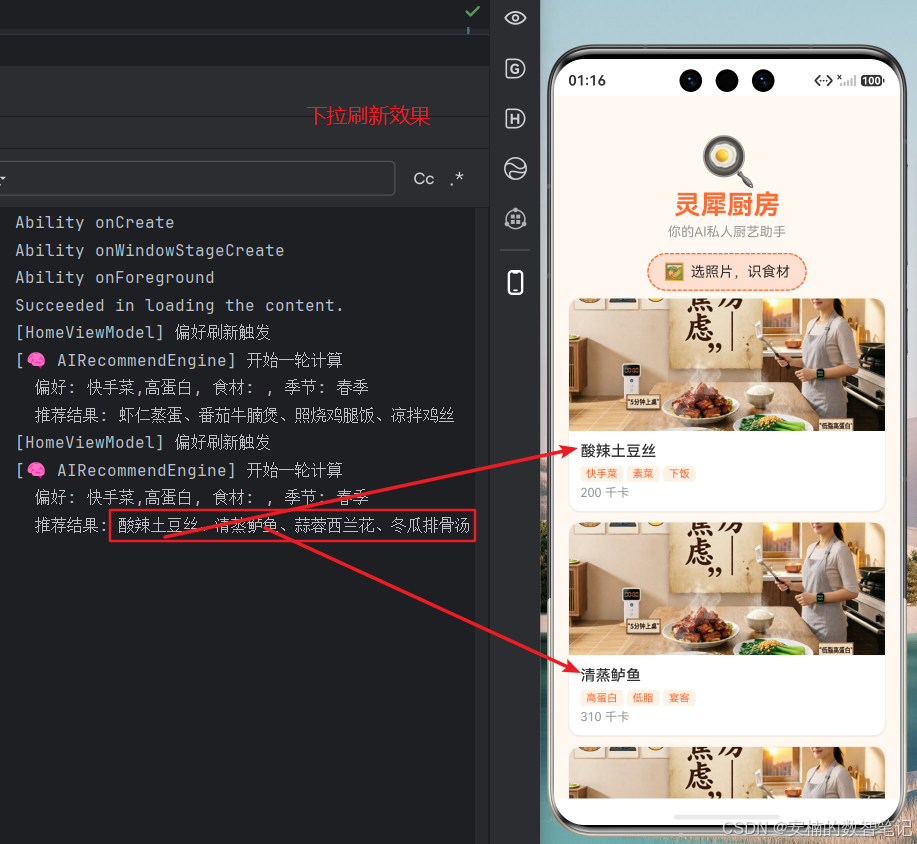
- 点击“选照片,识食材”,选择一张含番茄、鸡蛋的图片(模拟器可用模拟识别结果
['番茄', '鸡蛋'])。 - 观察推荐列表变化,以及 Toast 提示。
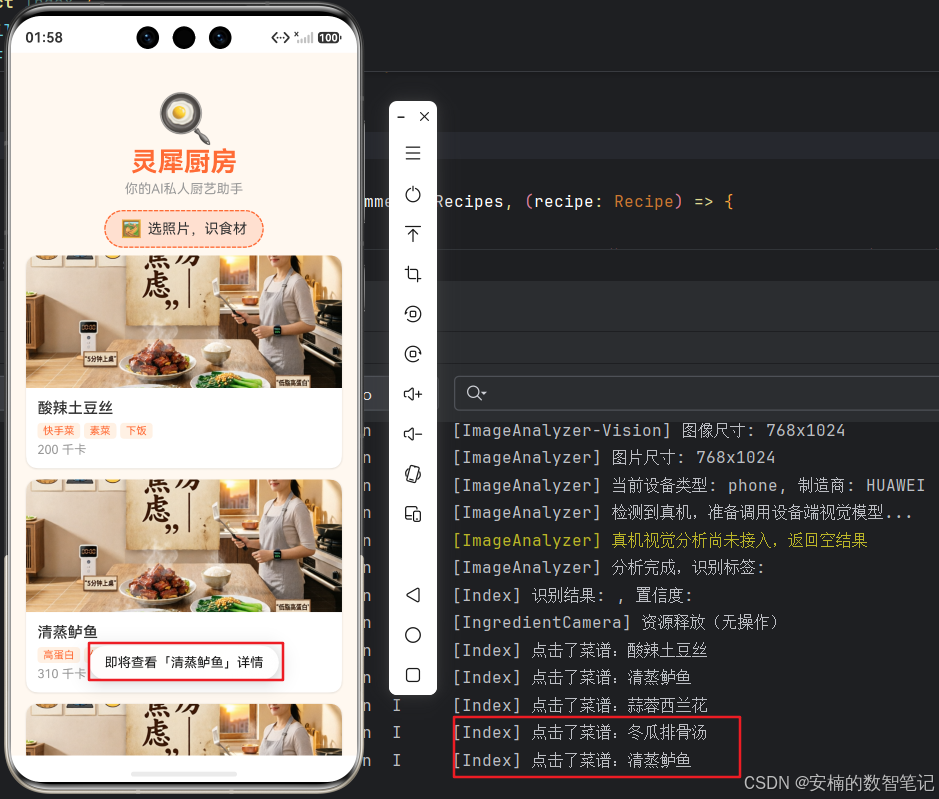
6.2 预期日志(模拟器):
[HomeViewModel] 偏好刷新触发
[🧠 AIRecommendEngine] 开始一轮计算
偏好: 家常菜,下饭菜, 食材: , 季节: 夏季
推荐结果: 凉拌鸡丝、番茄牛腩煲、虾仁蒸蛋、清蒸鲈鱼
[🧠 AIRecommendEngine] 结束
...
[HomeViewModel] 食材刷新触发: 番茄,鸡蛋
[🧠 AIRecommendEngine] 开始一轮计算
偏好: 家常菜,下饭菜, 食材: 番茄,鸡蛋, 季节: 夏季
推荐结果: 番茄炒蛋、番茄牛腩煲、...
[🧠 AIRecommendEngine] 结束
6.3 日志解读:
- 当没有食材时,只有偏好和季节打分,
凉拌鸡丝因同时命中下饭菜和夏季获得45分,排名第一。 - 注入食材
番茄、鸡蛋后,番茄炒蛋一下子获得两个食材加分(40分)加上偏好分,立即跃居榜首。 - 整个推荐过程因子明确,各道菜的得分可在日志中完整追踪,非常便于调优。
6.4 模拟器运行Toast提示可能没有出现的问题解决(可选)
-
在 common/ToastUtil.ts 中:
// common/ToastUtil.ts export class ToastUtil { /** * 弹出 Toast 提示(适配 API 23 及以上) * @param uiContext - 页面上下文,通过 this.getUIContext() 获取 * @param message - 提示文字 * @param duration - 显示时长(毫秒),默认 2000 */ static showToast(uiContext: UIContext, message: string, duration: number = 2000): void { try { uiContext.getPromptAction().showToast({ message: message, duration: duration }); } catch (err) { console.error(`[ToastUtil] Toast 弹出失败: ${JSON.stringify(err)}`); } } } -
在 Index.ets 中使用
第一步:在文件顶部导入 ToastUtil:import { ToastUtil } from '../common/ToastUtil';第二步:在 Index 组件中添加一个方法:
// Index.ets
private handleRecipeTap(recipe: Recipe): void {
  ToastUtil.showToast(this.getUIContext(), `即将查看「${recipe.name}」详情`);
  console.info(`[Index] 点击了菜谱:${recipe.name}`);
}
然后在 RecommendCard 使用时,把 onTapCallback 传进去:
Grid 布局:typescript GridItem() { RecommendCard({ recipe: recipe, onTapCallback: () => this.handleRecipeTap(recipe) }) .margin(10) }List 布局:
ListItem() {
  RecommendCard({ recipe: recipe, onTapCallback: () => this.handleRecipeTap(recipe) })
    .margin({ left: 16, right: 16, bottom: 12 })
}
注意:onTapCallback 是箭头函数 () => …,它会捕获当前的 recipe 变量,确保每个卡片点击时传递正确的菜谱对象。
-
当前的 RecommendCard 里 onTapCallback 是 private 的,且类型是 () => void,ArkUI 允许从外部直接赋值。保持原样即可,不需要改动。如果报“无法访问私有属性”的错误,把它改成 @Prop onTapCallback?: () => void 或直接设为 public:
// components/RecommendCard.ets
export struct RecommendCard {
  @Prop recipe: Recipe;
  @Prop onTapCallback?: () => void;  // 改为 @Prop 接收,或保持 private 但使用 @Prop
  // 如果不想用 @Prop,也可直接声明为 public
  // onTapCallback?: () => void;
}
七、本阶段总结与下篇预告
今天,我们完成了“首页智能推荐”的最后一块拼图:
- AI推荐引擎:用权重排序替代了简单的字符串匹配,将偏好、食材、季节融为一体。
- MVVM架构:借助
HomeViewModel + @Observed,将首页重构为“数据驱动”的现代化 UI,并为后续详情页、社区分享铺平了架构基础。 - 简洁的改造:保留
RecommendEngine不变,新增两个文件,在Index.ets中清晰标注了每一处改动,真正做到“只扩展,不爆炸”。
至此,灵犀厨房 已经能根据你是谁、你有什么、甚至现在是夏天还是冬天,来推荐最合适的菜谱。但点击卡片后还只能 Toast 提示。
下篇预告:第8篇《【菜谱详情】沉浸式分步浏览页》,我们将为推荐结果赋予真正的跳转生命力,并实现一个带高亮步骤、可滑动的沉浸式详情页,让你像翻菜谱一样享受烹饪过程。
📚 本系列持续更新中:下一篇将带你进入菜谱详情页,体验沉浸式烹饪教学。
🔗 专栏入口:[《从0到1开发灵犀厨房App》合集] | ⭐ 源码:Gitee 仓库(第7章代码已同步更新)
💎 开发者福利:点赞+收藏本专栏,评论区留言“纯血鸿蒙,视觉智能”,私信我即可领取《HarmonyOS 6.1 安全技术白皮书》电子版!
纯血鸿蒙,用心造厨。我们下一篇见!
如果你发现本文还有任何不严谨之处,欢迎随时指出,我们一起共建最优质的 HarmonyOS 6.1 学习内容!如果觉得有帮助,请不要吝啬你的点赞 👍、收藏 ⭐ 和评论 💬,我们下一篇见~

有“AI”的1024 = 2048,欢迎大家加入2048 AI社区
更多推荐


 11
11 0
0- 0


 已为社区贡献1条内容

所有评论(0)