鸿蒙PC Electron框架餐饮点餐系统 - 桌面端后台管理完整实现
类型定义是整个系统的基石,确保了数据的类型安全。// 菜品分类类型| 'appetizer' // 凉菜| 'main_course' // 热菜| 'soup' // 汤类| 'dessert' // 甜品| 'drink' // 饮品| 'snack' // 小吃| 'combo' // 套餐// 订单状态流转| 'pending' // 待确认| 'confirmed' // 已确认| 'p
Vue3 + TypeScript 餐饮点餐系统 - 桌面端后台管理完整实现
欢迎加入开源鸿蒙PC社区:
https://harmonypc.csdn.net/
项目 Git 仓库:
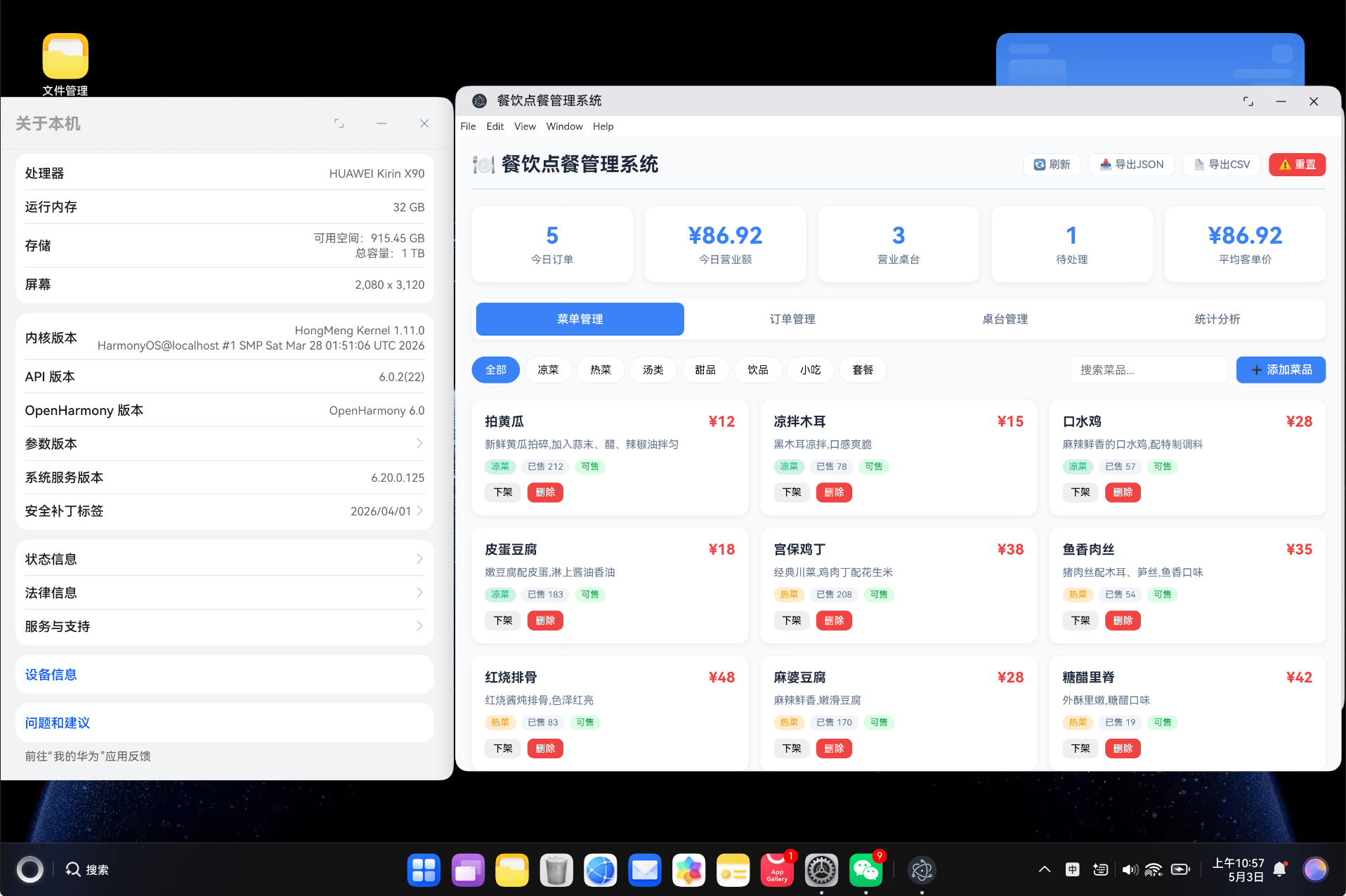
https://atomgit.com/liboqian/harmonyOs_Restaurant
基于 Vue3 Composition API + TypeScript 构建的餐饮点餐桌面端后台管理系统,支持菜单管理、订单管理、桌台管理、统计分析等核心功能,采用 localStorage 实现数据持久化,可打包为 HarmonyOS 应用。
一、项目背景
随着餐饮行业的数字化转型,传统的纸质点餐方式已无法满足现代化餐厅的管理需求。餐饮老板需要一套高效的后台管理系统来管理菜单、订单、桌台和销售数据。
1.1 痛点分析
传统餐饮管理面临以下挑战:
- 菜单更新繁琐,无法实时同步到前厅
- 订单状态追踪困难,厨房与前厅信息不同步
- 桌台状态管理依赖人工记忆,容易出错
- 销售数据统计滞后,无法实时掌握经营情况
- 缺乏菜品销售分析,难以优化菜单结构
1.2 解决方案
基于 Vue3 + TypeScript 构建的桌面端后台管理系统,具备以下特点:
- 响应式 UI:清晰的数据展示,支持分类筛选和搜索
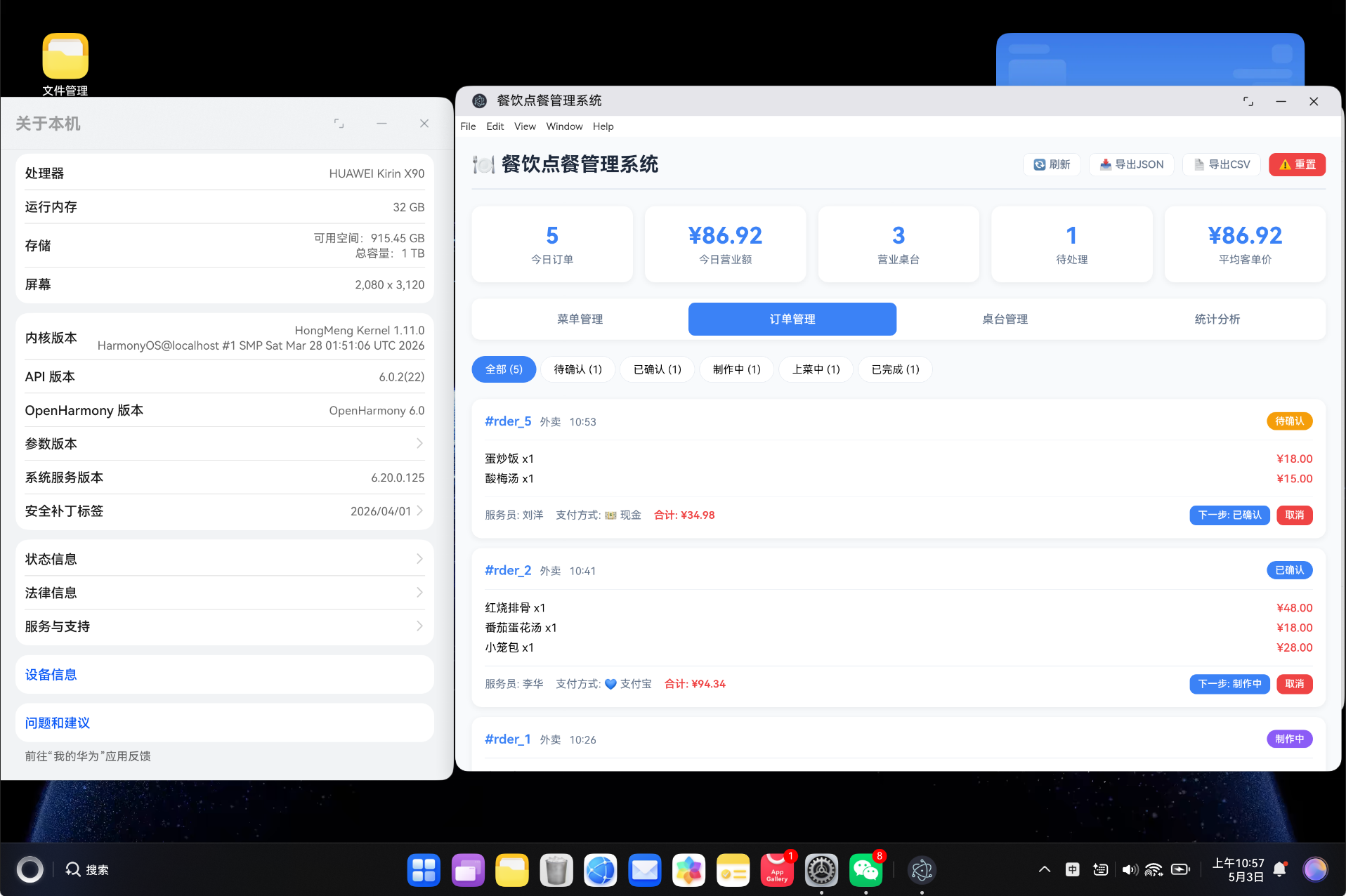
- 订单状态流:待确认 → 已确认 → 制作中 → 上菜中 → 已完成,全流程可追踪
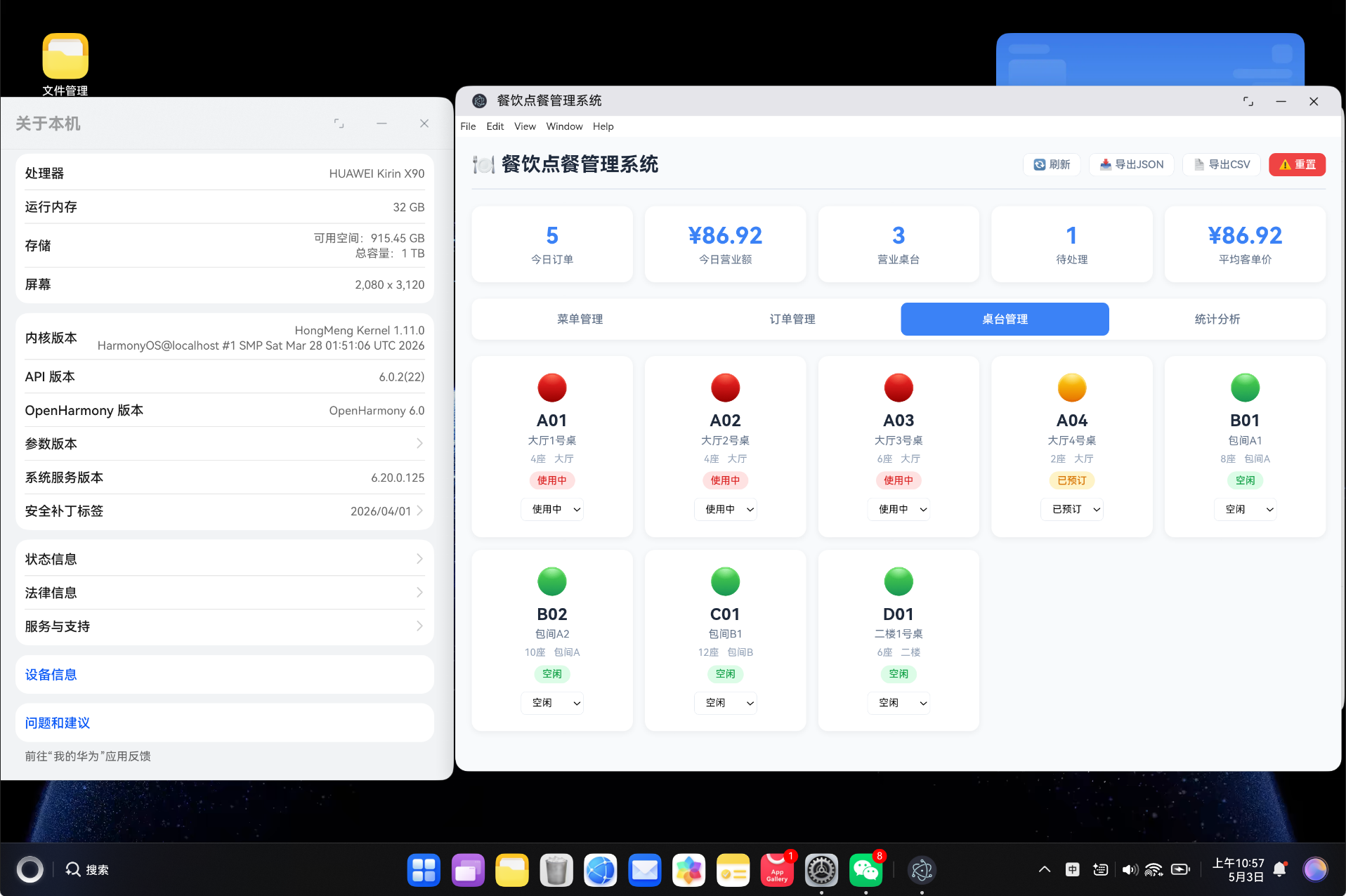
- 桌台可视化:颜色标识桌台状态,一目了然
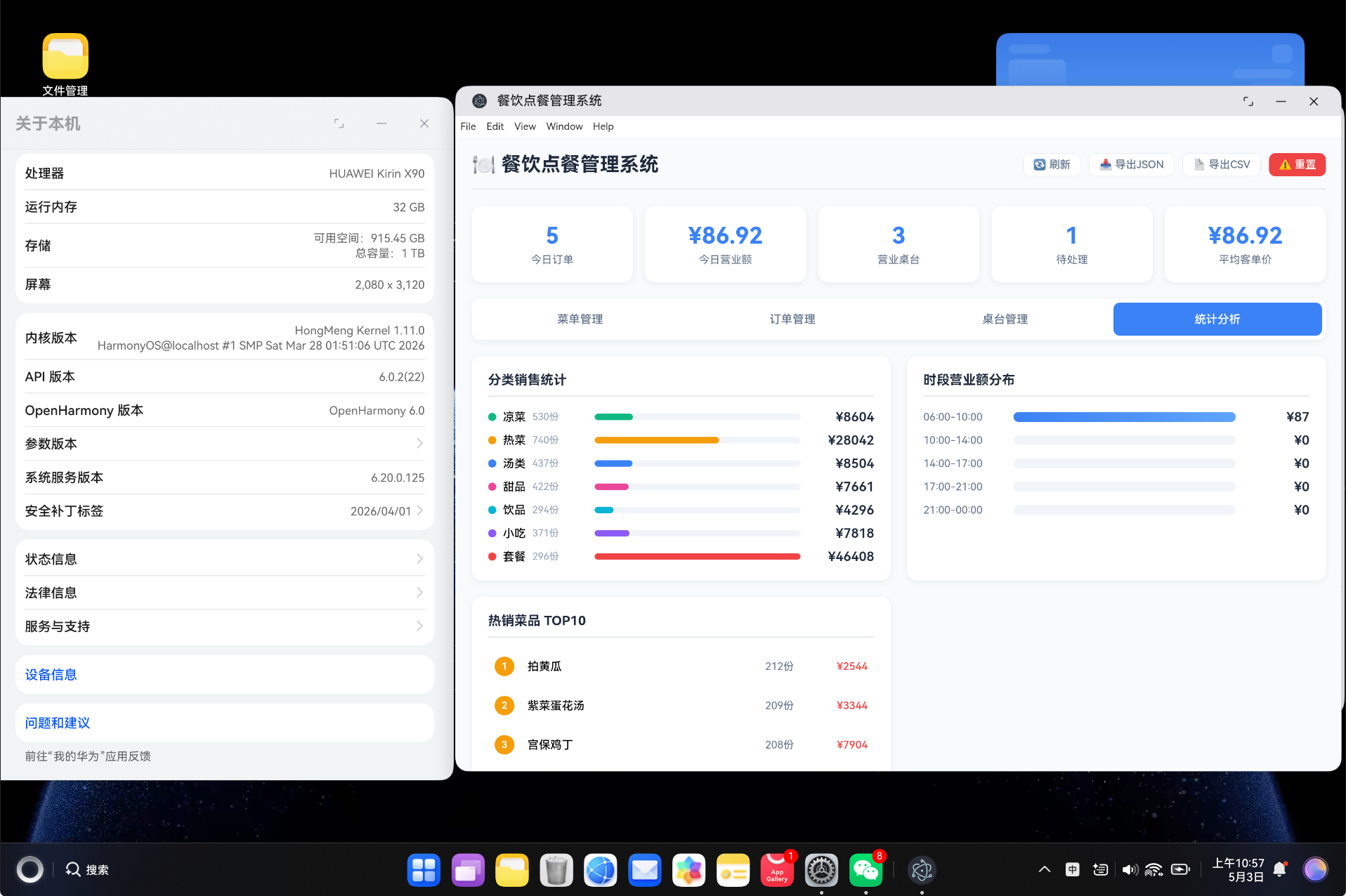
- 实时统计:分类销售、时段分布、热销排行
- 数据持久化:localStorage 存储,刷新不丢失
- HarmonyOS 兼容:可打包为鸿蒙应用部署
1.3 效果预览

二、技术栈
2.1 核心技术
| 技术 | 版本 | 说明 |
|---|---|---|
| Vue3 | ^3.4.0 | 前端框架,使用 Composition API |
| TypeScript | ^5.3.0 | 类型安全的 JavaScript 超集 |
| Vue Router | ^4.6.4 | Vue 官方路由管理 |
| Vite | ^5.0.0 | 极速构建工具 |
| HarmonyOS | API 11+ | 鸿蒙操作系统 |
2.2 技术选型理由
为什么选择 Vue3?
- Composition API 提供更好的逻辑复用能力
<script setup>语法糖简化组件开发- 优秀的 TypeScript 支持
- 响应式系统更高效
为什么选择 TypeScript?
- 静态类型检查,减少运行时错误
- 更好的 IDE 智能提示
- 代码可维护性更强
- 团队协作更高效
2.3 开发环境配置
{
  "name": "restaurant-pos-system",
  "version": "1.0.0",
  "type": "module",
  "scripts": {
    "dev": "vite",
    "build": "vite build",
    "preview": "vite preview"
  }
}
💡 提示:Vite 5 相比 Webpack 有 10-100 倍的构建速度提升,非常适合快速迭代开发。
三、项目架构
3.1 目录结构
vue-app/
├── src/
│   ├── types/
│   │   └── restaurant.ts          # 类型定义
│   ├── services/
│   │   └── RestaurantService.ts   # 业务逻辑层
│   ├── components/
│   │   └── RestaurantPanel.vue    # 主组件
│   ├── views/
│   │   └── RestaurantView.vue     # 视图组件
│   ├── router/
│   │   └── index.ts               # 路由配置
│   ├── styles/
│   │   └── global.css             # 全局样式
│   ├── App.vue                    # 根组件
│   └── main.ts                    # 入口文件
├── index.html                     # HTML 模板
├── package.json                   # 项目配置
├── vite.config.ts                 # Vite 配置
└── tsconfig.json                  # TypeScript 配置
3.2 架构设计
┌─────────────────────────────────────────────┐
│                  View 层                     │
│           RestaurantView.vue                 │
├─────────────────────────────────────────────┤
│                Component 层                  │
│           RestaurantPanel.vue                │
│  ┌──────────┬──────────┬────────┬────────┐  │
│  │ 菜单管理 │ 订单管理 │ 桌台管理│ 统计分析│  │
│  └──────────┴──────────┴────────┴────────┘  │
├─────────────────────────────────────────────┤
│                Service 层                    │
│          RestaurantService.ts               │
│  ┌──────────┬──────────┬────────┬────────┐  │
│  │ 菜单管理 │ 订单管理 │ 桌台管理│ 数据导出│  │
│  └──────────┴──────────┴────────┴────────┘  │
├─────────────────────────────────────────────┤
│                Type 层                       │
│            restaurant.ts                    │
│  MenuItem | Order | Table | DashboardStats  │
├─────────────────────────────────────────────┤
│              数据存储层                       │
│              localStorage                    │
└─────────────────────────────────────────────┘
四、TypeScript 类型定义
4.1 核心类型
类型定义是整个系统的基石,确保了数据的类型安全。
// 菜品分类类型
export type MenuItemCategory =
  | 'appetizer'    // 凉菜
  | 'main_course'  // 热菜
  | 'soup'         // 汤类
  | 'dessert'      // 甜品
  | 'drink'        // 饮品
  | 'snack'        // 小吃
  | 'combo'        // 套餐

// 订单状态流转
export type OrderStatus =
  | 'pending'     // 待确认
  | 'confirmed'   // 已确认
  | 'preparing'   // 制作中
  | 'serving'     // 上菜中
  | 'completed'   // 已完成
  | 'cancelled'   // 已取消

// 支付方式
export type PaymentMethod = 'cash' | 'card' | 'wechat' | 'alipay'

// 订单类型
export type OrderType = 'dine_in' | 'takeout' | 'delivery'

// 桌台状态
export type TableStatus = 'available' | 'occupied' | 'reserved' | 'cleaning'
4.2 接口定义
// 菜品接口
export interface MenuItem {
  id: string               // 唯一标识
  name: string             // 菜品名称
  category: MenuItemCategory  // 分类
  price: number            // 售价
  cost: number             // 成本
  description: string      // 描述
  image?: string           // 图片
  tags: string[]           // 标签
  isAvailable: boolean     // 是否可售
  preparationTime: number  // 预计制作时间(分钟)
  calories?: number        // 热量(卡路里)
  createdAt: number        // 创建时间戳
  salesCount: number       // 销量
}

// 订单项接口
export interface OrderItem {
  id: string           // 唯一标识
  menuItemId: string   // 菜品ID
  menuItemName: string // 菜品名称
  quantity: number     // 数量
  price: number        // 单价
  notes?: string       // 备注
}

// 订单接口
export interface Order {
  id: string           // 订单号
  tableId: string      // 桌台ID
  tableName: string    // 桌台名称
  items: OrderItem[]   // 订单项列表
  status: OrderStatus  // 订单状态
  subtotal: number     // 小计
  discount: number     // 折扣
  tax: number          // 税费
  total: number        // 总金额
  paymentMethod: PaymentMethod  // 支付方式
  orderType: OrderType          // 订单类型
  waiterName: string   // 服务员
  createdAt: number    // 创建时间
  updatedAt: number    // 更新时间
  completedAt?: number // 完成时间
}

// 桌台接口
export interface Table {
  id: string            // 唯一标识
  number: string        // 桌号
  name: string          // 桌台名称
  seats: number         // 座位数
  status: TableStatus   // 状态
  currentOrderId?: string  // 当前订单ID
  location: string      // 位置
}

// 仪表盘统计
export interface DashboardStats {
  todayOrders: number       // 今日订单数
  todayRevenue: number      // 今日营业额
  activeTables: number      // 营业桌台数
  pendingOrders: number     // 待处理订单
  averageOrderValue: number // 平均客单价
  totalMenuItems: number    // 菜品总数
}
4.3 配置常量
// 分类配置
export const CATEGORY_CONFIG: Record<MenuItemCategory, { label: string; color: string }> = {
  appetizer: { label: '凉菜', color: '#10b981' },
  main_course: { label: '热菜', color: '#f59e0b' },
  soup: { label: '汤类', color: '#3b82f6' },
  dessert: { label: '甜品', color: '#ec4899' },
  drink: { label: '饮品', color: '#06b6d4' },
  snack: { label: '小吃', color: '#8b5cf6' },
  combo: { label: '套餐', color: '#ef4444' },
}

// 桌台配置
export const TABLES_CONFIG = [
  { id: 't1', number: 'A01', name: '大厅1号桌', seats: 4, location: '大厅' },
  { id: 't2', number: 'A02', name: '大厅2号桌', seats: 4, location: '大厅' },
  { id: 't3', number: 'A03', name: '大厅3号桌', seats: 6, location: '大厅' },
  { id: 't4', number: 'A04', name: '大厅4号桌', seats: 2, location: '大厅' },
  { id: 't5', number: 'B01', name: '包间A1', seats: 8, location: '包间A' },
  { id: 't6', number: 'B02', name: '包间A2', seats: 10, location: '包间A' },
  { id: 't7', number: 'C01', name: '包间B1', seats: 12, location: '包间B' },
  { id: 't8', number: 'D01', name: '二楼1号桌', seats: 6, location: '二楼' },
]

// 订单状态配置
export const ORDER_STATUS_CONFIG: Record<OrderStatus, { label: string; color: string; next?: OrderStatus }> = {
  pending: { label: '待确认', color: '#f59e0b', next: 'confirmed' },
  confirmed: { label: '已确认', color: '#3b82f6', next: 'preparing' },
  preparing: { label: '制作中', color: '#8b5cf6', next: 'serving' },
  serving: { label: '上菜中', color: '#06b6d4', next: 'completed' },
  completed: { label: '已完成', color: '#10b981' },
  cancelled: { label: '已取消', color: '#ef4444' },
}
五、服务层实现
5.1 服务类结构
服务层封装了所有业务逻辑,提供清晰的数据操作接口。
import { MenuItem, Order, OrderItem, Table, DashboardStats } from '../types/restaurant'

const TAX_RATE = 0.06  // 税率 6%

class _RestaurantService {
  private menus: MenuItem[] = []
  private orders: Order[] = []
  private tables: Table[] = []

  constructor() {
    this.loadFromStorage()
    if (this.menus.length === 0) {
      this.initDemoData()
    }
  }
}
5.2 数据持久化
private loadFromStorage(): void {
  try {
    const menus = localStorage.getItem('restaurant_menus')
    const orders = localStorage.getItem('restaurant_orders')
    const tables = localStorage.getItem('restaurant_tables')
    if (menus) this.menus = JSON.parse(menus)
    if (orders) this.orders = JSON.parse(orders)
    if (tables) this.tables = JSON.parse(tables)
  } catch {
    this.menus = []
    this.orders = []
    this.tables = []
  }
}

private saveToStorage(): void {
  localStorage.setItem('restaurant_menus', JSON.stringify(this.menus))
  localStorage.setItem('restaurant_orders', JSON.stringify(this.orders))
  localStorage.setItem('restaurant_tables', JSON.stringify(this.tables))
}
5.3 菜品管理
getMenus(): MenuItem[] {
  return [...this.menus]
}

searchMenuItems(keyword: string): MenuItem[] {
  const lowerKeyword = keyword.toLowerCase()
  return this.menus.filter(item =>
    item.name.toLowerCase().includes(lowerKeyword) ||
    item.description.toLowerCase().includes(lowerKeyword) ||
    item.tags.some(tag => tag.toLowerCase().includes(lowerKeyword))
  )
}

addMenuItem(item: Omit<MenuItem, 'id' | 'createdAt' | 'salesCount'>): MenuItem {
  const newItem: MenuItem = {
    ...item,
    id: generateId(),
    createdAt: Date.now(),
    salesCount: 0,
  }
  this.menus.push(newItem)
  this.saveToStorage()
  return newItem
}

updateMenuItem(id: string, updates: Partial<MenuItem>): boolean {
  const index = this.menus.findIndex(item => item.id === id)
  if (index === -1) return false
  this.menus[index] = { ...this.menus[index], ...updates }
  this.saveToStorage()
  return true
}

deleteMenuItem(id: string): boolean {
  const index = this.menus.findIndex(item => item.id === id)
  if (index === -1) return false
  this.menus.splice(index, 1)
  this.saveToStorage()
  return true
}
5.4 订单管理
createOrder(orderData: {
  tableId: string
  tableName: string
  items: { menuItemId: string; quantity: number; notes?: string }[]
  orderType: 'dine_in' | 'takeout' | 'delivery'
  waiterName: string
}): Order {
  const items: OrderItem[] = orderData.items.map(orderItem => {
    const menuItem = this.menus.find(m => m.id === orderItem.menuItemId)
    if (!menuItem) throw new Error(`Menu item not found: ${orderItem.menuItemId}`)
    return {
      id: generateId(),
      menuItemId: menuItem.id,
      menuItemName: menuItem.name,
      quantity: orderItem.quantity,
      price: menuItem.price,
      notes: orderItem.notes,
    }
  })

  const subtotal = items.reduce((sum, item) => sum + item.price * item.quantity, 0)
  const discount = 0
  const tax = subtotal * TAX_RATE
  const total = subtotal - discount + tax

  const order: Order = {
    id: generateId(),
    tableId: orderData.tableId,
    tableName: orderData.tableName,
    items,
    status: 'pending',
    subtotal,
    discount,
    tax,
    total,
    paymentMethod: 'cash',
    orderType: orderData.orderType,
    waiterName: orderData.waiterName,
    createdAt: Date.now(),
    updatedAt: Date.now(),
  }

  this.orders.push(order)
  this.saveToStorage()
  return order
}

updateOrderStatus(id: string, status: OrderStatus): boolean {
  const index = this.orders.findIndex(order => order.id === id)
  if (index === -1) return false

  this.orders[index].status = status
  this.orders[index].updatedAt = Date.now()

  if (status === 'completed') {
    this.orders[index].completedAt = Date.now()
    this.orders[index].items.forEach(item => {
      const menuIndex = this.menus.findIndex(m => m.id === item.menuItemId)
      if (menuIndex !== -1) {
        this.menus[menuIndex].salesCount += item.quantity
      }
    })
  }

  this.saveToStorage()
  return true
}
5.5 统计分析
getStats(): DashboardStats {
  const today = new Date()
  today.setHours(0, 0, 0, 0)
  const todayTimestamp = today.getTime()

  const todayOrders = this.orders.filter(o => o.createdAt >= todayTimestamp)
  const todayRevenue = todayOrders
    .filter(o => o.status === 'completed')
    .reduce((sum, o) => sum + o.total, 0)

  const activeTables = this.tables.filter(t => t.status === 'occupied').length
  const pendingOrders = this.orders.filter(o => o.status === 'pending').length

  const completedOrders = this.orders.filter(o => o.status === 'completed')
  const averageOrderValue = completedOrders.length > 0
    ? completedOrders.reduce((sum, o) => sum + o.total, 0) / completedOrders.length
    : 0

  return {
    todayOrders: todayOrders.length,
    todayRevenue,
    activeTables,
    pendingOrders,
    averageOrderValue,
    totalMenuItems: this.menus.length,
  }
}

getSalesByCategory(): Record<string, { label: string; sales: number; revenue: number; color: string }> {
  const categorySales = {}

  this.menus.forEach(item => {
    if (!categorySales[item.category]) {
      categorySales[item.category] = {
        label: CATEGORY_CONFIG[item.category].label,
        sales: 0,
        revenue: 0,
        color: CATEGORY_CONFIG[item.category].color
      }
    }
    categorySales[item.category].sales += item.salesCount
    categorySales[item.category].revenue += item.salesCount * item.price
  })

  return categorySales
}
5.6 数据导出
exportData(format: 'json' | 'csv'): string {
  if (format === 'json') {
    return JSON.stringify({
      menus: this.menus,
      orders: this.orders,
      tables: this.tables,
      exportedAt: new Date().toISOString(),
    }, null, 2)
  }

  let csv = 'Name,Category,Price,Sales,Revenue\n'
  this.menus.forEach(item => {
    csv += `${item.name},${item.category},${item.price},${item.salesCount},${item.salesCount * item.price}\n`
  })
  return csv
}
六、核心功能实现
6.1 菜单管理模块
菜单管理支持分类筛选、搜索和上下架操作。
<template>
  <div class="toolbar">
    <div class="filter-tabs">
      <button
        v-for="cat in menuCategories"
        :key="cat.key"
        :class="['filter-tab', { active: selectedCategory === cat.key }]"
        @click="selectedCategory = cat.key"
      >
        {{ cat.label }}
      </button>
    </div>
    <div class="toolbar-right">
      <input v-model="searchKeyword" class="input" type="text" placeholder="搜索菜品..." />
      <button class="btn btn-primary" @click="showAddModal = true">➕ 添加菜品</button>
    </div>
  </div>

  <div class="menu-grid">
    <div v-for="item in filteredMenus" :key="item.id" class="menu-card">
      <div class="menu-card-header">
        <h3>{{ item.name }}</h3>
        <span class="price">¥{{ item.price }}</span>
      </div>
      <p class="menu-desc">{{ item.description }}</p>
      <div class="menu-meta">
        <span class="tag" :style="{ backgroundColor: CATEGORY_CONFIG[item.category].color + '33' }">
          {{ CATEGORY_CONFIG[item.category].label }}
        </span>
        <span class="tag tag-sales">已售 {{ item.salesCount }}</span>
      </div>
      <div class="menu-actions">
        <button class="btn btn-xs" @click="toggleAvailability(item)">
          {{ item.isAvailable ? '下架' : '上架' }}
        </button>
        <button class="btn btn-xs btn-danger" @click="deleteMenu(item.id)">删除</button>
      </div>
    </div>
  </div>
</template>
菜品卡片效果:
| 元素 | 说明 |
|---|---|
| 菜品名称 | 16px 粗体,深色显示 |
| 价格 | 18px 红色加粗,醒目突出 |
| 描述 | 13px 灰色,最多显示两行 |
| 分类标签 | 带分类对应颜色背景 |
| 销量标签 | 灰色背景,显示累计销量 |
| 状态标签 | 绿色/红色标识可售/下架 |
6.2 订单管理模块
订单管理支持状态筛选和订单状态流转。
<div class="orders-list">
  <div v-for="order in filteredOrders" :key="order.id" class="order-card">
    <div class="order-header">
      <div>
        <span class="order-id">#{{ order.id.slice(-6) }}</span>
        <span class="order-table">{{ order.tableName }}</span>
        <span class="order-time">{{ formatTime(order.createdAt) }}</span>
      </div>
      <div class="order-status-badge"
           :style="{ backgroundColor: ORDER_STATUS_CONFIG[order.status].color }">
        {{ ORDER_STATUS_CONFIG[order.status].label }}
      </div>
    </div>

    <div class="order-items">
      <div v-for="item in order.items" :key="item.id" class="order-item-row">
        <span>{{ item.menuItemName }} x{{ item.quantity }}</span>
        <span class="order-item-price">¥{{ (item.price * item.quantity).toFixed(2) }}</span>
      </div>
    </div>

    <div class="order-footer">
      <div class="order-summary">
        <span>服务员: {{ order.waiterName }}</span>
        <span>支付方式: {{ PAYMENT_METHODS[order.paymentMethod].label }}</span>
        <span class="order-total">合计: ¥{{ order.total.toFixed(2) }}</span>
      </div>
      <div class="order-actions">
        <button v-if="ORDER_STATUS_CONFIG[order.status].next"
                class="btn btn-xs btn-primary"
                @click="advanceOrderStatus(order.id)">
          下一步: {{ ORDER_STATUS_CONFIG[ORDER_STATUS_CONFIG[order.status].next!].label }}
        </button>
      </div>
    </div>
  </div>
</div>
订单状态流转图:
pending → confirmed → preparing → serving → completed
   ↓
cancelled
| 状态 | 颜色 | 说明 | 可执行操作 |
|---|---|---|---|
| 待确认 | 🟡 橙色 | 新订单等待确认 | 确认 / 取消 |
| 已确认 | 🔵 蓝色 | 已确认待制作 | 开始制作 / 取消 |
| 制作中 | 🟣 紫色 | 厨房制作中 | 开始上菜 |
| 上菜中 | 🔵 青色 | 菜品已上桌 | 完成订单 |
| 已完成 | 🟢 绿色 | 订单已完成 | 无 |
| 已取消 | 🔴 红色 | 订单已取消 | 无 |
6.3 桌台管理模块
桌台管理以卡片形式展示,颜色区分状态。
<div class="tables-grid">
  <div v-for="table in tables" :key="table.id"
       class="table-card" :class="`table-${table.status}`">
    <div class="table-icon">{{ getTableIcon(table.status) }}</div>
    <div class="table-number">{{ table.number }}</div>
    <div class="table-name">{{ table.name }}</div>
    <div class="table-info">
      <span>{{ table.seats }}座</span>
      <span>{{ table.location }}</span>
    </div>
    <div class="table-status-text">{{ getTableStatusText(table.status) }}</div>
    <select v-model="table.status" @change="updateTableStatus(table.id, table.status)">
      <option value="available">空闲</option>
      <option value="occupied">使用中</option>
      <option value="reserved">已预订</option>
      <option value="cleaning">清洁中</option>
    </select>
  </div>
</div>
桌台状态标识:
| 状态 | 图标 | 背景色 | 说明 |
|---|---|---|---|
| 空闲 | 🟢 | #dcfce7 | 可用桌台 |
| 使用中 | 🔴 | #fee2e2 | 有顾客用餐 |
| 已预订 | 🟡 | #fef3c7 | 已被预订 |
| 清洁中 | 🔵 | #dbeafe | 正在清洁 |
6.4 统计分析模块
统计分析提供三个维度的数据可视化。
<div class="stats-grid">
  <!-- 分类销售统计 -->
  <div class="stats-section">
    <h3>分类销售统计</h3>
    <div class="category-stat-row" v-for="(data, category) in categorySalesData" :key="category">
      <div class="category-stat-info">
        <span class="category-dot" :style="{ backgroundColor: data.color }"></span>
        <span>{{ data.label }}</span>
        <span>{{ data.sales }}份</span>
      </div>
      <div class="category-stat-bar">
        <div class="bar-fill" :style="{ width: getCategoryPercentage(data.revenue) + '%' }"></div>
      </div>
      <span>¥{{ data.revenue.toFixed(0) }}</span>
    </div>
  </div>

  <!-- 时段营业额分布 -->
  <div class="stats-section">
    <h3>时段营业额分布</h3>
    <div class="time-range-row" v-for="(revenue, range) in timeRangeData" :key="range">
      <span>{{ range }}</span>
      <div class="time-range-bar">
        <div class="time-range-fill" :style="{ width: getTimeRangePercentage(revenue) + '%' }"></div>
      </div>
      <span>¥{{ revenue.toFixed(0) }}</span>
    </div>
  </div>

  <!-- 热销菜品 TOP10 -->
  <div class="stats-section">
    <h3>热销菜品 TOP10</h3>
    <div class="top-menu-row" v-for="(item, index) in topMenuItems" :key="item.id">
      <span class="rank" :class="{ 'rank-top3': index < 3 }">{{ index + 1 }}</span>
      <span>{{ item.name }}</span>
      <span>{{ item.salesCount }}份</span>
      <span>¥{{ (item.salesCount * item.price).toFixed(0) }}</span>
    </div>
  </div>
</div>
七、响应式数据管理
7.1 组合式 API 使用
import { ref, computed, onMounted } from 'vue'

const activeTab = ref('menu')
const selectedCategory = ref('all')
const selectedOrderStatus = ref('all')
const searchKeyword = ref('')
const showAddModal = ref(false)
const toastMessage = ref('')
const toastType = ref('success')

const menus = ref<MenuItem[]>([])
const orders = ref<any[]>([])
const tables = ref<any[]>([])
const stats = ref({
  todayOrders: 0,
  todayRevenue: 0,
  activeTables: 0,
  pendingOrders: 0,
  averageOrderValue: 0,
  totalMenuItems: 0
})
7.2 计算属性
const filteredMenus = computed(() => {
  let result = menus.value
  if (selectedCategory.value !== 'all') {
    result = result.filter(m => m.category === selectedCategory.value)
  }
  if (searchKeyword.value) {
    result = result.filter(m =>
      m.name.includes(searchKeyword.value) ||
      m.description.includes(searchKeyword.value) ||
      m.tags.some((t: string) => t.includes(searchKeyword.value))
    )
  }
  return result
})

const filteredOrders = computed(() => {
  if (selectedOrderStatus.value === 'all') return orders.value
  return orders.value.filter(o => o.status === selectedOrderStatus.value)
})

const topMenuItems = computed(() => {
  return [...menus.value]
    .sort((a, b) => b.salesCount - a.salesCount)
    .slice(0, 10)
})
7.3 数据刷新
function refreshData(): void {
  menus.value = RestaurantService.getMenus()
  orders.value = RestaurantService.getOrders()
  tables.value = RestaurantService.getTables()
  stats.value = RestaurantService.getStats()
  showToast('数据已刷新', 'success')
}

onMounted(() => {
  refreshData()
})
八、样式设计
8.1 全局样式变量
:root {
  --primary: #3b82f6;
  --primary-hover: #2563eb;
  --success: #16a34a;
  --warning: #f59e0b;
  --danger: #ef4444;
  --bg-light: #f8fafc;
  --bg-white: #ffffff;
  --text-primary: #1e293b;
  --text-secondary: #64748b;
  --text-light: #94a3b8;
  --border: #e2e8f0;
  --shadow: 0 2px 8px rgba(0, 0, 0, 0.06);
  --shadow-hover: 0 4px 12px rgba(0, 0, 0, 0.1);
  --radius: 12px;
  --radius-sm: 8px;
  --radius-xs: 6px;
}
8.2 卡片样式
.stat-card {
  background: white;
  border-radius: 12px;
  padding: 20px;
  text-align: center;
  box-shadow: 0 2px 8px rgba(0, 0, 0, 0.06);
  transition: transform 0.2s;
}

.stat-card:hover {
  transform: translateY(-2px);
}

.menu-card {
  background: white;
  border-radius: 12px;
  padding: 16px;
  box-shadow: 0 2px 8px rgba(0, 0, 0, 0.06);
  transition: transform 0.2s, box-shadow 0.2s;
}

.menu-card:hover {
  transform: translateY(-2px);
  box-shadow: 0 4px 12px rgba(0, 0, 0, 0.1);
}
8.3 状态标签样式
.tag {
  padding: 3px 8px;
  border-radius: 12px;
  font-size: 11px;
}

.tag-available {
  background: #dcfce7;
  color: #16a34a;
}

.tag-unavailable {
  background: #fee2e2;
  color: #dc2626;
}

.order-status-badge {
  padding: 4px 10px;
  border-radius: 12px;
  color: white;
  font-size: 12px;
  font-weight: 500;
}
九、构建与部署
9.1 构建命令
# 清理缓存
Remove-Item -Recurse -Force "dist" -ErrorAction SilentlyContinue
Remove-Item -Recurse -Force ".hvigor" -ErrorAction SilentlyContinue

# 构建
npm run build
9.2 构建输出
✓ 37 modules transformed.
../dist/index.html                           0.63 kB │ gzip:  0.46 kB
../dist/assets/index-CBgsX6DZ.css            0.21 kB │ gzip:  0.19 kB
../dist/assets/RestaurantView-Cx9z6Lk0.css   9.97 kB │ gzip:  2.13 kB
../dist/assets/RestaurantView-lLoF_5k3.js   27.16 kB │ gzip:  9.35 kB
../dist/assets/index-Bduw2RZ-.js            91.46 kB │ gzip: 35.85 kB
✓ built in 621ms
9.3 构建产物分析
| 文件 | 大小 | Gzip 后 | 说明 |
|---|---|---|---|
| index.html | 0.63 KB | 0.46 KB | HTML 入口 |
| index.css | 0.21 KB | 0.19 KB | 全局样式 |
| RestaurantView.css | 9.97 KB | 2.13 KB | 组件样式 |
| RestaurantView.js | 27.16 KB | 9.35 KB | 业务逻辑 |
| index.js | 91.46 KB | 35.85 KB | Vue + Router |
| 总计 | 129.43 KB | 47.98 KB | - |
十、核心亮点
10.1 订单状态流设计
订单状态采用有限状态机设计,确保状态流转的合法性:
const ORDER_STATUS_CONFIG: Record<OrderStatus, { next?: OrderStatus }> = {
  pending: { next: 'confirmed' },
  confirmed: { next: 'preparing' },
  preparing: { next: 'serving' },
  serving: { next: 'completed' },
  completed: {},
  cancelled: {},
}
设计优势:
- 状态流转可配置,易于扩展
- 防止非法状态跳转
- 清晰的状态语义
10.2 数据持久化方案
采用 localStorage 实现数据持久化:
const STORAGE_KEYS = {
  menus: 'restaurant_menus',
  orders: 'restaurant_orders',
  tables: 'restaurant_tables',
  lastSalesDate: 'restaurant_last_sales_date',
}

// 保存数据
private saveToStorage(): void {
  localStorage.setItem(STORAGE_KEYS.menus, JSON.stringify(this.menus))
  localStorage.setItem(STORAGE_KEYS.orders, JSON.stringify(this.orders))
  localStorage.setItem(STORAGE_KEYS.tables, JSON.stringify(this.tables))
}

// 加载数据
private loadFromStorage(): void {
  const menus = localStorage.getItem(STORAGE_KEYS.menus)
  if (menus) this.menus = JSON.parse(menus)
}
10.3 自动销量统计
每天首次打开应用时自动更新销量数据:
private simulateDailySales(): void {
  const lastDate = localStorage.getItem(STORAGE_KEYS.lastSalesDate)
  const today = new Date().toDateString()

  if (lastDate !== today) {
    this.menus.forEach(item => {
      item.salesCount += Math.floor(Math.random() * 15)
    })
    localStorage.setItem(STORAGE_KEYS.lastSalesDate, today)
    this.saveToStorage()
  }
}
十一、常见问题解答
11.1 如何添加新菜品分类?
- 在
restaurant.ts中添加类型:
export type MenuItemCategory = '...' | 'new_category'
- 在
CATEGORY_CONFIG中添加配置:
new_category: { label: '新分类', color: '#xxxxxx' }
- 在组件的下拉菜单中添加选项
11.2 如何修改税率?
在 RestaurantService.ts 中修改 TAX_RATE 常量:
const TAX_RATE = 0.08 // 改为 8%
11.3 如何对接真实后端?
修改 RestaurantService 中的方法,将 localStorage 操作替换为 API 调用:
async getMenus(): Promise<MenuItem[]> {
  const response = await fetch('/api/menus')
  return response.json()
}

async updateOrderStatus(id: string, status: OrderStatus): Promise<boolean> {
  await fetch(`/api/orders/${id}/status`, {
    method: 'PUT',
    body: JSON.stringify({ status })
  })
  return true
}
十二、总结
本项目基于 Vue3 + TypeScript 实现了一个功能完整的餐饮点餐后台管理系统,主要特点包括:
- 完整的功能模块:菜单管理、订单管理、桌台管理、统计分析四大模块
- 类型安全:完整的 TypeScript 类型定义,编译时即可发现错误
- 状态流转:订单状态采用有限状态机设计,流转清晰可控
- 数据持久化:localStorage 存储,刷新不丢失数据
- 响应式设计:基于 Vue3 Composition API,逻辑清晰可维护
- 美观 UI:卡片式设计,颜色标识状态,交互友好
- 统计分析:分类销售、时段分布、热销排行多维度数据分析
- 数据导出:支持 JSON 和 CSV 格式导出
项目代码结构清晰,遵循分层架构设计,易于扩展和维护。可直接打包为 HarmonyOS 应用部署到鸿蒙设备。
十三、参考资料
- Vue3 官方文档
- TypeScript 官方文档
- Vite 构建工具
- Vue Router 路由
- HarmonyOS 开发文档
- localStorage API
- CSDN 博客质量分标准
- Composition API 最佳实践
- TypeScript 类型体操

有“AI”的1024 = 2048,欢迎大家加入2048 AI社区
更多推荐

 0
0 0
0- 0


 已为社区贡献2条内容

所有评论(0)