在MCP主机内渲染的交互式UI应用程序 Interactive UI applications that render inside MCP hosts like Claude Desktop
MCP应用是在MCP主机(如Claude桌面端)内直接渲染的交互式UI解决方案。它突破了纯文本交互的局限,允许服务器返回HTML界面(数据可视化、表单、仪表盘等),实现深度交互体验。相比独立网页应用,MCP应用具有四大优势:1)保持对话上下文;2)支持双向数据流;3)无缝集成主机功能;4)严格的沙盒安全机制。适用于复杂数据探索、多选项配置、富媒体展示等场景。开发者可使用任意前端框架或原生JS构建,
Interactive UI applications that render inside MCP hosts like Claude Desktop
Text responses can only go so far. Sometimes users need to interact with data, not just read about it. MCP Apps let servers return interactive HTML interfaces (data visualizations, forms, dashboards) that render directly in the chat.
在MCP主机(如Claude桌面端)内渲染的交互式UI应用程序
纯文本反馈有其局限性。有时用户需要与数据交互,而不仅仅是阅读数据。MCP应用程序允许服务器返回可直接在聊天界面中渲染的交互式HTML界面(数据可视化、表单、仪表盘)。
Why not just build a web app?You could build a standalone web app and send users a link. However, MCP Apps offer these key advantages that a separate page can’t match:
- Context preservation. The app lives inside the conversation. Users don’t switch tabs, lose their place, or wonder which chat thread had that dashboard. The UI is right there, alongside the discussion that led to it.
- Bidirectional data flow. Your app can call any tool on the MCP server, and the host can push fresh results to your app. A standalone web app would need its own API, authentication, and state management. MCP Apps get this via existing MCP patterns.
- Integration with the host’s capabilities. The app can delegate actions to the host, which can then invoke the capabilities and tools the user has already connected (subject to user consent). Instead of every app implementing and maintaining direct integrations (e.g., email providers), the app can request an outcome (like “schedule this meeting”), and the host routes it through the user’s existing connected capabilities.
- Security guarantees. MCP Apps run in a sandboxed iframe controlled by the host. They can’t access the parent page, steal cookies, or escape their container. This means hosts can safely render third-party apps without trusting the server author completely.
If your use case doesn’t benefit from these properties, a regular web app might be simpler. But if you want tight integration with the LLM-based conversation, MCP Apps are a much better tool.
为什么不直接开发一个网页应用?
你可以构建一个独立的网页应用并发送链接给用户。但MCP应用提供了独立页面无法比拟的以下核心优势:
上下文保留
应用直接内嵌在对话中。用户无需切换标签页、不会丢失进度,也不必回忆哪个聊天线程包含那个仪表盘。交互界面就在引发讨论的对话旁呈现。
双向数据流
你的应用能调用MCP服务器上的任何工具,主机也能向应用推送最新结果。独立网页应用需自行搭建API接口、认证系统和状态管理,而MCP应用通过现有模式直接获得这些能力。
与主机功能的无缝集成
应用可将操作委托给主机,由主机调用用户已连接的功能工具(需获得用户授权)。无需每个应用单独维护直接集成(如邮件服务商),只需请求结果(例如"安排会议"),主机就会通过用户现有连接能力实现。
安全保障
MCP应用运行在主机控制的沙盒化iframe中,无法访问父页面、窃取cookie或突破容器限制。这意味着主机可以安全渲染第三方应用,无需完全信任服务器开发者。
如果你的使用场景无需这些特性,常规网页应用可能更简单。但若需要与基于LLM的对话深度集成,MCP应用是更优选择。
How MCP Apps workTraditional MCP tools return text, images, resources or structured data that the host displays as part of the conversation. MCP Apps extend this pattern by allowing tools to declare a reference to an interactive UI in their tool description that the host renders in place.The core pattern combines two MCP primitives: a tool that declares a UI resource in its description, plus a UI resource that renders data as an interactive HTML interface.When a large language model (LLM) decides to call a tool that supports MCP Apps, here’s what happens:
- UI preloading: The tool description includes a
_meta.ui.resourceUrifield pointing to aui://resource. The host can preload this resource before the tool is even called, enabling features like streaming tool inputs to the app. - Resource fetch: The host fetches the UI resource from the server. This resource contains an HTML page, often bundled with its JavaScript and CSS for simplicity. Apps can also load external scripts and resources from origins specified in
_meta.ui.csp. - Sandboxed rendering: Web hosts typically render the HTML inside a sandboxed iframe within the conversation. The sandbox restricts the app’s access to the parent page, ensuring security. The resource’s
_meta.uiobject can includepermissionsto request additional capabilities (e.g., microphone, camera) andcspto control what external origins the app can load resources from. - Bidirectional communication: The app and host communicate through a JSON-RPC protocol that forms its own dialect of MCP. Some requests and notifications are shared with the core MCP protocol (e.g.,
tools/call), some are similar (e.g.,ui/initialize), and most are new with aui/method name prefix. The app can request tool calls, send messages, update the model’s context, and receive data from the host.
MCP应用的工作原理
传统MCP工具会返回文本、图像、资源或结构化数据,由主机在对话中展示。而MCP应用通过允许工具在其描述中声明交互式UI引用,由主机直接渲染该UI,从而扩展了这一模式。
核心模式结合了两种MCP基础构件:
- 在工具描述中声明UI资源的工具
- 将数据渲染为交互式HTML界面的UI资源
当大型语言模型(LLM)决定调用支持MCP应用的工具时,流程如下:
- UI预加载:工具描述包含一个指向
ui://资源的_meta.ui.resourceUri字段。主机甚至可以在工具被调用前预加载此资源,从而支持诸如将工具输入流式传输到应用等功能。 - 资源获取:主机从服务器获取UI资源。该资源通常包含一个HTML页面,为简化流程,常会捆绑其JavaScript和CSS。应用还可以从
_meta.ui.csp指定的外部源加载脚本和资源。 - 沙盒渲染:Web主机通常在对话内的沙盒化
iframe中渲染HTML。沙盒限制应用对父页面的访问,确保安全性。资源的_meta.ui对象可包含请求额外功能(如麦克风、摄像头)的permissions,以及控制应用可从哪些外部源加载资源的csp。 - 双向通信:应用与主机通过JSON-RPC协议通信,该协议构成了MCP的一种衍生方言。部分请求和通知与核心MCP协议共享(如
tools/call),部分类似(如ui/initialize),而大多数新方法则以ui/为前缀。应用可请求工具调用、发送消息、更新模型上下文,并从主机接收数据。
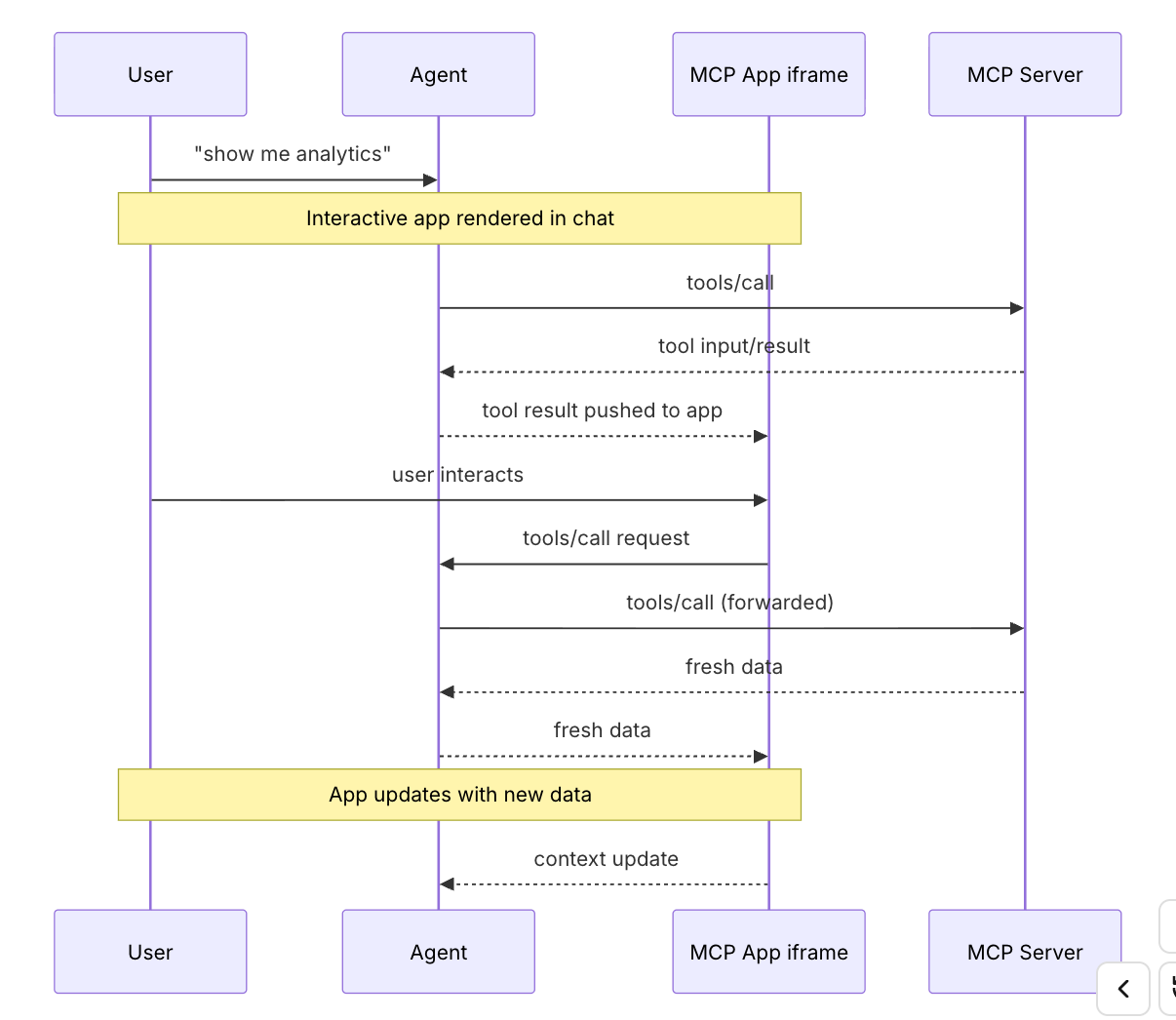
The app stays isolated from the host but can still call MCP tools through the secure postMessage channel.
When to use MCP AppsMCP Apps are a good fit when your use case involves:Exploring complex data. A user asks “show me sales by region.” A text response might list numbers, but an MCP App can render an interactive map where users click regions to drill down, hover for details, and toggle between metrics, all without additional prompts.Configuring with many options. Setting up a deployment involves dozens of interdependent choices. Rather than a back-and-forth conversation (“Which region?” “What instance size?” “Enable autoscaling?”), an MCP App presents a form where users see all options at once, with validation and defaults.Viewing rich media. When a user asks to review a PDF, see a 3D model, or preview generated images, text descriptions fall short. An MCP App embeds the actual viewer (pan, zoom, rotate) directly in the conversation.Real-time monitoring. A dashboard showing live metrics, logs, or system status needs continuous updates. An MCP App maintains a persistent connection, updating the display as data changes without requiring the user to ask “what’s the status now?”Multi-step workflows. Approving expense reports, reviewing code changes, or triaging issues involves examining items one by one. An MCP App provides navigation controls, action buttons, and state that persists across interactions.
何时使用 MCP 应用程序
当您的使用场景涉及以下情况时,MCP 应用程序非常适合:
探索复杂数据
用户询问“按地区显示销售额”。文本回复可能只列出数字,但 MCP 应用程序可以渲染交互式地图,用户可点击区域深入查看、悬停获取详情,并在指标间切换,无需额外提示。
配置多选项
部署设置涉及大量相互依赖的选项。MCP 应用程序无需来回对话(如“哪个地区?”“实例大小?”“启用自动扩展?”),而是提供表单,用户可一次性查看所有选项,并附带验证和默认值。
查看富媒体内容
当用户要求查看 PDF、3D 模型或生成图像的预览时,文本描述效果有限。MCP 应用程序直接将实际查看器(平移、缩放、旋转)嵌入对话中。
实时监控
显示实时指标、日志或系统状态的仪表板需要持续更新。MCP 应用程序保持持久连接,随数据变化更新显示,无需用户反复询问“现在状态如何?”。
多步骤工作流
审批费用报告、审查代码变更或分类问题需要逐项检查。MCP 应用程序提供导航控件、操作按钮,并在交互间保持状态持久性。
Security modelMCP Apps run in a sandboxed iframe, which provides strong isolation from the host application. The sandbox prevents your app from accessing the parent window’s DOM, reading the host’s cookies or local storage, navigating the parent page, or executing scripts in the parent context.All communication between your app and the host goes through the postMessage API. The host controls which capabilities your app can access. For example, a host might restrict which tools an app can call or disable the sendOpenLink capability.The sandbox is designed to prevent apps from escaping to access the host or user data.
安全模型
MCP应用程序运行在沙盒化的iframe中,与宿主应用实现了强隔离。该沙盒机制能阻止您的应用访问父窗口的DOM、读取宿主cookie或本地存储、跳转父级页面,或在父级上下文中执行脚本。
应用与宿主间的所有通信均通过postMessage API进行。宿主可控制应用能访问哪些功能,例如限制应用可调用的工具或禁用sendOpenLink功能。
沙盒的设计旨在防止应用逃逸访问宿主或用户数据。
Framework supportMCP Apps use their own dialect of MCP, built on JSON-RPC like the core protocol. Some messages are shared with regular MCP (e.g., tools/call), while others are specific to apps (e.g., ui/initialize). The transport is postMessage instead of stdio or HTTP. Since it’s all standard web primitives, you can use any framework or none at all.The App class from @modelcontextprotocol/ext-apps is a convenience wrapper, not a requirement. You can implement the postMessage protocol directly if you prefer to avoid dependencies or need tighter control.The examples directory includes starter templates for React, Vue, Svelte, Preact, Solid, and vanilla JavaScript. These demonstrate recommended patterns for each framework’s system, but they’re examples rather than requirements. You can choose whatever works best for your use case.
框架支持
MCP应用使用基于JSON-RPC的自定义MCP方言(与核心协议类似)。部分消息与常规MCP通用(如tools/call),另一些则为应用专属(如ui/initialize)。通信层采用postMessage而非stdio或HTTP。由于完全基于标准Web原生技术,开发者可自由选择框架或无需框架。
@modelcontextprotocol/ext-apps提供的App类仅是便捷封装,并非强制要求。若希望避免依赖项或需要更精细控制,可直接实现postMessage协议。
示例目录包含React、Vue、Svelte、Preact、Solid及原生JavaScript的入门模板,这些示例展示了各框架体系下的推荐实践模式,但仅供参考而非强制规范。开发者可根据实际需求选择最适合的方案。
Client support
MCP Apps is an extension to the core MCP specification. Host support varies by client.
MCP Apps are currently supported by Claude, Claude Desktop, VS Code GitHub Copilot, Goose, Postman, and MCPJam. See the client matrix for the full list of extension support across clients.If you’re building an MCP client and want to support MCP Apps, you have two options:
- Use a framework: The @mcp-ui/client package provides React components for rendering and interacting with MCP Apps views in your host application. See the MCP-UI documentation for usage details.
- Build on AppBridge: The SDK includes an App Bridge module that handles rendering apps in sandboxed iframes, message passing, tool call proxying, and security policy enforcement. The basic-host example shows how to integrate it.
See the API documentation for implementation details.
客户支持
MCP Apps是核心MCP规范的扩展功能。各客户端对它的支持程度有所不同。
目前支持MCP Apps的客户端包括Claude、Claude Desktop、VS Code GitHub Copilot、Goose、Postman以及MCPJam。完整客户端扩展支持列表请参阅客户端矩阵文档。如果您正在开发MCP客户端并希望支持MCP Apps,有两种实现方案:
使用框架方案:@mcp-ui/client包提供React组件,用于在宿主应用程序中渲染MCP Apps界面并实现交互功能。具体用法详见MCP-UI文档。 基于AppBridge开发:SDK包含AppBridge模块,可处理沙盒iframe中的应用程序渲染、消息传递、工具调用代理及安全策略实施。基础宿主示例演示了集成方法。 实现细节请参阅API文档。
ExamplesThe ext-apps repository includes ready-to-run examples demonstrating different use cases:
- 3D and visualization: map-server (CesiumJS globe), threejs-server (Three.js scenes), shadertoy-server (shader effects)
- Data exploration: cohort-heatmap-server, customer-segmentation-server, wiki-explorer-server
- Business applications: scenario-modeler-server, budget-allocator-server
- Media: pdf-server, video-resource-server, sheet-music-server, say-server (text-to-speech)
- Utilities: qr-server, system-monitor-server, transcript-server (speech-to-text)
- Starter templates: React, Vue, Svelte, Preact, Solid, vanilla JavaScript
To start building your own MCP App, see the build guide.
示例
ext-apps 代码库包含可直接运行的示例,展示不同使用场景:
3D与可视化:map-server(CesiumJS地球仪)、threejs-server(Three.js场景)、shadertoy-server(着色器特效)
数据探索:cohort-heatmap-server、customer-segmentation-server、wiki-explorer-server
商业应用:scenario-modeler-server、budget-allocator-server
媒体:pdf-server、video-resource-server、sheet-music-server、say-server(文本转语音)
工具:qr-server、system-monitor-server、transcript-server(语音转文本)
入门模板:React、Vue、Svelte、Preact、Solid、原生JavaScript
要开始构建自己的MCP应用,请参阅构建指南。
---
Interactive UI applications that render inside MCP hosts like Claude Desktop
在MCP主机内渲染的交互式UI应用程序

有“AI”的1024 = 2048,欢迎大家加入2048 AI社区
更多推荐
 8
8 0
0- 0


 已为社区贡献67条内容

所有评论(0)