Flutter for OpenHarmony 三方库 keyboard_actions 键盘操作栏适配详解
欢迎加入开源鸿蒙跨平台社区:https://openharmonycrossplatform.csdn.net
本文基于 Flutter 3.27.5 开发
一、从用户体验出发:为什么需要键盘操作栏
1.1 表单输入中的痛点
在移动应用中,表单输入是最常见的交互场景之一。但原生键盘往往缺少一些实用的辅助功能:
场景一:多字段表单的切换
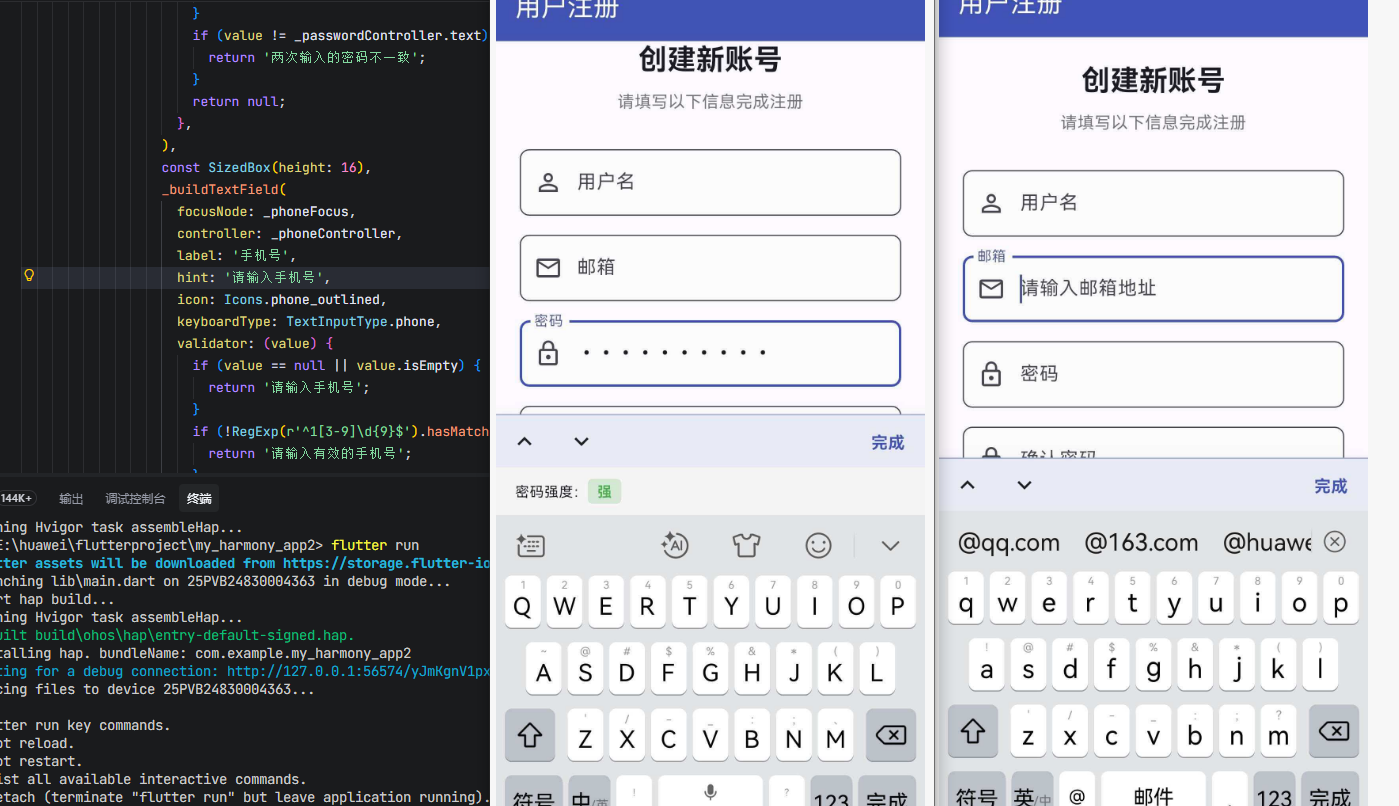
用户填写注册表单时,需要在用户名、邮箱、密码等多个字段之间切换。如果没有"上一个/下一个"按钮,用户只能手动点击各个输入框,效率低下。
场景二:键盘的关闭
用户完成输入后,往往不知道如何关闭键盘。在 iOS 上这是一个经典问题,在 OpenHarmony 上同样存在。一个"完成"按钮可以显著提升用户体验。
场景三:自定义键盘区域
某些场景下,需要在键盘上方显示额外的内容,比如日期选择器、颜色选择器、验证提示等。原生键盘无法满足这些需求。
1.2 技术方案对比
| 方案 | 特点 | 适用场景 |
|---|---|---|
| keyboard_actions | 在键盘上方显示操作栏,支持上一个/下一个/完成按钮 | 多字段表单 |
| 手动实现 Overlay | 自己管理 Overlay 的显示和位置计算 | 高度定制化的场景 |
| 系统键盘配置 | 依赖系统键盘自带的功能 | 简单场景 |
keyboard_actions 的优势在于:自动管理键盘的显示和隐藏、自动计算偏移量、支持自定义按钮和自定义键盘区域,开发者只需配置即可使用。
二、keyboard_actions 库功能全景
2.1 核心 API 一览
keyboard_actions 提供了三个核心类:
KeyboardActions:主组件,包裹在需要键盘操作栏的页面外层,负责管理 Overlay 的显示和键盘避让。
KeyboardActionsConfig:配置类,定义键盘操作栏的全局设置,如背景颜色、分隔线颜色、是否显示上一个/下一个按钮等。
KeyboardActionsItem:单个输入项的配置,绑定 FocusNode,定义该输入框对应的操作栏按钮和自定义键盘区域。
2.2 跨平台支持情况
| 平台 | 键盘操作栏 | 键盘避让 | 自定义键盘区域 | 上一个/下一个 |
|---|---|---|---|---|
| Android | ✅ | ✅ | ✅ | ✅ |
| iOS | ✅ | ✅ | ✅ | ✅ |
| OpenHarmony | ✅ | ✅ | ✅ | ✅ |
| Web | ❌ | ❌ | ❌ | ❌ |
2.3 环境配置
添加依赖
dependencies:
  keyboard_actions:
    git:
      url: https://atomgit.com/openharmony-sig/fluttertpc_keyboard_actions.git
执行 flutter pub get 安装。
使用注意
使用 KeyboardActions 时,需要将 Scaffold.resizeToAvoidBottomInset 设置为 false,因为键盘避让由 KeyboardActions 自行管理。
三、源码深度剖析
3.1 整体架构
keyboard_actions 采用纯 Dart 实现,不依赖任何平台特定代码,通过 Overlay 和 FocusNode 监听实现键盘操作栏:
┌─────────────────────────────────────────────┐
│           应用层                              │
│   KeyboardActions + KeyboardActionsConfig   │
└──────────────┬──────────────────────────────┘
               │
               │ FocusNode 监听
               │
┌──────────────▼──────────────────────────────┐
│      状态管理层                               │
│   KeyboardActionstate                       │
│   ├── _map (FocusNode 映射)                  │
│   ├── _currentAction (当前操作项)             │
│   └── _overlayEntry (Overlay 条目)           │
└──────────────┬──────────────────────────────┘
               │
               │ Overlay 插入/移除
               │
┌──────────────▼──────────────────────────────┐
│      UI 渲染层                                │
│   _buildBar() / _insertOverlay()            │
│   └── 操作栏按钮 + 自定义 footer              │
└──────────────┬──────────────────────────────┘
               │
               │ BottomAreaAvoider
               │
┌──────────────▼──────────────────────────────┐
│      键盘避让层                               │
│   SingleChildScrollView + 偏移计算           │
└─────────────────────────────────────────────┘
3.2 平台检测机制
keyboard_actions 通过条件导入实现跨平台检测:
// platform_check.dart
import 'platform_web.dart' if (dart.library.io) 'platform_io.dart';

abstract class PlatformCheck {
  static bool get isWeb => currentPlatform == PlatformCheckType.Web;
  static bool get isAndroid => currentPlatform == PlatformCheckType.Android;
  static bool get isIOS => currentPlatform == PlatformCheckType.IOS;
  static bool get isOHOS => currentPlatform == PlatformCheckType.OHOS;
}
// platform_io.dart
PlatformCheckType get currentPlatform {
  if (Platform.isWindows) return PlatformCheckType.Windows;
  if (Platform.isFuchsia) return PlatformCheckType.Fuchsia;
  if (Platform.isMacOS) return PlatformCheckType.MacOS;
  if (Platform.isLinux) return PlatformCheckType.Linux;
  if (Platform.isIOS) return PlatformCheckType.IOS;
  if (defaultTargetPlatform == TargetPlatform.ohos) return PlatformCheckType.IOS;
  return PlatformCheckType.Android;
}
设计特点:
- 条件导入:使用
if (dart.library.io)实现 Web 和原生平台的代码分离 - OpenHarmony 检测:通过
defaultTargetPlatform == TargetPlatform.ohos判断 OpenHarmony 平台 - 枚举类型:定义了
OHOS枚举值,支持KeyboardActionsPlatform.OHOS配置
3.3 核心状态管理
3.3.1 FocusNode 映射管理
class KeyboardActionstate extends State<KeyboardActions> with WidgetsBindingObserver {
  Map<int, KeyboardActionsItem> _map = Map();
  KeyboardActionsItem? _currentAction;
  int? _currentIndex = 0;
  OverlayEntry? _overlayEntry;

  void setConfig(KeyboardActionsConfig newConfig) {
    clearConfig();
    config = newConfig;
    for (int i = 0; i < config!.actions!.length; i++) {
      _addAction(i, config!.actions![i]);
    }
    _startListeningFocus();
  }

  void _addAction(int index, KeyboardActionsItem action) {
    _map[index] = action;
  }

  void _startListeningFocus() {
    _map.values.forEach((action) =>
      action.focusNode.addListener(_focusNodeListener));
  }
设计特点:
- 索引映射:使用
Map<int, KeyboardActionsItem>存储所有输入项,支持按索引访问 - 自动监听:配置完成后自动为所有 FocusNode 添加监听器
- 生命周期管理:在
dispose时清除所有监听器
3.3.2 焦点变化处理
Future<Null> _focusNodeListener() async {
  bool hasFocusFound = false;
  _map.keys.forEach((key) {
    final currentAction = _map[key]!;
    if (currentAction.focusNode.hasFocus) {
      hasFocusFound = true;
      _currentAction = currentAction;
      _currentIndex = key;
      return;
    }
  });
  _focusChanged(hasFocusFound);
}

void _focusChanged(bool showBar) async {
  if (_isAvailable) {
    if (_dismissAnimation != null) {
      await _dismissAnimation?.future;
    }
    if (showBar && !_isShowing) {
      _insertOverlay();
    } else if (!showBar && _isShowing) {
      _removeOverlay();
    } else if (showBar && _isShowing) {
      if (PlatformCheck.isAndroid || PlatformCheck.isOHOS) {
        _updateOffset();
      }
      _overlayEntry!.markNeedsBuild();
    }
  }
}
实现逻辑:
- 遍历所有 FocusNode,找到当前获得焦点的输入项
- 更新
_currentAction和_currentIndex - 根据焦点状态显示或隐藏 Overlay
- 在 Android 和 OpenHarmony 平台上,自动更新偏移量
3.4 Overlay 插入与移除
3.4.1 插入 Overlay
void _insertOverlay() {
  OverlayState os = Overlay.of(context);
  _inserted = true;
  _overlayEntry = OverlayEntry(builder: (context) {
    _currentFooter = (_currentAction!.footerBuilder != null)
        ? _currentAction!.footerBuilder!(context)
        : null;

    final queryData = MediaQuery.of(context);
    return Stack(
      children: [
        if (widget.tapOutsideBehavior != TapOutsideBehavior.none)
          Positioned.fill(
            child: Listener(
              onPointerDown: (event) {
                if (!widget.keepFocusOnTappingNode ||
                    _currentAction?.focusNode.rect.contains(event.position) != true) {
                  _clearFocus();
                }
              },
              behavior: widget.tapOutsideBehavior ==
                      TapOutsideBehavior.translucentDismiss
                  ? HitTestBehavior.translucent
                  : HitTestBehavior.opaque,
            ),
          ),
        Positioned(
          left: 0,
          right: 0,
          bottom: queryData.viewInsets.bottom,
          child: Material(
            color: config!.keyboardBarColor ?? Colors.grey[200],
            elevation: config!.keyboardBarElevation ?? 20,
            child: Column(
              mainAxisSize: MainAxisSize.min,
              children: <Widget>[
                if (_currentAction!.displayActionBar)
                  _buildBar(_currentAction!.displayArrows),
                if (_currentFooter != null)
                  AnimatedContainer(
                    duration: _timeToDismiss,
                    child: _currentFooter,
                    height: _inserted ? _currentFooter!.preferredSize.height : 0,
                  ),
              ],
            ),
          ),
        ),
      ],
    );
  });
  os.insert(_overlayEntry!);
}
实现逻辑:
- 获取当前 OverlayState
- 如果有自定义 footerBuilder,构建自定义键盘区域
- 构建 Stack,包含点击外部关闭的透明层和操作栏
- 操作栏定位在键盘上方(
bottom: queryData.viewInsets.bottom) - 插入 Overlay
3.4.2 移除 Overlay
void _removeOverlay({bool fromDispose = false}) async {
  _inserted = false;
  if (_currentFooter != null && _dismissAnimationNeeded) {
    if (mounted && !fromDispose) {
      _overlayEntry?.markNeedsBuild();
      _dismissAnimation = Completer<void>();
      await Future.delayed(_timeToDismiss);
      _dismissAnimation?.complete();
      _dismissAnimation = null;
    }
  }
  _overlayEntry?.remove();
  _overlayEntry = null;
  _currentFooter = null;
  if (!fromDispose && _dismissAnimationNeeded) _updateOffset();
  _dismissAnimationNeeded = true;
}
实现逻辑:
- 如果有自定义 footer,等待动画完成(110ms)
- 移除 Overlay
- 更新偏移量
3.5 偏移量计算
void _updateOffset() {
  if (!mounted) return;

  if (!_isShowing || !_isAvailable) {
    setState(() { _offset = 0.0; });
    return;
  }

  double newOffset = _currentAction!.displayActionBar ? _kBarSize : 0;

  final keyboardHeight = EdgeInsets.fromWindowPadding(
          WidgetsBinding.instance.window.viewInsets,
          WidgetsBinding.instance.window.devicePixelRatio)
      .bottom;

  newOffset += keyboardHeight;

  if (_currentFooter != null) {
    newOffset += _currentFooter!.preferredSize.height;
  }

  newOffset -= _localMargin + _distanceBelowWidget;

  if (newOffset < 0) newOffset = 0;

  if (_offset != newOffset) {
    setState(() { _offset = newOffset; });
  }
}
偏移量组成:
- 操作栏高度(45.0)
- 键盘高度
- 自定义 footer 高度
- 减去 KeyboardActions 组件下方的距离
3.6 操作栏构建
Widget _buildBar(bool displayArrows) {
  return AnimatedCrossFade(
    duration: _timeToDismiss,
    crossFadeState: _isShowing ? CrossFadeState.showFirst : CrossFadeState.showSecond,
    firstChild: Container(
      height: _kBarSize,
      width: MediaQuery.of(context).size.width,
      decoration: BoxDecoration(
        border: Border(
          top: BorderSide(
            color: widget.config.keyboardSeparatorColor,
            width: 1.0,
          ),
        ),
      ),
      child: SafeArea(
        top: false,
        bottom: false,
        child: Row(
          mainAxisAlignment: _currentAction?.toolbarAlignment ?? MainAxisAlignment.end,
          children: [
            if (config!.nextFocus && displayArrows) ...[
              IconButton(
                icon: Icon(Icons.keyboard_arrow_up),
                onPressed: _previousIndex != null ? _onTapUp : null,
              ),
              IconButton(
                icon: Icon(Icons.keyboard_arrow_down),
                onPressed: _nextIndex != null ? _onTapDown : null,
              ),
              const Spacer(),
            ],
            if (_currentAction?.displayDoneButton != null &&
                _currentAction!.displayDoneButton &&
                (_currentAction!.toolbarButtons == null ||
                    _currentAction!.toolbarButtons!.isEmpty))
              Padding(
                padding: const EdgeInsets.all(5.0),
                child: InkWell(
                  onTap: () {
                    if (_currentAction?.onTapAction != null) {
                      _currentAction!.onTapAction!();
                    }
                    _clearFocus();
                  },
                  child: Container(
                    padding: EdgeInsets.symmetric(vertical: 8.0, horizontal: 12.0),
                    child: config?.defaultDoneWidget ??
                        Text("Done", style: TextStyle(fontSize: 16.0)),
                  ),
                ),
              ),
            if (_currentAction?.toolbarButtons != null)
              ..._currentAction!.toolbarButtons!
                  .map((item) => item(_currentAction!.focusNode))
                  .toList()
          ],
        ),
      ),
    ),
    secondChild: const SizedBox.shrink(),
  );
}
操作栏组成:
- 上一个/下一个按钮(如果启用)
- 完成按钮(如果启用且没有自定义按钮)
- 自定义按钮(如果提供)
四、完整实战项目:用户注册表单
下面通过一个完整的用户注册表单,展示 keyboard_actions 的实际应用。这个应用包含多个输入字段、键盘操作栏、自定义键盘区域和表单验证等功能。
4.1 应用功能说明
- 多字段表单:用户名、邮箱、密码、确认密码、手机号
- 键盘操作栏:上一个/下一个/完成按钮
- 自定义键盘区域:密码强度指示器
- 表单验证:实时验证输入内容
- 键盘避让:自动滚动到当前输入框
4.2 完整代码
import 'package:flutter/material.dart';
import 'package:keyboard_actions/keyboard_actions.dart';
void main() {
runApp(const RegisterApp());
}
class RegisterApp extends StatelessWidget {
const RegisterApp({super.key});
Widget build(BuildContext context) {
return MaterialApp(
title: '用户注册',
theme: ThemeData(
colorScheme: ColorScheme.fromSeed(seedColor: Colors.indigo),
useMaterial3: true,
),
home: const RegisterPage(),
debugShowCheckedModeBanner: false,
);
}
}
class RegisterPage extends StatefulWidget {
const RegisterPage({super.key});
State<RegisterPage> createState() => _RegisterPageState();
}
class _RegisterPageState extends State<RegisterPage> {
final _usernameFocus = FocusNode();
final _emailFocus = FocusNode();
final _passwordFocus = FocusNode();
final _confirmPasswordFocus = FocusNode();
final _phoneFocus = FocusNode();
final _usernameController = TextEditingController();
final _emailController = TextEditingController();
final _passwordController = TextEditingController();
final _confirmPasswordController = TextEditingController();
final _phoneController = TextEditingController();
final _formKey = GlobalKey<FormState>();
String _passwordStrength = '';
Color _strengthColor = Colors.grey;
void initState() {
super.initState();
_passwordController.addListener(_checkPasswordStrength);
}
void dispose() {
_usernameFocus.dispose();
_emailFocus.dispose();
_passwordFocus.dispose();
_confirmPasswordFocus.dispose();
_phoneFocus.dispose();
_usernameController.dispose();
_emailController.dispose();
_passwordController.dispose();
_confirmPasswordController.dispose();
_phoneController.dispose();
super.dispose();
}
void _checkPasswordStrength() {
final password = _passwordController.text;
if (password.isEmpty) {
_passwordStrength = '';
_strengthColor = Colors.grey;
} else if (password.length < 6) {
_passwordStrength = '弱';
_strengthColor = Colors.red;
} else if (password.length < 10) {
_passwordStrength = '中';
_strengthColor = Colors.orange;
} else {
_passwordStrength = '强';
_strengthColor = Colors.green;
}
setState(() {});
}
KeyboardActionsConfig _buildConfig(BuildContext context) {
return KeyboardActionsConfig(
keyboardActionsPlatform: KeyboardActionsPlatform.ALL,
nextFocus: true,
keyboardBarColor: Colors.indigo[50],
keyboardSeparatorColor: Colors.indigo[200]!,
defaultDoneWidget: Text(
'完成',
style: TextStyle(color: Colors.indigo, fontWeight: FontWeight.bold),
),
actions: [
KeyboardActionsItem(
focusNode: _usernameFocus,
displayDoneButton: true,
),
KeyboardActionsItem(
focusNode: _emailFocus,
displayDoneButton: true,
),
KeyboardActionsItem(
focusNode: _passwordFocus,
displayDoneButton: true,
footerBuilder: (context) => _buildPasswordStrengthIndicator(context),
),
KeyboardActionsItem(
focusNode: _confirmPasswordFocus,
displayDoneButton: true,
),
KeyboardActionsItem(
focusNode: _phoneFocus,
displayDoneButton: true,
),
],
);
}
PreferredSizeWidget _buildPasswordStrengthIndicator(BuildContext context) {
return _PreferredSizedContainer(
preferredSize: const Size.fromHeight(40),
child: Container(
width: double.infinity,
padding: const EdgeInsets.symmetric(horizontal: 16),
color: Colors.grey[100],
child: Row(
children: [
Text('密码强度:', style: TextStyle(fontSize: 12)),
Container(
padding: const EdgeInsets.symmetric(horizontal: 8, vertical: 2),
decoration: BoxDecoration(
color: _strengthColor.withOpacity(0.2),
borderRadius: BorderRadius.circular(4),
),
child: Text(
_passwordStrength,
style: TextStyle(
color: _strengthColor,
fontSize: 12,
fontWeight: FontWeight.bold,
),
),
),
],
),
),
);
}
void _submitForm() {
if (_formKey.currentState!.validate()) {
ScaffoldMessenger.of(context).showSnackBar(
const SnackBar(
content: Text('注册成功!'),
backgroundColor: Colors.green,
),
);
}
}
Widget build(BuildContext context) {
return Scaffold(
appBar: AppBar(
title: const Text('用户注册'),
backgroundColor: Colors.indigo,
foregroundColor: Colors.white,
),
body: KeyboardActions(
config: _buildConfig(context),
tapOutsideBehavior: TapOutsideBehavior.translucentDismiss,
overscroll: 20,
child: SafeArea(
child: SingleChildScrollView(
padding: const EdgeInsets.all(20),
child: Form(
key: _formKey,
child: Column(
crossAxisAlignment: CrossAxisAlignment.stretch,
children: [
const Text(
'创建新账号',
style: TextStyle(
fontSize: 24,
fontWeight: FontWeight.bold,
),
textAlign: TextAlign.center,
),
const SizedBox(height: 8),
Text(
'请填写以下信息完成注册',
style: TextStyle(color: Colors.grey[600]),
textAlign: TextAlign.center,
),
const SizedBox(height: 30),
_buildTextField(
focusNode: _usernameFocus,
controller: _usernameController,
label: '用户名',
hint: '请输入用户名(3-20个字符)',
icon: Icons.person_outline,
validator: (value) {
if (value == null || value.isEmpty) {
return '请输入用户名';
}
if (value.length < 3 || value.length > 20) {
return '用户名长度为3-20个字符';
}
return null;
},
),
const SizedBox(height: 16),
_buildTextField(
focusNode: _emailFocus,
controller: _emailController,
label: '邮箱',
hint: '请输入邮箱地址',
icon: Icons.email_outlined,
keyboardType: TextInputType.emailAddress,
validator: (value) {
if (value == null || value.isEmpty) {
return '请输入邮箱';
}
if (!value.contains('@')) {
return '请输入有效的邮箱地址';
}
return null;
},
),
const SizedBox(height: 16),
_buildTextField(
focusNode: _passwordFocus,
controller: _passwordController,
label: '密码',
hint: '请输入密码(至少6个字符)',
icon: Icons.lock_outline,
obscureText: true,
validator: (value) {
if (value == null || value.isEmpty) {
return '请输入密码';
}
if (value.length < 6) {
return '密码长度至少6个字符';
}
return null;
},
),
const SizedBox(height: 16),
_buildTextField(
focusNode: _confirmPasswordFocus,
controller: _confirmPasswordController,
label: '确认密码',
hint: '请再次输入密码',
icon: Icons.lock_outline,
obscureText: true,
validator: (value) {
if (value == null || value.isEmpty) {
return '请确认密码';
}
if (value != _passwordController.text) {
return '两次输入的密码不一致';
}
return null;
},
),
const SizedBox(height: 16),
_buildTextField(
focusNode: _phoneFocus,
controller: _phoneController,
label: '手机号',
hint: '请输入手机号',
icon: Icons.phone_outlined,
keyboardType: TextInputType.phone,
validator: (value) {
if (value == null || value.isEmpty) {
return '请输入手机号';
}
if (!RegExp(r'^1[3-9]\d{9}$').hasMatch(value)) {
return '请输入有效的手机号';
}
return null;
},
),
const SizedBox(height: 30),
ElevatedButton(
onPressed: _submitForm,
style: ElevatedButton.styleFrom(
backgroundColor: Colors.indigo,
foregroundColor: Colors.white,
padding: const EdgeInsets.symmetric(vertical: 16),
shape: RoundedRectangleBorder(
borderRadius: BorderRadius.circular(8),
),
),
child: const Text(
'注册',
style: TextStyle(fontSize: 16, fontWeight: FontWeight.bold),
),
),
const SizedBox(height: 20),
],
),
),
),
),
),
);
}
Widget _buildTextField({
required FocusNode focusNode,
required TextEditingController controller,
required String label,
required String hint,
required IconData icon,
TextInputType? keyboardType,
bool obscureText = false,
String? Function(String?)? validator,
}) {
return TextFormField(
focusNode: focusNode,
controller: controller,
keyboardType: keyboardType,
obscureText: obscureText,
decoration: InputDecoration(
labelText: label,
hintText: hint,
prefixIcon: Icon(icon),
border: OutlineInputBorder(
borderRadius: BorderRadius.circular(8),
),
focusedBorder: OutlineInputBorder(
borderRadius: BorderRadius.circular(8),
borderSide: BorderSide(color: Colors.indigo, width: 2),
),
filled: true,
fillColor: Colors.grey[50],
),
validator: validator,
);
}
}
class _PreferredSizedContainer extends StatelessWidget implements PreferredSizeWidget {
final Widget child;
final Size preferredSize;
const _PreferredSizedContainer({required this.child, required this.preferredSize});
Widget build(BuildContext context) => child;
}
4.3 代码解析
4.3.1 配置构建
KeyboardActionsConfig _buildConfig(BuildContext context) {
  return KeyboardActionsConfig(
    keyboardActionsPlatform: KeyboardActionsPlatform.ALL,
    nextFocus: true,
    keyboardBarColor: Colors.indigo[50],
    keyboardSeparatorColor: Colors.indigo[200]!,
    defaultDoneWidget: Text(
      '完成',
      style: TextStyle(color: Colors.indigo, fontWeight: FontWeight.bold),
    ),
    actions: [
      KeyboardActionsItem(focusNode: _usernameFocus),
      KeyboardActionsItem(focusNode: _emailFocus),
      KeyboardActionsItem(
        focusNode: _passwordFocus,
        footerBuilder: (context) => _buildPasswordStrengthIndicator(context),
      ),
      KeyboardActionsItem(focusNode: _confirmPasswordFocus),
      KeyboardActionsItem(focusNode: _phoneFocus),
    ],
  );
}
配置说明:
keyboardActionsPlatform: KeyboardActionsPlatform.ALL:在所有平台启用nextFocus: true:显示上一个/下一个按钮keyboardBarColor:操作栏背景颜色defaultDoneWidget:自定义完成按钮actions:每个输入项的配置,密码字段带有自定义 footer
4.3.2 自定义键盘区域
PreferredSizeWidget _buildPasswordStrengthIndicator(BuildContext context) {
  return _PreferredSizedContainer(
    preferredSize: const Size.fromHeight(40),
    child: Container(
      width: double.infinity,
      padding: const EdgeInsets.symmetric(horizontal: 16),
      color: Colors.grey[100],
      child: Row(
        children: [
          Text('密码强度:', style: TextStyle(fontSize: 12)),
          Container(
            padding: const EdgeInsets.symmetric(horizontal: 8, vertical: 2),
            decoration: BoxDecoration(
              color: _strengthColor.withOpacity(0.2),
              borderRadius: BorderRadius.circular(4),
            ),
            child: Text(
              _passwordStrength,
              style: TextStyle(
                color: _strengthColor,
                fontSize: 12,
                fontWeight: FontWeight.bold,
              ),
            ),
          ),
        ],
      ),
    ),
  );
}
实现要点:
- 返回
PreferredSizeWidget,必须指定高度 - 根据密码内容动态更新强度显示
- 在键盘上方显示,不影响正常输入
4.3.3 键盘使用方式
KeyboardActions(
  config: _buildConfig(context),
  tapOutsideBehavior: TapOutsideBehavior.translucentDismiss,
  overscroll: 20,
  child: SafeArea(
    child: SingleChildScrollView(
      // 表单内容
    ),
  ),
)
参数说明:
config:键盘操作栏配置tapOutsideBehavior:点击外部关闭键盘overscroll:额外滚动距离,确保输入框完全可见child:需要键盘避让的内容
五、关键注意事项
5.1 Scaffold 配置
使用 KeyboardActions 时,必须将 Scaffold.resizeToAvoidBottomInset 设置为 false:
Scaffold(
  resizeToAvoidBottomInset: false,
  body: KeyboardActions(
    config: config,
    child: // ...
  ),
)
因为键盘避让由 KeyboardActions 自行管理,如果同时启用会导致双重偏移。
5.2 FocusNode 管理
每个 KeyboardActionsItem 必须绑定一个 FocusNode,且需要在 dispose 中释放:
void dispose() {
_focusNode.dispose();
_controller.dispose();
super.dispose();
}
5.3 自定义 footer 高度
自定义 footerBuilder 必须返回 PreferredSizeWidget,且高度必须准确。由于 SizedBox 不是 PreferredSizeWidget,需要自定义包装类:
class _PreferredSizedContainer extends StatelessWidget implements PreferredSizeWidget {
final Widget child;
final Size preferredSize;
const _PreferredSizedContainer({required this.child, required this.preferredSize});
Widget build(BuildContext context) => child;
}
// 使用方式
KeyboardActionsItem(
focusNode: _focusNode,
footerBuilder: (context) => _PreferredSizedContainer(
preferredSize: const Size.fromHeight(50),
child: // 自定义内容
),
)
5.4 平台兼容性
keyboard_actions 是纯 Dart 库,在 OpenHarmony 平台上完全兼容,无需额外的原生代码适配。平台检测通过 defaultTargetPlatform == TargetPlatform.ohos 实现。
六、总结
通过深入分析 keyboard_actions 的源码和实际应用,我们了解到:
架构设计:采用纯 Dart 实现,通过 Overlay 和 FocusNode 监听实现键盘操作栏,不依赖任何平台特定代码。
核心优势:自动管理键盘的显示和隐藏、自动计算偏移量、支持自定义按钮和自定义键盘区域,开发者只需配置即可使用。
OpenHarmony 兼容性:由于是纯 Dart 库,在 OpenHarmony 平台上完全兼容,无需额外的原生代码适配。平台检测通过 defaultTargetPlatform == TargetPlatform.ohos 实现。
应用场景:适合多字段表单、需要键盘操作栏的场景,如注册表单、登录表单、信息填写等。
七、参考资源

有“AI”的1024 = 2048,欢迎大家加入2048 AI社区
更多推荐


 7
7 0
0- 0


 已为社区贡献2条内容

所有评论(0)