[ZYNQ Linux] 端侧AI模型部署(DPU)
3.用Ultra RAM(容量较大、速率较慢)可以降低Bram的使用petalinux根据平台会自动生成相关的设备树。驱动Linux新的版本已经加入xilinx_dpu的驱动。源码里面没找到,下载xilinx_dpu.c、xilinx_dpu.h单独编译成模块。驱动注册后会生成/dev/dpu设备。用户空间petalinux 里面要加入meta_vitis_ai层,把xrt等相关ai的库编译到文件
·
[ZYNQ Linux] 端侧AI模型部署(DPU)
环境
- Vitis2023.1
- 4ev
- DPU4.1
PL
- DPU 不在Vivado里面,需要单独下载并加入到仓库里面
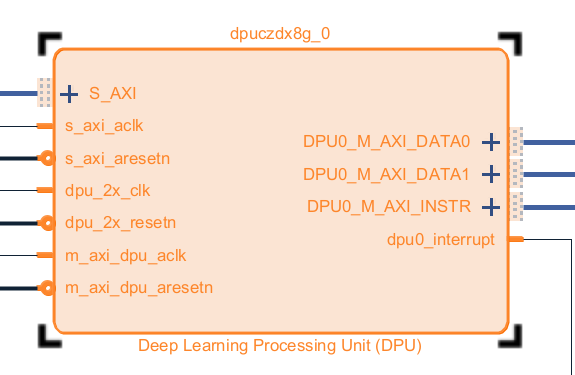
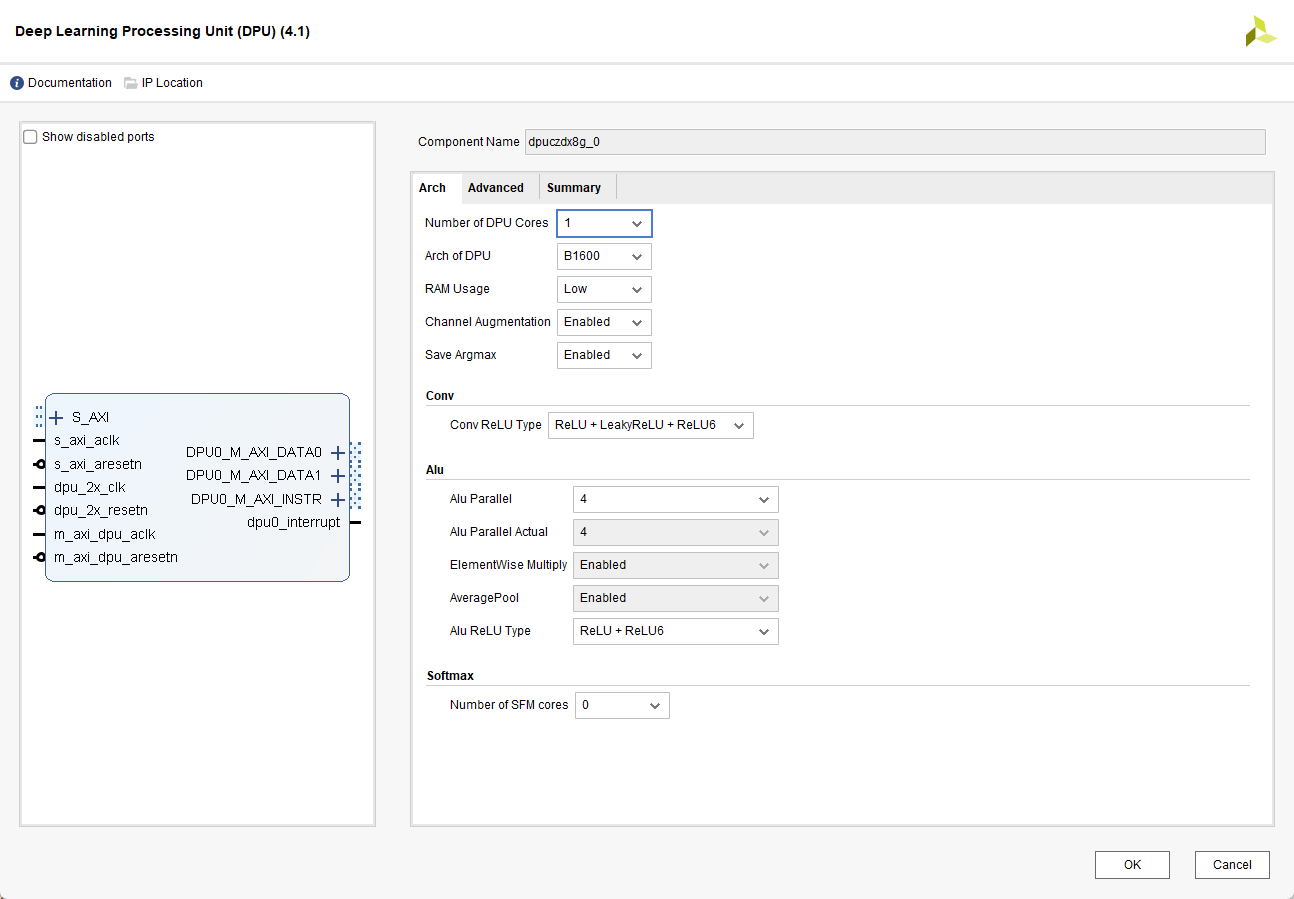
- DPU有不同的配置,需要的资源也不一样,根据实际情况选择,这里选择B1600
3. 用Ultra RAM(容量较大、速率较慢)可以降低Bram的使用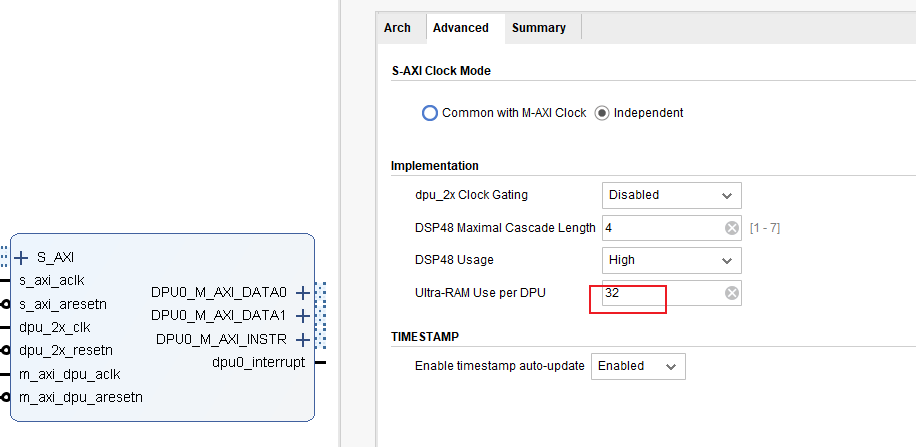
PS
内核驱动
设备树
petalinux根据平台会自动生成相关的设备树。
		dpuczdx8g_0: dpuczdx8g@81000000 {
			clock-names = "s_axi_aclk", "dpu_2x_clk", "m_axi_dpu_aclk";
			clocks = <&zynqmp_clk 71>, <&misc_clk_0>, <&misc_clk_1>;
			compatible = "xlnx,dpuczdx8g-4.1";
			interrupt-names = "dpu0_interrupt";
			interrupt-parent = <&gic>;
			interrupts = <0 93 4>;
			reg = <0x0 0x81000000 0x0 0x1000000>;
		};
驱动
Linux新的版本已经加入xilinx_dpu的驱动。
源码里面没找到,下载xilinx_dpu.c、xilinx_dpu.h单独编译成模块。
驱动注册后会生成/dev/dpu设备。
[    8.637444] xlnx-dpu 81000000.dpuczdx8g: Freq: axilite: 99 MHz, dpu: 199 MHz, dsp: 399 MHz
[    8.637464] xlnx-dpu 81000000.dpuczdx8g: found 1 dpu core @200MHz and 0 softmax core
[    8.638241] xlnx-dpu 81000000.dpuczdx8g: dpu registered as /dev/dpu successfully
用户空间
petalinux 里面要加入meta_vitis_ai层,把xrt等相关ai的库编译到文件系统。理论上可以单独编译,比较复杂。
这些运行环境(库、命令工具)是在/dev/dpu的驱动上提供了C、Python等的调用接口,使用起来更方便。
xdputil 命令
- 查询DPU状态、进行DPU测试等等
xdputil query
{
    "DPU IP Spec":{
        "DPU Core Count":1,
        "IP version":"v4.1.0",
        "enable softmax":"False"
    },
    "VAI Version":{
        "libvart-runner.so":"Xilinx vart-runner Version: 3.5.0-b7953a2a9f60e23efdfced5c186328dd1449665c  2025-10-18-08:16:45 ",
        "libvitis_ai_library-dpu_task.so":"Advanced Micro Devices vitis_ai_library dpu_task Version: 3.5.0-b7953a2a9f60e23efdfced5c186328dd1449665c  2023-06-29 03:20:28 [UTC] ",
        "libxir.so":"Xilinx xir Version: xir-b7953a2a9f60e23efdfced5c186328dd1449665c 2023-09-12-22:56:08",
        "target_factory":"target-factory.3.5.0 b7953a2a9f60e23efdfced5c186328dd1449665c"
    },
    "kernels":[
        {
            "DPU Arch":"DPUCZDX8G_ISA1_B1600",
            "DPU Frequency (MHz)":200,
            "XRT Frequency (MHz)":100,
            "cu_idx":0,
            "fingerprint":"0x101000056010404",
            "is_vivado_flow":true,
            "name":"DPU Core 0"
        }
    ]
}
xdputil status
{
    "kernels":[
        {
            "addrs_registers":{
                "dpu0_base_addr_0":"0x5cd00000",
                "dpu0_base_addr_1":"0x60800000",
                "dpu0_base_addr_2":"0x5bb80000",
                "dpu0_base_addr_3":"0x5bb40000",
                "dpu0_base_addr_4":"0x0",
                "dpu0_base_addr_5":"0x0",
                "dpu0_base_addr_6":"0x0",
                "dpu0_base_addr_7":"0x0"
            },
            "common_registers":{
                "ADDR_CODE":"0x7070f0f",
                "CONV END":26034,
                "CONV START":26034,
                "HP_ARCOUNT_MAX":7,
                "HP_ARLEN":15,
                "HP_AWCOUNT_MAX":7,
                "HP_AWLEN":15,
                "LOAD END":56453,
                "LOAD START":56453,
                "MISC END":6876,
                "MISC START":6876,
                "PROF_NUM":0,
                "PROF_VALUE":0,
                "SAVE END":9608,
                "SAVE START":9608
            },
            "name":"DPU Registers Core 0"
        }
    ]
模型量化
板端算力有限,常规模型(浮点)需要计算量太大,需要转为整型模型,同时还要适配DPU这个IP核。
在vitis_ai的docker容器里进行模型的优化和量化,直接使用命令行工具。
运行测试
工具简单测试
xdputil benchmark tf_yolov3_vehicle.xmodel 1
WARNING: Logging before InitGoogleLogging() is written to STDERR
I20221108 16:06:05.424556 14502 test_dpu_runner_mt.cpp:477] shuffle results for batch...
I20221108 16:06:05.430514 14502 performance_test.hpp:73] 0% ...
I20221108 16:06:11.430667 14502 performance_test.hpp:76] 10% ...
I20221108 16:06:17.430840 14502 performance_test.hpp:76] 20% ...
I20221108 16:06:23.431015 14502 performance_test.hpp:76] 30% ...
I20221108 16:06:29.431193 14502 performance_test.hpp:76] 40% ...
I20221108 16:06:35.431375 14502 performance_test.hpp:76] 50% ...
I20221108 16:06:41.431551 14502 performance_test.hpp:76] 60% ...
I20221108 16:06:47.431721 14502 performance_test.hpp:76] 70% ...
I20221108 16:06:53.431895 14502 performance_test.hpp:76] 80% ...
I20221108 16:06:59.432073 14502 performance_test.hpp:76] 90% ...
I20221108 16:07:05.432251 14502 performance_test.hpp:76] 100% ...
I20221108 16:07:05.432341 14502 performance_test.hpp:79] stop and waiting for all threads terminated....
I20221108 16:07:05.499524 14502 performance_test.hpp:85] thread-0 processes 168 frames
I20221108 16:07:05.499594 14502 performance_test.hpp:93] it takes 67225 us for shutdown
I20221108 16:07:05.499619 14502 performance_test.hpp:94] FPS= 2.79678 number_of_frames= 168 time= 60.0691 seconds.
I20221108 16:07:05.499673 14502 performance_test.hpp:96] BYEBYE
Test PASS.
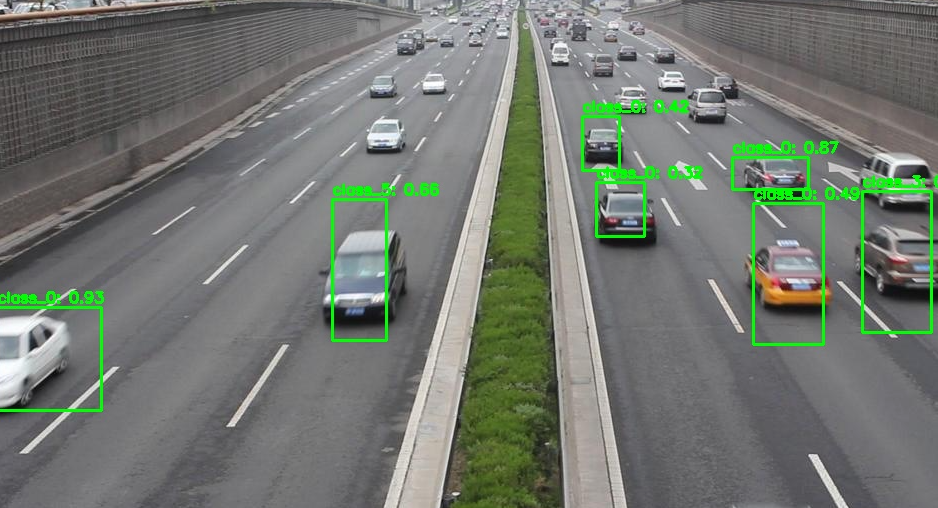
python接口调用
- 量化参数可以使用xdputil获取
import os
import cv2
import time
import numpy as np
import xir
import vart

# ==================== 配置参数 ====================
MODEL_PATH = "tf_yolov3_vehicle.xmodel"
IMAGE_PATH = "test.jpg"
OUTPUT_PATH = "result.jpg"
CONF_THRESHOLD = 0.3          # 置信度阈值
SIZE_FILTER_RATIO = 0.8       # 丢弃宽高大于原图80%的框
MIN_BOX_SIZE = 10             # 丢弃宽高小于10像素的框
TOP_EDGE_THRESHOLD = 5        # 丢弃ymin小于此值的框(图片上方边缘)

ANCHORS = np.array([
    (10, 13), (16, 30), (33, 23),
    (30, 61), (62, 45), (59, 119),
    (116, 90), (156, 198), (373, 326)
])

CLASS_NAMES = ["vehicle"]      # 会被模型实际类别数覆盖

# 量化参数(从xmodel获取)
INPUT_SCALE = 0.015625         # 2^-6
OUTPUT_SCALE = 0.25            # 2^-2
INPUT_ZERO_POINT = 0
OUTPUT_ZERO_POINT = 0

DEBUG = True
# =================================================

def sigmoid(x):
    return 1 / (1 + np.exp(-x))

def get_child_subgraph_dpu(graph: xir.Graph):
    root = graph.get_root_subgraph()
    if root.is_leaf:
        return []
    child_subgraphs = root.toposort_child_subgraph()
    return [cs for cs in child_subgraphs
            if cs.has_attr("device") and cs.get_attr("device").upper() == "DPU"]

def decode_yolo_output(output, anchors, stride, conf_thresh, num_classes):
    batch, grid_h, grid_w, feat_len = output.shape
    num_anchors = len(anchors)
    output = output.reshape(batch, grid_h, grid_w, num_anchors, -1)
    tx = output[..., 0]
    ty = output[..., 1]
    tw = output[..., 2]
    th = output[..., 3]
    obj_conf = sigmoid(output[..., 4])
    class_probs = sigmoid(output[..., 5:5+num_classes])

    grid_x = np.arange(grid_w)
    grid_y = np.arange(grid_h)
    grid_x, grid_y = np.meshgrid(grid_x, grid_y)
    grid_x = np.expand_dims(grid_x, axis=-1)
    grid_y = np.expand_dims(grid_y, axis=-1)
    grid_x = np.tile(grid_x, (1, 1, num_anchors))
    grid_y = np.tile(grid_y, (1, 1, num_anchors))

    cx = (grid_x + sigmoid(tx)) * stride
    cy = (grid_y + sigmoid(ty)) * stride
    w = np.exp(tw) * anchors[:, 0]
    h = np.exp(th) * anchors[:, 1]
    xmin = cx - w / 2
    ymin = cy - h / 2
    xmax = cx + w / 2
    ymax = cy + h / 2

    max_class_prob = np.max(class_probs, axis=-1)
    class_id = np.argmax(class_probs, axis=-1)
    confidence = obj_conf * max_class_prob

    boxes = []
    for b in range(batch):
        mask = confidence[b] >= conf_thresh
        if not np.any(mask):
            continue
        boxes.append(np.stack([
            xmin[b][mask], ymin[b][mask], xmax[b][mask], ymax[b][mask],
            confidence[b][mask], class_id[b][mask]
        ], axis=-1))
    return np.concatenate(boxes, axis=0) if boxes else np.empty((0, 6))

def letterbox_image(image, target_size):
    h, w = image.shape[:2]
    target_w, target_h = target_size
    scale = min(target_w / w, target_h / h)
    new_w, new_h = int(w * scale), int(h * scale)
    resized = cv2.resize(image, (new_w, new_h))
    canvas = np.full((target_h, target_w, 3), 128, dtype=np.uint8)
    dx = (target_w - new_w) // 2
    dy = (target_h - new_h) // 2
    canvas[dy:dy+new_h, dx:dx+new_w] = resized
    return canvas, scale, dx, dy

def keep_small_boxes_no_overlap(boxes):
    """
    严格无交叉:如果两个框有交集(inter面积 > 0),则只保留面积较小的框,丢弃较大的框。
    boxes: (N, 6) [xmin, ymin, xmax, ymax, conf, class_id]
    返回: 过滤后的boxes
    """
    if len(boxes) == 0:
        return boxes

    # 计算面积
    areas = (boxes[:, 2] - boxes[:, 0]) * (boxes[:, 3] - boxes[:, 1])
    # 按面积从小到大排序(小框优先)
    sorted_idx = np.argsort(areas)
    boxes_sorted = boxes[sorted_idx]
    areas_sorted = areas[sorted_idx]

    keep = [True] * len(boxes_sorted)

    for i in range(len(boxes_sorted)):
        if not keep[i]:
            continue
        box_i = boxes_sorted[i]
        for j in range(i+1, len(boxes_sorted)):
            if not keep[j]:
                continue
            box_j = boxes_sorted[j]
            # 计算交集面积
            xx1 = max(box_i[0], box_j[0])
            yy1 = max(box_i[1], box_j[1])
            xx2 = min(box_i[2], box_j[2])
            yy2 = min(box_i[3], box_j[3])
            inter_area = max(0, xx2 - xx1) * max(0, yy2 - yy1)
            # 只要有交集(inter_area > 0),则抑制大框
            if inter_area > 0:
                keep[j] = False

    return boxes_sorted[keep]

def postprocess_yolov3(outputs, original_shape, anchors, num_classes, conf_thresh,
                       size_filter_ratio=0.8, min_size=10):
    all_boxes = []
    orig_h, orig_w = original_shape
    in_h, in_w = 416, 416  # 模型输入尺寸
    max_allowed_w = in_w * size_filter_ratio
    max_allowed_h = in_h * size_filter_ratio

    for out in outputs:
        batch, h, w, feat_len = out.shape
        # 跳过13x13层(产生超大框)
        if h == 13:
            continue
        elif h == 26:
            stride = 16
            anchor_group = anchors[3:6]
        elif h == 52:
            stride = 8
            anchor_group = anchors[0:3]
        else:
            continue

        boxes = decode_yolo_output(out, anchor_group, stride, conf_thresh, num_classes)
        if len(boxes) == 0:
            continue

        # 尺寸过滤(在模型输入坐标系中)
        widths = boxes[:, 2] - boxes[:, 0]
        heights = boxes[:, 3] - boxes[:, 1]
        valid = (widths < max_allowed_w) & (heights < max_allowed_h) & (widths > min_size) & (heights > min_size)
        boxes = boxes[valid]
        if len(boxes) > 0:
            all_boxes.append(boxes)

    if not all_boxes:
        return []
    all_boxes = np.concatenate(all_boxes, axis=0)
    # 严格无交叉重叠抑制(保留小框)
    filtered_boxes = keep_small_boxes_no_overlap(all_boxes)
    return filtered_boxes

def main():
    if not os.path.exists(MODEL_PATH):
        print(f"Error: Model file '{MODEL_PATH}' not found.")
        return
    if not os.path.exists(IMAGE_PATH):
        print(f"Error: Image file '{IMAGE_PATH}' not found.")
        return

    print("1. Loading model...")
    graph = xir.Graph.deserialize(MODEL_PATH)
    subgraphs = get_child_subgraph_dpu(graph)
    if not subgraphs:
        print("Error: No DPU subgraph found.")
        return
    runner = vart.Runner.create_runner(subgraphs[0], "run")

    input_tensors = runner.get_input_tensors()
    output_tensors = runner.get_output_tensors()
    input_shape = input_tensors[0].dims
    print(f"   Input shape: {input_shape}")
    print("   Output tensors:")
    for i, t in enumerate(output_tensors):
        print(f"      [{i}] shape={t.dims}, dtype={t.dtype}")

    feat_len = output_tensors[0].dims[-1]
    num_classes = (feat_len // 3) - 5
    print(f"   Detected num_classes: {num_classes}")

    if num_classes == len(CLASS_NAMES):
        class_names = CLASS_NAMES
    else:
        print(f"   Using auto-generated class names (class_0...class_{num_classes-1})")
        class_names = [f"class_{i}" for i in range(num_classes)]

    orig_img = cv2.imread(IMAGE_PATH)
    if orig_img is None:
        print(f"Error: Cannot read {IMAGE_PATH}")
        return
    orig_h, orig_w = orig_img.shape[:2]
    _, in_h, in_w, _ = input_shape
    img_resized, scale, dx, dy = letterbox_image(orig_img, (in_w, in_h))

    # 预处理
    img_float = img_resized.astype(np.float32) / 255.0
    input_int8 = np.clip(img_float * (1.0 / INPUT_SCALE), -128, 127).astype(np.int8)
    input_buffer = np.empty(input_shape, dtype=np.int8)
    input_buffer[0] = input_int8

    output_buffers = [np.empty(t.dims, dtype=np.int8) for t in output_tensors]

    print("2. Running inference...")
    start_time = time.time()
    job = runner.execute_async([input_buffer], output_buffers)
    runner.wait(job)
    inference_time = time.time() - start_time
    print(f"   Inference time: {inference_time:.3f}s")

    print("3. Postprocessing...")
    outputs_float = []
    for buf in output_buffers:
        float_out = buf.astype(np.float32) * OUTPUT_SCALE
        outputs_float.append(float_out)
        if DEBUG:
            print(f"   Output range after dequant: [{float_out.min():.3f}, {float_out.max():.3f}]")

    boxes_raw = postprocess_yolov3(outputs_float, (orig_h, orig_w), ANCHORS, num_classes,
                                   CONF_THRESHOLD, SIZE_FILTER_RATIO, MIN_BOX_SIZE)
    print(f"   Detected {len(boxes_raw)} objects (conf_thresh={CONF_THRESHOLD})")

    # 将坐标映射回原图,并过滤顶部边缘框
    final_boxes = []
    for box in boxes_raw:
        xmin, ymin, xmax, ymax, conf, cls_id = box
        # 映射回原图坐标
        xmin = (xmin - dx) / scale
        ymin = (ymin - dy) / scale
        xmax = (xmax - dx) / scale
        ymax = (ymax - dy) / scale
        # 裁剪到图像边界
        xmin = max(0, min(orig_w, xmin))
        ymin = max(0, min(orig_h, ymin))
        xmax = max(0, min(orig_w, xmax))
        ymax = max(0, min(orig_h, ymax))
        # 过滤无效框
        if xmin >= xmax or ymin >= ymax:
            continue
        # 去掉起始于图片上方边缘的框(ymin 过小)
        if ymin < TOP_EDGE_THRESHOLD:
            continue
        final_boxes.append([int(xmin), int(ymin), int(xmax), int(ymax), conf, int(cls_id)])

    print(f"   Final boxes after scaling and top-edge filter: {len(final_boxes)}")
    if len(final_boxes) > 0:
        widths = [b[2]-b[0] for b in final_boxes]
        heights = [b[3]-b[1] for b in final_boxes]
        print(f"   Box width range: {min(widths)} - {max(widths)}, height range: {min(heights)} - {max(heights)}")

    # 绘制结果
    for box in final_boxes:
        xmin, ymin, xmax, ymax, conf, cls_id = box
        cv2.rectangle(orig_img, (xmin, ymin), (xmax, ymax), (0, 255, 0), 2)
        label = f"{class_names[cls_id]}: {conf:.2f}"
        cv2.putText(orig_img, label, (xmin, ymin-5), cv2.FONT_HERSHEY_SIMPLEX, 0.5, (0, 255, 0), 2)

    cv2.imwrite(OUTPUT_PATH, orig_img)
    print(f"4. Result saved to {OUTPUT_PATH}")

if __name__ == "__main__":
    main()

有“AI”的1024 = 2048,欢迎大家加入2048 AI社区
更多推荐

 1
1 0
0- 0


 已为社区贡献2条内容

所有评论(0)