【GUI-Agent】阶跃星辰 GUI-MCP 解读---(5)---命令解析和工具映射
25年底,阶跃星辰升级发布了全新的AI Agent系列模型Step-GUI,包括云端模型Step-GUI、首个面向GUI Agent的MCP协议:GUI-MCP(Graphical User Interface - Model Context Protocol),这是首个专为图形用户界面自动化而设计的 MCP 实现,兼顾标准化与隐私保护。因此,我们就来解读这个MCP协议,顺便看看端侧Agent的实
【GUI-Agent】阶跃星辰 GUI-MCP 解读—(5)—命令解析和工具映射
文章目录
0x00 摘要
25年底,阶跃星辰升级发布了全新的AI Agent系列模型Step-GUI,包括云端模型Step-GUI、首个面向GUI Agent的MCP协议:GUI-MCP(Graphical User Interface - Model Context Protocol),这是首个专为图形用户界面自动化而设计的 MCP 实现,兼顾标准化与隐私保护。
因此,我们就来解读这个MCP协议,顺便看看端侧Agent的实现架构。本文是第五篇,主要是介绍GUI-MCP 的命令解析和工具映射。
因为是反推解读,而且时间有限,所以可能会有各种错误,还请大家不吝指出。
0x01 MCP 命令解析流程
1.1 功能层级
GUI-MCP 采用分层设计,将功能划分为两个不同层级:低层 MCP 与高层 MCP。
1.1.1 低层 MCP
低层 MCP 专注于原子级设备操作,提供细粒度控制接口。该层级公开以下类别的原语:
- 设备管理:接口 get_device_list() 获取所有已连接设备,实现多设备编排。
- 状态感知:接口 get_screenshot() 捕获当前设备屏幕状态,为决策提供视觉反馈。
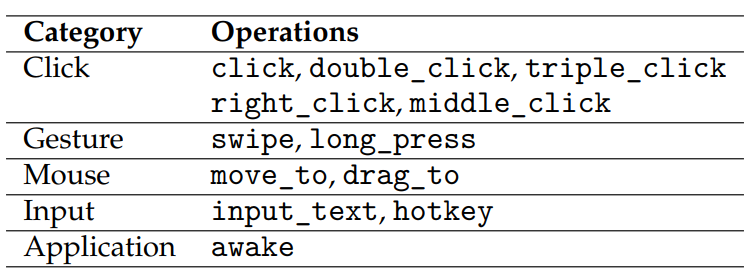
- 基本操作:如下图所示的完整交互原语集合。
这些原子接口为主语言模型提供最大灵活性,使其能够根据当前状态和任务需求进行细粒度规划与控制。适合需要逐步规划的场景。
1.1.2 高层 MCP
高层 MCP 专注于抽象任务执行,通过封装完整任务执行逻辑实现。其主要接口为:execute_task(task_description)。该接口接受自然语言任务描述,并自动完成任务。例如:
- execute_task(“点击第一个元素”)
- execute_task(“买一杯咖啡”)
- execute_task(“搜索白色帆布鞋,37 码,100 元以内,并把第一个结果加入收藏”)
注意:实际上在代码中,高层 MCP的主要接口为 ask_agent。execute_task 只是中间管理层。
1.2 命令执行链路
-
客户端请求处理如下
- MCP 协议解析:FastMCP 框架解析 MCP 协议请求
- 工具匹配:根据请求中的工具名称匹配注册的工具函数
- 参数映射:将请求参数映射到函数参数
- 执行调用:调用相应的工具函数
-
工具执行流程
- 参数解析:将 MCP 请求参数转换为 Python 函数参数
- 函数调用:执行注册的工具函数
- 结果封装:将函数返回值封装为 MCP 响应格式
1.3 FastMCP 框架
FastMCP框架会自动提取所有@mcp.tool装饰的函数及其文档字符串,然后将这些信息作为系统提示提供给LLM,使LLM知道有哪些工具可以,即如何使用它们。当LLM需要执行某个操作时,它可以根据这些工具描述选择合适的工具并生成相应的调用参数。
创建FastMCP实例时会自动处理工具发现和文档生成,这里的instructions参数提供了服务器的整体功能说明
mcp = FastMCP(name="Gelab-MCP-Server", instructions="""
This MCP server provides tools to interact with connected mobile devices using a GUI agent.
              """
)
0x02 工具注册机制
工具注册机制如下:
- 工具注册:通过 mcp.tool 装饰器注册工具函数,比如
- list_connected_devices 工具获取连接的设备列表
- ask_agent 工具执行 GUI 代理任务
- 类型注解:使用Annotated和Field定义参数类型和描述
- 参数验证:通过类型注解和Field验证参数
2.1 工具注册
当使用MCP服务器时,工具信息通过@mcp.tool方式来完成。这些工具的文档字符串详细描述了每个工具的功能和使用方法。
@mcp.tool
def list_connected_devices() -> list:
    """
        List all connected mobile devices.

        Returns:
            list: A list of connected device IDs.
    """
    devices = get_device_list()
    print("Connected devices:", devices)
    return devices
@mcp.tool 是一个装饰器,用于将普通函数注册为 MCP服务器中的工具函数。它的主要作用包括:
-
工具注册功能
能将被装饰的函数注册为 MCP 服务器可提供的工具
使函数能够通过 MCP 协议被远程客户端调用
自动生成符合 MCP 协议的接口描述
-
接口标准化
自动提取函数签名信息(参数类型、默认值等)
利用 Python 的类型提示(如 Annotated)和 Pydantic 的 Field 来定义参数约束和文档
将函数文档字符串转换为工具的详细说明文档
-
参数验证与转换
基于类型注解自动验证传入参数的类型
对不符合要求的参数进行错误处理
将客户端传入的数据转换为函数所需的正确类型
-
协议兼容性
保证注册的工具符合 FastMCP 框架的要求
提供统一的调用接口供客户端使用
支持多种传输协议(如 HTTP、WebSocket 等)
-
工具映射表
- 工具名称映射:每个装饰器函数注册为一个可调用的 MCP 工具
- list_connected_devices → 获取设备列表
- ask_agent → 执行 GUI 任务
- 参数映射:通过类型注解自动映射参数
- 返回值处理:将函数返回值转换为 MCP 协议格式
- 映射配置
- 工具描述:工具函数的文档字符串作为工具描述
- 参数描述:
Field中的description参数提供参数说明 - 类型检查:运行时参数类型验证
- 工具名称映射:每个装饰器函数注册为一个可调用的 MCP 工具
2.2 具体工具实现
工具函数实现
- 后端实现:工具函数调用
mcp_backend_implements中的实现函数 - 参数传递:将 MCP 参数传递给后端函数
- 结果返回:返回标准化的执行结果
from mcp_server.mcp_backend_implements import (
    get_device_list, # 被 list_connected_devices 使用
    get_screenshot,
    execute_task, # 被 ask_agent 等使用
)
具体如下:
- 设备管理工具
list_connected_devices:调用get_device_list获取设备列表- 参数:无参数
- 返回:设备 ID 列表
- GUI 代理工具
ask_agent:执行 GUI 任务- 接收
device_id、task、max_steps等参数 - 调用
execute_task执行任务 - 返回任务执行结果
- 接收
- ask_agent_start_new_task:开始新任务
- ask_agent_continue:继续之前的任务
代码如下:
2.2.1 list_connected_devices
@mcp.tool
def list_connected_devices() -> list:
    """
        List all connected mobile devices.

        Returns:
            list: A list of connected device IDs.
    """
    devices = get_device_list()
    print("Connected devices:", devices)
    return devices
2.2.2 ask_agent
ask_agent 是一个 MCP 工具,专为在移动设备上启动全新 GUI 代理任务而设计,核心特征如下:
核心功能
- 新任务启动:每次调用均开始全新的任务执行,并自动重置设备环境。
- 设备控制:针对由 device_id 指定的已连接移动设备。
- 任务解析:接收自然语言描述的任务内容。
- 环境重置:在开始前自动重置设备环境。
任务执行主要参数
- device_id:目标设备标识。
- task:自然语言描述的任务内容。
- max_steps:代理最多可执行的步数(默认 20)。
执行行为
- 始终重置环境:调用 execute_task 时设置 reset_environment = True。
- 有限的中间日志:禁用大部分中间日志和截图。
- 启用最终字幕:生成最终图像字幕。
- 基于客户端的 INFO 处理:采用 pass_to_client 模式处理 INFO 动作。
使用场景
- 在移动设备上启动全新的任务
- 在不同应用程序中执行独立操作
- 需要环境重置的情况
- 简单的、单一应用程序的任务
本质上,ask_agent 通过 MCP 框架提供了一个干净、标准化的入口点来启动 GUI 自动化任务。
@mcp.tool
def ask_agent(
    device_id: Annotated[str, Field(description="ID of the device to perform the task on. listed by list_connected_devices tool.")],

    task: Annotated[str | None, Field(description="The task that the agent needs to perform on the mobile device. if this is not None, the agent will try to perform this task. if None, the session_id must be provided to continue the previous session.")],

    # reset_environment: Annotated[bool, Field(description="Whether to reset the environment before executing the task, close current app, and back to home screen. If you want to execute a independent task, set this to True will make it easy to execute. If you want to continue the previous session, set this to False.")] = False,

    max_steps: Annotated[int, Field(description="Maximum number of steps the agent can take to complete the task.")] = 20,

    session_id: Annotated[str | None, Field(description="Optional, session ID must provide when the last task endwith INFO action and you want to reply, the session id and device id and the reply from client must be provided.")] = None,

    # When the INFO action is called, how to handle it.
    # 1. "auto_reply": the INFO action will be handled automatically by calling the caption model to generate image captions.
    # 2. "no_reply": the INFO action will be ignored. THE AGENT MAY GET STUCK IF THE INFO ACTION IS IGNORED.
    # 3. "manual_reply": the INFO action will cause an interruption, and the user needs to provide the reply manually by input things in server's console.
    # 4. "pass_to_client": the INFO action will be returned to the MCP client to handle it.
#     reply_mode: Annotated[str, Field(description='''
#         How to handle the INFO action during task execution.

#         Options:
#             - "auto_reply": Automatically generate image captions for INFO actions.
#             - "no_reply": Ignore INFO actions (may cause the agent to get stuck).
#             - "manual_reply": Interrupt and require user input for INFO actions.
#             - "pass_to_client": Pass INFO actions to the MCP client for handling.
# ''')] = "auto_reply",

    reply_from_client: Annotated[str | None, Field(description="If the last task is ended with INFO action, and you want to give GUI agent a reply, provide the reply here. If you do so, you must provide last session id and last device id.")] = None,
) -> dict:

    """
# GUI Agent Documentation

Ask the GUI agent to perform the specified task on a connected device.
The GUI Agent can be able to understand natural language instructions and interact with the device accordingly.
The agent will be able to execute a high-level task description,if you have any additional requirements, write them down in detail at tast string.


## The agent has the below limited capabilities:

1. The task must be related to an app that is already installed on the device. for example, "打开微信,帮我发一条消息给张三,说今天下午三点开会"; "帮我在淘宝上搜索一款性价比高的手机,并加入购物车"; "to purchase an ea on Amazon".

2. The task must be simple and specific. for example, "do yyy in xxx app"; "find xxx information in xxx app". ONE THING AT ONE APP AT A TIME.

3. The agent may not be able to handle complex tasks that require multi-step reasoning or planning. for example. You may need to break down complex tasks into simpler sub-tasks and ask the agent to perform them sequentially. For example, instead of asking the agent to "plan a trip to Paris for xxx", you can ask it to "search for flights to Paris on xxx app", "find hotels in Paris on xxx app", make the plan yourself and ask agent to "sent the plan to xxx via IM app like wechat".

4. The agent connot accept multimodal inputs now. if you want to provide additional information like screenshot captions, please include them in the task description.

## Usage guidance:

1. you should never directly ask an Agent to pay or order anything. If user want to make a purchase, you should ask agent to stop brfore ordering/paying, and let user to order/pay.

2. tell the agent, if human verification is appeared during the task execution, the agent should ask Client. when the you see the INFO, you should ask user to handle the verification manually. after user says "done", you can continue the task with the session_id and device_id and ask the agent to continue in reply_from_client.

Returns:
    dict: Execution log containing details of the task execution.
    with keys including
        - device_info: Information about the device used for task execution.
        - final_action: The final action taken by the agent to complete the task.
        - global_step_idx: The total number of steps taken during the task execution.
        - local_step_idx: The number of steps taken in the current session.
        - session_id: The session ID for maintaining context across multiple tasks.
        - stop_reason: The reason for stopping the task execution (e.g., TASK_COMPLETED_SUCCESSFULLY).
        - task: The original task description provided to the agent.
    """

    reply_mode = "pass_to_client"

    if task is not None:
        assert session_id is None, "If task is provided, session_id must be None."
        # New task, so reset_environment is True
        reset_environment = True
    else:
        assert session_id is not None, "If task is None, session_id must be provided to continue the previous session."
        # Continuing previous session, so reset_environment is False
        reset_environment = False

    return_log = execute_task(
        device_id=device_id,

        task=task,

        reset_environment=reset_environment,
        max_steps=max_steps,

        enable_intermediate_logs=False,
        enable_intermediate_image_caption=False,
        enable_intermediate_screenshots=False,

        enable_final_screenshot=False,
        enable_final_image_caption=False,

        reply_mode=reply_mode,

        session_id=session_id,
        reply_from_client=reply_from_client,
    )

    return return_log
2.3 协议交互模式
协议交互模式如下:
-
请求 - 响应模式
- 请求格式:MCP 协议请求包含工具名称和参数
- 响应格式:返回工具执行结果或错误信息
- 错误处理:异常情况返回错误信息
-
会话管理
- 会话状态:通过
session_id管理长期任务 - 状态保持:在多个请求间保持任务状态
- 上下文传递:传递执行上下文信息
- 会话状态:通过
2.4 扩展机制
工具的扩展机制如下:
-
新工具注册
- 函数定义:定义带类型注解的函数
- 装饰器应用:使用
mcp.tool装饰器注册 - 参数验证:使用
Field定义参数约束
-
工具发现
- 工具列表:客户端可以发现可用的 MCP 工具
- 元数据获取:获取工具的参数和返回值信息
- 动态调用:根据工具元数据动态调用
通过以上机制,GUI-MCP 实现了命令解析和工具映射的完整流程,支持灵活的工具扩展和标准化的协议交互。
0x03 业务逻辑层
我们接下来看看 MCP 的业务如何处理。
3.1 层次细分
根据代码分析,MCP位于项目最外层,专门负责对外提供 HTTP 服务接口,整体架构层级如下:
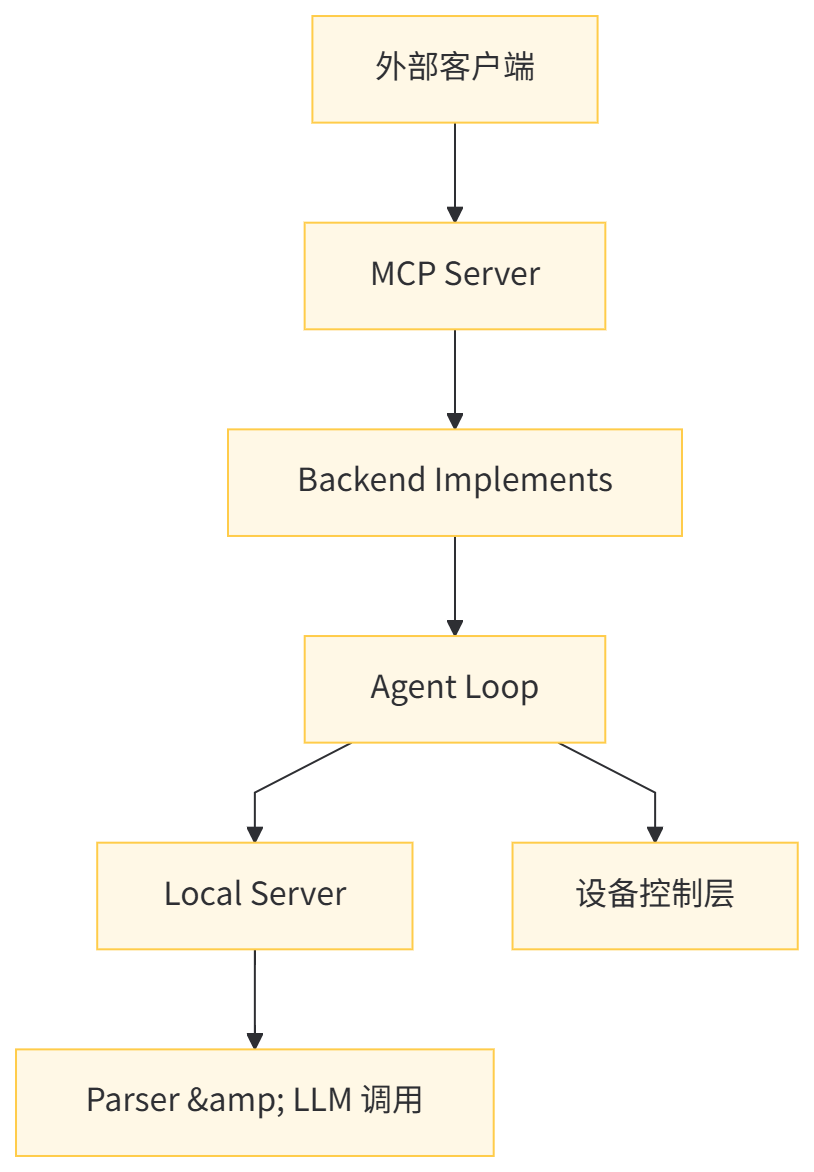
业务逻辑层(操作流程框架)如下:
- 任务执行:
mcp_backend_implements.py中的execute_task函数处理核心逻辑,从 mcp_backend_implements.py 名字就能看出来,这是 MCP 后端。 - 代理循环:
mcp_agent_loop.py实现 GUI 代理循环- 控制整个任务执行循环
- 协调设备操作与模型推理
- 处理任务完成条件和异常情况
- 状态管理:会话管理和任务状态跟踪
3.1.1 功能定位层
从功能定位来看,划分如下:
MCP工具实现层
- execute_task 是 MCP Server 中的核心工具函数之一
- 实现了 MCP 协议定义的移动设备自动化操作能力。作为底层功能支撑
- 它为 MCP 客户端提供具体的设备控制服务
GUI Agent 接口封装
- 封装复杂的 GUI Agent 执行逻辑
- 提供标准化接口供 MCP 上层工具调用
- 屏蔽底层设备交互的复杂细节
3.1.2 架构集成层面
服务端组件整合
- 集成于 FastMCP 框架体系中
- 与其他 MCP 工具函数协同工作(如 list_connected_devices、get_screenshot)
- 依赖 gui_agent_loop 实现具体任务执行逻辑
多层级抽象设计
-
API 层:向客户端暴露统一的操作接口
-
在 simple_gelab_mcp_server_withcaption.py 和 detailed_gelab_mcp_server.py 中,MCP 作为 HTTP 服务运行
-
使用 FastMCP 框架创建服务;
-
提供 list_connected_devices、ask_agent、ask_agent_start_new_task、ask_agent_continue 等工具接口;
-
这些工具最终调用 mcp_backend_implements.py 中的函数。
-
-
业务层:execute_task 处理业务逻辑和参数转换,是 MCP 工具的主要实现
- 调用 mcp_agent_loop.py 中的 gui_agent_loop 函数;
- 处理任务配置和参数传递。
-
执行层:gui_agent_loop 负责实际设备控制和代理交互
- 负责截图、模型调用、动作解析、设备控制等完整循环
- 通过 LocalServer、Parser、LLM
- 调用与设备执行层协同工作
3.2 execute_task
execute_task 是连接MCP协议框架与底层移动设备自动化系统的桥梁。execute_task 函数的核心职责,是在已连接的移动设备上完成指定的 GUI 任务。它通过与 GUI 代理服务器通信,依次驱动设备执行一系列界面操作,从而达成给定目标。
execute_task 具体功能如下:
- 任务执行管理
- 在指定设备上启动并执行 GUI 任务;支持新建会话或继续现有会话。
- 按需决定是否重置设备环境,确保任务在干净或保留状态下开始。
- 设备交互控制
- 控制设备上的应用行为;获取实时屏幕截图供代理分析。
- 执行点击、滑动、输入文本等界面操作,完成用户指定的界面路径。
- 执行参数配置
- 设定最大执行步数,防止无限循环。
- 配置日志级别(中间步骤、截图、图像描述等)。
- 定义遇到 INFO 操作时的处理策略(需要澄清的情况)。
- 结果返回与会话管理
- 返回详细执行日志,包括每一步的截图与描述。
- 维护会话状态,支持后续继续执行。
- 提供停止原因和执行统计,便于复盘与优化。
函数内部通过调用 gui_agent_loop 实现任务循环,协调代理决策与设备操作之间的交互。
代码如下:
def execute_task(
    device_id: str,
    task: str,

    # Whether to reset the environment before starting the task. If True:
    # 1. The HOME key will be pressedand, the init screen will be set up to the initial state.
    # 2. The target app will be launched afresh.
    reset_environment: bool,

    # The max number of steps for the agent to perform.
    # The actual step limit is min(max_steps, the default max_steps set in the gui_agent_config)
    max_steps: int,

    # Whether to return intermediate logs during the task execution. If True:
    # 1. the intermediate logs will be logged and returned along with the final result.
    enable_intermediate_logs: bool,

    # Whether call caption model to generate image captions for each screenshot during the task execution. If True:
    # 1. image captions will be generated and returned along with the intermediate screenshots.
    # 2. only works when enable_intermediate_logs is True.
    # 3. the enable_intermediate_image_caption or return_intermediate_screenshots must be True when enable_intermediate_logs is True.
    enable_intermediate_image_caption: bool,

    # Whether to return the intermediate screenshots during the task execution. If True:
    # 1. the intermediate screenshots will be logged and returned along with the final result.
    # 2. only works when enable_intermediate_logs is True.
    # 3. the enable_intermediate_image_caption or enable_intermediate_screenshots must be True when enable_intermediate_logs is True.
    enable_intermediate_screenshots: bool,

    # Whether to return the final screenshot after task execution. If True:
    # 1. the final screenshot will be returned along with the final result.
    enable_final_screenshot: bool,

    # Whether to return the final image caption after task execution. If True:
    # 1. the final image caption will be returned along with the final result.
    enable_final_image_caption: bool,

    # When the INFO action is called, how to handle it.
    # 1. "auto_reply": the INFO action will be handled automatically by calling the caption model to generate image captions.
    # 2. "no_reply": the INFO action will be ignored. THE AGENT MAY GET STUCK IF THE INFO ACTION IS IGNORED.
    # 3. "manual_reply": the INFO action will cause an interruption, and the user needs to provide the reply manually by input things in server's console.
    # 4. "pass_to_client": the INFO action will be returned to the MCP client to handle it.
    reply_mode: str,

    # Optional session ID to continue an existing session. If None, a new session will be created.
    # If not None:
    # 1. The existing session with the given session_id will be continued.
    # 2. If a completed sessionid is provided, will raise an error.
    session_id: str,

    # Optional reply from the client to handle the INFO action when reply_mode is "pass_to_client".
    reply_from_client: str,

    # optional you can provide extra infomation to pass to the agent and log it
    extra_info: dict = {},
):
    """
        # GUI Agent Documentation

        Ask the GUI agent to perform the specified task on a connected device.
        The GUI Agent can be able to understand natural language instructions and interact with the device accordingly.
        The agent will be able to execute a high-level task description by performing a sequence of low-level actions on the device.

        ## For high-level tasks, the agent has the below limited capabilities:

        1. The task must be related to an app that is already installed on the device. for example, "打开微信,帮我发一条消息给张三,说今天下午三点开会"; "帮我在淘宝上搜索一款性价比高的手机,并加入购物车"; "to purchase an ea on Amazon".

        2. The task must be simple and specific. for example, "do yyy in xxx app"; "find xxx information in xxx app". ONE THING AT ONE APP AT A TIME.

        3. The agent may not be able to handle complex tasks that require multi-step reasoning or planning. for example. You may need to break down complex tasks into simpler sub-tasks and ask the agent to perform them sequentially. For example, instead of asking the agent to "plan a trip to Paris for xxx", you can ask it to "search for flights to Paris on xxx app", "find hotels in Paris on xxx app", make the plan yourself and ask agent to "sent the plan to xxx via IM app like wechat".

        ## For low-level tasks, the agent can perform the below actions:

        1. CLICK: Click on a specific point on the screen, you need to ask the agent to click the specific thing, e.g., "点击搜索按钮", "点击发送按钮", "点击确认按钮", etc.

        2. SWIPE: Swipe from one point to another point on the screen, you need to ask the agent to swipe from one specific point to another, e.g., "在屏幕主界面向下滑动以刷新页面", "向左滑动以查看下一张图片", etc.

        3. LONG_PRESS: Long press on a specific point on the screen, you need to ask the agent to long press on a specific thing, e.g., "长按应用图标以打开菜单", "长按图片以查看大图", etc.

        4. INPUT_TEXT: Input text into a specific text field, you need to ask the agent to input specific text into a specific field, e.g., "在搜索框中输入'天气预报'", "在消息输入框中输入'你好,张三'", etc.

        5. AWAKE: to open some app.

        ## Function Arguments

        Args:
            device_id (str): The ID of the connected device.
            task (str): The task description for the GUI agent.
            reset_environment (bool): Whether to reset the environment before starting the task.
            max_steps (int): Maximum number of steps for the agent to perform.
            enable_intermediate_logs (bool): Whether to return intermediate logs during the task execution.
            enable_intermediate_image_caption (bool): Whether call caption model to generate image captions for each screenshot during the task execution.
            enable_intermediate_screenshots (bool): Whether to return the intermediate screenshots during the task execution.
            enable_final_screenshot (bool): Whether to return the final screenshot after task execution.
            enable_final_image_caption (bool): Whether to return the final image caption after task execution.
            reply_mode (str): How to handle the INFO action when it is called.
            session_id (str): Optional session ID to continue an existing session.
            reply_from_client (str): Optional reply from the client to handle the INFO action when reply_mode is "pass_to_client".
        Returns:
            dict: The result of the task execution.
    """

    # load mcp server config
    mcp_server_config = yaml.safe_load(smart_open("mcp_server_config.yaml", "r"))
    agent_loop_config = mcp_server_config['agent_loop_config']

    # determine the actual max_steps
    max_steps = min(max_steps, agent_loop_config.get('max_steps', 40))

    l2_server = LocalServer(mcp_server_config['server_config'])

    result = gui_agent_loop(
        agent_server=l2_server,
        device_id=device_id,
        agent_loop_config=agent_loop_config,

        max_steps=max_steps,

        enable_intermediate_logs=enable_intermediate_logs,
        enable_intermediate_image_caption=enable_intermediate_image_caption,
        enable_intermediate_screenshots=enable_intermediate_screenshots,

        enable_final_screenshot=enable_final_screenshot,
        enable_final_image_caption=enable_final_image_caption,

        reply_mode=reply_mode,

        task=task,
        session_id=session_id,
        reply_from_client=reply_from_client,

        reset_environment=reset_environment,
        reflush_app=reset_environment,

        extra_info=extra_info,
    )

    return result
3.3 gui_agent_loop
gui_agent_loop 是整个移动设备GUI自动化系统的核心执行循环函数,负责协调代理决策与设备操作之间的交互。
-
核心功能概述:在移动设备上执行基于GUI代理的任务,形成一个完整的 感知-决策-执行 循环。
- 初始化设备环境
- 与代理服务器通信获取指令
- 在设备上执行操作
- 处理特殊事件(如INFO请求)
- 记录执行过程和结果
-
详细功能分解
-
设备初始化与准备
- 检测并初始化指定的移动设备
- 根据配置决定是否重置设备环境(回到主屏幕)
- 获取设备屏幕尺寸等基本信息
-
任务会话管理
- 创建新的任务会话或继续已有会话
- 管理会话状态和上下文信息
- 支持跨多次调用的会话延续
-
图像感知与处理
- 定期捕获设备屏幕截图
- 将截图转换为 Base64 URL 格式供代理分析
- 支持并行图像生成以提高效率
-
代理交互循环
- 向代理服务器发送观察结果(主要是截图)
- 接收代理预测的操作指令
- 将代理操作转换为设备可执行的具体命令
-
设备操作执行
- 执行各种用户界面操作(点击、滑动、输入文本等)
- 处理不同类型的操作类型(CLICK、SWIPE、INPUT_TEXT 等)
- 支持应用刷新和环境重置
-
特殊情况处理
- INFO 操作处理:当代理需要更多信息时的四种处理模式
- auto_reply: 自动使用模型生成回复
- no_reply: 忽略请求(可能导致代理卡住)
- manual_reply: 手动输入回复
- pass_to_client: 传递给客户端处理
- 屏幕状态检测:检测屏幕开关状态并相应处理
- INFO 操作处理:当代理需要更多信息时的四种处理模式
-
执行监控与日志记录
- 跟踪执行步骤和全局步骤索引
- 记录中间日志、截图和图像描述
- 监控停止条件(完成、中止、达到最大步骤等)
-
-
关键参数说明
| 参数 | 功能 |
|---|---|
| agent_server | 与之交互的代理服务器实例 |
| device_id | 目标设备的设备标识符 |
| task | 要执行的任务描述 |
| session_id | 会话标识符(用于继续会话) |
| max_steps | 最大执行步骤数 |
| reply_mode | INFO 操作的处理模式 |
- 工作流程
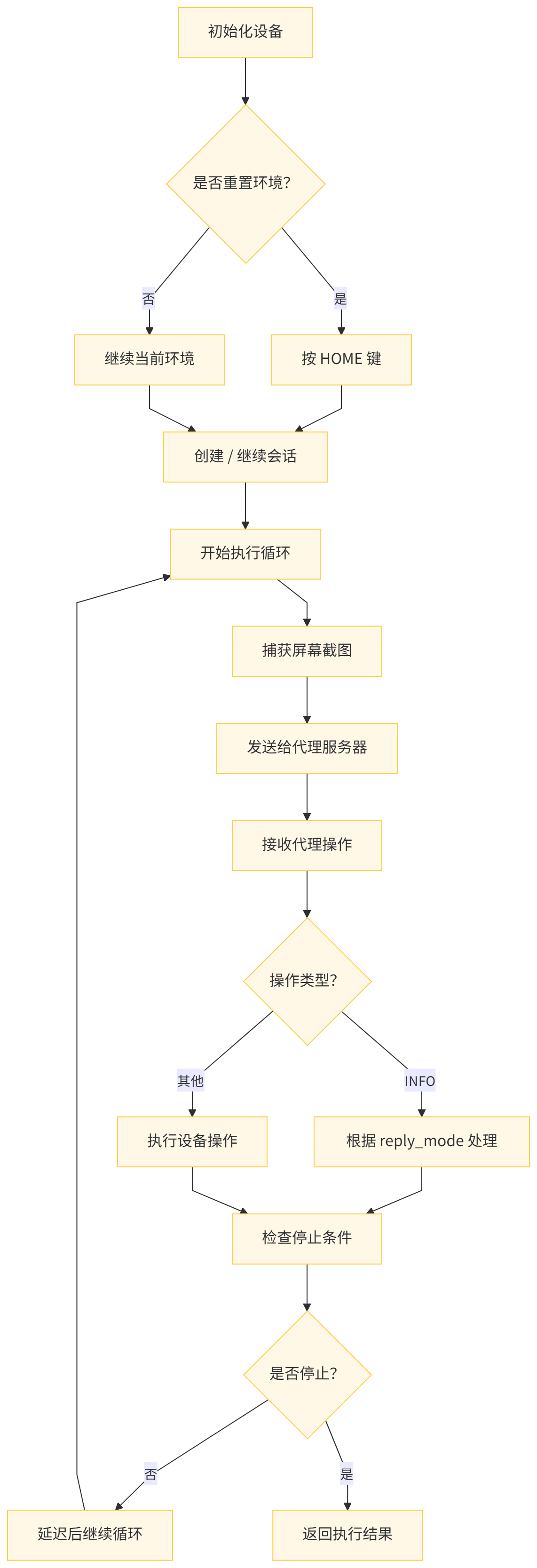
- 返回值结构。函数返回一个字典,包含:
- session_id:会话标识符
- device_info:设备信息
- final_action:最终执行的操作
- stop_reason:停止原因
- intermediate_logs:中间执行日志(可选)
总体来看,gui_agent_loop 是连接高级任务描述与低级设备操作的桥梁,实现了完整的移动端 GUI 自动化执行引擎。
代码如下:
def gui_agent_loop(
        # the agent server to interact with
        agent_server,

        # the detail config of agent loop
        agent_loop_config: dict,

        # device id
        device_id: str,

        # max steps
        max_steps: int,

        enable_intermediate_logs: bool = False,
        enable_intermediate_image_caption: bool = False,
        enable_intermediate_screenshots: bool = False,

        enable_final_screenshot: bool = False,
        enable_final_image_caption: bool = False,

        # whether to reset the environment before starting the task
        reset_environment: bool = True,

        # whether to reflush app when awake
        reflush_app: bool = True,

        # When the INFO action is called, how to handle it.
        # 1. "auto_reply": the INFO action will be handled automatically by calling the caption model to generate image captions.
        # 2. "no_reply": the INFO action will be ignored. THE AGENT MAY GET STUCK IF THE INFO ACTION IS IGNORED.
        # 3. "manual_reply": the INFO action will cause an interruption, and the user needs to provide the reply manually by input things in server's console.
        # 4. "pass_to_client": the INFO action will be returned to the MCP client to handle it.
        reply_mode: str = "pass_to_client",  # options: "auto_reply", "pass_to_client",

        # task: the task to execute, if None, the session id must be provided, meaning to continue an existing session
        task: str = None,

        # if session_id is provided, continue the existing session, happens only when last action in this session is INFO, and need reply from client
        session_id: str = None,

        # optional you can provide extra infomation to pass to the agent and log it
        extra_info: dict = {},

        reply_from_client: str = None,
        # agent_server, device_info, task, rollout_config, extra_info = {}, reflush_app=True, auto_reply = False, reset_environment=True
        ):
    """
    Evaluate a task on a device using the provided frontend action converter and action function.

    """

    # to check task and session_id
    assert (task is not None and session_id is None) or (task is None and session_id is not None), "Either task or session_id must be provided, but not both. task: {}, session_id: {}".format(task, session_id)

    if enable_intermediate_logs == False:
        enable_intermediate_image_caption = False
        enable_intermediate_screenshots = False

    device_wm_size = get_device_wm_size(device_id)

    # init device for the first time
    open_screen(device_id)
    init_device(device_id)

    # if reset_environment, press home key before starting the task
    if reset_environment and session_id is None and task is not None:
        press_home_key(device_id, print_command=True)

    # task, task_type = task, rollout_config['task_type']
    task_type = agent_loop_config['task_type']

    if session_id is None:
        session_id = agent_server.get_session({
            "task": task,
            "task_type": task_type,
            "model_config": agent_loop_config['model_config'],
            "extra_info": extra_info
        })

        print(f"New Session ID: {session_id}")

        return_log = {
            "session_id": session_id,
            "device_info": {
                "device_id": device_id,
                "device_wm_size": device_wm_size
            },
            "task": task,

            # "rollout_config": rollout_config,
            # "extra_info": extra_info
        }
    else:
        print(f"Continue Session ID: {session_id}")

        return_log = {
            "session_id": session_id,
            "device_info": {
                "device_id": device_id,
                "device_wm_size": device_wm_size
            },
            "reply_from_client": reply_from_client,

            # "rollout_config": rollout_config,
            # "extra_info": extra_info
        }

    delay_after_capture = agent_loop_config.get('delay_after_capture', 2)

    history_actions = []


    # The log will contain interleaved:
    # 1. {agent predicted action}
    # 2. {screenshot if enabled}
    # 3. {image caption (if enabled)}
    # at least, the final action will be returned

    # TODO: to support intermidiate logs and screenshots
    intermidiate_logs = []

    stop_reason = "NOT_STARTED"


    if reply_from_client is not None:
        reply_info = reply_from_client
    else:
        reply_info = None

    action = None

    global_step_idx = 0
    # restart the steps from 0, even continuing an existing session
    for step_idx in range(max_steps):

        if not dectect_screen_on(device_id):
            print("Screen is off, turn on the screen first")
            stop_reason = "MANUAL_STOP_SCREEN_OFF"
            break

        image_path = capture_screenshot(device_id, "tmp_screenshot", print_command=False)

        # current step log use to store intermediate logs if enabled
        current_step_log = {

        }

        image_b64_url = make_b64_url(image_path)

        current_step_log["screenshot_b64_url"] = image_b64_url

        if enable_intermediate_image_caption:
            # to start a thread to caption the image while the agent is thinking
            caption_result_container = {}
            caption_thread = threading.Thread(
                target=lambda: caption_current_screenshot(
                    current_task=task,
                    current_image_url=image_b64_url,
                    model_config=agent_loop_config['caption_config'].get('model_config', agent_loop_config['model_config']),
                    result_container=caption_result_container
                )
            )
            caption_thread.start()


        smart_remove(image_path)

        payload = {
            "session_id": session_id,
            "observation": {
                "screenshot": {
                    "type": "image_url",
                    "image_url": {
                        "url": image_b64_url
                    }
                },
            }
        }

        # assume when reply info is provided, it must be used for current step
        if reply_info is not None:
            print(f"Using reply from client: {reply_info}")
            payload['observation']['query'] = reply_info
            reply_info = None  # reset after use

        server_return = agent_server.automate_step(payload)
        action, global_step_idx = server_return['action'], server_return['current_step']

        if enable_intermediate_image_caption:
            # wait for caption thread to finish
            caption_thread.join()
            caption_text = caption_result_container.get('caption', '')
            current_step_log['screenshot_caption'] = caption_text

        current_step_log['agent_action'] = action
        current_step_log['global_step_idx'] = global_step_idx

        intermidiate_logs.append(current_step_log)

        # check screen status before acting on device
        if not dectect_screen_on(device_id):
            print("Screen is off, turn on the screen first")
            stop_reason = "MANUAL_STOP_SCREEN_OFF"
            break

        #TODO: to replace with the new function
        action = uiTars_to_frontend_action(action)

        if action['action_type'].upper() == "INFO":
            if reply_mode == "auto_reply":
                print(f"AUTO REPLY INFO FROM MODEL!")
                reply_info = auto_reply(image_b64_url, task, action, model_provider=agent_loop_config['model_config']['model_provider'], model_name=agent_loop_config['model_config']['model_name'])
                print(f"info: {reply_info}")

            elif reply_mode == "no_reply":
                print(f"INFO action ignored as per reply_mode=no_reply. Agent may get stuck.")
                reply_info = "Please follow the task and continue. Don't ask further questions."
                # do nothing, agent may get stuck

            elif reply_mode == "manual_reply":
                print(f"EN: Agent asks: {action['value']} Please Reply: ")
                print(f"ZH: Agent 问你: {action['value']} 回复一下:")

                reply_info = input("Your reply:")

                print(f"Replied info action: {reply_info}")

            elif reply_mode == "pass_to_client":
                print(f"Passing INFO action to client for reply.")
                # break the loop and return to client for handling
                stop_reason = "INFO_ACTION_NEEDS_REPLY"
                break

            else:
                raise ValueError(f"Unknown reply_mode: {reply_mode}")

        act_on_device(action, device_id, device_wm_size, print_command=True, reflush_app=reflush_app)

        history_actions.append(action)

        print(f"Step {step_idx+1}/{max_steps} done.\nAction Type: {action['action_type']}, cot: {action.get('cot', '')}\nSession ID: {session_id}\n")

        # print(f"local:{step_idx+1}/global:{global_step_idx}/{max_steps} done. Action: {action}")

        if action['action_type'].upper() in ['COMPLETE', "ABORT"]:
            stop_reason = action['action_type'].upper()
            break

        time.sleep(delay_after_capture)

    # if intermediate caption is not enabled, but final caption is enabled, caption the final screenshot
    if enable_final_image_caption and not enable_intermediate_image_caption:
        last_image_b64_url = intermidiate_logs[-1]['screenshot_b64_url']
        caption_text = caption_current_screenshot(
            current_task=task,
            current_image_url=last_image_b64_url,
            model_config=agent_loop_config['caption_config'].get('model_config', agent_loop_config['model_config']),
        )
        intermidiate_logs[-1]['screenshot_caption'] = caption_text

    final_action_log = intermidiate_logs[-1] if len(intermidiate_logs) > 0 else {}
    final_action_log = final_action_log.copy()

    if not enable_final_screenshot:
        if 'screenshot_b64_url' in final_action_log:
            del final_action_log['screenshot_b64_url']
    if not enable_final_image_caption:
        if 'screenshot_caption' in final_action_log:
            del final_action_log['screenshot_caption']
    return_log['final_action'] = final_action_log

    new_intermediate_logs = []
    if enable_intermediate_logs:
        for log in intermidiate_logs[:-1]:
            new_log = {}
            if enable_intermediate_screenshots and 'screenshot_b64_url' in log:
                new_log['screenshot_b64_url'] = log['screenshot_b64_url']
            if enable_intermediate_image_caption and 'screenshot_caption' in log:
                new_log['screenshot_caption'] = log['screenshot_caption']
            new_log['agent_action'] = log['agent_action']
            new_log['global_step_idx'] = log['global_step_idx']
            new_intermediate_logs.append(new_log)
    else:
        new_intermediate_logs = None

    if new_intermediate_logs and len(new_intermediate_logs) > 1:
        return_log['intermediate_logs'] = new_intermediate_logs  # exclude the last one which is final action
    else:
        if enable_intermediate_logs:
            return_log['intermediate_logs'] = []
        pass

    if stop_reason in ['MANUAL_STOP_SCREEN_OFF', 'INFO_ACTION_NEEDS_REPLY', "NOT_STARTED"]:
        pass
    elif  action['action_type'].upper() == 'COMPLETE':
        stop_reason = "TASK_COMPLETED_SUCCESSFULLY"
    elif action['action_type'].upper() == 'ABORT':
        stop_reason = "TASK_ABORTED_BY_AGENT"
    elif step_idx == max_steps - 1:
        stop_reason = "MAX_STEPS_REACHED"


    return_log['stop_reason'] = stop_reason
    return_log['local_step_idx'] = step_idx + 1
    return_log['global_step_idx'] = global_step_idx

    print(f"Session {session_id} done. Stop reason: {stop_reason} in {len(history_actions)} steps.")
    # print(f"Task {task} done in {len(history_actions)} steps. Session ID: {session_id}")

    return return_log
3.4 不同层级MCP的处理
我们接下来看看不同层级MCP的处理,即原子操作参数约束与高阶操作任务描述标准化。
3.4.1 低阶 MCP 原子操作参数约束
-
原子操作类型定义
- action_tools.py 中定义的操作枚举:
- ACTION_TYPE_ENUM:包含 COMPLETE、CLICK、LONG_PRESS、TYPE、HOT_KEY、SLIDE、AWAKE、WAIT、INFO 等
- DIRECTION_TYPE_ENUM:包含 UP、DOWN、LEFT、RIGHT 方向枚举
- _HOT_KEY_TYPE_ENUM:包含 ENTER、BACK、HOME 等按键枚举
- action_tools.py 中定义的操作枚举:
-
坐标相关操作约束
- CLICK、LONG_PRESS、DOUBLE_CLICK 操作约束:
- 必须包含
point参数 point必须是长度为 2 的列表或元组- 坐标值必须为整数且在 0-1000 范围内
- 必须包含
- SLIDE 操作约束:
- 必须包含
point1和point2参数或point和direction参数 - 所有坐标值必须在 0-1000 范围内
- 必须包含
- CLICK、LONG_PRESS、DOUBLE_CLICK 操作约束:
-
文本相关操作约束
- TYPE、AWAKE、INFO 操作约束:
- 必须包含
value参数 value必须是字符串类型
- 必须包含
- AWAKE操作约束:
- 应用名称必须在 package_map.py 中存在映射
- WAIT 操作约束:
value参数表示等待时间(秒),必须是数值类型
- TYPE、AWAKE、INFO 操作约束:
-
完成状态操作约束
- COMPLETE 操作约束:
- 可选包含
status参数 status必须是_COMPLETE_STATUS_ENUM中的值(SUCCESS 或 FAILURE)
- 可选包含
- ABORT 操作约束:
- 可包含
abort_reason说明终止原因
- 可包含
- COMPLETE 操作约束:
3.4.2 高阶 MCP 操作任务描述标准化
任务描述格式规范
execute_task 函数参数标准化
- device_id:设备 ID,字符串类型
- task:任务描述,字符串类型
- reset_environment:是否重置环境,布尔类型
- max_steps:最大步骤数,整数类型
ask_agent 工具参数标准化
- 使用 Annotated 类型注解定义参数描述
- 所有参数都使用 Field 定义详细描述
任务描述内容标准化
-
任务范围约束
- 必须与设备上已安装的应用相关
- 任务应简单具体,一次只完成一个应用中的一个任务
-
任务描述结构
- 明确指定要操作的应用
- 详细描述操作步骤和期望结果
- 包含必要的上下文信息
比如可以参见ask_agent的工具说明
## The agent has the below limited capabilities:

1. The task must be related to an app that is already installed on the device. for example, "打开微信,帮我发一条消息给张三,说今天下午三点开会"; "帮我在淘宝上搜索一款性价比高的手机,并加入购物车"; "to purchase an ea on Amazon".

2. The task must be simple and specific. for example, "do yyy in xxx app"; "find xxx information in xxx app". ONE THING AT ONE APP AT A TIME.

3. The agent may not be able to handle complex tasks that require multi-step reasoning or planning. for example. You may need to break down complex tasks into simpler sub-tasks and ask the agent to perform them sequentially. For example, instead of asking the agent to "plan a trip to Paris for xxx", you can ask it to "search for flights to Paris on xxx app", "find hotels in Paris on xxx app", make the plan yourself and ask agent to "sent the plan to xxx via IM app like wechat".

4. The agent connot accept multimodal inputs now. if you want to provide additional information like screenshot captions, please include them in the task description.
0xEE 个人信息
★★★★★★关于生活和技术的思考★★★★★★
微信公众账号:罗西的思考
如果您想及时得到个人撰写文章的消息推送,或者想看看个人推荐的技术资料,敬请关注。

0xFF 参考

有“AI”的1024 = 2048,欢迎大家加入2048 AI社区
更多推荐
 2
2 0
0- 0


 已为社区贡献33条内容

所有评论(0)