MCP实战一
·
MCP(模型上下文协议)架构与配置技术指南
摘要
本技术指南全面阐述MCP(Model Context Protocol)协议的三层架构设计与通信协议类型。文档旨在帮助开发者、系统架构师和技术负责人深入理解MCP的核心组件交互方式和通信机制,为正确设计、配置和部署MCP生态系统提供完整的技术参考。
第一部分:架构设计篇
1. 概述与架构总览
MCP(Model Context Protocol)是一个标准化的应用程序接口协议,其核心目标是为大型语言模型提供安全、可控的外部工具和数据源访问能力。通过清晰的职责分离,MCP构建了一个模块化、可扩展的AI工具生态系统。
1.1 架构演进背景
传统AI工具集成           MCP架构改进
┌─────────────┐         ┌─────────────────┐
│  紧耦合架构  │         │  分层解耦架构   │
├─────────────┤         ├─────────────────┤
│ 应用  │ 工具 │         │   Host          │
│              │         │   │    │        │
│ 直接集成    │         │Client  │  Server │
│ 功能混杂    │         │        │         │
│ 升级困难    │         │协议通信 │ 独立部署│
└─────────────┘         └─────────────────┘
1.2 整体架构图
MCP生态系统的三层架构模型
┌────────────────────────────────────────────────────────────────┐
│                     第1层:用户交互层 (Host Layer)                 │
│                                                                 │
│  ┌──────────────────────────────────────────────────────────┐  │
│  │                 宿主应用 (Host Application)                │  │
│  │  • Claude Desktop / Cherry Studio / 其他MCP兼容应用        │  │
│  │  • 提供用户界面和模型集成环境                              │  │
│  └──────────────────────────────────────────────────────────┘  │
│                            │                                    │
│              ┌─────────────┼─────────────┐                     │
│              │             │             │                     │
│    ┌─────────▼─┐   ┌──────▼──────┐   ┌──▼────────┐           │
│    │ 大语言模型  │   │  MCP配置管理 │   │ 用户界面   │         │
│    │ (LLM)     │   │  界面        │   │ (UI)     │           │
│    └───────────┘   └──────────────┘   └──────────┘           │
│                            │                                    │
└────────────────────────────┼────────────────────────────────────┘
                             │ 内部API调用
┌────────────────────────────┼────────────────────────────────────┐
│                     第2层:协议通信层 (Client Layer)             │
│                                                                 │
│  ┌──────────────────────────────────────────────────────────┐  │
│  │                 MCP客户端 (Client Implementation)         │  │
│  │  • 协议实现模块                                          │  │
│  │  • 连接管理器                                            │  │
│  │  • 工具路由器                                            │  │
│  └──────────────────────────────────────────────────────────┘  │
│                              │                                  │
│          ┌───────────────────┼───────────────────┐             │
│          │                   │                   │             │
│    ┌─────▼─────┐     ┌──────▼──────┐     ┌──────▼──────┐     │
│    │  连接池    │     │  协议适配层   │     │ 请求处理引擎  │     │
│    │  Manager  │     │ Protocol    │     │ Engine     │     │
│    └───────────┘     │  Adapter    │     └────────────┘     │
│                      └──────────────┘                         │
│                              │ 外部协议通信                     │
└──────────────────────────────┼─────────────────────────────────┘
                               │
┌──────────────────────────────┼─────────────────────────────────┐
│                     第3层:功能服务层 (Server Layer)             │
│                                                                 │
│  ┌─────────────┐  ┌─────────────┐  ┌─────────────┐  ┌──────┐  │
│  │  Excel      │  │  截图       │  │文件系统     │  │  ... │  │
│  │  MCP服务器  │  │  MCP服务器   │  │MCP服务器    │  │      │  │
│  └─────────────┘  └─────────────┘  └─────────────┘  └──────┘  │
│         │               │               │               │      │
│    ┌────▼────┐    ┌────▼────┐    ┌────▼────┐    ┌────▼────┐  │
│    │ Excel   │    │系统截图 │    │本地文件 │    │外部API  │  │
│    │ 库支持  │    │ API     │    │系统     │    │ 集成    │  │
│    └─────────┘    └─────────┘    └─────────┘    └─────────┘  │
└───────────────────────────────────────────────────────────────┘
1.3 三层架构职责划分矩阵
| 架构层级 | 核心组件 | 主要职责 | 技术特征 | 关键关注点 |
|---|---|---|---|---|
| 交互层 | Host | 1. 用户界面呈现 2. 大模型集成 3. 工具配置管理 | 图形界面 模型推理 配置存储 | 用户体验 模型响应质量 配置易用性 |
| 协议层 | Client | 1. MCP协议实现 2. Server连接管理 3. 请求/响应路由 | 网络通信 协议适配 连接池 | 通信可靠性 协议兼容性 性能优化 |
| 执行层 | Server | 1. 工具能力注册 2. 具体操作执行 3. 资源访问控制 | 无头服务 领域逻辑 系统集成 | 功能完整性 安全性 资源管理 |
2. MCP三层架构详解
2.1 Host(宿主应用)
定义:Host是终端用户直接操作的应用程序,作为MCP生态系统的入口点和运行环境。
2.1.1 核心功能模块
Host应用内部结构
┌─────────────────────────────────────────────┐
│             Host Application                 │
├─────────────────────────────────────────────┤
│ 1. 用户界面子系统                           │
│    ├── 主窗口/对话框管理器                   │
│    ├── 配置管理面板                         │
│    └── 工具调用界面                         │
├─────────────────────────────────────────────┤
│ 2. 大模型集成子系统                         │
│    ├── 模型加载器                           │
│    ├── 提示工程管理器                       │
│    └── 响应渲染器                           │
├─────────────────────────────────────────────┤
│ 3. MCP配置子系统                           │
│    ├── 服务器配置持久化                     │
│    ├── 工具权限管理                         │
│    └── 连接状态监控                         │
└─────────────────────────────────────────────┘
2.1.2 典型实现特征
| 特征维度 | 说明 | 示例实现 |
|---|---|---|
| 跨平台支持 | 支持Windows、macOS、Linux | 使用Electron/Tauri框架打包 |
| 配置持久化 | 支持JSON/YAML配置文件 | 存储在 ~/.mcp/config.json |
| 热重载能力 | 无需重启应用更新配置 | 文件监听 + 配置重载机制 |
| 错误处理 | 友好的错误提示界面 | Toast通知 + 详细错误日志 |
2.1.3 主流Host实现对比
| 应用名称 | 开发方 | 核心优势 | 目标用户 |
|---|---|---|---|
| Claude Desktop | Anthropic | 官方支持,Claude模型深度集成 | 普通用户、Claude重度使用者 |
| Cherry Studio | 社区开源 | 高度可扩展,配置灵活 | 开发者、技术爱好者 |
| Cursor IDE | 第三方开发商 | 编程场景深度优化 | 软件开发者 |
| Windsurf | 第三方开源 | 数据科学工作流集成 | 数据分析师、研究员 |
2.2 Client(MCP客户端)
定义:MCP Client是内嵌在Host应用中的轻量级无界面组件,负责实现MCP协议规范并管理所有通信活动。
2.2.1 Client内部架构
// MCP Client核心模块关系图
class MCPClient {
  constructor() {
    // 1. 连接管理模块
    this.connectionManager = new ConnectionManager();

    // 2. 协议适配器工厂
    this.protocolFactory = new ProtocolFactory();

    // 3. 工具注册表
    this.toolRegistry = new ToolRegistry();

    // 4. 请求队列管理器
    this.requestQueue = new RequestQueue();

    // 5. 健康检查器
    this.healthMonitor = new HealthMonitor();
  }

  // 连接MCP服务器
  async connectServer(config) {
    const protocol = this.protocolFactory.create(config.transport);
    const connection = await this.connectionManager.establish(
      protocol,
      config
    );

    // 初始化连接
    await connection.initialize();

    // 获取可用工具列表
    const tools = await connection.listTools();
    this.toolRegistry.registerTools(connection.id, tools);

    return connection;
  }
}
2.2.2 Client关键职责
| 职责领域 | 具体职能 | 实现机制 |
|---|---|---|
| 协议实现 | 实现MCP规范定义的消息格式(JSON-RPC风格) | JSON序列化/反序列化,结构化消息解析 |
| 连接管理 | 建立、维护和释放与Server的连接 | 连接池、连接健康检查、自动重连 |
| 工具发现 | 自动发现注册的可用工具 | 定时调用 tools/list 方法探测 |
| 请求路由 | 将工具调用请求路由到正确的Server | 基于工具名到Server的映射表 |
| 错误处理 | 处理网络错误、超时、协议错误等服务端异常 | 分级的异常处理策略和重试机制 |
2.2.3 性能优化策略
| 优化策略 | 实现方式 | 预期收益 |
|---|---|---|
| 连接复用 | 维护持久化连接池,避免频繁建立连接 | 减少握手开销,提升响应速度 |
| 请求批处理 | 将多个小请求合并为批量请求 | 减少网络往返次数 |
| 结果缓存 | 对相同参数的请求结果进行短期缓存 | 避免重复计算,减轻Server负载 |
| 懒加载 | 仅在需要时加载工具描述信息 | 降低启动时的内存占用 |
| 自适应超时 | 根据历史性能动态调整请求超时时间 | 平衡响应可靠性与用户体验 |
2.3 Server(MCP服务器)
定义:MCP Server是独立的进程或服务,为特定应用领域提供工具能力,通过MCP协议向Client暴露功能接口。
2.3.1 Server生命周期管理
渲染错误: Mermaid 渲染失败: Parse error on line 13:
...of Error: 可配置的异常处理策略:
1. 立即重启
2.... -----------------------^ Expecting 'SPACE', 'NL', 'HIDE_EMPTY', 'scale', 'COMPOSIT_STATE', 'STRUCT_STOP', 'STATE_DESCR', 'ID', 'FORK', 'JOIN', 'CHOICE', 'CONCURRENT', 'note', 'acc_title', 'acc_descr', 'acc_descr_multiline_value', 'CLICK', 'classDef', 'style', 'class', 'direction_tb', 'direction_bt', 'direction_rl', 'direction_lr', 'EDGE_STATE', got 'DESCR'
1. 立即重启
2.... -----------------------^ Expecting 'SPACE', 'NL', 'HIDE_EMPTY', 'scale', 'COMPOSIT_STATE', 'STRUCT_STOP', 'STATE_DESCR', 'ID', 'FORK', 'JOIN', 'CHOICE', 'CONCURRENT', 'note', 'acc_title', 'acc_descr', 'acc_descr_multiline_value', 'CLICK', 'classDef', 'style', 'class', 'direction_tb', 'direction_bt', 'direction_rl', 'direction_lr', 'EDGE_STATE', got 'DESCR'
2.3.2 工具注册与暴露机制
// 典型的MCP Server工具注册流程
const { Server } = require('@modelcontextprotocol/sdk');

// 创建服务器实例
const server = new Server(
  {
    name: 'data-processing-server',
    version: '2.1.0',
    capabilities: {
      tools: {},
      logging: { level: 'debug' }
    }
  }
);

// 定义工具元数据
const tools = [
  {
    name: 'process_dataset',
    description: '处理指定的数据集并返回统计信息',
    inputSchema: {
      type: 'object',
      properties: {
        dataset_path: {
          type: 'string',
          description: '数据集文件路径,支持CSV、JSON、Parquet格式'
        },
        operations: {
          type: 'array',
          items: {
            type: 'string',
            enum: ['clean', 'normalize', 'aggregate', 'sample']
          },
          description: '要执行的数据处理操作列表'
        },
        output_format: {
          type: 'string',
          enum: ['json', 'csv', 'parquet'],
          default: 'json'
        }
      },
      required: ['dataset_path']
    }
  }
];

// 设置请求处理器
server.setRequestHandler('tools/list', async () => ({
  tools: tools.map(tool => ({
    ...tool,
    serverInfo: {
      name: server.options.name,
      version: server.options.version
    }
  }))
}));

// 设置工具调用处理器
server.setRequestHandler('tools/call', async (request) => {
  const { name, arguments: args } = request.params;

  // 路由到具体的工具实现
  switch (name) {
    case 'process_dataset':
      return await handleProcessDataset(args);
    default:
      throw new Error(`未知的工具:${name}`);
  }
});

// 启动服务器(支持多种传输方式)
if (process.argv.includes('--stdio')) {
  server.connectStdio();
} else if (process.argv.includes('--sse')) {
  const port = process.env.PORT || 3000;
  server.listenSSE({ port });
}
2.3.3 Server分类与资源需求
| 服务器类别 | 典型示例 | 资源类型 | 内存占用 | CPU需求 | 部署复杂度 |
|---|---|---|---|---|---|
| 文件操作类 | excel-mcp-server, filesystem-mcp-server | I/O密集型 | 中等 | 低-中等 | 低 |
| 系统工具类 | screenshot-mcp-server, clipboard-mcp-server | 系统API密集 | 低 | 低 | 低 |
| 网络服务类 | http-proxy-mcp-server, websocket-mcp-server | 网络I/O密集 | 中等 | 中等 | 中等 |
| 数据处理类 | pandas-mcp-server, sql-query-mcp-server | 计算密集型 | 高 | 高 | 高 |
| 外部集成类 | github-mcp-server, jira-mcp-server | API调用密集 | 低-中等 | 低 | 中等 |
3. 核心原则与设计理念
3.1 设计原则矩阵
| 设计原则 | 架构体现 | 技术实现 | 业务价值 |
|---|---|---|---|
| 单一职责 | 明确的Host/Client/Server分离 | 每个组件专注特定职责 | 提高可维护性,降低变更影响范围 |
| 开闭原则 | 通过新Server增加功能,无需修改Host | Server插件化架构 | 支持快速功能迭代和生态扩展 |
| 里氏替换 | 同类型Server可相互替换 | 统一协议接口 | 提升系统灵活性和可靠性 |
| 接口隔离 | 细粒度的工具能力暴露 | 按需注册工具,最小权限原则 | 增强系统安全性和可控性 |
| 依赖倒置 | Client依赖协议抽象,而非具体Server | 协议抽象层隔离实现细节 | 支持多语言多种工具实现 |
3.2 MCP架构演进趋势
MCP架构演进路线图
2023 Q4 - 2024 Q1     2024 Q2 - 2024 Q3     2024 Q4+

┌─────────────┐       ┌─────────────┐       ┌─────────────┐
│ 基础架构确立 │       │  生态扩展期  │       │  企业级应用  │
├─────────────┤       ├─────────────┤       ├─────────────┤
│ • 三层架构   │       │ • 工具市场   │       │ • 权限管理  │
│ • 基本通信   │──────►│ • 标准库     │──────►│ • 审计追踪  │
│ • 本地工具   │       │ • 远程服务   │       │ • 高可用    │
└─────────────┘       │ • 安全增强   │       │ • 多云部署  │
                      └─────────────┘       └─────────────┘
第二部分:通信协议篇
4. MCP通信协议类型总览
4.1 协议选择决策树
4.2 协议能力对比矩阵
| 能力维度 | stdio | SSE | streamableHttp |
|---|---|---|---|
| 通信方向 | 双向同步 | 单向推送为主 | 双向异步 |
| 连接模型 | 进程间管道 | HTTP长连接 | HTTP请求/响应 |
| 数据流支持 | 不支持流式 | 支持事件流 | 支持分块流式传输 |
| 网络要求 | 无网络需求 | 需要稳定网络 | 可容忍间歇性网络 |
| 防火墙穿透 | 不适用 | 需要配置 | 标准HTTP端口 |
| 最大数据量 | 受限于管道缓冲区 | 适合中等数据量 | 适合大文件传输 |
| 配置复杂度 | ⭐☆☆☆☆ (极易) | ⭐⭐☆☆☆ (简单) | ⭐⭐⭐☆☆ (中等) |
| 安全性 | ⭐⭐⭐⭐⭐ (很高) | ⭐⭐⭐☆☆ (中等) | ⭐⭐⭐☆☆ (中等) |
| 实时性 | ⭐⭐⭐⭐☆ (良好) | ⭐⭐⭐⭐⭐ (优秀) | ⭐⭐⭐☆☆ (中等) |
5. 三种通信协议详解
5.1 stdio(标准输入输出)
定义:stdio是基于操作系统进程间通信的最简单协议,通过启动本地进程并与其标准输入/输出流进行交互。
5.1.1 技术实现原理
stdio协议通信架构
┌──────────────────────────────────────┐
│           Cherry Studio (Host)        │
│                                       │
│  ┌─────────────────────────────────┐  │
│  │        MCP Client内部           │  │
│  │                                 │  │
│  │  ┌──────────┐     ┌──────────┐ │  │
│  │  │ 请求序列化│────►│ 子进程     │ │  │
│  │  │  模块    │◄────│  管理器   │ │  │
│  │  └──────────┘     └────┬──────┘ │  │
│  │                         │        │  │
│  └─────────────────────────┼────────┘  │
│                            │ IPC管道    │
└────────────────────────────┼────────────┘
                             ▼
                    ┌────────────────┐
                    │  MCP Server    │
                    │ (子进程)        │
                    │                │
                    │ stdin <──数据──│
                    │ stdout ──数据─►│
                    │ stderr ──日志─►│
                    └────────────────┘
5.1.2 最佳实践配置
{
  "mcpServers": {
    "local-excel-processor": {
      // 核心配置
      "command": "python",
      "args": [
        "-m",
        "excel_mcp.main",
        "--config", "${HOME}/.excel_mcp/config.yaml"
      ],

      // 环境变量配置
      "env": {
        "EXCEL_MAX_ROWS": "100000",
        "EXCEL_TIMEOUT_SECONDS": "30",
        "TEMP_DIR": "/tmp/excel_processing",
        "LOG_LEVEL": "INFO"
      },

      // 高级参数
      "options": {
        "cwd": "${HOME}/projects/data",      // 工作目录
        "detached": false,                    // 不分离进程
        "stdio": ["pipe", "pipe", "pipe"],    // stdin, stdout, stderr
        "windowsHide": true                   // Windows隐藏窗口
      },

      // 元数据
      "description": "本地Excel数据处理服务",
      "category": "file-processing",
      "versionRequirement": ">=1.2.0",

      // 健康检查
      "healthCheck": {
        "command": ["python", "-c", "import excel_mcp; print('OK')"],
        "timeout": 5000,
        "interval": 30000
      }
    }
  }
}
5.1.3 使用场景与限制
| 使用场景 | 适用性 | 配置提示 |
|---|---|---|
| 本地开发环境 | ✅ 高度适用 | 使用相对路径或环境变量 |
| CLI工具包装 | ✅ 高度适用 | 配置命令和参数即可 |
| 权限敏感操作 | ✅ 高度适用 | Server与Host同用户权限 |
| 网络隔离环境 | ✅ 高度适用 | 不依赖网络,纯本地通信 |
| 跨机器部署 | ❌ 不适用 | 需要网络通信能力 |
| 大规模并发 | ⚠️ 有限适用 | 需考虑进程资源限制 |
| 长时间运行 | ⚠️ 有限适用 | 需要监控进程健康状态 |
5.1.4 故障排查指南
stdio通信故障排查流程图
发现通信问题 → 检查进程状态 → 查看标准错误输出 → 验证配置语法 → 测试直接执行
     ↓                ↓                ↓                ↓              ↓
   超时/无响应      进程未启动       权限/依赖错误      JSON格式错误  程序自身错误
     ↓                ↓                ↓                ↓              ↓
检查Host日志     查看系统进程列表   检查环境变量       使用JSON验证器  单独测试命令
     ↓                ↓                ↓                ↓              ↓
[增加超时时间]   [修正启动命令]    [安装缺失依赖]    [修复配置]
5.2 SSE(Server-Sent Events,服务器发送事件)
定义:SSE是一种基于HTTP的服务器向客户端单向实时推送事件的技术,采用长连接机制保持通信。
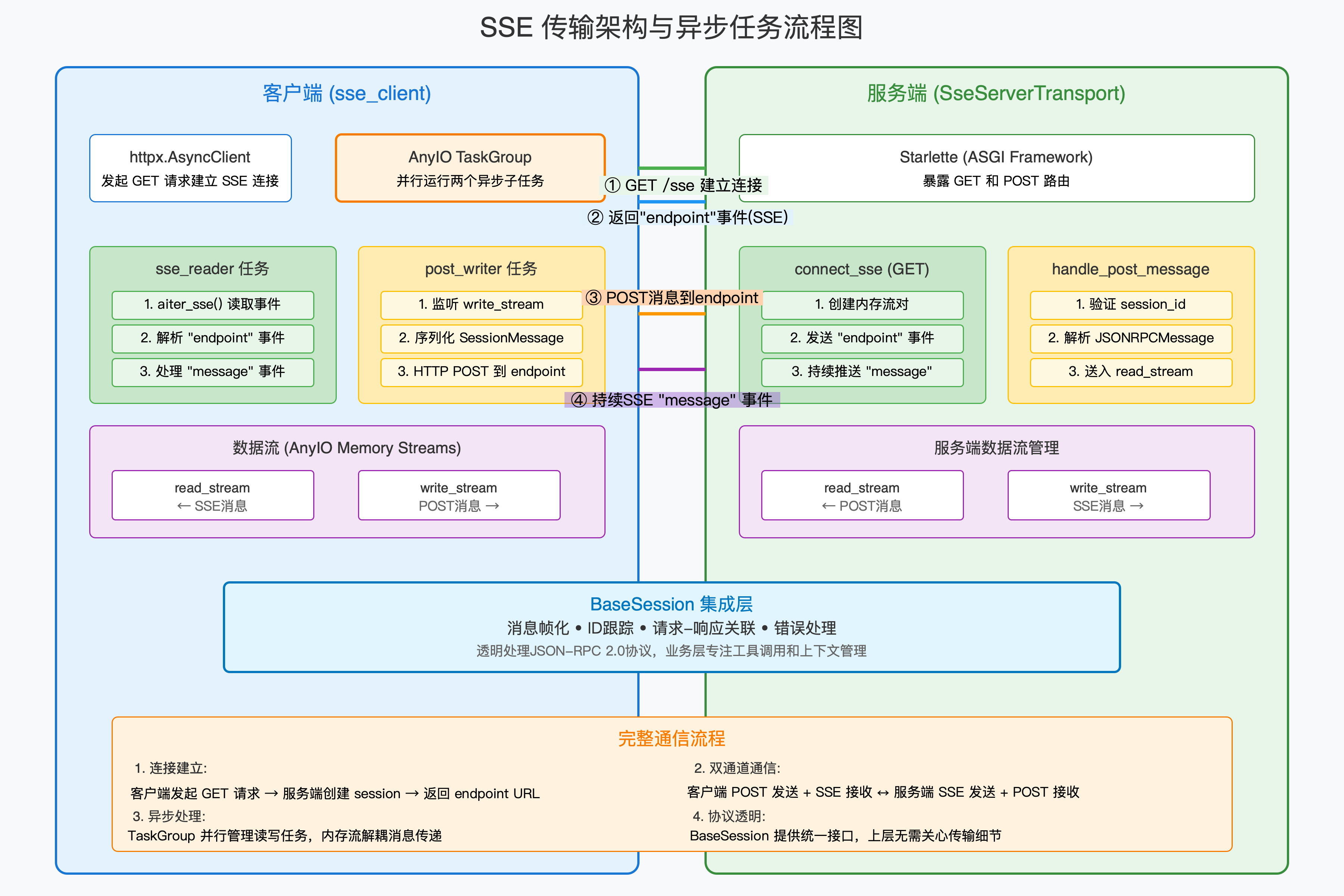
5.2.1 协议消息格式
SSE事件流格式示例
Client请求:
  GET /mcp/events HTTP/1.1
  Host: localhost:3000
  Accept: text/event-stream
  Cache-Control: no-cache

Server响应流:
  : MCP SSE端点已连接
  event: initialized
  data: {"serverInfo": {"name": "excel-server", "version": "1.0.0"}}

  event: tools_list
  data: {"tools": [{"name": "read_excel", ...}]}

  event: tool_result
  data: {"result": {"content": [{"type": "text", "text": "处理完成"}]}}

  event: error
  data: {"code": 500, "message": "Excel文件不存在"}

  : 心跳保持连接
  : ping 1700000000000
5.2.2 SSE服务器配置示例
// Cherry Studio SSE服务器配置
{
  "mcpServers": {
    "remote-monitoring": {
      "url": "https://monitoring.example.com/api/mcp/events",

      // 认证配置
      "authentication": {
        "type": "bearer",
        "token": "${MONITORING_API_TOKEN}",  // 从环境变量读取
        "refreshInterval": 3600              // 令牌刷新间隔(秒)
      },

      // 连接参数
      "connection": {
        "transport": "sse",
        "reconnect": {
          "enabled": true,
          "initialDelay": 1000,      // 初始重连延迟(毫秒)
          "maxDelay": 30000,         // 最大重连延迟
          "backoffFactor": 1.5       // 退避因子
        },
        "heartbeat": {
          "interval": 30000,         // 心跳间隔(毫秒)
          "timeout": 60000           // 心跳超时时间
        }
      },

      // 请求头配置
      "headers": {
        "User-Agent": "CherryStudio/1.0",
        "X-Client-ID": "${CLIENT_ID}",
        "X-Request-ID": "${GENERATED_ID}"  // 每次请求生成唯一ID
      },

      // 元数据
      "description": "远程系统监控和告警服务",
      "version": "2.0.0",

      // 重试策略
      "retryPolicy": {
        "maxAttempts": 3,
        "retryableErrors": ["ECONNRESET", "ETIMEDOUT"]
      }
    }
  }
}
5.2.3 SSE优点与注意事项
| 优点 | 技术实现 | 业务价值 |
|---|---|---|
| 实时推送 | 服务器可主动推送事件,无需客户端轮询 | 即时通知,提升交互体验 |
| 自动重连 | 连接断开后客户端自动尝试重连 | 提升系统容错能力 |
| 协议轻量 | 基于HTTP,无需额外端口 | 兼容现有基础设施 |
| 浏览器原生支持 | 现代浏览器内置EventSource API | 前端集成简单 |
| 注意事项 | 原因 | 缓解策略 |
|---|---|---|
| 单向通信限制 | SSE主要是服务器→客户端 | 客户端通过其他HTTP请求发送数据 |
| 连接数限制 | 浏览器限制每个域名6个并发连接 | 使用域名分片或HTTP/2 |
| 不支持二进制数据 | 仅支持UTF-8文本 | 使用Base64编码或分多个事件发送 |
5.3 streamableHttp(流式HTTP)
定义:streamableHttp是基于HTTP/1.1分块传输编码或HTTP/2流式传输的协议,支持大文件的高效传输。
5.3.1 流式传输机制对比
传统HTTP vs streamableHttp传输对比

传统HTTP(一次性)           streamableHttp(流式)
┌──────────────────┐        ┌──────────────────┐
│  请求 1: 下载文件A  │        │  请求 1: 开始传输文件A│
│  等待完整响应     │        │  立即开始接收数据块  │
│  内存占用: 100MB │        │  内存占用: 1MB缓冲区│
├──────────────────┤        ├──────────────────┤
│  请求完成          │        │  持续接收数据块    │
│  开始处理         │        │  边接收边处理      │
│  总耗时: 10秒     │        │  总耗时: 8秒       │
└──────────────────┘        └──────────────────┘
5.3.2 流式响应示例代码
// MCP Server实现流式响应的示例
const { Server } = require('@modelcontextprotocol/sdk');
const fs = require('fs');
const { createGzip } = require('zlib');

const server = new Server(
  { name: 'large-file-server', version: '1.0.0' },
  { capabilities: { streaming: true } }
);

// 处理大文件流式读取
server.setRequestHandler('tools/call', async (request, extra) => {
  const { name, arguments: args } = request.params;

  if (name === 'stream_large_file') {
    const filePath = args.filepath;
    const fileSize = fs.statSync(filePath).size;

    // 设置流式响应
    const responseStream = new ReadableStream({
      async start(controller) {
        try {
          // 发送元数据作为第一个数据块
          controller.enqueue(
            JSON.stringify({
              type: 'metadata',
              fileSize,
              chunkSize: 1024 * 1024, // 1MB每块
              totalChunks: Math.ceil(fileSize / (1024 * 1024))
            })
          );

          // 流式读取文件
          const readStream = fs.createReadStream(filePath, {
            highWaterMark: 1024 * 1024 // 1MB缓冲区
          });

          let chunkIndex = 0;
          readStream.on('data', (chunk) => {
            controller.enqueue(
              JSON.stringify({
                type: 'chunk',
                index: chunkIndex++,
                data: chunk.toString('base64'), // 二进制转Base64
                size: chunk.length
              })
            );
          });

          readStream.on('end', () => {
            controller.enqueue(
              JSON.stringify({ type: 'complete', totalChunks: chunkIndex })
            );
            controller.close();
          });

          readStream.on('error', (err) => {
            controller.error(err);
          });
        } catch (error) {
          controller.error(error);
        }
      }
    });

    // 返回流式响应
    return {
      streaming: true,
      stream: responseStream
    };
  }
});
5.3.3 企业级streamableHttp配置
{
  "mcpServers": {
    "enterprise-data-pipeline": {
      "url": "https://data-api.example.com/v1/mcp/stream",

      // 传输协议配置
      "transport": "streamableHttp",
      "protocol": "http/2",  // 可选:http/1.1, http/2, http/3

      // 流控制参数
      "streaming": {
        "chunkSize": 1048576,           // 1MB每块
        "bufferSize": 5242880,          // 5MB缓冲区
        "timeoutPerChunk": 30000,       // 每块超时时间(毫秒)
        "maxConcurrentStreams": 100,    // HTTP/2最大并发流
        "compression": "gzip"           // 压缩算法
      },

      // TLS/SSL配置
      "tls": {
        "enabled": true,
        "minVersion": "TLSv1.2",
        "ciphers": [
          "TLS_AES_256_GCM_SHA384",
          "TLS_CHACHA20_POLY1305_SHA256"
        ],
        "certVerification": "strict"
      },

      // 高级网络配置
      "network": {
        "keepAlive": true,
        "keepAliveMsecs": 1000,
        "maxSockets": 50,
        "maxFreeSockets": 10
      },

      // 监控与指标
      "monitoring": {
        "enableMetrics": true,
        "metricsEndpoint": "/_metrics",
        "logLevel": "info",
        "traceIdHeader": "X-Trace-ID"
      }
    }
  }
}
5.3.4 流式传输性能调优
| 性能参数 | 推荐值 | 调优建议 | 影响因素 |
|---|---|---|---|
| 块大小 | 512KB-4MB | 根据网络延迟调整,高延迟网络用大块 | 网络RTT、服务器内存 |
| 并发流数 | 10-100 | 基于服务器处理能力调整 | 服务器CPU、磁盘I/O |
| 缓冲区大小 | 内存的1-5% | 避免内存溢出,保持流畅传输 | 可用内存、文件大小 |
| 超时设置 | 30-120秒 | 长超时用于大文件,短超时用于交互 | 网络稳定性、文件大小 |
| 压缩级别 | gzip-6 | 平衡压缩比和CPU消耗 | 网络带宽、服务器负载 |
6. 协议对比与选择指南
6.1 技术选型决策矩阵
| 选择标准 \ 协议类型 | stdio | SSE | streamableHttp |
|---|---|---|---|
| 部署位置 | 同一台主机 | 任意位置(需要网络可达) | 任意位置(需要网络可达) |
| 数据传输方向 | 双向同步 | 服务器→客户端单向推送 | 双向流式异步 |
| 最大数据负载 | 中等(受管道缓冲区限制) | 中等(适合文本和事件) | 大(适合文件和流) |
| 实时性要求 | 良好(毫秒级延迟) | 优秀(毫秒级推送延迟) | 良好(依赖分块大小) |
| 安全要求 | 很高(进程隔离) | 中等(依赖HTTPS) | 中等(依赖HTTPS和认证) |
| 开发复杂度 | 低 | 中等 | 高 |
| 调试便利性 | 容易(查看进程日志) | 中等(需要网络调试) | 复杂(需要流调试工具) |
| 扩展性 | 有限(单机扩展) | 良好(可水平扩展) | 优秀(支持负载均衡) |
6.2 典型应用场景匹配表
| 业务场景 | 推荐协议 | 原因 | 配置要点 |
|---|---|---|---|
| 本地文件处理工具 | stdio | 无需网络,最安全简单 | 配置命令和参数,注意路径解析 |
| 实时监控告警系统 | SSE | 服务器主动推送实时事件 | 配置重连和心跳机制 |
| 大文件上传/下载 | streamableHttp | 支持流式分块传输,内存占用低 | 配置块大小和缓冲区 |
| API网关代理 | streamableHttp | 需要双向复杂通信,兼容REST | 配置认证和超时参数 |
| 内部测试工具 | stdio | 快速搭建,无外部依赖 | 使用相对路径和环境变量 |
| 多租户SaaS服务 | SSE + streamableHttp | 混合使用,事件用SSE,数据用HTTP | 分服务配置不同协议 |
第三部分:实践应用篇
7. 配置示例与最佳实践
7.1 多协议混合部署配置
// 企业级混合部署配置示例
{
  "version": "2.0",
  "environment": "${NODE_ENV}",  // development, staging, production
  "mcpServers": {

    // 本地stdio工具(开发用)
    "dev-database": {
      "command": "docker",
      "args": [
        "run", "--rm",
        "-v", "${PWD}/data:/data",
        "postgres-mcp:latest"
      ],
      "description": "本地开发数据库工具",
      "enabled": "${NODE_ENV} === 'development'"
    },

    // 内网SSE服务(监控)
    "internal-monitoring": {
      "url": "http://monitoring.internal:8080/api/mcp-events",
      "transport": "sse",
      "headers": {
        "X-API-Key": "${INTERNAL_API_KEY}"
      },
      "description": "内部系统监控服务",
      "healthCheck": {
        "endpoint": "/health",
        "interval": 30000
      }
    },

    // 公网streamableHttp服务(文件处理)
    "cloud-storage": {
      "url": "https://storage-api.example.com/v2/mcp/stream",
      "transport": "streamableHttp",
      "authentication": {
        "type": "oauth2",
        "clientId": "${CLOUD_CLIENT_ID}",
        "clientSecret": "${CLOUD_CLIENT_SECRET}",
        "tokenUrl": "https://auth.example.com/oauth/token",
        "scopes": ["files:read", "files:write"]
      },
      "description": "云存储文件处理服务",
      "rateLimit": {
        "requestsPerMinute": 100,
        "burstCapacity": 20
      }
    },

    // 第三方AI服务集成
    "vision-ai": {
      "url": "https://ai-vendor.com/api/mcp-sse",
      "transport": "sse",
      "description": "第三方计算机视觉AI服务",
      "billing": {
        "metered": true,
        "costPerRequest": 0.001
      },
      "cache": {
        "enabled": true,
        "ttl": 3600000
      }
    }
  },

  // 全局配置
  "global": {
    "timeout": 60000,
    "maxRetries": 3,
    "concurrentConnections": 10,
    "logLevel": "${LOG_LEVEL}",
    "telemetry": {
      "enabled": true,
      "endpoint": "https://telemetry.example.com/v1/events"
    }
  }
}
7.2 环境特定配置策略
| 环境 | 配置策略 | 安全性考虑 | 性能优化 |
|---|---|---|---|
| 开发环境 | 使用本地stdio服务 配置相对路径 启用详细日志 | 本地文件权限控制 不暴露敏感信息 | 最小化启动延迟 热重载配置 |
| 测试环境 | 使用内网SSE服务 模拟生产配置 数据隔离 | 内网防火墙规则 测试专用凭据 | 适中超时设置 连接池优化 |
| 预生产环境 | 混合部署 镜像生产配置 蓝绿部署支持 | 生产级别认证 审计日志启用 | 负载测试优化 缓存策略验证 |
| 生产环境 | 高可用部署 多地域冗余 自动故障转移 | 强认证加密 最小权限原则 安全审计 | 连接复用优化 CDN集成 自动扩缩容 |
7.3 配置验证与测试
// 配置验证脚本示例
const fs = require('fs');
const path = require('path');
const { spawn } = require('child_process');
const fetch = require('node-fetch');

class MCPConfigValidator {
  constructor(configPath) {
    this.config = JSON.parse(fs.readFileSync(configPath, 'utf8'));
    this.results = [];
  }

  async validateAll() {
    console.log(`开始验证 ${Object.keys(this.config.mcpServers).length} 个MCP服务器配置...`);

    for (const [name, serverConfig] of Object.entries(this.config.mcpServers)) {
      console.log(`\n验证服务器: ${name}`);

      switch (serverConfig.transport || 'stdio') {
        case 'stdio':
          await this.validateStdioServer(name, serverConfig);
          break;
        case 'sse':
          await this.validateSSEServer(name, serverConfig);
          break;
        case 'streamableHttp':
          await this.validateStreamableHttpServer(name, serverConfig);
          break;
      }
    }

    this.printValidationReport();
  }

  async validateStdioServer(name, config) {
    if (!config.command) {
      this.addResult(name, 'ERROR', '缺少必填字段: command');
      return;
    }

    try {
      // 测试命令是否存在
      const testArgs = config.args || [];
      const process = spawn(config.command, [...testArgs, '--version'], {
        stdio: ['ignore', 'pipe', 'pipe'],
        timeout: 5000
      });

      return new Promise((resolve) => {
        let stdout = '';
        let stderr = '';

        process.stdout.on('data', (data) => stdout += data.toString());
        process.stderr.on('data', (data) => stderr += data.toString());

        process.on('close', (code) => {
          if (code === 0) {
            this.addResult(name, 'SUCCESS', `命令验证成功: ${stdout.trim()}`);
          } else {
            this.addResult(name, 'WARNING', `命令退出码 ${code}: ${stderr.trim()}`);
          }
          resolve();
        });

        process.on('error', (err) => {
          this.addResult(name, 'ERROR', `命令执行失败: ${err.message}`);
          resolve();
        });
      });
    } catch (error) {
      this.addResult(name, 'ERROR', `配置解析失败: ${error.message}`);
    }
  }

  // 其他验证方法类似...

  addResult(serverName, level, message) {
    this.results.push({
      server: serverName,
      level,
      message,
      timestamp: new Date().toISOString()
    });
  }

  printValidationReport() {
    console.log('\n' + '='.repeat(50));
    console.log('配置验证报告');
    console.log('='.repeat(50));

    const summary = {
      SUCCESS: 0,
      WARNING: 0,
      ERROR: 0
    };

    this.results.forEach(result => {
      summary[result.level] = (summary[result.level] || 0) + 1;
      const icon = result.level === 'SUCCESS' ? '✅' :
                   result.level === 'WARNING' ? '⚠️' : '❌';
      console.log(`${icon} ${result.server}: ${result.message}`);
    });

    console.log('\n' + '='.repeat(50));
    console.log(`总计: ${summary.SUCCESS} 成功, ${summary.WARNING} 警告, ${summary.ERROR} 错误`);
    console.log('='.repeat(50));
  }
}

// 使用验证器
const validator = new MCPConfigValidator('./mcp-config.json');
validator.validateAll().catch(console.error);
文档修订记录
| 版本 | 修订日期 | 修订内容 | 审查状态 | 修订人 |
|---|---|---|---|---|
| 1.0 | 2024-05-15 | 初始版本,整合架构与协议内容 | ✅ 已审查 | 技术文档组 |
| 0.9 | 2024-05-12 | 协议部分详细扩展 | ⚠️ 技术审查中 | 网络协议组 |
| 0.8 | 2024-05-10 | 架构部分细化,增加配置示例 | ✅ 已审查 | 架构设计组 |
附录:相关资源
官方资源链接
- MCP规范文档: https://spec.modelcontextprotocol.io/latest
- GitHub仓库: https://github.com/modelcontextprotocol
- 示例代码库: https://github.com/modelcontextprotocol/examples
- SDK下载: https://www.npmjs.com/search?q=%40modelcontextprotocol
- UV工具 https://github.com/astral-sh/uv
社区与支持
- Discord社区: https://discord.gg/modelcontextprotocol
- Stack Overflow标签: #modelcontextprotocol
- 技术博客: https://blog.anthropic.com/category/technical/
工具与库
- MCP服务器模板: https://github.com/modelcontextprotocol/server-template
- 配置验证工具: https://www.npmjs.com/package/mcp-config-validator
- 监控仪表板: https://github.com/modelcontextprotocol/monitoring-dashboard

有“AI”的1024 = 2048,欢迎大家加入2048 AI社区
更多推荐


 6
6 0
0- 0


 已为社区贡献3条内容

所有评论(0)