Qwen3.5微调全攻略:SFT、RLHF、多模态、Agent一站式掌握
本文详细介绍了Qwen3.5模型微调的全流程指南,基于阿里巴巴ModelScope官方框架ms-swift,提供一站式解决方案。内容涵盖: 数据格式转换:支持messages/sharegpt/alpaca/query-response四种格式自动转换 全场景支持:预训练、SFT、RLHF(DPO/KTO/GRPO)、多模态、Agent等场景的数据格式详解 Agent微调:深入解析工具调用原理,提
🚀 一站式掌握 Qwen3.5 微调:涵盖 SFT、RLHF、多模态、Agent 等全场景数据格式 | 20+ Agent Template 深度解析 | ms-swift 框架实战教程 | 附完整训练代码
一、概述
为什么需要这篇文章?
在微调 Qwen3.5 模型时,你是否遇到过这些困惑:
- ❓ 数据格式五花八门,不知道该用哪种?
- ❓ Agent 微调到底是什么,如何让模型学会调用工具?
- ❓ 20+ 种 Agent Template 该如何选择?
- ❓ 多模态、RLHF、工具调用的数据该怎么准备?
本文基于 ms-swift(阿里巴巴 ModelScope 官方微调框架),为你提供:
✅ 4 种自动转换数据格式 - messages/sharegpt/alpaca/query-response 一键适配
✅ 全场景数据格式 - 预训练、SFT、DPO/KTO/GRPO、多模态、Agent 全覆盖
✅ Agent 微调深度解析 - 原理、数据格式、20+ Template 对比、实战代码
✅ 开箱即用的训练脚本 - 复制粘贴即可运行
适合人群:AI 研究者、算法工程师、大模型应用开发者
二、ms-swift 标准数据集格式
ms-swift 的标准数据集格式可接受的 keys 包括:
| Key | 说明 | 是否必需 |
|---|---|---|
messages |
对话消息列表 | 必需 |
rejected_response |
用于 DPO 等 RLHF 训练 | 可选 |
label |
用于 KTO 训练和分类模型训练 | 可选 |
images |
多模态图片路径/URL | 可选 |
videos |
多模态视频路径/URL | 可选 |
audios |
多模态音频路径/URL | 可选 |
tools |
Agent 任务的工具定义 | 可选 |
objects |
grounding 任务 | 可选 |
2.1 四种可自动转换的数据格式
ms-swift 的 AutoPreprocessor 支持将以下四种格式自动转换为标准格式:
1) messages 格式(标准格式)
{"messages": [{"role": "system", "content": "<system>"}, {"role": "user", "content": "<query1>"}, {"role": "assistant", "content": "<response1>"}, {"role": "user", "content": "<query2>"}, {"role": "assistant", "content": "<response2>"}]}
2) sharegpt 格式
{"system": "<system>", "conversation": [{"human": "<query1>", "assistant": "<response1>"}, {"human": "<query2>", "assistant": "<response2>"}]}
3) query-response 格式
{"system": "<system>", "query": "<query2>", "response": "<response2>", "history": [["<query1>", "<response1>"]]}
自动字段映射:
- system:
system,system_prompt - query:
query,prompt,input,instruction,question,problem - response:
response,answer,output,targets,target,answer_key,answers,solution,text,completion,content
4) alpaca 格式
{"system": "<system>", "instruction": "<query-inst>", "input": "<query-input>", "output": "<response>"}
注意:
instruction和input字段将组合成 query 字段。若两者都不为空,query = f'{instruction}\n{input}'
三、各场景数据格式详解
3.1 预训练数据格式
{"messages": [{"role": "assistant", "content": "I love music"}]}{"messages": [{"role": "assistant", "content": "教练我要打篮球"}]}{"messages": [{"role": "assistant", "content": "西红柿鸡蛋盖饭和地三鲜盖饭哪个更权威"}]}
3.2 监督微调(SFT)数据格式
{"messages": [{"role": "system", "content": "你是个有用无害的助手"}, {"role": "user", "content": "告诉我明天的天气"}, {"role": "assistant", "content": "明天天气晴朗"}]}{"messages": [{"role": "system", "content": "你是个有用无害的数学计算器"}, {"role": "user", "content": "1+1等于几"}, {"role": "assistant", "content": "等于2"}, {"role": "user", "content": "再加1呢"}, {"role": "assistant", "content": "等于3"}]}
控制损失计算:可通过 loss 字段控制对应回复是否计算损失:
{"messages": [{"role": "user", "content": "你好"}, {"role": "assistant", "content": "你好,有什么可以帮助你的吗?", "loss": false}, {"role": "user", "content": "1+1等于几?"}, {"role": "assistant", "content": "等于2", "loss": true}]}
3.3 RLHF 数据格式
DPO/ORPO/CPO/SimPO/RM
{"messages": [{"role": "system", "content": "你是个有用无害的助手"}, {"role": "user", "content": "告诉我明天的天气"}, {"role": "assistant", "content": "明天天气晴朗"}], "rejected_response": "我不知道"}
KTO
{"messages": [{"role": "user", "content": "告诉我明天的天气"}, {"role": "assistant", "content": "我不知道"}], "label": false}{"messages": [{"role": "user", "content": "1+1等于几"}, {"role": "assistant", "content": "等于2"}], "label": true}
PPO/GRPO
{"messages": [{"role": "system", "content": "你是个有用无害的助手"}, {"role": "user", "content": "告诉我明天的天气"}]}{"messages": [{"role": "user", "content": "1+1等于几"}, {"role": "assistant", "content": "等于2"}, {"role": "user", "content": "再加1呢"}]}
3.4 多模态数据格式
{"messages": [{"role": "user", "content": "浙江的省会在哪?"}, {"role": "assistant", "content": "浙江的省会在杭州。"}]}{"messages": [{"role": "user", "content": "<image><image>两张图片有什么区别"}, {"role": "assistant", "content": "前一张是小猫,后一张是小狗"}], "images": ["/xxx/x.jpg", "/xxx/x.png"]}{"messages": [{"role": "user", "content": "<audio>语音说了什么"}, {"role": "assistant", "content": "今天天气真好呀"}], "audios": ["/xxx/x.mp3"]}{"messages": [{"role": "user", "content": "<image>图片中是什么,<video>视频中是什么"}, {"role": "assistant", "content": "图片中是一个大象,视频中是一只小狗在草地上奔跑"}], "images": ["/xxx/x.jpg"], "videos": ["/xxx/x.mp4"]}
特殊标签说明:
<image>- 图片插入位置<video>- 视频插入位置<audio>- 音频插入位置
四、Agent 微调详解
4.1 什么是 Agent 微调?
Agent 微调是让大语言模型具备工具调用能力的训练过程。通过 Agent 微调,模型可以:
- 理解工具描述:解析 API 的功能、参数和使用方法
- 决策工具调用:判断何时需要调用工具,选择合适的工具
- 生成调用参数:根据用户需求生成正确的工具调用参数
- 整合工具结果:将工具返回的结果整合到最终回答中
4.2 Agent 微调解决的核心问题
| 问题类型 | 描述 | Agent 微调的解决方案 |
|---|---|---|
| 能力边界 | LLM 知识有截止日期,无法获取实时信息 | 通过调用外部 API 获取实时数据 |
| 计算精度 | LLM 数学计算能力有限 | 调用计算器等专业工具 |
| 专业任务 | 无法执行代码、操作文件等 | 调用代码执行器、文件系统等工具 |
| 多模态交互 | 需要与外部系统交互 | 调用各类 API 完成复杂任务 |
| 任务分解 | 复杂任务需要多步骤完成 | 支持多轮工具调用和结果整合 |
4.3 Agent 数据集格式
ms-swift 使用 agent-template 实现了 Agent 数据格式与模型的解耦,基于统一的数据集格式,可以灵活切换不同模型进行训练。
纯文本 Agent 数据样本
{ "tools": "[{\"type\": \"function\", \"function\": {\"name\": \"realtime_aqi\", \"description\": \"天气预报。获取实时空气质量。当前空气质量,PM2.5,PM10信息\", \"parameters\": {\"type\": \"object\", \"properties\": {\"city\": {\"type\": \"string\", \"description\": \"城市名,例如:上海\"}}, \"required\": [\"city\"]}}}]", "messages": [ {"role": "user", "content": "北京和上海今天的天气情况"}, {"role": "tool_call", "content": "{\"name\": \"realtime_aqi\", \"arguments\": {\"city\": \"北京\"}}"}, {"role": "tool_call", "content": "{\"name\": \"realtime_aqi\", \"arguments\": {\"city\": \"上海\"}}"}, {"role": "tool_response", "content": "{\"city\": \"北京\", \"aqi\": \"10\", \"unit\": \"celsius\"}"}, {"role": "tool_response", "content": "{\"city\": \"上海\", \"aqi\": \"72\", \"unit\": \"fahrenheit\"}"}, {"role": "assistant", "content": "根据天气预报工具,北京今天的空气质量指数为10,属于良好水平;上海今天的空气质量指数为72,属于轻度污染水平。"} ]}
多模态 Agent 数据样本
{ "tools": "[{\"type\": \"function\", \"function\": {\"name\": \"click\", \"description\": \"点击屏幕中的某个位置\", \"parameters\": {\"type\": \"object\", \"properties\": {\"x\": {\"type\": \"integer\", \"description\": \"横坐标\"}, \"y\": {\"type\": \"integer\", \"description\": \"纵坐标\"}}, \"required\": [\"x\", \"y\"]}}}]", "messages": [ {"role": "user", "content": "<image>现在几点了?"}, {"role": "assistant", "content": "<think>\n我可以通过打开日历App来获取当前时间。\n</think>\n"}, {"role": "tool_call", "content": "{\"name\": \"click\", \"arguments\": {\"x\": 105, \"y\": 132}}"}, {"role": "tool_response", "content": "{\"images\": \"<image>\", \"status\": \"success\"}"}, {"role": "assistant", "content": "成功打开日历App,现在的时间为中午11点"} ], "images": ["desktop.png", "calendar.png"]}
4.4 Agent 数据格式关键要素
| 字段 | 说明 |
|---|---|
tools |
JSON 字符串,包含工具列表定义 |
role: "tool_call" |
模型发起的工具调用,content 为 JSON 字符串 |
role: "tool_response" |
工具返回的结果(也可写成 role: "tool") |
role: "assistant" |
模型的文本回复 |
重要特性:
- 并行工具调用:支持连续多个
tool_call,如上例中同时查询北京和上海 - 混合输出:支持
assistant和tool_call混合出现 - 多模态支持:
<image>标签数量应与images长度相同
4.5 tools 字段格式
tools = [{ 'type': 'function', 'function': { 'name': 'get_current_weather', 'description': 'Get the current weather in a given location', 'parameters': { 'type': 'object', 'properties': { 'location': { 'type': 'string', 'description': 'The city and state, e.g. San Francisco, CA' }, 'unit': { 'type': 'string', 'enum': ['celsius', 'fahrenheit'] } }, 'required': ['location'] } }}]
五、Agent Template 详解
ms-swift 支持多种 Agent Template,实现了数据格式与模型的解耦:
5.1 支持的 Agent Template
| Template 名称 | 适用场景 | 特点 |
|---|---|---|
hermes |
通用 Agent 训练 | 使用 <tool_call> XML 标签 |
react_en |
ReAct 格式(英文) | Action/Action Input/Observation 格式 |
react_zh |
ReAct 格式(中文) | 中文版 ReAct |
qwen_en |
Qwen 官方格式(英文) | 使用 ✿FUNCTION✿ 等特殊标记 |
qwen_zh |
Qwen 官方格式(中文) | 中文版 Qwen 格式 |
qwen3_coder |
Qwen3-Coder 专用 | 使用 <function=...> 格式 |
qwen3_5 |
Qwen3.5 专用 | 基于 qwen3_coder 优化 |
glm4 |
GLM4 系列 | GLM4 官方格式 |
llama3 / llama4 |
Llama 系列 | Llama 官方格式 |
deepseek_v3_1 |
DeepSeek V3.1 | DeepSeek 官方格式 |
5.2 Hermes 格式示例(推荐)
使用 agent_template='hermes' 时,数据会被编码为:
[INPUT_IDS] <|im_start|>systemYou are Qwen, created by Alibaba Cloud. You are a helpful assistant.# ToolsYou may call one or more functions to assist with the user query.You are provided with function signatures within <tools></tools> XML tags:<tools>{"type": "function", "function": {"name": "realtime_aqi", "description": "天气预报。获取实时空气质量", "parameters": {...}}}</tools>For each function call, return a json object with function name and arguments within <tool_call></tool_call> XML tags:<tool_call>{"name": <function-name>, "arguments": <args-json-object>}</tool_call><|im_end|><|im_start|>user北京和上海今天的天气情况<|im_end|><|im_start|>assistant<tool_call>{"name": "realtime_aqi", "arguments": {"city": "北京"}}</tool_call><tool_call>{"name": "realtime_aqi", "arguments": {"city": "上海"}}</tool_call><|im_end|><|im_start|>user<tool_response>{"city": "北京", "aqi": "10", "unit": "celsius"}</tool_response><tool_response>{"city": "上海", "aqi": "72", "unit": "fahrenheit"}</tool_response><|im_end|><|im_start|>assistant根据天气预报工具,北京今天的空气质量指数为10,属于良好水平;上海今天的空气质量指数为72,属于轻度污染水平。<|im_end|>
5.3 ReAct 格式示例
使用 agent_template='react_en' 时:
[INPUT_IDS] <|im_start|>systemAnswer the following questions as best you can. You have access to the following tools:realtime_aqi: Call this tool to interact with the realtime_aqi API. What is the realtime_aqi API useful for? 天气预报。获取实时空气质量 Parameters: {...} Format the arguments as a JSON object.Use the following format:Question: the input question you must answerThought: you should always think about what to doAction: the action to take, should be one of [realtime_aqi]Action Input: the input to the actionObservation: the result of the action... (this Thought/Action/Action Input/Observation can be repeated zero or more times)Thought: I now know the final answerFinal Answer: the final answer to the original input questionBegin!<|im_end|><|im_start|>user北京和上海今天的天气情况<|im_end|><|im_start|>assistantAction: realtime_aqiAction Input: {'city': '北京'}Action: realtime_aqiAction Input: {'city': '上海'}Observation:{"city": "北京", "aqi": "10", "unit": "celsius"}Observation:{"city": "上海", "aqi": "72", "unit": "fahrenheit"}根据天气预报工具,北京今天的空气质量指数为10,属于良好水平;上海今天的空气质量指数为72,属于轻度污染水平。<|im_end|>
5.4 Qwen3.5 专用格式
Qwen3.5 使用 qwen3_5 agent template,格式如下:
# ToolsYou have access to the following functions:<tools>{"type": "function", "function": {"name": "get_weather", ...}}</tools>If you choose to call a function ONLY reply in the following format with NO suffix:<tool_call><function=example_function_name><parameter=example_parameter_1>value_1</parameter><parameter=example_parameter_2>This is the value for the second parameterthat can spanmultiple lines</parameter></function></tool_call><IMPORTANT>Reminder:- Function calls MUST follow the specified format- Required parameters MUST be specified- You may provide optional reasoning BEFORE the function call, but NOT after</IMPORTANT>
六、损失权重控制(loss_scale)
Agent 训练中,可以使用 loss_scale 参数调节不同部分的损失权重:
6.1 ReAct 格式的 loss_scale
使用 --loss_scale react:
| 字段 | 损失权重 |
|---|---|
Action: 及后续内容 |
2 |
Action Input: 及后续内容 |
2 |
Thought: 及后续内容 |
1 |
Final Answer: 及后续内容 |
1 |
Observation: 本身 |
2 |
Observation: 后的工具结果 |
0(不计算损失) |
6.2 忽略空思维块
使用 --loss_scale ignore_empty_think 可忽略 <think>\n\n</think>\n\n 的损失计算,这在训练推理模型时非常有用。
七、Qwen3.5 Agent 训练实战
7.1 训练命令示例
CUDA_VISIBLE_DEVICES=0 \swift sft \ --model Qwen/Qwen3.5-4B \ --tuner_type lora \ --dataset AI-ModelScope/function-calling-chatml \ --agent_template qwen3_5 \ --load_from_cache_file true \ --split_dataset_ratio 0.01 \ --add_non_thinking_prefix true \ --loss_scale ignore_empty_think \ --torch_dtype bfloat16 \ --num_train_epochs 2 \ --per_device_train_batch_size 4 \ --learning_rate 1e-4 \ --lora_rank 8 \ --lora_alpha 32 \ --target_modules all-linear \ --max_length 8192 \ --output_dir output/Qwen3.5-4B-Agent
7.2 关键参数说明
| 参数 | 说明 |
|---|---|
--agent_template qwen3_5 |
使用 Qwen3.5 专用 Agent 模板 |
--loss_scale ignore_empty_think |
忽略空思维块的损失 |
--add_non_thinking_prefix true |
添加非思考前缀 |
--dataset |
可使用 AI-ModelScope/function-calling-chatml 等 Agent 数据集 |
八、常用 Agent 数据集
ms-swift 内置支持多个 Agent 相关数据集:
| 数据集 | 说明 |
|---|---|
AI-ModelScope/function-calling-chatml |
函数调用数据集 |
AI-ModelScope/ms_agent_for_agentfabric |
AgentFabric 数据集 |
damo/MSAgent-Bench |
MSAgent 基准数据集 |
iic/ms_agent |
MS Agent 数据集 |
iic/MSAgent-Pro |
MS Agent Pro 数据集 |
iic/MSAgent-MultiRole |
多角色 Agent 数据集 |
swift/ToolBench |
工具调用基准数据集 |
LLM-Research/xlam-function-calling-60k |
60K 函数调用数据集 |
huangjintao/AgentInstruct_copy |
Agent 指令数据集 |
九、总结
9.1 数据格式选择建议
| 场景 | 推荐格式 |
|---|---|
| 通用 SFT | messages 格式 |
| Agent 训练 | 带 tools 的 messages 格式 + qwen3_5/hermes template |
| 多模态训练 | messages 格式 + images/videos/audios 字段 |
| RLHF 训练 | messages 格式 + rejected_response/label 字段 |
9.2 Agent 微调核心要点
- 数据格式统一:使用 ms-swift 标准 Agent 格式,通过
agent_template自动转换 - 模板解耦:同一数据集可切换不同
agent_template适配不同模型 - 损失控制:使用
loss_scale控制不同部分的训练权重 - 并行调用:支持多工具并行调用训练
- 多模态支持:支持图片、视频、音频等多模态 Agent 场景
AI行业迎来前所未有的爆发式增长:从DeepSeek百万年薪招聘AI研究员,到百度、阿里、腾讯等大厂疯狂布局AI Agent,再到国家政策大力扶持数字经济和AI人才培养,所有信号都在告诉我们:AI的黄金十年,真的来了!
在行业火爆之下,AI人才争夺战也日趋白热化,其就业前景一片蓝海!
我给大家准备了一份全套的《AI大模型零基础入门+进阶学习资源包》,包括AI大模型入门学习思维导图、精品AI大模型学习书籍手册、视频教程、实战学习等录播视频免费分享出来。😝有需要的小伙伴,可以VX扫描下方二维码免费领取🆓

人才缺口巨大
人力资源社会保障部有关报告显示,据测算,当前,****我国人工智能人才缺口超过500万,****供求比例达1∶10。脉脉最新数据也显示:AI新发岗位量较去年初暴增29倍,超1000家AI企业释放7.2万+岗位……
单拿今年的秋招来说,各互联网大厂释放出来的招聘信息中,我们就能感受到AI浪潮,比如百度90%的技术岗都与AI相关!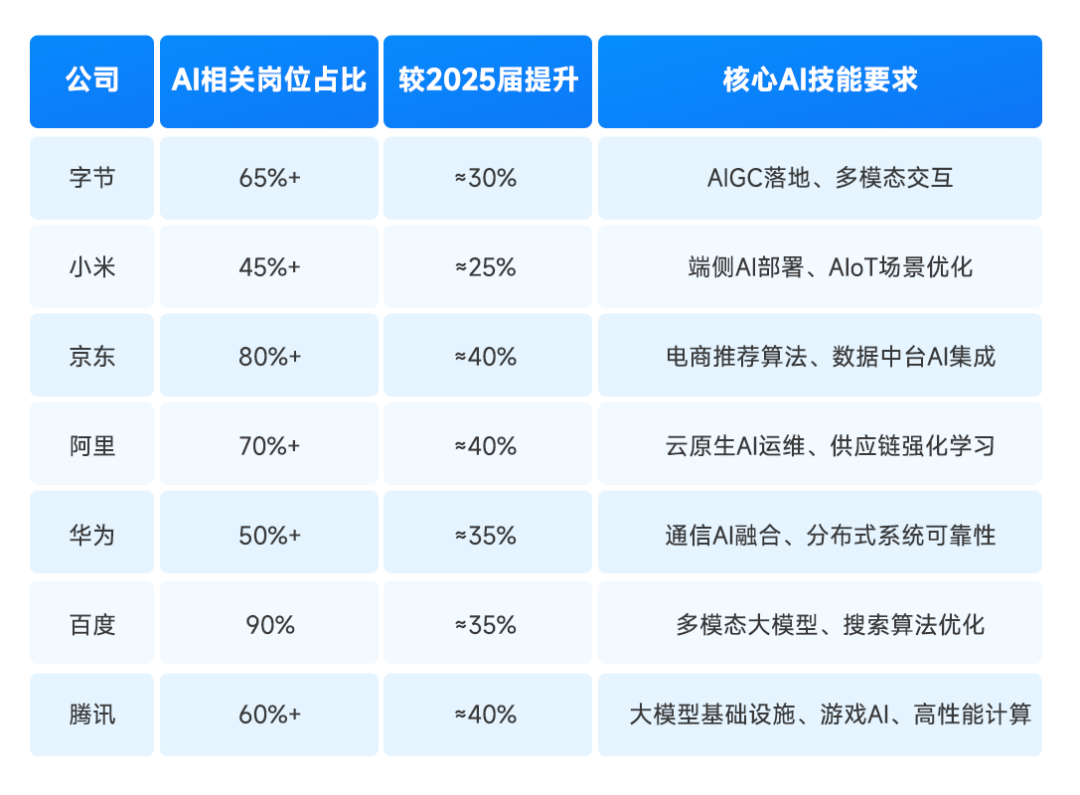
就业薪资超高
在旺盛的市场需求下,AI岗位不仅招聘量大,薪资待遇更是“一骑绝尘”。企业为抢AI核心人才,薪资给的非常慷慨,过去一年,懂AI的人才普遍涨薪40%+!
脉脉高聘发布的《2025年度人才迁徙报告》显示,在2025年1月-10月的高薪岗位Top20排行中,AI相关岗位占了绝大多数,并且平均薪资月薪都超过6w!
在去年的秋招中,小红书给算法相关岗位的薪资为50k起,字节开出228万元的超高年薪,据《2025年秋季校园招聘白皮书》,AI算法类平均年薪达36.9万,遥遥领先其他行业!
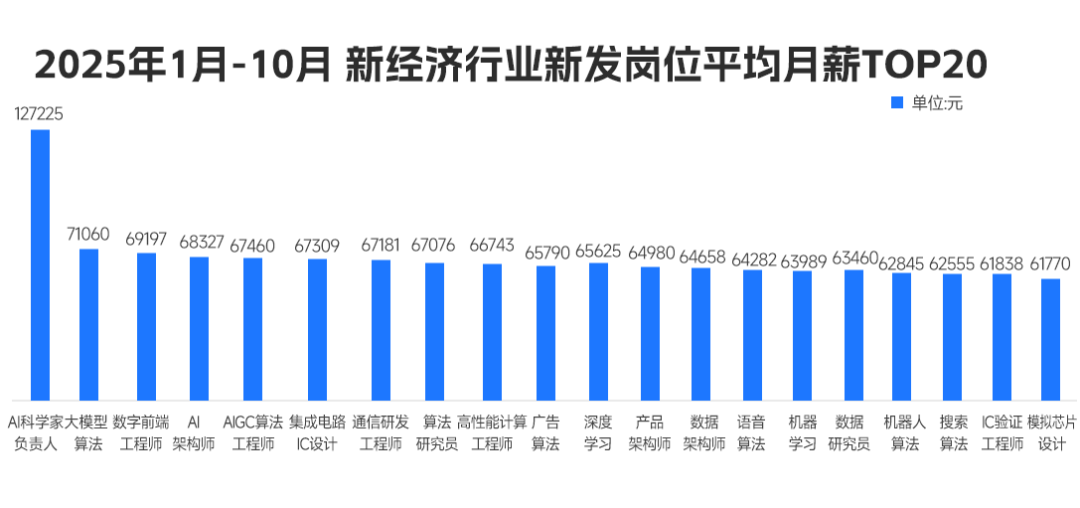
总结来说,当前人工智能岗位需求多,薪资高,前景好。在职场里,选对赛道就能赢在起跑线。抓住AI风口,轻松实现高薪就业!
但现实却是,仍有很多同学不知道如何抓住AI机遇,会遇到很多就业难题,比如:
❌ 技术过时:只会CRUD的开发者,在AI浪潮中沦为“职场裸奔者”;
❌ 薪资停滞:初级岗位内卷到白菜价,传统开发3年经验薪资涨幅不足15%;
❌ 转型无门:想学AI却找不到系统路径,83%自学党中途放弃。
他们的就业难题解决问题的关键在于:不仅要选对赛道,更要跟对老师!
我给大家准备了一份全套的《AI大模型零基础入门+进阶学习资源包》,包括AI大模型入门学习思维导图、精品AI大模型学习书籍手册、视频教程、实战学习等录播视频免费分享出来。😝有需要的小伙伴,可以VX扫描下方二维码免费领取🆓


有“AI”的1024 = 2048,欢迎大家加入2048 AI社区
更多推荐

 1
1 0
0- 0


 已为社区贡献797条内容

所有评论(0)