小龙虾OpenClaw教程1-windows如何安装小龙虾openclaw
openclaw 的依赖链(具体是 @whiskeysockets/baileys → libsignal)在 package.json 里用了 git+ssh:// 的方式指向 whiskeysockets/libsignal-node 这个仓库,而你本地没有为 GitHub 配置 SSH 公钥(publickey),所以 git ls-remote 失败。安装成功后进行配置,配置的过程我并未全
一、在PowerShell中执行下面命令
iwr -useb https://openclaw.ai/install.ps1 | iex二、安装错误及解决
安装过程中可能会报以下错误
报错
node.exe : npm error code 128
所在位置 D:\nvm4w\nodejs\npm.ps1:16 字符: 5
+ & "$basedir/node$exe" "$basedir/node_modules/npm/bin/npm-cli.js" ...
+ ~~~~~~~~~~~~~~~~~~~~~~~~~~~~~~~~~~~~~~~~~~~~~~~~~~~~~~~~~~~~~~~~~
+ CategoryInfo : NotSpecified: (npm error code 128:String) [], RemoteException
+ FullyQualifiedErrorId : NativeCommandError
重新运行一次
npm install -g openclaw@latest查看报错内容如下
npm error code 128
npm error An unknown git error occurred
npm error command git --no-replace-objects ls-remote ssh://git@github.com/whiskeysockets/libsignal-node.git
npm error git@github.com: Permission denied (publickey).
npm error fatal: Could not read from remote repository.
npm error
npm error Please make sure you have the correct access rights
npm error and the repository exists.
npm notice
npm notice New minor version of npm available! 11.3.0 -> 11.11.0
npm notice Changelog: https://github.com/npm/cli/releases/tag/v11.11.0
npm notice To update run: npm install -g npm@11.11.0
npm notice
npm error A complete log of this run can be found in: C:\Users\Administrator\AppData\Local\npm-cache\_logs\2026-03-09T02_45_47_668Z-debug-0.log
原因
openclaw 的依赖链(具体是 @whiskeysockets/baileys → libsignal)在 package.json 里用了 git+ssh:// 的方式指向 whiskeysockets/libsignal-node 这个仓库,而你本地没有为 GitHub 配置 SSH 公钥(publickey),所以 git ls-remote 失败。
这个仓库是公开的(public repo),不需要任何权限就能 clone/download,但 npm 默认把 git+ssh 协议转成 SSH,导致它要求认证 → 报 Permission denied。
这是 openclaw 项目常见的安装坑(GitHub issue #12841、#2711 等很多人遇到),尤其在全新环境或没配过 GitHub SSH 的 Windows 上。
解决方案
配置
git config --global url."https://github.com/".insteadOf "ssh://git@github.com/"
git config --global url."https://".insteadOf "git@github.com:"
//npm cache clean --force
npm cache clean --force
// 先卸载:
npm uninstall -g openclaw
iwr -useb https://openclaw.ai/install.ps1 | iex三、安装成功
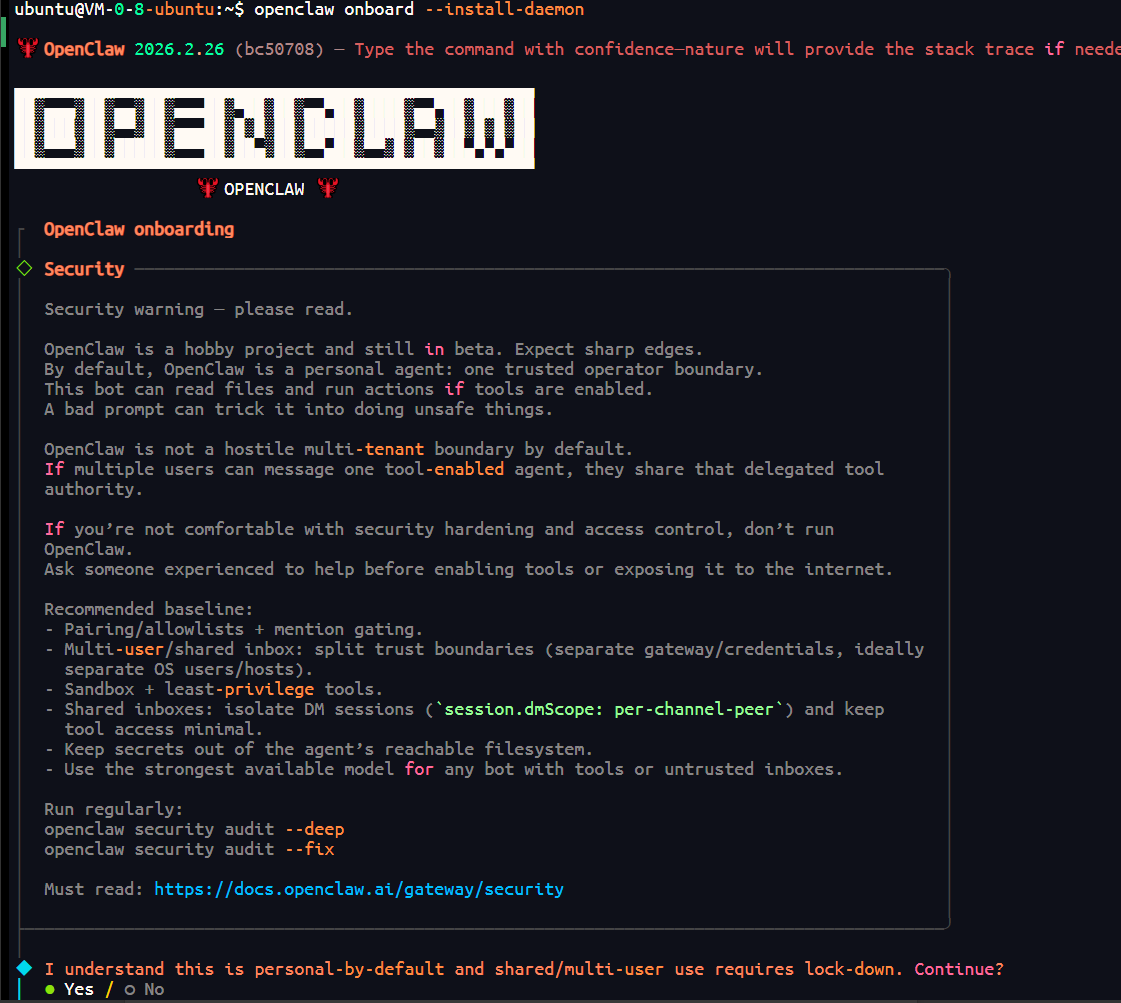
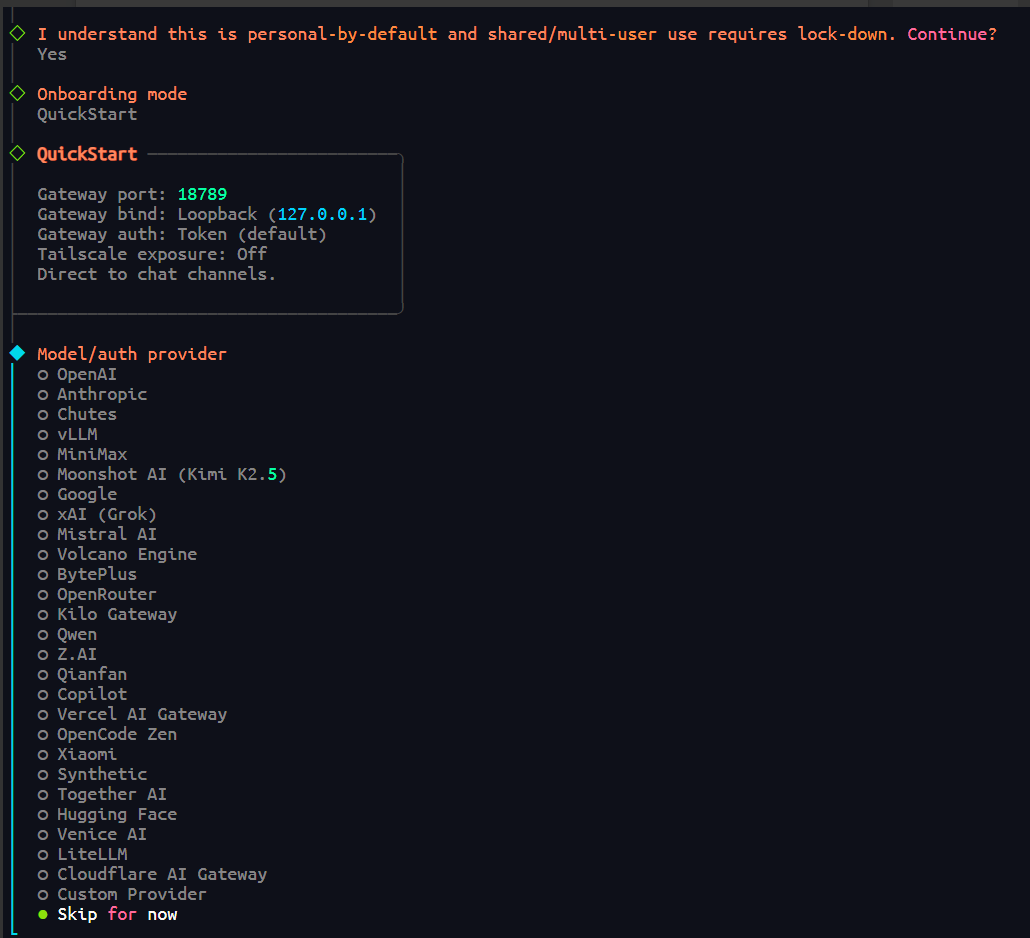
安装成功后进行配置,配置的过程我并未全部截取图片,基本上除了第一步选yes外,其他的全选skip for now以及no即可。
安装成功后进行配置,这一步选yes
选skip for now
四、OpenClaw 中配置 Coding Plan
我使用的是阿里云的百炼,仅说一下我的配置。如果你使用其他的,可以进行想应的调整
如果你也想用阿里云百炼,现存可以使用下面的链接进行购买,
https://www.aliyun.com/benefit/ai/aistar?clubBiz=subTask..12416235..10263..
在终端执行以下命令打开 Web UI。
openclaw dashboard在Web UI的左侧菜单栏中选择配置 > All Settings > RAW。
{
"models": {
"mode": "merge",
"providers": {
"bailian": {
"baseUrl": "https://coding.dashscope.aliyuncs.com/v1",
"apiKey": "YOUR_API_KEY",
"api": "openai-completions",
"models": [
{
"id": "qwen3.5-plus",
"name": "qwen3.5-plus",
"reasoning": false,
"input": ["text", "image"],
"cost": { "input": 0, "output": 0, "cacheRead": 0, "cacheWrite": 0 },
"contextWindow": 1000000,
"maxTokens": 65536
},
{
"id": "qwen3-max-2026-01-23",
"name": "qwen3-max-2026-01-23",
"reasoning": false,
"input": ["text"],
"cost": { "input": 0, "output": 0, "cacheRead": 0, "cacheWrite": 0 },
"contextWindow": 262144,
"maxTokens": 65536
},
{
"id": "qwen3-coder-next",
"name": "qwen3-coder-next",
"reasoning": false,
"input": ["text"],
"cost": { "input": 0, "output": 0, "cacheRead": 0, "cacheWrite": 0 },
"contextWindow": 262144,
"maxTokens": 65536
},
{
"id": "qwen3-coder-plus",
"name": "qwen3-coder-plus",
"reasoning": false,
"input": ["text"],
"cost": { "input": 0, "output": 0, "cacheRead": 0, "cacheWrite": 0 },
"contextWindow": 1000000,
"maxTokens": 65536
},
{
"id": "MiniMax-M2.5",
"name": "MiniMax-M2.5",
"reasoning": false,
"input": ["text"],
"cost": { "input": 0, "output": 0, "cacheRead": 0, "cacheWrite": 0 },
"contextWindow": 204800,
"maxTokens": 131072
},
{
"id": "glm-5",
"name": "glm-5",
"reasoning": false,
"input": ["text"],
"cost": { "input": 0, "output": 0, "cacheRead": 0, "cacheWrite": 0 },
"contextWindow": 202752,
"maxTokens": 16384
},
{
"id": "glm-4.7",
"name": "glm-4.7",
"reasoning": false,
"input": ["text"],
"cost": { "input": 0, "output": 0, "cacheRead": 0, "cacheWrite": 0 },
"contextWindow": 202752,
"maxTokens": 16384
},
{
"id": "kimi-k2.5",
"name": "kimi-k2.5",
"reasoning": false,
"input": ["text", "image"],
"cost": { "input": 0, "output": 0, "cacheRead": 0, "cacheWrite": 0 },
"contextWindow": 262144,
"maxTokens": 32768
}
]
}
}
},
"agents": {
"defaults": {
"model": {
"primary": "bailian/qwen3.5-plus"
},
"models": {
"bailian/qwen3.5-plus": {},
"bailian/qwen3-max-2026-01-23": {},
"bailian/qwen3-coder-next": {},
"bailian/qwen3-coder-plus": {},
"bailian/MiniMax-M2.5": {},
"bailian/glm-5": {},
"bailian/glm-4.7": {},
"bailian/kimi-k2.5": {}
}
}
},
"gateway": {
"mode": "local"
}
}
将YOUR_API_KEY替换为Coding Plan 专属 API Key。
单击右上角 Save 保存,然后单击 Update使配置生效。
保存成功后,apiKey将显示为“__OPENCLAW_REDACTED__”。脱敏保护,仅用于前端界面隐藏,不影响实际调用。


有“AI”的1024 = 2048,欢迎大家加入2048 AI社区
更多推荐

 10
10 0
0- 0


 已为社区贡献3条内容

所有评论(0)