Spring AI 实战:ChatMemory、SSE 流式输出与 Function Calling
Spring AI 三大核心能力实战:ChatMemory 多轮对话与 Redis 持久化、SSE 流式输出打字机效果、Function Calling 工具调用让 AI 操作数据库和发邮件,附完整代码。
本文核心解决三个问题:怎么让 AI 记住上下文、怎么实现打字机效果的流式响应、怎么让 AI 调用外部系统获取实时数据。面向有 Spring Boot 基础的 Java 后端开发者。
一、ChatMemory:让 AI 记住对话
1.1 为什么需要手动管理对话记忆
大模型本质上是无状态的——每次 API 调用都是独立的,模型不会自动记住上一轮说了什么。这意味着如果我们不做任何处理,第二轮对话时模型完全不知道第一轮聊了啥。
在上一篇文章中提到过,API 的输入是一个消息列表(System、User、Assistant),多轮对话的"记忆"实际上是靠我们把历史消息全部塞进去实现的。模型并没有真正"记住",它只是每次都把完整的聊天记录重新读一遍。
1.2 手动管理:ConcurrentHashMap 方案
最直接的思路——自己维护一个 Map,key 是会话 ID,value 是历史消息列表:
@RestController
@RequestMapping("/manual-chat")
public class ManualChatController {

    private final ChatClient chatClient;
    // 手动维护每个会话的历史(演示用,生产不推荐)
    private final Map<String, List<Message>> sessions = new ConcurrentHashMap<>();

    public ManualChatController(ChatClient.Builder builder) {
        this.chatClient = builder.build();
    }

    @PostMapping
    public String chat(@RequestBody ChatRequest request) {
        // 获取或创建该会话的历史
        List<Message> history = sessions.computeIfAbsent(request.conversationId(), id -> {
            List<Message> list = new ArrayList<>();
            list.add(new SystemMessage("你是一个 Java 技术助手"));
            return list;
        });

        // 追加用户消息
        history.add(new UserMessage(request.message()));

        // 带完整历史调用模型
        String reply = chatClient.prompt()
                .messages(history)
                .call()
                .content();

        // 把模型回复也追加进历史
        history.add(new AssistantMessage(reply));

        return reply;
    }

    record ChatRequest(String conversationId, String message) {
    }
}
这段代码功能上是能跑的,但问题很明显:
| 问题 | 说明 |
|---|---|
| 内存无限增长 | 聊得越多历史越长,没有淘汰机制 |
| 重启即丢失 | 存在 JVM 堆内存里,服务重启全没了 |
| Token 超限 | 历史太长超过上下文窗口,直接报错 |
| 多实例不共享 | 集群部署时各节点数据不一致 |
1.3 Spring AI ChatMemory:优雅方案
Spring AI 提供了 ChatMemory 抽象和 MessageChatMemoryAdvisor,帮我们把记忆管理从业务代码中剥离出来:
@RestController
@RequestMapping("/memory-chat")
public class MemoryChatController {

    private final ChatClient chatClient;
    // 单独持有 chatMemory 实例,以便在每次请求时按 conversationId 构建 Advisor
    private final MessageWindowChatMemory chatMemory;

    public MemoryChatController(ChatClient.Builder builder) {
        this.chatMemory = MessageWindowChatMemory.builder().maxMessages(10).build();
        this.chatClient = builder
                .defaultSystem("你是一个 Java 技术助手")
                .build();
    }

    @GetMapping
    public String chat(
            @RequestParam String message,
            @RequestParam(defaultValue = "default") String conversationId) {

        return chatClient.prompt()
                .user(message)
                .advisors(MessageChatMemoryAdvisor.builder(chatMemory)
                        .conversationId(conversationId)
                        .build())
                .call()
                .content();
    }
}
对比手动方案,代码量少了一半,而且关键改进在于:
- MessageWindowChatMemory:自动维护历史消息,
maxMessages(10)限制最多保留 10 条,超出的旧消息自动丢弃——既省 Token 又不会撑爆上下文窗口。 - MessageChatMemoryAdvisor:作为 Advisor(拦截器),在每次请求前自动注入历史消息,请求后自动保存新消息。业务代码完全不用关心记忆管理。
- conversationId:支持多会话隔离,不同用户、不同对话互不干扰。
maxMessages 怎么设? 没有固定答案,取决于业务场景。简单问答 5-10 条够了;复杂多轮任务可以设 20-30 条。设太大会浪费 Token(费用涨),设太小模型容易"失忆"。建议从 10 条开始,根据实际效果调整。
二、Redis 持久化 ChatMemory
2.1 为什么内存方案不够
上面的 MessageWindowChatMemory 默认把消息存在内存里(InMemoryChatMemoryRepository),开发调试没问题,但到生产环境就不行了:
| 场景 | 内存方案的问题 |
|---|---|
| 服务重启/发版 | 所有对话记录丢失 |
| 多实例部署 | 用户请求落到不同实例,记忆不共享 |
| 大量并发用户 | 内存占用不可控 |
解决方案很自然——把消息存到 Redis 里。Spring AI 的设计也考虑到了这一点,ChatMemory 的底层存储是通过 ChatMemoryRepository 接口抽象的,我们只需要实现这个接口就行。
2.2 实现 RedisChatMemoryRepository
public class RedisChatMemoryRepository implements ChatMemoryRepository {

    private static final String KEY_PREFIX = "chat:memory:";
    private static final int TTL_DAYS = 7;

    private final StringRedisTemplate redisTemplate;
    private final ObjectMapper objectMapper;

    public RedisChatMemoryRepository(StringRedisTemplate redisTemplate, ObjectMapper objectMapper) {
        this.redisTemplate = redisTemplate;
        this.objectMapper = objectMapper;
    }

    /**
     * 追加消息并刷新过期时间
     */
    @Override
    public void saveAll(String conversationId, List<Message> messages) {
        String key = KEY_PREFIX + conversationId;
        // 先删除旧数据,再写入完整列表
        redisTemplate.delete(key);
        for (Message message : messages) {
            try {
                MessageRecord record = new MessageRecord(
                        message.getMessageType().name(),
                        message.getText()
                );
                redisTemplate.opsForList().rightPush(key, objectMapper.writeValueAsString(record));
            } catch (Exception e) {
                throw new RuntimeException("存储消息失败", e);
            }
        }
        redisTemplate.expire(key, TTL_DAYS, TimeUnit.DAYS);
    }

    /**
     * 返回该会话的全部消息,裁剪逻辑由外层 MessageWindowChatMemory 处理
     */
    @Override
    public List<Message> findByConversationId(String conversationId) {
        String key = KEY_PREFIX + conversationId;
        List<String> rawMessages = redisTemplate.opsForList().range(key, 0, -1);
        if (rawMessages == null) return new ArrayList<>();

        List<Message> messages = new ArrayList<>();
        for (String raw : rawMessages) {
            try {
                MessageRecord record = objectMapper.readValue(raw, MessageRecord.class);
                if ("USER".equals(record.role())) {
                    messages.add(new UserMessage(record.content()));
                } else if ("ASSISTANT".equals(record.role())) {
                    messages.add(new AssistantMessage(record.content()));
                }
            } catch (Exception ignored) {
            }
        }
        return messages;
    }

    @Override
    public void deleteByConversationId(String conversationId) {
        redisTemplate.delete(KEY_PREFIX + conversationId);
    }

    @Override
    public List<String> findConversationIds() {
        Set<String> keys = redisTemplate.keys(KEY_PREFIX + "*");
        if (keys == null) return new ArrayList<>();
        return keys.stream()
                .map(key -> key.substring(KEY_PREFIX.length()))
                .toList();
    }

    record MessageRecord(String role, String content) {
    }
}
几个设计要点:
- Key 设计:
chat:memory:{conversationId},前缀统一方便管理和清理。 - TTL 7 天:对话记录不需要永久保存,自动过期减少 Redis 内存压力。
- saveAll 全量覆盖:每次保存先删后写,保证和
MessageWindowChatMemory裁剪后的数据一致。这里要注意,ChatMemoryRepository是纯存储层,负责读写所有消息;裁剪(只保留最近 N 条)的逻辑由上层的MessageWindowChatMemory处理。 - 序列化:用 Jackson 把消息转成 JSON 字符串存储,方便调试和排查。
2.3 配置类装配
@Configuration
public class ChatMemoryConfig {

    @Bean
    public ChatMemory chatMemory(StringRedisTemplate redisTemplate, ObjectMapper objectMapper) {
        RedisChatMemoryRepository repository = new RedisChatMemoryRepository(redisTemplate, objectMapper);
        // 底层走 Redis 持久化,上层限制最多保留 20 条消息
        return MessageWindowChatMemory.builder()
                .chatMemoryRepository(repository)
                .maxMessages(20)
                .build();
    }
}
2.4 使用 Redis 版 ChatMemory
Controller 层的代码和内存版几乎一样,唯一的区别是注入的 ChatMemory 现在底层走 Redis:
@RestController
@RequestMapping("/redis-chat")
public class RedisChatController {

    private final ChatClient chatClient;
    private final ChatMemory chatMemory;

    public RedisChatController(ChatClient.Builder builder, ChatMemory chatMemory) {
        this.chatMemory = chatMemory;
        this.chatClient = builder
                .defaultSystem("你是一个 Java 技术助手")
                .build();
    }

    @GetMapping
    public String chat(
            @RequestParam String message,
            @RequestParam(defaultValue = "default") String conversationId) {

        return chatClient.prompt()
                .user(message)
                .advisors(MessageChatMemoryAdvisor.builder(chatMemory)
                        .conversationId(conversationId)
                        .build())
                .call()
                .content();
    }
}
实际开发提示:生产环境建议
conversationId用userId + sessionId的组合,这样既能区分不同用户,又能区分同一用户的不同会话。另外,findConversationIds()中用了keys命令,数据量大时可能阻塞 Redis,生产中可以改用scan命令。
三、SSE 流式输出:打字机效果
3.1 为什么需要流式输出
大模型生成一段回答通常需要几秒甚至十几秒。如果用普通的 HTTP 请求,用户点击"发送"后只能干等,直到全部生成完才一次性收到结果——体验很差。
ChatGPT 的做法是流式输出(Streaming)——模型每生成一个词就立刻推送给前端,用户看到的就是"打字机效果",感知上的等待时间大幅缩短。
技术上,Spring AI 用 SSE(Server-Sent Events) 实现,返回类型是 Flux<String>(Project Reactor 的响应式流)。
3.2 基础流式接口
@RestController
@RequestMapping("/api/stream")
public class StreamController {

    private final ChatClient chatClient;

    public StreamController(ChatClient.Builder builder) {
        this.chatClient = builder
                .defaultSystem("你是一个 Java 技术助手,回答详细且有条理。")
                .build();
    }

    /**
     * 流式对话接口
     * produces = TEXT_EVENT_STREAM_VALUE 告诉 Spring 这是 SSE 响应
     */
    @GetMapping(value = "/chat", produces = MediaType.TEXT_EVENT_STREAM_VALUE)
    public Flux<String> streamChat(@RequestParam String message) {
        return chatClient.prompt()
                .user(message)
                .stream()
                .content();
    }
}
和普通调用的区别就两处:.call() 改成 .stream(),返回类型从 String 改成 Flux<String>。加上 produces = MediaType.TEXT_EVENT_STREAM_VALUE,Spring 会自动处理 SSE 协议。
3.3 流式 + ChatMemory 组合
流式输出和对话记忆可以无缝组合,写法和非流式版本基本一致:
@RestController
@RequestMapping("/api/stream/conversation")
public class StreamConversationController {

    private final ChatClient chatClient;
    private final MessageWindowChatMemory chatMemory;

    public StreamConversationController(ChatClient.Builder builder) {
        this.chatMemory = MessageWindowChatMemory.builder().maxMessages(10).build();
        this.chatClient = builder
                .defaultSystem("你是一个 Java 技术助手")
                .build();
    }

    @GetMapping(produces = MediaType.TEXT_EVENT_STREAM_VALUE)
    public Flux<String> streamChat(
            @RequestParam String message,
            @RequestParam(defaultValue = "default") String conversationId) {

        return chatClient.prompt()
                .user(message)
                .advisors(MessageChatMemoryAdvisor.builder(chatMemory)
                        .conversationId(conversationId)
                        .build())
                .stream()
                .content();
    }
}
MessageChatMemoryAdvisor 在流式模式下同样能正常工作——会在流开始前注入历史消息,流结束后自动保存本轮对话。
3.4 服务端收集完整回复(存库场景)
流式推送给前端的同时,服务端往往需要拿到完整的回复内容——比如存入数据库做审计、统计 Token 用量等。关键技巧是用 doOnNext 逐片段收集,doOnComplete 在流结束时触发保存:
@Slf4j
@RestController
@RequestMapping("/api/stream/save")
public class StreamSaveController {

    private final ChatClient chatClient;

    public StreamSaveController(ChatClient.Builder builder) {
        this.chatClient = builder.build();
    }

    /**
     * 流式推送给前端,同时在服务端收集完整回复后存库
     */
    @GetMapping(produces = MediaType.TEXT_EVENT_STREAM_VALUE)
    public Flux<String> chatAndSave(
            @RequestParam String message,
            @RequestParam(defaultValue = "default") String conversationId) {

        StringBuilder fullResponse = new StringBuilder();

        return chatClient.prompt()
                .user(message)
                .stream()
                .content()
                .doOnNext(fullResponse::append)
                .doOnComplete(() -> saveToDatabase(conversationId, message, fullResponse.toString()));
    }

    private void saveToDatabase(String conversationId, String question, String answer) {
        // 替换为实际的数据库操作
        log.info("保存对话 conversationId={}, answer长度={}", conversationId, answer.length());
    }
}
注意:
doOnNext和doOnComplete是 Reactor 的操作符,不会影响流的内容——前端依然逐片段收到数据,保存逻辑在服务端"旁路"执行。
3.5 错误处理与超时控制
流式调用比普通调用多了一个问题——流中途出错怎么办?比如模型响应超时、网络抖动等。如果不处理,前端会突然断开连接,用户体验很差:
@RestController
@RequestMapping("/api/stream/safe")
public class StreamSafeController {

    private static final Logger log = LoggerFactory.getLogger(StreamSafeController.class);
    private final ChatClient chatClient;

    public StreamSafeController(ChatClient.Builder builder) {
        this.chatClient = builder.build();
    }

    @GetMapping(produces = MediaType.TEXT_EVENT_STREAM_VALUE)
    public Flux<String> streamChat(@RequestParam String message) {
        return chatClient.prompt()
                .user(message)
                .stream()
                .content()
                // 超时控制:30 秒内没有新数据就触发 TimeoutException
                .timeout(Duration.ofSeconds(30))
                // 超时时推送提示后结束流
                .onErrorResume(TimeoutException.class,
                        e -> Flux.just("[响应超时,请重试]"))
                // 其他异常统一处理
                .onErrorResume(e -> {
                    log.error("流式调用出错: {}", e.getMessage());
                    return Flux.just("[抱歉,生成过程中出现错误,请稍后重试]");
                });
    }
}
这里用到三个 Reactor 操作符:
| 操作符 | 作用 |
|---|---|
timeout(Duration) |
两个数据片段之间超过指定时间就抛 TimeoutException |
onErrorResume(异常类, fallback) |
捕获特定异常,返回一个友好的提示消息 |
onErrorResume(fallback) |
兜底处理所有其他异常 |
生产建议:超时时间根据模型响应速度设置,国内调用海外模型建议 60 秒以上;如果是本地部署的模型,15-30 秒通常够了。另外,前端也要做好 SSE 断线重连机制。
四、Function Calling:让 AI 有手有脚
4.1 为什么需要 Function Calling
大模型的知识有截止日期,也没法直接查数据库、调 API。当用户问"北京今天天气怎么样"或"帮我查一下订单状态"时,模型靠自己的知识是回答不了的。
Function Calling(也叫 Tool Calling / Tool Use)解决的就是这个问题:让模型在推理过程中主动调用开发者提供的函数,获取实时数据或执行外部操作,再基于结果生成最终回答。
4.2 工作流程
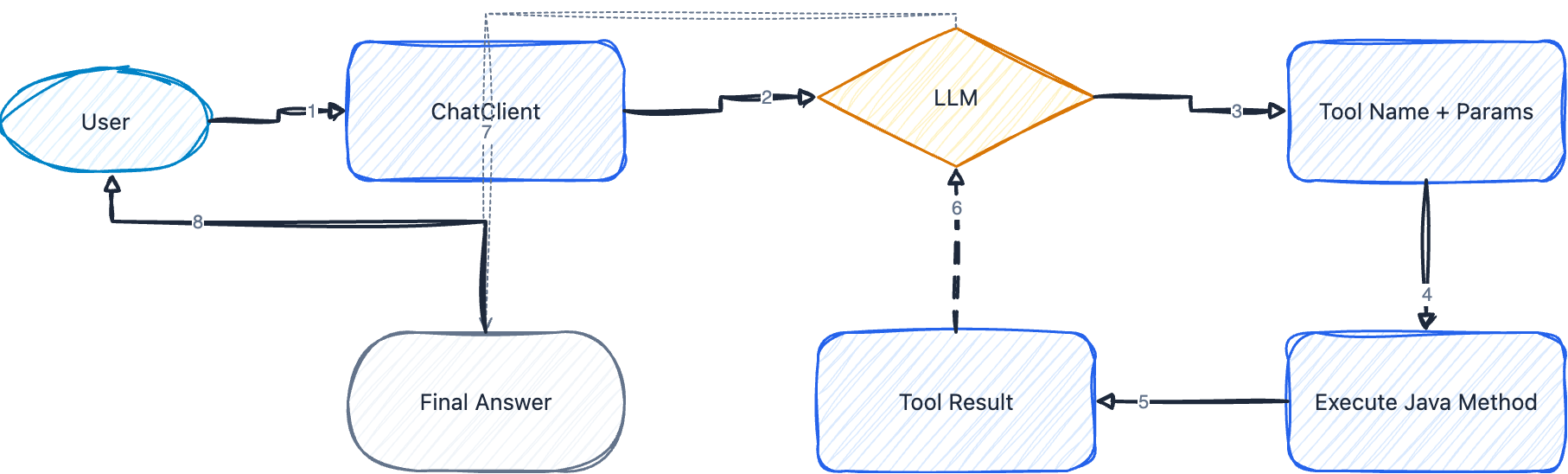
一次 Function Calling 的完整流程:
① 用户提问:"北京今天天气怎么样?"
② 模型分析意图,发现需要调用 getWeather 工具,参数 city="北京"
③ 框架自动执行 getWeather("北京"),拿到结果
④ 结果返回给模型
⑤ 模型基于工具返回的真实数据,生成自然语言回答
关键点:模型不是直接执行函数,而是生成"我需要调用 xxx 工具,参数是 yyy"的结构化指令,由框架(Spring AI)在应用侧执行真正的函数调用。模型扮演的角色更像是"调度员"。
4.3 @Tool 和 @ToolParam 注解
Spring AI 通过注解来声明工具,非常直观:
@Tool(description = "..."):标记方法为 AI 可调用的工具,description 是给模型看的,描述这个工具做什么用。@ToolParam(description = "..."):标注参数的含义,帮助模型正确传参。
4.4 基础示例:天气查询工具
先看工具类的定义:
@Component
public class WeatherTools {

    @Tool(description = "获取指定城市的当前天气。返回温度、天气状况、风力等信息。")
    public String getWeather(
            @ToolParam(description = "城市名称,例如:北京、上海、广州") String city) {

        // 这里调用真实的天气 API,演示用假数据
        return String.format("""
                城市:%s
                温度:25°C
                天气:晴
                风力:北风3级
                湿度:45%%
                更新时间:%s
                """, city, java.time.LocalDateTime.now());
    }

    @Tool(description = "获取未来几天的天气预报")
    public String getWeatherForecast(
            @ToolParam(description = "城市名称") String city,
            @ToolParam(description = "预报天数,1-7天") int days) {

        StringBuilder sb = new StringBuilder();
        sb.append(city).append(" 未来 ").append(days).append(" 天天气预报:\n");
        String[] weathers = {"晴", "多云", "小雨", "阴", "大风"};
        for (int i = 1; i <= days; i++) {
            sb.append(String.format("第%d天:%s,20-%d°C\n", i, weathers[i % weathers.length], 20 + i));
        }
        return sb.toString();
    }
}
再看 Controller 怎么用:
@RestController
@RequestMapping("/api/weather")
public class WeatherChatController {

    private final ChatClient chatClient;
    private final WeatherTools weatherTools;

    public WeatherChatController(ChatClient.Builder builder, WeatherTools weatherTools) {
        this.weatherTools = weatherTools;
        this.chatClient = builder
                .defaultSystem("你是一个天气助手,帮用户查询天气信息。不要编造天气数据,只根据工具返回的信息回答。")
                .build();
    }

    @GetMapping
    public String chat(@RequestParam String message) {
        return chatClient.prompt()
                .user(message)
                // 注册工具,可以传多个
                .tools(weatherTools)
                .call()
                .content();
    }
}
只需要一行 .tools(weatherTools) 就把工具注册进去了。当用户问天气相关的问题时,模型会自动判断该调哪个方法、传什么参数;如果用户问的跟天气无关,模型就不会调用工具,直接正常回答。
description 写好很重要。模型靠 description 判断什么时候该调这个工具、怎么传参。描述不清楚,模型要么不调用,要么传错参数。建议写清楚:这个工具做什么、参数是什么格式、返回什么内容。
五、Function Calling 进阶
5.1 数据库驱动的工具:JPA + Tool
真实业务中,工具往往要查数据库。Spring AI 的 Tool 就是普通的 Spring Bean,可以正常注入 Repository:
@Component
public class OrderQueryTools {

    private final OrderRepository orderRepository;
    private final ProductRepository productRepository;

    public OrderQueryTools(OrderRepository orderRepository,
                           ProductRepository productRepository) {
        this.orderRepository = orderRepository;
        this.productRepository = productRepository;
    }

    @Tool(description = "根据订单号查询订单状态和物流信息")
    public String getOrderStatus(
            @ToolParam(description = "订单号,格式如:ORD001") String orderId) {

        Order order = orderRepository.findById(orderId).orElse(null);
        if (order == null) {
            return "未找到订单号为 " + orderId + " 的订单";
        }
        return String.format("""
                订单号:%s
                状态:%s
                金额:¥%.2f
                创建时间:%s
                预计到达:%s
                物流单号:%s
                """,
                order.getId(),
                order.getStatus().getDisplayName(),
                order.getTotalAmount(),
                order.getCreatedAt(),
                order.getEstimatedDelivery() != null ? order.getEstimatedDelivery() : "暂无",
                order.getTrackingNumber() != null ? order.getTrackingNumber() : "暂无");
    }

    @Tool(description = "查询用户的历史订单列表,返回最近的订单记录")
    public String getUserOrders(
            @ToolParam(description = "用户ID") Long userId,
            @ToolParam(description = "查询条数,默认5条,最多20条") int limit) {

        int safeLimit = Math.min(limit, 20);
        List<Order> orders = orderRepository.findByUserIdOrderByCreatedAtDesc(
                userId, PageRequest.of(0, safeLimit));

        if (orders.isEmpty()) {
            return "该用户暂无历史订单";
        }

        StringBuilder sb = new StringBuilder("最近 " + orders.size() + " 条订单:\n");
        for (Order order : orders) {
            sb.append(String.format("- %s (%s) ¥%.2f - %s\n",
                    order.getId(),
                    order.getCreatedAt().toLocalDate(),
                    order.getTotalAmount(),
                    order.getStatus().getDisplayName()));
        }
        return sb.toString();
    }

    @Tool(description = "搜索商品信息,根据关键词查找商品名称和库存")
    public String searchProducts(
            @ToolParam(description = "搜索关键词,如商品名称") String keyword,
            @ToolParam(description = "最大返回数量,默认5个") int maxResults) {

        List<Product> products = productRepository.searchByKeyword(
                keyword, PageRequest.of(0, Math.min(maxResults, 10)));

        if (products.isEmpty()) {
            return "没有找到与 \"" + keyword + "\" 相关的商品";
        }

        StringBuilder sb = new StringBuilder();
        for (Product product : products) {
            sb.append(String.format("- %s:¥%.2f,库存%d件,评分%.1f\n",
                    product.getName(),
                    product.getPrice(),
                    product.getStock(),
                    product.getRating()));
        }
        return sb.toString();
    }
}
注意 getUserOrders 中的 int safeLimit = Math.min(limit, 20) 和 searchProducts 中的 Math.min(maxResults, 10)——模型传过来的参数不可信,必须在工具内部做校验和限制。模型可能传一个很大的数字,如果不限制,一次查几万条出来既浪费资源又可能超出上下文窗口。
5.2 全局注册 vs 按请求注册
注册工具有两种方式:
// 方式一:按请求注册 —— 每次调用指定
chatClient.prompt()
        .user(message)
        .tools(weatherTools)     // 只在这次请求中可用
        .call().content();

// 方式二:全局注册 —— 构建 ChatClient 时指定
this.chatClient = builder
        .defaultTools(orderQueryTools)  // 每次调用都带这个工具
        .build();
| 方式 | 适用场景 |
|---|---|
按请求注册 .tools() |
不同接口需要不同工具集合 |
全局注册 .defaultTools() |
某个 ChatClient 始终需要某些工具(如客服场景) |
下面是一个全局注册的客服示例,同时集成了 ChatMemory:
@RestController
@RequestMapping("/api/customer-service")
public class CustomerServiceController {

    private final ChatClient chatClient;
    private final MessageWindowChatMemory chatMemory;

    public CustomerServiceController(
            ChatClient.Builder builder,
            OrderQueryTools orderQueryTools) {

        this.chatMemory = MessageWindowChatMemory.builder().maxMessages(10).build();
        this.chatClient = builder
                .defaultSystem("""
                        你是一个电商平台的智能客服助手。

                        你可以:
                        - 查询订单状态和物流
                        - 查询用户历史订单
                        - 搜索商品信息

                        规则:
                        - 只回答与订单、商品相关的问题
                        - 需要查询时直接调用工具,不要编造数据
                        - 对用户友好耐心
                        """)
                .defaultTools(orderQueryTools)  // 全局注册工具,每次调用都带
                .build();
    }

    @PostMapping
    public String chat(@RequestBody CustomerServiceRequest request) {
        return chatClient.prompt()
                .user(request.message())
                .advisors(MessageChatMemoryAdvisor.builder(chatMemory)
                        .conversationId(request.userId().toString())
                        .build())
                .call()
                .content();
    }

    record CustomerServiceRequest(Long userId, String message) {
    }
}
这个例子把前面学的东西全串起来了:ChatMemory 负责记忆、Function Calling 负责查数据、System Prompt 负责约束行为。
5.3 Void 工具:有副作用的操作
并非所有工具都需要返回数据。发邮件、发短信、设置提醒——这些操作执行完就行了,不需要返回结果给模型:
@Component
public class NotificationTools {

    private static final Logger log = LoggerFactory.getLogger(NotificationTools.class);

    private final JavaMailSender mailSender;
    private final Map<String, String> reminderStore = new ConcurrentHashMap<>();

    public NotificationTools(JavaMailSender mailSender) {
        this.mailSender = mailSender;
    }

    /**
     * 无返回值工具:执行完模型就知道操作已完成
     */
    @Tool(description = "发送邮件通知给指定邮箱")
    public void sendEmail(
            @ToolParam(description = "收件人邮箱") String email,
            @ToolParam(description = "邮件主题") String subject,
            @ToolParam(description = "邮件正文") String body) {

        SimpleMailMessage message = new SimpleMailMessage();
        message.setTo(email);
        message.setSubject(subject);
        message.setText(body);
        mailSender.send(message);
        log.info("邮件已发送至 {}", email);
        // void 返回,模型收到 tool result 后会自动继续生成回复
    }

    /**
     * 有返回值工具:返回提醒 ID,模型会把结果告诉用户
     */
    @Tool(description = "创建一个日程提醒,返回提醒ID")
    public String createReminder(
            @ToolParam(description = "提醒内容") String content,
            @ToolParam(description = "提醒时间,格式:yyyy-MM-dd HH:mm") String reminderTime) {

        String reminderId = "RMD-" + UUID.randomUUID().toString().substring(0, 8).toUpperCase();
        reminderStore.put(reminderId, reminderTime + " | " + content);
        log.info("创建提醒 [{}]: {} at {}", reminderId, content, reminderTime);
        return "提醒已创建,ID: " + reminderId + ",将于 " + reminderTime + " 提醒你:" + content;
    }
}
Controller 的用法完全一样:
@RestController
@RequestMapping("/api/notify")
public class NotificationController {

    private final ChatClient chatClient;
    private final NotificationTools notificationTools;

    public NotificationController(ChatClient.Builder builder, NotificationTools notificationTools) {
        this.notificationTools = notificationTools;
        this.chatClient = builder
                .defaultSystem("""
                        你是一个助手,可以帮用户发送邮件或创建日程提醒。
                        需要操作时直接调用工具,不要编造结果。
                        操作完成后用自然语言告知用户结果。
                        """)
                .build();
    }

    @GetMapping
    public String chat(@RequestParam String message) {
        return chatClient.prompt()
                .user(message)
                .tools(notificationTools)
                .call()
                .content();
    }
}
用户说"帮我给 zhangsan@example.com 发一封邮件,告诉他明天下午三点开会",模型会自动解析出收件人、主题、正文,调用 sendEmail 工具,然后回复"邮件已发送"之类的自然语言。
5.4 多工具编排
一个 ChatClient 可以同时注册多个工具类。模型会根据用户的意图自动判断调用哪个(甚至哪几个):
// 注册多个工具
chatClient.prompt()
        .user(message)
        .tools(orderQueryTools, notificationTools, weatherTools)
        .call().content();
如果用户说"帮我查一下 ORD001 的订单状态,然后发邮件通知我",模型可能会:
1. 先调用 getOrderStatus("ORD001") 查订单
2. 再调用 sendEmail(...) 发邮件
3. 最后汇总结果回复用户
5.5 安全注意事项
Function Calling 的参数是模型生成的,不是用户直接输入的,但也不能无条件信任:
| 风险 | 应对措施 |
|---|---|
| 参数越界(查 10000 条数据) | 工具内部做 Math.min 限制 |
| SQL 注入 | 使用 JPA / PreparedStatement,不拼 SQL |
| 越权访问 | 校验用户 ID 是否有权查看该订单 |
| 敏感操作(删除、转账) | 需要二次确认机制,不要让模型直接执行 |
核心原则:工具只是模型的"手",但"手"该不该动、能动多大幅度,必须由应用层把关。
六、写在最后
这篇文章覆盖了 Spring AI 实战中三个最常用的能力,总结一下:
| 能力 | 解决的问题 | 核心 API |
|---|---|---|
| ChatMemory | 多轮对话记忆 | MessageWindowChatMemory + MessageChatMemoryAdvisor |
| SSE 流式输出 | 长回答的用户体验 | .stream().content() 返回 Flux<String> |
| Function Calling | AI 调用外部系统 | @Tool + @ToolParam + .tools() |
几个实践建议:
- ChatMemory 从内存开始,再升级 Redis。开发调试用内存版就够了,上生产再换 Redis 实现,代码改动极小。
- 流式输出是标配。只要涉及面向用户的对话界面,一定用流式,体验差距是质变级别的。
- Function Calling 的 description 要花心思写。这是模型判断调用时机和传参方式的唯一依据,写得模糊就等着出 bug。
- 三者可以自由组合。一个完整的 AI 应用通常三者都要用上:ChatMemory 管记忆、SSE 做输出、Function Calling 接外部系统。

有“AI”的1024 = 2048,欢迎大家加入2048 AI社区
更多推荐


 13
13 0
0- 0


 已为社区贡献2条内容

所有评论(0)