华为的300I-Duo加速卡部署qwen2.5-vl-7b大模型踩坑记录
本文记录了在华为Atlas 300I-Duo服务器上部署千问视觉大模型(Qwen2.5-VL-7B)的过程。重点包括:1)环境配置需确保驱动、固件、CANN Toolkit和MindIE版本严格一致;2)容器部署时需正确设置npuMemSize参数,为ViT模块预留显存空间;3)通过修改config.json配置文件调整模型参数;4)启动推理服务后分别验证了文本和图像处理能力。文章特别强调了版本对
文章目录
文章目录
前言
最近在华为的设备上面进行千问视觉大模型的部署,此次选择的服务器是华为的300I-Duo加速卡,显存为21G,总共有四张卡。由于第一次在华为的服务器上面部署视觉类的大模型,因为踩坑不少,记录一些踩坑,方便其他人部署的时候不会在踩坑。
1.安装环境
1.1服务器环境
系统:
aarch64
Kylin Linux Advanced Server release V10 (Lance)
NAME="Kylin Linux Advanced Server"
VERSION="V10 (Lance)"
ID="kylin"
VERSION_ID="V10"
PRETTY_NAME="Kylin Linux Advanced Server V10 (Lance)"
ANSI_COLOR="0;31"
显卡:
Atlas 300I Duo 推理卡 21G显存
1.2安装驱动与固件
去华为的官网安装:npu驱动安装
主要安装是下图所示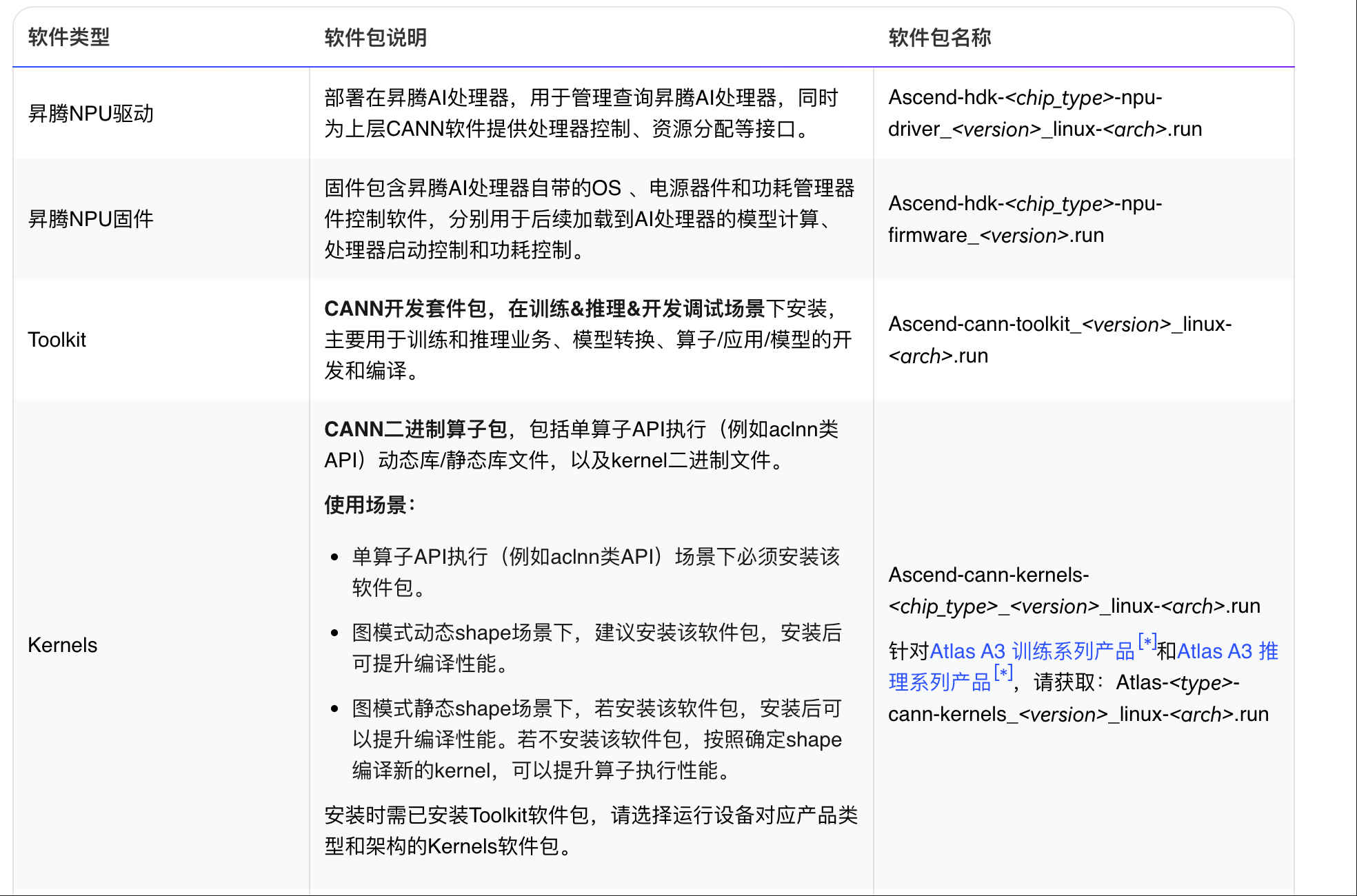 npu固件
npu固件
./Ascend-hdk-310p-npu-driver_25.2.0_linux-aarch64.run --full
./Ascend-hdk-310p-npu-firmware_7.7.0.6.236.run --full
CANN Toolkit
安装网站:
CANN官网安装
Ascend-cann-toolkit_8.2.RC2_linux-aarch64.run
Kernel:
Ascend-cann-kernels-310p_8.2.RC2_linux-aarch64.run
MindIE ARM
这个很关键,华为这边的大模型镜像主要是通过MindIE来加载的
安装网站:
MindIE安装
Ascend-mindie_2.1.RC2_linux-aarch64_abi1.run
1.3拉取镜像
拉镜像的网站:
MindIE镜像拉取
2.1.RC2-300I-Duo-py311-openeuler24.03-lts
以上的步骤必须要保持版本一直,如果拉去的镜像是RC2的,那么cann必须也是RC2的,如果版本不一致的话,那么启动的时候会报相应的错误。笔者就是在这一步没有对齐版本,导致在这一步卡了很久,后来才发现版本不对。
1.4下载大模型权重
下载Qwen2.5-vl-7B模型:模型权重可以从 ModelScope 或 Hugging Face 等平台下载,国内推荐使用魔塔社区(Modelscope),速度较快。
https://www.modelscope.cn/models/Qwen/Qwen2.5-VL-7B-Instruct/summary
2.容器部署
具体启动的方式可以参考华为的官网:
华为容器部署以及启动
2.1启动容器
docker run -dit -u root \
--name ${容器名} \
-e ASCEND_RUNTIME_OPTIONS=NODRV \
--privileged=true \
-v /home/路径:/home/路径 \ #权重挂载路径
-v /usr/local/Ascend/driver/:/usr/local/Ascend/driver/ \
-v /usr/local/Ascend/firmware/:/usr/local/Ascend/firmware/ \
-v /usr/local/sbin/:/usr/local/sbin \
-v /etc/ascend_install.info:/etc/ascend_install.info \
-v /usr/local/bin/npu-smi:/usr/local/bin/npu-smi \
--shm-size=500g \
${MindIE 1.0.0 镜像} \
/bin/bash
2.2config文件修改
进入容器之后,需要修改相应的config参数
# 进入容器
docker exec -it xxx bin/bash
vim /usr/local/Ascend/mindie/latest/mindie-service/conf/config.json
{
...
"ServerConfig" :
{
...
"port" : 1040, #自定义
"managementPort" : 1041, #自定义
"metricsPort" : 1042, #自定义
...
"httpsEnabled" : false,
...
},

"BackendConfig": {
...
"npuDeviceIds" : [[0,1,2,3]],
...
"ModelDeployConfig":
{
"maxSeqLen" : 50000,
"maxInputTokenLen" : 50000,
"truncation" : false,
"ModelConfig" : [
{
"modelInstanceType": "Standard",
"modelName" : "qwen2_vl", # 为了方便使用benchmark测试,modelname建议使用qwen2_vl
"modelWeightPath" : "/data/datasets/Qwen2-VL-7B-Instruct",
"worldSize" : 4, # 这一步和显卡的数量对应
...
"npuMemSize" : 4, #kvcache分配,可自行调整,单位是GB,切勿设置为-1,需要给vit预留显存空间
...
}
]
},
"ScheduleConfig" :
{
...
"maxPrefillTokens" : 50000,
"maxIterTimes": 4096,
...
}
}
}
这里面npuMemSize比较关键,因为笔者发现虽然最后启动了大模型容器,输入文本的时候可以得到正常的结果,但是如果输入图片的时候会报错,最终排查发现,显存不够,导致出错。所以比较限制其大小。对于多模态模型,npuMemSize不支持设置为-1,因为需要给ViT部分预留空间。可根据以下公式计算,并向上取整后得到npuMemSize的值:4num_hidden_layersnum_key_value_heads*(hidden_size/num_attention_heads)*(maxPrefillBatchSize×maxSeqLen)/worldSize/(1024×1024×1024),其中:num_hidden_layers、
2.3启动推理服务
在容器内,进入MindIE服务脚本目录并启动服务:
cd /usr/local/Ascend/mindie/latest/mindie-service/bin
./mindieservice_daemon        # 前台启动,方便查看日志
# 或
nohup ./mindieservice_daemon > output.log 2>&1 &  # 后台启动,日志写入文件
如果启动模型出现的报错的话,相关报错在
cd ~/mindserver/log/debug
# 路径可能有点没写对,但是大致的位置就是在这里,可以进去找到相应时间的日志,然后查看相关报错
服务成功启动后,通常会看到提示信息,并且可以通过 npu-smi 命令观察到NPU计算负载显著增加。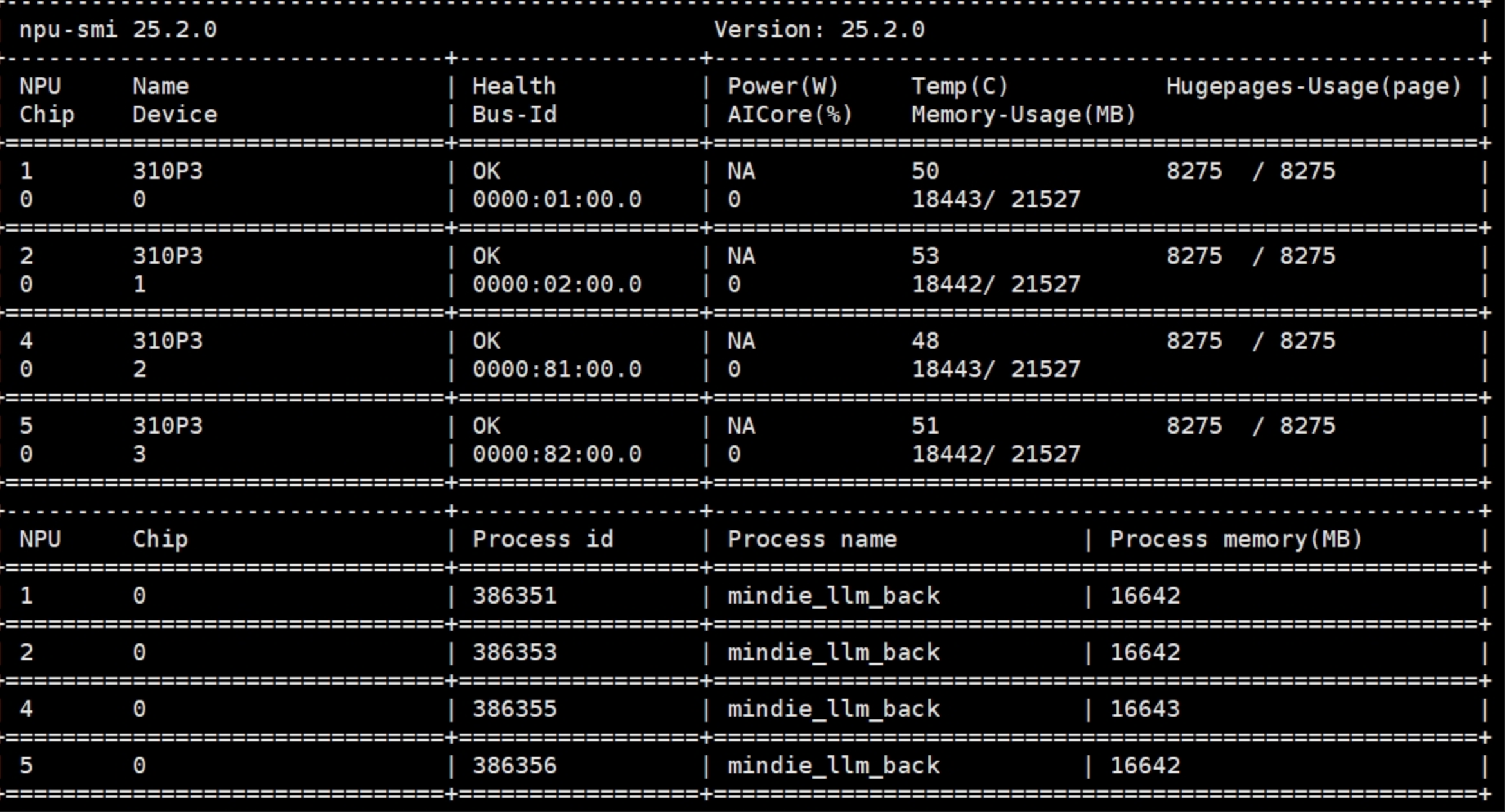
3.测试验证
3.1测试语言能力
import requests
import json

url = "http://localhost:1040/v1/chat/completions"  # 替换为你的服务器IP和端口
headers = {"Content-Type": "application/json"}
data = {
    "model": "qwen-vl-7b",	 # 与配置文件中的modelName一致
    "messages": [{"role": "user", "content": "请用一句话介绍华为昇腾AI处理器"}],
    "max_tokens": 100,
    "temperature": 0.7
}

response = requests.post(url, headers=headers, data=json.dumps(data))
print(response.json())
大模型回复
基本到这一步大模型算是部署成功,但是我们后面还要测试其图片能力,输入图片和语言有点差别,输入图片需要留一定的空间,因此在前面限制的npuMemSize很关键,如果测试语言没问题,但是图片会报错的话,可以不断改变这个值进行
3.2测试其图片能力
import requests
import json
import base64
import os
from PIL import Image
import io

def compress_image(image_path, max_size=768):
    """压缩图片到指定大小"""
    try:
        img = Image.open(image_path)
        if max(img.size) > max_size:
            ratio = max_size / max(img.size)
            new_size = (int(img.size[0] * ratio), int(img.size[1] * ratio))
            img = img.resize(new_size, Image.LANCZOS)

        byte_arr = io.BytesIO()
        img.convert('RGB').save(byte_arr, format='JPEG', quality=85)
        return byte_arr.getvalue()
    except Exception as e:
        print(f"图片压缩失败: {e}")
        return None

def image_to_base64(image_path):
    """压缩图片并转换为base64"""
    compressed = compress_image(image_path)
    if compressed is None:
        # 如果压缩失败,尝试直接读取
        try:
            with open(image_path, "rb") as f:
                return base64.b64encode(f.read()).decode('utf-8')
        except:
            return None
    return base64.b64encode(compressed).decode('utf-8')

url = "http://127.0.0.1:1040/v1/chat/completions"
headers = {"Content-Type": "application/json"}

# 图片路径
image_path = "2.jpg"

# 检查图片是否存在
if not os.path.exists(image_path):
    print(f"错误: 图片文件不存在: {image_path}")
    exit(1)

base64_image = image_to_base64(image_path)
if base64_image is None:
    print("图片处理失败")
    exit(1)

# 正确的消息格式
data = {
    "model": "qwen-vl-7b",
    "messages": [
        {
            "role": "user",
            "content": [
                {
                    "type": "image_url",
                    "image_url": {
                        "url": f"data:image/jpeg;base64,{base64_image}"
                    }
                },
                {
                    "type": "text",
                    "text": "请描述这张图片的内容"
                }
            ]
        }
    ],
    "max_tokens": 1000,
    "temperature": 0.7
}

try:
    response = requests.post(url, headers=headers, data=json.dumps(data))
    response.raise_for_status()
    result = response.json()

    # 提取回答内容
    if 'choices' in result and result['choices']:
        content = result['choices'][0]['message']['content']
        print("模型回答:")
        print(content)
    else:
        print("完整响应:")
        print(json.dumps(result, indent=2))
except Exception as e:
    print(f"请求失败: {e}")
    if hasattr(e, 'response') and e.response:
        print("错误详情:", e.response.text)
测试图片:
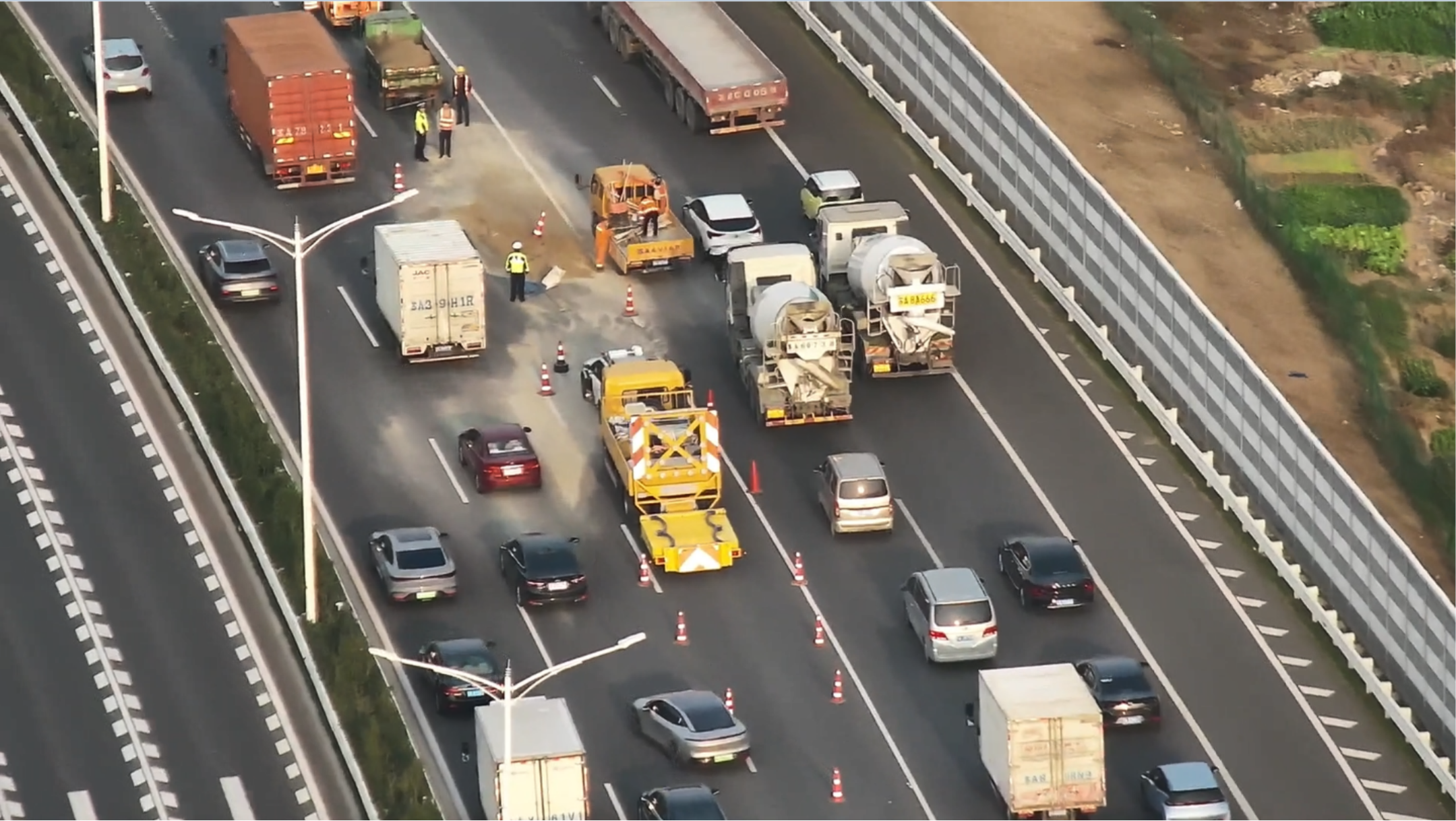
模型理解如下:
4.相关报错
问题1:
error: call aclnnInplaceZero failed, error code is 561103
[ERROR] 2026-03-05-14:41:09 (PID:9826, Device:3, RankID:-1) ERR00100 PTA call acl api failed.
EZ9999: Inner Error!
EZ9999: [PID: 9826] 2026-03-05-14:41:09.292.423 Parse dynamic kernel config fail.
        TraceBack (most recent call last):
       AclOpKernelInit failed opType
       ZerosLike ADD_TO_LAUNCHER_LIST_AICORE failed.

[2026-03-05 14:41:09.005+0800] [9826] [281458610336096] [batchscheduler] [ERROR] [model.py:64] : [MIE04E13030A] [Model] >>> return initialize error result: {'status': 'error', 'npuBlockNum': '0', 'cpuBlockNum': '0', 'memPoolId': '-1'}
问题2:
RuntimeError: CANN execute error, Exception: The Inner error is reported as above. The process exits for this inner error, and the current working operator name is Qwen25VL_VIT_graph.
Since the operator is called asynchronously, the stacktrace may be inaccurate. If you want to get the accurate stacktrace, please set the environment variable ASCEND_LAUNCH_BLOCKING=1.
Note: ASCEND_LAUNCH_BLOCKING=1 will force ops to run in synchronous mode, resulting in performance degradation. Please unset ASCEND_LAUNCH_BLOCKING in time after debugging.
[ERROR] 2026-03-06-17:02:22 (PID:315, Device:1, RankID:-1) ERR00100 PTA call acl api failed.
    raise RuntimeError(f"CANN execute error, Exception: {e}") from e
RuntimeError: CANN execute error, Exception: The Inner error is reported as above. The process exits for this inner error, and the current working operator name is Qwen25VL_VIT_graph.
Since the operator is called asynchronously, the stacktrace may be inaccurate. If you want to get the accurate stacktrace, please set the environment variable ASCEND_LAUNCH_BLOCKING=1.
Note: ASCEND_LAUNCH_BLOCKING=1 will force ops to run in synchronous mode, resulting in performance degradation. Please unset ASCEND_LAUNCH_BLOCKING in time after debugging.
[ERROR] 2026-03-06-17:02:22 (PID:317, Device:2, RankID:-1) ERR00100 PTA call acl api failed.
5.总结
本文主要是记录华为的服务器上面部署qwen2.5-vl模型的一些踩坑问题,其中最主要的是你必须要保持服务器的驱动、固件、cann、MindIE ARM安装包、以及镜像,cann环境hccl和mindie不匹配导致的问题,需要严格配置每一个版本,需要做到一一对应。如果有一项没有对应的话,就会出现问题。如果出现了报错的话,首先排查是不是版本的问题。
文本参考的大佬文档:
300I-Duo加速卡部署qwen2.5-vl-7b

有“AI”的1024 = 2048,欢迎大家加入2048 AI社区
更多推荐

 2
2 0
0- 0


 已为社区贡献1条内容

所有评论(0)