08-FunctionCalling与Agent智能体系统设计
摘要: 本文系统介绍了Function Calling的概念、工作原理及实际应用。Function Calling使大模型能够调用外部函数,实现与真实世界的交互,扩展了模型的知识和行为能力。文章详细解析了OpenAI和Qwen模型的Function Calling接口使用,并通过天气查询、地图搜索、数据库操作等案例演示了实战应用。同时,探讨了Function Calling带来的质变——从孤立应答
💡 学习目标
- 理解Function Calling的概念
- 理解Function Calling的工作原理
- 实战使用OpenAI提供的Function Calling接口(基础请求及优化)
- 探讨自定义Function的提供的可能性
- 探讨Function Calling在大模型应用场景中带来的“质变”
- 智能体/LLM应用的定义与作用
- 什么是智能体?智能体与大模型的关系是什么样的
- 智能体概念的演进过程,基本架构与功能
- 智能体开发框架smolagents
- Agentic RAG 实战
- 智能体的应用场景
- 探讨智能体在行业场景中的落地情况
- 探讨智能体系统/LLM应用的常见分类
1. Function Calling的概念
Function Calling(函数调用),顾名思义,为模型提供了一种调用函数的方法/能力。
- Function Calling成立的模型能力基础:
- 问题理解和行动规划
- 结构化数据输出
- 上下文学习 In-Context Learning
Function Calling让模型输出不再局限于自身推理输出,而是可以与外部系统交互,完成更复杂的任务
- 常见Function Calling应用场景包括:
- 查询检索,补充额外信息(如RAG、搜索)
- 理解用户输入,向外部系统写入信息(如表单填写)
- 调用外部系统能力,完成实际行为动作(如下订单)
- ...
2. Function Calling的工作原理
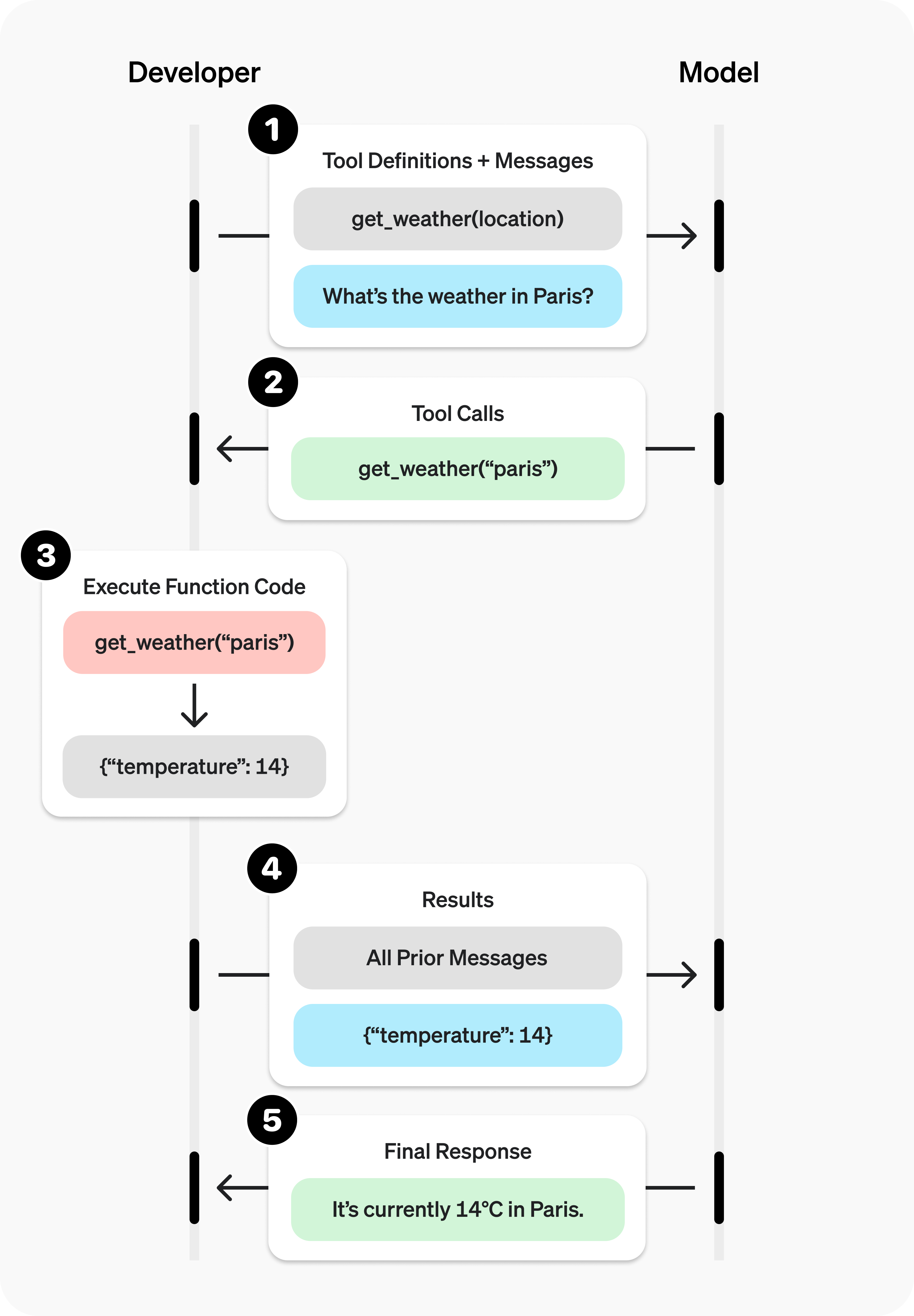
2.1 OpenAI官方定义
OpenAI官方说明文档:https://platform.openai.com/docs/guides/function-calling
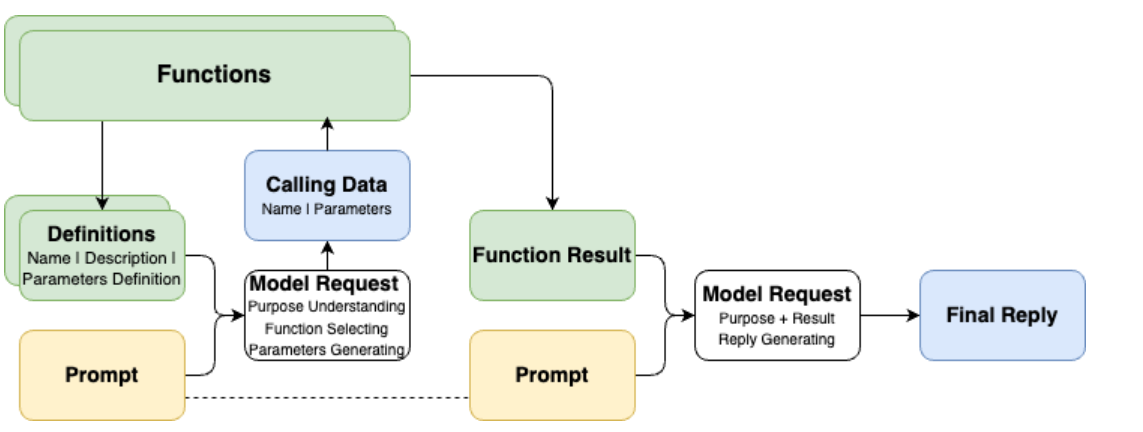
2.2 描述Function Calling的另一个流程图
2.3 Calling是结果,理解和选择才是第一步
- 除了代表用户诉求的Prompt之外,Function Calling还需要将可用的工具信息(Function Definitions)也提供给模型
- 在第一次请求时,模型的核心工作如下:
- 理解Prompt所代表的“诉求”和Definitions所代表的“行动可能性”
- “选择”完成“诉求”所需要进行的“行动”(从“行动可能性”中获得)
- 根据所选择的“行动”,给出执行“行动”所需的“行动参数”(Parameters)
- 那么想一想:
- 什么影响“选择”的效果?
- 什么影响“行动”的可执行性和效果?
2.4 作为可选项的结果回调和最终回复输出
- 在对话流中,将Function Calling的结果(Function Result)与初始的Prompt诉求再次组合,提供给模型以获得最终的回复输出,是常见的流程(RAG就是一个典型的例子)
- 但如果我们将Function Calling用于非对话流场景,最终回复输出就不一定是必选项了,例如:
- 【只需要完成Calling动作】我们只是希望通过Function Calling完成行动选择和发起,接下来就进入业务处理流程,例如:理解用户表达并代替用户下单
- 【只需要完成行动参数Parameters生成】我们只是希望将Function Calling做好工具使用决策,并完成部分请求参数的生成,接下来需要走业务流程补全其他参数(比如鉴权信息),例如:敏感数据查询
在实际生产中,不给出最终回复输出,而只是使用Function Calling返回的调用方法数据,是很常见的用法。
3. 实际调用Function Calling
从官方案例开始
第一步:工具决策和调用信息生成
import os
from openai import OpenAI

client = OpenAI(
    api_key=os.getenv("OPENAI_API_KEY"),
    base_url=os.getenv("OPENAI_BASE_URL"),
)

# 给出工具定义
tools = [
    # 每一个列表元素项,就是一个工具定义
    {
        # 类型标注(固定格式)
        "type": "function",
        # 函数定义
        "function": {
            # 函数名称(帮助我们去查找本地的函数在哪里,函数映射ID)
            "name": "get_weather",
            # 函数描述(帮助模型去理解函数的作用,适用场景,可以理解为Prompt的一部分)
            "description": "Get current temperature for provided coordinates in celsius.",
            # 函数依赖参数的定义(帮助模型去理解如果要做参数生成,应该怎么生成)
            "parameters": {
                # 参数形式
                "type": "object", # 对应输出JSON String
                # 参数结构
                "properties": {
                    # 参数名,参数类型
                    "latitude": {"type": "number"},
                    # 参数名,参数类型
                    "longitude": {"type": "number"}
                },
                # 必须保证生成的参数列表(每个元素对应上面properties的参数名)
                "required": ["latitude", "longitude"],
                "additionalProperties": False
            },
            # 格式是否严格(默认为True)
            "strict": True
        }
    }
]

# 给出诉求表达
messages = [{"role": "user", "content": "What's the weather like in Shanghai today?"}]
#messages = [{"role": "user", "content": "How are you today?"}]
#messages = [{"role": "user", "content": "请告诉我北京的经纬度"}]
#messages = [{"role": "user", "content": "What's the weather like today?"}]

# 发起请求
completion = client.chat.completions.create(
    model="gpt-4o",
    messages=messages,
    # 把工具定义提交给模型,就已经默认启用了Function Calling
    tools=tools,
)
# print(completion.choices[0].message)
# print(completion.choices[0].message.tool_calls[0].function)
if completion.choices[0].message.tool_calls:
    print(completion.choices[0].message.tool_calls[0].function)
else:
print("No function is called.")-
情况1:问与工具的无关的问题会发生什么?
messages = [{"role": "user", "content": "How are you today?"}]不调用
-
情况2:问无法获得确切行动参数的问题会发生什么?
messages = [{"role": "user", "content": "What's the weather like today?"}]不调用
-
如何容错:
if completion.choices[0].message.tool_calls:
    print(completion.choices[0].message.tool_calls[0].function)
else:
    print("No function is called.")
第二步:实际调用工具
function_calling_message = completion.choices[0].message
function_calling = completion.choices[0].message.tool_calls[0]

print("Call Function Name:", function_calling.function.name)
print("Call Function Arguments:", function_calling.function.arguments)

# Python基础:函数参数定义及解析
def test(arg1, arg2, *, arg3, arg4):
    return f"success: {arg1}, {arg2}, {arg3}, {arg4}"

args = (1, 2) # 列表型数据展开为位置参数
kwargs = { # 字典型数据展开为具名参数(key)
    "arg3": 3,
    "arg4": 4
}

test(*args, **kwargs)

import json

def get_weather(*, latitude:float, longitude:float):
    return {
        "temperature": 23,
        "weather": "Sunny",
        "wind_direction": "South",
        "windy": 2,
    }

functions = {
    "get_weather": get_weather
}

function_result = functions[function_calling.function.name](**json.loads(function_calling.function.arguments))
print(function_result)
第三步:将结果返回给模型获取最终结果
print(messages)
# 必须:让模型知道自己之前给了一个什么指令(包含tool_call_id)
messages.append(function_calling_message)
# 包含了tool_call_id的结果加入消息列
messages.append({
    "role": "tool",
    "tool_call_id": function_calling.id,
    "content": str(function_result),
})
print(messages)

final_result = client.chat.completions.create(
    model="gpt-4o",
    messages=messages,
    tools=tools,
)
print(final_result.choices[0].message.content)
如果获得错误信息会怎么样,会重试,但不多..
error_messages = messages[:1]
error_messages.append(function_calling_message)
error_messages.append({
    "role": "tool",
    "tool_call_id": function_calling.id,
    "content": str(TypeError("Key 'latitude' can not be supported any more, please use 'lat' instead.")),
})
print(error_messages)

final_result = client.chat.completions.create(
    model="gpt-4o",
    messages=error_messages,
    tools=tools,
)
print(final_result.choices[0])
qwen完整代码
import os
import json
import dashscope
from dashscope import Generation

# 设置API密钥
dashscope.api_key = os.getenv("DASHSCOPE_API_KEY")

# 工具定义
tools = [
    {
        "type": "function",
        "function": {
            "name": "get_weather",
            "description": "Get current temperature for provided coordinates in celsius.",
            "parameters": {
                "type": "object",
                "properties": {
                    "latitude": {"type": "number"},
                    "longitude": {"type": "number"}
                },
                "required": ["latitude", "longitude"],
                "additionalProperties": False
            }
        }
    }
]

# 用户消息
messages = [{"role": "user", "content": "What's the weather like in Shanghai today?"}]

# 发起请求
response = Generation.call(
    model="qwen-plus",  # 或 "qwen-turbo", "qwen-max" 等
    messages=messages,
    tools=tools
)

# 解析响应
if response.status_code == 200:
    message = response.output.choices[0]['message']

    # 检查是否有工具调用
    if 'tool_calls' in message and message['tool_calls']:
        # 获取第一个工具调用
        tool_call = message['tool_calls'][0]

        # 从工具调用中提取函数信息
        if 'function' in tool_call:
            function_info = {
                "name": tool_call['function'].get('name', ''),
                "arguments": tool_call['function'].get('arguments', '')
            }
            print(function_info)

            # 如果需要,解析JSON格式的参数
            if function_info['arguments']:
                try:
                    args_dict = json.loads(function_info['arguments'])
                    print(f"解析后的参数: {args_dict}")
                except json.JSONDecodeError as e:
                    print(f"参数解析失败: {e}")
        else:
            print("工具调用中没有找到function字段")
            print(f"工具调用结构: {tool_call}")
    else:
        print("No function is called.")
        if 'content' in message and message['content']:
            print("Assistant response:", message['content'])
        else:
            print("Assistant没有返回内容")
else:
    print(f"Error: {response.code} - {response.message}")

# 第二步:实际调用工具
# 获取工具调用消息
function_calling_message = response.output.choices[0]['message']

# 检查是否有工具调用
if 'tool_calls' in function_calling_message and function_calling_message['tool_calls']:
    # 获取第一个工具调用
    function_calling = function_calling_message['tool_calls'][0]

    # 提取函数调用信息
    function_name = function_calling['function'].get('name', '')
    function_arguments = function_calling['function'].get('arguments', '')

    print("Call Function Name:", function_name)
    print("Call Function Arguments:", function_arguments)

    # 导入json库用于解析参数
    import json


    # 定义实际的天气获取函数
    def get_weather(*, latitude: float, longitude: float):
        """
        模拟天气查询函数
        参数:
            latitude: 纬度
            longitude: 经度
        返回:
            包含天气信息的字典
        """
        return {
            "temperature": 23,
            "weather": "Sunny",
            "wind_direction": "South",
            "windy": 2,
        }


    # 函数映射表,将函数名映射到实际函数
    functions = {
        "get_weather": get_weather
    }

    # 调用函数
    try:
        # 解析JSON格式的参数
        args_dict = json.loads(function_arguments)

        # 调用对应函数,并将参数字典展开
        function_result = functions[function_name](**args_dict)
        print("函数调用结果:", function_result)

    except json.JSONDecodeError as e:
        print(f"参数解析失败: {e}")
        function_result = {"error": f"参数解析失败: {e}"}
    except KeyError as e:
        print(f"函数名 {function_name} 不存在: {e}")
        function_result = {"error": f"函数 {function_name} 未定义"}
    except TypeError as e:
        print(f"函数参数错误: {e}")
        function_result = {"error": f"参数错误: {e}"}

    # 第三步:将结果返回给模型获取最终结果
    print("当前消息列表:", messages)

    # 必须:让模型知道自己之前给了一个什么指令(包含tool_call_id)
    # 将模型的工具调用请求添加到消息列表
    messages.append(function_calling_message)

    # 将工具调用结果添加到消息列表
    # 注意:工具调用的结果必须以字符串形式传递
    messages.append({
        "role": "tool",
        "tool_call_id": function_calling.get('id', ''),  # 使用工具调用的ID
        "content": json.dumps(function_result, ensure_ascii=False),  # 将结果转换为JSON字符串
    })

    print("添加工具结果后的消息列表:", messages)

    # 再次调用模型,将工具执行结果传回
    try:
        final_response = Generation.call(
            model="qwen-plus",  # 可以使用同一个模型,也可以使用其他Qwen模型
            messages=messages,
            tools=tools,  # 可以继续传递工具定义,但通常不需要再次调用工具
        )

        if final_response.status_code == 200:
            final_message = final_response.output.choices[0]['message']
            if 'content' in final_message and final_message['content']:
                print("最终回复:", final_message['content'])
            else:
                print("模型没有返回内容")
        else:
            print(f"最终请求失败: {final_response.code} - {final_response.message}")

    except Exception as e:
        print(f"调用模型获取最终结果时出错: {e}")

    # 如果获得错误信息会怎么样,会重试,但不多...
    # 模拟错误处理场景
    print("\n--- 错误处理示例 ---")

    # 创建错误消息列表(从原始用户消息开始)
    error_messages = messages[:1]  # 只保留原始用户消息

    # 添加工具调用请求
    error_messages.append(function_calling_message)

    # 模拟工具返回错误信息
    error_messages.append({
        "role": "tool",
        "tool_call_id": function_calling.get('id', ''),
        "content": json.dumps({
            "error": "Key 'latitude' can not be supported any more, please use 'lat' instead."
        }, ensure_ascii=False),
    })

    print("错误处理的消息列表:", error_messages)

    # 尝试用错误信息重新调用模型
    try:
        error_response = Generation.call(
            model="qwen-plus",
            messages=error_messages,
            tools=tools,  # 重新传递工具定义,让模型可以调整参数
        )

        if error_response.status_code == 200:
            error_message = error_response.output.choices[0]['message']
            print("模型对错误的响应:", error_message)

            # 检查模型是否重新调用了工具
            if 'tool_calls' in error_message and error_message['tool_calls']:
                new_tool_call = error_message['tool_calls'][0]
                new_function_name = new_tool_call['function'].get('name', '')
                new_function_args = new_tool_call['function'].get('arguments', '')
                print("模型重新调用工具:", new_function_name)
                print("新参数:", new_function_args)

                # 可以在这里再次尝试调用工具
                try:
                    new_args_dict = json.loads(new_function_args)
                    if 'lat' in new_args_dict and 'lon' in new_args_dict:
                        # 转换为原函数需要的参数名
                        new_args_dict['latitude'] = new_args_dict.pop('lat')
                        new_args_dict['longitude'] = new_args_dict.pop('lon')

                        # 再次调用函数
                        new_result = functions[new_function_name](**new_args_dict)
                        print("重试后的结果:", new_result)
                except Exception as e:
                    print(f"重试时出错: {e}")
            else:
                if 'content' in error_message and error_message['content']:
                    print("模型的文本回复:", error_message['content'])
        else:
            print(f"错误处理请求失败: {error_response.code} - {error_response.message}")

    except Exception as e:
        print(f"错误处理时调用模型出错: {e}")

else:
    print("没有工具调用,模型直接回复:")
    if 'content' in function_calling_message and function_calling_message['content']:
        print(function_calling_message['content'])
4. 在实际应用场景中的一些案例
4.1 封装基本方法
import os
import json
from typing import TypedDict
from openai import OpenAI

class FunctionCallingResult(TypedDict):
    name: str
    arguments: str

class ModelRequestWithFunctionCalling:
    def __init__(self):
        self._client = OpenAI(
            api_key=os.getenv("OPENAI_API_KEY"),
            base_url=os.getenv("OPENAI_BASE_URL"),
        )
        self._function_infos = {}
        self._function_mappings = {}
        self._messages = []

    def register_function(self, *, name, description, parameters, function, **kwargs):
        self._function_infos.update({
            name: {
                "type": "function",
                "function": {
                    "name": name,
                    "description": description,
                    "parameters": parameters,
                    **kwargs
                }
            }
        })
        self._function_mappings.update({ name: function })
        return self

    def reset_messages(self):
        self._messages = []
        return self

    def append_message(self, role, content, **kwargs):
        self._messages.append({ "role": role, "content": content, **kwargs })
        print("[Processing Messages]:", self._messages[-1])
        return self

    def _call(self, function_calling_result:FunctionCallingResult):
        function = self._function_mappings[function_calling_result.name]
        arguments = json.loads(function_calling_result.arguments)
        return function(**arguments)

    def request(self, *, role="user", content=None):
        if role and content:
            self._messages.append({ "role": role, "content": content })
        result = self._client.chat.completions.create(
            model="gpt-4o",
            messages=self._messages,
            tools=self._function_infos.values(),
        )
        self.append_message(**dict(result.choices[0].message))
        if result.choices[0].message.tool_calls:
            for tool_call in result.choices[0].message.tool_calls:
                call_result = self._call(tool_call.function)
                self.append_message("tool", str(call_result), tool_call_id=tool_call.id)
            return self.request()
        else:
            self.append_message("assistant", result.choices[0].message.content)
            return result.choices[0].message.content
4.2 联网检索现实场景
去高德地图注册apikey
import requests
import os
import json
amap_key = os.getenv("AMAP_MAPS_API_KEY")
amap_base_url = "https://restapi.amap.com/v5" # 默认是 https://restapi.amap.com/v5
def get_location_coordinate(location, city):
url = f"{amap_base_url}/place/text?key={amap_key}&keywords={location}®ion={city}"
r = requests.get(url)
result = r.json()
if "pois" in result and result["pois"]:
return result["pois"][0]
return None
def search_nearby_pois(longitude, latitude, keyword):
url = f"{amap_base_url}/place/around?key={amap_key}&keywords={keyword}&location={longitude},{latitude}"
r = requests.get(url)
result = r.json()
ans = ""
if "pois" in result and result["pois"]:
for i in range(min(3, len(result["pois"]))):
name = result["pois"][i]["name"]
address = result["pois"][i]["address"]
distance = result["pois"][i]["distance"]
ans += f"{name}\n{address}\n距离:{distance}米\n\n"
return ans
function_calling_request = ModelRequestWithFunctionCalling()
(
function_calling_request
.register_function(
name="get_location_coordinate",
description="根据POI名称,获得POI的经纬度坐标",
parameters={
"type": "object",
"properties": {
"location": {
"type": "string",
"description": "POI名称,必须是中文",
},
"city": {
"type": "string",
"description": "POI所在的城市名,必须是中文",
}
},
"required": ["location", "city"],
},
function=get_location_coordinate,
)
.register_function(
name="search_nearby_pois",
description="搜索给定坐标附近的poi",
parameters={
"type": "object",
"properties": {
"longitude": {
"type": "string",
"description": "中心点的经度",
},
"latitude": {
"type": "string",
"description": "中心点的纬度",
},
"keyword": {
"type": "string",
"description": "目标poi的关键字",
}
},
"required": ["longitude", "latitude", "keyword"],
},
function=search_nearby_pois,
)
)
result = function_calling_request.request(content="五道口附近的咖啡馆")
print("----------------------\n\n", result)qwen模型完整代码
import os
import json
from typing import TypedDict
import dashscope
from dashscope import Generation
# 函数调用结果的类型定义
class FunctionCallingResult(TypedDict):
name: str
arguments: str
# 基于函数调用的模型请求类
class ModelRequestWithFunctionCalling:
def __init__(self):
# 设置dashscope API密钥
dashscope.api_key = os.getenv("DASHSCOPE_API_KEY")
# 存储函数信息
self._function_infos = {}
# 函数映射:函数名 -> 实际函数
self._function_mappings = {}
# 消息历史记录
self._messages = []
def register_function(self, *, name, description, parameters, function, **kwargs):
# 注册函数信息
self._function_infos[name] = {
"type": "function",
"function": {
"name": name,
"description": description,
"parameters": parameters,
**kwargs
}
}
# 注册函数映射
self._function_mappings[name] = function
return self
def reset_messages(self):
# 清空消息历史
self._messages = []
return self
def append_message(self, role, content, **kwargs):
# 添加消息到历史记录
self._messages.append({"role": role, "content": content, **kwargs})
return self
def _call(self, function_calling_result: FunctionCallingResult):
# 调用实际函数
function = self._function_mappings[function_calling_result["name"]]
arguments = json.loads(function_calling_result["arguments"])
return function(**arguments)
def request(self, *, role="user", content=None):
# 添加用户消息
if role and content:
self._messages.append({"role": role, "content": content})
# 调用Qwen模型
result = Generation.call(
model="qwen-plus", # 使用qwen-plus模型
messages=self._messages,
tools=list(self._function_infos.values()), # 传递工具定义
)
# 获取模型响应
message = result.output.choices[0]['message']
# 将模型响应添加到消息历史
self._messages.append(message)
# 检查是否有工具调用
if 'tool_calls' in message and message['tool_calls']:
# 处理每个工具调用
for tool_call in message['tool_calls']:
# 调用函数
call_result = self._call(tool_call['function'])
# 将函数调用结果添加到消息历史
self._messages.append({
"role": "tool",
"tool_call_id": tool_call['id'],
"content": json.dumps(call_result, ensure_ascii=False),
})
# 递归调用request,将函数结果发送回模型
return self.request()
else:
# 没有工具调用,返回模型回复
return message['content']
# 高德地图API相关函数
import requests
# 获取高德地图API密钥
amap_key = os.getenv("AMAP_MAPS_API_KEY")
# 高德API基础URL
amap_base_url = "https://restapi.amap.com/v5"
# 根据地点名称获取坐标
def get_location_coordinate(location, city):
url = f"{amap_base_url}/place/text?key={amap_key}&keywords={location}®ion={city}"
r = requests.get(url)
result = r.json()
if "pois" in result and result["pois"]:
return result["pois"][0]
return None
# 搜索附近地点
def search_nearby_pois(longitude, latitude, keyword):
url = f"{amap_base_url}/place/around?key={amap_key}&keywords={keyword}&location={longitude},{latitude}"
r = requests.get(url)
result = r.json()
ans = ""
if "pois" in result and result["pois"]:
for i in range(min(3, len(result["pois"]))):
name = result["pois"][i]["name"]
address = result["pois"][i]["address"]
distance = result["pois"][i]["distance"]
ans += f"{name}\n{address}\n距离:{distance}米\n\n"
return ans
# 使用示例
function_calling_request = ModelRequestWithFunctionCalling()
# 注册函数
(
function_calling_request
.register_function(
name="get_location_coordinate",
description="根据POI名称,获得POI的经纬度坐标",
parameters={
"type": "object",
"properties": {
"location": {
"type": "string",
"description": "POI名称,必须是中文",
},
"city": {
"type": "string",
"description": "POI所在的城市名,必须是中文",
}
},
"required": ["location", "city"],
},
function=get_location_coordinate,
)
.register_function(
name="search_nearby_pois",
description="搜索给定坐标附近的poi",
parameters={
"type": "object",
"properties": {
"longitude": {
"type": "string",
"description": "中心点的经度",
},
"latitude": {
"type": "string",
"description": "中心点的纬度",
},
"keyword": {
"type": "string",
"description": "目标poi的关键字",
}
},
"required": ["longitude", "latitude", "keyword"],
},
function=search_nearby_pois,
)
)
# 发送请求
result = function_calling_request.request(content="宁夏吴忠财满街的烧烤店")
print("----------------------\n\n", result)4.3 本地数据库查询
4.3.1 数据准备
import sqlite3

database_schema_string = """
CREATE TABLE orders (
    id INT PRIMARY KEY NOT NULL, -- 主键,不允许为空
    customer_id INT NOT NULL, -- 客户ID,不允许为空
    product_id STR NOT NULL, -- 产品ID,不允许为空
    price DECIMAL(10,2) NOT NULL, -- 价格,不允许为空
    status INT NOT NULL, -- 订单状态,整数类型,不允许为空。0代表待支付,1代表已支付,2代表已退款
    create_time TIMESTAMP DEFAULT CURRENT_TIMESTAMP, -- 创建时间,默认为当前时间
    pay_time TIMESTAMP -- 支付时间,可以为空
);
"""

conn = sqlite3.connect(':memory:')
cursor = conn.cursor()

cursor.execute(database_schema_string)

mock_data = [
    (1, 1001, 'TSHIRT_1', 50.00, 0, '2023-09-12 10:00:00', None),
    (2, 1001, 'TSHIRT_2', 75.50, 1, '2023-09-16 11:00:00', '2023-08-16 12:00:00'),
    (3, 1002, 'SHOES_X2', 25.25, 2, '2023-10-17 12:30:00', '2023-08-17 13:00:00'),
    (4, 1003, 'SHOES_X2', 25.25, 1, '2023-10-17 12:30:00', '2023-08-17 13:00:00'),
    (5, 1003, 'HAT_Z112', 60.75, 1, '2023-10-20 14:00:00', '2023-08-20 15:00:00'),
    (6, 1002, 'WATCH_X001', 90.00, 0, '2023-10-28 16:00:00', None)
]

for record in mock_data:
    cursor.execute('''
    INSERT INTO orders (id, customer_id, product_id, price, status, create_time, pay_time)
    VALUES (?, ?, ?, ?, ?, ?, ?)
    ''', record)

conn.commit()

def query_db(query):
    cursor.execute(query)
    return cursor.fetchall()
4.3.2 调用执行
function_calling_request = ModelRequestWithFunctionCalling()

(
    function_calling_request
        .register_function(
            name="query_db",
            description="使用此函数查询业务数据库获取结果,输出的SQL需要能够在Python的sqlite3中执行",
            parameters={
                "type": "object",
                "properties": {
                    "query": {
                        "type": "string",
                        "description": f"""
                        SQL query extracting info to answer the user's question.
                        The query should be returned in plain text, not in JSON.
                        The query should only contain grammars supported by SQLite.
                        """,
                    }
                },
                "required": ["query"],
            },
            function=query_db,
        )
)

question = "2023年10月总共成交了几笔订单?"

result = function_calling_request.request(
    content=f"""
    问题:{ question },
    数据库元数据信息:{ database_schema_string },
"""
)
4.4 跨模型协作
利用文心4.0以上模型作为搜索工具
安装文心调用SDK,,并获取api
pip install erniebot
ernie-4.5-turbo-128k-preview,使用这个模型
测试
import os
import erniebot

erniebot.api_type = "aistudio"
erniebot.access_token = os.getenv("AISTUDIO_ACCESS_TOKEN")
# 访问aistudio.baidu.com注册账号,可获得自己的access_token

response = erniebot.ChatCompletion.create(
    model="ernie-4.5-turbo-32k",
    messages=[{
        "role": "user",
        "content": "GPT-5发布会有哪些亮点?"
    }])

print(response.get_result())
import os
from openai import OpenAI
client = OpenAI(
api_key=os.getenv("AISTUDIO_ACCESS_TOKEN"), # Access Token属于个人账户的重要隐私信息,请谨慎管理,切忌随意对外公开,
base_url="https://aistudio.baidu.com/llm/lmapi/v3", # aistudio 大模型 api 服务域名
)
chat_completion = client.chat.completions.create(
model="ernie-4.5-turbo-32k",
messages=[
{
"role": "user",
"content": "GPT-5发布会有哪些亮点?"
}
],
stream=True,
extra_body={
"penalty_score": 1,
"web_search": {
"enable": True
}
},
max_completion_tokens=12288,
temperature=0.95,
top_p=0.7
)
for chunk in chat_completion:
if hasattr(chunk.choices[0].delta, "reasoning_content") and chunk.choices[0].delta.reasoning_content:
print(chunk.choices[0].delta.reasoning_content, end="", flush=True)
else:
print(chunk.choices[0].delta.content, end="", flush=True)封装工具
import erniebot

erniebot.api_type = "aistudio"
erniebot.access_token = os.environ.get("AISTUDIO_ACCESS_TOKEN")

def nl_search(question:str):
    prompt = f"""
基于联网搜索结果回答此问题:{ question }
其他输出要求:答案中的关键信息必须标注精确到内容页面的来源链接
你的回答:
"""
    response = erniebot.ChatCompletion.create(
    model="ernie-4.5",
    messages=[{
        "role": "user",
        "content": prompt,
    }])
    return response.get_result()
调用执行
function_calling_request = ModelRequestWithFunctionCalling()

(
    function_calling_request
        .register_function(
            name="nl_search",
            description="使用此工具,可以用自然语言输入,获得基于网络搜索的事实性结果总结",
            parameters={
                "type": "object",
                "properties": {
                    "question": {
                        "type": "string",
                        "description": "使用自然语言总结用户关注的关键问题",
                    }
                },
                "required": ["question"],
            },
            function=nl_search,
        )
)

question = "GPT-5发布会有哪些亮点?"

result = function_calling_request.request(
    content=question,
)
print(result)
5. Function Calling在大模型应用场景中带来的“质变”
- 知识层面:从模型自身知识(来源于训练语料)扩展到真实世界知识
- 行为层面:从“思考模拟器”、“问题应答”扩展到“理解问题-选择行动-发起请求-理解结果-给出回应”
- 架构层面:让模型不再是一个孤立模块,而是可以融入现有信息系统之中
给软件开发思想带来的冲击:
- 不是基于“规则”而是基于“世界理解”的调用
- 接纳没有明确的处理过程带来的输出不确定性(如数据查询)
- 不走极端:“全盘拒绝”和“全盘接受”都不可取
6. 智能体/LLM应用的定义
- Agent智能体的概念存在“过度炒作“的现象,部分媒体使用“智能体“这个词指代任何基于LLM能力构建的应用
- 不给出清晰定义的概念讨论甚至衍生讨论都是耍流氓
6.1 机器学习概念中的Agent
在机器学习领域,智能体(Agent)通常指能够感知环境、做出决策并采取行动以实现特定目标的实体。这些智能体具备自主性,能够通过传感器获取环境信息,经过内部处理后,通过执行器对环境施加影响。这种架构使智能体能够在复杂、多变的环境中自主运作。
- 例如:
- Alpha Go
- 星际争霸/Dota 2对战AI
- 学踢足球的AI 点击观看
6.2 由各类开源项目实践并由Lilian Weng总结的LLM-Powered Autonomous Agents
-
原文地址(必看):https://lilianweng.github.io/posts/2023-06-23-agent/
-
重要意义:给基于LLM驱动的智能体讨论提供了共识性的基础定义
-
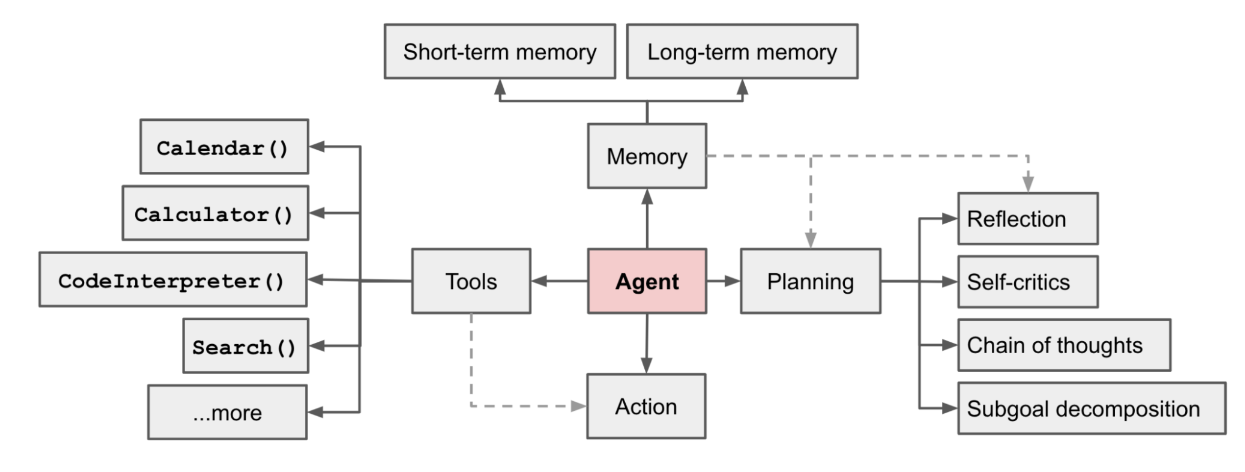
架构图:
-
核心概念:
- 核心驱动:LLM(提供基础智力、通识、逻辑、上下文内学习等基础能力)
- 关键组件:
- 规划(Planning):将复杂任务分解为可管理的子目标(Task Decomposition),并通过自我反思(Self-Reflection)来提高结果质量
- 记忆(Memory):包括短期记忆(对话记录)和长期记忆(通过外部向量存储和快速检索来保留和回忆信息)(这部分突破项目不多,去年有一个叫Mem0的项目刷过一次屏)
- 工具使用(Tool Use):学习调用外部工具,补充额外信息或完成环境交互
-
Inspiration:
6.3 多智能体协同
-
智能体概念的提出让一批使用类似上述结构(通常是简化的结构,比如只使用Role设定,或是ReAct Prompt)尝试进行多次模型请求协同的项目被关注,核心思想是通过不同的智能体分工协作,组成更大的协作网络
-
代表项目:
- Camel.ai
- MetaGPT
- Microsoft AutoGen
- OpenAI Swarm(现在的Agent SDK)
7. 智能体开发框架smolagents
7.1 smolagents 介绍
Github:https://github.com/huggingface/smolagents
官方文档:https://huggingface.co/docs/smolagents/index
smolagents是HuggingFace官方推出的Agent开发库,构建强大 agent 的最简单框架!。
首先来介绍一下smolagents吧,smol是small的俏皮用法,故smolagents的含义是“轻量的agent工具”。smolagents库提供:
✨ 简洁性:Agent 逻辑仅需约千行代码。我们将抽象保持在原始代码之上的最小形态!
🌐 支持任何 LLM:支持通过 Hub 托管的模型,使用其 transformers 版本或通过我们的推理 API 加载,也支持 OpenAI、Anthropic 等模型。使用任何 LLM 为 agent 提供动力都非常容易。
🧑💻 一流的代码 agent 支持,即编写代码作为其操作的 agent(与"用于编写代码的 agent"相对),在此了解更多。
🤗 Hub 集成:您可以在 Hub 上共享和加载工具,更多功能即将推出!
8 实战:Agentic RAG
8.1 传统 RAG 的局限性
尽管传统 RAG 方法有诸多优势,但它也面临一些挑战:
- 单次检索步骤:如果初始检索结果较差,则最终生成的结果将受到影响
- 查询文档不匹配:用户查询(通常是问题)可能与包含答案(通常是陈述)的文档不太匹配
- 推理能力有限:简单的 RAG 流程无法进行多步推理或查询细化
- 上下文窗口约束:检索到的文档必须适合模型的上下文窗口
8.2 Agentic RAG 的主要优势
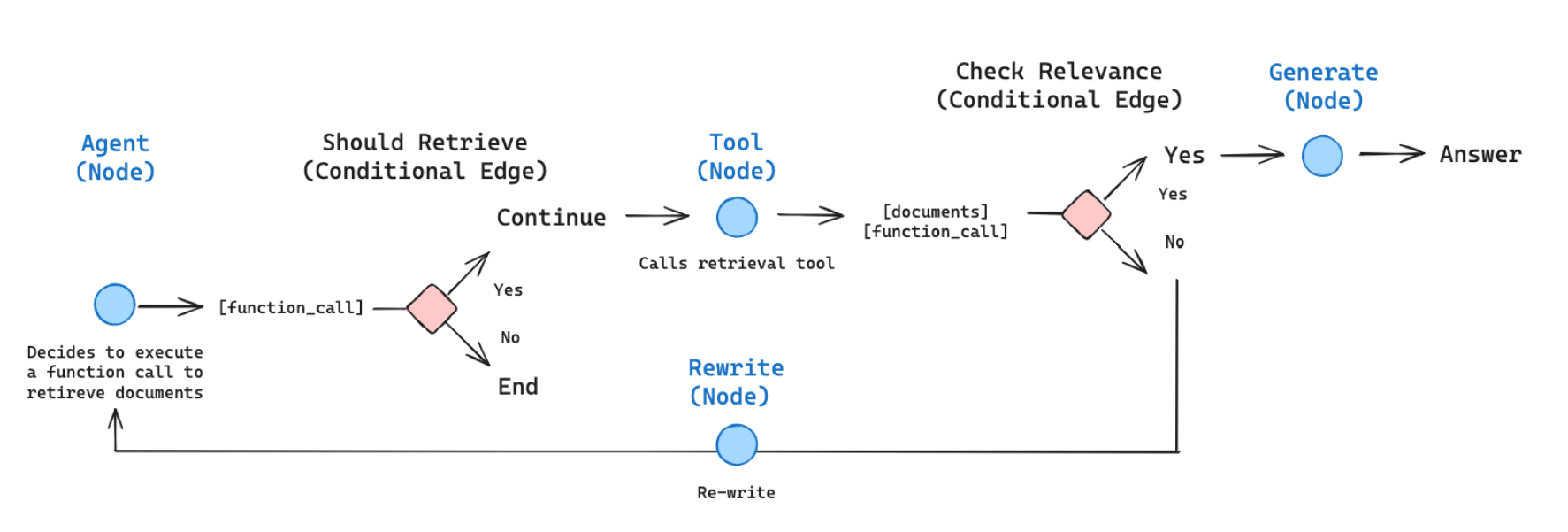
拥有检索工具的代理可以:
-
✅制定优化查询:代理可以将用户问题转换为易于检索的查询
-
✅执行多次检索:代理可以根据需要迭代检索信息
-
✅对检索到的内容进行推理:代理可以从多个来源进行分析、综合并得出结论
-
✅自我批评和改进:代理可以评估检索结果并调整其方法
这种方法自然地实现了先进的 RAG 技术:
- Hypothetical Document Embedding (HyDE):代理不直接使用用户查询,而是制定检索优化查询
- Self-Query Refinement:代理可以分析初始结果,并使用细化查询执行后续检索
8.3 构建 Agentic RAG 系统
pip install smolagents pandas langchain langchain-community sentence-transformers datasets rank_bm25
你需要一个有效的 token 作为环境变量 HF_TOKEN 来调用 Inference Providers。
Hugging Face 注册 - 登录 - 创建 Access Tokens - 系统环境变量配置 HF_TOKEN
我们首先加载一个知识库以在其上执行 RAG:此数据集是许多 Hugging Face 库的文档页面的汇编,存储为 markdown 格式。我们将仅保留 transformers 库的文档。然后通过处理数据集并将其存储到向量数据库中,为检索器准备知识库。我们将使用 LangChain 来利用其出色的向量数据库工具。
import datasets
from langchain.docstore.document import Document
from langchain.text_splitter import RecursiveCharacterTextSplitter
from langchain_community.retrievers import BM25Retriever

knowledge_base = datasets.load_dataset("m-ric/huggingface_doc", split="train")
knowledge_base = knowledge_base.filter(lambda row: row["source"].startswith("huggingface/transformers"))

source_docs = [
    Document(page_content=doc["text"], metadata={"source": doc["source"].split("/")[1]})
    for doc in knowledge_base
]

text_splitter = RecursiveCharacterTextSplitter(
    chunk_size=500,
    chunk_overlap=50,
    add_start_index=True,
    strip_whitespace=True,
    separators=["\n\n", "\n", ".", " ", ""],
)
docs_processed = text_splitter.split_documents(source_docs)
现在文档已准备好。我们来一起构建我们的 agent RAG 系统! 👉 我们只需要一个 RetrieverTool,我们的 agent 可以利用它从知识库中检索信息。
由于我们需要将 vectordb 添加为工具的属性,我们不能简单地使用带有 @tool 装饰器的简单工具构造函数:因此我们将遵循 tools 教程 中突出显示的高级设置
from smolagents import Tool

class RetrieverTool(Tool):
    name = "retriever"
    description = "Uses semantic search to retrieve the parts of transformers documentation that could be most relevant to answer your query."
    inputs = {
        "query": {
            "type": "string",
            "description": "The query to perform. This should be semantically close to your target documents. Use the affirmative form rather than a question.",
        }
    }
    output_type = "string"

    def __init__(self, docs, **kwargs):
        super().__init__(**kwargs)
        self.retriever = BM25Retriever.from_documents(
            docs, k=10
        )

    def forward(self, query: str) -> str:
        assert isinstance(query, str), "Your search query must be a string"

        docs = self.retriever.invoke(
            query,
        )
        return "\nRetrieved documents:\n" + "".join(
            [
                f"\n\n===== Document {str(i)} =====\n" + doc.page_content
                for i, doc in enumerate(docs)
            ]
        )

retriever_tool = RetrieverTool(docs_processed)
BM25 检索方法是一个经典的检索方法,因为它的设置速度非常快。为了提高检索准确性,你可以使用语义搜索,使用文档的向量表示替换 BM25:因此你可以前往 MTEB Leaderboard 选择一个好的嵌入模型。
现在我们已经创建了一个可以从知识库中检索信息的工具,现在我们可以很容易地创建一个利用这个 retriever_tool 的 agent!此 agent 将使用如下参数初始化:
tools:代理将能够调用的工具列表。model:为代理提供动力的 LLM。
我们的 model 必须是一个可调用对象,它接受一个消息的 list 作为输入,并返回文本。它还需要接受一个 stop_sequences 参数,指示何时停止生成。为了方便起见,我们直接使用包中提供的 HfEngine 类来获取调用 Hugging Face 的 Inference API 的 LLM 引擎。
接着,我们将使用 meta-llama/Llama-3.3-70B-Instruct 作为 llm 引 擎,因为:
- 它有一个长 128k 上下文,这对处理长源文档很有用。
- 它在 HF 的 Inference API 上始终免费提供!
Note: 此 Inference API 托管基于各种标准的模型,部署的模型可能会在没有事先通知的情况下进行更新或替换。了解更多信息,请点击这里。
from smolagents import InferenceClientModel, CodeAgent

agent = CodeAgent(
    tools=[retriever_tool],
    model=InferenceClientModel(model_id="meta-llama/Llama-3.3-70B-Instruct"),
    max_steps=4
)
当我们初始化 CodeAgent 时,它已经自动获得了一个默认的系统提示,告诉 LLM 引擎按步骤处理并生成工具调用作为代码片段,但你可以根据需要替换此提示模板。接着,当其 .run() 方法被调用时,代理将负责调用 LLM 引擎,并在循环中执行工具调用,直到工具 final_answer 被调用,而其参数为最终答案。
agent_output = agent.run("For a transformers model training, which is slower, the forward or the backward pass?")

print("Final output:")
print(agent_output)
9. 智能体系统/LLM应用的应用场景
项目举例:
- DeepResearch
应用场景举例:
- 文案生成
- Auto Coder
- NL2DB
- 智能家居
- 智能座舱
10. 智能体系统/LLM应用核心逻辑的几种分类
- CoT/简单工作流
- 附加Function Calling的单次请求
- 基于SOP的复杂工作流
- 自规划
- ...
11. 学习打卡
- 掌握Function Calling核心概念和工作原理
- 掌握智能体Agent核心概念和工作原理
- 掌握智能体开发框架smolagents
- 基于smolagents开发Agentic RAG应用,参考 smolagents\examples 目录下
rag.py和rag_using_chromadb.py - 基于smolagents开发text_to_sql应用,参考 smolagents\examples 目录下
text_to_sql.py

有“AI”的1024 = 2048,欢迎大家加入2048 AI社区
更多推荐
 0
0 0
0- 0


 已为社区贡献6条内容

所有评论(0)