从零到一:使用 Next.js 15 + React 19 构建现代化企业官网
文章目录
前言
在 2026 年,企业官网不仅是展示品牌形象的窗口,更是连接客户的重要渠道。本文记录了我使用最新的 Next.js 15 和 React 19 技术栈,从零开始构建一个功能完整、性能优异的企业官网的完整过程。
项目链接
- GitHub:https://github.com/bruce4code/nextjs15-enterprise-template
- 在线演示:https://nextjs15-enterprise-template.vercel.app
- 技术文档:查看项目 README.md
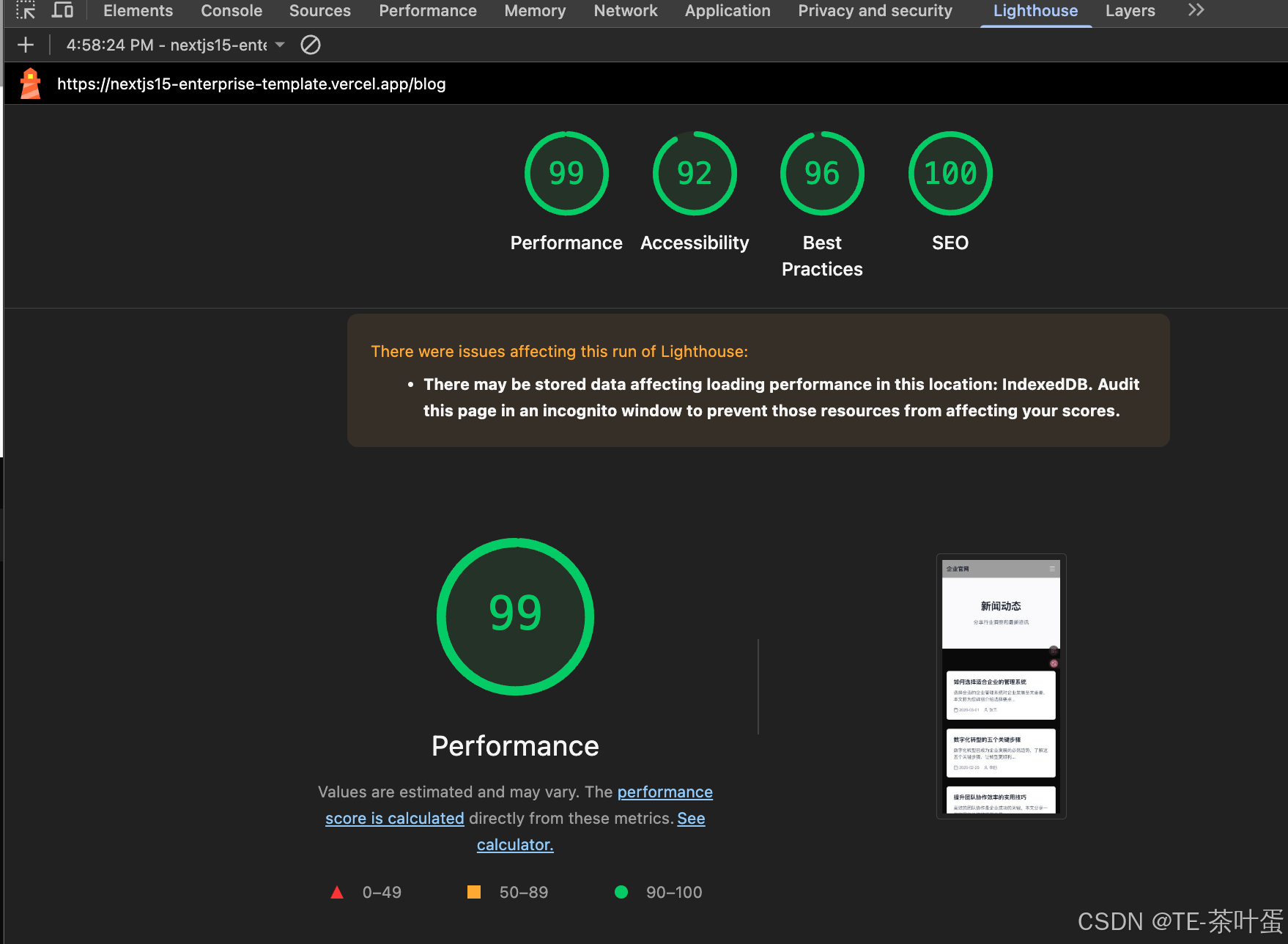
跑分
技术选型
为什么选择 Next.js 15?
经过调研,我选择了 Next.js 15 作为核心框架,主要基于以下考虑:
- SEO 友好:支持 SSR/SSG,对搜索引擎优化至关重要
- 性能卓越:自动代码分割、图片优化、React Compiler
- 开发体验:热更新、TypeScript 支持、文件系统路由
- 部署简单:Vercel 一键部署,零配置
- 生态成熟:丰富的插件和社区支持
最终技术栈
- 框架:Next.js 15 (App Router)
- UI 库:React 19 (React Compiler)
- 样式:Tailwind CSS
- 类型检查:TypeScript
- 表单:React Hook Form + Zod
- 动画:Framer Motion
- 图标:Lucide React
- 部署:Vercel
项目规划
使用 Spec 模式
为了更好地管理项目开发流程,我采用了 Spec(规格说明)模式,将整个项目分为 6 个阶段:
- Phase 1:项目初始化和基础配置
- Phase 2:布局和通用组件
- Phase 3:核心页面开发
- Phase 4:交互功能
- Phase 5:SEO 和性能优化
- Phase 6:部署和测试
这种方式让开发过程更加清晰,每个阶段都有明确的目标和验收标准。
开发过程
Phase 1:项目初始化
首先创建 Next.js 项目:
npx create-next-app@latest my-website --typescript --tailwind --eslint --app --src-dir=false --import-alias="@/*"
关键配置选择:
- ✅ TypeScript:类型安全
- ✅ Tailwind CSS:快速样式开发
- ✅ ESLint:代码质量保证
- ✅ App Router:使用最新的路由系统
- ✅ React Compiler:自动性能优化
安装核心依赖:
npm install framer-motion lucide-react react-hook-form zod @hookform/resolvers clsx tailwind-merge
创建项目目录结构:
my-website/
├── app/                    # 页面路由
│   ├── layout.tsx         # 根布局
│   ├── page.tsx           # 首页
│   ├── about/             # 关于页面
│   ├── products/          # 产品页面
│   ├── blog/              # 博客页面
│   └── contact/           # 联系页面
├── components/
│   ├── layout/            # 布局组件
│   ├── ui/                # 通用 UI 组件
│   └── sections/          # 页面区块组件
├── lib/                   # 工具函数
└── public/                # 静态资源
配置 SEO 基础:
// lib/seo.ts
export const siteConfig = {
  name: "企业官网",
  description: "我们提供专业的产品和服务,致力于为客户创造价值",
  url: "https://example.com",
  ogImage: "https://example.com/og.jpg",
};

export function constructMetadata({
  title = siteConfig.name,
  description = siteConfig.description,
  image = siteConfig.ogImage,
  noIndex = false,
}: {
  title?: string;
  description?: string;
  image?: string;
  noIndex?: boolean;
} = {}): Metadata {
  return {
    title,
    description,
    openGraph: {
      title,
      description,
      images: [{ url: image }],
    },
    twitter: {
      card: "summary_large_image",
      title,
      description,
      images: [image],
    },
    ...(noIndex && {
      robots: {
        index: false,
        follow: false,
      },
    }),
  };
}
创建 sitemap 和 robots.txt:
// app/sitemap.ts
export default function sitemap(): MetadataRoute.Sitemap {
  const baseUrl = "https://example.com";

  return [
    {
      url: baseUrl,
      lastModified: new Date(),
      changeFrequency: "monthly",
      priority: 1,
    },
    // ... 其他页面
  ];
}

// app/robots.ts
export default function robots(): MetadataRoute.Robots {
  return {
    rules: {
      userAgent: "*",
      allow: "/",
    },
    sitemap: "https://example.com/sitemap.xml",
  };
}
Phase 2:布局和通用组件
创建通用 UI 组件,采用组合式设计:
Button 组件:
// components/ui/button.tsx
interface ButtonProps extends ButtonHTMLAttributes<HTMLButtonElement> {
  variant?: "primary" | "secondary" | "outline";
  size?: "sm" | "md" | "lg";
}

const Button = forwardRef<HTMLButtonElement, ButtonProps>(
  ({ className, variant = "primary", size = "md", ...props }, ref) => {
    return (
      <button
        ref={ref}
        className={cn(
          "inline-flex items-center justify-center rounded-lg font-medium transition-colors",
          {
            "bg-blue-600 text-white hover:bg-blue-700": variant === "primary",
            "bg-gray-200 text-gray-900 hover:bg-gray-300": variant === "secondary",
            "border-2 border-blue-600 text-blue-600 hover:bg-blue-50": variant === "outline",
          },
          {
            "h-9 px-4 text-sm": size === "sm",
            "h-11 px-6 text-base": size === "md",
            "h-14 px-8 text-lg": size === "lg",
          },
          className
        )}
        {...props}
      />
    );
  }
);
响应式 Header:
// components/layout/header.tsx
export function Header() {
  const [mobileMenuOpen, setMobileMenuOpen] = useState(false);

  return (
    <header className="sticky top-0 z-50 w-full border-b bg-white/95 backdrop-blur">
      <Container>
        <div className="flex h-16 items-center justify-between">
          {/* Logo */}
          <Link href="/" className="text-xl font-bold text-gray-900">
            企业官网
          </Link>

          {/* Desktop Navigation */}
          <nav className="hidden md:flex md:gap-8">
            {navItems.map((item) => (
              <Link key={item.href} href={item.href}>
                {item.label}
              </Link>
            ))}
          </nav>

          {/* Mobile Menu Button */}
          <button
            className="md:hidden"
            onClick={() => setMobileMenuOpen(!mobileMenuOpen)}
          >
            {mobileMenuOpen ? <X /> : <Menu />}
          </button>
        </div>

        {/* Mobile Navigation */}
        {mobileMenuOpen && (
          <nav className="md:hidden">
            {/* 移动端菜单项 */}
          </nav>
        )}
      </Container>
    </header>
  );
}
Footer 组件:
包含公司信息、快速链接、联系方式等模块,采用响应式网格布局。
Phase 3:核心页面开发
首页设计:
首页包含三个主要区块:
- Hero 区块:品牌展示和主要 CTA
// components/sections/hero.tsx
export function Hero() {
  return (
    <section className="relative bg-gradient-to-b from-blue-50 to-white py-20 md:py-32">
      <Container>
        <motion.div
          initial={{ opacity: 0, y: 20 }}
          animate={{ opacity: 1, y: 0 }}
          transition={{ duration: 0.5 }}
          className="mx-auto max-w-3xl text-center"
        >
          <h1 className="mb-6 text-4xl font-bold tracking-tight text-gray-900 md:text-6xl">
            专业的解决方案
            <span className="text-blue-600">提供商</span>
          </h1>
          <p className="mb-8 text-lg text-gray-600 md:text-xl">
            我们致力于为客户提供高质量的产品和服务,助力企业数字化转型
          </p>
          <div className="flex flex-col gap-4 sm:flex-row sm:justify-center">
            <Button size="lg">立即咨询</Button>
            <Button size="lg" variant="outline">了解更多</Button>
          </div>
        </motion.div>
      </Container>
    </section>
  );
}
- Features 区块:核心优势展示
使用 Framer Motion 实现滚动触发动画:
<motion.div
  initial={{ opacity: 0, y: 20 }}
  whileInView={{ opacity: 1, y: 0 }}
  transition={{ duration: 0.5, delay: index * 0.1 }}
  viewport={{ once: true }}
>
  <Card>
    <feature.icon className="mx-auto mb-4 h-12 w-12 text-blue-600" />
    <h3>{feature.title}</h3>
    <p>{feature.description}</p>
  </Card>
</motion.div>
- CTA 区块:行动号召
产品页面:
实现产品列表和详情页的动态路由:
// app/products/page.tsx - 产品列表
// app/products/[id]/page.tsx - 产品详情

// 注意 Next.js 15 中 params 是 Promise
export default async function ProductDetailPage({
  params
}: {
  params: Promise<{ id: string }>
}) {
  const { id } = await params;
  const product = productsData[id];

  if (!product) {
    notFound();
  }

  return (
    // 产品详情内容
  );
}
博客页面:
类似的动态路由结构,支持文章列表和详情展示。
联系页面:
包含联系方式展示和在线表单。
Phase 4:交互功能
表单验证:
使用 React Hook Form + Zod 实现强大的表单验证:
// lib/validations.ts
export const contactFormSchema = z.object({
  name: z.string().min(2, "姓名至少需要2个字符"),
  email: z.string().email("请输入有效的邮箱地址"),
  phone: z.string().optional(),
  message: z.string().min(10, "留言内容至少需要10个字符"),
});

// app/contact/page.tsx
const {
  register,
  handleSubmit,
  formState: { errors },
  reset,
} = useForm<ContactFormData>({
  resolver: zodResolver(contactFormSchema),
});

const onSubmit = async (data: ContactFormData) => {
  // 处理表单提交
  await submitForm(data);
  reset();
};
返回顶部按钮:
// components/ui/scroll-to-top.tsx
export function ScrollToTop() {
  const [isVisible, setIsVisible] = useState(false);

  useEffect(() => {
    const toggleVisibility = () => {
      setIsVisible(window.scrollY > 300);
    };
    window.addEventListener("scroll", toggleVisibility);
    return () => window.removeEventListener("scroll", toggleVisibility);
  }, []);

  return (
    <AnimatePresence>
      {isVisible && (
        <motion.button
          initial={{ opacity: 0, scale: 0.8 }}
          animate={{ opacity: 1, scale: 1 }}
          exit={{ opacity: 0, scale: 0.8 }}
          onClick={() => window.scrollTo({ top: 0, behavior: "smooth" })}
        >
          <ArrowUp />
        </motion.button>
      )}
    </AnimatePresence>
  );
}
平滑滚动:
在 globals.css 中添加:
html {
  scroll-behavior: smooth;
}
Phase 5:SEO 和性能优化
结构化数据:
添加 JSON-LD 结构化数据提升 SEO:
// lib/structured-data.ts
export function generateOrganizationSchema() {
  return {
    "@context": "https://schema.org",
    "@type": "Organization",
    name: "企业官网",
    url: "https://example.com",
    logo: "https://example.com/logo.png",
    description: "我们提供专业的产品和服务",
    contactPoint: {
      "@type": "ContactPoint",
      telephone: "+86-400-123-4567",
      contactType: "customer service",
    },
  };
}

// 在页面中使用
<script
  type="application/ld+json"
  dangerouslySetInnerHTML={{ __html: JSON.stringify(organizationSchema) }}
/>
性能优化配置:
// next.config.ts
const nextConfig: NextConfig = {
  reactCompiler: true,

  images: {
    formats: ["image/avif", "image/webp"],
    deviceSizes: [640, 750, 828, 1080, 1200, 1920, 2048, 3840],
  },

  compress: true,
  poweredByHeader: false,
  reactStrictMode: true,
};
完善的 Sitemap:
包含所有静态和动态页面:
export default function sitemap(): MetadataRoute.Sitemap {
  const baseUrl = "https://example.com";

  // 静态页面
  const routes = [
    { url: baseUrl, priority: 1 },
    { url: `${baseUrl}/about`, priority: 0.8 },
    // ...
  ];

  // 动态产品页面
  const productPages = productIds.map((id) => ({
    url: `${baseUrl}/products/${id}`,
    priority: 0.8,
  }));

  // 动态博客页面
  const blogPages = blogIds.map((id) => ({
    url: `${baseUrl}/blog/${id}`,
    priority: 0.6,
  }));

  return [...routes, ...productPages, ...blogPages];
}
404 页面:
// app/not-found.tsx
export default function NotFound() {
  return (
    <div className="flex min-h-[60vh] items-center">
      <Container>
        <div className="mx-auto max-w-md text-center">
          <h1 className="mb-4 text-6xl font-bold">404</h1>
          <h2 className="mb-4 text-2xl font-semibold">页面未找到</h2>
          <Link href="/">
            <Button size="lg">返回首页</Button>
          </Link>
        </div>
      </Container>
    </div>
  );
}
Phase 6:部署和测试
构建测试:
npm run build
构建成功输出:
Route (app)
┌ ○ /
├ ○ /about
├ ○ /blog
├ ƒ /blog/[id]
├ ○ /contact
├ ○ /products
├ ƒ /products/[id]
├ ○ /sitemap.xml
└ ○ /robots.txt

○  (Static)   预渲染为静态内容
ƒ  (Dynamic)  按需服务端渲染
Vercel 部署:
- 推送代码到 GitHub:
git remote add origin https://github.com/bruce4code/nextjs15-enterprise-template.git
git push -u origin main
- 在 Vercel 导入项目
- 自动检测 Next.js 配置
- 点击 Deploy 开始部署
- 2-3 分钟后部署完成
部署配置:
创建 vercel.json 添加安全响应头:
{
  "headers": [
    {
      "source": "/(.*)",
      "headers": [
        {
          "key": "X-Content-Type-Options",
          "value": "nosniff"
        },
        {
          "key": "X-Frame-Options",
          "value": "DENY"
        },
        {
          "key": "X-XSS-Protection",
          "value": "1; mode=block"
        }
      ]
    }
  ]
}
Docker 支持:
创建 Dockerfile 支持容器化部署:
FROM node:18-alpine AS base

FROM base AS deps
WORKDIR /app
COPY package*.json ./
RUN npm ci

FROM base AS builder
WORKDIR /app
COPY --from=deps /app/node_modules ./node_modules
COPY . .
RUN npm run build

FROM base AS runner
WORKDIR /app
ENV NODE_ENV production
COPY --from=builder /app/public ./public
COPY --from=builder /app/.next/standalone ./
COPY --from=builder /app/.next/static ./.next/static

EXPOSE 3000
CMD ["node", "server.js"]
遇到的问题和解决方案
问题 1:Next.js 15 params 变成 Promise
问题:
Error: Route "/products/[id]" used `params.id`.
`params` is a Promise and must be unwrapped with `await`
解决:
// 错误写法
export default function Page({ params }: { params: { id: string } }) {
  const product = productsData[params.id];
}

// 正确写法
export default async function Page({ params }: { params: Promise<{ id: string }> }) {
  const { id } = await params;
  const product = productsData[id];
}
问题 2:Footer 中 key 重复
问题:
Encountered two children with the same key
原因:多个链接使用了相同的 href 作为 key
解决:给每个链接不同的 href 或使用 label 作为 key
// 修改前
{ label: "产品服务", href: "/products" },
{ label: "解决方案", href: "/products" },  // 重复

// 修改后
{ label: "产品服务", href: "/products" },
{ label: "解决方案", href: "/products#solutions" },
问题 3:TypeScript 类型错误
问题:
Property 'title' does not exist on type '{}'
解决:定义明确的类型接口
// 修改前
const productsData: Record<string, any> = { ... };

// 修改后
interface Product {
  title: string;
  description: string;
  details: string;
  features: string[];
}

const productsData: Record<string, Product> = { ... };
问题 4:Vercel 域名国内访问
问题:.vercel.app 域名在国内访问受限
解决方案:
- 绑定自定义域名(推荐)
- 部署到国内云服务商
- 使用 CDN 加速
- 开发阶段使用科学上网
性能表现
构建完成后的性能指标:
- 构建时间:~3 秒
- 页面数量:11 个路由
- 静态页面:7 个
- 动态页面:4 个
- 包大小:优化后的生产构建
预期 Lighthouse 评分:
- Performance: > 90
- Accessibility: > 90
- Best Practices: > 90
- SEO: > 90
项目亮点
-
完整的 SEO 优化
- Metadata API 配置
- 自动生成 Sitemap
- 结构化数据(JSON-LD)
- Open Graph 和 Twitter Cards
-
出色的用户体验
- 响应式设计
- 流畅的动画效果
- 表单验证反馈
- 加载状态提示
-
现代化技术栈
- React 19 + React Compiler
- TypeScript 类型安全
- Tailwind CSS 快速开发
- Framer Motion 动画
-
完善的工程化
- Git 版本控制
- 阶段性提交
- 文档完善
- 部署自动化
后续优化方向
-
功能增强
- 添加多语言支持(i18n)
- 集成 CMS 系统(Sanity/Strapi)
- 添加搜索功能
- 集成分析工具(Google Analytics)
-
性能优化
- 图片懒加载优化
- 代码分割优化
- 缓存策略优化
- CDN 配置
-
内容管理
- 接入 Headless CMS
- 支持 Markdown/MDX
- 内容版本管理
- 定时发布功能
-
用户体验
- 添加深色模式
- 优化移动端体验
- 添加骨架屏
- 优化加载动画
总结
通过这次从零到一的实践,我深刻体会到:
- 规划的重要性:使用 Spec 模式让开发过程更加有序
- 技术选型的关键:选择成熟的技术栈可以事半功倍
- 渐进式开发:分阶段实现功能,每个阶段都可验收
- 注重细节:SEO、性能、用户体验都需要精心打磨
- 文档的价值:完善的文档让项目更易维护和扩展
这个项目不仅是一个企业官网模板,更是一个学习现代 Web 开发的完整案例。希望这篇文章能帮助到正在学习 Next.js 的开发者。
参考资料

有“AI”的1024 = 2048,欢迎大家加入2048 AI社区
更多推荐


 9
9 0
0- 0


 已为社区贡献5条内容

所有评论(0)