三阶魔方
目录
〇,三阶魔方


一,三阶魔方的公式
几乎所有初学者都会学的:层先法
进阶方法:CFOP
盲拧:盲拧公式
我只学了最基础的层先法,层先法易学,但是步骤多,所以慢,我基本上都是1-2分钟。
资源分享汇总_csuzhucong的博客-CSDN博客_csdn资源
如果练练手速,层先法可以保证1分钟复原,但是再进一步就难了。
要想更快,就需要CFOP。
三阶魔方复原世界纪录大概是5秒左右。
而盲拧,也有盲拧的公式。
二,复原方法
1,术语
上下前后左右分别是UDFBLR,默认是顺时针,上角有 ' 表示逆时针
如果是高阶魔方,下标1表示第1层,下标2表示第2层,下标12表示12层一起。
2,层先法
层先法,就是指将魔方分为三层:底层、中层、顶层,分层复原。
用层先法复原魔方一共分七步,分别为:做好底层十字、复原底层、复原中层棱块、做好顶面十字、复原顶面、调整顶角位置、调整顶棱位置。
其中最后2步的顺序也可以反过来。
做好底层十字、复原底层不需要公式。
复原中层棱块需要用到1个公式:U'L'ULUFU'F' 或者另外一个和它左右对称的公式。
做好顶面十字需要用到1个公式:FRUR'U'F'
复原顶面需要用到2个公式:小鱼1和小鱼2
调整顶角位置需要用到1个公式:换棱公式
调整顶棱位置只需要用小鱼1和小鱼2即可。
三,魔方重组——棱块和角块的位置和方向
如果将魔方拆开,随机拼起来,那么能复原的概率是多少?
注意,这里的拆开,遵循的是魔方的实际结构,6个中心块动不了,只有8个角块和12个棱块可以互换翻转。
答案是1/12
我是在初三的一个晚上,躺在床上想起白天看到的这个问题,就自己心算出来的,后来上网一查,发现我的推算过程确实是对的。
按照层先法,七步分别为:做好底层十字、复原底层、复原中层棱块、做好顶面十字、复原顶面、调整顶角位置、调整顶棱位置。
每一步能成功的概率依次是1,1,1,1/2,1/3,1,1/2,乘起来就是1/12。
这里的概率其实是条件概率,即前面的步骤全部成功,后面的步骤不能破坏前面已经成功的部分的情况下能够成功的概率。
神奇的是,如果最后两步反过来,每一步能成功的概率仍然依次是1,1,1,1/2,1/3,1,1/2,乘起来当然也还是1/12。
PS:利用1/12这个概率,可以算出能复原的魔方一共有多少种不同的状态。
即8!* 3^8 * 12!*2^12 / 12 = 4325亿亿
四,魔方的定位——中心块的方向
三阶魔方的每个块的位置显然都是唯一确定的,但是方向呢?
棱块和角块的方向也是唯一确定的,中心块的方向是无法辨识的,除非有额外标注。
对于三阶图案魔方A、B、C,在正常魔方的基础之上,还标注了图案:

不难发现,当我们不关注图案,只关注颜色,把魔方复原之后,除了中心块之外所有图案的位置和方向一定是正确的,但是中心块的方向有可能是错的。
五,另一个有趣的问题——中心块的位置
如果交换魔方的6个中心块位置,棱块和角块不变,能复原吗?
因为魔方的角块是可以定位的,所以6个中心块的相对位置是唯一确定的。
在6个中心块的相对位置固定的情况下,中心块位置的变动只有2种:六元轮换和四元轮换。
(1)六元轮换

(黄红绿白橘蓝)->(绿黄红蓝白橘)
这个是可以复原的,而且非常简单,只需要4步(4步都是转中间层,准确的说应该是8步)
任何六元轮换都可以表示成若干次这个六元轮换和某个四元轮换的叠加,所以接下来只需要研究四元轮换即可。
(2)四元轮换
四元轮换相当于上下2个中心块不变,中间四个中心块即中间这一圈转0度、90度、180度、270度
首先看看90度:

(黄白红绿橘蓝)->(黄白蓝红绿橘)
这种情况是无法复原的,按照层先法尝试复原得到的结果:

除了2个棱块的位置不对,其他块都OK
再看看180度:
(黄白红绿橘蓝)->(黄白橘蓝红绿)
这种情况是可以复原的
其他2种情况:
0度就是没变,270度和90度的同理的。
至此,关于中心块的位置的研究就结束了,在中心块的相对位置正确的情况下,有1/2的概率魔方是可以复原的。
六,中心块、棱块、角块的相对位置
上一章的结论是,固定棱块和角块,中心块整体移动位置(即中心块之间的相对位置不变)的情况下,1/2的概率是正确的。
如果固定棱块和中心块,整体移动角块呢?

角块整体转动90度,结果是可以复原的,即是正确的。
由此可得,角块整体移动到任意位置都是正确的。
如果固定角块和中心块,整体移动棱块呢?

棱块整体转动90度,结果是不可以复原的。
七,重新回顾魔方重组问题
魔方重组问题:如果将魔方拆开,随机拼起来,那么能复原的概率是多少?
结合上面第三、五、六章的结论,我们可以给出更接近本质的表述:
把26个块看成三部分,6个中心块,12个棱块,8个角块
中心块由1个颜色组成,6个中心块的相对位置和方向正确的概率是1,
棱块由2个颜色组成,12个棱块的相对位置和方向正确的概率是1/2,
角块由3个颜色组成,8个角块的相对位置和方向正确的概率是1/3,
6个中心块、12个棱块、8个角块的相对位置和方向都正确的情况下,合在一起正确的概率是1/2,可以理解为角块组是任意的,中心块组和棱块组之间位置关系正确的概率是1/2。
PS:逻辑关系写的还不是非常清楚,特做补充如下:
将魔方拆开,随机拼起来,如果12个棱块可以转到相对位置正确,8个角块也可以转到相对位置正确
那么12个棱块和8个角块这20个块一定能转到相对位置和方向都正确,但是此时和6个中心块的相对位置只有1/2的概率是对的。
也可以让6个中心块和8个角块这14个块转到相对位置和方向都正确,但是此时和12个棱块的相对位置只有1/2的概率是对的。
还可以在保持8个角块的相对位置和方向正确的前提下,尝试让6个中心块和12个棱块这18个块转到相对位置和方向都正确,只有1/2的概率能成功。
但是如果不用保持8个角块的相对位置和方向正确,移动可以让6个中心块和12个棱块这18个块转到相对位置和方向都正确,之后再把8个角块的位置复原,只有1/2的概率能成功。
八,三阶魔方网页版
基于二阶魔方网页版继续修改。
1,公式按钮
提示词:
新增录入公式的功能,输入公式名称和公式内容,点击添加公式则生成一个按钮,点击按钮的效果同操作序列执行按钮
deepseek输出结果:
<!DOCTYPE html>
<html lang="zh-CN">
<head>
<meta charset="UTF-8">
<meta name="viewport" content="width=device-width, initial-scale=1.0">
<title>三阶魔方 3D</title>
<style>
  :root {
    --bg1: #161b26;
    --bg2: #1f2635;
    --txt: #e8edf5;
    --dim: #8fa0bf;
    --panel: #1b2231;
  }
  * { box-sizing: border-box; }
  html, body { height: 100%; }
  body {
    margin: 0;
    font-family: "Segoe UI", "PingFang SC", "Microsoft YaHei", sans-serif;
    background: radial-gradient(1200px 700px at 50% -10%, var(--bg2), var(--bg1));
    color: var(--txt);
    padding: 20px 16px 30px;
    overflow: auto;
  }
  h1 { margin: 0 0 4px; font-size: 24px; letter-spacing: 3px; text-align: center; }
  #status {
    min-height: 24px;
    margin: 2px 0 10px;
    font-size: 14px;
    color: var(--dim);
    transition: color .3s;
    text-align: center;
  }
  #status.solved { color: #7ee08a; font-weight: bold; animation: pop .55s ease; }
  @keyframes pop {
    0% { transform: scale(.6); opacity: 0; }
    70% { transform: scale(1.18); }
    100% { transform: scale(1); opacity: 1; }
  }

  #layout {
    display: flex;
    gap: 22px;
    width: 100%;
    max-width: 1100px;
    margin: 0 auto;
    align-items: flex-start;
    justify-content: center;
  }
  #leftCol {
    flex: 1 1 auto;
    min-width: 0;
    max-width: 600px;
    display: flex;
    flex-direction: column;
    align-items: center;
  }
  #rightCol {
    flex: 0 0 330px;
    width: 330px;
    position: sticky;
    top: 20px;
  }

  #stage {
    width: 100%;
    max-width: 560px;
    height: 58vh;
    min-height: 360px;
    max-height: 560px;
  }

  #controls { margin-top: 12px; display: flex; flex-direction: column; gap: 10px; align-items: center; }
  .move-row { display: flex; gap: 7px; flex-wrap: wrap; justify-content: center; }
  .move-label { font-size: 12px; color: #6c7b99; letter-spacing: 1px; margin-bottom: -2px; }

  #faceButtons { flex-wrap: nowrap; gap: 5px; }
  #faceButtons button { padding: 8px 6px; min-width: 36px; font-size: 13px; }

  button {
    border: none;
    border-radius: 9px;
    padding: 10px 15px;
    font-size: 15px;
    font-weight: 600;
    cursor: pointer;
    background: #37425c;
    color: #fff;
    box-shadow: 0 3px 0 #1a2130;
    transition: transform .06s, background .15s, box-shadow .06s;
    min-width: 48px;
    letter-spacing: .5px;
  }
  button:hover { background: #46557a; }
  button:active { transform: translateY(3px); box-shadow: 0 0 0 #1a2130; }
  button.cw  { background: #3153a8; }
  button.cw:hover  { background: #436bcb; }
  button.ccw { background: #a84f33; }
  button.ccw:hover { background: #c9633f; }
  button.rot { background: #6b4fa0; }
  button.rot:hover { background: #8462c4; }
  button.tool { background: #2f7a55; }
  button.tool:hover { background: #3b9768; }
  button.tool.warn { background: #8a3d3d; }
  button.tool.warn:hover { background: #a84c4c; }
  button.copy { background: #2a6e8f; }
  button.copy:hover { background: #3588ad; }

  .hint {
    margin-top: 10px;
    font-size: 12.5px;
    color: #6c7b99;
    text-align: center;
    line-height: 1.8;
  }
  kbd {
    background: #2a3344;
    border: 1px solid #4a5a7a;
    border-radius: 5px;
    padding: 1px 7px;
    font-size: 12px;
  }

  #recordBox { display: flex; flex-direction: column; gap: 10px; }
  #recordTitle { font-size: 15px; font-weight: 700; color: #cfd9ea; letter-spacing: 1px; text-align: center; }
  #recordPanel {
    background: var(--panel);
    border: 1px solid #2a3344;
    border-radius: 10px;
    padding: 14px 16px;
    font-family: "Cascadia Code", "Consolas", "Courier New", monospace;
    font-size: 13px;
    line-height: 1.65;
    color: #cfd9ea;
    white-space: pre-wrap;
    word-break: break-all;
    max-height: 58vh;
    overflow: auto;
    margin: 0;
  }
  #copyBtn { width: 100%; }

  #seqRow {
    width: 100%;
    max-width: 560px;
    margin-top: 4px;
  }
  #seqInput {
    flex: 1;
    min-width: 220px;
    max-width: 440px;
    padding: 9px 12px;
    border-radius: 8px;
    border: 1px solid #4a5a7a;
    background: #161b26;
    color: #e8edf5;
    font-size: 14px;
    font-family: "Cascadia Code", "Consolas", monospace;
  }
  #seqInput:focus { outline: none; border-color: #6d88c8; }

  /* 公式录入 */
  #formulaRow {
    width: 100%;
    max-width: 560px;
    margin-top: 2px;
    gap: 6px;
  }
  #formulaNameInput,
  #formulaContentInput {
    padding: 9px 12px;
    border-radius: 8px;
    border: 1px solid #4a5a7a;
    background: #161b26;
    color: #e8edf5;
    font-size: 13px;
    font-family: "Cascadia Code", "Consolas", monospace;
  }
  #formulaNameInput {
    width: 110px;
    flex: 0 0 110px;
  }
  #formulaContentInput {
    flex: 1;
    min-width: 160px;
  }
  #formulaNameInput:focus,
  #formulaContentInput:focus {
    outline: none;
    border-color: #6d88c8;
  }
  #formulaButtons { margin-top: 2px; }
  #formulaButtons button.formula { background: #8a5f9e; }
  #formulaButtons button.formula:hover { background: #a174b8; }

  @media (max-width: 920px) {
    #layout { flex-direction: column; align-items: center; }
    #rightCol { width: 100%; max-width: 560px; position: static; }
    #recordPanel { max-height: 300px; }
    #stage { height: 46vh; min-height: 280px; }
  }
  @media (max-width: 560px) {
    button { padding: 8px 10px; font-size: 13px; min-width: 40px; }
    #faceButtons { flex-wrap: wrap; }
    #formulaNameInput { width: 90px; flex-basis: 90px; }
  }
</style>
</head>
<body>
  <h1>三阶魔方</h1>
  <div id="status">加载中…</div>

  <div id="layout">
    <div id="leftCol">
      <div id="stage"></div>
      <div id="controls">
        <div class="move-row" id="faceButtons"></div>
        <div class="move-label">整体转体(不计步数)</div>
        <div class="move-row" id="rotButtons"></div>
        <div class="move-row">
          <button class="tool" id="scrambleBtn">打乱</button>
          <button class="tool warn" id="resetBtn">复原</button>
        </div>
        <div class="move-row" id="seqRow">
          <input id="seqInput" type="text"
                 placeholder="输入操作序列,如 F' L U' L U D F B' D F U' L' R B' R' D' R'" />
          <button class="tool" id="seqBtn">执行</button>
        </div>
        <div class="move-row" id="formulaRow">
          <input id="formulaNameInput" type="text" placeholder="公式名称" />
          <input id="formulaContentInput" type="text"
                 placeholder="公式内容,如 R U R' U'" />
          <button class="tool" id="addFormulaBtn">添加公式</button>
        </div>
        <div class="move-row" id="formulaButtons"></div>
      </div>
      <div class="hint">
        键盘:<kbd>U</kbd><kbd>R</kbd><kbd>F</kbd><kbd>D</kbd><kbd>L</kbd><kbd>B</kbd> 转层,
        <kbd>X</kbd><kbd>Y</kbd><kbd>Z</kbd> 整体转体,<kbd>Shift</kbd> + 字母为逆时针。<br>
        下方镜面面板会完整显示底面颜色。右键公式按钮可删除。
      </div>
    </div>

    <div id="rightCol">
      <div id="recordBox">
        <div id="recordTitle">📋 棋谱</div>
        <button class="tool copy" id="copyBtn">📋 一键复制棋谱</button>
        <pre id="recordPanel"></pre>
      </div>
    </div>
  </div>

<script type="importmap">
{
  "imports": {
    "three": "https://cdn.jsdelivr.net/npm/three@0.160.0/build/three.module.js"
  }
}
</script>

<script type="module">
import * as THREE from 'three';

// ---------- 场景 ----------
const stage = document.getElementById('stage');
const statusEl = document.getElementById('status');
const recordPanel = document.getElementById('recordPanel');
const copyBtn = document.getElementById('copyBtn');

const renderer = new THREE.WebGLRenderer({ antialias: true, alpha: true });
renderer.setPixelRatio(Math.min(window.devicePixelRatio, 2));
renderer.setSize(stage.clientWidth, stage.clientHeight);
stage.appendChild(renderer.domElement);

const scene = new THREE.Scene();
const camera = new THREE.PerspectiveCamera(38, stage.clientWidth / stage.clientHeight, 0.1, 100);
camera.position.set(4.6, 4.3, 6.9);
camera.lookAt(0, -0.6, 0);

scene.add(new THREE.AmbientLight(0xffffff, 0.9));
const light1 = new THREE.DirectionalLight(0xffffff, 1.3);
light1.position.set(5, 9, 6);
scene.add(light1);
const light2 = new THREE.DirectionalLight(0xffffff, 0.45);
light2.position.set(-4, -3, -2);
scene.add(light2);

// ---------- 颜色:上白 下黄 左绿 右蓝 前红 后橙 ----------
const COL_HEX = {
  U: '#f5f5f5',
  D: '#ffd500',
  R: '#3b82f6',
  L: '#3aab4e',
  F: '#e33c3c',
  B: '#ff8c1a'
};
const COL_CHAR = { U: 'W', D: 'Y', R: 'B', L: 'G', F: 'R', B: 'O' };
const CHAR_HEX = { W: '#f5f5f5', Y: '#ffd500', B: '#3b82f6', G: '#3aab4e', R: '#e33c3c', O: '#ff8c1a' };

// ---------- 坐标体系:三阶块中心 -1 / 0 / 1,块宽 0.97 ----------
const H = 1;
const SIZE = 0.97;

const FACE_DEF = {
  U: { axis: 'y', side:  H, vec: new THREE.Vector3(0, 1, 0) },
  D: { axis: 'y', side: -H, vec: new THREE.Vector3(0,-1, 0) },
  R: { axis: 'x', side:  H, vec: new THREE.Vector3(1, 0, 0) },
  L: { axis: 'x', side: -H, vec: new THREE.Vector3(-1,0, 0) },
  F: { axis: 'z', side:  H, vec: new THREE.Vector3(0, 0, 1) },
  B: { axis: 'z', side: -H, vec: new THREE.Vector3(0, 0,-1) }
};

// 整体转体:y 和 z 已互换 —— y 操作绕 z 轴,z 操作绕 y 轴
const ROT_DEF = {
  x: { axis: 'x' },
  y: { axis: 'z' },
  z: { axis: 'y' }
};

// 局面显示顺序:U D L R F B
const FACE_ORDER = ['U','D','L','R','F','B'];

// ---------- 贴纸纹理 ----------
function roundedRect(ctx, x, y, w, h, r) {
  ctx.beginPath();
  ctx.moveTo(x + r, y);
  ctx.arcTo(x + w, y,     x + w, y + h, r);
  ctx.arcTo(x + w, y + h, x,     y + h, r);
  ctx.arcTo(x,     y + h, x,     y,     r);
  ctx.arcTo(x,     y,     x + w, y,     r);
  ctx.closePath();
}

function makeStickerTexture(hex) {
  const size = 128;
  const canvas = document.createElement('canvas');
  canvas.width = canvas.height = size;
  const ctx = canvas.getContext('2d');
  ctx.fillStyle = '#0b0b0d';
  roundedRect(ctx, 0, 0, size, size, 14);
  ctx.fill();
  const m = 17;
  ctx.fillStyle = hex;
  roundedRect(ctx, m, m, size - 2 * m, size - 2 * m, 9);
  ctx.fill();
  const tex = new THREE.CanvasTexture(canvas);
  tex.colorSpace = THREE.SRGBColorSpace;
  tex.anisotropy = 4;
  return tex;
}

const TEX = {};
for (const f in COL_HEX) TEX[f] = makeStickerTexture(COL_HEX[f]);

const blackPlastic = new THREE.MeshStandardMaterial({ color: 0x0a0a0c, roughness: 0.62, metalness: 0.08 });
function stickerMaterial(face) {
  return new THREE.MeshStandardMaterial({ map: TEX[face], roughness: 0.3, metalness: 0.05 });
}

// ---------- 镜面面板(直接绘制底面颜色) ----------
const mirrorCanvas = document.createElement('canvas');
mirrorCanvas.width = mirrorCanvas.height = 256;
const mctx = mirrorCanvas.getContext('2d');
const mirrorTex = new THREE.CanvasTexture(mirrorCanvas);
mirrorTex.colorSpace = THREE.SRGBColorSpace;

const mirrorMat = new THREE.MeshBasicMaterial({ map: mirrorTex });
const mirrorMesh = new THREE.Mesh(new THREE.PlaneGeometry(3.6, 3.6), mirrorMat);
mirrorMesh.rotation.x = -Math.PI / 2;
mirrorMesh.position.y = -2.7;
scene.add(mirrorMesh);

function updateMirror() {
  const d = getState().D || '?????????';
  // D 面顺序与 U 面一致:第一行为后排,第三行为前排
  mctx.clearRect(0, 0, 256, 256);

  mctx.fillStyle = '#0d0f14';
  roundedRect(mctx, 0, 0, 256, 256, 18);
  mctx.fill();

  const cell = 56, gap = 8;
  const ox = (256 - cell * 3 - gap * 2) / 2;
  const oy = ox;

  for (let i = 0; i < 9; i++) {
    const r = Math.floor(i / 3), c = i % 3;
    mctx.fillStyle = CHAR_HEX[d[i]] || '#999';
    roundedRect(mctx, ox + c * (cell + gap), oy + r * (cell + gap), cell, cell, 8);
    mctx.fill();
  }
  mirrorTex.needsUpdate = true;
}

// ---------- 26 个块(8 角 + 12 棱 + 6 中心) ----------
let cubies = [];
const pivot = new THREE.Group();
scene.add(pivot);

function createCubie(x, y, z) {
  const mats = [
    x ===  H ? stickerMaterial('R') : blackPlastic,
    x === -H ? stickerMaterial('L') : blackPlastic,
    y ===  H ? stickerMaterial('U') : blackPlastic,
    y === -H ? stickerMaterial('D') : blackPlastic,
    z ===  H ? stickerMaterial('F') : blackPlastic,
    z === -H ? stickerMaterial('B') : blackPlastic
  ];
  const geo = new THREE.BoxGeometry(SIZE, SIZE, SIZE);
  const mesh = new THREE.Mesh(geo, mats);
  mesh.position.set(x, y, z);
  scene.add(mesh);

  const colors = {
    px: x ===  H ? COL_CHAR.R : null,
    nx: x === -H ? COL_CHAR.L : null,
    py: y ===  H ? COL_CHAR.U : null,
    ny: y === -H ? COL_CHAR.D : null,
    pz: z ===  H ? COL_CHAR.F : null,
    nz: z === -H ? COL_CHAR.B : null
  };
  return { mesh, home: new THREE.Vector3(x, y, z), colors };
}

function buildCube() {
  cubies.forEach(c => scene.remove(c.mesh));
  cubies = [];
  for (const x of [-H, 0, H])
    for (const y of [-H, 0, H])
      for (const z of [-H, 0, H])
        cubies.push(createCubie(x, y, z));
}

// ---------- 旋转 ----------
const moveQueue = [];
let busy = false;
let moveCount = 0;
let scrambleSeq = [];
let userSeq = [];
let initialState = null;

function easeInOutCubic(t) {
  return t < 0.5 ? 4 * t * t * t : 1 - Math.pow(-2 * t + 2, 3) / 2;
}

function snap(v) { return Math.round(v); }

function performRotation(selected, axis, dir, duration, done) {
  selected.forEach(c => pivot.attach(c.mesh));
  const angle = -dir * Math.PI / 2;
  const start = performance.now();

  function frame(now) {
    let t = Math.min(1, (now - start) / duration);
    const e = easeInOutCubic(t);
    pivot.rotation.set(0, 0, 0);
    pivot.rotation[axis] = angle * e;

    if (t < 1) {
      requestAnimationFrame(frame);
    } else {
      pivot.rotation.set(0, 0, 0);
      pivot.rotation[axis] = angle;
      selected.forEach(c => {
        scene.attach(c.mesh);
        c.mesh.position.x = snap(c.mesh.position.x);
        c.mesh.position.y = snap(c.mesh.position.y);
        c.mesh.position.z = snap(c.mesh.position.z);
      });
      pivot.rotation.set(0, 0, 0);
      done();
    }
  }
  requestAnimationFrame(frame);
}

function performMove(face, dir, duration, done) {
  if (FACE_DEF[face]) {
    const def = FACE_DEF[face];
    const selected = cubies.filter(c => Math.abs(c.mesh.position[def.axis] - def.side) < 0.01);
    // 顺时针 = 从该面外侧看。轴正侧(U/R/F)与轴负侧(D/L/B)旋转角符号相反
    const flip = def.side > 0 ? 1 : -1;
    performRotation(selected, def.axis, dir * flip, duration, done);
  } else if (ROT_DEF[face]) {
    performRotation(cubies.slice(), ROT_DEF[face].axis, dir, duration, done);
  }
}

function enqueueMove(face, dir, duration, opts = {}) {
  moveQueue.push({
    face, dir, duration,
    count: opts.count !== false,
    record: !!opts.record,
    onDone: opts.onDone
  });
  if (!busy) processQueue();
}

function processQueue() {
  if (moveQueue.length === 0) { busy = false; return; }
  busy = true;
  const m = moveQueue.shift();

  if (m.record) userSeq.push({ face: m.face, dir: m.dir });

  performMove(m.face, m.dir, m.duration, () => {
    if (m.count) {
      moveCount++;
      if (isSolved()) {
        statusEl.textContent = '🎉 已复原!共用了 ' + moveCount + ' 步';
        statusEl.classList.add('solved');
      } else {
        statusEl.textContent = '步数:' + moveCount;
        statusEl.classList.remove('solved');
      }
    }
    if (m.onDone) m.onDone();
    updateRecordPanel();
    processQueue();
  });
}

// ---------- 轴判定(抗浮点误差) ----------
function axisToKey(v) {
  const ax = Math.abs(v.x), ay = Math.abs(v.y), az = Math.abs(v.z);
  if (ax >= ay && ax >= az) return v.x >= 0 ? 'px' : 'nx';
  if (ay >= ax && ay >= az) return v.y >= 0 ? 'py' : 'ny';
  return v.z >= 0 ? 'pz' : 'nz';
}

// ---------- 复原判定:6 个面每面 9 个贴纸颜色一致 ----------
function isSolved() {
  const st = getState();
  for (const f of FACE_ORDER) {
    const s = st[f];
    if (!s || s.length !== 9) return false;
    for (let i = 1; i < 9; i++) {
      if (s[i] !== s[0]) return false;
    }
  }
  return true;
}

// ---------- 局面读取 ----------
function getFaceSlots(face) {
  const s = [];
  for (let r = 0; r < 3; r++)
    for (let c = 0; c < 3; c++) {
      const x = c - 1;
      const yTop = 1 - r;
      const z = r - 1;
      let p;
      if (face === 'U')      p = [x,  H, z];
      else if (face === 'D') p = [x, -H, z];      // 与 U 面顺序一致
      else if (face === 'F') p = [x, yTop,  H];
      else if (face === 'B') p = [-x, yTop, -H];
      else if (face === 'R') p = [H, yTop, -x];
      else                   p = [-H, yTop, x];   // L
      s.push(new THREE.Vector3(p[0], p[1], p[2]));
    }
  return s;
}

function faceColorString(face) {
  const slots = getFaceSlots(face);
  const n = FACE_DEF[face].vec;
  let out = '';
  for (const p of slots) {
    const cubie = cubies.find(c => c.mesh.position.distanceTo(p) < 0.01);
    if (!cubie) { out += '?'; continue; }
    const n0 = n.clone().applyQuaternion(cubie.mesh.quaternion.clone().invert());
    out += cubie.colors[axisToKey(n0)] || '?';
  }
  return out;
}

function getState() {
  const state = {};
  for (const f of FACE_ORDER) state[f] = faceColorString(f);
  return state;
}

function stateToText(state) {
  return FACE_ORDER.map(f => f + ': ' + state[f]).join('\n');
}

function moveNotation(m) {
  return m.face + (m.dir === -1 ? "'" : '');
}

function seqToText(seq) {
  return seq.length ? seq.map(moveNotation).join(' ') : '(无)';
}

// ---------- 棋谱 ----------
function buildRecordText() {
  const lines = [];
  lines.push('三阶魔方棋谱');
  lines.push('');
  lines.push('【打乱序列】');
  lines.push(seqToText(scrambleSeq));
  lines.push('');
  lines.push('【初始局面(打乱后)】');
  lines.push(initialState ? stateToText(initialState) : '(打乱中…)');
  lines.push('');
  lines.push('【当前局面】');
  lines.push(stateToText(getState()));
  lines.push('');
  lines.push('【完整操作序列】');
  lines.push(seqToText([...scrambleSeq, ...userSeq]));
  return lines.join('\n');
}

function updateRecordPanel() {
  recordPanel.textContent = buildRecordText();
  updateMirror();
}

async function copyRecord() {
  const text = buildRecordText();
  let ok = false;
  try {
    await navigator.clipboard.writeText(text);
    ok = true;
  } catch (e) {
    const ta = document.createElement('textarea');
    ta.value = text;
    ta.style.position = 'fixed';
    ta.style.opacity = '0';
    document.body.appendChild(ta);
    ta.select();
    try { ok = document.execCommand('copy'); } catch (_) {}
    ta.remove();
  }
  const old = copyBtn.textContent;
  copyBtn.textContent = ok ? '✅ 已复制' : '❌ 复制失败';
  setTimeout(() => { copyBtn.textContent = old; }, 1500);
}

// ---------- 操作序列解析与执行 ----------
function parseSequence(text) {
  const normalized = text.replace(/[’′]/g, "'");
  const tokens = normalized.trim().split(/[\s,,]+/).filter(Boolean);
  const moves = [];
  for (const raw of tokens) {
    const m = raw.match(/^([xyzurfdbl])([''])?$/i);
    if (!m) continue;
    const ch = m[1].toLowerCase();
    const face = (ch === 'x' || ch === 'y' || ch === 'z') ? ch : ch.toUpperCase();
    const dir = m[2] === "'" ? -1 : 1;
    moves.push({ face, dir });
  }
  return moves;
}

function executeSequence(text) {
  const moves = parseSequence(text);
  if (moves.length === 0) {
    statusEl.textContent = '无法解析的操作序列';
    statusEl.classList.remove('solved');
    return;
  }

  moves.forEach((mv, i) => {
    const isLayer = !!FACE_DEF[mv.face];
    enqueueMove(mv.face, mv.dir, 260, {
      count: isLayer,
      record: true,
      onDone: i === moves.length - 1 ? () => {
        if (!isSolved()) {
          statusEl.textContent = '序列执行完成(' + moves.length + ' 步操作)';
        }
      } : undefined
    });
  });
}

// ---------- 公式录入 ----------
const STORAGE_KEY = 'cubeFormulas';
let formulas = [];

function loadFormulas() {
  try {
    formulas = JSON.parse(localStorage.getItem(STORAGE_KEY) || '[]');
    if (!Array.isArray(formulas)) formulas = [];
  } catch (e) {
    formulas = [];
  }
}

function saveFormulas() {
  localStorage.setItem(STORAGE_KEY, JSON.stringify(formulas));
}

function renderFormulaButtons() {
  const box = document.getElementById('formulaButtons');
  box.innerHTML = '';

  formulas.forEach((f, idx) => {
    const btn = document.createElement('button');
    btn.className = 'formula';
    btn.textContent = f.name;
    btn.title = f.content + '(右键删除)';
    btn.addEventListener('click', () => executeSequence(f.content));

    // 右键删除公式
    btn.addEventListener('contextmenu', e => {
      e.preventDefault();
      if (confirm('删除公式「' + f.name + '」?')) {
        formulas.splice(idx, 1);
        saveFormulas();
        renderFormulaButtons();
      }
    });

    box.appendChild(btn);
  });
}

function addFormula() {
  const nameInput = document.getElementById('formulaNameInput');
  const contentInput = document.getElementById('formulaContentInput');

  const name = nameInput.value.trim();
  const content = contentInput.value.trim();

  if (!name) {
    statusEl.textContent = '请填写公式名称';
    statusEl.classList.remove('solved');
    return;
  }
  if (!parseSequence(content).length) {
    statusEl.textContent = '公式内容无法解析';
    statusEl.classList.remove('solved');
    return;
  }

  // 同名公式覆盖
  const exist = formulas.findIndex(f => f.name === name);
  if (exist >= 0) {
    formulas[exist].content = content;
  } else {
    formulas.push({ name, content });
  }

  saveFormulas();
  renderFormulaButtons();
  nameInput.value = '';
  contentInput.value = '';
  statusEl.textContent = '已添加公式:' + name;
  statusEl.classList.remove('solved');
}

// ---------- 打乱 / 复原 ----------
function resetCubeInternal() {
  moveQueue.length = 0;
  busy = false;
  cubies.forEach(c => { if (c.mesh.parent === pivot) scene.attach(c.mesh); });
  pivot.rotation.set(0, 0, 0);
  cubies.forEach(c => {
    c.mesh.position.copy(c.home);
    c.mesh.quaternion.identity();
  });
}

function generateScramble(n = 25) {
  const faces = Object.keys(FACE_DEF);
  const seq = [];
  let last = null;
  for (let i = 0; i < n; i++) {
    let f, d;
    do {
      f = faces[Math.floor(Math.random() * faces.length)];
      d = Math.random() < 0.5 ? 1 : -1;
    } while (last && last === f);
    seq.push({ face: f, dir: d });
    last = f;
  }
  return seq;
}

function scramble() {
  resetCubeInternal();
  userSeq = [];
  initialState = null;
  moveCount = 0;
  statusEl.textContent = '打乱中…';
  statusEl.classList.remove('solved');

  scrambleSeq = generateScramble(25);
  scrambleSeq.forEach((m, idx) => {
    enqueueMove(m.face, m.dir, 90, {
      count: false,
      record: false,
      onDone: idx === scrambleSeq.length - 1 ? () => {
        initialState = getState();
        moveCount = 0;
        statusEl.textContent = '已打乱,开始复原吧';
      } : undefined
    });
  });
}

function resetCube() {
  resetCubeInternal();
  moveCount = 0;
  scrambleSeq = [];
  userSeq = [];
  initialState = null;
  statusEl.textContent = '已还原到初始状态';
  statusEl.classList.remove('solved');
  updateRecordPanel();
}

// ---------- 按钮 & 键盘 ----------
function buildButtons() {
  const faceBox = document.getElementById('faceButtons');
  for (const face of ['U','R','F','D','L','B']) {
    const cw = document.createElement('button');
    cw.className = 'cw';
    cw.textContent = face;
    cw.title = face + ' 顺时针';
    cw.addEventListener('click', () => enqueueMove(face, 1, 220, { count: true, record: true }));

    const ccw = document.createElement('button');
    ccw.className = 'ccw';
    ccw.textContent = face + "'";
    ccw.title = face + ' 逆时针';
    ccw.addEventListener('click', () => enqueueMove(face, -1, 220, { count: true, record: true }));

    faceBox.appendChild(cw);
    faceBox.appendChild(ccw);
  }

  const rotBox = document.getElementById('rotButtons');
  for (const face of ['x','y','z']) {
    const cw = document.createElement('button');
    cw.className = 'rot';
    cw.textContent = face;
    cw.title = face + ' 整体顺时针';
    cw.addEventListener('click', () => enqueueMove(face, 1, 220, { count: false, record: true }));

    const ccw = document.createElement('button');
    ccw.className = 'rot';
    ccw.textContent = face + "'";
    ccw.title = face + ' 整体逆时针';
    ccw.addEventListener('click', () => enqueueMove(face, -1, 220, { count: false, record: true }));

    rotBox.appendChild(cw);
    rotBox.appendChild(ccw);
  }

  document.getElementById('scrambleBtn').addEventListener('click', scramble);
  document.getElementById('resetBtn').addEventListener('click', resetCube);
  copyBtn.addEventListener('click', copyRecord);

  const seqInput = document.getElementById('seqInput');
  const seqBtn = document.getElementById('seqBtn');

  seqBtn.addEventListener('click', () => executeSequence(seqInput.value));

  seqInput.addEventListener('keydown', e => {
    if (e.key === 'Enter') {
      e.preventDefault();
      executeSequence(seqInput.value);
    }
  });

  document.getElementById('addFormulaBtn').addEventListener('click', addFormula);

  const formulaContentInput = document.getElementById('formulaContentInput');
  formulaContentInput.addEventListener('keydown', e => {
    if (e.key === 'Enter') {
      e.preventDefault();
      addFormula();
    }
  });

  loadFormulas();
  renderFormulaButtons();

  window.addEventListener('keydown', e => {
    const k = e.key.toUpperCase();
    if (!/^[URFDLBXYZ]$/.test(k)) return;

    let moveKey = k;
    if (k === 'X' || k === 'Y' || k === 'Z') moveKey = k.toLowerCase();

    const isLayer = !!FACE_DEF[moveKey];
    const dir = e.shiftKey ? -1 : 1;
    enqueueMove(moveKey, dir, 220, { count: isLayer, record: true });
  });
}

// ---------- 渲染循环 & 自适应 ----------
function animate() {
  requestAnimationFrame(animate);
  renderer.render(scene, camera);
}

window.addEventListener('resize', () => {
  const w = stage.clientWidth, h = stage.clientHeight;
  camera.aspect = w / h;
  camera.updateProjectionMatrix();
  renderer.setSize(w, h);
});

// ---------- 启动 ----------
buildCube();
buildButtons();
statusEl.textContent = '已就绪';
scramble();
updateRecordPanel();
animate();
</script>
</body>
</html>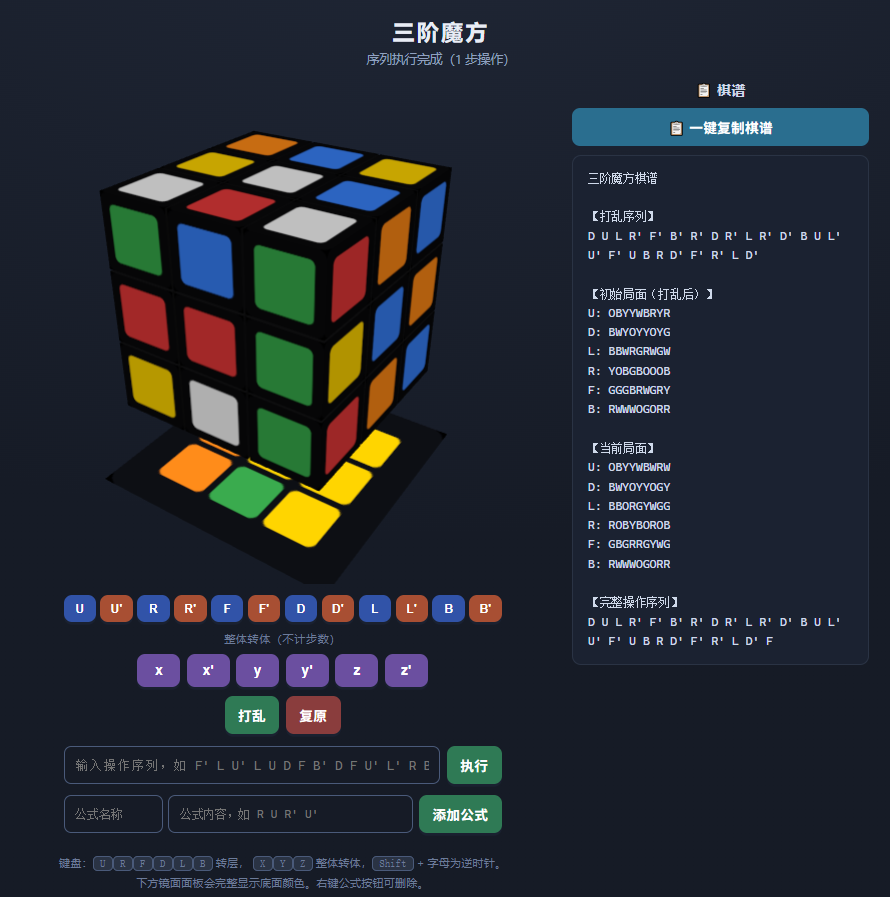
PS:
AI还自动添加了持久化功能,刷新网页不会丢失公式。
AI还自动添加了删除按钮功能,鼠标右键单击会出现弹窗。
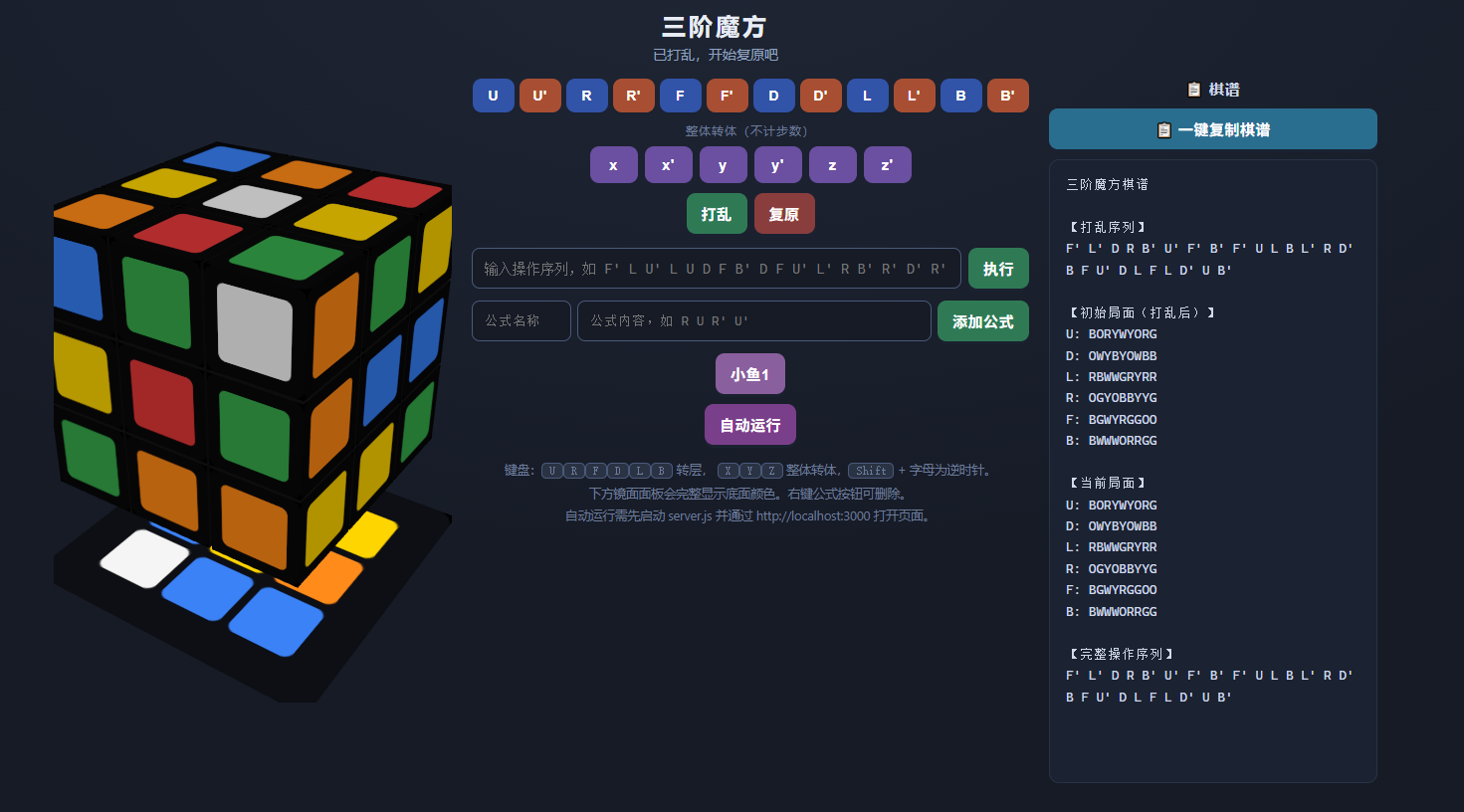
2,自动运行按钮
4轮提示词:
新增一个自动运行按钮,点击按钮之后自动把当前局面存到‘D:/cubeInput.txt’,然后开始循环等待,直到‘D:/cubeOutput.txt’的内容不为空,把其中的内容全部复制,处理逻辑同操作序列执行按钮,至此这个自动运行按钮的事件结束。
把界面优化一下,分成左中右三块,魔方放最左边,棋谱放最右边,剩下的都放中间。
对于操作序列,省略中间结果的显示,直接全部执行完再显示。
enqueueMove(mv.face, mv.dir, 200改成enqueueMove(mv.face, mv.dir, 2,不然总时间太久了
最终deepseek输出:
整个工程分为2个部分,把server.js和cube.html放在同一目录
server.js的内容:
const http = require('http');
const fs = require('fs');
const path = require('path');

const PORT = 3000;
const INPUT_FILE = 'D:/cubeInput.txt';
const OUTPUT_FILE = 'D:/cubeOutput.txt';
const HTML_FILE = path.join(__dirname, 'cube.html'); // 网页文件名

const server = http.createServer((req, res) => {
  res.setHeader('Access-Control-Allow-Origin', '*');
  res.setHeader('Access-Control-Allow-Methods', 'GET, POST, OPTIONS');
  res.setHeader('Access-Control-Allow-Headers', 'Content-Type');

  if (req.method === 'OPTIONS') {
    res.writeHead(204);
    res.end();
    return;
  }

  const url = new URL(req.url, 'http://localhost');

  // 写入当前局面到 D:/cubeInput.txt
  if (req.method === 'POST' && url.pathname === '/write-input') {
    let body = '';
    req.on('data', chunk => { body += chunk; });
    req.on('end', () => {
      try {
        fs.writeFileSync(INPUT_FILE, body, 'utf8');
        res.writeHead(200, { 'Content-Type': 'application/json' });
        res.end(JSON.stringify({ ok: true }));
      } catch (e) {
        res.writeHead(500, { 'Content-Type': 'application/json' });
        res.end(JSON.stringify({ ok: false, error: e.message }));
      }
    });
    return;
  }

  // 读取 D:/cubeOutput.txt,读完后自动清空,方便下次再次等待
  if (req.method === 'GET' && url.pathname === '/read-output') {
    try {
      const content = fs.readFileSync(OUTPUT_FILE, 'utf8');
      fs.writeFileSync(OUTPUT_FILE, '', 'utf8');
      res.writeHead(200, { 'Content-Type': 'application/json' });
      res.end(JSON.stringify({ content }));
    } catch (e) {
      res.writeHead(200, { 'Content-Type': 'application/json' });
      res.end(JSON.stringify({ content: '' }));
    }
    return;
  }

  // 提供网页
  fs.readFile(HTML_FILE, (err, data) => {
    if (err) {
      res.writeHead(404, { 'Content-Type': 'text/plain; charset=utf-8' });
      res.end('未找到 cube.html,请确认文件名和路径');
      return;
    }
    res.writeHead(200, { 'Content-Type': 'text/html; charset=utf-8' });
    res.end(data);
  });
});

server.listen(PORT, () => {
  console.log('服务已启动:http://localhost:' + PORT);
  console.log('输入文件:', INPUT_FILE);
  console.log('输出文件:', OUTPUT_FILE);
});
cube.html的内容:
<!DOCTYPE html>
<html lang="zh-CN">
<head>
<meta charset="UTF-8">
<meta name="viewport" content="width=device-width, initial-scale=1.0">
<title>三阶魔方 3D</title>
<style>
  :root {
    --bg1: #161b26;
    --bg2: #1f2635;
    --txt: #e8edf5;
    --dim: #8fa0bf;
    --panel: #1b2231;
  }
  * { box-sizing: border-box; }
  html, body { height: 100%; }
  body {
    margin: 0;
    font-family: "Segoe UI", "PingFang SC", "Microsoft YaHei", sans-serif;
    background: radial-gradient(1200px 700px at 50% -10%, var(--bg2), var(--bg1));
    color: var(--txt);
    padding: 20px 16px 30px;
    overflow: auto;
  }
  h1 { margin: 0 0 4px; font-size: 24px; letter-spacing: 3px; text-align: center; }
  #status {
    min-height: 24px;
    margin: 2px 0 10px;
    font-size: 14px;
    color: var(--dim);
    transition: color .3s;
    text-align: center;
  }
  #status.solved { color: #7ee08a; font-weight: bold; animation: pop .55s ease; }
  @keyframes pop {
    0% { transform: scale(.6); opacity: 0; }
    70% { transform: scale(1.18); }
    100% { transform: scale(1); opacity: 1; }
  }

  #layout {
    display: flex;
    gap: 20px;
    width: 100%;
    max-width: 1400px;
    margin: 0 auto;
    align-items: flex-start;
    justify-content: center;
  }
  #leftCol {
    flex: 0 0 400px;
    width: 400px;
    display: flex;
    flex-direction: column;
    align-items: center;
  }
  #middleCol {
    flex: 1 1 auto;
    min-width: 320px;
    max-width: 560px;
    display: flex;
    flex-direction: column;
    align-items: center;
    gap: 10px;
  }
  #rightCol {
    flex: 0 0 330px;
    width: 330px;
    position: sticky;
    top: 20px;
  }

  #stage {
    width: 100%;
    height: 68vh;
    min-height: 420px;
    max-height: 680px;
  }

  #controls { display: flex; flex-direction: column; gap: 10px; align-items: center; width: 100%; }
  .move-row { display: flex; gap: 7px; flex-wrap: wrap; justify-content: center; }
  .move-label { font-size: 12px; color: #6c7b99; letter-spacing: 1px; margin-bottom: -2px; }

  #faceButtons { flex-wrap: wrap; gap: 5px; }
  #faceButtons button { padding: 9px 8px; min-width: 42px; font-size: 14px; }

  button {
    border: none;
    border-radius: 9px;
    padding: 10px 15px;
    font-size: 15px;
    font-weight: 600;
    cursor: pointer;
    background: #37425c;
    color: #fff;
    box-shadow: 0 3px 0 #1a2130;
    transition: transform .06s, background .15s, box-shadow .06s;
    min-width: 48px;
    letter-spacing: .5px;
  }
  button:hover { background: #46557a; }
  button:active { transform: translateY(3px); box-shadow: 0 0 0 #1a2130; }
  button.cw  { background: #3153a8; }
  button.cw:hover  { background: #436bcb; }
  button.ccw { background: #a84f33; }
  button.ccw:hover { background: #c9633f; }
  button.rot { background: #6b4fa0; }
  button.rot:hover { background: #8462c4; }
  button.tool { background: #2f7a55; }
  button.tool:hover { background: #3b9768; }
  button.tool.warn { background: #8a3d3d; }
  button.tool.warn:hover { background: #a84c4c; }
  button.copy { background: #2a6e8f; }
  button.copy:hover { background: #3588ad; }
  #autoRunBtn { background: #7a3f8a; }
  #autoRunBtn:hover { background: #9550a8; }

  .hint {
    margin-top: 4px;
    font-size: 12.5px;
    color: #6c7b99;
    text-align: center;
    line-height: 1.8;
  }
  kbd {
    background: #2a3344;
    border: 1px solid #4a5a7a;
    border-radius: 5px;
    padding: 1px 7px;
    font-size: 12px;
  }

  #recordBox { display: flex; flex-direction: column; gap: 10px; }
  #recordTitle { font-size: 15px; font-weight: 700; color: #cfd9ea; letter-spacing: 1px; text-align: center; }
  #recordPanel {
    background: var(--panel);
    border: 1px solid #2a3344;
    border-radius: 10px;
    padding: 14px 16px;
    font-family: "Cascadia Code", "Consolas", "Courier New", monospace;
    font-size: 13px;
    line-height: 1.65;
    color: #cfd9ea;
    white-space: pre-wrap;
    word-break: break-all;
    height: 68vh;
    min-height: 420px;
    max-height: 680px;
    overflow: auto;
    margin: 0;
  }
  #copyBtn { width: 100%; }

  #seqRow {
    width: 100%;
    margin-top: 4px;
    flex-wrap: nowrap;
  }
  #seqInput {
    flex: 1;
    min-width: 150px;
    padding: 9px 12px;
    border-radius: 8px;
    border: 1px solid #4a5a7a;
    background: #161b26;
    color: #e8edf5;
    font-size: 14px;
    font-family: "Cascadia Code", "Consolas", monospace;
  }
  #seqInput:focus { outline: none; border-color: #6d88c8; }

  #formulaRow {
    width: 100%;
    margin-top: 2px;
    gap: 6px;
    flex-wrap: nowrap;
  }
  #formulaNameInput,
  #formulaContentInput {
    padding: 9px 12px;
    border-radius: 8px;
    border: 1px solid #4a5a7a;
    background: #161b26;
    color: #e8edf5;
    font-size: 13px;
    font-family: "Cascadia Code", "Consolas", monospace;
  }
  #formulaNameInput {
    width: 100px;
    flex: 0 0 100px;
  }
  #formulaContentInput {
    flex: 1;
    min-width: 120px;
  }
  #formulaNameInput:focus,
  #formulaContentInput:focus {
    outline: none;
    border-color: #6d88c8;
  }
  #formulaButtons { margin-top: 2px; }
  #formulaButtons button.formula { background: #8a5f9e; }
  #formulaButtons button.formula:hover { background: #a174b8; }

  @media (max-width: 1200px) {
    #layout { flex-wrap: wrap; }
    #leftCol { flex: 0 0 360px; width: 360px; }
    #rightCol { flex: 0 0 300px; width: 300px; }
  }
  @media (max-width: 980px) {
    #layout { flex-direction: column; align-items: center; }
    #leftCol { flex: 1 1 auto; width: 100%; max-width: 520px; }
    #middleCol { flex: 1 1 auto; width: 100%; max-width: 560px; }
    #rightCol { width: 100%; max-width: 560px; position: static; }
    #stage { height: 52vh; min-height: 320px; max-height: 520px; }
    #recordPanel { height: auto; max-height: 320px; min-height: 0; }
  }
  @media (max-width: 560px) {
    button { padding: 8px 10px; font-size: 13px; min-width: 40px; }
    #formulaNameInput { width: 84px; flex-basis: 84px; }
    #seqRow, #formulaRow { flex-wrap: wrap; }
  }
</style>
</head>
<body>
  <h1>三阶魔方</h1>
  <div id="status">加载中…</div>

  <div id="layout">
    <div id="leftCol">
      <div id="stage"></div>
    </div>

    <div id="middleCol">
      <div id="controls">
        <div class="move-row" id="faceButtons"></div>
        <div class="move-label">整体转体(不计步数)</div>
        <div class="move-row" id="rotButtons"></div>
        <div class="move-row">
          <button class="tool" id="scrambleBtn">打乱</button>
          <button class="tool warn" id="resetBtn">复原</button>
        </div>
        <div class="move-row" id="seqRow">
          <input id="seqInput" type="text"
                 placeholder="输入操作序列,如 F' L U' L U D F B' D F U' L' R B' R' D' R'" />
          <button class="tool" id="seqBtn">执行</button>
        </div>
        <div class="move-row" id="formulaRow">
          <input id="formulaNameInput" type="text" placeholder="公式名称" />
          <input id="formulaContentInput" type="text"
                 placeholder="公式内容,如 R U R' U'" />
          <button class="tool" id="addFormulaBtn">添加公式</button>
        </div>
        <div class="move-row" id="formulaButtons"></div>
        <div class="move-row">
          <button class="tool" id="autoRunBtn">自动运行</button>
        </div>
      </div>
      <div class="hint">
        键盘:<kbd>U</kbd><kbd>R</kbd><kbd>F</kbd><kbd>D</kbd><kbd>L</kbd><kbd>B</kbd> 转层,
        <kbd>X</kbd><kbd>Y</kbd><kbd>Z</kbd> 整体转体,<kbd>Shift</kbd> + 字母为逆时针。<br>
        下方镜面面板会完整显示底面颜色。右键公式按钮可删除。<br>
        自动运行需先启动 server.js 并通过 http://localhost:3000 打开页面。
      </div>
    </div>

    <div id="rightCol">
      <div id="recordBox">
        <div id="recordTitle">📋 棋谱</div>
        <button class="tool copy" id="copyBtn">📋 一键复制棋谱</button>
        <pre id="recordPanel"></pre>
      </div>
    </div>
  </div>

<script type="importmap">
{
  "imports": {
    "three": "https://cdn.jsdelivr.net/npm/three@0.160.0/build/three.module.js"
  }
}
</script>

<script type="module">
import * as THREE from 'three';

// ---------- 场景 ----------
const stage = document.getElementById('stage');
const statusEl = document.getElementById('status');
const recordPanel = document.getElementById('recordPanel');
const copyBtn = document.getElementById('copyBtn');

const renderer = new THREE.WebGLRenderer({ antialias: true, alpha: true });
renderer.setPixelRatio(Math.min(window.devicePixelRatio, 2));
renderer.setSize(stage.clientWidth, stage.clientHeight);
stage.appendChild(renderer.domElement);

const scene = new THREE.Scene();
const camera = new THREE.PerspectiveCamera(38, stage.clientWidth / stage.clientHeight, 0.1, 100);
camera.position.set(4.6, 4.3, 6.9);
camera.lookAt(0, -0.6, 0);

scene.add(new THREE.AmbientLight(0xffffff, 0.9));
const light1 = new THREE.DirectionalLight(0xffffff, 1.3);
light1.position.set(5, 9, 6);
scene.add(light1);
const light2 = new THREE.DirectionalLight(0xffffff, 0.45);
light2.position.set(-4, -3, -2);
scene.add(light2);

// ---------- 颜色:上白 下黄 左绿 右蓝 前红 后橙 ----------
const COL_HEX = {
  U: '#f5f5f5',
  D: '#ffd500',
  R: '#3b82f6',
  L: '#3aab4e',
  F: '#e33c3c',
  B: '#ff8c1a'
};
const COL_CHAR = { U: 'W', D: 'Y', R: 'B', L: 'G', F: 'R', B: 'O' };
const CHAR_HEX = { W: '#f5f5f5', Y: '#ffd500', B: '#3b82f6', G: '#3aab4e', R: '#e33c3c', O: '#ff8c1a' };

// ---------- 坐标体系:三阶块中心 -1 / 0 / 1,块宽 0.97 ----------
const H = 1;
const SIZE = 0.97;

const FACE_DEF = {
  U: { axis: 'y', side:  H, vec: new THREE.Vector3(0, 1, 0) },
  D: { axis: 'y', side: -H, vec: new THREE.Vector3(0,-1, 0) },
  R: { axis: 'x', side:  H, vec: new THREE.Vector3(1, 0, 0) },
  L: { axis: 'x', side: -H, vec: new THREE.Vector3(-1,0, 0) },
  F: { axis: 'z', side:  H, vec: new THREE.Vector3(0, 0, 1) },
  B: { axis: 'z', side: -H, vec: new THREE.Vector3(0, 0,-1) }
};

// 整体转体:y 和 z 已互换 —— y 操作绕 z 轴,z 操作绕 y 轴
const ROT_DEF = {
  x: { axis: 'x' },
  y: { axis: 'z' },
  z: { axis: 'y' }
};

// 局面显示顺序:U D L R F B
const FACE_ORDER = ['U','D','L','R','F','B'];

// ---------- 贴纸纹理 ----------
function roundedRect(ctx, x, y, w, h, r) {
  ctx.beginPath();
  ctx.moveTo(x + r, y);
  ctx.arcTo(x + w, y,     x + w, y + h, r);
  ctx.arcTo(x + w, y + h, x,     y + h, r);
  ctx.arcTo(x,     y + h, x,     y,     r);
  ctx.arcTo(x,     y,     x + w, y,     r);
  ctx.closePath();
}

function makeStickerTexture(hex) {
  const size = 128;
  const canvas = document.createElement('canvas');
  canvas.width = canvas.height = size;
  const ctx = canvas.getContext('2d');
  ctx.fillStyle = '#0b0b0d';
  roundedRect(ctx, 0, 0, size, size, 14);
  ctx.fill();
  const m = 17;
  ctx.fillStyle = hex;
  roundedRect(ctx, m, m, size - 2 * m, size - 2 * m, 9);
  ctx.fill();
  const tex = new THREE.CanvasTexture(canvas);
  tex.colorSpace = THREE.SRGBColorSpace;
  tex.anisotropy = 4;
  return tex;
}

const TEX = {};
for (const f in COL_HEX) TEX[f] = makeStickerTexture(COL_HEX[f]);

const blackPlastic = new THREE.MeshStandardMaterial({ color: 0x0a0a0c, roughness: 0.62, metalness: 0.08 });
function stickerMaterial(face) {
  return new THREE.MeshStandardMaterial({ map: TEX[face], roughness: 0.3, metalness: 0.05 });
}

// ---------- 镜面面板(直接绘制底面颜色) ----------
const mirrorCanvas = document.createElement('canvas');
mirrorCanvas.width = mirrorCanvas.height = 256;
const mctx = mirrorCanvas.getContext('2d');
const mirrorTex = new THREE.CanvasTexture(mirrorCanvas);
mirrorTex.colorSpace = THREE.SRGBColorSpace;

const mirrorMat = new THREE.MeshBasicMaterial({ map: mirrorTex });
const mirrorMesh = new THREE.Mesh(new THREE.PlaneGeometry(3.6, 3.6), mirrorMat);
mirrorMesh.rotation.x = -Math.PI / 2;
mirrorMesh.position.y = -2.7;
scene.add(mirrorMesh);

function updateMirror() {
  const d = getState().D || '?????????';
  mctx.clearRect(0, 0, 256, 256);

  mctx.fillStyle = '#0d0f14';
  roundedRect(mctx, 0, 0, 256, 256, 18);
  mctx.fill();

  const cell = 56, gap = 8;
  const ox = (256 - cell * 3 - gap * 2) / 2;
  const oy = ox;

  for (let i = 0; i < 9; i++) {
    const r = Math.floor(i / 3), c = i % 3;
    mctx.fillStyle = CHAR_HEX[d[i]] || '#999';
    roundedRect(mctx, ox + c * (cell + gap), oy + r * (cell + gap), cell, cell, 8);
    mctx.fill();
  }
  mirrorTex.needsUpdate = true;
}

// ---------- 26 个块(8 角 + 12 棱 + 6 中心) ----------
let cubies = [];
const pivot = new THREE.Group();
scene.add(pivot);

function createCubie(x, y, z) {
  const mats = [
    x ===  H ? stickerMaterial('R') : blackPlastic,
    x === -H ? stickerMaterial('L') : blackPlastic,
    y ===  H ? stickerMaterial('U') : blackPlastic,
    y === -H ? stickerMaterial('D') : blackPlastic,
    z ===  H ? stickerMaterial('F') : blackPlastic,
    z === -H ? stickerMaterial('B') : blackPlastic
  ];
  const geo = new THREE.BoxGeometry(SIZE, SIZE, SIZE);
  const mesh = new THREE.Mesh(geo, mats);
  mesh.position.set(x, y, z);
  scene.add(mesh);

  const colors = {
    px: x ===  H ? COL_CHAR.R : null,
    nx: x === -H ? COL_CHAR.L : null,
    py: y ===  H ? COL_CHAR.U : null,
    ny: y === -H ? COL_CHAR.D : null,
    pz: z ===  H ? COL_CHAR.F : null,
    nz: z === -H ? COL_CHAR.B : null
  };
  return { mesh, home: new THREE.Vector3(x, y, z), colors };
}

function buildCube() {
  cubies.forEach(c => scene.remove(c.mesh));
  cubies = [];
  for (const x of [-H, 0, H])
    for (const y of [-H, 0, H])
      for (const z of [-H, 0, H])
        cubies.push(createCubie(x, y, z));
}

// ---------- 旋转 ----------
const moveQueue = [];
let busy = false;
let moveCount = 0;
let scrambleSeq = [];
let userSeq = [];
let initialState = null;

function easeInOutCubic(t) {
  return t < 0.5 ? 4 * t * t * t : 1 - Math.pow(-2 * t + 2, 3) / 2;
}

function snap(v) { return Math.round(v); }

function performRotation(selected, axis, dir, duration, done) {
  selected.forEach(c => pivot.attach(c.mesh));
  const angle = -dir * Math.PI / 2;
  const start = performance.now();

  function frame(now) {
    let t = Math.min(1, (now - start) / duration);
    const e = easeInOutCubic(t);
    pivot.rotation.set(0, 0, 0);
    pivot.rotation[axis] = angle * e;

    if (t < 1) {
      requestAnimationFrame(frame);
    } else {
      pivot.rotation.set(0, 0, 0);
      pivot.rotation[axis] = angle;
      selected.forEach(c => {
        scene.attach(c.mesh);
        c.mesh.position.x = snap(c.mesh.position.x);
        c.mesh.position.y = snap(c.mesh.position.y);
        c.mesh.position.z = snap(c.mesh.position.z);
      });
      pivot.rotation.set(0, 0, 0);
      done();
    }
  }
  requestAnimationFrame(frame);
}

function performMove(face, dir, duration, done) {
  if (FACE_DEF[face]) {
    const def = FACE_DEF[face];
    const selected = cubies.filter(c => Math.abs(c.mesh.position[def.axis] - def.side) < 0.01);
    const flip = def.side > 0 ? 1 : -1;
    performRotation(selected, def.axis, dir * flip, duration, done);
  } else if (ROT_DEF[face]) {
    performRotation(cubies.slice(), ROT_DEF[face].axis, dir, duration, done);
  }
}

function enqueueMove(face, dir, duration, opts = {}) {
  moveQueue.push({
    face, dir, duration,
    count: opts.count !== false,
    record: !!opts.record,
    silent: opts.silent === true,
    onDone: opts.onDone
  });
  if (!busy) processQueue();
}

function processQueue() {
  if (moveQueue.length === 0) { busy = false; return; }
  busy = true;
  const m = moveQueue.shift();

  if (m.record) userSeq.push({ face: m.face, dir: m.dir });

  performMove(m.face, m.dir, m.duration, () => {
    if (m.count) {
      moveCount++;
      if (isSolved()) {
        statusEl.textContent = '🎉 已复原!共用了 ' + moveCount + ' 步';
        statusEl.classList.add('solved');
      } else {
        statusEl.textContent = '步数:' + moveCount;
        statusEl.classList.remove('solved');
      }
    }
    if (m.onDone) m.onDone();
    if (!m.silent) updateRecordPanel();
    processQueue();
  });
}

// ---------- 轴判定(抗浮点误差) ----------
function axisToKey(v) {
  const ax = Math.abs(v.x), ay = Math.abs(v.y), az = Math.abs(v.z);
  if (ax >= ay && ax >= az) return v.x >= 0 ? 'px' : 'nx';
  if (ay >= ax && ay >= az) return v.y >= 0 ? 'py' : 'ny';
  return v.z >= 0 ? 'pz' : 'nz';
}

// ---------- 复原判定:6 个面每面 9 个贴纸颜色一致 ----------
function isSolved() {
  const st = getState();
  for (const f of FACE_ORDER) {
    const s = st[f];
    if (!s || s.length !== 9) return false;
    for (let i = 1; i < 9; i++) {
      if (s[i] !== s[0]) return false;
    }
  }
  return true;
}

// ---------- 局面读取 ----------
function getFaceSlots(face) {
  const s = [];
  for (let r = 0; r < 3; r++)
    for (let c = 0; c < 3; c++) {
      const x = c - 1;
      const yTop = 1 - r;
      const z = r - 1;
      let p;
      if (face === 'U')      p = [x,  H, z];
      else if (face === 'D') p = [x, -H, z];
      else if (face === 'F') p = [x, yTop,  H];
      else if (face === 'B') p = [-x, yTop, -H];
      else if (face === 'R') p = [H, yTop, -x];
      else                   p = [-H, yTop, x];
      s.push(new THREE.Vector3(p[0], p[1], p[2]));
    }
  return s;
}

function faceColorString(face) {
  const slots = getFaceSlots(face);
  const n = FACE_DEF[face].vec;
  let out = '';
  for (const p of slots) {
    const cubie = cubies.find(c => c.mesh.position.distanceTo(p) < 0.01);
    if (!cubie) { out += '?'; continue; }
    const n0 = n.clone().applyQuaternion(cubie.mesh.quaternion.clone().invert());
    out += cubie.colors[axisToKey(n0)] || '?';
  }
  return out;
}

function getState() {
  const state = {};
  for (const f of FACE_ORDER) state[f] = faceColorString(f);
  return state;
}

function stateToText(state) {
  return FACE_ORDER.map(f => f + ': ' + state[f]).join('\n');
}

function moveNotation(m) {
  return m.face + (m.dir === -1 ? "'" : '');
}

function seqToText(seq) {
  return seq.length ? seq.map(moveNotation).join(' ') : '(无)';
}

// ---------- 棋谱 ----------
function buildRecordText() {
  const lines = [];
  lines.push('三阶魔方棋谱');
  lines.push('');
  lines.push('【打乱序列】');
  lines.push(seqToText(scrambleSeq));
  lines.push('');
  lines.push('【初始局面(打乱后)】');
  lines.push(initialState ? stateToText(initialState) : '(打乱中…)');
  lines.push('');
  lines.push('【当前局面】');
  lines.push(stateToText(getState()));
  lines.push('');
  lines.push('【完整操作序列】');
  lines.push(seqToText([...scrambleSeq, ...userSeq]));
  return lines.join('\n');
}

function updateRecordPanel() {
  recordPanel.textContent = buildRecordText();
  updateMirror();
}

async function copyRecord() {
  const text = buildRecordText();
  let ok = false;
  try {
    await navigator.clipboard.writeText(text);
    ok = true;
  } catch (e) {
    const ta = document.createElement('textarea');
    ta.value = text;
    ta.style.position = 'fixed';
    ta.style.opacity = '0';
    document.body.appendChild(ta);
    ta.select();
    try { ok = document.execCommand('copy'); } catch (_) {}
    ta.remove();
  }
  const old = copyBtn.textContent;
  copyBtn.textContent = ok ? '✅ 已复制' : '❌ 复制失败';
  setTimeout(() => { copyBtn.textContent = old; }, 1500);
}

// ---------- 操作序列解析与执行(静默执行,结束后刷新一次) ----------
function parseSequence(text) {
  const normalized = text.replace(/[’′]/g, "'");
  const tokens = normalized.trim().split(/[\s,,]+/).filter(Boolean);
  const moves = [];
  for (const raw of tokens) {
    const m = raw.match(/^([xyzurfdbl])([''])?$/i);
    if (!m) continue;
    const ch = m[1].toLowerCase();
    const face = (ch === 'x' || ch === 'y' || ch === 'z') ? ch : ch.toUpperCase();
    const dir = m[2] === "'" ? -1 : 1;
    moves.push({ face, dir });
  }
  return moves;
}

function executeSequence(text) {
  const moves = parseSequence(text);
  if (moves.length === 0) {
    statusEl.textContent = '无法解析的操作序列';
    statusEl.classList.remove('solved');
    return;
  }

  moves.forEach((mv, i) => {
    const isLayer = !!FACE_DEF[mv.face];
    const isLast = i === moves.length - 1;
    enqueueMove(mv.face, mv.dir, 2, {
      count: isLayer,
      record: true,
      silent: true,
      onDone: isLast ? () => {
        updateRecordPanel();
        if (!isSolved()) {
          statusEl.textContent = '序列执行完成(' + moves.length + ' 步操作)';
          statusEl.classList.remove('solved');
        }
      } : undefined
    });
  });
}

// ---------- 自动运行 ----------
const SERVER = 'http://localhost:3000';

async function autoRun() {
  const stateText = stateToText(getState());

  try {
    const res = await fetch(SERVER + '/write-input', {
      method: 'POST',
      headers: { 'Content-Type': 'text/plain; charset=utf-8' },
      body: stateText
    });
    if (!res.ok) throw new Error('write failed');
  } catch (e) {
    statusEl.textContent = '❌ 无法连接本地服务,请先运行 server.js 并从 http://localhost:3000 打开页面';
    statusEl.classList.remove('solved');
    return;
  }

  statusEl.textContent = '已写入 D:/cubeInput.txt,等待 D:/cubeOutput.txt…';
  statusEl.classList.remove('solved');

  let content = '';
  const maxWait = 120000;
  const start = performance.now();

  while (true) {
    if (performance.now() - start > maxWait) {
      statusEl.textContent = '等待 D:/cubeOutput.txt 超时';
      statusEl.classList.remove('solved');
      return;
    }
    try {
      const res = await fetch(SERVER + '/read-output');
      const data = await res.json();
      content = (data.content || '').trim();
    } catch (e) {}
    if (content) break;
    await new Promise(r => setTimeout(r, 500));
  }

  executeSequence(content);
}

// ---------- 公式录入 ----------
const STORAGE_KEY = 'cubeFormulas';
let formulas = [];

function loadFormulas() {
  try {
    formulas = JSON.parse(localStorage.getItem(STORAGE_KEY) || '[]');
    if (!Array.isArray(formulas)) formulas = [];
  } catch (e) {
    formulas = [];
  }
}

function saveFormulas() {
  localStorage.setItem(STORAGE_KEY, JSON.stringify(formulas));
}

function renderFormulaButtons() {
  const box = document.getElementById('formulaButtons');
  box.innerHTML = '';

  formulas.forEach((f, idx) => {
    const btn = document.createElement('button');
    btn.className = 'formula';
    btn.textContent = f.name;
    btn.title = f.content + '(右键删除)';
    btn.addEventListener('click', () => executeSequence(f.content));

    btn.addEventListener('contextmenu', e => {
      e.preventDefault();
      if (confirm('删除公式「' + f.name + '」?')) {
        formulas.splice(idx, 1);
        saveFormulas();
        renderFormulaButtons();
      }
    });

    box.appendChild(btn);
  });
}

function addFormula() {
  const nameInput = document.getElementById('formulaNameInput');
  const contentInput = document.getElementById('formulaContentInput');

  const name = nameInput.value.trim();
  const content = contentInput.value.trim();

  if (!name) {
    statusEl.textContent = '请填写公式名称';
    statusEl.classList.remove('solved');
    return;
  }
  if (!parseSequence(content).length) {
    statusEl.textContent = '公式内容无法解析';
    statusEl.classList.remove('solved');
    return;
  }

  const exist = formulas.findIndex(f => f.name === name);
  if (exist >= 0) {
    formulas[exist].content = content;
  } else {
    formulas.push({ name, content });
  }

  saveFormulas();
  renderFormulaButtons();
  nameInput.value = '';
  contentInput.value = '';
  statusEl.textContent = '已添加公式:' + name;
  statusEl.classList.remove('solved');
}

// ---------- 打乱 / 复原 ----------
function resetCubeInternal() {
  moveQueue.length = 0;
  busy = false;
  cubies.forEach(c => { if (c.mesh.parent === pivot) scene.attach(c.mesh); });
  pivot.rotation.set(0, 0, 0);
  cubies.forEach(c => {
    c.mesh.position.copy(c.home);
    c.mesh.quaternion.identity();
  });
}

function generateScramble(n = 25) {
  const faces = Object.keys(FACE_DEF);
  const seq = [];
  let last = null;
  for (let i = 0; i < n; i++) {
    let f, d;
    do {
      f = faces[Math.floor(Math.random() * faces.length)];
      d = Math.random() < 0.5 ? 1 : -1;
    } while (last && last === f);
    seq.push({ face: f, dir: d });
    last = f;
  }
  return seq;
}

function scramble() {
  resetCubeInternal();
  userSeq = [];
  initialState = null;
  moveCount = 0;
  statusEl.textContent = '打乱中…';
  statusEl.classList.remove('solved');

  scrambleSeq = generateScramble(25);
  scrambleSeq.forEach((m, idx) => {
    enqueueMove(m.face, m.dir, 90, {
      count: false,
      record: false,
      onDone: idx === scrambleSeq.length - 1 ? () => {
        initialState = getState();
        moveCount = 0;
        statusEl.textContent = '已打乱,开始复原吧';
      } : undefined
    });
  });
}

function resetCube() {
  resetCubeInternal();
  moveCount = 0;
  scrambleSeq = [];
  userSeq = [];
  initialState = null;
  statusEl.textContent = '已还原到初始状态';
  statusEl.classList.remove('solved');
  updateRecordPanel();
}

// ---------- 按钮 & 键盘 ----------
function buildButtons() {
  const faceBox = document.getElementById('faceButtons');
  for (const face of ['U','R','F','D','L','B']) {
    const cw = document.createElement('button');
    cw.className = 'cw';
    cw.textContent = face;
    cw.title = face + ' 顺时针';
    cw.addEventListener('click', () => enqueueMove(face, 1, 220, { count: true, record: true }));

    const ccw = document.createElement('button');
    ccw.className = 'ccw';
    ccw.textContent = face + "'";
    ccw.title = face + ' 逆时针';
    ccw.addEventListener('click', () => enqueueMove(face, -1, 220, { count: true, record: true }));

    faceBox.appendChild(cw);
    faceBox.appendChild(ccw);
  }

  const rotBox = document.getElementById('rotButtons');
  for (const face of ['x','y','z']) {
    const cw = document.createElement('button');
    cw.className = 'rot';
    cw.textContent = face;
    cw.title = face + ' 整体顺时针';
    cw.addEventListener('click', () => enqueueMove(face, 1, 220, { count: false, record: true }));

    const ccw = document.createElement('button');
    ccw.className = 'rot';
    ccw.textContent = face + "'";
    ccw.title = face + ' 整体逆时针';
    ccw.addEventListener('click', () => enqueueMove(face, -1, 220, { count: false, record: true }));

    rotBox.appendChild(cw);
    rotBox.appendChild(ccw);
  }

  document.getElementById('scrambleBtn').addEventListener('click', scramble);
  document.getElementById('resetBtn').addEventListener('click', resetCube);
  copyBtn.addEventListener('click', copyRecord);

  const seqInput = document.getElementById('seqInput');
  const seqBtn = document.getElementById('seqBtn');

  seqBtn.addEventListener('click', () => executeSequence(seqInput.value));

  seqInput.addEventListener('keydown', e => {
    if (e.key === 'Enter') {
      e.preventDefault();
      executeSequence(seqInput.value);
    }
  });

  document.getElementById('addFormulaBtn').addEventListener('click', addFormula);

  const formulaContentInput = document.getElementById('formulaContentInput');
  formulaContentInput.addEventListener('keydown', e => {
    if (e.key === 'Enter') {
      e.preventDefault();
      addFormula();
    }
  });

  document.getElementById('autoRunBtn').addEventListener('click', autoRun);

  loadFormulas();
  renderFormulaButtons();

  window.addEventListener('keydown', e => {
    const k = e.key.toUpperCase();
    if (!/^[URFDLBXYZ]$/.test(k)) return;

    let moveKey = k;
    if (k === 'X' || k === 'Y' || k === 'Z') moveKey = k.toLowerCase();

    const isLayer = !!FACE_DEF[moveKey];
    const dir = e.shiftKey ? -1 : 1;
    enqueueMove(moveKey, dir, 220, { count: isLayer, record: true });
  });
}

// ---------- 渲染循环 & 自适应 ----------
function animate() {
  requestAnimationFrame(animate);
  renderer.render(scene, camera);
}

window.addEventListener('resize', () => {
  const w = stage.clientWidth, h = stage.clientHeight;
  camera.aspect = w / h;
  camera.updateProjectionMatrix();
  renderer.setSize(w, h);
});

// ---------- 启动 ----------
buildCube();
buildButtons();
statusEl.textContent = '已就绪';
scramble();
updateRecordPanel();
animate();
</script>
</body>
</html>
使用方法:
(1)安装 Node.js(如果还没有)。
(2)把 cube.html和 server.js 放同一目录。
(3)命令行进入该目录,运行: node server.js
(4)浏览器打开 http://localhost:3000(实测直接双击打开网页其实也行)

有“AI”的1024 = 2048,欢迎大家加入2048 AI社区
更多推荐
 0
0 0
0- 0


 已为社区贡献24条内容

所有评论(0)