Spring AI 1.x 系列【10】深入响应结果对象
1. 概述
响应,就是模型根据你的输入,通过理解、推理、生成,给出的一段结构化 / 非结构化输出,本质是基于海量数据学到的语言 / 知识规律,自动生成的合理内容。
2. 智普 API
2.1 错误码
调用智谱开放平台 API 时,接收到的响应码由两部分组成:
- 外层是
HTTP状态码。 - 内层是响应体正文中的定义的业务错误码,提供了更具体的错误描述。
部分 HTTP 状态错误码: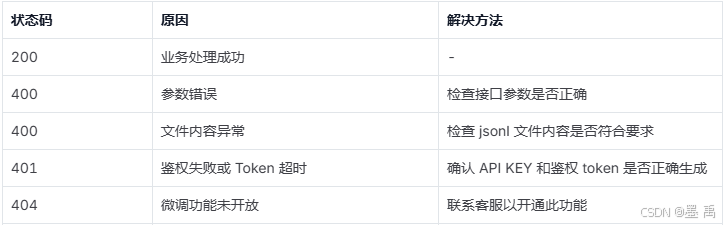
部分业务错误码: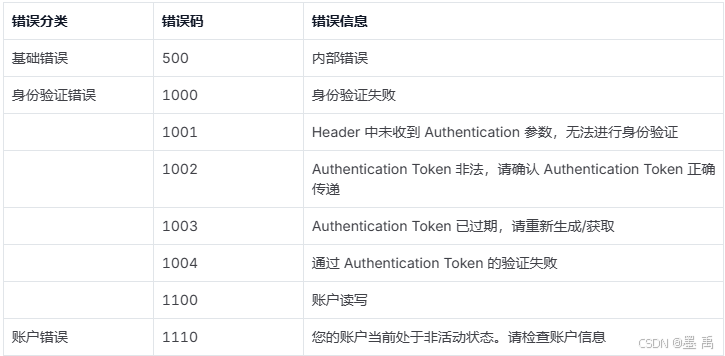
2.2 数据格式
在智谱 API 文档中,可以查看到对话补全返回的响应内容: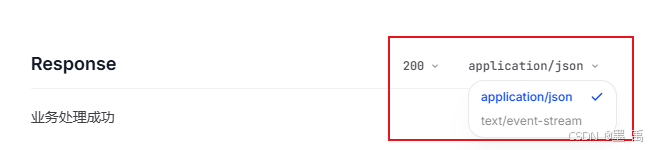
支持两种格式:
application/json:JSON格式返回。text/event-stream:服务器推送(SSE),实现流式输出。
返回响应参数说明:
| 参数名称 | 简单描述 | 数据类型 |
|---|---|---|
| id | 任务 ID | string |
| request_id | 请求 ID | string |
| created | 请求创建时间,Unix 时间戳(秒) | integer |
| model | 模型名称 | string |
| choices | 模型响应列表 | object[] |
| choices.index | 结果索引 | integer |
| choices.message | 响应消息对象 | object |
| choices.message.role | 当前对话角色,默认 assistant | string |
| choices.message.content | 对话文本内容;工具调用时为 null | string |
| choices.message.reasoning_content | 思维链内容(仅部分模型返回) | string |
| choices.message.audio | 音频内容(仅语音模型返回) | object |
| choices.message.audio.id | 音频内容 ID | string |
| choices.message.audio.data | 音频 Base64 编码 | string |
| choices.message.audio.expires_at | 音频过期时间 | string |
| choices.message.tool_calls | 工具调用列表 | object[] |
| choices.message.tool_calls.function | 函数调用信息 | object |
| choices.message.tool_calls.function.name | 函数名称 | string |
| choices.message.tool_calls.function.arguments | 函数参数字符串(JSON) | string |
| choices.message.tool_calls.mcp | MCP 工具调用参数 | object |
| choices.message.tool_calls.mcp.id | MCP 调用唯一标识 | string |
| choices.message.tool_calls.mcp.type | 调用类型:mcp_list_tools / mcp_call | enum |
| choices.message.tool_calls.mcp.server_label | MCP 服务器标签 | string |
| choices.message.tool_calls.mcp.error | 错误信息 | string |
| choices.message.tool_calls.mcp.tools | 工具列表(type=mcp_list_tools 时) | object[] |
| choices.message.tool_calls.mcp.tools.name | 工具名称 | string |
| choices.message.tool_calls.mcp.tools.description | 工具描述 | string |
| choices.message.tool_calls.mcp.tools.annotations | 工具注解 | object |
| choices.message.tool_calls.mcp.tools.input_schema | 工具入参 Schema | object |
| choices.message.tool_calls.mcp.tools.input_schema.type | 固定为 object | enum |
| choices.message.tool_calls.mcp.tools.input_schema.properties | 参数属性定义 | object |
| choices.message.tool_calls.mcp.tools.input_schema.required | 必填参数列表 | string[] |
| choices.message.tool_calls.mcp.tools.input_schema.additionalProperties | 是否允许额外参数 | boolean |
| choices.message.tool_calls.mcp.arguments | 工具调用参数 JSON 字符串 | string |
| choices.message.tool_calls.mcp.name | 工具名称 | string |
| choices.message.tool_calls.mcp.output | 工具返回结果 | object |
| choices.message.tool_calls.id | 工具调用唯一标识 | string |
| choices.message.tool_calls.type | 工具类型:function / mcp | string |
| choices.finish_reason | 结束原因:stop/tool_calls/length/sensitive/network_error | string |
| usage | Token 使用统计 | object |
| usage.prompt_tokens | 输入 Token 数 | number |
| usage.completion_tokens | 输出 Token 数 | number |
| usage.prompt_tokens_details | 输入 Token 详情 | object |
| usage.prompt_tokens_details.cached_tokens | 缓存命中 Token 数 | number |
| usage.total_tokens | 总 Token 数 | integer |
| video_result | 视频生成结果 | object[] |
| video_result.url | 视频链接 | string |
| video_result.cover_image_url | 视频封面链接 | string |
| web_search | 网页搜索结果 | object[] |
| web_search.icon | 来源图标 | string |
| web_search.title | 结果标题 | string |
| web_search.link | 网页链接 | string |
| web_search.media | 来源名称 | string |
| web_search.publish_date | 发布时间 | string |
| web_search.content | 引用内容 | string |
| web_search.refer | 角标序号 | string |
| content_filter | 内容安全审核信息 | object[] |
| content_filter.role | 安全审核环节:assistant/user/history | string |
| content_filter.level | 严重等级 0~3,0最严重 | integer |
JSON 响应示例:
{
  "id": "<string>",
  "request_id": "<string>",
  "created": 123,
  "model": "<string>",
  "choices": [
    {
      "index": 123,
      "message": {
        "role": "assistant",
        "content": "<string>",
        "reasoning_content": "<string>",
        "audio": {
          "id": "<string>",
          "data": "<string>",
          "expires_at": "<string>"
        },
        "tool_calls": [
          {
            "function": {
              "name": "<string>",
              "arguments": "<string>"
            },
            "mcp": {
              "id": "<string>",
              "type": "mcp_list_tools",
              "server_label": "<string>",
              "error": "<string>",
              "tools": [
                {
                  "name": "<string>",
                  "description": "<string>",
                  "annotations": {},
                  "input_schema": {
                    "type": "object",
                    "properties": {},
                    "required": [
                      "<string>"
                    ],
                    "additionalProperties": true
                  }
                }
              ],
              "arguments": "<string>",
              "name": "<string>",
              "output": {}
            },
            "id": "<string>",
            "type": "<string>"
          }
        ]
      },
      "finish_reason": "<string>"
    }
  ],
  "usage": {
    "prompt_tokens": 123,
    "completion_tokens": 123,
    "prompt_tokens_details": {
      "cached_tokens": 123
    },
    "total_tokens": 123
  },
  "video_result": [
    {
      "url": "<string>",
      "cover_image_url": "<string>"
    }
  ],
  "web_search": [
    {
      "icon": "<string>",
      "title": "<string>",
      "link": "<string>",
      "media": "<string>",
      "publish_date": "<string>",
      "content": "<string>",
      "refer": "<string>"
    }
  ],
  "content_filter": [
    {
      "role": "<string>",
      "level": 123
    }
  ]
}
3. 响应 API
核心关联逻辑:
ChatResponse(对话总响应)
├─ ChatResponseMetadata(全局元数据)
└─ List<Generation>(多条单次生成结果)
   └─ Generation(单次生成结果)
      ├─ AssistantMessage(模型生成的实际内容)
      └─ DefaultChatGenerationMetadata(单条元数据:终止原因、审核信息等)
3.1 ModelResponse
ModelResponse 是 Spring AI 中所有 AI 模型响应的顶层统一接口:
public interface ModelResponse<T extends ModelResult<?>> {
    T getResult();

    List<T> getResults();

    ResponseMetadata getMetadata();
}
声明了三个方法:
T getResult():获取单条核心结果。List<T> getResults():获取多条结果列表。ResponseMetadata getMetadata():获取响应元数据(非业务结果的辅助信息)。
针对不同 AI 任务所定义的一系列的响应子类:
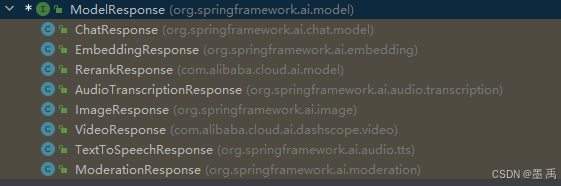
3.1.1 ChatResponse
ChatResponse 是对象模型的响应实现类:
public class ChatResponse implements ModelResponse<Generation> {
    private final ChatResponseMetadata chatResponseMetadata;
    private final List<Generation> generations;
    //........
}
核心属性:
generations:封装多条回复的核心内容。chatResponseMetadata:封装聊天场景特有的响应数据。
3.1.2 ChatResponseMetadata
ChatResponseMetadata 专门存储对话模型响应的辅助信息,如请求 ID、模型名称、Token 消耗、限流信息等,是开发中做「监控、计费、限流控制」的核心类。
public class ChatResponseMetadata extends AbstractResponseMetadata implements ResponseMetadata {
    private static final Logger logger = LoggerFactory.getLogger(ChatResponseMetadata.class);
    private String id = "";
    private String model = "";
    private RateLimit rateLimit = new EmptyRateLimit();
    private Usage usage = new EmptyUsage();
    private PromptMetadata promptMetadata = PromptMetadata.empty();
    //...........
}
实现了 ResponseMetadata 接口,其所有子类如下:
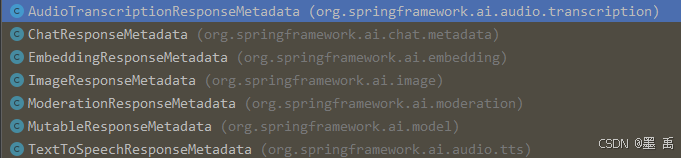
核心属性:
id:本次请求/响应的唯一标识(链路追踪、问题排查核心)。model:本次调用使用的 AI 模型名称。rateLimit:模型调用的限流信息(防止超配额调用)。usage:Token消耗统计(计费、成本控制核心)。promptMetadata:请求提示词的元数据(提示词长度、类型、模板ID等)。
3.1.3 ChatClientResponse
基于 Java Record(Java 16+ 特性) 实现的 ChatClientResponse 类,封装的完整响应信息:
public record ChatClientResponse(ChatResponse chatResponse, Map<String, Object> context) {
    public ChatClientResponse(@Nullable ChatResponse chatResponse, Map<String, Object> context) {
        Assert.notNull(context, "context cannot be null");
        Assert.noNullElements(context.keySet(), "context keys cannot be null");
        this.chatResponse = chatResponse;
        this.context = context;
    }
    //.....
}
核心字段:
chatResponse:ChatResponse。context:上下文元数据。
3.2 ModelResult
ModelResult 是 Spring AI 标准化「单条 AI 输出结果」的顶层接口:
public interface ModelResult<T> {
    T getOutput();

    ResultMetadata getMetadata();
}
声明了两个方法:
TgetOutput():获取单条结果的输出内容。getMetadata():获取单条结果的「元数据」。
针对不同 AI 任务所定义的一系列的结果子类: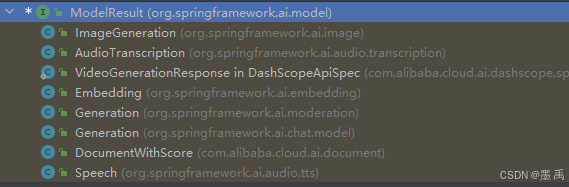
3.2.1 Generation
public class Generation implements ModelResult<AssistantMessage> {
    private final AssistantMessage assistantMessage;
    private ChatGenerationMetadata chatGenerationMetadata;

    public Generation(AssistantMessage assistantMessage) {
        this(assistantMessage, ChatGenerationMetadata.NULL);
    }

    public Generation(AssistantMessage assistantMessage, ChatGenerationMetadata chatGenerationMetadata) {
        this.assistantMessage = assistantMessage;
        this.chatGenerationMetadata = chatGenerationMetadata;
    }
    //......
}
核心属性:
assistantMessage:助手消息对象,模型生成的核心内容(回答文本、多模态内容等)。chatGenerationMetadata:生成结果的元数据(终止原因、生成ID、审核信息等)。
3.2.2 ChatGenerationMetadata
ChatGenerationMetadata 用于封装单次对话生成结果元数据,主要作用是为每一轮模型生成的响应附加上下文信息,方便链路追踪、结果分析和问题排查。
public class DefaultChatGenerationMetadata implements ChatGenerationMetadata {
    private final Map<String, Object> metadata;
    private final String finishReason;
    private final Set<String> contentFilters;
    //......
}
核心属性:
metadata:元数据。finishReason:生成终止的原因。contentFilters:内容审核命中的规则集。
3.3 ChatClient.CallResponseSpec
在 ChatClient#call() 同步调用方法中,返回的是 CallResponseSpec 对象:
        public ChatClient.CallResponseSpec call() {
            BaseAdvisorChain advisorChain = this.buildAdvisorChain();
            return new DefaultCallResponseSpec(DefaultChatClientUtils.toChatClientRequest(this), advisorChain, this.observationRegistry, this.chatClientObservationConvention);
        }
CallResponseSpec 可以让你能以不同形式拿到 AI 返回的结果,接口定义如下:
    public interface CallResponseSpec {
        @Nullable
        <T> T entity(ParameterizedTypeReference<T> type);

        @Nullable
        <T> T entity(StructuredOutputConverter<T> structuredOutputConverter);

        @Nullable
        <T> T entity(Class<T> type);

        ChatClientResponse chatClientResponse();

        @Nullable
        ChatResponse chatResponse();

        @Nullable
        String content();

        <T> ResponseEntity<ChatResponse, T> responseEntity(Class<T> type);

        <T> ResponseEntity<ChatResponse, T> responseEntity(ParameterizedTypeReference<T> type);

        <T> ResponseEntity<ChatResponse, T> responseEntity(StructuredOutputConverter<T> structuredOutputConverter);
    }
常用方法:
String content():直接获取 AI 返回的文本内容字符串。ChatResponse chatResponse():获取原始AI响应对象。ChatClientResponse chatClientResponse():获取客户端封装的完整响应(包含更多上下文)。
响应转换方法:
entity():将 AI 返回的文本响应(如JSON)自动转换为你指定的Java对象。responseEntity():将AI原始响应自动转换为你指定的Java对象。
DefaultCallResponseSpec 是默认实现,核心结构如下:
    public static class DefaultCallResponseSpec implements ChatClient.CallResponseSpec {
        private final ChatClientRequest request;
        private final BaseAdvisorChain advisorChain;
        private final ObservationRegistry observationRegistry;
        private final ChatClientObservationConvention observationConvention;
        //.....
}
除了实现接口的所有方法外,还定义了多个核心成员属性:
ChatClientRequest:标准化对话请求(含Prompt、模型配置、上下文等)对象。BaseAdvisorChain:切面链(请求拦截/前置/后置处理的增强器集合)。ObservationRegistry:监控观测注册器(Micrometer框架,收集指标)。ChatClientObservationConvention:观测约定(定义监控指标的命名/标签规则)。
3.4 ChatClient.StreamResponseSpec
在 ChatClient#stream() 流式响应方法中,返回的是 StreamResponseSpec 对象:
        public ChatClient.StreamResponseSpec stream() {
            BaseAdvisorChain advisorChain = this.buildAdvisorChain();
            return new DefaultStreamResponseSpec(DefaultChatClientUtils.toChatClientRequest(this), advisorChain, this.observationRegistry, this.chatClientObservationConvention);
        }
作用和 CallResponseSpec 一致,不过是用于流式场景,接口定义:
    public interface StreamResponseSpec {
        Flux<ChatClientResponse> chatClientResponse();

        Flux<ChatResponse> chatResponse();

        Flux<String> content();
    }
5. 案例演示
5.1 同步响应结果
call() 支持返回以下三种响应对象:
        String content= zhiPuAiChatClient.prompt("你好").call().content();

        ChatResponse chatResponse= zhiPuAiChatClient.prompt("你好").call().chatResponse();

        ChatClientResponse chatClientResponse = zhiPuAiChatClient.prompt("你好").call().chatClientResponse();
ChatResponse 中可以看到响应的元数据内容:
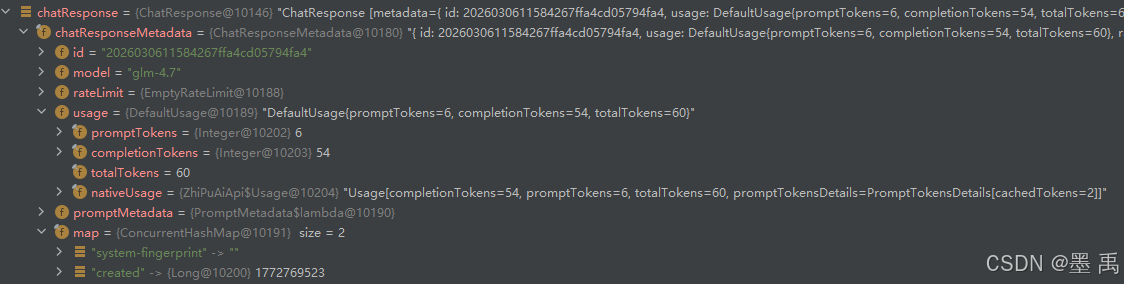
Generation 列表返回了模型的文本输入,以及元数据: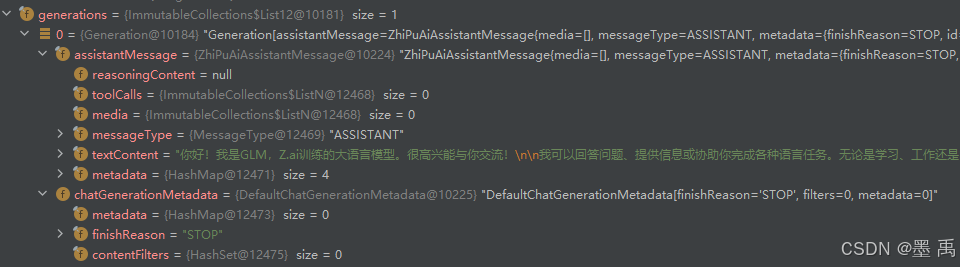
如果返回 ChatClientResponse 还会包含一个上下文元数据,不过这里没有:
5.2 流式响应结果
stream() 相关方法返回的是 Reactor (响应式编程)框架中的 Flux 对象:
        Flux<String> content = zhiPuAiChatClient.prompt("你好").stream().content();

        Flux<ChatResponse> chatResponse= zhiPuAiChatClient.prompt("你好").stream().chatResponse();

        Flux<ChatClientResponse> chatClientResponse = zhiPuAiChatClient.prompt("你好").stream().chatClientResponse();
通过 Reactor 副作用操作符(Side Effect Operators)可以在响应式数据流的不同生命周期阶段执行特定逻辑:
doOnNext:正常元素发射时执行。doOnComplete:序列正常完成时执行。doOnError:序列抛出异常时执行。doFinally:序列最终结束时执行。doOnSubscribe:订阅时执行。
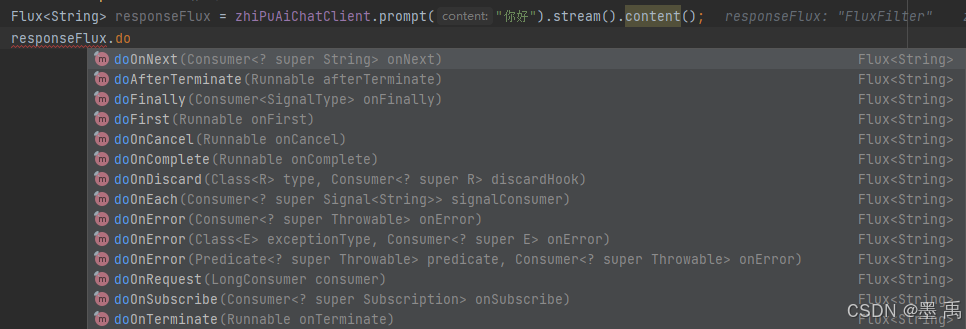
doOnNext 简单示例:
    @Test
    public void test07() {
        Flux<ChatResponse> chatResponseFlux= zhiPuAiChatClient.prompt("你好").stream().chatResponse();
        chatResponseFlux.doOnNext(chatResponse -> {
            Generation result = chatResponse.getResult();
            ChatResponseMetadata metadata = chatResponse.getMetadata();
            System.out.println("===========================");
            System.out.println(result.getOutput().getText());
            System.out.println(result.getMetadata());
            System.out.println(metadata);
        }).blockLast();
     }
打印结果如下: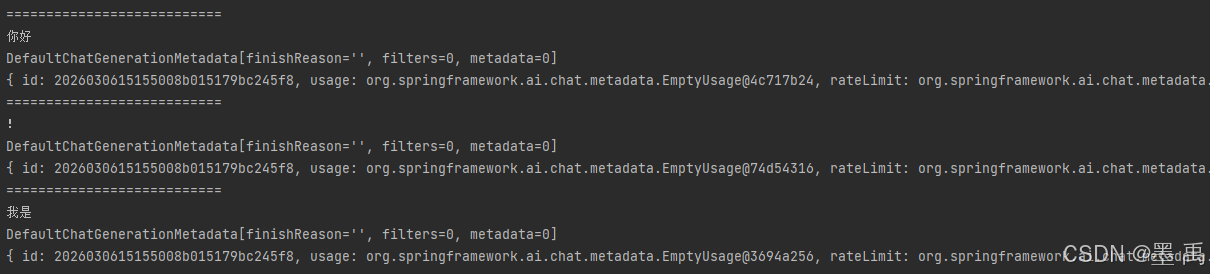
5.3 Token 消耗信息
AI 模型运行需要大量计算资源(GPU/CPU),Token 是量化计算资源消耗的标准化单位。Token 消耗 是 AI 模型计费、限流、成本核算的核心依据,包括输入 + 输出的 Token 消耗总和。
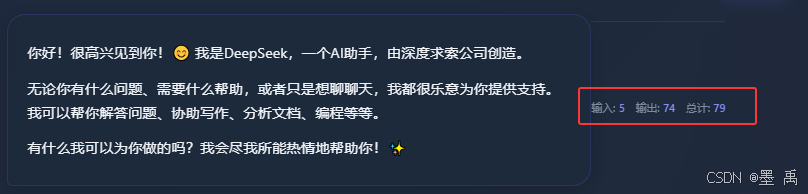
Usage 接口是 AI 模型调用中用于标准化统计 Token 消耗的核心接口:
public interface Usage {
		// 输入文本(提问)的 Token 数
    Integer getPromptTokens();
		// 输出文本(回答)的 Token 数
    Integer getCompletionTokens();
		// 总消耗 Token 数(默认实现)
    default Integer getTotalTokens() {
        Integer promptTokens = this.getPromptTokens();
        promptTokens = promptTokens != null ? promptTokens : 0;
        Integer completionTokens = this.getCompletionTokens();
        completionTokens = completionTokens != null ? completionTokens : 0;
        return promptTokens + completionTokens;
    }
		// 模型原生的 Token 数据(兼容不同模型)
    Object getNativeUsage();
}
同步调用时,可以使用 ChatResponse.getMetadata().getUsage() 方法查询到 Token 消耗信息:
        ChatResponse chatResponse= zhiPuAiChatClient.prompt("你好").call().chatResponse();
        Usage usage = chatResponse.getMetadata().getUsage();
        Integer promptTokens = usage.getPromptTokens();
        Integer completionTokens = usage.getCompletionTokens();
        Integer totalTokens = usage.getTotalTokens();
        System.out.println("提示词 消耗 TOKEN 数:"+promptTokens);
        System.out.println("生成内容 消耗 TOKEN 数:"+completionTokens);
        System.out.println("共计消耗 TOKEN 数:"+totalTokens);
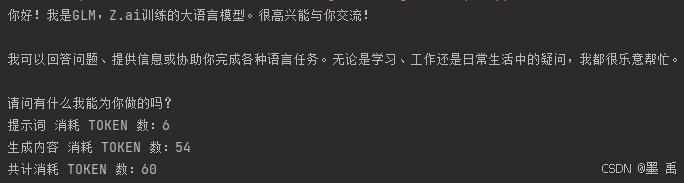
如果是 stream 接口在处理中时,返回的是空实现,没有消耗信息:
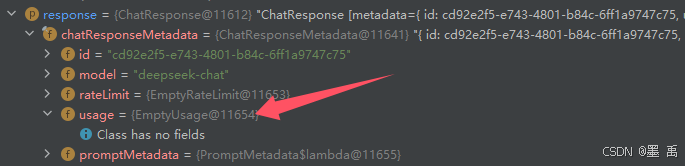
是在最后一次流中会输出本次消耗信息:


有“AI”的1024 = 2048,欢迎大家加入2048 AI社区
更多推荐
 11
11 0
0- 0


 已为社区贡献33条内容

所有评论(0)