springai框架使用MCP时,出现Did not observe any item or terminal signal within 20000ms in ‘source(Mono......
摘要:开发过程中遇到系统启动报错"Did not observe any item or terminal signal within 20000ms",排查发现是Node版本问题。最初错误提示缺少参数,通过在mcpServerConfig.json5中添加"--npm"参数解决,但随后出现超时问题。最终将Node版本升级到16+并恢复原配置后成功运行。另外
系统跑不起来,报以下错:
Did not observe any item or terminal signal within 20000ms in 'source(MonoDeferContextual)' (and no fallback has been configured)
开发环境
相关框架版本
springai1.0.0、springai-alibaba1.0.0.4、node14
配置stdio形式
---------------mcpServerConfig.json5-------------------
{
  "mcpServers": {
    "amap-maps": {
      "command": "cmd",
      "args": [
        "/c",
        "npx",
        "-y",
        "@amap/amap-maps-mcp-server"
      ],
      "env": {
        "AMAP_MAPS_API_KEY": "you_key"
      }
    }
  }
}


--------------------application.yaml---------------------
...省略其他
mcp:
   client:
   # 本地服务器方式
      stdio:
        servers-configuration: classpath:/mcpServerConfig.json5
      toolcallback:
        enabled: true
问题
1. 开始报了“ERROR: You must supply a command.”,提示少了参数

在mcpServerConfig.json5中的mcpServers.amap-maps.args加了"--npm",解决了这个问题。
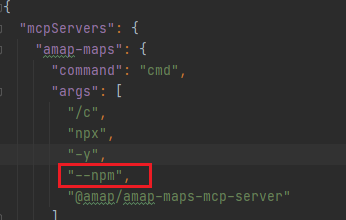
重新运行,可以看到“Amap Maps MCP Server running on stdio”,说明下载下来了

2. 但是出现新的问题,出现超时

这个是地图MCP注册成功,框架要去获取地图MCP能够提供的toolList;
3. 最后解决这个问题
修改了node的版本到16以上,mcpServerConfig.json5改回之前的配置

打印tool信息,说明就成功了
Server response with Protocol: 2024-11-05, Capabilities: ServerCapabilities[completions=null, experimental=null, logging=null, prompts=null, resources=null, tools=ToolCapabilities[listChanged=null]], Info: Implementation[name=mcp-server/amap-maps, version=0.1.0] and Instructions null
终于成功了,这里应该是框架会和node平台做通信,但是node14版本低,获取toolList失败超时导致的
因为在args中加了“--npm”可以将高德MCP下载下来,这里我就排除了node版本问题,怀疑项目没有配置好,找了大半天。
题外话:感觉AI相关的技术都要求比较新,除了这个node,像SpringBoot需要3以上,JDK17以上,所以,下次有相关问题,可以考虑版本是否最新
其他
在stdio失败后,我配置了sse形式的,通过url调用,使用过程中出现Invalid key问题,以下是一开始的配置
mcp:
  client:
     sse:
       connections:
          tencent-map:
             url: https://mcp.map.qq.com/sse?key=<you_key>
因为官网给了一个url,我直接url配置在一起,可以看到运行成功

但是,使用时报了Invalid key
Servlet.service() for servlet [dispatcherServlet] in context with path [] threw exception [Request processing failed: java.lang.IllegalStateException: Error calling tool: [TextContent[audience=null, priority=null, text=Invalid Key]]] with root cause
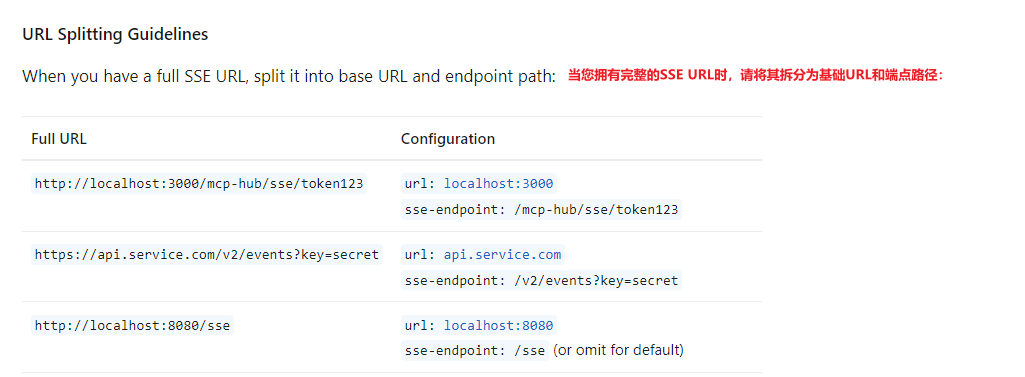
最后把参数改到sse-endpoint,成功解决
tencent-map:
   url: https://mcp.amap.com
   sse-endpoint: /sse?key=<you_key>
原因:可能是AI进行地图服务请求时,会将sse-endpoint信息一起发送,而我没有配置,默认sse-endpoint=/sse,这样就没有拿到我的key
所以,sse形式的配置,最后是把/sse?arg1=arg配置在sse-endpoint上,springai官网也提示这个规范

有“AI”的1024 = 2048,欢迎大家加入2048 AI社区
更多推荐

 6
6 0
0- 0


 已为社区贡献2条内容

所有评论(0)