使用caliper压力测试fabric区块链,报错版本未指定:Error: Benchmark failed with error code 6...如何解决?
🏆本文收录于 《全栈 Bug 调优(实战版)》 专栏。专栏聚焦真实项目中的各类疑难 Bug,从成因剖析 → 排查路径 → 解决方案 → 预防优化全链路拆解,形成一套可复用、可沉淀的实战知识体系。无论你是初入职场的开发者,还是负责复杂项目的资深工程师,都可以在这里构建一套属于自己的「问题诊断与性能调优」方法论,助你稳步进阶、放大技术价值 。
🏆本文收录于 《全栈 Bug 调优(实战版)》 专栏。专栏聚焦真实项目中的各类疑难 Bug,从成因剖析 → 排查路径 → 解决方案 → 预防优化全链路拆解,形成一套可复用、可沉淀的实战知识体系。无论你是初入职场的开发者,还是负责复杂项目的资深工程师,都可以在这里构建一套属于自己的「问题诊断与性能调优」方法论,助你稳步进阶、放大技术价值 。
📌 特别说明:
文中问题案例来源于真实生产环境与公开技术社区,并结合多位一线资深工程师与架构师的长期实践经验,经过人工筛选与AI系统化智能整理后输出。文中的解决方案并非唯一“标准答案”,而是兼顾可行性、可复现性与思路启发性的实践参考,供你在实际项目中灵活运用与演进。
欢迎订阅本专栏,一次订阅后,专栏内所有文章可永久免费阅读,后续更新内容皆不用再次订阅,持续更新中。
📢 问题描述
详细问题描述如下: 使用caliper压力测试fabric区块链,报错版本未指定。我用caliper测试fabric区块链性能,所有环境,包括链码都部署好了,链码也都测试过了。在用caliper压力测试时出现以下问题。
我的环境为:
centOS7.9,
fabricV2.2.9,
nodejs:18.15,
npm:10.7
caliper:0.50.
报错如下:
[root@localhost caliper-test]# caliper launch manager     --caliper-workspace .     --caliper-networkconfig networks/fabric-network.yaml     --caliper-benchconfig benchmarks/accessBenchmark.yaml     --caliper-flow-only-test
2025.02.05-07:17:43.728 info  [caliper] [cli-launch-manager]    Set workspace path: /root/go/src/hrinfo/caliper-test
2025.02.05-07:17:43.734 info  [caliper] [cli-launch-manager]    Set benchmark configuration path: /root/go/src/hrinfo/caliper-test/benchmarks/accessBenchmark.yaml
2025.02.05-07:17:43.735 info  [caliper] [cli-launch-manager]    Set network configuration path: /root/go/src/hrinfo/caliper-test/networks/fabric-network.yaml
2025.02.05-07:17:43.735 info  [caliper] [cli-launch-manager]    Set SUT type: fabric
2025.02.05-07:17:43.744 info  [caliper] [benchmark-validator]   No observer specified, will default to `none`
2025.02.05-07:17:43.744 info  [caliper] [caliper-engine]        Starting benchmark flow
2025.02.05-07:17:43.746 info  [caliper] [caliper-engine]        Skipping start commands due to benchmark flow conditioning
2025.02.05-07:17:43.746 info  [caliper] [caliper-engine]        Skipping initialization phase due to benchmark flow conditioning
2025.02.05-07:17:43.747 info  [caliper] [caliper-engine]        Skipping install smart contract phase due to benchmark flow conditioning
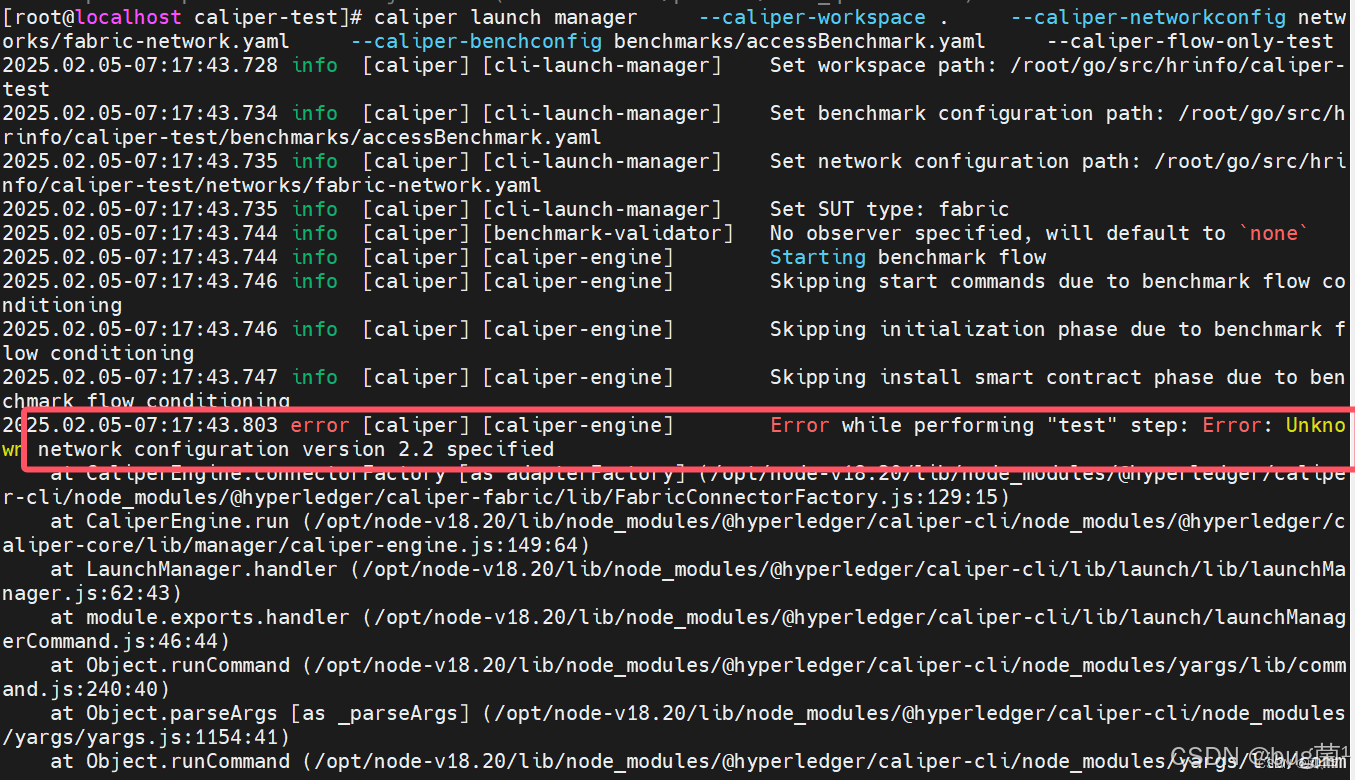
2025.02.05-07:17:43.803 error [caliper] [caliper-engine]        Error while performing "test" step: Error: Unknown network configuration version 2.2 specified
    at CaliperEngine.connectorFactory [as adapterFactory] (/opt/node-v18.20/lib/node_modules/@hyperledger/caliper-cli/node_modules/@hyperledger/caliper-fabric/lib/FabricConnectorFactory.js:129:15)
    at CaliperEngine.run (/opt/node-v18.20/lib/node_modules/@hyperledger/caliper-cli/node_modules/@hyperledger/caliper-core/lib/manager/caliper-engine.js:149:64)
    at LaunchManager.handler (/opt/node-v18.20/lib/node_modules/@hyperledger/caliper-cli/lib/launch/lib/launchManager.js:62:43)
    at module.exports.handler (/opt/node-v18.20/lib/node_modules/@hyperledger/caliper-cli/lib/launch/launchManagerCommand.js:46:44)
    at Object.runCommand (/opt/node-v18.20/lib/node_modules/@hyperledger/caliper-cli/node_modules/yargs/lib/command.js:240:40)
    at Object.parseArgs [as _parseArgs] (/opt/node-v18.20/lib/node_modules/@hyperledger/caliper-cli/node_modules/yargs/yargs.js:1154:41)
    at Object.runCommand (/opt/node-v18.20/lib/node_modules/@hyperledger/caliper-cli/node_modules/yargs/lib/command.js:198:30)
    at Object.parseArgs [as _parseArgs] (/opt/node-v18.20/lib/node_modules/@hyperledger/caliper-cli/node_modules/yargs/yargs.js:1154:41)
    at Object.get [as argv] (/opt/node-v18.20/lib/node_modules/@hyperledger/caliper-cli/node_modules/yargs/yargs.js:1088:21)
    at Object.<anonymous> (/opt/node-v18.20/lib/node_modules/@hyperledger/caliper-cli/caliper.js:39:5)
2025.02.05-07:17:43.804 info  [caliper] [caliper-engine]        Skipping end command due to benchmark flow conditioning
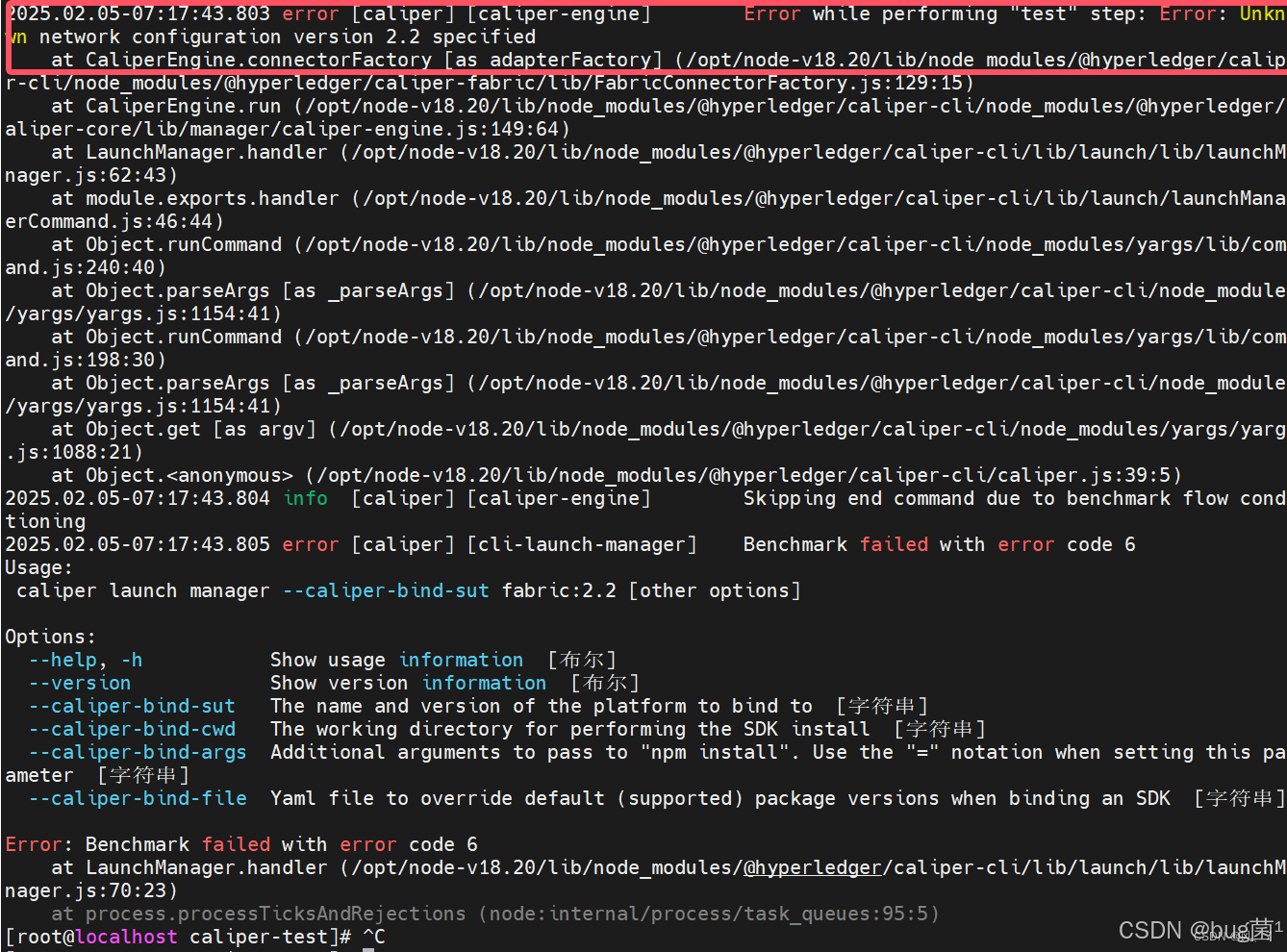
2025.02.05-07:17:43.805 error [caliper] [cli-launch-manager]    Benchmark failed with error code 6
Usage:
 caliper launch manager --caliper-bind-sut fabric:2.2 [other options]

Options:
  --help, -h           Show usage information  [布尔]
  --version            Show version information  [布尔]
  --caliper-bind-sut   The name and version of the platform to bind to  [字符串]
  --caliper-bind-cwd   The working directory for performing the SDK install  [字符串]
  --caliper-bind-args  Additional arguments to pass to "npm install". Use the "=" notation when setting this parameter  [字符串]
  --caliper-bind-file  Yaml file to override default (supported) package versions when binding an SDK  [字符串]

Error: Benchmark failed with error code 6
    at LaunchManager.handler (/opt/node-v18.20/lib/node_modules/@hyperledger/caliper-cli/lib/launch/lib/launchManager.js:70:23)
    at process.processTicksAndRejections (node:internal/process/task_queues:95:5)
报错截图1如下:
报错截图2如下:
我查了一下,是这个配置文件的问题,我把version=2.2,2.0,2.2.9全都试了一遍,Error while performing "test" step: Error: Unknown network configuration version 2.2 specified 都是这个类似的错误说没有指定。
与之相关的networkConfig.yaml文件如下:
name: Fabric test
version: "2.2"

caliper:
  blockchain: fabric

channels:
  - channelName: mychannel
    contracts:
    - id: hrinfoCC
      contractID: hrinfoCC
      language: golang

organizations:
  - mspid: Org1MSP
    identities:
      certificates:
      - name: 'User1'
        clientPrivateKey:
          path: '/root/go/src/hrinfo/fixtures/organizations/peerOrganizations/org1.example.com/users/User1@org1.example.com/msp/keystore/priv_sk'
        clientSignedCert:
          path: '/root/go/src/hrinfo/fixtures/organizations/peerOrganizations/org1.example.com/users/User1@org1.example.com/msp/signcerts/User1@org1.example.com-cert.pem'
    connectionProfile:
      path: '/root/go/src/hrinfo/fixtures/organizations/peerOrganizations/org1.example.com/connection-org1.yaml'
      discover: true

peers:
  - peer0.org1.example.com:
      url: grpcs://localhost:7051
      tlsCACerts:
        path: /root/go/src/hrinfo/fixtures/organizations/peerOrganizations/org1.example.com/peers/peer0.org1.example.com/tls/ca.crt
      grpcOptions:
        ssl-target-name-override: peer0.org1.example.com
        hostnameOverride: peer0.org1.example.com

orderers:
  - orderer.example.com:
      url: grpcs://localhost:7050
      tlsCACerts:
        path: /root/go/src/hrinfo/fixtures/organizations/ordererOrganizations/example.com/orderers/orderer.example.com/tls/ca.crt
      grpcOptions:
        ssl-target-name-override: orderer.example.com
        hostnameOverride: orderer.example.com
📣 请知悉:如下方案不保证一定适配你的问题!
如下是针对上述问题进行专业角度剖析答疑,不喜勿喷,仅供参考:

✅️ 问题理解
这是 Caliper 0.5.0 与 Fabric 网络配置文件版本字段不匹配的问题,不是 Fabric 的版本号填错了,而是 Caliper 网络配置文件自身 Schema 版本号填错了 。
核心错误剖析:
Error: Unknown network configuration version 2.2 specified
  at FabricConnectorFactory.js:129:15
FabricConnectorFactory.js 在第 129 行进行版本校验,它期待的 version 字段是 Caliper 自己的配置 Schema 版本号,而不是 Fabric 的版本号。Caliper 0.5.x 只认识 "2.0.0" 这一个合法值,填 "2.2"、"2.0"、"2.2.9" 全都会报 Unknown version。
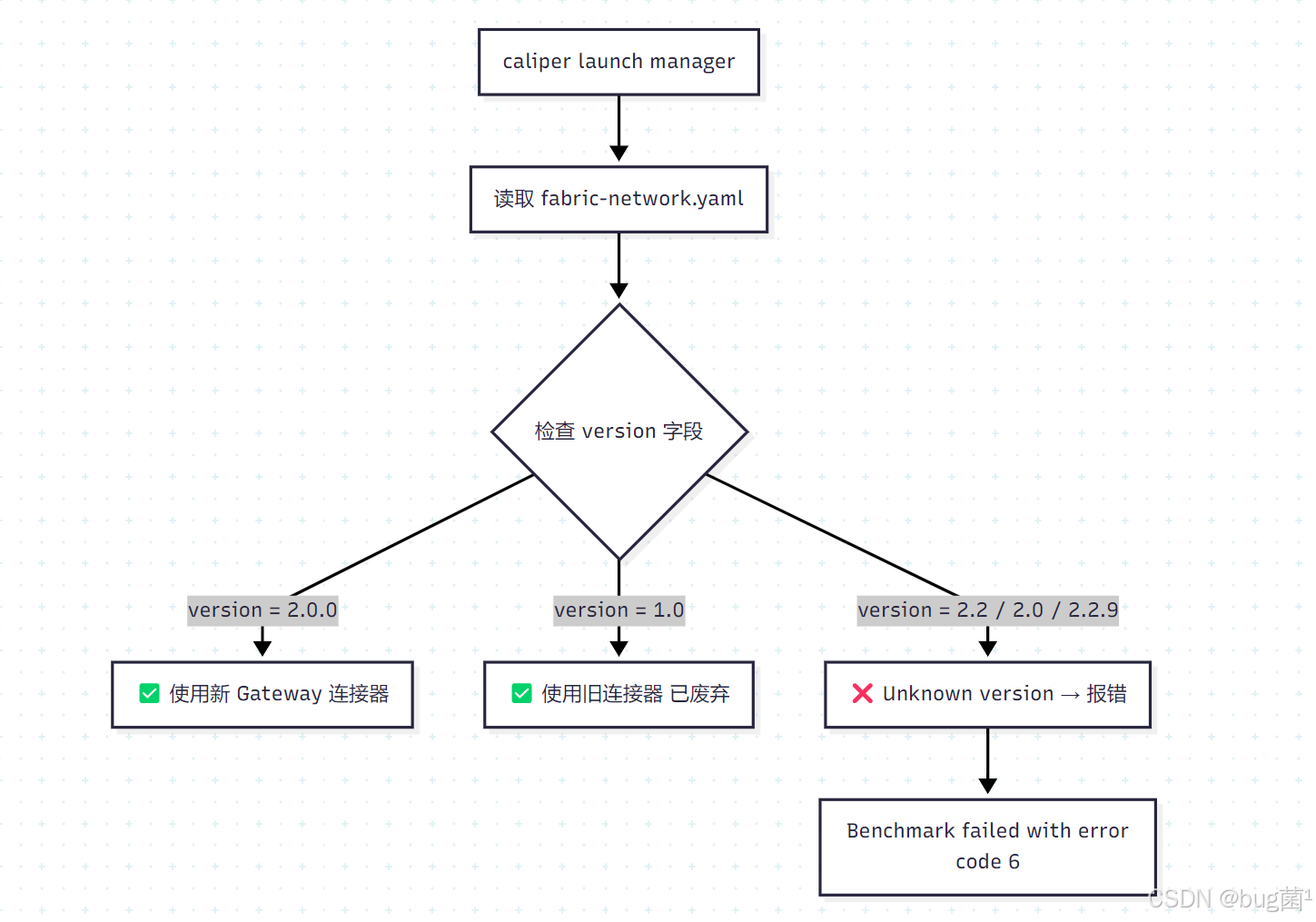
你的配置文件存在两个问题:
第一个是 version: "2.2" 这个值 Caliper 根本不认识,必须改为 "2.0.0"。第二个是你的配置文件底部的 peers 和 orderers 块是旧版格式的残留,在 Caliper 0.5.x 的新格式中这两个块完全不需要,保留反而可能造成解析混乱。
✅️ 问题解决方案
🟢 方案 A:修正 version 字段 + 清理配置文件(根本解法)
第一步:修改 fabric-network.yaml,将 version 改为 "2.0.0",并删除旧格式的 peers 和 orderers 块。
你的完整正确配置应如下:
name: Fabric test
version: "2.0.0"        # ← 必须是 "2.0.0",这是 Caliper 的 Schema 版本,不是 Fabric 版本!

caliper:
  blockchain: fabric

channels:
  - channelName: mychannel
    contracts:
      - id: hrinfoCC
        contractID: hrinfoCC
        language: golang

organizations:
  - mspid: Org1MSP
    identities:
      certificates:
        - name: 'User1'
          clientPrivateKey:
            path: '/root/go/src/hrinfo/fixtures/organizations/peerOrganizations/org1.example.com/users/User1@org1.example.com/msp/keystore/priv_sk'
          clientSignedCert:
            path: '/root/go/src/hrinfo/fixtures/organizations/peerOrganizations/org1.example.com/users/User1@org1.example.com/msp/signcerts/User1@org1.example.com-cert.pem'
    connectionProfile:
      path: '/root/go/src/hrinfo/fixtures/organizations/peerOrganizations/org1.example.com/connection-org1.yaml'
      discover: true

# ⚠️ 注意:删除下面的 peers 和 orderers 块!
# Caliper 0.5.x 新格式中,节点信息全部由 connectionProfile 提供,不需要再单独列出
为什么要删除 peers 和 orderers 块?
Caliper 0.5.x 的新 Gateway 连接器模式下,所有节点信息(peer 地址、TLS 证书、orderer 地址等)都从 connectionProfile 指定的 connection-org1.yaml 文件中读取,如果同时在 network config 里再写一遍 peers/orderers,会造成格式解析冲突。
第二步:确认 connection-org1.yaml 文件存在且格式正确
cat /root/go/src/hrinfo/fixtures/organizations/peerOrganizations/org1.example.com/connection-org1.yaml
标准的 connection-org1.yaml 格式应包含以下内容:
name: grpc.connection.org1.example.com
version: 1.0.0

client:
  organization: Org1
  connection:
    timeout:
      peer:
        endorser: '300'

organizations:
  Org1:
    mspid: Org1MSP
    peers:
      - peer0.org1.example.com
    certificateAuthorities:
      - ca.org1.example.com

peers:
  peer0.org1.example.com:
    url: grpcs://localhost:7051
    tlsCACerts:
      path: /root/go/src/hrinfo/fixtures/organizations/peerOrganizations/org1.example.com/peers/peer0.org1.example.com/tls/ca.crt
    grpcOptions:
      ssl-target-name-override: peer0.org1.example.com
      hostnameOverride: peer0.org1.example.com

orderers:
  orderer.example.com:
    url: grpcs://localhost:7050
    tlsCACerts:
      path: /root/go/src/hrinfo/fixtures/organizations/ordererOrganizations/example.com/orderers/orderer.example.com/tls/ca.crt
    grpcOptions:
      ssl-target-name-override: orderer.example.com

channels:
  mychannel:
    orderers:
      - orderer.example.com
    peers:
      peer0.org1.example.com:
        endorsingPeer: true
        chaincodeQuery: true
        ledgerQuery: true
        eventSource: true
第三步:重新执行 Caliper 测试
caliper launch manager \
  --caliper-workspace . \
  --caliper-networkconfig networks/fabric-network.yaml \
  --caliper-benchconfig benchmarks/accessBenchmark.yaml \
  --caliper-flow-only-test
🟣 方案 B:先执行 caliper bind 绑定 Fabric SDK(必须确认已绑定)
错误提示里有一行关键提示:
Usage: caliper launch manager --caliper-bind-sut fabric:2.2 [other options]
这说明 Caliper 的 Fabric SDK 可能没有绑定,或绑定后缓存状态异常。必须先 bind 再 launch:
# 绑定 Fabric 2.2 的 SDK
caliper bind --caliper-bind-sut fabric:2.2

# 等待 npm install 完成后验证
caliper bind --caliper-bind-sut fabric:2.2 --version
如果 bind 时因为网络问题很慢,使用淘宝镜像:
caliper bind \
  --caliper-bind-sut fabric:2.2 \
  --caliper-bind-args="--registry https://registry.npmmirror.com"
bind 成功后再重新执行方案 A 的 launch 命令。
🟡 方案 C:检查 keystore/priv_sk 私钥文件名(常见踩坑点)
Fabric 2.x 默认生成的私钥文件名是一串随机哈希,不叫 priv_sk,而是类似 a1b2c3d4e5f6...._sk。
# 检查实际私钥文件名
ls /root/go/src/hrinfo/fixtures/organizations/peerOrganizations/org1.example.com/users/User1@org1.example.com/msp/keystore/

# 通常输出类似:
# 7c3a19f8e2b54d1098a76cdef0123456789abcdef01234567_sk
如果文件名不是 priv_sk,有两种解决方式:
# 方式1:创建软链接,让 priv_sk 指向真实文件
cd /root/go/src/hrinfo/fixtures/organizations/peerOrganizations/org1.example.com/users/User1@org1.example.com/msp/keystore/
ln -s 真实文件名_sk priv_sk

# 方式2:直接修改 fabric-network.yaml 中的路径,填入真实文件名
clientPrivateKey:
  path: '/root/.../keystore/7c3a19f8e2b54d1098a76cdef0123456789abcdef01234567_sk'
🔵 方案 D:降级 Node.js 版本解决兼容性问题
Caliper 0.5.0 与 Node.js 18 的兼容性存在一些已知问题,官方测试环境是 Node.js 14/16:
# 安装 nvm 管理 Node 版本
curl -o- https://raw.githubusercontent.com/nvm-sh/nvm/v0.39.0/install.sh | bash
source ~/.bashrc

# 安装并切换到 Node 14
nvm install 14
nvm use 14
node --version  # 验证:v14.x.x

# 重新全局安装 Caliper CLI
npm install -g --only=prod @hyperledger/caliper-cli@0.5.0 \
  --registry https://registry.npmmirror.com

# 重新绑定
caliper bind --caliper-bind-sut fabric:2.2

# 重新执行测试
caliper launch manager \
  --caliper-workspace . \
  --caliper-networkconfig networks/fabric-network.yaml \
  --caliper-benchconfig benchmarks/accessBenchmark.yaml \
  --caliper-flow-only-test
✅️ 问题延伸
Caliper 网络配置 version 字段含义对照表
| version 值 | 含义 | 对应连接器 | Caliper 版本 |
|---|---|---|---|
"1.0" |
旧格式(已废弃) | 旧 Fabric SDK 连接器 | 0.3.x |
"2.0.0" |
新格式(当前标准) | 新 Gateway 连接器 | 0.4.x / 0.5.x |
"2.2" / "2.0" |
❌ 非法值 | 无 | 任何版本都报错 |
⚠️ 关键理解: version 字段跟 Fabric 节点版本毫无关系,它描述的是 Caliper 的配置 YAML 格式版本。
Caliper 0.5.0 完整工作流程

查看 FabricConnectorFactory.js 支持的合法版本
# 直接查看源码,确认支持哪些 version 值
grep -n "version" /opt/node-v18.20/lib/node_modules/@hyperledger/caliper-cli/node_modules/@hyperledger/caliper-fabric/lib/FabricConnectorFactory.js | head -20
✅️ 问题预测
🔮 修复 version 字段后,可能遇到的后续报错:
预测 1:Error: discovery 服务发现失败
# 临时关闭服务发现,改为手动指定
connectionProfile:
  path: '/root/.../connection-org1.yaml'
  discover: false    # ← 改为 false
预测 2:Error: Cannot find module 缺少 grpc 依赖
# 在 caliper-test 目录下本地安装缺少的依赖
cd /root/go/src/hrinfo/caliper-test
npm install @grpc/grpc-js --registry https://registry.npmmirror.com
预测 3:UNAVAILABLE: Connection dropped gRPC 连接断开
# 确认 Fabric 节点正在运行
docker ps | grep -E "peer|orderer"
# 若节点未启动
cd /root/go/src/hrinfo/fixtures
docker-compose up -d
预测 4:Error: No valid responses from any peers 背书失败
# 确认链码已在 mychannel 上安装并实例化
docker exec -it cli peer chaincode list --instantiated -C mychannel
预测 5:生成的 HTML 报告乱码或无法打开
# 报告默认生成在 workspace 目录下
ls /root/go/src/hrinfo/caliper-test/report.html
# 用浏览器或 scp 下载到本机打开查看
✅️ 小结
| 维度 | 内容 |
|---|---|
| 🎯 根本原因 | fabric-network.yaml 中 version: "2.2" 是非法值,Caliper 0.5.x 只接受 "2.0.0" |
| ✅ 最关键修改 | 将第 2 行改为 version: "2.0.0",同时删除文件末尾的 peers 和 orderers 块 |
| 🔑 常被忽略的坑 | 私钥路径 keystore/priv_sk 中文件名需确认与实际生成的哈希文件名一致 |
| ⚡ 前置步骤确认 | 执行 caliper launch 前必须先确认已执行 caliper bind --caliper-bind-sut fabric:2.2 |
| 💡 一句话总结 | version 是 Caliper 自己的 Schema 版本号,不是 Fabric 的版本号,固定写 "2.0.0" 就对了 |
| 📋 操作顺序 | 改 version → 删多余 peers/orderers → 确认私钥路径 → caliper bind → caliper launch |
💪 改一个字段就能解决,就是这个 version 的坑确实很隐蔽,不看源码根本不知道!按方案 A 改完马上就能跑起来。
🌹 结语 & 互动说明
希望以上分析与解决思路,能为你当前的问题提供一些有效线索或直接可用的操作路径。
若你按文中步骤执行后仍未解决:
- 不必焦虑或抱怨,这很常见——复杂问题往往由多重因素叠加引起;
- 欢迎你将最新报错信息、关键代码片段、环境说明等补充到评论区;
- 我会在力所能及的范围内,结合大家的反馈一起帮你继续定位 👀
💡 如果你有更优或更通用的解法:
- 非常欢迎在评论区分享你的实践经验或改进方案;
- 你的这份补充,可能正好帮到更多正在被类似问题困扰的同学;
- 正所谓「赠人玫瑰,手有余香」,也算是为技术社区持续注入正向循环
🧧 文末福利:技术成长加速包 🧧
文中部分问题来自本人项目实践,部分来自读者反馈与公开社区案例,也有少量经由全网社区与智能问答平台整理而来。
若你尝试后仍没完全解决问题,还请多一点理解、少一点苛责——技术问题本就复杂多变,没有任何人能给出对所有场景都 100% 套用的方案。
如果你已经找到更适合自己项目现场的做法,非常建议你沉淀成文档或教程,这不仅是对他人的帮助,更是对自己认知的再升级。
如果你还在持续查 Bug、找方案,可以顺便逛逛我专门整理的 Bug 专栏👉《全栈 Bug 调优(实战版)》👈️

这里收录的都是在真实场景中踩过的坑,希望能帮你少走弯路,节省更多宝贵时间。
✍️ 如果这篇文章对你有一点点帮助:
- 欢迎给 bug菌 来个一键三连:关注 + 点赞 + 收藏
- 你的支持,是我持续输出高质量实战内容的最大动力。
同时也欢迎关注我的硬核公众号 「猿圈奇妙屋」:
获取第一时间更新的技术干货、BAT 等互联网公司最新面试真题、4000G+ 技术 PDF 电子书、简历 / PPT 模板、技术文章 Markdown 模板等资料,通通免费领取。
你能想到的绝大部分学习资料,我都尽量帮你准备齐全,剩下的只需要你愿意迈出那一步来拿。
🫵 Who am I?
我是 bug菌:
- 热活跃于 CSDN | 掘金 | InfoQ | 51CTO | 华为云 | 阿里云 | 腾讯云 等技术社区;
- CSDN 博客之星 Top30、华为云多年度十佳博主/卓越贡献者、掘金多年度人气作者 Top40;
- 掘金、InfoQ、51CTO 等平台签约及优质作者;
- 全网粉丝累计 30w+。
更多高质量技术内容及成长资料,可查看这个合集入口 👉 点击查看 👈️
硬核技术公众号 「猿圈奇妙屋」 期待你的加入,一起进阶、一起打怪升级。

- End -

有“AI”的1024 = 2048,欢迎大家加入2048 AI社区
更多推荐
 1
1 0
0- 0


 已为社区贡献63条内容

所有评论(0)