Nginx-Rewrite相关功能
文章目录
1 ngx_http_rewrite_module模块指令
if指令
用于条件匹配判断,并根据条件判断结果选择不同的Nginx配置,可以配置在server或location块中进行配置,Nginx的if语法仅能使用if做单次判断,不支持使用if else或者if elif这样的多重判断,用法如下:
if (条件匹配) {
	action
}
使用正则表达式对变量进行匹配,匹配成功时if指令认为条件为true,否则认为false,变量与表达式之间使用以下符号链接:
= #比较变量和字符串是否相等,相等时if指令认为该条件为true,反之为false
!= #比较变量和字符串是否不相等,不相等时if指令认为条件为true,反之为false
~ #区分大小写字符,可以通过正则表达式匹配,满足匹配条件为真,不满足匹配条件为假
!~ #区分大小写字符,判断是否匹配,不满足匹配条件为真,满足匹配条件为假

~* #不区分大小写字符,可以通过正则表达式匹配,满足匹配条件为真,不满足匹配条件为假
!~* #不区分大小字符,判断是否匹配,满足匹配条件为假,不满足匹配条件为真

-f 和 !-f #判断请求的文件是否存在和是否不存在
-d 和 !-d #判断请求的目录是否存在和是否不存在
-x 和 !-x #判断文件是否可执行和是否不可执行
-e 和 !-e #判断请求的文件或目录是否存在和是否不存在(包括文件,目录,软链接)

#注意:
#如果$变量的值为空字符串或0,则if指令认为该条件为false,其他条件为true。
#nginx 1.0.1之前$变量的值如果以0开头的任意字符串会返回false
set指令
指定key并给其定义一个变量,变量可以调用Nginx内置变量赋值给key,另外set定义格式为set $key value,value可以是text,variables和两者的组合。
break指令
注意: 如果break指令在location块中后续指令还会继续执行,是不执行 ngx_http_rewrite_module模块的指令,其它指令还会执行
- 用于中断当前相同作用域(location)中的其他Nginx配置
- 与该指令处于同一作用域的Nginx配置中,位于它前面的配置生效
- 位于后面的 ngx_http_rewrite_module 模块中指令就不再执行
- Nginx服务器在根据配置处理请求的过程中遇到该指令的时候,回到上一层作用域继续向下读取配置
- 该指令可以在server块和locationif块中使用
return指令
return用于完成对请求的处理,并直接向客户端返回响应状态码,比如:可以指定重定向URL(对于特殊重定向状态码,301/302等) 或者是指定提示文本内容(对于特殊状态码403/500等),处于此指令后的所有配置都将不被执行,return可以在server、if 和 location块进行配置。
2 rewrite指令
通过正则表达式的匹配来改变URI,可以同时存在一个或多个指令,按照顺序依次对URI进行匹配,rewrite主要是针对用户请求的URL或者是URI做具体处理
语法格式:rewrite regex replacement [flag];
rewrite将用户请求的URI基于regex所描述的模式进行检查,匹配到时将其替换为表达式指定的新的URI
注意:如果在同一级配置块中存在多个rewrite规则,那么会自下而下逐个检查;被某条件规则替换完成后,会重新一轮的替换检查,隐含有循环机制,但不超过10次;如果超过,提示500响应码,[flag]所表示的标志位用于控制此循环机制
如果替换后的URL是以http://或https://开头,则替换结果会直接以重定向返回给客户端, 即永久重定向301
正则表达式格式:
.		# 匹配除换行符以外的任意字符
\w		# 匹配字母或数字或下划线或汉字
\s		# 匹配任意的空白符
\d		# 匹配数字
\b		# 匹配单词的开始或结束
^		# 匹配字付串的开始
$		# 匹配字符串的结束
*		# 匹配重复零次或更多次
+		# 匹配重复一次或更多次
?		# 匹配重复零次或一次
(n)		# 匹配重复n次
{n,}	# 匹配重复n次或更多次
{n,m}	# 匹配重复n到m次
*?		# 匹配重复任意次,但尽可能少重复
+?		# 匹配重复1次或更多次,但尽可能少重复
??		# 匹配重复0次或1次,但尽可能少重复
{n,m}?	# 匹配重复n到m次,但尽可能少重复
{n,}?	# 匹配重复n次以上,但尽可能少重复
\W		# 匹配任意不是字母,数字,下划线,汉字的字符
\S		# 匹配任意不是空白符的字符
\D		# 匹配任意非数字的字符
\B		# 匹配不是单词开头或结束的位置
[^x]	# 匹配除了x以外的任意字符
[^lee]	# 匹配除了lee 这几个字母以外的任意字符
rewrite flag介绍
利用nginx的rewrite的指令,可以实现url的重新跳转,rewrite有四种不同的flag,分别是redirect(临时重定向302)、permanent(永久重定向301)、break和last。其中前两种是跳转型的flag,后两种是代理型。
- 跳转型指由客户端浏览器重新对新地址进行请求
- 代理型是在WEB服务器内部实现跳转
rewrite 格式:
Syntax: rewrite regex replacement [flag]; #通过正则表达式处理用户请求并返回替换后的数据包。
Default: —
Context: server, location, if
flag 说明:
redirect;
# 临时重定向,重写完成后以临时重定向方式直接返回重写后生成的新URL给客户端
# 由客户端重新发起请求;使用相对路径,或者http://或https://开头,状态码:302
permanent;
# 重写完成后以永久重定向方式直接返回重写后生成的新URL给客户端
# 由客户端重新发起请求,状态码:301
break;
# 重写完成后,停止对当前URL在当前location中后续的其它重写操作
# 而后直接跳转至重写规则配置块之后的其它配置,结束循环,建议在location中使用
# 适用于一个URL一次重写
last;
# 重写完成后,停止对当前URI在当前location中后续的其它重写操作,
# 而后对新的URL启动新一轮重写检查,不建议在location中使用
# 适用于一个URL多次重写,要注意避免出现超过十次以及URL重写后返回错误的给用户
重定向场景
域名的临时的调整,后期可能会变,之前的域名或者URL可能还用、或者跳转的目的域名和URL还会跳转,这种情况浏览器不会缓存跳转,临时重定向不会缓存域名解析记录(A记录),但是永久重定向会缓存。
永久重定向301
- 域名永久型调整,即域名永远跳转至另外一个新的域名,之前的域名再也不使用,跳转记录可以缓存到客户端浏览器
- 永久重定向会缓存DNS解析记录, 浏览器中有 from disk cache 信息,即使nginx服务器无法访问,浏览器也会利用缓存进行重定向
临时重定向302
- 域名临时重定向,告诉浏览器域名不是固定重定向到当前目标域名,后期可能随时会更改,因此浏览器不会缓存当前域名的解析记录,而浏览器会缓存永久重定向的DNS解析记录,这也是临时重定向与永久重定向最大的本质区别。
- 即当nginx服务器无法访问时,浏览器不能利用缓存,而导致重定向失败
3 防盗链
防盗链基于客户端携带的Referer实现的。
Referer 是 HTTP 请求头字段,记录了用户从哪个页面链接跳转过来的完整 URL 信息。
盗链 是指第三方网站未经授权,直接在其页面中引用你网站的资源(图片、视频、CSS、JS 等),导致用户访问第三方网站时消耗你的服务器带宽和资源,而不是打开了完整的网页。此时 HTTP 请求中的 Referer 字段会显示为第三方网站的域名/URL。
正常的referer信息有以下几种:
none: # 请求报文首部没有referer首部,比如用户直接在浏览器输入域名访问web网站,就没有referer信息。
blocked: # 请求报文有referer首部,但无有效值,比如为空。
server_names: # referer首部中包含本主机名及即nginx 监听的server_name。
arbitrary_string: # 自定义指定字符串,但可使用*作通配符。例如:*.xixi.org www.xixi.*
regular expression: # 被指定的正则表达式模式匹配到的字符串,要使用~开头。例如:~.*\.xixi\.com
正常通过搜索引擎搜索web 网站并访问该网站的referer信息如下:
172.25.254.1 - - [02/Mar/2026:11:40:54 +0800] "GET / HTTP/1.1" 301 165 "-" "Mozilla/5.0 (Windows NT 10.0; Win64; x64) AppleWebKit/537.36 (KHTML, like Gecko) Chrome/142.0.0.0 Safari/537.36"
4 实践
4.1 ngx_http_rewrite_module模块指令实践
[root@Nginx ~]# vim /usr/local/nginx/conf/conf.d/vhosts.conf
  1 server {
  2     listen 80;
  3     server_name xixi;
  4     location /vars {
  5         echo $remote_user;
  6         echo $request_method;
  7         echo $request_filename;
  8         echo $request_uri;
  9         echo $scheme;
 10     }
 11     location / {
 12         set $test1 buxixi;
 13         if ( $http_user_agent = edge ) {
 14             return 200 $test1;
 15         }
 16         if ( $http_user_agent = chrome ) {
 17             break;
 18         }
 19         set $test2 buhaha;
 20         echo $test1 $test2;
 21     }
 22 }
[root@Nginx ~]# nginx -s reload
[root@Nginx ~]# curl xixi
buxixi buhaha
[root@Nginx ~]# curl -A "chrome" xixi
buxixi
[root@Nginx ~]# curl -A "edge" xixi
buxixi[root@Nginx ~]#
4.2 rewrite指令实践
redirect和permanent
[root@Nginx ~]# vim /usr/local/nginx/conf/conf.d/vhosts.conf
  1 server {
  2     listen 80;
  3     server_name xixi;
  4     location /vars {
  5         echo $remote_user;
  6         echo $request_method;
  7         echo $request_filename;
  8         echo $request_uri;
  9         echo $scheme;
 10     }
 11     location / {
 12         if ( $http_user_agent = chrome ) {
 13             rewrite / http://www.baidu.com redirect;
 14         }
 15         if ( $http_user_agent = edge ) {
 16             rewrite / http://www.aliyun.com permanent;
 17         }
 18     }
 19 }
[root@Nginx ~]# nginx -s reload
[root@Nginx ~]# curl -IA "chrome" xixi
HTTP/1.1 302 Moved Temporarily		# 定向放回值
Server: Tengine/
Date: Mon, 02 Mar 2026 03:47:57 GMT
Content-Type: text/html
Content-Length: 141
Connection: keep-alive
Keep-Alive: timeout=100
Location: http://www.baidu.com		# 定向效果

[root@Nginx ~]# curl -IA "edge" xixi
HTTP/1.1 301 Moved Permanently
Server: Tengine/
Date: Mon, 02 Mar 2026 03:48:06 GMT
Content-Type: text/html
Content-Length: 165
Connection: keep-alive
Keep-Alive: timeout=100
Location: http://www.aliyun.com

# 利用重写实现全站加密
[root@Nginx ~]# mkdir /usr/local/nginx/certs
[root@Nginx ~]# openssl req -newkey rsa:2048 -nodes -sha256 \
> -keyout /usr/local/nginx/certs/xixi.key -x509 -days 365 \
> -out /usr/local/nginx/certs/xixi.crt
[root@Nginx ~]# vim /usr/local/nginx/conf/conf.d/vhosts.conf
  1 server {
  2     listen 80;
  3     listen 443 ssl;
  4     server_name xixi;
  5     root /usr/local/nginx/xixi/gxf/html;
  6     ssl_certificate /usr/local/nginx/certs/xixi.crt;
  7     ssl_certificate_key /usr/local/nginx/certs/xixi.key;
  8     ssl_session_cache shared:sslcache:20m;
  9     ssl_session_timeout 10m;
 10     location / {
 11         if ($scheme = http ){
 12             rewrite /(.*) https://$host/$1 redirect;
 13         }
 14     }
 15 }
[root@Nginx ~]# nginx -s reload
[root@Nginx ~]# curl  -I  http://xixi
HTTP/1.1 302 Moved Temporarily
Server: Tengine/
Date: Mon, 02 Mar 2026 07:10:21 GMT
Content-Type: text/html
Content-Length: 141
Connection: keep-alive
Keep-Alive: timeout=100
Location: https://xixi/
break 和 last
[root@Nginx ~]# mkdir /usr/local/nginx/xixi/gxf/html/{break,last,test1,test2}
[root@Nginx ~]# echo break >/usr/local/nginx/xixi/gxf/html/break/index.html
[root@Nginx ~]# echo last >/usr/local/nginx/xixi/gxf/html/last/index.html
[root@Nginx ~]# echo test1 >/usr/local/nginx/xixi/gxf/html/test1/index.html
[root@Nginx ~]# echo test2 >/usr/local/nginx/xixi/gxf/html/test2/index.html
[root@Nginx ~]# vim /usr/local/nginx/conf/conf.d/vhosts.conf
  1 server {
  2     listen 80;
  3     server_name xixi;
  4     root /usr/local/nginx/xixi/gxf/html;
  5     location /vars {
  6         echo $remote_user;
  7         echo $request_method;
  8         echo $request_filename;
  9         echo $request_uri;
 10         echo $scheme;
 11     }
 12         location /break {
 13 			rewrite ^/break/(.*) /test1/$1 break;
 14 			rewrite ^/test1/(.*) /test2/$1 ;
 15         }
 16         location /last {
 17 			rewrite ^/last/(.*) /test1/$1 last;
 18 			rewrite ^/test1/(.*) /test2/$1 ;
 19         }
 20         location /test1 {
 21             return 200 "test1 end page";
 22         }
 23         location /test2 {
 24             return 200 "TEST2 END PAGE";
 25         }
 26 }
[root@Nginx ~]# nginx -s reload
[root@Nginx ~]# curl -L xixi/break/index.html
test1
[root@Nginx ~]# curl -L xixi/last/index.html
test1 end page[root@Nginx ~]#
4.3 防盗链
实现盗链
[root@Nginx ~]# mkdir /usr/local/nginx/xixi/gxf/html/images
[root@Nginx ~]# cd /usr/local/nginx/xixi/gxf/html/images
[root@Nginx images]# ll
total 1988
-rw-r--r-- 1 root root 2032052 Mar  2 13:15 晚霞云01.jpg
[root@Nginx images]# mv 晚霞云01.jpg test.jpg
[root@Nginx images]# vim /usr/local/nginx/conf/conf.d/vhosts.conf
  1 server {
  2     listen 80;
  3     server_name xixi;
  4     root /usr/local/nginx/xixi/gxf/html;
  5     location /vars {
  6         echo $remote_user;
  7         echo $request_method;
  8         echo $request_filename;
  9         echo $request_uri;
 10         echo $scheme;
 11     }
 12     # 1. 网站正常页面访问(不防盗链)
 13     location / {
 14         index index.html;
 15     }
 16 }
[root@Nginx images]# nginx -s reload
# 盗链主机
[root@RS1 ~]# echo 172.25.254.10 xixi >>/etc/hosts
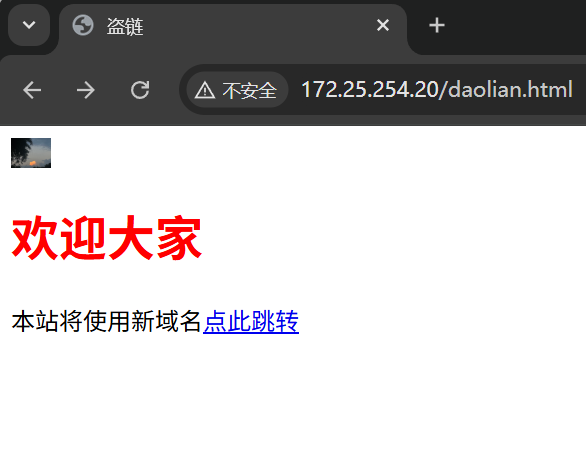
[root@RS1 ~]# vim /var/www/html/daolian.html
  1 <html>
  2     <head>
  3         <meta http-equiv=Content-Type content="text/html;charset=utf-8">
  4         <title>盗链</title>
  5     </head>
  6     <body>
  7         <img src="http://172.25.254.10/images/test.jpg" weight=20px height=20px>
  8         <h1 style="color:red">欢迎大家</h1>
  9         <p>本站将使用新域名<a href=http://172.25.254.10>点此跳转</a></p>
 10     </body>
 11 </html>
[root@RS1 ~]# systemctl start httpd
实现防盗链
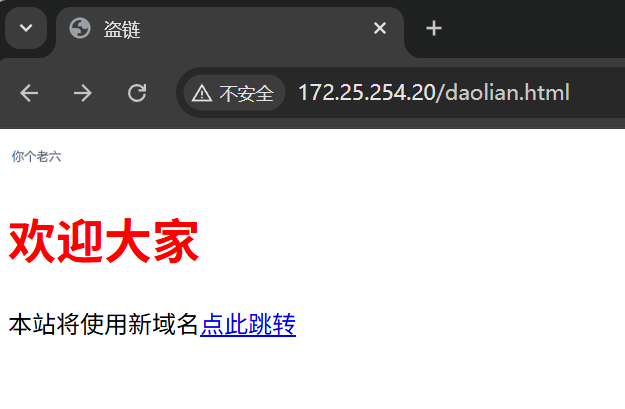
[root@Nginx images]# vim /usr/local/nginx/conf/conf.d/vhosts.conf
  1 server {
  2     listen 80;
  3     server_name xixi;
  4     root /usr/local/nginx/xixi/gxf/html;
  5     location /vars {
  6         echo $remote_user;
  7         echo $request_method;
  8         echo $request_filename;
  9         echo $request_uri;
 10         echo $scheme;
 11     }
 12     # 1. 网站正常页面访问(不防盗链)
 13     location / {
 14         index index.html;
 15     }
 16
 17     # 2. 图片目录 - 盗链返回警告
 18     location /images {
 19         valid_referers none blocked server_names *.xixi;
 20         if ($invalid_referer) {
 21             rewrite ^/ http://xixi/laoliu.png redirect; # 注意此图片不能和正常图片放在一个目录中,不然不成功。
 22         }
 23     }
 24
 25     # 3. 视频/下载资源 - 盗链直接 403
 26     location /download {
 27         valid_referers none blocked server_names *.xixi;
 28         if ($invalid_referer) {
 29             return 403;
 30         }
 31     }
 32 }
[root@Nginx images]# nginx -s reload

有“AI”的1024 = 2048,欢迎大家加入2048 AI社区
更多推荐


 22
22 0
0- 0


 已为社区贡献3条内容

所有评论(0)