进程间通信
IPC 的英文interprocess communicate
三大类:
1、古老的通信方式
无名管道 有名管道 信号 (signal)
2、IPC对象通信 system v BSD suse fedora kernel.org
消息队列(用的相对少,这里不讨论)
共享内存
信号量集
3、socket通信
网络通信
管道==》无名管道、有名管道
无名管道 ===》pipe ==》只能给有亲缘关系进程通信
有名管道 ===》fifo ==》可以给任意单机进程通信
管道的特性:
1、管道是 半双工的工作模式
2、所有的管道都是特殊的文件不支持定位操作。lseek->> fd fseek ->>FILE*
3、管道是特殊文件,读写使用文件IO。open,read,write,close; 标准io也可以,需要注意标准io是带缓冲区的 fgets,fread,fgetc。
无名管道(pipe)
无名管道使用框架:
创建管道 》fork()=》》读写管道 ==》关闭管道
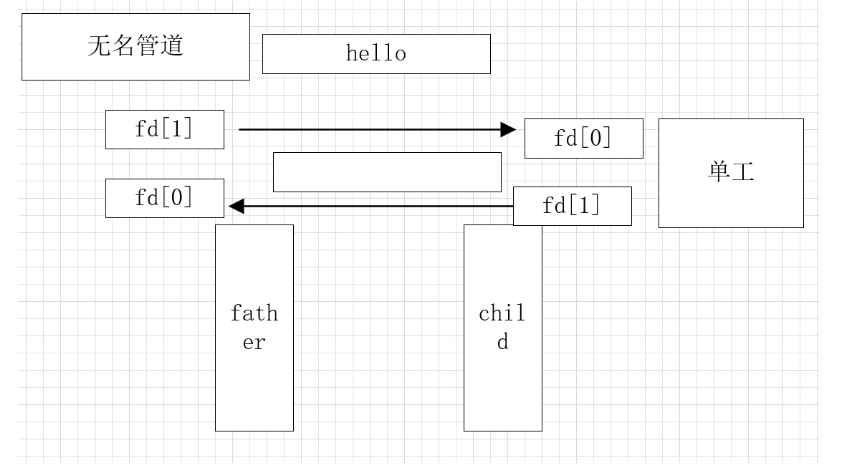
相关函数
int pipe(int pipefd[2]);
功能:创建并打开一个无名管道
参数:pipefd[0] ==>无名管道的固定读端
pipefd[1] ==>无名管道的固定写端
返回值:成功 0
失败 -1;
1.读端存在,一直向管道中去写,超过64k,写会阻塞。
/**
 * @file 02pipe_write_block.c
 * @author your name (you@domain.com)
 * @brief 读端存在,一直向管道中去写,超过64k,写会阻塞。
 * @version 0.1
 * @date 2026-02-27
 *
 * @copyright Copyright (c) 2026
 *
 */
#include <stdio.h>
#include <stdlib.h>
#include <unistd.h>
#include <pthread.h>
#include <string.h>
int	main(int argc, char **argv)
{
    int fd[2] = {0};
    // 创建匿名管道,打开管道文件,用于父子进程
    int ret = pipe(fd);
    if (ret == -1)
    {
        perror("pipe");
        return 1;
    }
    pid_t pid = fork();
    if (pid > 0)
    {
        // 父进程,关闭读端
        close(fd[0]);
        char buf[1024] = {0};
        memset(buf, 'a', sizeof(buf));
        int i = 0;
        for (i = 0; i < 65; i++)
        {
            write(fd[1], buf, sizeof(buf));// 写入64k后,会阻塞
            printf("i = %d\n",i);
        }

    }
    else if (pid == 0)
    {
        // 子进程,关闭端
        close(fd[1]);
        char buf[100] = {0};
        sleep(5);
    }else
    {
        perror("fork");
        return 1;
    }

    return 0;
}
2.写端是存在的,读管道,如果管道为空的话,读会阻塞。
/**
 * @brief 写端是存在的,读管道,如果管道为空的话,读会阻塞。
 *
 */
#include <stdio.h>
#include <stdlib.h>
#include <unistd.h>
#include <pthread.h>
#include <string.h>
int	main(int argc, char **argv)
{
    int fd[2] = {0};
    // 创建匿名管道,打开管道文件,用于父子进程
    int ret = pipe(fd);
    if (ret == -1)
    {
        perror("pipe");
        return 1;
    }
    pid_t pid = fork();
    if (pid > 0)
    {
        // 父进程,关闭读端
        close(fd[0]);
        //停3s再写 让子进程读端阻塞 因为pipe此时为空,读操作阻塞
        sleep(3);
        char buf[100] = "helloworld";
        write(fd[1], buf, strlen(buf));
    }
    else if (pid == 0)
    {
        // 子进程,关闭端
        close(fd[1]);
        char buf[100] = {0};
        read(fd[0], buf, sizeof(buf));// 读阻塞
        printf("pipe is %s\n",buf);
    }else
    {
        perror("fork");
        return 1;
    }

    return 0;
}
3.管道破裂,读端关闭,写管道。
/**
 * @file 03pipe_broken.c
 * @author your name (you@domain.com)
 * @brief 管道破裂,读端关闭,写管道。
 * @version 0.1
 * @date 2026-02-27
 *
 * @copyright Copyright (c) 2026
 *
 */
#include <stdio.h>
#include <stdlib.h>
#include <unistd.h>
#include <pthread.h>
#include <string.h>
int	main(int argc, char **argv)
{
    int fd[2] = {0};
    // 创建匿名管道,打开管道文件,用于父子进程
    int ret = pipe(fd);
    if (ret == -1)
    {
        perror("pipe");
        return 1;
    }
    pid_t pid = fork();
    if (pid > 0)
    {
        // 父进程,关闭读端
        close(fd[0]);
        sleep(1);
        char buf[100] = "helloworld";
        // 管道破裂,错误信号,会导致写段关闭 ,需要gdb,跟踪
        write(fd[1], buf, strlen(buf));
        printf("写入完毕\n");// 观察这个内容是否会输出
    }
    else if (pid == 0)
    {
        // 子进程,关闭读写端
        close(fd[1]);
        close(fd[0]);
        exit(0);
    }else
    {
        perror("fork");
        return 1;
    }

    return 0;
}
4. read 0 ,写端关闭,如果管道没有内容,read 0 ;
/**
 * @file 04read_zero.c
 * @author your name (you@domain.com)
 * @brief  read 0 ,写端关闭,如果管道没有内容,read 0 ;
 * @version 0.1
 * @date 2026-02-27
 *
 * @copyright Copyright (c) 2026
 *
 */
#include <stdio.h>
#include <stdlib.h>
#include <unistd.h>
#include <pthread.h>
#include <string.h>
int	main(int argc, char **argv)
{
    int fd[2] = {0};
    // 创建匿名管道,打开管道文件,用于父子进程
    int ret = pipe(fd);
    if (ret == -1)
    {
        perror("pipe");
        return 1;
    }
    pid_t pid = fork();
    if (pid > 0)
    {
        // 父进程,关闭读端
        close(fd[0]);
        char buf[100] = "helloworld";
        write(fd[1], buf, strlen(buf));
        exit(0);
    }
    else if (pid == 0)
    {
        // 子进程,关闭写端
        close(fd[1]);
        sleep(2);
        char buf[100] = {0};
        while (1)
        {
             // ==0 进程间通信结束
            int ret = read(fd[0], buf, sizeof(buf));
            //==0 管道内容读取结束, <0 出错
            if (ret <= 0)
            {
                break;
            }
            printf("pipe is %s\n",buf);
        }
        printf("进程间通信结束\n");

    }else
    {
        perror("fork");
        return 1;
    }

    return 0;
}
我们可以通过父进程向pipe中写,子进程向pipe中读的方式,在父子进程间发送文件。
/**
 * @file 05pipe_copyfile.c
 * @author your name (you@domain.com)
 * @brief 通过管道读写文件实现父进程向子进程传文件
 * @version 0.1
 * @date 2026-02-27
 *
 * @copyright Copyright (c) 2026
 *
 */
#include <stdio.h>
#include <stdlib.h>
#include <sys/types.h>
#include <unistd.h>
#include <pthread.h>
#include <string.h>
#include <sys/stat.h>
#include <fcntl.h>

int	main(int argc, char **argv)
{
    int fd[2];
    int ret = pipe(fd);
    if (ret == -1)
    {
        perror("pipe");
        return 1;
    }

    pid_t pid = fork();
    if (pid > 0)
    {
        // 父进程,关闭读端
        close(fd[0]);
        int fd_src = open("1.png",O_RDONLY);
        if (fd_src == -1)
        {
            perror("open fail");
            return -1;
        }
        char buf[1024] = {0};
        int ret;
        while ((ret = read(fd_src, buf, sizeof(buf))) > 0)
        {
            write(fd[1], buf, ret);//图片中是位二进制文件,包括‘\0’,所以不能strlen()
        }
        close(fd_src);
        close(fd[1]);
    }else if (pid == 0)
    {
        // 子进程,关闭写端
        close(fd[1]);
        int fd_dst = open("2.png",O_WRONLY|O_CREAT|O_TRUNC,0666);
        if (fd_dst == -1)
        {
            perror("open fail");
            return -1;
        }
        int ret;
        char buf[1024] = {0};
        while ((ret = read(fd[0], buf, sizeof(buf))) > 0)
        {
            write(fd_dst, buf, ret);//图片中是位二进制文件,包括‘\0’,所以不能strlen()
        }
        close(fd_dst);
        close(fd[0]);
    }


    return 0;
}
以下代码我们通过父进程从终端接收英文单词,将接收到的单词通过pipe传给子进程,子进程拿到后对文件进行查找,实现查字典的功能。方式一:
/**
 * @file 06pipe_dic.c
 * @author your name (you@domain.com)
 * @brief 使用pipe,完成一个查字典的功能。
          父进程,读字典文件,写管道。
          子进程,接收需要查找的单词,读管道,查找单词的意思。
          如果找到了,显式意思。没有找到,显式没有这个单词。
          可以连续查找单词。
          #quit ,程序退出。
 * @version 0.1
 * @date 2026-02-27
 *
 * @copyright Copyright (c) 2026
 *
 */
#include <stdio.h>
#include <stdlib.h>
#include <sys/types.h>
#include <unistd.h>
#include <pthread.h>
#include <string.h>
#include <sys/stat.h>
#include <fcntl.h>
int	main(int argc, char **argv)
{
    int fd[2];
    int ret = pipe(fd);
    if (ret == -1)
    {
        perror("pipe");
        return 1;
    }

    pid_t pid = fork();
    if (pid > 0)
    {
        // 父进程,关闭读端
        close(fd[0]);
        while (1)
        {
            char buf[1024] = {0};
            fgets(buf, sizeof(buf), stdin);
            buf[strlen(buf)-1] = '\0';
            write(fd[1], buf, strlen(buf));
            if (strncmp(buf, "#quit", 5) == 0)
            {
                close(fd[1]);
                return 1;
            }
        }
    }else if (pid == 0)
    {
         // 子进程,关闭写端
        close(fd[1]);
        while (1)
        {
            FILE* fp = fopen("dict.txt","r");
            if (fp == NULL)
            {
                perror("open fail");
                return -1;
            }
            char buf[1024] = {0};
            read(fd[0], buf, sizeof(buf));
            if (strncmp(buf, "#quit", 5) == 0)
            {
                close(fd[0]);
                return 1;
            }
            int flag = 0;
            char tmp[1024] = {0};
            while (fgets(tmp,sizeof(tmp),fp) != NULL)
            {
                char* dic[1024] = {0};
                int i = 0;
                dic[i++] = strtok(tmp," ");
                while ((dic[i++] = strtok(NULL, " ")))
                    ;
                if (strcmp(buf, dic[0]) == 0)
                {
                    int j = 1;
                    flag = 1;
                    for (j = 1; j < i-1; j++)
                    {
                        printf("%s ",dic[j]);
                    }
                }
                continue;
            }
            if (flag == 0)
            {
                printf("not find\n");
            }
        }

    }
    return 0;
}
方式二:
#include <stdio.h>
#include <stdlib.h>
#include <unistd.h>
#include <string.h>
#include <fcntl.h>
#define MAX 19661
int main(int argc, char** argv)
{
    int fd[2] = {0};
    // 创建匿名管道,打开管道文件
    int ret = pipe(fd);
    if (-1 == ret)
    {
        perror("pipe");
        return 1;
    }
    pid_t pid = fork();
    if (pid > 0)
    {
        // 父进程,关闭读段
        close(fd[0]);
        int fd_dict = open("/home/linux/dict.txt", O_RDONLY);
        if (-1 == fd_dict)
        {
            perror("open dict");
            return 1;
        }
        while (1)
        {
            while (1)
            {
                char buf[4096] = {0};
                int rd_ret = read(fd_dict, buf, sizeof(buf));
                if (rd_ret == 0)
                {
                    break;
                }
                write(fd[1], buf, rd_ret);  // 最终的退出条件,管道破裂
            }
            lseek(fd_dict, 0, SEEK_SET);  //回到文件的开头
        }
        close(fd_dict);
    }
    else if (0 == pid)
    {
        // 子进程,关闭写段
        close(fd[1]);
        FILE* fp = fdopen(fd[0], "r");

        while (1)
        {
            int num = 0;
            char line_buf[1024] = {0};
            char want_word[50] = {0};
            printf("input word:");
            fgets(want_word, sizeof(want_word), stdin);  // hello\0
            want_word[strlen(want_word) - 1] = '\0';
            if (0 == strcmp(want_word, "#quit"))
            {
                break;
            }
            while (1)
            {
                // read(fd[0],line_buf,sizeof(line_buf));
                fgets(line_buf, sizeof(line_buf), fp);
                char* word = strtok(line_buf, " ");
                char* mean = strtok(NULL, "\r");
                if (0 == strcmp(word, want_word))
                {
                    printf("%s %s\n", word, mean);
                    break;
                }
                num++;
                if (num >= MAX)
                {
                    printf("can't find,%s\n", want_word);
                    break;
                }
            }
        }
        exit(0);
    }
    else
    {
        perror("fork");
        return 1;
    }

    return 0;
}
有名管道(fifo)
有名管道===》fifo ==》有文件名称的管道。 文件系统中可见 ls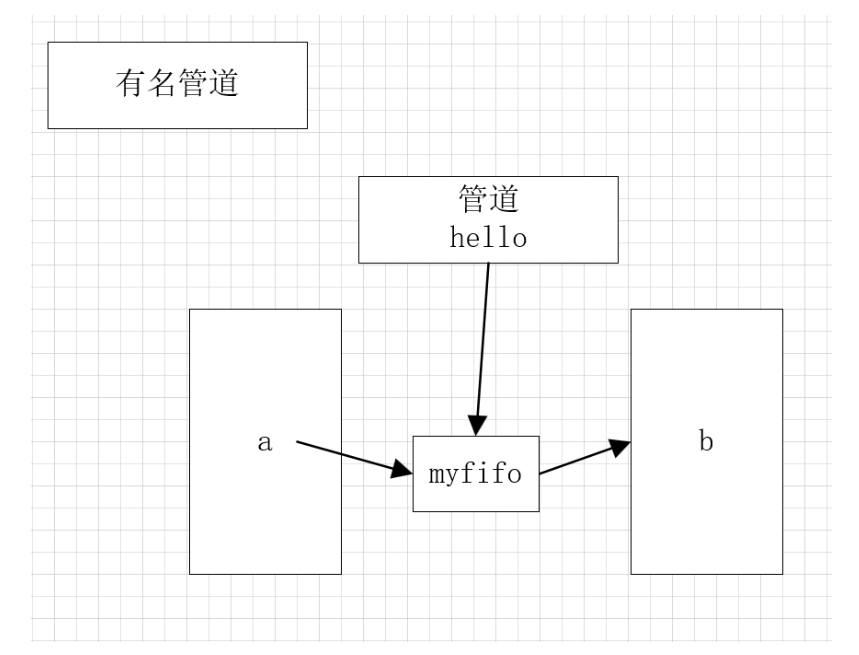
框架:
创建有名管道 ==》打开有名管道 ==》读写管道 ==》关闭管道 ==》卸载有名管道
相关函数
1.创建:mkfifo
#include <sys/types.h>
#include <sys/stat.h>
remove();
int mkfifo(const char *pathname, mode_t mode);
功能:在指定的pathname路径+名称下创建一个权限为
mode的有名管道文件。
参数:pathname要创建的有名管道路径+名称
mode 8进制文件权限。
返回值:成功 0
失败 -1;
2.打开有名管道 open,一般只有如下方式:
int fd-read = open("./fifo",O_RDONLY); ==>fd 是固定读端
int fd-write = open("./fifo",O_WRONLY); ==>fd 是固定写端
不能是 O_RDWR 方式打开文件。
不能有 O_CREAT 选项,因为创建管道有指定的mkfifo函数
如果有一端没有打开,则默认在open函数部分阻塞。
O_RDWR 方式打开文件。 open不会阻塞。需要自己把控好读写的节奏,避免管道破裂,或读到0
3、管道的读写: 文件IO
读: read(fd-read,buff,sizeof(buff));
写: write(fd-write,buff,sizeof(buff));
4、关闭管道:
close(fd);
5、卸载管道:remove();
int unlink(const char *pathname);
功能:将指定的pathname管道文件卸载,同时
从文件系统中删除。
参数: ptahtname 要卸载的有名管道
返回值:成功 0
失败 -1;
以下代码是通过fifo通信的写端。
#include <asm-generic/errno-base.h>
#include <stdio.h>
#include <stdlib.h>
#include <unistd.h>
#include <string.h>
#include <sys/types.h>
#include <sys/stat.h>
#include <fcntl.h>
#include<errno.h>
int	main(int argc, char **argv)
{
    int ret = mkfifo("myfifo",0666);
    if (ret == -1) {
        if (EEXIST == errno)//如果fifo已存在,若不指定,只能先w再r
        {
            //
        }else{
            perror("fifo");
            return 1;
        }
    }
    int fd = open("myfifo",O_WRONLY);
    if (fd == -1) {
        perror("open");
        return 1;
    }
    char buf[100] = "hello,fifo test";
    //写入fifo
    write(fd,buf,strlen(buf));

    close(fd);

    return 0;
}
以下代码为读端。
#include <stdio.h>
#include <stdlib.h>
#include <unistd.h>
#include <string.h>
#include <sys/types.h>
#include <sys/stat.h>
#include <fcntl.h>
#include<errno.h>
int	main(int argc, char **argv)
{
    int ret = mkfifo("myfifo",0666);
    if (ret == -1) {
        if (EEXIST == errno)//如果fifo已存在,若不指定,只能先w再r
        {
            //
        }else{
            perror("fifo");
            return 1;
        }
    }
    int fd = open("myfifo",O_RDONLY);
    if (fd == -1) {
        perror("open");
        return 1;
    }
    char buf[100] = {0};
    //从fifo读
    read(fd,buf,sizeof(buf));
    printf("fifo :%s\n",buf);
    close(fd);
    //remove()

    return 0;
}
我们可以通过fifo实现基于两个进程的聊天室。
a端:
#include <stdio.h>
#include <stdlib.h>
#include <unistd.h>
#include <string.h>
#include <sys/types.h>
#include <sys/stat.h>
#include <fcntl.h>
#include <errno.h>
#include <pthread.h>

void* th1(void* arg)
{
    int fd =  *(int*)arg;
    while(1)
    {
        char buf[100]={0};
        read(fd,buf,sizeof(buf));// #quit\n
        if(0== strcmp(buf,"#quit\n"))
        {
            //break;
            exit(0);
        }
        printf("from B:%s",buf);
        fflush(stdout);
    }
    return NULL;
}


void* th2(void* arg)
{
    int fd =  *(int*)arg;
    while(1)
    {
        char buf[100]={0};
        printf("to B:");
        fgets(buf,sizeof(buf),stdin); // #quit\n
        write(fd,buf,strlen(buf));
        if(0 == strcmp(buf,"#quit\n"))
        {
            exit(0);
        }

    }
    return NULL;
}

int main(int argc, char **argv)
{
    int ret = mkfifo("myfifo1", 0666);
    if (-1 == ret)
    {
        if (EEXIST == errno)  // 管道已经存在的错误
        {
            //
        }
        else
        {
            perror("mkfifo1");
            return 1;
        }
    }
    ret = mkfifo("myfifo2", 0666);
    if (-1 == ret)
    {
        if (EEXIST == errno)  // 管道已经存在的错误
        {
            //
        }
        else
        {
            perror("mkfifo2");
            return 1;
        }
    }

    // open 会阻塞,这边写,另外一遍必须读,这样才不会阻塞
    int fd_w = open("myfifo1", O_WRONLY);
    if (-1 == fd_w)
    {
        perror("open myfifo1");
        return 1;
    }

    // open 会阻塞
    int fd_r = open("myfifo2", O_RDONLY);
    if (-1 == fd_r)
    {
        perror("open myfifo2");
        return 1;
    }

    pthread_t tid1,tid2;
    //由于发送和接受需要同时进行,而不是串行时间,需要并发,所以开两个线程
    pthread_create(&tid1,NULL,th1,&fd_r);
    pthread_create(&tid2,NULL,th2,&fd_w);

    pthread_join(tid1,NULL);
    pthread_join(tid2,NULL);

    return 0;
}
b端:
#include <stdio.h>
#include <stdlib.h>
#include <unistd.h>
#include <string.h>
#include <sys/types.h>
#include <sys/stat.h>
#include <fcntl.h>
#include <errno.h>
#include <pthread.h>

void* th1(void* arg)
{
    int fd = *(int*)arg;
    while (1)
    {
        char buf[100] = {0};
        read(fd, buf, sizeof(buf));  // #quit\n
        if (0 == strcmp(buf, "#quit\n"))
        {
            // break;
            exit(0);
        }
        printf("from A:%s", buf);
        fflush(stdout);
    }
    return NULL;
}

void* th2(void* arg)
{
    int fd = *(int*)arg;
    while (1)
    {
        char buf[100] = {0};
        printf("to A:");
        fgets(buf, sizeof(buf), stdin);  // #quit\n
        write(fd, buf, strlen(buf));
        if (0 == strcmp(buf, "#quit\n"))
        {
            exit(0);
        }
    }
    return NULL;
}

int main(int argc, char** argv)
{
    int ret = mkfifo("myfifo1", 0666);
    if (-1 == ret)
    {
        if (EEXIST == errno)  // 管道已经存在的错误
        {
            //
        }
        else
        {
            perror("mkfifo1");
            return 1;
        }
    }
    ret = mkfifo("myfifo2", 0666);
    if (-1 == ret)
    {
        if (EEXIST == errno)  // 管道已经存在的错误
        {
            //
        }
        else
        {
            perror("mkfifo2");
            return 1;
        }
    }

    // open 会阻塞,这边读,另外一遍必须写,这样才不会阻塞
    int fd_r = open("myfifo1", O_RDONLY);
    if (-1 == fd_r)
    {
        perror("open myfifo1");
        return 1;
    }

    // open 会阻塞
    int fd_w = open("myfifo2", O_WRONLY);
    if (-1 == fd_w)
    {
        perror("open myfifo2");
        return 1;
    }

    pthread_t tid1, tid2;
    //由于发送和接受需要同时进行,而不是串行时间,需要并发,所以开两个线程
    pthread_create(&tid1, NULL, th1, &fd_r);
    pthread_create(&tid2, NULL, th2, &fd_w);

    pthread_join(tid1, NULL);
    pthread_join(tid2, NULL);

    return 0;
}
该聊天室有以下几个要点:
1.由于两个进程需要互发消息,而fifo的读写端只有一个,因此,需要开启两个fifo。
2.在用open分别开启两个fifo文件时,必须先同时操作一个文件,两个进程分别开启他的读端和写端,即一段写,另一端必须读,不然会在open处阻塞。例如,若a端int fd_w = open("myfifo1", O_WRONLY); b端nt fd_w = open("myfifo2", O_WRONLY); 此时没有同时开启同一个fifo的读写端,两个进程阻塞,造成死锁。
3.在一个进程的视角中,发消息和收消息应该是并发的,所以这里需要在收发消息时开启两个线程,一个线程读一个线程写,不能写成串行形式。
进程间通信 ===》信号通信
应用:异步通信。 中断
1~64;32应用编程。
如何响应:
Term   Default action is to terminate the process.
Ign    Default action is to ignore the signal.
Core   Default action is to  terminate  the  process  and  dump  core  (see             core(5)).		gdb a.out -c core
Stop   Default action is to stop the process.
Cont   Default  action  is  to  continue  the  process  if  it is currently
              stopped.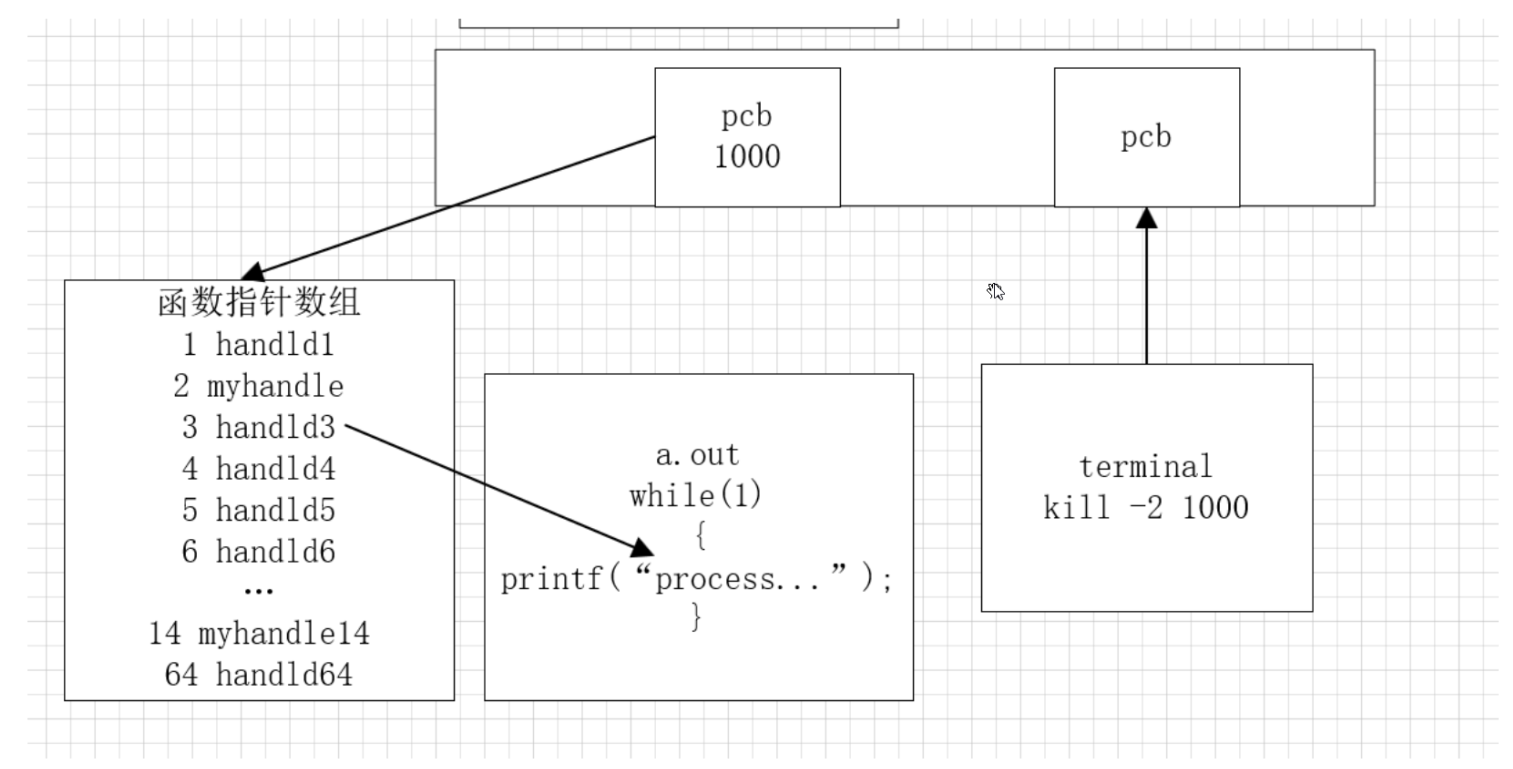
kill -xx xxxx
发送进程 信号 接收进程
kill -9 1000
a.out 9 1000
1、发送端
#include <sys/types.h>
#include <signal.h>
int kill(pid_t pid, int sig);
功能:通过该函数可以给pid进程发送信号为sig的系统信号。
参数:pid 要接收信号的进程pid
sig 当前程序要发送的信号编号 《=== kill -l
返回值:成功 0
失败 -1;
#include <sys/types.h>
#include <signal.h>
#include <stdio.h>
#include <stdlib.h>
#include <unistd.h>
int	main(int argc, char **argv)
{
    if (argc < 3)
    {
        printf("usage: ./a.out pid sig_num");
    }
    pid_t pid = atoi(argv[1]);
    int sig_num = atoi(argv[2]);
    int ret = kill(pid, sig_num);
    if (ret == -1)
    {
        perror("kill error");
        return 1;
    }

    return 0;
}
int raise(int sig)== kill(getpid(),int sig);
功能:给进程自己发送sig信号
unsigned int alarm(unsigned int seconds);SIGALAM
功能:定时由系统给当前进程发送信号
也称为闹钟函数
闹钟只有一个,定时只有一次有效,
但是必须根据代码逻辑是否执行判断。
#include <sys/types.h>
#include <signal.h>
#include <stdio.h>
#include <stdlib.h>
#include <unistd.h>
int flag = 0;

void handle(int num){
    flag = 1;
}

int	main(int argc, char **argv)
{
    //信号处理函数   捕获信号
    signal(SIGALRM, handle);
    //设置一个闹钟,5s 后,系统送信号给当前进程
    alarm(5);
    while (1)
    {
        if (flag == 0) {
            printf("i m processing pid = %d\n",getpid());
        }
        else {
            printf("i m sleep pid = %d\n",getpid());
        }
        sleep(1);
    }

    return 0;
}
int pause(void);
功能:进程暂停,不再继续执行,除非 收到其他信号。
#include <sys/types.h>
#include <signal.h>
#include <stdio.h>
#include <stdlib.h>
#include <unistd.h>

void handle(int num){

}

int	main(int argc, char **argv)
{
    signal(SIGCONT, handle);
    int i = 0;
    while (1)
    {
        printf("pid = %d\n",getpid());
        sleep(1);
        i++;
        if (i == 5)
        {
            pause();//进程暂停,会休眠,等信号到来,需要捕获信号
        }
    }

    return 0;
}
2、信号 kill -l ==>前32个有具体含义的信号
信号的含义详见图片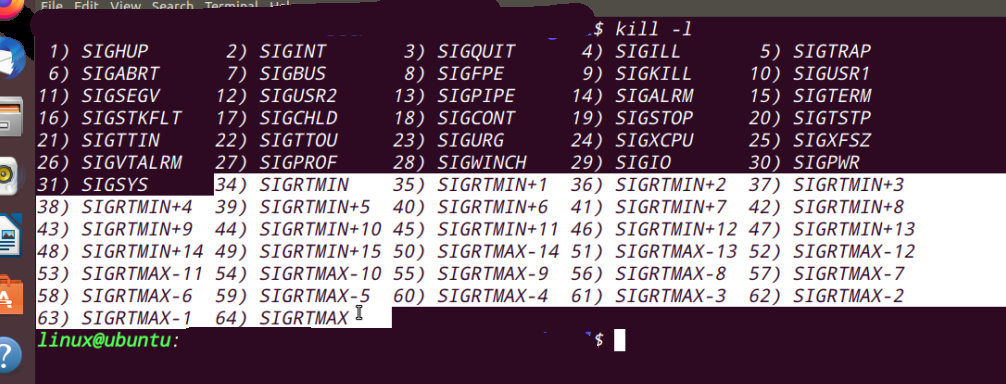
3、接收端
每个进程都会对信号作出默认响应,但不是唯一响应。
一般如下三种处理方式:
1、默认处理
2、忽略处理 9,19
3、自定义处理 9,19 捕获
以上三种方式的处理需要在如下函数上实现。
信号注册函数原型
sighandler_t signal(int signum, sighandler_t handler);
功能: 修改进程中,signum 对应的处理函数(系统中默认提供的那个)。
参数:
signum, 需要修改函数的对应的信号数。
handler,需要替换的函数的函数名。
有二个宏表示:SIG_DFL 表示默认处理
SIG_IGN 表示忽略处理:
void ( *signal(int signum, void (*handler)(int)) ) (int);
typedef void (*sighandler_t)(int);
===》void (*xx)(int); == void fun(int);
===》xx是 void fun(int) 类型函数的函数指针
===》typedef void(*xx)(int) sighandler_t; ///错误
typedef int myint;
===>sighandler_t signal(int signum, sighandler_t handler);
===> signal(int sig, sighandler_t fun);
===> signal(int sig, xxx fun);
===>fun 有三个宏表示:SIG_DFL 表示默认处理
SIG_IGN 表示忽略处理
fun 表示自定义处理
结论: 9 19 不能被忽略也不能被自定义
自定义信号处理:
SIGUSR1 系统给用户,预留的信号 , 自定义的信号
SIGUSR2
SIGCHLD ,父子进程中,当子进程退出后,给父进程发送的信号。 用于父进程回收子进程资源。
SIGKILL 9 强制关闭以及进程
SIGSTOP 19 强制咱体以及进程
SIGALAM 定时器,定时时间到达,由系统发给对应的进程。
SIGINT , 2 ,默认ctrl+C 发送给进程的,就是这个信号。
在所有的信号中有如下两个特例:
10 SIGUSR1
12 SIGUSR2
专门预留给程序员使用的未定义信号。
在下面的示例中,注册了两个用户定义信号,使用同一个handler。handler中通过num参数接收相应的信号并处理。当num == 10时,发送三个信号后,此时signal参数为SIG_IGN,即为忽略user1的信号,程序继续运行;当num == 12时signal参数为SIG_DFL,即为默认信号,此时printf语句运行五次后停止。
#include <stdio.h>
#include <stdlib.h>
#include <unistd.h>
#include <string.h>
#include <signal.h>
// num 表示 几号信号触发的 handle1
void handle1(int num)
{
    if(10 == num)
    {
        static int i = 0 ;
        printf("老爸,叫你...\n");
        i++;
        if(3 == i)
        {
            signal(SIGUSR1,SIG_IGN); // 忽略user1 信号
        }
    }
    if(12 == num)
    {
        static int i = 0 ;
        printf("老妈,叫你...\n");
        i++;
        if(5 == i)
        {
            signal(SIGUSR2,SIG_DFL); // user2 信号处理 回复默认
        }
    }

}

int main(int argc, char *argv[])
{
    // 多个信号,可以由一个信号处理函数响应
    signal(SIGUSR1,handle1);
    signal(SIGUSR2,handle1);
    while(1)
    {
        printf("i'm playing...,pid:%d\n",getpid());
        sleep(1);
    }
    return 0;
}
当子进程退出时,系统会给父进程发送SIGCHILD信号,默认为忽略。当不进行默认行为时,子进程推出后,系统会对父线程发送SIGCHILD信号,此时可以在handler中回收子进程资源。
#include <sys/types.h>
#include <signal.h>
#include <stdio.h>
#include <stdlib.h>
#include <unistd.h>
#include <sys/types.h>
#include<sys/wait.h>
void handle(int num){

    pid_t ret = wait(NULL);
    printf("recycle process pid = %d\n",getpid());

}

int	main(int argc, char **argv)
{
    // SIGCHLD ,对于父进程而言,默认情况是忽略
    // 当子进程结束后,会由系统 给父进程发送 SIGCHLD  这个信号。
    // SIGCHLD可以写handler来回收子进程资源
    signal(SIGCHLD, handle);//捕获SIGCHILD
    pid_t pid = fork();
    if (pid > 0)
    {
        while (1) {
            printf("father process....pid = %d\n",getpid());
            sleep(1);
        }
    }
    else if (pid == 0)
    {
        int i = 0;
        while (i < 3)
        {
            printf("child preocess....pid = %d\n",getpid());
            i++;
            sleep(1);
        }
        //当子进程执行3s后结束,系统向父进程发送SIGCHLD信号,
        //此时因为再handler内部进行了回收,不会产生僵尸进程
        exit(0);
    }
    else
    {
        perror("fork");
        return 1;
    }
    return 0;
}
共享内存
system V IPC。system V 是 unix一个版本。
共享内存和管道 特征对比:
1.共享内存就是一段内存区域。 管道底层实现是队列。
2.共享内存可以指定大小。 没有写阻塞,写入数据的大小,大于共享内存的大小,就越界了。
没读阻塞,如果写段没有写入数据的话,会读到随机数据。
3.数据会一致保留
共享内存 ===》效率最高的进程间通信方式,
使用步骤:
操作流程:
key ==》申请对象 ==》映射对象==》读写对象 ==》撤销映射 ==》删除对象
相关函数
key_t ftok(const char *pathname, int proj_id);
功能:通过该函数可以将pathname指定的路径用来以
proj_id生成唯一的临时键值。
参数:pathname 路径+名称===》任意文件,只要不会
被删除重建即可。
proj_id 整形的数字,一般用ASCII码的单字符
表示与参数1的运算。
返回值:成功 返回唯一键值
失败 -1;
int shmget(key_t key, size_t size, int shmflg);
功能:使用唯一键值key向内核提出共享内存使用申请
参数:key 唯一键值
size 要申请的共享内存大小
shmflg 申请的共享内存访问权限,八进制表示
如果是第一个申请,则用IPC_CREAT
如果要检测是否存在,用IPC_EXCL
返回值:成功 返回共享内存id,一般用shmid表示
失败 -1;
映射对象:shmat()
void *shmat(int shmid, const void *shmaddr, int shmflg);
功能:将指定shmid对应的共享内存映射到本地内存。
参数:shmid 要映射的本地内存
shmaddr 本地可用的地址,如果不确定则用NULL,表示
由系统自动分配。
shmflg
0,表示读写
SHM_RDONLY,只读
返回值:成功 返回映射的地址,一般等于shmaddr
失败 (void*)-1
共享内存的读写
strcpy , 字符串
memcpy, 二进制数据
撤销映射:shmdt
int shmdt(const void *shmaddr);
功能:将本地内存与共享内存断开映射关系。
参数:shmaddr 要断开的映射地址。
返回值:成功 0
失败 -1;
删除对象:shmctl
int shmctl(int shmid, int cmd, struct shmid_ds *buf);
功能:修改共享内存属性,也可以删除指定的共享内存对象。
参数:shmid 要删除的共享内存对象
cmd IPC_RMID 删除对象的宏
buff NULL 表示只删除对象。
返回值:成功 0
失败 -1
共享内存写端:
/**
 * @file 01shm_w.c
 * @author your name (you@domain.com)
 * @brief
 1 申请key 值
 2.申请共享内存
 3.映射内存 ,映射到用户空间(0~3G) ,可以读写
 4.内存写入数据
 5.断开映射关系
 * @version 0.1
 * @date 2026-02-28
 *
 * @copyright Copyright (c) 2026
 *
 */
 #include <stdio.h>
#include <stdlib.h>
#include <string.h>
#include <unistd.h>
#include <sys/types.h>
#include <sys/ipc.h>
#include <sys/shm.h>
int	main(int argc, char **argv)
{
    // 1 ,申请key 值
    key_t key = ftok("./", '#');
    if (key == -1)
    {
        perror("key");
        return 1;
    }
    printf("key is %d\n", key);
    // 2.申请共享内存
    int shmid = shmget(key, 4096, IPC_CREAT|0666);
    // 3.映射内存 ,由内核空间映射到用户空间(0~3G) ,可以读写
    void* p = shmat(shmid, NULL, !SHM_RDONLY);
    if ((void*)-1 == p )
    {
        perror("shmat");
        return 1;
    }
    // 4.内存写入数据
    strcpy(p, "hello world");
    //5.断开映射关系
    shmdt(p);

    return 0;
}
共享内存读端:
/**
 * @file 02shm_r.c
 * @author your name (you@domain.com)
 * @brief
 1 申请key 值
 2.找到共享内存
 3.映射内存 ,映射到用户空间(0~3G) ,可以读写
 4.读取共享内存数据
 5.断开映射关系
 6.删除共享内存
 * @version 0.1
 * @date 2026-02-28
 *
 * @copyright Copyright (c) 2026
 *
 */
#include <stdio.h>
#include <stdlib.h>
#include <string.h>
#include <unistd.h>
#include <sys/types.h>
#include <sys/ipc.h>
#include <sys/shm.h>
int	main(int argc, char **argv)
{
    // 1 ,申请key 值
    key_t key = ftok("./", '#');
    if (key == -1)
    {
        perror("key");
        return 1;
    }
    printf("key is %d\n", key);
    // 2.找到共享内存
    int shmid = shmget(key, 4096, IPC_CREAT|0666);
    // 3.映射内存 ,映射到用户空间(0~3G) ,可以读写
    void* p = shmat(shmid, NULL, !SHM_RDONLY);
    if ((void*)-1 == p )
    {
        perror("shmat");
        return 1;
    }
    // 4.读取共享内存数据
    printf("s = %s\n",(char*)p);
    //5.断开映射关系
    shmdt(p);
    //6.删除共享内存
    shmctl(shmid, IPC_RMID, NULL);
    return 0;
}

有“AI”的1024 = 2048,欢迎大家加入2048 AI社区
更多推荐

 20
20 0
0- 0


 已为社区贡献2条内容

所有评论(0)