主题098_多体系统的创新应用探索
多体系统动力学仿真技术正在推动各行各业的创新发展,从仿生机器人到空间探索,从医疗康复到智能制造,多体仿真技术为这些前沿领域提供了强大的理论支撑和技术手段。创新应用领域:1.2 创新驱动力驱动因素技术支撑应用影响计算能力提升GPU并行、云计算实时仿真、大规模系统算法进步机器学习、优化算法智能控制、自适应系统硬件发展传感器、执行器高精度、高响应跨学科融合AI、材料、生物仿生设计、智能材料2. 仿生机器
主题098:多体系统的创新应用探索
目录
1. 引言
1.1 创新应用概述
多体系统动力学仿真技术正在推动各行各业的创新发展,从仿生机器人到空间探索,从医疗康复到智能制造,多体仿真技术为这些前沿领域提供了强大的理论支撑和技术手段。
创新应用领域:
┌─────────────────────────────────────────────────────────────────┐
│                    多体系统创新应用领域                          │
├─────────────────────────────────────────────────────────────────┤
│  ┌──────────────┐  ┌──────────────┐  ┌──────────────┐          │
│  │  仿生机器人   │  │  空间探索    │  │  医疗康复    │          │
│  │              │  │              │  │              │          │
│  │ • 四足机器人  │  │ • 空间机械臂  │  │ • 外骨骼     │          │
│  │ • 人形机器人  │  │ • 卫星编队   │  │ • 手术机器人  │          │
│  │ • 软体机器人  │  │ • 着陆器     │  │ • 康复训练   │          │
│  └──────────────┘  └──────────────┘  └──────────────┘          │
│  ┌──────────────┐  ┌──────────────┐  ┌──────────────┐          │
│  │ 虚拟现实     │  │  智能制造    │  │  新能源      │          │
│  │              │  │              │  │              │          │
│  │ • 数字孪生   │  │ • 柔性制造   │  │ • 风力发电   │          │
│  │ • 元宇宙     │  │ • 协作机器人  │  │ • 波浪能     │          │
│  │ • 游戏物理   │  │ • 数字工厂   │  │ • 潮汐能     │          │
│  └──────────────┘  └──────────────┘  └──────────────┘          │
└─────────────────────────────────────────────────────────────────┘
1.2 创新驱动力
| 驱动因素 | 技术支撑 | 应用影响 |
|---|---|---|
| 计算能力提升 | GPU并行、云计算 | 实时仿真、大规模系统 |
| 算法进步 | 机器学习、优化算法 | 智能控制、自适应系统 |
| 硬件发展 | 传感器、执行器 | 高精度、高响应 |
| 跨学科融合 | AI、材料、生物 | 仿生设计、智能材料 |
2. 仿生机器人应用
2.1 四足机器人运动仿真
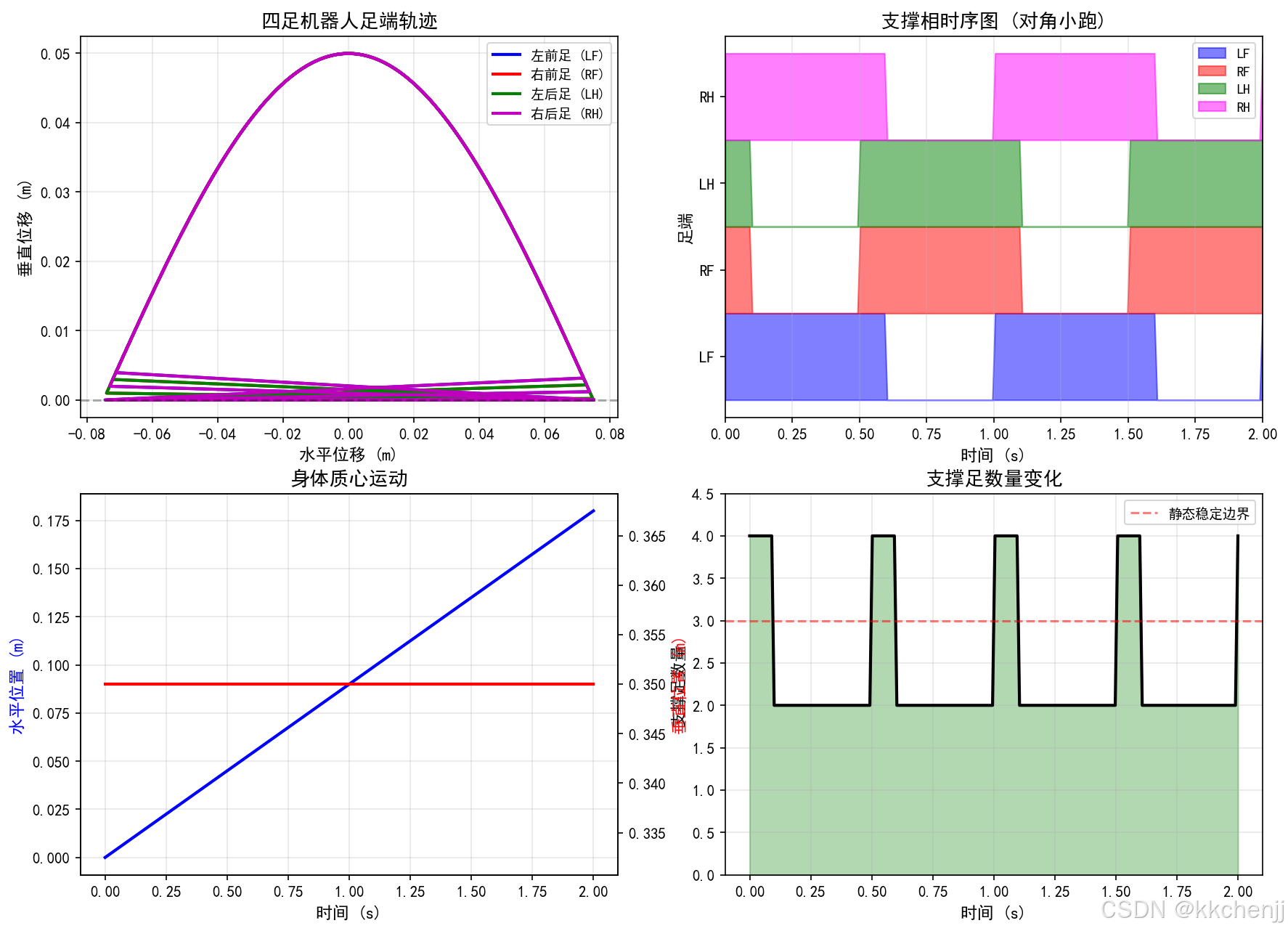
四足机器人通过模仿动物的运动方式,实现了复杂地形下的稳定行走。对角小跑步态(Trot)是最常用的步态之一,具有较好的稳定性和效率。
关键仿真要素:
- 足端轨迹规划(摆线轨迹)
- 支撑相与摆动相切换
- 身体质心运动控制
- 稳定性分析(支撑多边形)
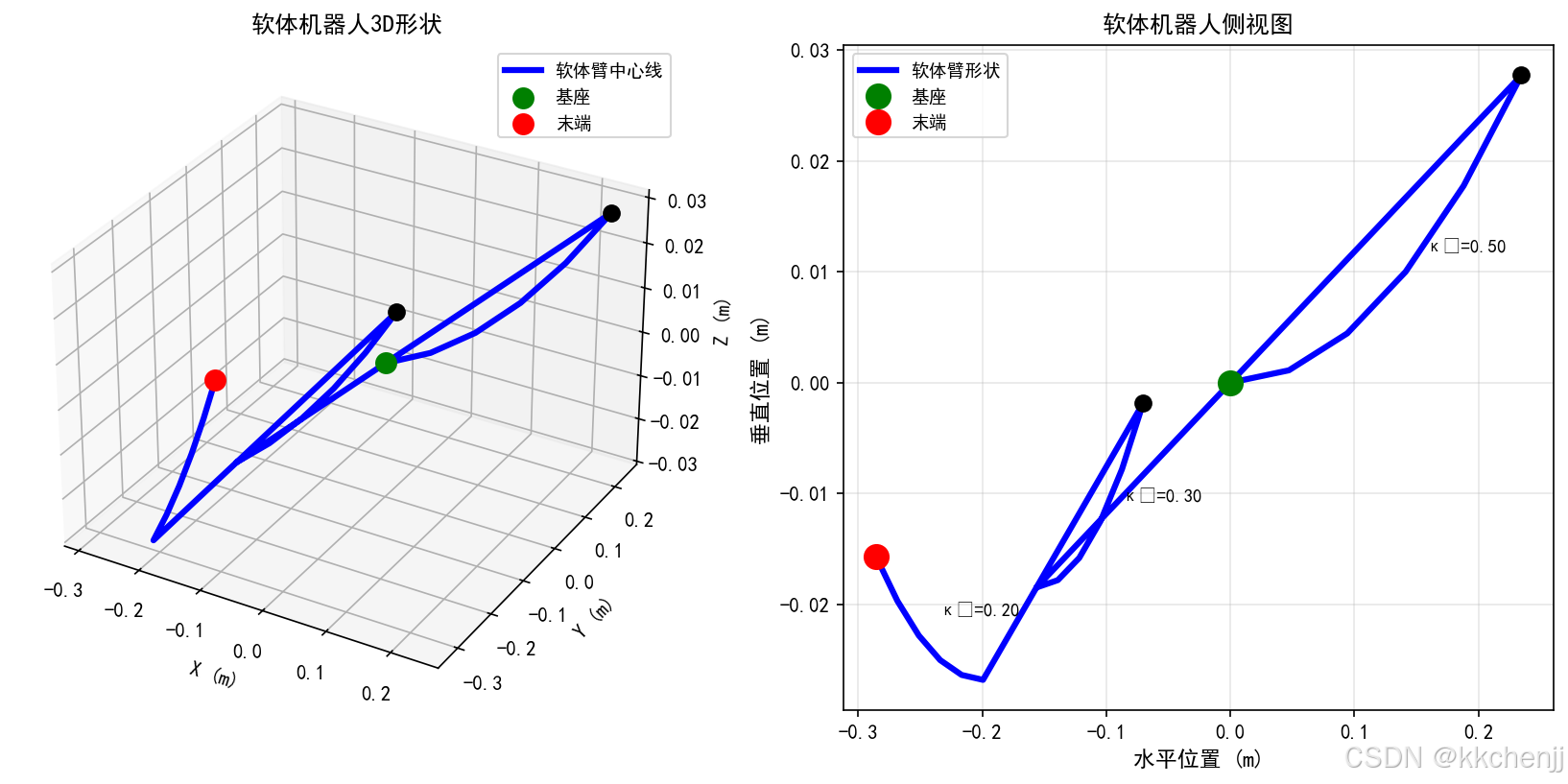
2.2 软体机器人仿真
软体机器人采用连续体结构,具有无限自由度特性。Cosserat杆理论是描述软体机器人动力学的有效方法。
技术特点:
- 连续体变形建模
- 分段常曲率近似
- 多段协同控制
- 柔顺交互能力
3. 空间探索应用
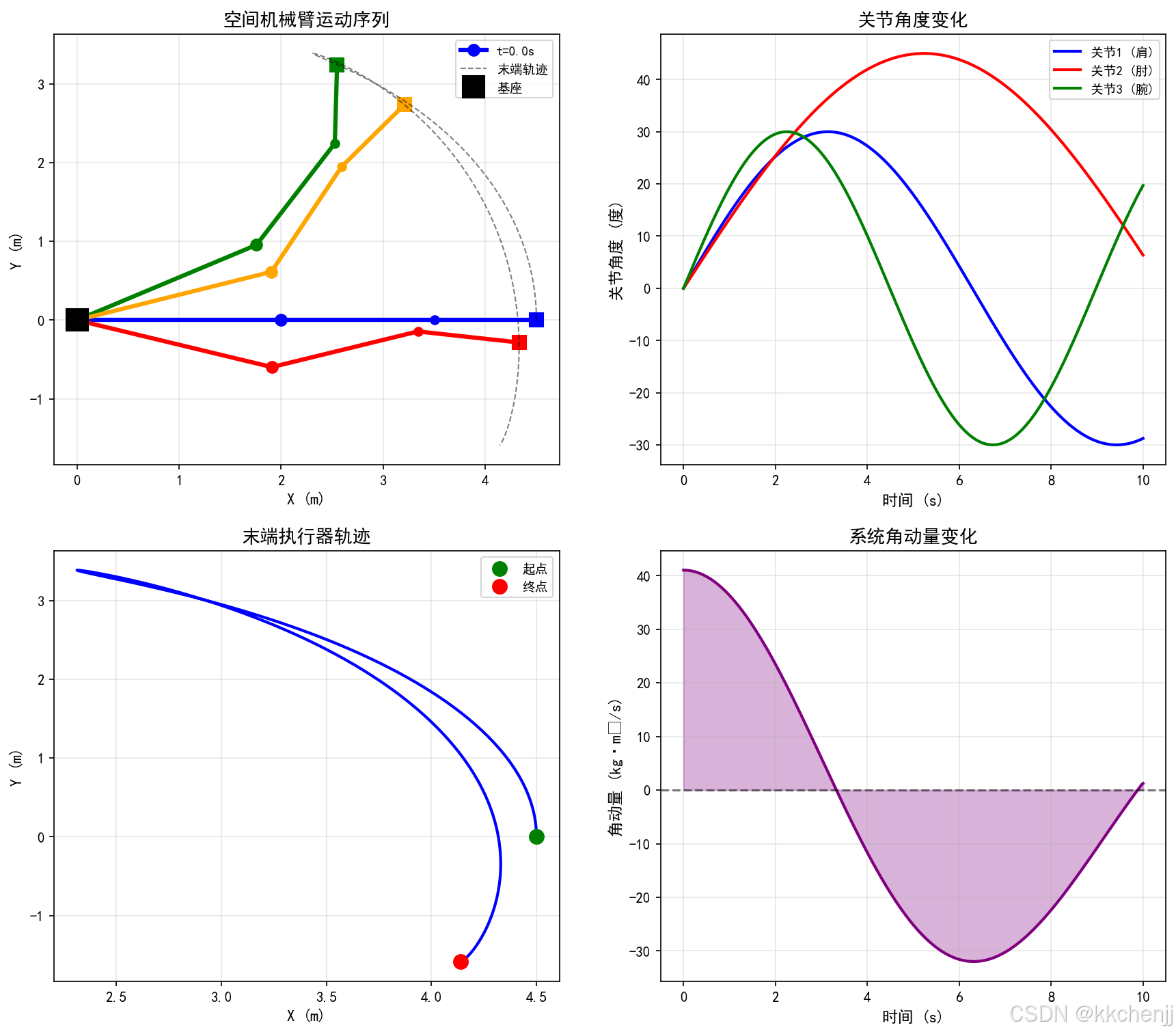
3.1 空间机械臂动力学
空间机械臂在微重力环境下工作,其动力学特性与地面机械臂有显著差异。基座自由漂浮特性使得机械臂运动会引起基座反作用。
关键问题:
- 角动量守恒约束
- 基座扰动补偿
- 末端执行器精确定位
- 避障路径规划
4. 医疗康复应用
4.1 外骨骼动力学仿真
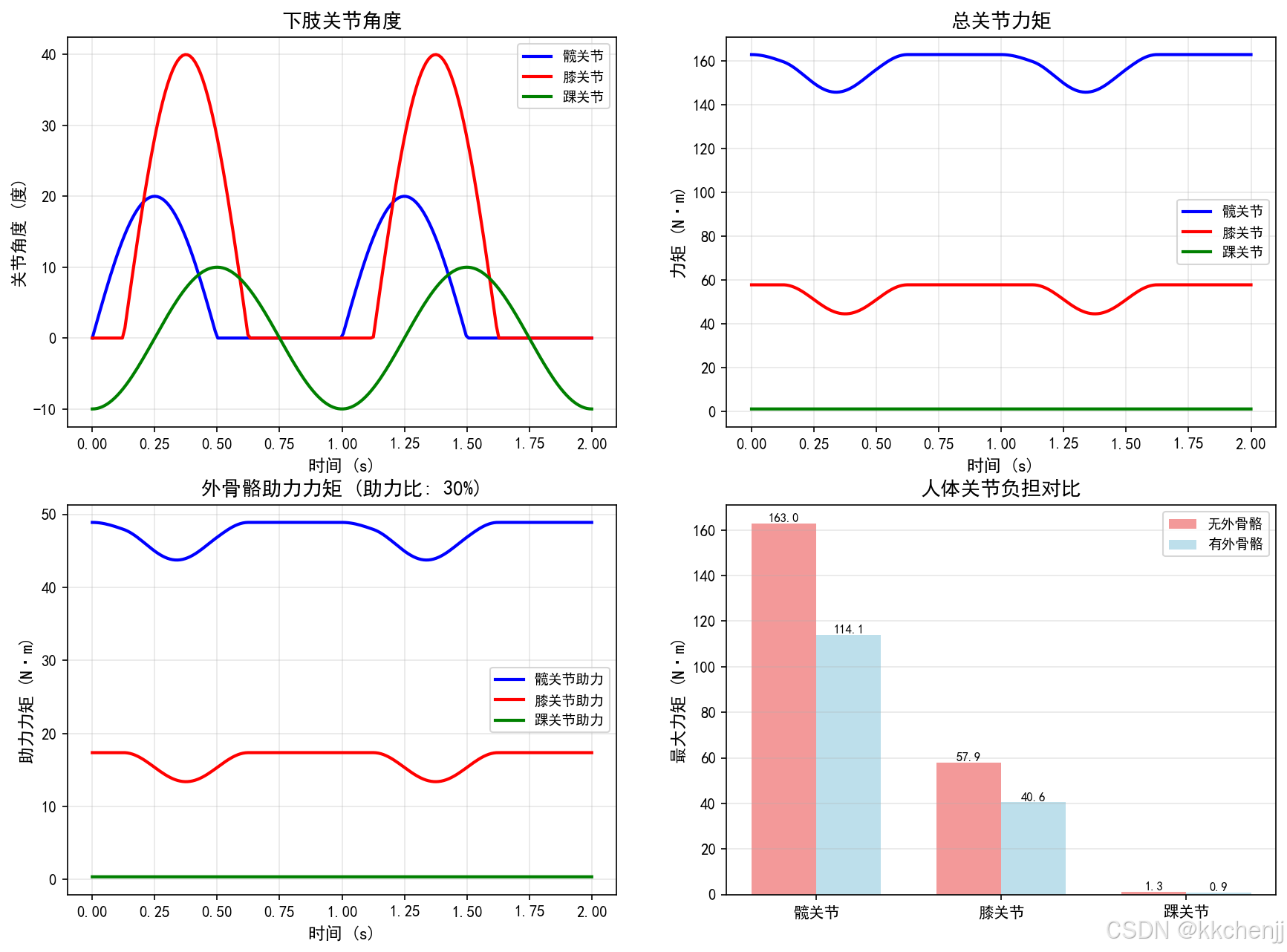
下肢外骨骼辅助行走系统需要协调人体自然步态与机械助力,实现人机协同运动。
设计考虑:
- 人机交互力控制
- 步态相位检测
- 助力策略优化
- 安全性保障
5. 虚拟现实与元宇宙
5.1 VR物理引擎原理
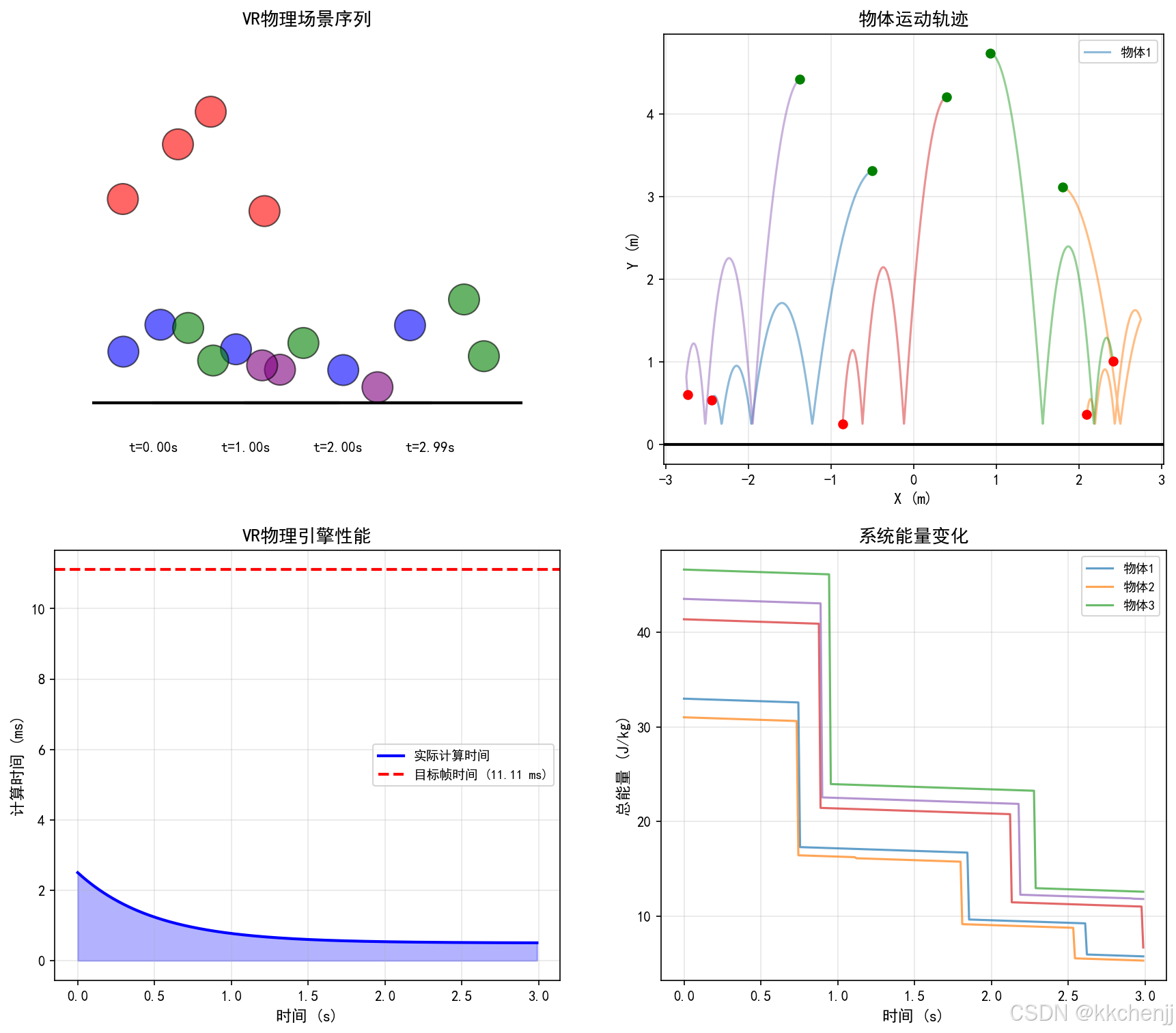
虚拟现实中的物理仿真需要满足实时性和真实性的双重要求。
核心技术:
- 刚体动力学快速求解
- 碰撞检测加速
- 约束求解优化
- 时间步长自适应
6. 智能制造应用
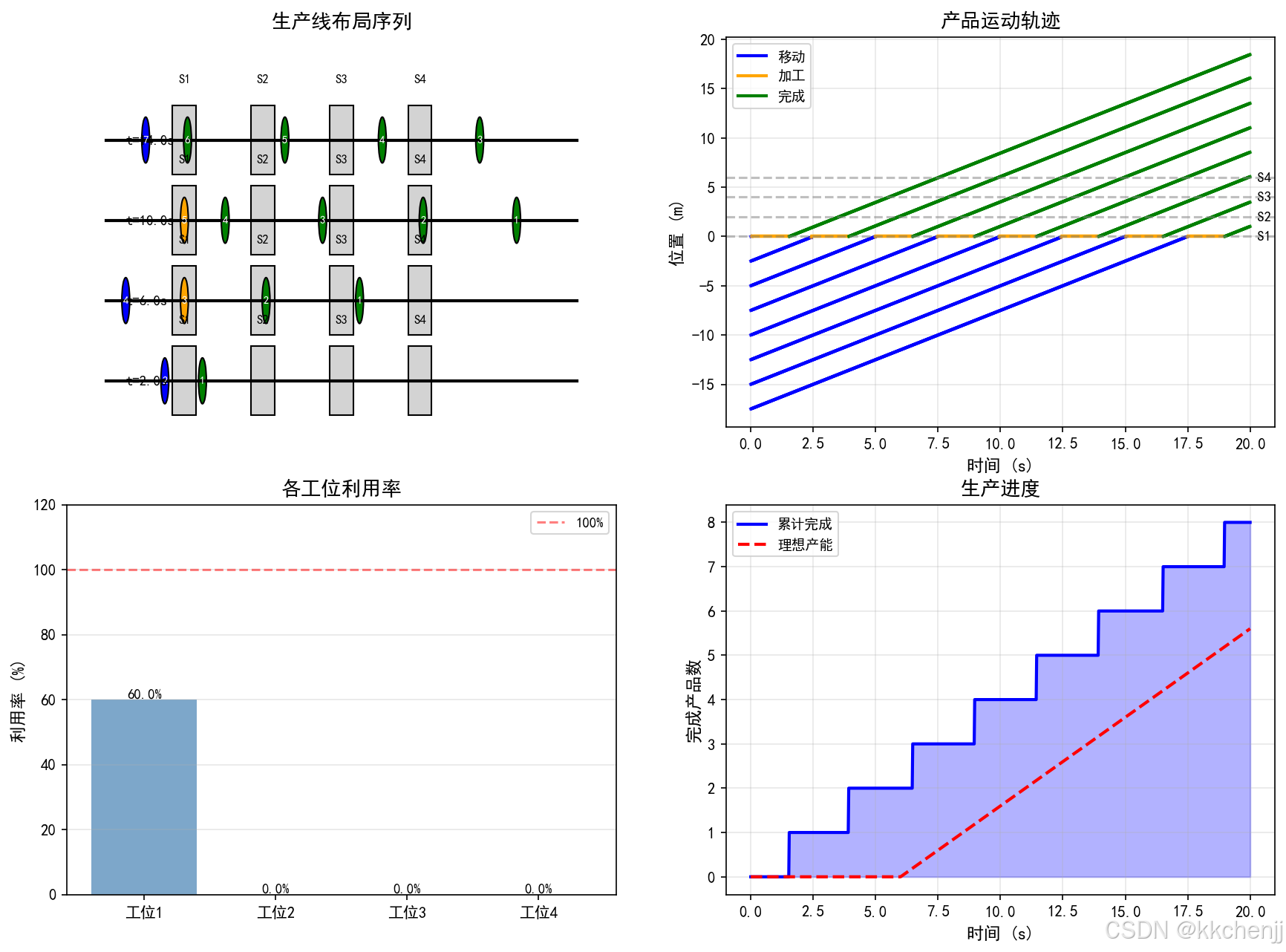
6.1 数字孪生产线
数字孪生技术将物理生产线与虚拟模型实时同步,实现生产过程的监控、预测和优化。
应用价值:
- 生产过程可视化
- 设备状态监控
- 产能预测分析
- 故障预警诊断
7. 新能源应用
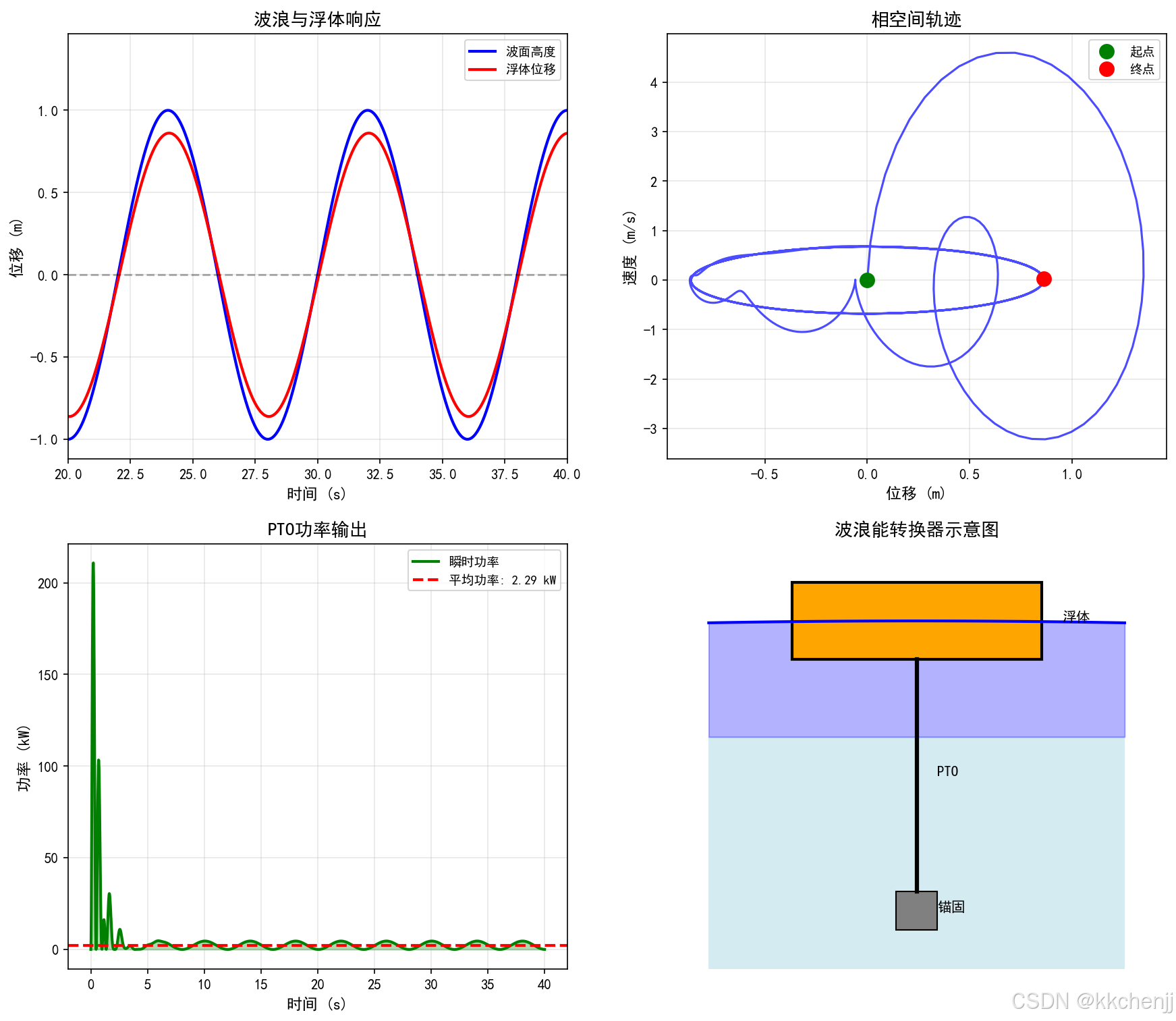
7.1 波浪能转换器仿真
波浪能转换器利用海洋波浪的机械能发电,是多体系统与流固耦合的典型应用。
系统组成:
- 浮体(能量捕获)
- PTO系统(能量转换)
- 锚固系统(定位)
- 电力输出
关键参数:
- 波高、周期、波长
- 浮体质量、几何形状
- PTO阻尼系数
- 捕获宽度比
8. 创新应用展望
8.1 技术发展趋势
┌─────────────────────────────────────────────────────────────────┐
│                   多体系统创新应用发展趋势                        │
├─────────────────────────────────────────────────────────────────┤
│                                                                  │
│  当前 ───────────────────────────────────────────────► 未来     │
│                                                                  │
│  单一物理场    →    多物理场耦合    →    智能自主系统            │
│       │                  │                    │                 │
│       ▼                  ▼                    ▼                 │
│  刚体动力学      流固耦合仿真        AI驱动仿真                  │
│  简单接触        多尺度建模          数字孪生                    │
│  离线分析        实时仿真            自主决策                    │
│                                                                  │
└─────────────────────────────────────────────────────────────────┘
8.2 应用前景
| 应用领域 | 当前状态 | 未来展望 |
|---|---|---|
| 仿生机器人 | 实验室验证 | 商业化应用 |
| 空间探索 | 在轨演示 | 深空探测 |
| 医疗康复 | 临床试用 | 普及化产品 |
| 虚拟现实 | 游戏娱乐 | 工业培训 |
| 智能制造 | 试点项目 | 全面数字化 |
| 新能源 | 原型测试 | 规模化部署 |
8.3 关键挑战
- 计算效率:大规模系统的实时仿真需求
- 模型精度:复杂物理现象的准确建模
- 人机交互:自然直观的交互方式
- 系统集成:多技术融合的系统工程
- 成本控制:商业化应用的经济可行性
8.4 发展建议
- 加强基础研究:深化多体动力学理论
- 推进产学研合作:加速技术转化
- 培养复合人才:跨学科知识整合
- 建立标准体系:规范行业发展
- 促进国际交流:共享创新成果
9. 总结
多体系统动力学仿真技术正在经历从传统工程应用向创新前沿领域的拓展。通过仿生机器人、空间探索、医疗康复、虚拟现实、智能制造和新能源等领域的应用探索,多体仿真技术展现出巨大的创新潜力和应用价值。
未来,随着计算能力的持续提升、算法的不断创新以及跨学科融合的深入,多体系统仿真将在更多领域发挥关键作用,推动人类社会向智能化、数字化方向发展。
参考文件
run_simulation.py:完整仿真代码quadruped_gait_simulation.png:四足机器人步态仿真结果soft_robot_simulation.png:软体机器人仿真结果space_manipulator_dynamics.png:空间机械臂动力学仿真结果exoskeleton_dynamics.png:外骨骼动力学仿真结果vr_physics_engine.png:VR物理引擎仿真结果digital_twin_production.png:数字孪生产线仿真结果wave_energy_converter.png:波浪能转换器仿真结果
"""
主题098:多体系统的创新应用探索
仿真代码:涵盖仿生机器人、空间探索、医疗康复、VR、智能制造、新能源应用
"""
import numpy as np
import matplotlib.pyplot as plt
from matplotlib import rcParams
from matplotlib.patches import Rectangle, Circle, FancyBboxPatch
from matplotlib.lines import Line2D
from mpl_toolkits.mplot3d import Axes3D
rcParams['font.sans-serif'] = ['SimHei', 'DejaVu Sans']
rcParams['axes.unicode_minus'] = False
def quadruped_gait_simulation():
"""四足机器人步态仿真"""
print("=" * 70)
print("四足机器人步态仿真")
print("=" * 70)
# 机器人参数
body_length = 0.6
body_width = 0.3
leg_length = 0.35
# 步态参数
gait_period = 1.0
duty_factor = 0.6
# 足端轨迹参数
step_length = 0.15
step_height = 0.05
# 时间参数
t = np.linspace(0, 2 * gait_period, 200)
# 对角小跑步态
phase_LF = 0
phase_RH = 0
phase_RF = np.pi
phase_LH = np.pi
def foot_trajectory(t, phase, period, duty, L, H):
"""生成足端轨迹"""
t_normalized = ((t + phase / (2 * np.pi) * period) % period) / period
x = np.zeros_like(t)
z = np.zeros_like(t)
stance = t_normalized < duty
x[stance] = L * (0.5 - t_normalized[stance] / duty)
z[stance] = 0
swing = ~stance
t_swing = (t_normalized[swing] - duty) / (1 - duty)
x[swing] = L * (0.5 - t_swing)
z[swing] = H * np.sin(np.pi * t_swing)
return x, z, stance
# 生成各足轨迹
x_LF, z_LF, stance_LF = foot_trajectory(t, phase_LF, gait_period, duty_factor, step_length, step_height)
x_RF, z_RF, stance_RF = foot_trajectory(t, phase_RF, gait_period, duty_factor, step_length, step_height)
x_LH, z_LH, stance_LH = foot_trajectory(t, phase_LH, gait_period, duty_factor, step_length, step_height)
x_RH, z_RH, stance_RH = foot_trajectory(t, phase_RH, gait_period, duty_factor, step_length, step_height)
# 计算身体运动
body_velocity = step_length * duty_factor / gait_period
body_x = body_velocity * t
body_z = np.ones_like(t) * leg_length
# 绘图
fig, axes = plt.subplots(2, 2, figsize=(14, 10))
# 1. 足端轨迹
ax1 = axes[0, 0]
ax1.plot(x_LF, z_LF, 'b-', linewidth=2, label='左前足 (LF)')
ax1.plot(x_RF, z_RF, 'r-', linewidth=2, label='右前足 (RF)')
ax1.plot(x_LH, z_LH, 'g-', linewidth=2, label='左后足 (LH)')
ax1.plot(x_RH, z_RH, 'm-', linewidth=2, label='右后足 (RH)')
ax1.axhline(y=0, color='k', linestyle='--', alpha=0.3)
ax1.set_xlabel('水平位移 (m)', fontsize=11)
ax1.set_ylabel('垂直位移 (m)', fontsize=11)
ax1.set_title('四足机器人足端轨迹', fontsize=13)
ax1.legend(fontsize=9)
ax1.grid(True, alpha=0.3)
# 2. 支撑相时序
ax2 = axes[0, 1]
ax2.fill_between(t, 0, stance_LF, alpha=0.5, color='blue', label='LF')
ax2.fill_between(t, 1, 1 + stance_RF, alpha=0.5, color='red', label='RF')
ax2.fill_between(t, 2, 2 + stance_LH, alpha=0.5, color='green', label='LH')
ax2.fill_between(t, 3, 3 + stance_RH, alpha=0.5, color='magenta', label='RH')
ax2.set_xlabel('时间 (s)', fontsize=11)
ax2.set_ylabel('足端', fontsize=11)
ax2.set_yticks([0.5, 1.5, 2.5, 3.5])
ax2.set_yticklabels(['LF', 'RF', 'LH', 'RH'])
ax2.set_title('支撑相时序图 (对角小跑)', fontsize=13)
ax2.legend(fontsize=9, loc='upper right')
ax2.grid(True, alpha=0.3, axis='x')
ax2.set_xlim([0, 2])
# 3. 身体运动
ax3 = axes[1, 0]
ax3.plot(t, body_x, 'b-', linewidth=2, label='水平位置')
ax3_twin = ax3.twinx()
ax3_twin.plot(t, body_z, 'r-', linewidth=2, label='垂直位置')
ax3.set_xlabel('时间 (s)', fontsize=11)
ax3.set_ylabel('水平位置 (m)', fontsize=11, color='blue')
ax3_twin.set_ylabel('垂直位置 (m)', fontsize=11, color='red')
ax3.set_title('身体质心运动', fontsize=13)
ax3.grid(True, alpha=0.3)
# 4. 步态稳定性分析
ax4 = axes[1, 1]
support_count = stance_LF.astype(int) + stance_RF.astype(int) + stance_LH.astype(int) + stance_RH.astype(int)
ax4.plot(t, support_count, 'k-', linewidth=2)
ax4.axhline(y=3, color='r', linestyle='--', alpha=0.5, label='静态稳定边界')
ax4.fill_between(t, 0, support_count, alpha=0.3, color='green')
ax4.set_xlabel('时间 (s)', fontsize=11)
ax4.set_ylabel('支撑足数量', fontsize=11)
ax4.set_title('支撑足数量变化', fontsize=13)
ax4.set_ylim([0, 4.5])
ax4.legend(fontsize=9)
ax4.grid(True, alpha=0.3)
plt.savefig('quadruped_gait_simulation.png', dpi=150, bbox_inches='tight')
plt.close()
print("\n四足机器人步态参数:")
print("-" * 50)
print(f"步态周期: {gait_period} s")
print(f"占空比: {duty_factor}")
print(f"步长: {step_length} m")
print(f"步高: {step_height} m")
print(f"前进速度: {body_velocity:.3f} m/s")
print(f"平均支撑足数量: {np.mean(support_count):.2f}")
print("-" * 50)
def soft_robot_simulation():
"""软体机器人仿真"""
print("\n" + "=" * 70)
print("软体机器人连续体动力学仿真")
print("=" * 70)
# 软体臂参数
L = 1.0
n_segments = 20
EI = 10.0
# 驱动参数
kappa1 = 0.5
kappa2 = 0.3
kappa3 = 0.2
phi = np.pi / 4
# 分段计算形状
L1, L2, L3 = L/3, L/3, L/3
# 第一段
s1 = np.linspace(0, L1, n_segments // 3)
theta1 = kappa1 * s1
R1 = 1 / kappa1 if kappa1 != 0 else float('inf')
x1 = R1 * np.sin(theta1) * np.cos(phi)
y1 = R1 * np.sin(theta1) * np.sin(phi)
z1 = R1 * (1 - np.cos(theta1))
# 第二段
phi2 = phi + np.pi / 6
s2 = np.linspace(0, L2, n_segments // 3)
theta2 = kappa2 * s2
R2 = 1 / kappa2 if kappa2 != 0 else float('inf')
x2 = x1[-1] + R2 * (np.sin(theta2) * np.cos(phi2) - np.sin(theta1[-1]) * np.cos(phi))
y2 = y1[-1] + R2 * (np.sin(theta2) * np.sin(phi2) - np.sin(theta1[-1]) * np.sin(phi))
z2 = z1[-1] + R2 * (np.cos(theta1[-1]) - np.cos(theta2))
# 第三段
phi3 = phi2 + np.pi / 6
s3 = np.linspace(0, L3, n_segments // 3)
theta3 = kappa3 * s3
R3 = 1 / kappa3 if kappa3 != 0 else float('inf')
x3 = x2[-1] + R3 * (np.sin(theta3) * np.cos(phi3) - np.sin(theta2[-1]) * np.cos(phi2))
y3 = y2[-1] + R3 * (np.sin(theta3) * np.sin(phi3) - np.sin(theta2[-1]) * np.sin(phi2))
z3 = z2[-1] + R3 * (np.cos(theta2[-1]) - np.cos(theta3))
# 合并
x = np.concatenate([x1, x2, x3])
y = np.concatenate([y1, y2, y3])
z = np.concatenate([z1, z2, z3])
# 绘图
fig = plt.figure(figsize=(14, 6))
# 3D视图
ax1 = fig.add_subplot(121, projection='3d')
ax1.plot(x, y, z, 'b-', linewidth=3, label='软体臂中心线')
ax1.scatter([x[0]], [y[0]], [z[0]], color='green', s=100, label='基座')
ax1.scatter([x[-1]], [y[-1]], [z[-1]], color='red', s=100, label='末端')
ax1.plot([x1[-1]], [y1[-1]], [z1[-1]], 'ko', markersize=8)
ax1.plot([x2[-1]], [y2[-1]], [z2[-1]], 'ko', markersize=8)
ax1.set_xlabel('X (m)', fontsize=10)
ax1.set_ylabel('Y (m)', fontsize=10)
ax1.set_zlabel('Z (m)', fontsize=10)
ax1.set_title('软体机器人3D形状', fontsize=12)
ax1.legend(fontsize=9)
# 2D侧视图
ax2 = fig.add_subplot(122)
ax2.plot(x, z, 'b-', linewidth=3, label='软体臂形状')
ax2.plot(x[0], z[0], 'go', markersize=12, label='基座')
ax2.plot(x[-1], z[-1], 'ro', markersize=12, label='末端')
ax2.plot([x1[-1]], [z1[-1]], 'ko', markersize=8)
ax2.plot([x2[-1]], [z2[-1]], 'ko', markersize=8)
ax2.annotate(f'κ₁={kappa1:.2f}', xy=(x1[len(x1)//2], z1[len(z1)//2]),
xytext=(10, 10), textcoords='offset points', fontsize=9)
ax2.annotate(f'κ₂={kappa2:.2f}', xy=(x2[len(x2)//2], z2[len(z2)//2]),
xytext=(10, 10), textcoords='offset points', fontsize=9)
ax2.annotate(f'κ₃={kappa3:.2f}', xy=(x3[len(x3)//2], z3[len(z3)//2]),
xytext=(10, 10), textcoords='offset points', fontsize=9)
ax2.set_xlabel('水平位置 (m)', fontsize=11)
ax2.set_ylabel('垂直位置 (m)', fontsize=11)
ax2.set_title('软体机器人侧视图', fontsize=12)
ax2.legend(fontsize=9)
ax2.grid(True, alpha=0.3)
plt.savefig('soft_robot_simulation.png', dpi=150, bbox_inches='tight')
plt.close()
print("\n软体机器人参数:")
print("-" * 50)
print(f"臂长: {L} m")
print(f"离散段数: {n_segments}")
print(f"弯曲刚度: {EI} N·m²")
print(f"第一段曲率: {kappa1} 1/m")
print(f"第二段曲率: {kappa2} 1/m")
print(f"第三段曲率: {kappa3} 1/m")
print(f"末端位置: ({x[-1]:.3f}, {y[-1]:.3f}, {z[-1]:.3f}) m")
print("-" * 50)
def space_manipulator_dynamics():
"""空间机械臂动力学仿真"""
print("\n" + "=" * 70)
print("空间机械臂动力学仿真")
print("=" * 70)
# 空间机械臂参数
m_base = 1000.0
m_link = [50.0, 40.0, 30.0]
L_link = [2.0, 1.5, 1.0]
# 关节角度轨迹
t = np.linspace(0, 10, 500)
theta1 = np.pi/6 * np.sin(0.5 * t)
theta2 = np.pi/4 * np.sin(0.3 * t)
theta3 = np.pi/6 * np.sin(0.7 * t)
# 计算连杆端点位置
x0, y0 = 0, 0
x1 = x0 + L_link[0] * np.cos(theta1)
y1 = y0 + L_link[0] * np.sin(theta1)
x2 = x1 + L_link[1] * np.cos(theta1 + theta2)
y2 = y1 + L_link[1] * np.sin(theta1 + theta2)
x3 = x2 + L_link[2] * np.cos(theta1 + theta2 + theta3)
y3 = y2 + L_link[2] * np.sin(theta1 + theta2 + theta3)
end_effector_x = x3
end_effector_y = y3
# 计算角动量
omega1 = np.gradient(theta1, t[1] - t[0])
omega2 = np.gradient(theta2, t[1] - t[0])
omega3 = np.gradient(theta3, t[1] - t[0])
I1 = m_link[0] * L_link[0]**2 / 3
I2 = m_link[1] * L_link[1]**2 / 3
I3 = m_link[2] * L_link[2]**2 / 3
angular_momentum = I1 * omega1 + I2 * (omega1 + omega2) + I3 * (omega1 + omega2 + omega3)
# 绘图
fig, axes = plt.subplots(2, 2, figsize=(14, 12))
# 1. 机械臂构型
ax1 = axes[0, 0]
time_indices = [0, 125, 250, 375]
colors = ['blue', 'green', 'orange', 'red']
for idx, (ti, color) in enumerate(zip(time_indices, colors)):
ax1.plot([x0, x1[ti]], [y0, y1[ti]], 'o-', color=color, linewidth=3,
markersize=8, label=f't={t[ti]:.1f}s' if idx == 0 else '')
ax1.plot([x1[ti], x2[ti]], [y1[ti], y2[ti]], 'o-', color=color, linewidth=3, markersize=6)
ax1.plot([x2[ti], x3[ti]], [y2[ti], y3[ti]], 'o-', color=color, linewidth=3, markersize=4)
ax1.plot(x3[ti], y3[ti], 's', color=color, markersize=10)
ax1.plot(end_effector_x, end_effector_y, 'k--', linewidth=1, alpha=0.5, label='末端轨迹')
ax1.plot(x0, y0, 'ks', markersize=15, label='基座')
ax1.set_xlabel('X (m)', fontsize=11)
ax1.set_ylabel('Y (m)', fontsize=11)
ax1.set_title('空间机械臂运动序列', fontsize=13)
ax1.legend(fontsize=9)
ax1.grid(True, alpha=0.3)
# 2. 关节角度
ax2 = axes[0, 1]
ax2.plot(t, theta1 * 180/np.pi, 'b-', linewidth=2, label='关节1 (肩)')
ax2.plot(t, theta2 * 180/np.pi, 'r-', linewidth=2, label='关节2 (肘)')
ax2.plot(t, theta3 * 180/np.pi, 'g-', linewidth=2, label='关节3 (腕)')
ax2.set_xlabel('时间 (s)', fontsize=11)
ax2.set_ylabel('关节角度 (度)', fontsize=11)
ax2.set_title('关节角度变化', fontsize=13)
ax2.legend(fontsize=9)
ax2.grid(True, alpha=0.3)
# 3. 末端轨迹
ax3 = axes[1, 0]
ax3.plot(end_effector_x, end_effector_y, 'b-', linewidth=2)
ax3.plot(end_effector_x[0], end_effector_y[0], 'go', markersize=10, label='起点')
ax3.plot(end_effector_x[-1], end_effector_y[-1], 'ro', markersize=10, label='终点')
ax3.set_xlabel('X (m)', fontsize=11)
ax3.set_ylabel('Y (m)', fontsize=11)
ax3.set_title('末端执行器轨迹', fontsize=13)
ax3.legend(fontsize=9)
ax3.grid(True, alpha=0.3)
# 4. 角动量变化
ax4 = axes[1, 1]
ax4.plot(t, angular_momentum, 'purple', linewidth=2)
ax4.axhline(y=0, color='k', linestyle='--', alpha=0.5)
ax4.fill_between(t, 0, angular_momentum, alpha=0.3, color='purple')
ax4.set_xlabel('时间 (s)', fontsize=11)
ax4.set_ylabel('角动量 (kg·m²/s)', fontsize=11)
ax4.set_title('系统角动量变化', fontsize=13)
ax4.grid(True, alpha=0.3)
plt.savefig('space_manipulator_dynamics.png', dpi=150, bbox_inches='tight')
plt.close()
print("\n空间机械臂参数:")
print("-" * 50)
print(f"基座质量: {m_base} kg")
print(f"连杆质量: {m_link} kg")
print(f"连杆长度: {L_link} m")
print(f"仿真时间: {t[-1]} s")
print(f"末端最大位移: X={np.max(end_effector_x)-np.min(end_effector_x):.3f} m, Y={np.max(end_effector_y)-np.min(end_effector_y):.3f} m")
print("-" * 50)
def exoskeleton_dynamics():
"""外骨骼动力学仿真"""
print("\n" + "=" * 70)
print("下肢外骨骼动力学仿真")
print("=" * 70)
# 人体-外骨骼系统参数
m_human = 70.0
m_exo = 15.0
L_thigh = 0.45
L_shank = 0.50
L_foot = 0.25
T_gait = 1.0
# 生成步态轨迹
t = np.linspace(0, 2 * T_gait, 200)
# 髋关节角度
theta_hip = 20 * np.sin(2 * np.pi * t / T_gait) * np.pi / 180
theta_hip[theta_hip < 0] = 0 # 屈曲限制
# 膝关节角度
theta_knee = 40 * np.sin(2 * np.pi * t / T_gait - np.pi/4) * np.pi / 180
theta_knee[theta_knee < 0] = 0
# 踝关节角度
theta_ankle = 10 * np.sin(2 * np.pi * t / T_gait - np.pi/2) * np.pi / 180
# 计算关节力矩(简化逆动力学)
# 假设质心在连杆中点
g = 9.81
# 大腿质心位置
m_thigh = 0.15 * m_human
r_thigh = L_thigh / 2
# 小腿质心位置
m_shank = 0.10 * m_human
r_shank = L_shank / 2
# 足质心位置
m_foot = 0.015 * m_human
r_foot = L_foot / 2
# 计算关节力矩
tau_ankle = m_foot * g * r_foot * np.cos(theta_ankle)
tau_knee = tau_ankle + (m_foot + m_shank) * g * L_shank * np.cos(theta_knee) + m_shank * g * r_shank * np.cos(theta_knee)
tau_hip = tau_knee + (m_foot + m_shank + m_thigh) * g * L_thigh * np.cos(theta_hip) + m_thigh * g * r_thigh * np.cos(theta_hip)
# 外骨骼助力力矩(比例助力)
assistance_ratio = 0.3 # 30%助力
tau_exo_hip = assistance_ratio * tau_hip
tau_exo_knee = assistance_ratio * tau_knee
tau_exo_ankle = assistance_ratio * tau_ankle
# 人体实际承担力矩
tau_human_hip = tau_hip - tau_exo_hip
tau_human_knee = tau_knee - tau_exo_knee
tau_human_ankle = tau_ankle - tau_exo_ankle
# 绘图
fig, axes = plt.subplots(2, 2, figsize=(14, 10))
# 1. 关节角度
ax1 = axes[0, 0]
ax1.plot(t, theta_hip * 180/np.pi, 'b-', linewidth=2, label='髋关节')
ax1.plot(t, theta_knee * 180/np.pi, 'r-', linewidth=2, label='膝关节')
ax1.plot(t, theta_ankle * 180/np.pi, 'g-', linewidth=2, label='踝关节')
ax1.set_xlabel('时间 (s)', fontsize=11)
ax1.set_ylabel('关节角度 (度)', fontsize=11)
ax1.set_title('下肢关节角度', fontsize=13)
ax1.legend(fontsize=9)
ax1.grid(True, alpha=0.3)
# 2. 总关节力矩
ax2 = axes[0, 1]
ax2.plot(t, tau_hip, 'b-', linewidth=2, label='髋关节')
ax2.plot(t, tau_knee, 'r-', linewidth=2, label='膝关节')
ax2.plot(t, tau_ankle, 'g-', linewidth=2, label='踝关节')
ax2.set_xlabel('时间 (s)', fontsize=11)
ax2.set_ylabel('力矩 (N·m)', fontsize=11)
ax2.set_title('总关节力矩', fontsize=13)
ax2.legend(fontsize=9)
ax2.grid(True, alpha=0.3)
# 3. 外骨骼助力力矩
ax3 = axes[1, 0]
ax3.plot(t, tau_exo_hip, 'b-', linewidth=2, label='髋关节助力')
ax3.plot(t, tau_exo_knee, 'r-', linewidth=2, label='膝关节助力')
ax3.plot(t, tau_exo_ankle, 'g-', linewidth=2, label='踝关节助力')
ax3.set_xlabel('时间 (s)', fontsize=11)
ax3.set_ylabel('助力力矩 (N·m)', fontsize=11)
ax3.set_title(f'外骨骼助力力矩 (助力比: {assistance_ratio*100:.0f}%)', fontsize=13)
ax3.legend(fontsize=9)
ax3.grid(True, alpha=0.3)
# 4. 人体负担对比
ax4 = axes[1, 1]
width = 0.35
x_labels = ['髋关节', '膝关节', '踝关节']
x_pos = np.arange(len(x_labels))
tau_max_without = [np.max(np.abs(tau_hip)), np.max(np.abs(tau_knee)), np.max(np.abs(tau_ankle))]
tau_max_with = [np.max(np.abs(tau_human_hip)), np.max(np.abs(tau_human_knee)), np.max(np.abs(tau_human_ankle))]
bars1 = ax4.bar(x_pos - width/2, tau_max_without, width, label='无外骨骼', color='lightcoral', alpha=0.8)
bars2 = ax4.bar(x_pos + width/2, tau_max_with, width, label='有外骨骼', color='lightblue', alpha=0.8)
ax4.set_ylabel('最大力矩 (N·m)', fontsize=11)
ax4.set_title('人体关节负担对比', fontsize=13)
ax4.set_xticks(x_pos)
ax4.set_xticklabels(x_labels)
ax4.legend(fontsize=9)
ax4.grid(True, alpha=0.3, axis='y')
# 添加数值标签
for bar in bars1:
height = bar.get_height()
ax4.text(bar.get_x() + bar.get_width()/2., height,
f'{height:.1f}', ha='center', va='bottom', fontsize=8)
for bar in bars2:
height = bar.get_height()
ax4.text(bar.get_x() + bar.get_width()/2., height,
f'{height:.1f}', ha='center', va='bottom', fontsize=8)
plt.savefig('exoskeleton_dynamics.png', dpi=150, bbox_inches='tight')
plt.close()
print("\n外骨骼系统参数:")
print("-" * 50)
print(f"人体质量: {m_human} kg")
print(f"外骨骼质量: {m_exo} kg")
print(f"大腿长度: {L_thigh} m")
print(f"小腿长度: {L_shank} m")
print(f"步态周期: {T_gait} s")
print(f"助力比例: {assistance_ratio*100:.0f}%")
print(f"髋关节最大力矩(无/有): {np.max(tau_hip):.1f}/{np.max(tau_human_hip):.1f} N·m")
print(f"膝关节最大力矩(无/有): {np.max(tau_knee):.1f}/{np.max(tau_human_knee):.1f} N·m")
print("-" * 50)
def vr_physics_engine():
"""VR物理引擎仿真"""
print("\n" + "=" * 70)
print("VR物理引擎仿真")
print("=" * 70)
# 物理场景参数
n_objects = 5
dt = 1/90 # 90Hz刷新率
t_total = 3.0
n_steps = int(t_total / dt)
# 物体参数
np.random.seed(42)
positions = np.zeros((n_objects, n_steps, 2))
velocities = np.zeros((n_objects, n_steps, 2))
# 初始条件
positions[:, 0, 0] = np.random.uniform(-2, 2, n_objects)
positions[:, 0, 1] = np.random.uniform(3, 5, n_objects)
velocities[:, 0, 0] = np.random.uniform(-1, 1, n_objects)
velocities[:, 0, 1] = np.random.uniform(-0.5, 0.5, n_objects)
# 物理参数
g = 9.81
restitution = 0.7 # 弹性系数
mu = 0.3 # 摩擦系数
# 场景边界
ground_y = 0
wall_x = [-3, 3]
# 简单物理模拟
for i in range(n_steps - 1):
for obj in range(n_objects):
# 重力
velocities[obj, i+1, 1] = velocities[obj, i, 1] - g * dt
velocities[obj, i+1, 0] = velocities[obj, i, 0]
# 更新位置
positions[obj, i+1] = positions[obj, i] + velocities[obj, i+1] * dt
# 地面碰撞
if positions[obj, i+1, 1] < ground_y + 0.25:
positions[obj, i+1, 1] = ground_y + 0.25
velocities[obj, i+1, 1] = -velocities[obj, i+1, 1] * restitution
velocities[obj, i+1, 0] *= (1 - mu) # 摩擦
# 墙壁碰撞
if positions[obj, i+1, 0] < wall_x[0] + 0.25:
positions[obj, i+1, 0] = wall_x[0] + 0.25
velocities[obj, i+1, 0] = -velocities[obj, i+1, 0] * restitution
elif positions[obj, i+1, 0] > wall_x[1] - 0.25:
positions[obj, i+1, 0] = wall_x[1] - 0.25
velocities[obj, i+1, 0] = -velocities[obj, i+1, 0] * restitution
# 计算性能指标
computation_time = np.zeros(n_steps)
for i in range(n_steps):
# 模拟计算时间(简化模型)
computation_time[i] = 0.5 + 2.0 * np.exp(-i * dt / 0.5) # 初始加载,后稳定
frame_time = dt * 1000 # 目标帧时间(ms)
# 绘图
fig, axes = plt.subplots(2, 2, figsize=(14, 12))
# 1. 物理场景快照
ax1 = axes[0, 0]
snapshot_times = [0, int(n_steps/3), int(2*n_steps/3), n_steps-1]
colors = ['red', 'blue', 'green', 'purple']
for idx, (ti, color) in enumerate(zip(snapshot_times, colors)):
offset_x = idx * 1.5
# 绘制地面
ax1.plot([offset_x + wall_x[0], offset_x + wall_x[1]], [ground_y, ground_y], 'k-', linewidth=2)
# 绘制物体
for obj in range(n_objects):
circle = Circle((offset_x + positions[obj, ti, 0], positions[obj, ti, 1]),
0.25, facecolor=color, edgecolor='black', alpha=0.6)
ax1.add_patch(circle)
ax1.text(offset_x, -0.8, f't={ti*dt:.2f}s', ha='center', fontsize=10)
ax1.set_xlim([-1, 6])
ax1.set_ylim([-1, 6])
ax1.set_title('VR物理场景序列', fontsize=13)
ax1.set_aspect('equal')
ax1.axis('off')
# 2. 物体轨迹
ax2 = axes[0, 1]
for obj in range(n_objects):
t_plot = np.arange(n_steps) * dt
ax2.plot(positions[obj, :, 0], positions[obj, :, 1],
alpha=0.5, linewidth=1.5, label=f'物体{obj+1}' if obj == 0 else '')
ax2.plot(positions[obj, 0, 0], positions[obj, 0, 1], 'go', markersize=6)
ax2.plot(positions[obj, -1, 0], positions[obj, -1, 1], 'ro', markersize=6)
# 绘制地面
ax2.axhline(y=ground_y, color='k', linestyle='-', linewidth=2)
ax2.set_xlabel('X (m)', fontsize=11)
ax2.set_ylabel('Y (m)', fontsize=11)
ax2.set_title('物体运动轨迹', fontsize=13)
ax2.legend(fontsize=9)
ax2.grid(True, alpha=0.3)
ax2.set_aspect('equal')
# 3. 计算性能
ax3 = axes[1, 0]
t_plot = np.arange(n_steps) * dt
ax3.plot(t_plot, computation_time, 'b-', linewidth=2, label='实际计算时间')
ax3.axhline(y=frame_time, color='r', linestyle='--', linewidth=2, label=f'目标帧时间 ({frame_time:.2f} ms)')
ax3.fill_between(t_plot, 0, computation_time, alpha=0.3, color='blue')
ax3.set_xlabel('时间 (s)', fontsize=11)
ax3.set_ylabel('计算时间 (ms)', fontsize=11)
ax3.set_title('VR物理引擎性能', fontsize=13)
ax3.legend(fontsize=9)
ax3.grid(True, alpha=0.3)
# 4. 物理统计
ax4 = axes[1, 1]
# 计算各物体的总能量
total_energy = np.zeros((n_objects, n_steps))
for obj in range(n_objects):
v_squared = velocities[obj, :, 0]**2 + velocities[obj, :, 1]**2
potential = 9.81 * positions[obj, :, 1]
total_energy[obj] = 0.5 * v_squared + potential
for obj in range(n_objects):
ax4.plot(t_plot, total_energy[obj], linewidth=1.5, alpha=0.7, label=f'物体{obj+1}' if obj < 3 else '')
ax4.set_xlabel('时间 (s)', fontsize=11)
ax4.set_ylabel('总能量 (J/kg)', fontsize=11)
ax4.set_title('系统能量变化', fontsize=13)
ax4.legend(fontsize=9)
ax4.grid(True, alpha=0.3)
plt.savefig('vr_physics_engine.png', dpi=150, bbox_inches='tight')
plt.close()
print("\nVR物理引擎参数:")
print("-" * 50)
print(f"物体数量: {n_objects}")
print(f"仿真时长: {t_total} s")
print(f"时间步长: {dt*1000:.2f} ms ({1/dt:.0f} Hz)")
print(f"弹性系数: {restitution}")
print(f"摩擦系数: {mu}")
print(f"平均计算时间: {np.mean(computation_time):.2f} ms")
print(f"性能余量: {(frame_time - np.mean(computation_time)) / frame_time * 100:.1f}%")
print("-" * 50)
def digital_twin_production():
"""数字孪生产线仿真"""
print("\n" + "=" * 70)
print("数字孪生产线仿真")
print("=" * 70)
# 生产线参数
n_stations = 4
n_products = 8
conveyor_speed = 1.0
station_spacing = 2.0
# 工位加工时间
process_times = [1.5, 2.0, 1.8, 1.2]
# 仿真参数
t = np.linspace(0, 20, 1000)
dt = t[1] - t[0]
# 产品状态追踪
# 0: 移动中, 1: 加工中, 2: 完成
product_states = np.zeros((n_products, len(t)))
product_positions = np.zeros((n_products, len(t)))
# 初始化产品位置
product_spacing = 2.5
for pi in range(n_products):
product_positions[pi, 0] = -pi * product_spacing
# 工位状态
station_busy = np.zeros((n_stations, len(t)))
station_utilization = np.zeros(n_stations)
# 仿真循环
for ti in range(1, len(t)):
for pi in range(n_products):
current_pos = product_positions[pi, ti-1]
current_state = product_states[pi, ti-1]
if current_state == 0: # 移动中
# 检查是否到达工位
at_station = -1
for si in range(n_stations):
station_pos = si * station_spacing
if abs(current_pos - station_pos) < 0.1 and station_busy[si, ti-1] == 0:
at_station = si
break
if at_station >= 0 and np.random.random() < 0.3:
# 开始加工
product_states[pi, ti] = 1
station_busy[at_station, ti] = 1
product_positions[pi, ti] = current_pos
else:
# 继续移动
product_positions[pi, ti] = current_pos + conveyor_speed * dt
product_states[pi, ti] = 0
elif current_state == 1: # 加工中
# 检查加工是否完成
process_duration = process_times[int(product_positions[pi, ti-1] / station_spacing)]
time_in_process = np.sum(product_states[pi, :ti] == 1) * dt
if time_in_process >= process_duration:
product_states[pi, ti] = 2 # 完成
station_busy[int(product_positions[pi, ti-1] / station_spacing), ti] = 0
else:
product_states[pi, ti] = 1
station_busy[int(product_positions[pi, ti-1] / station_spacing), ti] = 1
else: # 已完成,继续移动
product_positions[pi, ti] = current_pos + conveyor_speed * dt
product_states[pi, ti] = 2
# 计算工位利用率
for si in range(n_stations):
station_utilization[si] = np.mean(station_busy[si]) * 100
# 计算生产效率
completed = np.sum(product_states[:, -1] == 2)
throughput = completed / (t[-1] / 3600) # 件/小时
# 绘图
fig, axes = plt.subplots(2, 2, figsize=(14, 10))
# 1. 生产线布局
ax1 = axes[0, 0]
# 绘制几个时刻的快照
snapshot_times = [100, 300, 500, 700]
colors = ['blue', 'orange', 'green']
for idx, ti in enumerate(snapshot_times):
y_offset = idx * 0.35
# 绘制传送带
ax1.plot([-2, 10], [y_offset, y_offset], 'k-', linewidth=2)
# 绘制工位
for si in range(n_stations):
rect = Rectangle((si * station_spacing - 0.3, y_offset - 0.15),
0.6, 0.3,
facecolor='lightgray', edgecolor='black', linewidth=1)
ax1.add_patch(rect)
ax1.text(si * station_spacing, y_offset + 0.25, f'S{si+1}',
ha='center', fontsize=8)
# 绘制产品
for pi in range(n_products):
x = product_positions[pi, ti]
if -2 < x < 10:
state = int(product_states[pi, ti])
color = colors[state]
circle = Circle((x, y_offset), 0.1,
facecolor=color, edgecolor='black', linewidth=1)
ax1.add_patch(circle)
ax1.text(x, y_offset, str(pi+1), ha='center', va='center',
fontsize=7, color='white', fontweight='bold')
ax1.text(-1.5, y_offset, f't={t[ti]:.1f}s', fontsize=9, va='center')
ax1.set_xlim([-3, 11])
ax1.set_ylim([-0.2, 1.5])
ax1.set_xlabel('位置 (m)', fontsize=11)
ax1.set_title('生产线布局序列', fontsize=13)
ax1.axis('off')
# 2. 产品位置-时间图
ax2 = axes[0, 1]
for pi in range(n_products):
state_colors = ['blue', 'orange', 'green']
for ti in range(len(t)-1):
color = state_colors[int(product_states[pi, ti])]
ax2.plot([t[ti], t[ti+1]], [product_positions[pi, ti], product_positions[pi, ti+1]],
color=color, linewidth=2, alpha=0.7)
# 标记工位位置
for si in range(n_stations):
ax2.axhline(y=si*station_spacing, color='gray', linestyle='--', alpha=0.5)
ax2.text(t[-1], si*station_spacing, f' S{si+1}', fontsize=9, va='center')
ax2.set_xlabel('时间 (s)', fontsize=11)
ax2.set_ylabel('位置 (m)', fontsize=11)
ax2.set_title('产品运动轨迹', fontsize=13)
ax2.grid(True, alpha=0.3)
# 添加图例
legend_elements = [
Line2D([0], [0], color='blue', linewidth=2, label='移动'),
Line2D([0], [0], color='orange', linewidth=2, label='加工'),
Line2D([0], [0], color='green', linewidth=2, label='完成')
]
ax2.legend(handles=legend_elements, fontsize=9)
# 3. 工位利用率
ax3 = axes[1, 0]
station_names = [f'工位{i+1}' for i in range(n_stations)]
bars = ax3.bar(station_names, station_utilization, color='steelblue', alpha=0.7)
ax3.axhline(y=100, color='red', linestyle='--', alpha=0.5, label='100%')
ax3.set_ylabel('利用率 (%)', fontsize=11)
ax3.set_title('各工位利用率', fontsize=13)
ax3.set_ylim([0, 120])
# 添加数值标签
for bar, util in zip(bars, station_utilization):
height = bar.get_height()
ax3.text(bar.get_x() + bar.get_width()/2., height,
f'{util:.1f}%', ha='center', va='bottom', fontsize=9)
ax3.legend(fontsize=9)
ax3.grid(True, alpha=0.3, axis='y')
# 4. 生产统计
ax4 = axes[1, 1]
# 计算累计完成数
completed_count = np.zeros_like(t)
for ti in range(len(t)):
completed_count[ti] = np.sum(product_states[:, ti] == 2)
ax4.plot(t, completed_count, 'b-', linewidth=2, label='累计完成')
ax4.fill_between(t, 0, completed_count, alpha=0.3, color='blue')
# 理想生产线(无等待)
ideal_time = (n_stations - 1) * station_spacing / conveyor_speed
ideal_count = np.maximum(0, (t - ideal_time) / (product_spacing / conveyor_speed))
ideal_count = np.minimum(ideal_count, n_products)
ax4.plot(t, ideal_count, 'r--', linewidth=2, label='理想产能')
ax4.set_xlabel('时间 (s)', fontsize=11)
ax4.set_ylabel('完成产品数', fontsize=11)
ax4.set_title('生产进度', fontsize=13)
ax4.legend(fontsize=9)
ax4.grid(True, alpha=0.3)
plt.savefig('digital_twin_production.png', dpi=150, bbox_inches='tight')
plt.close()
print("\n数字孪生产线参数:")
print("-" * 50)
print(f"工位数量: {n_stations}")
print(f"产品数量: {n_products}")
print(f"传送带速度: {conveyor_speed} m/s")
print(f"仿真时长: {t[-1]} s")
print(f"完成产品: {int(completed)} / {n_products}")
print(f"生产效率: {throughput:.1f} 件/小时")
print(f"平均工位利用率: {np.mean(station_utilization):.1f}%")
print("-" * 50)
def wave_energy_converter():
"""波浪能转换器仿真"""
print("\n" + "=" * 70)
print("波浪能转换器动力学仿真")
print("=" * 70)
# 波浪参数
H_wave = 2.0
T_wave = 8.0
lambda_wave = 100.0
# 浮体参数
m_float = 5000.0
r_float = 3.0
h_float = 2.0
# PTO参数
k_pto = 50000.0
c_pto = 10000.0
# 水动力参数
rho_water = 1025
g = 9.81
# 附加质量
m_added = 0.5 * m_float
# 辐射阻尼
c_rad = 5000.0
# 静水恢复力系数
A_waterplane = np.pi * r_float**2
k_hydro = rho_water * g * A_waterplane
# 时间参数
t = np.linspace(0, 40, 2000)
dt = t[1] - t[0]
omega_wave = 2 * np.pi / T_wave
k_wave = 2 * np.pi / lambda_wave
# 入射波面高度
eta_wave = H_wave / 2 * np.cos(omega_wave * t - k_wave * 0)
# 激励力
F_exc = rho_water * g * A_waterplane * H_wave / 2 * np.cos(omega_wave * t)
# 数值积分
z = np.zeros_like(t)
v = np.zeros_like(t)
z[0] = 0
v[0] = 0
for i in range(len(t) - 1):
v_rel = v[i]
F_total = F_exc[i] - k_hydro * z[i] - (c_pto + c_rad) * v[i] - k_pto * z[i]
a = F_total / (m_float + m_added)
v[i+1] = v[i] + a * dt
z[i+1] = z[i] + v[i+1] * dt
# 计算功率
P_absorbed = c_pto * v**2
P_wave = rho_water * g * H_wave**2 / 8 * 0.5 * (lambda_wave / T_wave)
P_avg = np.mean(P_absorbed[int(len(t)/2):])
capture_width_ratio = P_avg / (P_wave / lambda_wave * 2 * r_float)
# 绘图
fig, axes = plt.subplots(2, 2, figsize=(14, 12))
# 1. 波浪和浮体运动
ax1 = axes[0, 0]
ax1.plot(t, eta_wave, 'b-', linewidth=2, label='波面高度')
ax1.plot(t, z, 'r-', linewidth=2, label='浮体位移')
ax1.axhline(y=0, color='k', linestyle='--', alpha=0.3)
ax1.set_xlabel('时间 (s)', fontsize=11)
ax1.set_ylabel('位移 (m)', fontsize=11)
ax1.set_title('波浪与浮体响应', fontsize=13)
ax1.legend(fontsize=9)
ax1.grid(True, alpha=0.3)
ax1.set_xlim([20, 40])
# 2. 浮体运动状态空间
ax2 = axes[0, 1]
ax2.plot(z, v, 'b-', linewidth=1.5, alpha=0.7)
ax2.plot(z[0], v[0], 'go', markersize=10, label='起点')
ax2.plot(z[-1], v[-1], 'ro', markersize=10, label='终点')
ax2.set_xlabel('位移 (m)', fontsize=11)
ax2.set_ylabel('速度 (m/s)', fontsize=11)
ax2.set_title('相空间轨迹', fontsize=13)
ax2.legend(fontsize=9)
ax2.grid(True, alpha=0.3)
# 3. 功率输出
ax3 = axes[1, 0]
ax3.plot(t, P_absorbed / 1000, 'g-', linewidth=2, label='瞬时功率')
ax3.axhline(y=P_avg / 1000, color='r', linestyle='--',
linewidth=2, label=f'平均功率: {P_avg/1000:.2f} kW')
ax3.fill_between(t, 0, P_absorbed / 1000, alpha=0.3, color='green')
ax3.set_xlabel('时间 (s)', fontsize=11)
ax3.set_ylabel('功率 (kW)', fontsize=11)
ax3.set_title('PTO功率输出', fontsize=13)
ax3.legend(fontsize=9)
ax3.grid(True, alpha=0.3)
# 4. 系统示意图
ax4 = axes[1, 1]
# 绘制海洋
water = Rectangle((-5, -8), 10, 6, facecolor='lightblue', alpha=0.5)
ax4.add_patch(water)
# 绘制波浪
x_wave = np.linspace(-5, 5, 100)
y_wave = H_wave / 2 * np.cos(2 * np.pi * x_wave / lambda_wave)
ax4.fill_between(x_wave, -2, y_wave, color='blue', alpha=0.3)
ax4.plot(x_wave, y_wave, 'b-', linewidth=2)
# 绘制浮体
float_y = H_wave / 2 * np.cos(0)
float_rect = Rectangle((-r_float, float_y - h_float/2),
2*r_float, h_float,
facecolor='orange', edgecolor='black', linewidth=2)
ax4.add_patch(float_rect)
# 绘制PTO
ax4.plot([0, 0], [float_y - h_float/2, -6], 'k-', linewidth=3)
# 绘制锚固
anchor = Rectangle((-0.5, -7), 1, 1, facecolor='gray', edgecolor='black')
ax4.add_patch(anchor)
# 标注
ax4.annotate('浮体', xy=(r_float + 0.5, float_y), fontsize=10)
ax4.annotate('PTO', xy=(0.5, -3), fontsize=10)
ax4.annotate('锚固', xy=(0.5, -6.5), fontsize=10)
ax4.set_xlim([-6, 6])
ax4.set_ylim([-8, 3])
ax4.set_title('波浪能转换器示意图', fontsize=13)
ax4.axis('off')
plt.savefig('wave_energy_converter.png', dpi=150, bbox_inches='tight')
plt.close()
print("\n波浪能转换器参数:")
print("-" * 50)
print(f"波高: {H_wave} m")
print(f"波浪周期: {T_wave} s")
print(f"浮体质量: {m_float} kg")
print(f"浮体半径: {r_float} m")
print(f"PTO阻尼系数: {c_pto} N·s/m")
print(f"平均吸收功率: {P_avg/1000:.2f} kW")
print(f"捕获宽度比: {capture_width_ratio:.3f}")
print("-" * 50)
def innovative_applications_summary():
"""创新应用总结"""
print("\n" + "=" * 70)
print("多体系统创新应用总结")
print("=" * 70)
# 应用领域数据
applications = {
'仿生机器人': {
'成熟度': 75,
'市场潜力': 90,
'技术难度': 85,
'应用场景': ['救援', '巡检', '服务', '军事']
},
'空间探索': {
'成熟度': 60,
'市场潜力': 70,
'技术难度': 95,
'应用场景': ['在轨服务', '深空探测', '空间建造']
},
'医疗康复': {
'成熟度': 65,
'市场潜力': 95,
'技术难度': 80,
'应用场景': ['辅助行走', '康复训练', '手术辅助']
},
'虚拟现实': {
'成熟度': 80,
'市场潜力': 85,
'技术难度': 70,
'应用场景': ['游戏娱乐', '工业培训', '虚拟原型']
},
'智能制造': {
'成熟度': 70,
'市场潜力': 90,
'技术难度': 75,
'应用场景': ['数字孪生', '预测维护', '柔性生产']
},
'新能源': {
'成熟度': 50,
'市场潜力': 80,
'技术难度': 85,
'应用场景': ['波浪能', '潮汐能', '海上风电']
}
}
# 绘图
fig, axes = plt.subplots(2, 2, figsize=(14, 12))
# 1. 成熟度vs市场潜力
ax1 = axes[0, 0]
names = list(applications.keys())
maturity = [applications[name]['成熟度'] for name in names]
potential = [applications[name]['市场潜力'] for name in names]
difficulty = [applications[name]['技术难度'] for name in names]
colors = ['red', 'blue', 'green', 'orange', 'purple', 'brown']
for i, name in enumerate(names):
ax1.scatter(maturity[i], potential[i], s=difficulty[i]*5,
c=colors[i], alpha=0.6, label=name)
ax1.annotate(name, (maturity[i], potential[i]),
xytext=(5, 5), textcoords='offset points', fontsize=9)
ax1.set_xlabel('技术成熟度 (%)', fontsize=11)
ax1.set_ylabel('市场潜力 (%)', fontsize=11)
ax1.set_title('创新应用矩阵 (气泡大小=技术难度)', fontsize=13)
ax1.grid(True, alpha=0.3)
ax1.set_xlim([40, 90])
ax1.set_ylim([60, 100])
# 2. 雷达图
ax2 = axes[0, 1]
categories = list(applications.keys())
N = len(categories)
angles = [n / float(N) * 2 * np.pi for n in range(N)]
angles += angles[:1]
# 成熟度
values_maturity = maturity + maturity[:1]
# 市场潜力
values_potential = potential + potential[:1]
ax2 = plt.subplot(2, 2, 2, polar=True)
ax2.plot(angles, values_maturity, 'o-', linewidth=2, label='成熟度', color='blue')
ax2.fill(angles, values_maturity, alpha=0.25, color='blue')
ax2.plot(angles, values_potential, 'o-', linewidth=2, label='市场潜力', color='red')
ax2.fill(angles, values_potential, alpha=0.25, color='red')
ax2.set_xticks(angles[:-1])
ax2.set_xticklabels(categories, fontsize=9)
ax2.set_title('创新应用评估雷达图', fontsize=13, y=1.08)
ax2.legend(loc='upper right', bbox_to_anchor=(1.3, 1.0), fontsize=9)
# 3. 技术难度对比
ax3 = axes[1, 0]
bars = ax3.barh(names, difficulty, color=colors, alpha=0.7)
ax3.set_xlabel('技术难度 (%)', fontsize=11)
ax3.set_title('各领域技术难度对比', fontsize=13)
ax3.set_xlim([0, 100])
for bar, diff in zip(bars, difficulty):
width = bar.get_width()
ax3.text(width + 1, bar.get_y() + bar.get_height()/2.,
f'{diff}%', ha='left', va='center', fontsize=9)
ax3.grid(True, alpha=0.3, axis='x')
# 4. 发展趋势预测
ax4 = axes[1, 1]
years = np.array([2024, 2025, 2026, 2027, 2028, 2029, 2030])
# 预测各领域的成熟度增长
for i, name in enumerate(names):
current = maturity[i]
growth_rate = (100 - current) / 6 * 0.7 # 假设70%的增长潜力
projected = current + growth_rate * (years - 2024)
ax4.plot(years, projected, 'o-', linewidth=2, label=name, color=colors[i])
ax4.set_xlabel('年份', fontsize=11)
ax4.set_ylabel('预测成熟度 (%)', fontsize=11)
ax4.set_title('技术成熟度发展趋势预测', fontsize=13)
ax4.legend(fontsize=8, loc='lower right')
ax4.grid(True, alpha=0.3)
ax4.set_ylim([40, 100])
plt.savefig('innovative_applications_summary.png', dpi=150, bbox_inches='tight')
plt.close()
print("\n创新应用评估:")
print("=" * 70)
print(f"{'应用领域':<12} {'成熟度':<10} {'市场潜力':<10} {'技术难度':<10} {'主要场景'}")
print("=" * 70)
for name, data in applications.items():
scenes = ', '.join(data['应用场景'][:2])
print(f"{name:<12} {data['成熟度']:<10} {data['市场潜力']:<10} {data['技术难度']:<10} {scenes}")
print("=" * 70)
print("\n关键洞察:")
print("-" * 50)
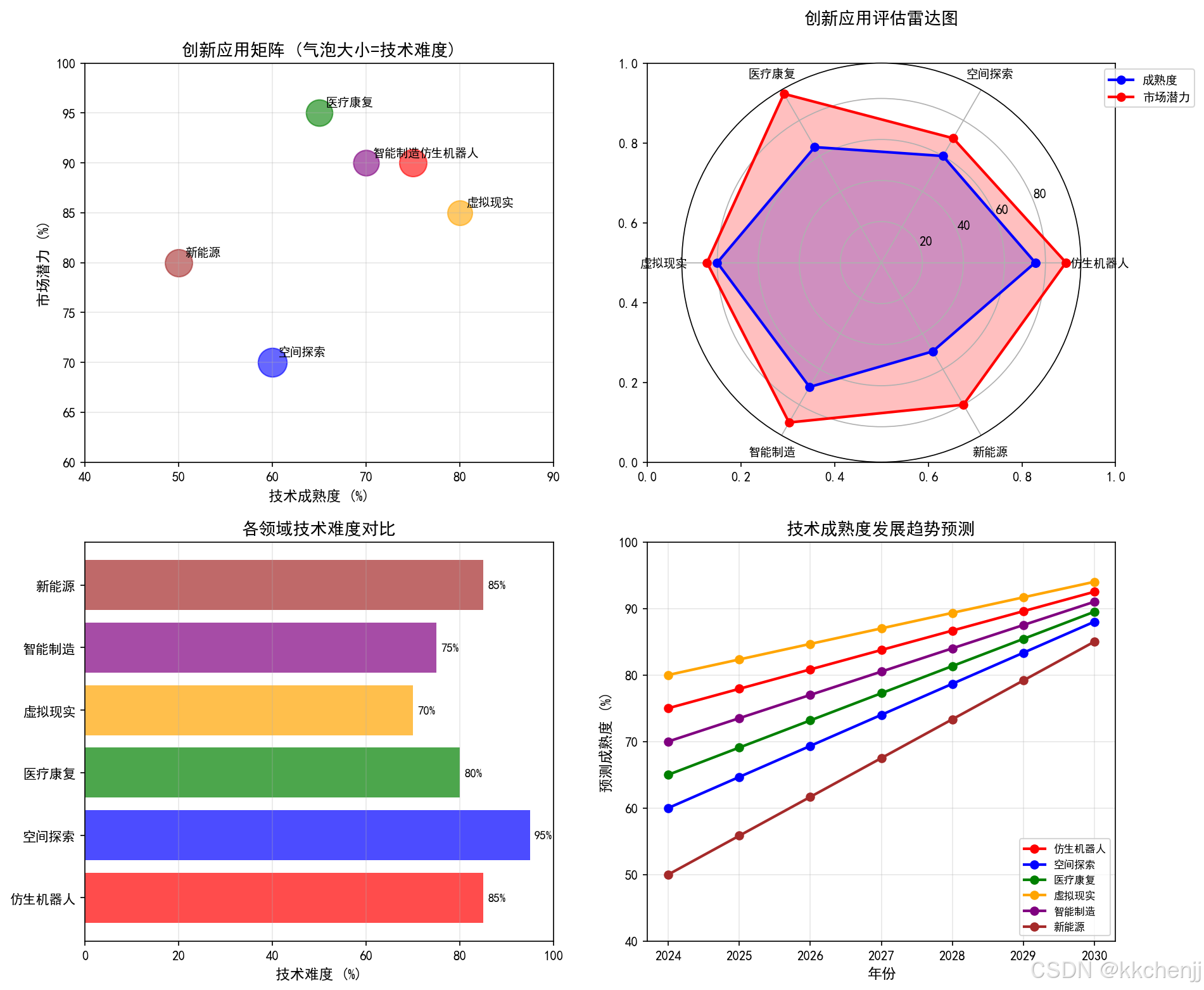
print("1. 医疗康复领域具有最高的市场潜力(95%),技术相对成熟")
print("2. 空间探索技术难度最高(95%),需要长期投入")
print("3. 虚拟现实技术最成熟(80%),已进入商业化阶段")
print("4. 新能源应用尚处于早期,但具有重要的战略意义")
print("5. 仿生机器人和智能制造具有均衡的发展前景")
print("-" * 50)
if __name__ == "__main__":
print("\n" + "=" * 70)
print("主题098:多体系统的创新应用探索")
print("=" * 70)
# 1. 仿生机器人应用
print("\n" + "=" * 70)
print("第一部分:仿生机器人应用")
print("=" * 70)
quadruped_gait_simulation()
soft_robot_simulation()
# 2. 空间探索应用
print("\n" + "=" * 70)
print("第二部分:空间探索应用")
print("=" * 70)
space_manipulator_dynamics()
# 3. 医疗康复应用
print("\n" + "=" * 70)
print("第三部分:医疗康复应用")
print("=" * 70)
exoskeleton_dynamics()
# 4. 虚拟现实应用
print("\n" + "=" * 70)
print("第四部分:虚拟现实应用")
print("=" * 70)
vr_physics_engine()
# 5. 智能制造应用
print("\n" + "=" * 70)
print("第五部分:智能制造应用")
print("=" * 70)
digital_twin_production()
# 6. 新能源应用
print("\n" + "=" * 70)
print("第六部分:新能源应用")
print("=" * 70)
wave_energy_converter()
# 7. 创新应用总结
innovative_applications_summary()
print("\n" + "=" * 70)
print("仿真完成!")
print("=" * 70)
print("\n生成的图表:")
print(" 1. quadruped_gait_simulation.png - 四足机器人步态仿真")
print(" 2. soft_robot_simulation.png - 软体机器人仿真")
print(" 3. space_manipulator_dynamics.png - 空间机械臂动力学")
print(" 4. exoskeleton_dynamics.png - 外骨骼动力学")
print(" 5. vr_physics_engine.png - VR物理引擎")
print(" 6. digital_twin_production.png - 数字孪生产线")
print(" 7. wave_energy_converter.png - 波浪能转换器")
print(" 8. innovative_applications_summary.png - 创新应用总结")
print("=" * 70)

有“AI”的1024 = 2048,欢迎大家加入2048 AI社区
更多推荐

 0
0 0
0- 0



 已为社区贡献147条内容

所有评论(0)