Linux系统编程(四)--- 进程
目录
通过exec函数簇,实现简单的Shell命令(linux上终端命令的实现)
问题:fork()&&fork()||fork(); 总共几个进程
一、进程介绍
1.为什么需要进程?
为了实现多任务,提高CPU利用效率,并发并行(单核cpu宏观并行,微观串行)
2.进程组成:
进程 = PCB(进程控制块) + text(代码段) + data + bss + 堆 + 栈
注意:这里的PCB和pcb板子不是一个意思,它指的是(Process Control Block)进程控制块
这是一个结构体:
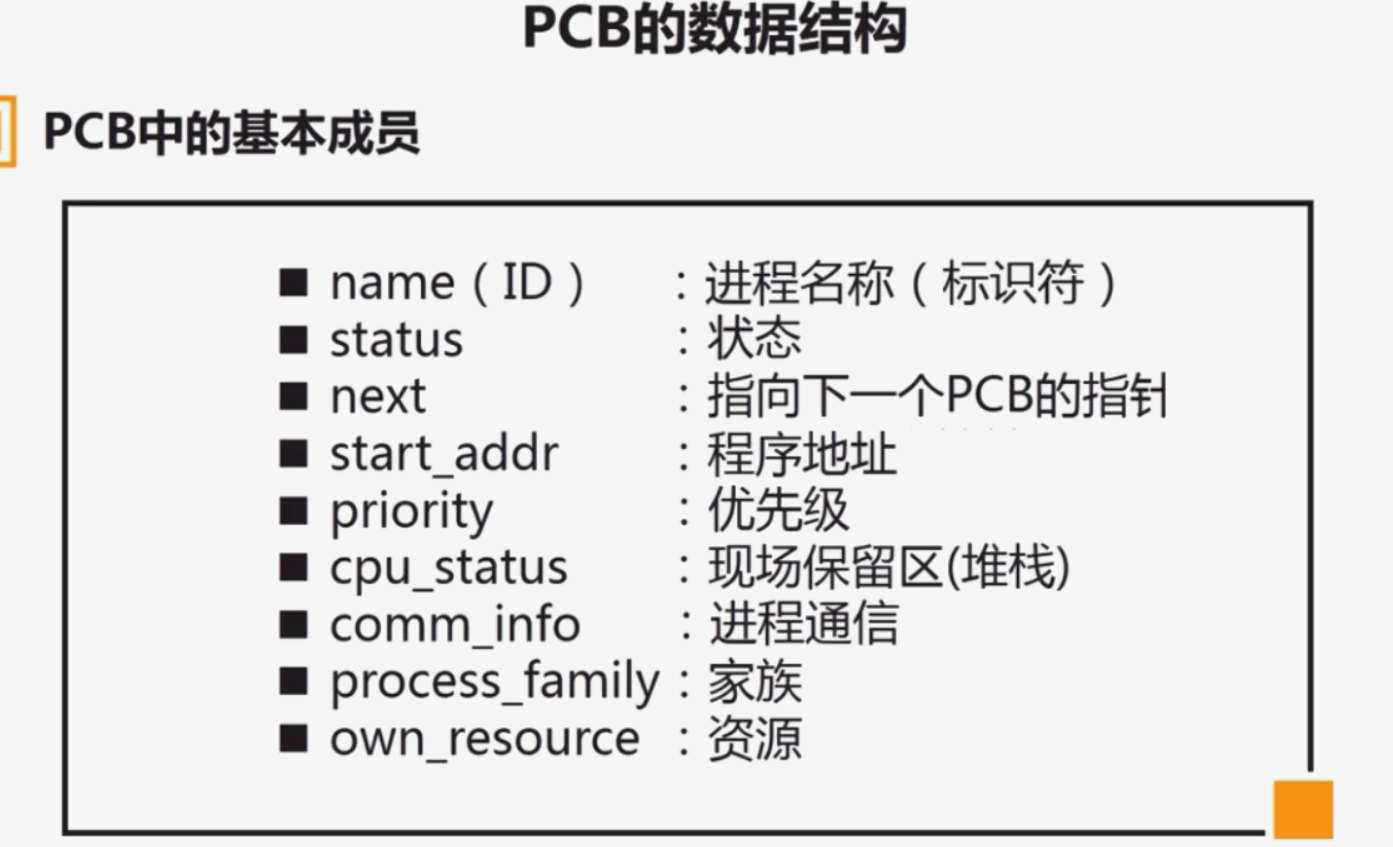
3.进程的状态:
三态模型:
就绪态(Ready):等待CPU调度
执行态(Running):正在CPU上运行
阻塞态(Blocked):等待某个事件(如I/O完成)
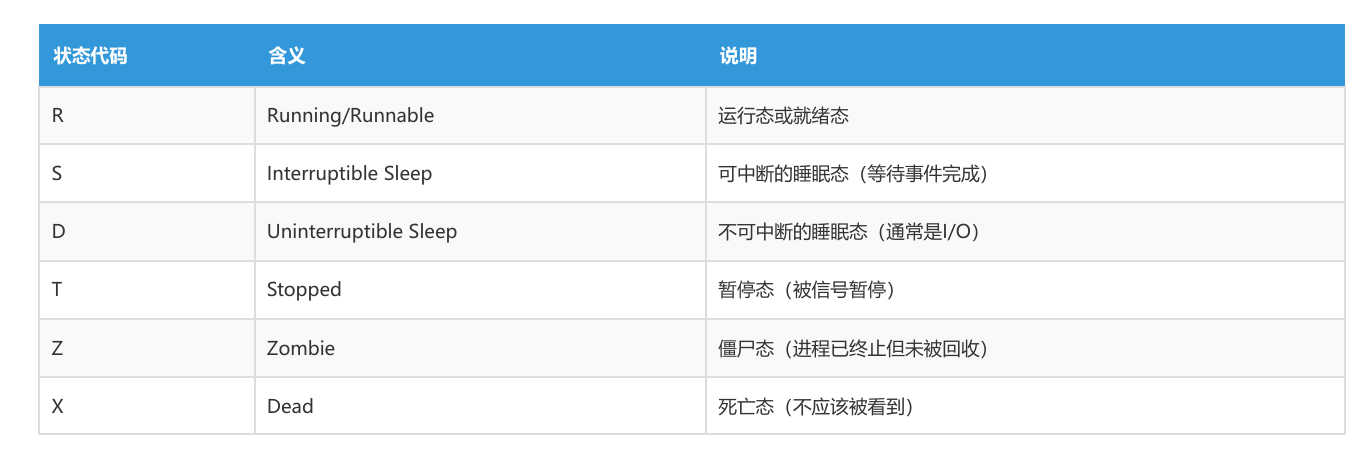
Linux进程状态代码:
二、进程的相关命令:
1. top - 动态查看进程
#显示进程的PID、状态、CPU使用率、内存使用等信息
2. ps - 查看进程快照
ps aux |grep a.out # 查看特定进程(a.out)
ps -eLf| grep # 查看PID和PPID(父进程ID)
3. pstree - 查看进程树
pstree -sp #查看进程的层次关系
4. kill - 发送信号
kill -l # 查看所有信号
kill -9 <pid> # 强制杀死进程(SIGKILL)
kill -19 <pid> # 暂停进程(SIGSTOP)
kill -18 <pid> # 继续进程(SIGCONT)
killall a.out # 杀死所有名为a.out的进程
5. fork - 进程的创建
函数原型:
#include <sys/types.h>
#include <unistd.h>
pid_t fork(void);
功能:
通过复制调用进程(父进程)来创建新进程(子进程)
子进程是父进程的副本,但有独立的进程空间
返回值:
父进程中:返回子进程的PID(大于0)
子进程中:返回0 失败:返回-1
基础的fork使用示例:
//基础的fork使用示例
#include <stdio.h>
#include <unistd.h>
int main(int argc, const char *argv[])
{
    // fork之前只有一个进程
    printf("---1 main---calling process---\n");

    // fork创建子进程
    pid_t pid = fork();

    // 错误处理
    if (pid < 0)
    {
        perror("fork fail");
        return -1;
    }

    // fork之后有两个进程,这行代码会被执行两次
    // 父进程:pid = 子进程的PID(大于0)
    // 子进程:pid = 0
    printf("--pid = %d -2 main---calling process---\n", pid);

    return 0;
}
父子进程执行不同的代码:
// 父子进程执行不同的代码
#include <stdio.h>
#include <unistd.h>
int main(int argc, const char *argv[])
{
    printf("---1 main---calling process---\n");
    pid_t pid = fork();

    if (pid < 0)
    {
        perror("fork fail");
        return -1;
    }

    printf("--pid = %d -2 main---calling process---\n", pid);

    // 父进程执行的代码
    if (pid > 0)
    {
        while(1)
        {
            // 打印子进程的PID
            printf("father pid = %d\n", pid);
            sleep(1);
        }
    }
    // 子进程执行的代码
    else if (pid == 0)
    {
        while(1)
        {
            // 在子进程中,pid = 0
            printf("child pid = %d\n", pid);
            // 如果想打印自己的PID,使用getpid()
            // printf("child my pid = %d\n", getpid());
            sleep(1);
        }
    }

    return 0;
}
注意:
1. fork成功之后有两个进程,一个父进程,一个子进程,进程的执行顺序是不确定的,最终由操作系统调度决定
2. 父子进程各自拥有自己独立的4g(32位系统)内存空间,各自有各自的程序段(text|bss|data|堆栈),相互之间没有影响
3. fork之前打开文件是父子进程共用一个文件表(文件状态、偏移量、信号等),fork之后打开文件就是独立的文件表了
6. exec函数族
为什么需要exec?
fork创建的子进程默认执行与父进程相同的代码。如果想让子进程执行完全不同的程序,就需要使用exec函数族。
include <unistd.h>//头文件
// l = list(参数逐个列出)
int execl(const char *path, const char *arg, ...);
// v = vector(参数用数组)
int execv(const char *path, char *const argv[]);
// p = PATH(在环境变量PATH中查找)
int execlp(const char *file, const char *arg, ...);
int execvp(const char *file, char *const argv[]);
// e = environment(可以传递环境变量)
int execle(const char *path, const char *arg, ..., char *const envp[]);
int execvpe(const char *file, char *const argv[], char *const envp[]);
单看函数很抽象,这里结合示例:
执行“ ls -l . ” 命令
1.execl示例:
#include <stdio.h>
#include <unistd.h>
int main(int argc, const char *argv[])
{
    printf("---test exec start---\n");

    // 执行 ls -l . 命令
    // 参数1:可执行文件的完整路径
    // 参数2:argv[0],通常是程序名
    // 参数3+:命令行参数
    // 最后:必须以NULL结尾
    if (execl("/bin/ls", "ls", "-l", ".", NULL) < 0)
    {
        perror("execl fail");
    }

    // exec成功后,这行代码不会执行
    // 因为当前进程的代码段已被替换
    printf("---test exec end---\n");
    return 0;
}
2.execv示例:
// 将参数组织成数组
#include <stdio.h>
#include <unistd.h>
int main(int argc, const char *argv[])
{
    printf("---test exec start---\n");

    // 将参数组织成数组
    char * const arg[] = {"ls", "-l", ".", NULL};

    // 使用execv,参数用数组传递
    if (execv("/bin/ls", arg) < 0)
    {
        perror("execv fail");
    }

    printf("---test exec end---\n");
    return 0;
}
3.execvp示例:
// 使用execvp,不需要完整路径
// 会在PATH环境变量指定的目录中查找ls命令
#include <stdio.h>
#include <unistd.h>
int main(int argc, const char *argv[])
{
    printf("---test exec start---\n");

    char * const arg[] = {"ls", "-l", ".", NULL};

    // 使用execvp,不需要完整路径
    // 会在PATH环境变量指定的目录中查找ls命令
    if (execvp("ls", arg) < 0)
    {
        perror("execvp fail");
    }

    printf("---test exec end---\n");
    return 0;
}
通过exec函数簇,实现简单的Shell命令(linux上终端命令的实现)
注意这个示例,没有回收子进程,后续会写上改进版的myshell实现
#include <stdio.h>
#include <string.h>
#include <unistd.h>
int main(int argc, const char *argv[])
{
    char buf[1024] = {0};

    while (1)
    {
        // 显示提示符
        printf("myshell$ ");

        // 读取用户输入
        fgets(buf, sizeof(buf), stdin);
        buf[strlen(buf)-1] = '\0';  // 去掉换行符

        // 检查退出命令
        if (strncmp(buf, "quit", 4) == 0 || strncmp(buf, "exit", 4) == 0)
        {
            printf("myshell exit...!\n");
            return -1;
        }

        // 解析命令和参数(使用strtok分割字符串)
        char *arg[20] = {NULL};
        int i = 0;
        arg[i++] = strtok(buf, " ");  // 第一个参数是命令
        while (arg[i++] = strtok(NULL, " "))  // 后续参数
            ;

        // 创建子进程执行命令
        pid_t pid = fork();
        if (pid < 0)
        {
            perror("fork fail");
            return -1;
        }

        if (pid > 0)
        {
            // 父进程等待子进程结束
            sleep(1);  // 简单等待,后面会用wait替换
        }
        else if (pid == 0)
        {
            // 子进程执行命令
            if (execvp(arg[0], arg) < 0)
            {
                perror("myshell fail");
                return -1;
            }
        }
    }
    return 0;
}
7. exit - 进程退出
进程正常退出的方式
1. 从main函数返回(return 0;)
2. 调用exit(0~255)函数:
冲刷缓冲区
3. 调用_exit(0~255)或_Exit(0~255)函数
不冲刷缓冲区
8.wait() - 回收子进程(阻塞)
函数原型
pid_t wait(int *wstatus);
@wstatus:保存子进程退出状态的地址,可以为NULL
#include <stdio.h>
#include <unistd.h>
#include <stdlib.h>
#include <sys/wait.h>
int main(int argc, const char *argv[])
{
    pid_t pid = fork();

    if (pid < 0)
    {
        perror("fork fail");
        return -1;
    }

    if (pid > 0)
    {
        // 父进程
        while(1)
        {
            printf("father pid = %d\n", pid);
            sleep(1);

            // 回收子进程资源
            // wait()是阻塞的,会等待直到有子进程退出
            if (wait(NULL) < 0)
            {
                perror("wait fail");
            }
            else
            {
                printf("child process terminated\n");
                break;  // 回收完成后退出循环
            }
        }
    }
    else if (pid == 0)
    {
        // 子进程运行5秒
        int i = 0;
        while(i < 5)
        {
            printf("child pid = %d\n", pid);
            sleep(1);
            ++i;
        }
        exit(99);  // 退出并返回状态码99
    }

    return 0;
}
9.waitpid() - 回收子进程(可以非阻塞)
函数原型:
pid_t waitpid(pid_t pid, int *wstatus, int options);
参数:
@pid值:
< -1 等待进程组ID等于|pid|的任意子进程
-1 等待任意子进程(等同于wait)
0 等待进程组ID与调用进程相同的任意子进程
> 0 等待进程ID等于pid的特定子进程
@options
0:阻塞等待
WNOHANG:非阻塞,如果没有子进程退出立即返回0
示例:
include <stdio.h>
#include <unistd.h>
#include <stdlib.h>
#include <sys/wait.h>
int main(int argc, const char *argv[])
{
    pid_t pid = fork();

    if (pid < 0)
    {
        perror("fork fail");
        return -1;
    }

    if (pid > 0)
    {
        // 父进程
        int status = 0;
        while(1)
        {
            printf("father pid = %d\n", pid);
            sleep(1);

            // 使用非阻塞的waitpid
            // 参数1:-1表示等待任意子进程
            // 参数2:保存退出状态
            // 参数3:WNOHANG表示非阻塞
            pid_t ret = waitpid(-1, &status, WNOHANG);

            if (ret < 0)
            {
                perror("wait fail");
            }
            else if (ret == 0)
            {
                // 没有子进程退出,继续循环
                continue;
            }
            else
            {
                // 有子进程退出了
                // 判断是正常退出还是被信号终止
                if (WIFEXITED(status))
                {
                    // 正常退出,获取退出状态码
                    printf("child exit status = %d\n", WEXITSTATUS(status));
                }
                if (WIFSIGNALED(status))
                {
                    // 被信号终止,获取信号编号
                    printf("child killed by signal = %d\n", WTERMSIG(status));
                }
                break;
            }
        }
    }
    else if (pid == 0)
    {
        // 子进程持续运行
        int i = 0;
        while(1)
        {
            printf("child pid = %d\n", pid);
            sleep(1);
            ++i;
        }
        exit(99);
    }

    return 0;
}
状态判断宏:
// 判断子进程是否正常退出 WIFEXITED(wstatus)
// 如果是正常退出,获取退出状态码 WEXITSTATUS(wstatus)
// 判断子进程是否被信号终止 WIFSIGNALED(wstatus)
// 如果是被信号终止,获取信号编号 WTERMSIG(wstatus)
改进的myshell
#include <stdio.h>
#include <string.h>
#include <unistd.h>
#include <sys/wait.h>
int main(int argc, const char *argv[])
{
    char buf[1024] = {0};

    while (1)
    {
        printf("myshell$ ");
        fgets(buf, sizeof(buf), stdin);
        buf[strlen(buf)-1] = '\0';

        if (strncmp(buf, "quit", 4) == 0 || strncmp(buf, "exit", 4) == 0)
        {
            printf("myshell exit...!\n");
            return -1;
        }

        // 解析命令
        char *arg[20] = {NULL};
        int i = 0;
        arg[i++] = strtok(buf, " ");
        while (arg[i++] = strtok(NULL, " "))
            ;

        pid_t pid = fork();
        if (pid < 0)
        {
            perror("fork fail");
            return -1;
        }

        if (pid > 0)
        {
            // 父进程使用wait等待子进程结束并回收资源
            // 这样可以避免产生僵尸进程
            wait(NULL);  // 阻塞等待子进程结束
        }
        else if (pid == 0)
        {
            // 子进程执行命令
            if (execvp(arg[0], arg) < 0)
            {
                perror("myshell fail");
                return -1;
            }
        }
    }
    return 0;
}
三、总结与补充:
重要概念对比:
孤儿进程父进程先结束,子进程还在运行无危害,被init收养
僵尸进程子进程已结束,父进程未回收占用资源,必须用wait回收
父子进程协作拷贝文件(父拷前半部分,子拷后半部分)
// 使用方法: ./a.out source.txt dest.txt
#include <stdio.h>
#include <fcntl.h>
#include <unistd.h>
#include <sys/stat.h>
int main(int argc, const char *argv[])
{
    // 检查参数
    if (argc != 3)
    {
        printf("Usage : %s <src> <dest>\n", argv[0]);
        return -1;
    }

    // 打开源文件(只读)
    int fd_s = open(argv[1], O_RDONLY);
    // 打开目标文件(写入、创建、截断)
    int fd_d = open(argv[2], O_WRONLY|O_CREAT|O_TRUNC, 0666);

    if (fd_s < 0 || fd_d < 0)
    {
        perror("open fail");
        return -1;
    }

    // 获取源文件大小
    struct stat st;
    if (stat(argv[1], &st) < 0)
    {
        perror("stat fail");
        return -1;
    }
    int len = st.st_size;  // 文件总大小

    // 创建子进程
    pid_t pid = fork();
    if (pid < 0)
    {
        perror("fork fail");
        return -1;
    }

    if (pid > 0)
    {
        // 父进程:拷贝前半部分
        char buf[len/2];

        // 从文件开头读取前半部分
        int ret = read(fd_s, buf, len/2);

        // 写入目标文件
        write(fd_d, buf, ret);

        printf("Father: copied first half (%d bytes)\n", ret);
    }
    else if (pid == 0)
    {
        // 子进程:拷贝后半部分

        // 注意:父子进程共享文件表项(包括文件偏移量)
        // 所以需要重新定位文件指针

        // 源文件指针移动到后半部分起始位置
        lseek(fd_s, len/2, SEEK_SET);
        // 目标文件指针也移动到后半部分起始位置
        lseek(fd_d, len/2, SEEK_SET);

        char buf[len/2];

        // 读取后半部分
        int ret = read(fd_s, buf, len/2);

        // 写入目标文件
        write(fd_d, buf, ret);

        printf("Child: copied second half (%d bytes)\n", ret);
    }

    // 关闭文件
    close(fd_s);
    close(fd_d);

    return 0;
wait和waitpid的关系
waitpid(-1,&status,0); <=>wait(&status)
问题:fork()&&fork()||fork(); 总共几个进程
注意:与和或运算的原则
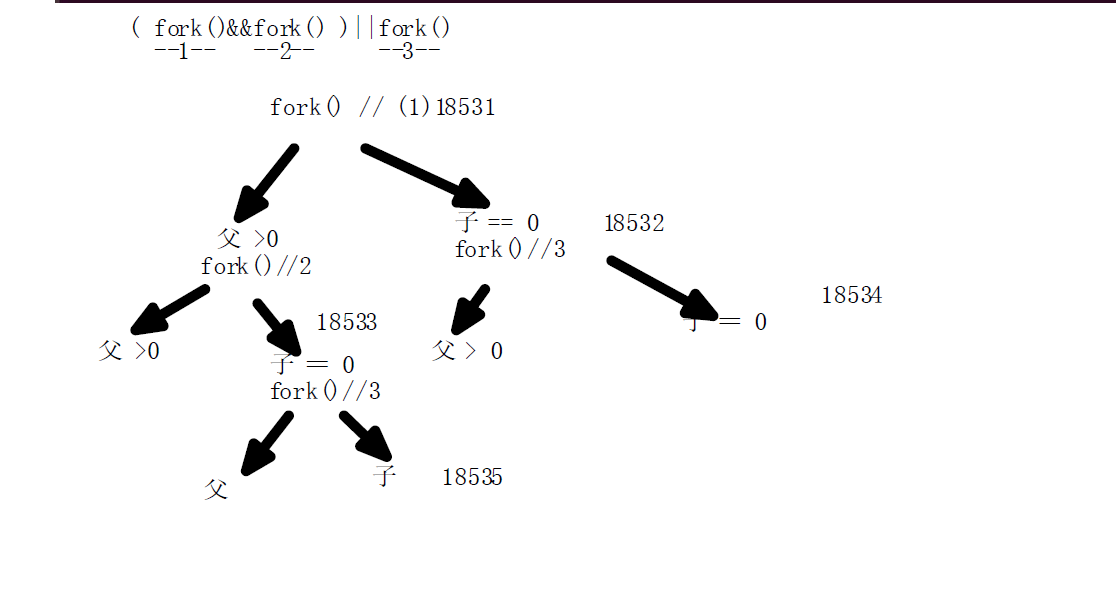
答案为5
父子进程变量注意事项:
如果变量没有修改,子进程一直用的是父进程的
若父子进程有一个进程把变量改了,那么子进程才会在自己的内存中开辟这个这变量的空间
这个行为叫 写时复制
节约内存空间

有“AI”的1024 = 2048,欢迎大家加入2048 AI社区
更多推荐



 10
10 0
0- 0


 已为社区贡献2条内容

所有评论(0)