TRAE AI IDE 开发Cangjie(仓颉语言) Elasticsearch 客户端SDK
·
代码示例gitcode地址
https://gitcode.com/yunting/es-cj.git
项目简介
基于仓颉语言实现的 Elasticsearch 客户端库,提供简洁的 ORM 风格 API 和强大的 Lambda 查询构建器。
特性
- ESClient: 完整的 Elasticsearch REST API 客户端
- @ESDocument/@ESField 宏: 自动生成
toJson()、fromJson()、toJsonString()、init()方法 - Mapper 类: 自动生成 CRUD 方法,包括
save()、batchSave()、createIndex()等 - LambdaQuery: Lambda 风格查询构建器,支持链式调用
- 字段映射: camelCase 自动转换为 snake_case
- 类型推断: 根据变量类型自动选择正确的 JSON 序列化方式
目录结构
es-cj/
├── src/
│   ├── client/              # ES 客户端
│   │   ├── es_client.cj         # 核心客户端
│   │   ├── es_client_builder.cj # 客户端构建器
│   │   ├── es_async_client.cj   # 异步客户端
│   │   ├── es_template.cj       # 统一操作接口
│   │   ├── es_config.cj         # 配置类
│   │   ├── transport.cj         # HTTP 传输层
│   │   ├── load_balancer.cj     # 负载均衡器
│   │   ├── bulk_queue.cj        # 批量操作队列
│   │   ├── response.cj          # 响应基类
│   │   ├── index_response.cj    # 索引响应
│   │   ├── get_response.cj      # 获取响应
│   │   ├── search_response.cj   # 搜索响应
│   │   ├── delete_response.cj   # 删除响应
│   │   ├── update_response.cj   # 更新响应
│   │   └── bulk_operation.cj    # 批量操作
│   ├── orm/                 # ORM 层
│   │   ├── lambda_query.cj      # Lambda 查询构建器
│   │   ├── query_builder.cj     # 查询条件构造器
│   │   └── aggregation.cj       # 聚合查询
│   ├── macros/              # 宏定义
│   │   └── ESDocument.cj        # @ESDocument/@ESField 宏
│   └── util/                # 工具类
│       ├── StringUtil.cj        # 字符串工具
│       ├── FieldMapping.cj      # 字段映射
│       └── AstUtil.cj           # AST 工具
└── test/                    # 测试代码
快速开始
引入依赖cjpm.toml
[dependencies]
	es_cj = { git = "https://gitcode.com/yunting/es-cj.git", branch = "main" }

[target.aarch64-apple-darwin.bin-dependencies]
	path-option = ["${CANGJIE_STDX_PATH}/darwin_aarch64_llvm/static/stdx"]

[target.aarch64-unknown-linux-gnu.bin-dependencies]
	path-option = ["${CANGJIE_STDX_PATH}/linux_aarch64_llvm/static/stdx"]
1. 创建客户端
import es_cj.client.*

let client = ESClientBuilder()
        .host("localhost:9200")
        .username("elastic")
        .password("password")
        .connectTimeout(Duration.second * 1)        // 连接超时
        .maxConnections(100)
        .build()

if (client.ping()) {
	println("Connected to Elasticsearch!")
}
集群模式
import es_cj.client.*

let client = ESClientBuilder()
        .host("xxxx:9200,xxxx:9200,xxxx:9200")
        .username("elastic")
        .password("password")
        .connectTimeout(Duration.second * 1)        // 连接超时
        .maxConnections(100)
        .build()

if (client.ping()) {
	println("Connected to Elasticsearch!")
}
2. 定义实体类
使用 @ESDocument 和 @ESField 宏自动生成序列化方法和 Mapper 类:
import es_cj.*
import es_cj.macros.*

@ESDocument[index = "test_user_file", shards=3, replicas=1]
class TestUserFile {
    @ESField[name = "user_id", type="keyword"]
    var userId: String = ""

    @ESField[name = "shoot_date", type="keyword"]
    var shootDate: String = ""

    @ESField[type = "keyword"]
    var location: String = ""

    @ESField[name = "upload_time",type="date"]
    var uploadTime: Int64 = 0
}
宏会自动生成:
public init() {
FieldMapping.register("TestUserFile", "userId", "user_id")
FieldMapping.register("TestUserFile", "shootDate", "shoot_date")
FieldMapping.register("TestUserFile", "location", "location")
FieldMapping.register("TestUserFile", "uploadTime", "uploadTime")
}

public func toJson(): JsonObject {
    ...
}
public func toJsonString(): String {
    ...
}
public static func fromJson(json: JsonValue): TestUserFile {
    ...
}

public class TestUserFileMapper {
    public let indexName: String = "test_user_file"
    public func existsIndex(): Bool
    public func createIndex(): CreateIndexResponse
    public func deleteIndex(): DeleteIndexResponse
    public func save(doc: TestUserFile): IndexResponse
    public func save(id: String, doc: TestUserFile): IndexResponse
    public func batchSave(dataList: ArrayList<TestUserFile>): BulkResponse
    public func get(id: String): ?TestUserFile
    public func delete(id: String): DeleteResponse
    public func search(query: LambdaQuery<TestUserFile>): SearchResponse
    public func searchHits(query: LambdaQuery<TestUserFile>): ArrayList<TestUserFile>
}
完整示例
1. 创建索引
import es_cj.*
import es_cj.macros.*

@ESDocument[index = "test_user_file", shards=3, replicas=1]
class TestUserFile {
    @ESField[name = "user_id", type="keyword"]
    var userId: String = ""

    @ESField[name = "shoot_date", type="keyword"]
    var shootDate: String = ""

    @ESField[type = "keyword"]
    var location: String = ""

    @ESField[name = "upload_time",type="date"]
    var uploadTime: Int64 = 0
}

func testCreateIndex(client: ESClient) {
    println("\n=== Create Index Test ===")

    let syncOps = ESClientOperations(client)
    let mapper = TestUserFileMapper(syncOps)
    println("IndexName: ${mapper.indexName}")

    if (mapper.existsIndex()) {
        println("Index already exists, deleting...")
        mapper.deleteIndex()
    }

    println("Creating index with shards=3, replicas=1...")
    let response = mapper.createIndex()
    println("Create index result: ${response.acknowledged}")
}
输出示例:
=== Create Index Test ===
IndexName: test_user_file
Index already exists, deleting...
Creating index with shards=3, replicas=1...
Create index result: true
2. 单个新增
import es_cj.*
import es_cj.macros.*
import std.time.DateTime

func testSave(client: ESClient) {
    println("\n=== Save Test ===")

    let syncOps = ESClientOperations(client)
    let mapper = TestUserFileMapper(syncOps)

    let doc = TestUserFile()
    doc.userId = "save_test"
    doc.shootDate = "2026-03"
    doc.location = "杭州"
    doc.uploadTime = DateTime.now().toUnixTimeStamp().toMilliseconds()

    println("Saving single document...")
    let response = mapper.save(doc)
    println("Save result: ${response.isSuccess()}, id: ${response.id}")

    println("\n=== Save with ID Test ===")
    let doc2 = TestUserFile()
    doc2.userId = "save_with_id"
    doc2.shootDate = "2026-04"
    doc2.location = "南京"
    doc2.uploadTime = DateTime.now().toUnixTimeStamp().toMilliseconds()

    let response2 = mapper.save("custom_id_123", doc2)
    println("Save with id result: ${response2.isSuccess()}, id: ${response2.id}")
}
输出示例:
=== Save Test ===
Saving single document...
Save result: true, id: 46JAjpwB3ytRRUVlDkBn

=== Save with ID Test ===
Save with id result: true, id: custom_id_123
3. 批量新增
import es_cj.*
import es_cj.macros.*
import std.time.DateTime

func testBatchSave(client: ESClient) {
    println("\n=== Batch Save Test ===")

    let syncOps = ESClientOperations(client)
    let mapper = TestUserFileMapper(syncOps)
    println("IndexName: ${mapper.indexName}")

    let dataList = ArrayList<TestUserFile>()
    let rawData = [
        ("test1", "2026-01", "深圳"),
        ("test1", "2026-01", "深圳"),
        ("test1", "2026-02", "深圳"),
        ("test1", "2026-02", "北京"),
        ("test1", "2026-02", "广州"),
        ("test1", "2026-02", "上海")
    ]

    let currentTime = DateTime.now().toUnixTimeStamp().toMilliseconds()
    var idx: Int64 = 0
    for ((userId, shootDate, location) in rawData) {
        let doc = TestUserFile()
        doc.userId = userId
        doc.shootDate = shootDate
        doc.location = location
        doc.uploadTime = currentTime + idx
        dataList.add(doc)
        idx ++
    }

    println("Batch saving ${dataList.size} documents...")
    let bulkResponse = mapper.batchSave(dataList)

    println("Bulk response status: ${bulkResponse.status}, errors: ${bulkResponse.errors}")

    if (bulkResponse.isSuccess()) {
        println("Batch save success!")
    } else {
        println("Batch save failed, errors: ${bulkResponse.hasErrors()}")
    }
}
输出示例:
=== Batch Save Test ===
IndexName: test_user_file
Batch saving 6 documents...
Bulk response status: 200, errors: false
Batch save success!
4. 条件查询(支持 IN 查询)
import es_cj.*
import es_cj.macros.*

func testQuery(client: ESClient) {
    println("\n=== Query Test ===")

    let syncOps = ESClientOperations(client)
    let mapper = TestUserFileMapper(syncOps)

    let locations = ArrayList<JsonValue>()
    locations.add(JsonString("深圳"))
    locations.add(JsonString("广州"))

    println("Query by userId and location (深圳 or 广州)...")
    let query = LambdaQuery<TestUserFile>()
            .forClass("TestUserFile")
            .eq("userId", "test1")
            .inArray("location", locations)
            .orderByAsc("uploadTime")
            .limit(10)

    let results = mapper.searchHits(query)
    println("Found ${results.size} documents:")
    for (doc in results) {
        println("  userId: ${doc.userId}, shootDate: ${doc.shootDate}, location: ${doc.location}")
    }
}
输出示例:
=== Query Test ===
Query by userId and location (深圳 or 广州)...
Found 4 documents:
  userId: test1, shootDate: 2026-01, location: 深圳
  userId: test1, shootDate: 2026-01, location: 深圳
  userId: test1, shootDate: 2026-02, location: 深圳
  userId: test1, shootDate: 2026-02, location: 广州
5. 多字段独立聚合查询
import es_cj.*
import es_cj.macros.*

func testAgg(client: ESClient) {
    println("\n=== Aggregation Test ===")

    let syncOps = ESClientOperations(client)
    let mapper = TestUserFileMapper(syncOps)

    println("Aggregation by userId, location and shootDate...")

    let locationAgg = Aggregation.terms("location_agg", "location")
            .size(10)
    let shootDateAgg = Aggregation.terms("shoot_date_agg", "shoot_date")
            .size(10)

    let query = LambdaQuery<TestUserFile>()
            .forClass("TestUserFile")
            .eq("userId", "test1")
            .aggregation("location_agg", locationAgg)
            .aggregation("shoot_date_agg", shootDateAgg)
            .limit(0)

    let response = mapper.search(query)
    println("Total hits: ${response.total}")

    if (let Some(agg) <- response.aggregations.get("location_agg")) {
        println("\n=== Location Aggregation ===")
        let aggResult = AggregationResult.fromJson("location_agg", agg)
        for (bucket in aggResult.buckets) {
            println("Location: ${bucket.key}, Count: ${bucket.docCount}")
        }
    }

    if (let Some(agg) <- response.aggregations.get("shoot_date_agg")) {
        println("\n=== ShootDate Aggregation ===")
        let aggResult = AggregationResult.fromJson("shoot_date_agg", agg)
        for (bucket in aggResult.buckets) {
            println("ShootDate: ${bucket.key}, Count: ${bucket.docCount}")
        }
    }
}
输出示例:
=== Aggregation Test ===
Aggregation by userId, location and shootDate...
Total hits: 6

=== Location Aggregation ===
Location: 深圳, Count: 3
Location: 上海, Count: 1
Location: 北京, Count: 1
Location: 广州, Count: 1

=== ShootDate Aggregation ===
ShootDate: 2026-01, Count: 2
ShootDate: 2026-02, Count: 4
6. 嵌套聚合查询(先按地点聚合,再按拍摄时间聚合)
import es_cj.*
import es_cj.macros.*

func testSubAgg(client: ESClient) {
    println("\n=== Sub Aggregation Test ===")

    let syncOps = ESClientOperations(client)
    let mapper = TestUserFileMapper(syncOps)

    println("Aggregation by userId, first location and then shootDate...")

    let locationAgg = Aggregation.terms("location_agg", "location")
            .size(10)
            .subAgg(
                    Aggregation.terms("shoot_date_agg", "shoot_date")
                    .size(10)
            )

    let query = LambdaQuery<TestUserFile>()
            .forClass("TestUserFile")
            .eq("userId", "test1")
            .aggregation("location_agg", locationAgg)
            .limit(0)

    let response = mapper.search(query)
    println("Total hits: ${response.total}")

    if (let Some(agg) <- response.aggregations.get("location_agg")) {
        println("\n=== Location Aggregation ===")
        let aggResult = AggregationResult.fromJson("location_agg", agg)
        for (bucket in aggResult.buckets) {
            println("Location: ${bucket.key}, Count: ${bucket.docCount}")

            if (let Some(shootDateResult) <- bucket.subAggregations.get("shoot_date_agg")) {
                for (sdBucket in shootDateResult.buckets) {
                    println("  ShootDate: ${sdBucket.key}, Count: ${sdBucket.docCount}")
                }
            }
        }
    }
}
输出示例:
=== Sub Aggregation Test ===
Aggregation by userId, first location and then shootDate...
Total hits: 6

=== Location Aggregation ===
Location: 深圳, Count: 3
  ShootDate: 2026-01, Count: 2
  ShootDate: 2026-02, Count: 1
Location: 上海, Count: 1
  ShootDate: 2026-02, Count: 1
Location: 北京, Count: 1
  ShootDate: 2026-02, Count: 1
Location: 广州, Count: 1
  ShootDate: 2026-02, Count: 1
7. 游标分页查询(search_after)
使用 search_after 实现深度分页,避免 from/size 的性能问题:
import es_cj.*
import es_cj.macros.*

func testSearchAfter(client: ESClient) {
    println("\n=== Search After Test ===")
    let syncOps = ESClientOperations(client)
    let mapper = TestUserFileMapper(syncOps)

    let q1 = LambdaQuery<TestUserFile>()
            .orderByDesc("uploadTime")
            .limit(2)

    let resp1 = mapper.search(q1)
    println("Page 1: ${resp1.hits.size} documents")
    for (hit in resp1.hits) {
        if (let Some(source) <- hit.source) {
            let doc = TestUserFile.fromJson(source)
            println("location: ${doc.location}, userId: ${doc.userId}, uploadTime: ${doc.uploadTime}")
        }
    }

    let lastSort = resp1.getLastSort()
    if (! lastSort.isEmpty()) {
        let q2 = LambdaQuery<TestUserFile>()
                .orderByDesc("uploadTime")
                .limit(2)
                .searchAfter(lastSort)

        let resp2 = mapper.search(q2)
        println("\nPage 2: ${resp2.hits.size} documents")
        for (hit in resp2.hits) {
            if (let Some(source) <- hit.source) {
                let doc = TestUserFile.fromJson(source)
                println("location: ${doc.location}, userId: ${doc.userId}, uploadTime: ${doc.uploadTime}")
            }
        }
    }
}
输出示例:
=== Search After Test ===
Page 1: 2 documents
  userId: user001, uploadTime: 1768380221868
  userId: user002, uploadTime: 1768380221867

Page 2: 2 documents
  userId: user003, uploadTime: 1768380221866
  userId: user004, uploadTime: 1768380221865
8. KNN 向量查询
使用 knn() 方法进行向量相似度搜索:
import es_cj.*
import es_cj.macros.*

@ESDocument[index = "test_vector_data"]
class TestVectorData {
    @ESField[name = "user_id", type="keyword"]
    var userId: String = ""

    @ESField[name = "title", type="keyword"]
    var title: String = ""

    @ESField[name = "dense_text",type="keyword"]
    var denseText: String = ""

    @ESField[name = "json_data",type="object"]
    var jsonData: JsonObject = JsonObject()

    @ESField[name = "text_vector",type="dense_vector"]
    var textVector: ArrayList<Float64> = ArrayList<Float64>()

    @ESField[name = "upload_time",type="date"]
    var uploadTime: Int64 = 0
}

func testQueryByVector(client: ESClient) {
    println("\n=== KNN Vector Search Test ===")
    let syncOps = ESClientOperations(client)
    let mapper = TestVectorDataMapper(syncOps)

    // 查询向量(1024维)
    let v = [- 0.037262, 0.048157, - 0.018295, ...]

    // KNN 查询
    let q = LambdaQuery<TestVectorData>()
            .knn("textVector", v, 3, numCandidates: 100)

    let response = mapper.search(q)
    println("Found ${response.hits.size} similar documents:")

    for (hit in response.hits) {
        if (let Some(source) <- hit.source) {
            let doc = TestVectorData.fromJson(source)
            println("userId: ${doc.userId}, title: ${doc.title}")
        }
    }
}
输出示例:
=== KNN Vector Search Test ===
Found 3 similar documents:
  userId: user001, title: 钓鱼
  userId: user002, title: 打球
  userId: user003, title: 看漫画
KNN 参数说明:
| 参数 | 说明 |
|---|---|
field |
向量字段名 |
vector |
查询向量(Array<Float64> 或 ArrayList<Float64>) |
k |
返回的最相似文档数量 |
numCandidates |
候选文档数量(默认 100) |
API 参考
ESClientBuilder
| 方法 | 说明 | 默认值 |
|---|---|---|
host(host: String) |
设置 ES 主机地址(支持逗号分隔的多节点) | localhost:9200 |
username(username: String) |
设置用户名 | - |
password(password: String) |
设置密码 | - |
maxConnections(max: Int64) |
设置连接池大小 | 100 |
connectTimeout(t: Duration) |
设置连接超时时间 | 5s |
readTimeout(t: Duration) |
设置读取超时时间 | 30s |
writeTimeout(t: Duration) |
设置写入超时时间 | 10s |
build() |
构建 ESClient 实例 | - |
性能优化建议
let client = ESClientBuilder()
        .host("node1:9200,node2:9200,node3:9200")  // 多节点负载均衡
        .maxConnections(200)                        // 连接池大小
        .connectTimeout(Duration.second * 1)        // 连接超时
        .readTimeout(Duration.second * 30)          // 读取超时
        .writeTimeout(Duration.second * 30)         // 写入超时
        .build()
Mapper 类(自动生成)
| 方法 | 说明 |
|---|---|
existsIndex() |
检查索引是否存在 |
createIndex() |
创建索引(根据 @ESField 注解生成 mappings) |
deleteIndex() |
删除索引 |
save(doc) |
保存单个文档(自动生成ID,refresh=true) |
save(id, doc) |
保存单个文档(指定ID,refresh=true) |
batchSave(dataList) |
批量保存(默认 refresh=true) |
batchSave(dataList, refresh) |
批量保存(指定 refresh 参数) |
get(id) |
获取文档 |
delete(id) |
删除文档 |
update(id, doc) |
更新文档 |
search(query) |
搜索文档 |
searchHits(query) |
搜索并返回实体列表 |
LambdaQuery
| 方法 | 说明 |
|---|---|
forClass(className) |
设置实体类名 |
eq(field, value) |
精确匹配(Term 查询) |
term(field, value) |
Term 查询 |
match(field, value) |
Match 查询 |
inArray(field, values) |
IN 查询(Terms 查询) |
gt(field, value) |
大于 |
gte(field, value) |
大于等于 |
lt(field, value) |
小于 |
lte(field, value) |
小于等于 |
between(field, min, max) |
范围查询 |
like(field, value) |
模糊查询(Wildcard) |
matchQuery(field, value) |
Match 查询 |
matchPhrase(field, value) |
Match Phrase 查询 |
isNull(field) |
字段为空 |
isNotNull(field) |
字段不为空 |
and(queries) |
AND 组合查询 |
or(queries) |
OR 组合查询 |
aggregation(name, agg) |
添加聚合 |
orderByAsc(field) |
升序排序 |
orderByDesc(field) |
降序排序 |
limit(size) |
返回数量 |
offset(from) |
偏移量 |
page(pageNum, pageSize) |
分页 |
knn(field, vector, k, numCandidates?) |
KNN 向量相似度搜索 |
searchAfter(values) |
游标分页(传入排序值) |
build() |
构建 JSON 查询 |
Aggregation
| 方法 | 说明 |
|---|---|
terms(name, field) |
Terms 聚合 |
sum(name, field) |
Sum 聚合 |
avg(name, field) |
Avg 聚合 |
min(name, field) |
Min 聚合 |
max(name, field) |
Max 聚合 |
count(name, field) |
Count 聚合 |
stats(name, field) |
Stats 聚合 |
topHits(name) |
Top Hits 聚合 |
size(size) |
设置返回桶数量 |
subAgg(agg) |
添加子聚合 |
@ESDocument 宏参数
| 参数 | 说明 | 默认值 |
|---|---|---|
index |
指定索引名称 | 类名转下划线(如 TestUserFile -> test_user_file) |
shards |
主分片数 | 1 |
replicas |
副本数 | 1 |
@ESField 宏参数
| 参数 | 说明 | 默认值 |
|---|---|---|
name |
ES 字段名 | 变量名 |
type |
ES 字段类型(keyword, text, date, integer, long, double, boolean, object, dense_vector 等) | text |
工具类
StringUtil
StringUtil.toUnderlineCase("userId")    // -> "user_id"
StringUtil.toCamelCase("user_id")       // -> "userId"
StringUtil.upperFirst("name")           // -> "Name"
StringUtil.lowerFirst("Name")           // -> "name"
FieldMapping
FieldMapping.register("User", "userId", "user_id")
let esName = FieldMapping.getESFieldName("User", "userId")  // -> "user_id"
依赖
- 仓颉标准库
- stdx.encoding.json
- stdx.net.http
TRAE IDE开发Cangjie项目
下载仓颉项目的Agent模板
git clone https://gitcode.com/mumu_xsy/claudecodetemplate4cj.git
创建项目
mkdir es-cj
cd es-cj
cjpm init --name es_cj
输出
cjpm init success
# 查看
ls
# 创建情况
cjpm.toml	src
# 查看
cat cjpm.toml
# 输出
[package]
  cjc-version = "1.0.0"
  name = "es_cj"
  description = "nothing here"
  version = "1.0.0"
  target-dir = ""
  src-dir = ""
  output-type = "executable"
  compile-option = ""
  override-compile-option = ""
  link-option = ""
  package-configuration = {}

[dependencies]
TRAE IDE 打开es-cj项目
将下载的claudecodetemplate4cj项目的.claude目录、CLAUDE.md、Task.md复制到项目下
存放目录结构
es-cj/
├── .claude/
│   ├── agents/     #
│   └── cangJie_docs/      #
├── src/        #
├── CLAUDE.md   #
└── Task.md     #
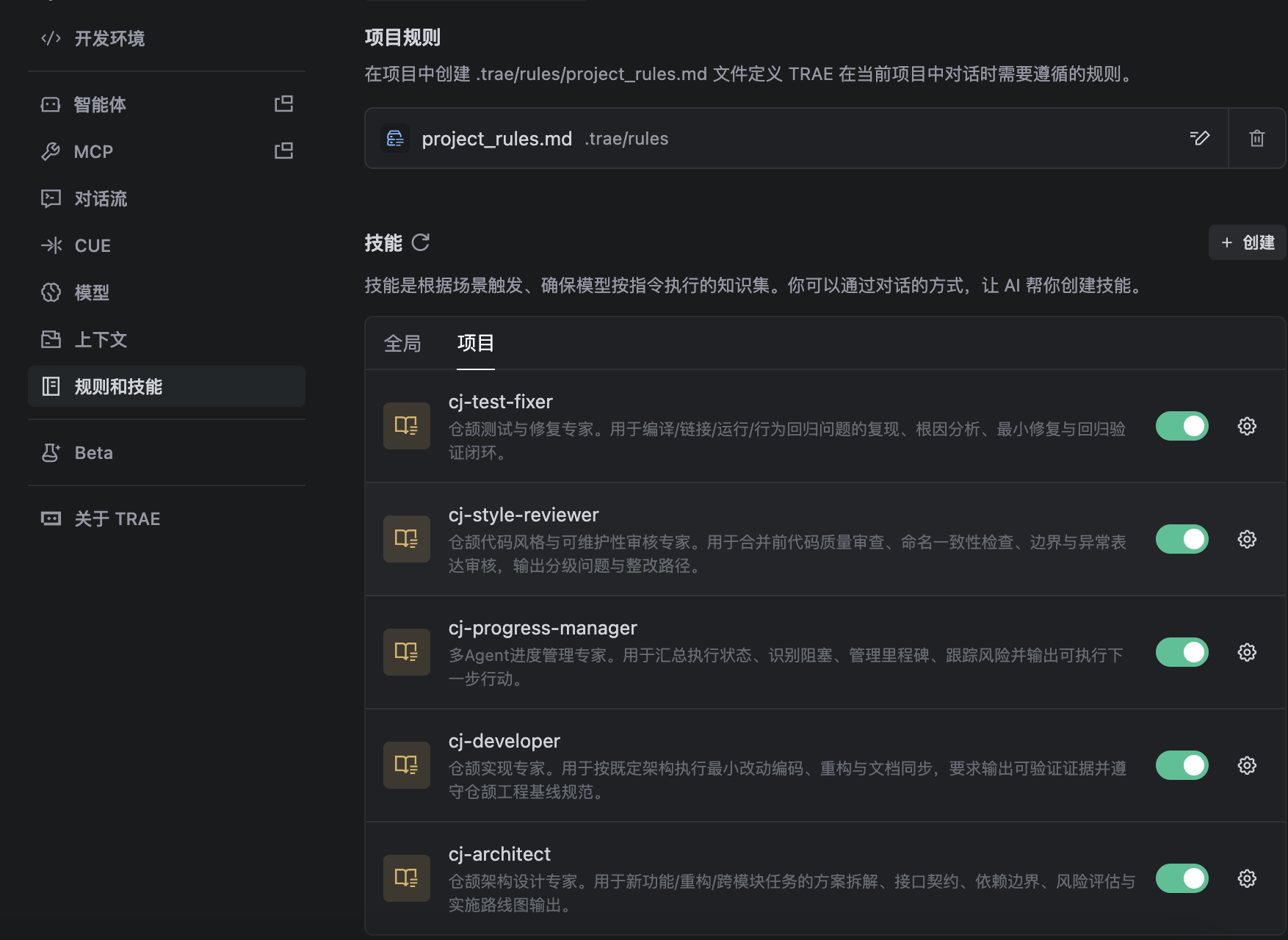
TRAE IDE 设置规则和技能
- 项目规则
project_rules.md 复制 CLAUDE.md内容 - 技能
上传.claude/agents目录下的.md文件
创建技能
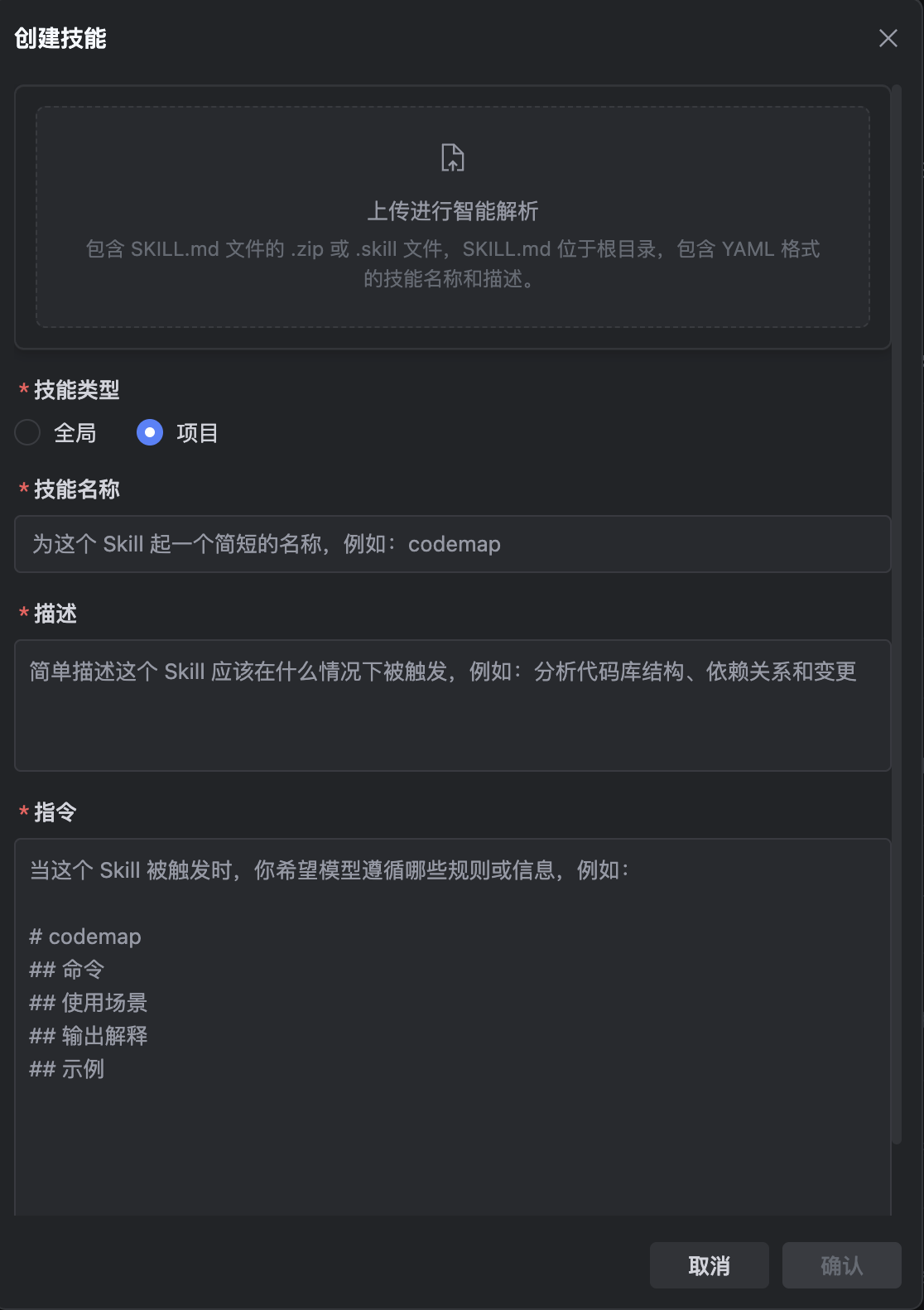
配置示例
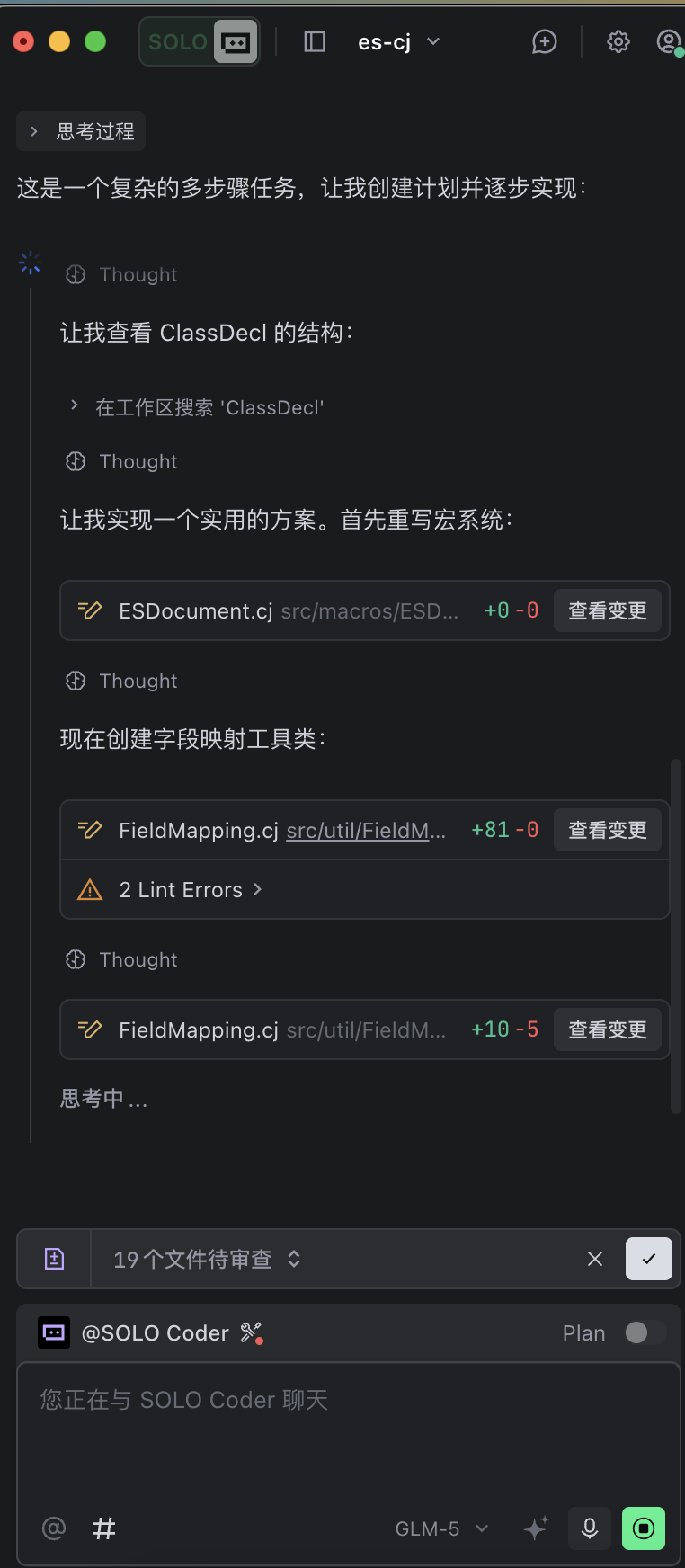
对话写代码
最终目录结构
es-cj/
├── .claude/
│   ├── agents/                        # Agent 配置
│   │   ├── cj-architect.md            # 架构设计专家
│   │   ├── cj-developer.md            # 实现专家
│   │   ├── cj-progress-manager.md     # 进度管理专家
│   │   ├── cj-style-reviewer.md       # 代码风格审核专家
│   │   └── cj-test-fixer.md           # 测试修复专家
│   └── cangJie_docs/                  # 仓颉文档
├── .trae/
│   ├── rules/                         # 项目规则
│   │   └── project_rules.md           # 项目规则配置
│   └── skills/                        # 技能配置
│       ├── cj-architect/              # 架构设计技能
│       │   └── SKILL.md
│       ├── cj-developer/              # 实现技能
│       │   └── SKILL.md
│       ├── cj-progress-manager/       # 进度管理技能
│       │   └── SKILL.md
│       ├── cj-style-reviewer/         # 代码风格审核技能
│       │   └── SKILL.md
│       └── cj-test-fixer/             # 测试修复技能
│           └── SKILL.md
├── src/                               # 源代码
├── CLAUDE.md                          # Claude 配置
└── Task.md                            # 任务文档
备注

有“AI”的1024 = 2048,欢迎大家加入2048 AI社区
更多推荐
 11
11 0
0- 0


 已为社区贡献3条内容

所有评论(0)