Java基础-12:Java IO深度解析与避坑指南:从底层原理到BIO NIO AIO实战
一、Java IO概述:底层原理与核心概念
Java IO(Input/Output)是Java处理数据输入输出的核心机制,通过**流(Stream)**抽象实现数据的读写操作。其核心思想是将数据源和目标(如文件、网络、内存等)统一抽象为流,通过流机制实现数据的传输。
1.1 流分类与体系结构
Java IO流分为四大类:
| 分类维度 | 类型 | 基类 | 说明 |
|---|---|---|---|
| 按流向 | 输入流 | InputStream/Reader |
从数据源读取数据 |
| 按流向 | 输出流 | OutputStream/Writer |
向目标写入数据 |
| 按处理单位 | 字节流 | InputStream/OutputStream |
8位字节,处理二进制数据 |
| 按处理单位 | 字符流 | Reader/Writer |
16位字符,处理文本数据 |
| 按功能 | 节点流 | FileInputStream等 |
直接连接数据源 |
| 按功能 | 处理流 | BufferedInputStream等 |
包装节点流,提供额外功能 |
类继承图: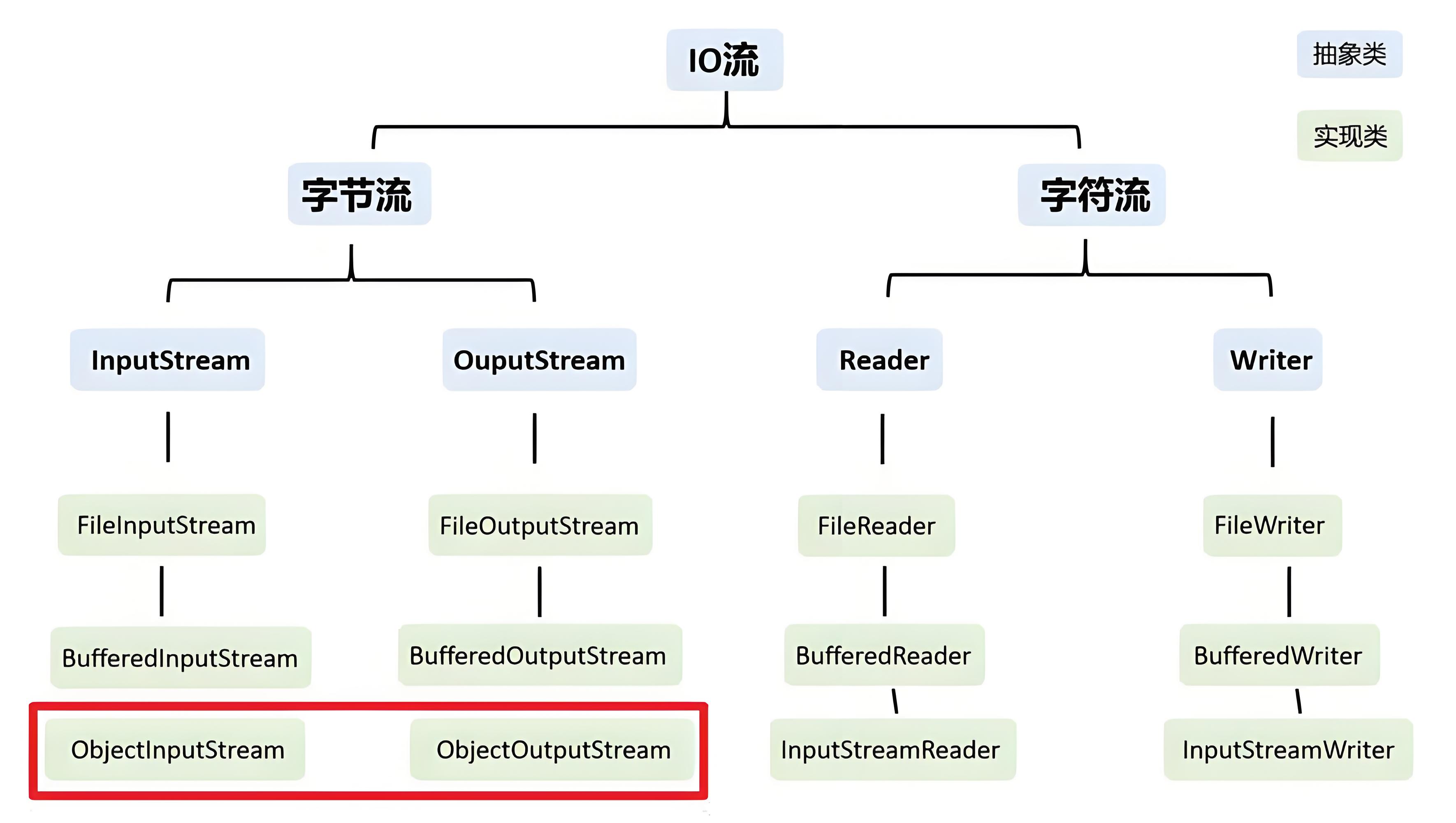
1.2 底层实现原理
┌─────────────────────────────────────────────────────────────┐
│                    Java IO 体系架构                          │
├─────────────────────────────────────────────────────────────┤
│  应用层                                                      │
│  ┌──────────────┐  ┌──────────────┐  ┌──────────────┐       │
│  │ BufferedReader│  │BufferedWriter│  │  自定义处理流  │       │
│  └──────┬───────┘  └──────┬───────┘  └──────┬───────┘       │
│         │                 │                 │               │
│  ┌──────▼───────┐  ┌──────▼───────┐  ┌──────▼───────┐       │
│  │InputStreamReader│ │OutputStreamWriter│ │  转换流     │       │
│  └──────┬───────┘  └──────┬───────┘  └──────┬───────┘       │
│         │                 │                 │               │
│  ┌──────▼───────┐  ┌──────▼───────┐  ┌──────▼───────┐       │
│  │FileInputStream│ │FileOutputStream│ │  节点流     │       │
│  └──────┬───────┘  └──────┬───────┘  └──────┬───────┘       │
│         │                 │                 │               │
│  ┌──────▼─────────────────▼─────────────────▼───────┐       │
│  │              操作系统文件系统/网络/内存            │       │
│  └───────────────────────────────────────────────────┘       │
└─────────────────────────────────────────────────────────────┘
核心机制:
- 数据流模型:通过字节流或字符流将数据按顺序传输,支持单向读写
- 缓冲机制:缓冲流通过内存缓冲区减少磁盘/网络IO次数,大幅提升性能
- 装饰器模式:处理流通过包装其他流扩展功能,符合"开闭原则"
二、核心类与使用场景
2.1 字节流(InputStream/OutputStream)
常用类:
FileInputStream/FileOutputStream:文件读写BufferedInputStream/BufferedOutputStream:缓冲流,提升效率ObjectInputStream/ObjectOutputStream:对象序列化与反序列化
使用场景: 处理二进制数据(如图片、视频、压缩文件)、网络数据传输、对象持久化
代码示例:文件复制(字节流+缓冲流)
import java.io.*;

public class FileCopyExample {
    public static void copyFile(String sourcePath, String targetPath) {
        // 使用 try-with-resources 自动关闭流
        try (BufferedInputStream bis = new BufferedInputStream(
                 new FileInputStream(sourcePath));
             BufferedOutputStream bos = new BufferedOutputStream(
                 new FileOutputStream(targetPath))) {

            byte[] buffer = new byte[8192]; // 8KB缓冲区
            int len;
            while ((len = bis.read(buffer)) != -1) {
                bos.write(buffer, 0, len);
            }
            // 刷新缓冲区,确保数据写入
            bos.flush();
            System.out.println("文件复制完成!");

        } catch (IOException e) {
            System.err.println("文件复制失败:" + e.getMessage());
            e.printStackTrace();
        }
    }

    public static void main(String[] args) {
        copyFile("source.jpg", "target.jpg");
    }
}
2.2 字符流(Reader/Writer)
常用类:
FileReader/FileWriter:文本文件读写(默认平台编码)BufferedReader/BufferedWriter:带缓冲的文本流,支持readLine()按行读取InputStreamReader/OutputStreamWriter:字节流与字符流的桥梁,可指定编码
使用场景: 处理文本数据(如TXT、JSON、XML),需考虑编码兼容性
代码示例:文本文件按行读取与写入
import java.io.*;
import java.nio.charset.StandardCharsets;

public class TextFileExample {

    // 按行读取文本文件
    public static void readFileByLine(String filePath) {
        try (BufferedReader reader = new BufferedReader(
                 new InputStreamReader(
                     new FileInputStream(filePath),
                     StandardCharsets.UTF_8))) {

            String line;
            int lineNum = 0;
            while ((line = reader.readLine()) != null) {
                lineNum++;
                System.out.println("第" + lineNum + "行: " + line);
            }

        } catch (IOException e) {
            System.err.println("读取文件失败:" + e.getMessage());
            e.printStackTrace();
        }
    }

    // 写入文本文件
    public static void writeFile(String filePath, String content) {
        try (BufferedWriter writer = new BufferedWriter(
                 new OutputStreamWriter(
                     new FileOutputStream(filePath, true), // true表示追加模式
                     StandardCharsets.UTF_8))) {

            writer.write(content);
            writer.newLine(); // 写入换行符
            // try-with-resources 会自动flush和close

        } catch (IOException e) {
            System.err.println("写入文件失败:" + e.getMessage());
            e.printStackTrace();
        }
    }

    public static void main(String[] args) {
        readFileByLine("data.txt");
        writeFile("output.txt", "Hello, Java IO!");
    }
}
三、避坑指南:常见陷阱与完整解决方案
3.1 陷阱一:资源泄露——忘记关闭流
❌ 错误示例:
// 危险!如果readLine()抛出异常,fis永远不会被关闭
FileInputStream fis = new FileInputStream("file.txt");
BufferedReader reader = new BufferedReader(new InputStreamReader(fis));
String line = reader.readLine();
// 忘记关闭...
✅ 正确解决方案(try-with-resources):
import java.io.*;
import java.nio.charset.StandardCharsets;

public class ResourceManagementExample {

    // 方案1:try-with-resources(推荐,Java 7+)
    public static String readFileSafe(String filePath) {
        StringBuilder content = new StringBuilder();

        try (FileInputStream fis = new FileInputStream(filePath);
             InputStreamReader isr = new InputStreamReader(fis, StandardCharsets.UTF_8);
             BufferedReader reader = new BufferedReader(isr)) {

            String line;
            while ((line = reader.readLine()) != null) {
                content.append(line).append("\n");
            }
            return content.toString();

        } catch (IOException e) {
            System.err.println("读取文件失败:" + e.getMessage());
            e.printStackTrace();
            return null;
        }
        // 所有流会自动关闭,即使发生异常
    }

    // 方案2:传统finally块关闭(Java 7之前)
    public static String readFileLegacy(String filePath) {
        FileInputStream fis = null;
        BufferedReader reader = null;
        StringBuilder content = new StringBuilder();

        try {
            fis = new FileInputStream(filePath);
            reader = new BufferedReader(new InputStreamReader(fis, StandardCharsets.UTF_8));

            String line;
            while ((line = reader.readLine()) != null) {
                content.append(line).append("\n");
            }
            return content.toString();

        } catch (IOException e) {
            System.err.println("读取文件失败:" + e.getMessage());
            e.printStackTrace();
            return null;

        } finally {
            // 必须分别关闭,且注意关闭顺序和异常处理
            if (reader != null) {
                try {
                    reader.close();
                } catch (IOException e) {
                    e.printStackTrace();
                }
            }
            if (fis != null) {
                try {
                    fis.close();
                } catch (IOException e) {
                    e.printStackTrace();
                }
            }
        }
    }

    public static void main(String[] args) {
        String content = readFileSafe("test.txt");
        System.out.println(content);
    }
}
3.2 陷阱二:字符编码问题导致乱码
❌ 错误示例:
// 使用默认编码,跨平台会乱码
FileReader reader = new FileReader("data.txt");  // 使用平台默认编码
FileWriter writer = new FileWriter("output.txt"); // 使用平台默认编码
✅ 正确解决方案(显式指定编码):
import java.io.*;
import java.nio.charset.StandardCharsets;

public class EncodingExample {

    // 正确:显式指定UTF-8编码
    public static void copyFileWithEncoding(String sourcePath, String targetPath) {

        try (InputStreamReader reader = new InputStreamReader(
                 new FileInputStream(sourcePath), StandardCharsets.UTF_8);
             OutputStreamWriter writer = new OutputStreamWriter(
                 new FileOutputStream(targetPath), StandardCharsets.UTF_8);
             BufferedReader br = new BufferedReader(reader);
             BufferedWriter bw = new BufferedWriter(writer)) {

            String line;
            while ((line = br.readLine()) != null) {
                bw.write(line);
                bw.newLine();
            }
            System.out.println("文件复制完成(UTF-8编码)");

        } catch (IOException e) {
            System.err.println("文件操作失败:" + e.getMessage());
            e.printStackTrace();
        }
    }

    // 检测文件编码(简单示例)
    public static String detectEncoding(byte[] data) {
        // 实际生产环境建议使用juniversalchardet等库
        if (data.length >= 3 &&
            data[0] == (byte)0xEF &&
            data[1] == (byte)0xBB &&
            data[2] == (byte)0xBF) {
            return "UTF-8-BOM";
        }
        return "UTF-8"; // 默认
    }

    public static void main(String[] args) {
        copyFileWithEncoding("source.txt", "target.txt");
    }
}
3.3 陷阱三:缓冲流使用不当导致性能低下
❌ 错误示例:
// 没有使用缓冲流,每次read/write都直接访问磁盘
FileInputStream fis = new FileInputStream("largefile.dat");
FileOutputStream fos = new FileOutputStream("output.dat");
int data;
while ((data = fis.read()) != -1) { // 每次只读1字节!
    fos.write(data);
}
✅ 正确解决方案(使用缓冲流+合理缓冲区大小):
import java.io.*;

public class BufferPerformanceExample {

    private static final int BUFFER_SIZE = 8192; // 8KB,经验值

    // 高性能文件复制
    public static void copyFileWithBuffer(String sourcePath, String targetPath) {

        try (BufferedInputStream bis = new BufferedInputStream(
                 new FileInputStream(sourcePath), BUFFER_SIZE);
             BufferedOutputStream bos = new BufferedOutputStream(
                 new FileOutputStream(targetPath), BUFFER_SIZE)) {

            byte[] buffer = new byte[BUFFER_SIZE];
            int bytesRead;
            long totalBytes = 0;

            while ((bytesRead = bis.read(buffer)) != -1) {
                bos.write(buffer, 0, bytesRead);
                totalBytes += bytesRead;
            }

            // 确保所有缓冲数据写入磁盘
            bos.flush();

            System.out.println("复制完成,总字节数: " + totalBytes);

        } catch (IOException e) {
            System.err.println("文件复制失败:" + e.getMessage());
            e.printStackTrace();
        }
    }

    // 性能对比测试
    public static void performanceTest() {
        String sourceFile = "test_large.dat";
        String targetFile1 = "output_no_buffer.dat";
        String targetFile2 = "output_with_buffer.dat";

        // 创建测试文件
        createTestFile(sourceFile, 100 * 1024 * 1024); // 100MB

        // 无缓冲复制
        long start = System.currentTimeMillis();
        copyFileNoBuffer(sourceFile, targetFile1);
        long noBufferTime = System.currentTimeMillis() - start;

        // 有缓冲复制
        start = System.currentTimeMillis();
        copyFileWithBuffer(sourceFile, targetFile2);
        long withBufferTime = System.currentTimeMillis() - start;

        System.out.println("无缓冲耗时: " + noBufferTime + "ms");
        System.out.println("有缓冲耗时: " + withBufferTime + "ms");
        System.out.println("性能提升: " + (noBufferTime * 1.0 / withBufferTime) + "倍");
    }

    private static void copyFileNoBuffer(String src, String dst) {
        try (FileInputStream fis = new FileInputStream(src);
             FileOutputStream fos = new FileOutputStream(dst)) {

            byte[] buffer = new byte[8192];
            int len;
            while ((len = fis.read(buffer)) != -1) {
                fos.write(buffer, 0, len);
            }
        } catch (IOException e) {
            e.printStackTrace();
        }
    }

    private static void createTestFile(String path, int sizeMB) {
        try (FileOutputStream fos = new FileOutputStream(path);
             BufferedOutputStream bos = new BufferedOutputStream(fos)) {

            byte[] data = new byte[1024 * 1024]; // 1MB
            for (int i = 0; i < sizeMB; i++) {
                bos.write(data);
            }
        } catch (IOException e) {
            e.printStackTrace();
        }
    }

    public static void main(String[] args) {
        performanceTest();
    }
}
3.4 陷阱四:大文件处理导致内存溢出
❌ 错误示例:
// 危险!大文件会直接导致OOM
public static String readFileToMemory(String filePath) throws IOException {
    File file = new File(filePath);
    byte[] allBytes = new byte[(int) file.length()]; // 大文件会OOM!
    new FileInputStream(file).read(allBytes);
    return new String(allBytes);
}
✅ 正确解决方案(流式处理/分片读取):
import java.io.*;
import java.nio.channels.FileChannel;
import java.nio.MappedByteBuffer;
import java.nio.charset.StandardCharsets;

public class LargeFileExample {

    // 方案1:流式处理(推荐)
    public static void processLargeFileStream(String filePath) {

        try (BufferedReader reader = new BufferedReader(
                 new InputStreamReader(
                     new FileInputStream(filePath),
                     StandardCharsets.UTF_8),
                 8192)) {

            String line;
            long lineCount = 0;
            while ((line = reader.readLine()) != null) {
                // 逐行处理,不占用大量内存
                processLine(line);
                lineCount++;

                // 可选:每处理10000行输出进度
                if (lineCount % 10000 == 0) {
                    System.out.println("已处理 " + lineCount + " 行");
                }
            }
            System.out.println("处理完成,总行数: " + lineCount);

        } catch (IOException e) {
            System.err.println("处理大文件失败:" + e.getMessage());
            e.printStackTrace();
        }
    }

    // 方案2:使用NIO内存映射(适合随机访问)
    public static void processLargeFileNIO(String filePath) {

        try (FileInputStream fis = new FileInputStream(filePath);
             FileChannel channel = fis.getChannel()) {

            long fileSize = channel.size();
            long processedBytes = 0;

            // 分块映射,避免一次性映射超大文件
            long chunkSize = 100 * 1024 * 1024; // 每次映射100MB

            for (long position = 0; position < fileSize; position += chunkSize) {
                long size = Math.min(chunkSize, fileSize - position);

                MappedByteBuffer buffer = channel.map(
                    FileChannel.MapMode.READ_ONLY,
                    position,
                    size
                );

                // 处理缓冲区数据
                byte[] data = new byte[buffer.remaining()];
                buffer.get(data);
                processData(data);

                processedBytes += size;
                System.out.println("进度: " + (processedBytes * 100 / fileSize) + "%");
            }

        } catch (IOException e) {
            System.err.println("NIO处理失败:" + e.getMessage());
            e.printStackTrace();
        }
    }

    // 方案3:分片读取大文件
    public static void readLargeFileInChunks(String filePath, int chunkSize) {

        try (FileInputStream fis = new FileInputStream(filePath);
             BufferedInputStream bis = new BufferedInputStream(fis)) {

            byte[] buffer = new byte[chunkSize];
            int bytesRead;
            long totalBytes = 0;

            while ((bytesRead = bis.read(buffer)) != -1) {
                // 处理当前块数据
                processChunk(buffer, bytesRead);
                totalBytes += bytesRead;
            }

            System.out.println("读取完成,总字节: " + totalBytes);

        } catch (IOException e) {
            System.err.println("分片读取失败:" + e.getMessage());
            e.printStackTrace();
        }
    }

    private static void processLine(String line) {
        // 实际业务处理逻辑
        // 例如:解析、过滤、转换等
    }

    private static void processData(byte[] data) {
        // 处理映射的数据
    }

    private static void processChunk(byte[] chunk, int length) {
        // 处理分片数据
    }

    public static void main(String[] args) {
        processLargeFileStream("large_log_file.log");
        // processLargeFileNIO("large_data.bin");
        // readLargeFileInChunks("huge_file.dat", 8192);
    }
}
3.5 陷阱五:对象序列化版本不一致
❌ 错误示例:
// 没有定义serialVersionUID,类修改后反序列化会失败
public class User implements Serializable {
    // 缺少 serialVersionUID
    private String name;
    private int age;
    // 如果后续添加字段,反序列化旧数据会出错
}
✅ 正确解决方案(显式定义版本号+兼容性处理):
import java.io.*;
import java.util.Date;

// 正确:实现Serializable并定义serialVersionUID
public class SerializableUser implements Serializable {

    // 显式定义版本号,确保兼容性
    private static final long serialVersionUID = 1L;

    private String name;
    private int age;
    private transient String password; // transient字段不会被序列化
    private Date createTime;

    // 新增字段时,提供默认值保证向后兼容
    private String email; // 新版本字段

    public SerializableUser(String name, int age) {
        this.name = name;
        this.age = age;
        this.createTime = new Date();
    }

    // 自定义序列化过程(可选)
    private void writeObject(ObjectOutputStream out) throws IOException {
        out.defaultWriteObject(); // 默认序列化
        // 可以添加额外逻辑
    }

    // 自定义反序列化过程(可选)
    private void readObject(ObjectInputStream in) throws IOException, ClassNotFoundException {
        in.defaultReadObject(); // 默认反序列化
        // 处理版本兼容,如旧数据没有email字段
        if (this.email == null) {
            this.email = "unknown@example.com";
        }
    }

    // Getter和Setter
    public String getName() { return name; }
    public int getAge() { return age; }
    public String getEmail() { return email; }

    @Override
    public String toString() {
        return "User{name='" + name + "', age=" + age + ", email='" + email + "'}";
    }
}

// 序列化与反序列化工具类
public class SerializationExample {

    // 序列化对象到文件
    public static void serializeObject(SerializableUser user, String filePath) {

        try (FileOutputStream fos = new FileOutputStream(filePath);
             ObjectOutputStream oos = new ObjectOutputStream(fos)) {

            oos.writeObject(user);
            System.out.println("对象序列化成功");

        } catch (IOException e) {
            System.err.println("序列化失败:" + e.getMessage());
            e.printStackTrace();
        }
    }

    // 从文件反序列化对象
    public static SerializableUser deserializeObject(String filePath) {

        try (FileInputStream fis = new FileInputStream(filePath);
             ObjectInputStream ois = new ObjectInputStream(fis)) {

            SerializableUser user = (SerializableUser) ois.readObject();
            System.out.println("对象反序列化成功: " + user);
            return user;

        } catch (IOException | ClassNotFoundException e) {
            System.err.println("反序列化失败:" + e.getMessage());
            e.printStackTrace();
            return null;
        }
    }

    public static void main(String[] args) {
        // 创建并序列化对象
        SerializableUser user = new SerializableUser("张三", 25);
        serializeObject(user, "user.dat");

        // 反序列化对象
        SerializableUser loadedUser = deserializeObject("user.dat");
        System.out.println("加载的用户: " + loadedUser);
    }
}
3.6 陷阱六:输出流未刷新导致数据丢失
❌ 错误示例:
// 忘记flush或close,数据可能还在缓冲区未写入
BufferedWriter writer = new BufferedWriter(new FileWriter("output.txt"));
writer.write("重要数据");
// 程序结束,但数据可能丢失!
✅ 正确解决方案(确保刷新):
import java.io.*;
import java.nio.charset.StandardCharsets;

public class FlushExample {

    // 方案1:try-with-resources自动flush和close
    public static void writeWithAutoFlush(String filePath, String content) {

        try (BufferedWriter writer = new BufferedWriter(
                 new OutputStreamWriter(
                     new FileOutputStream(filePath),
                     StandardCharsets.UTF_8))) {

            writer.write(content);
            writer.newLine();
            // try-with-resources会自动调用flush()和close()

        } catch (IOException e) {
            System.err.println("写入失败:" + e.getMessage());
            e.printStackTrace();
        }
    }

    // 方案2:手动flush(需要close的场景)
    public static void writeWithManualFlush(String filePath, String content) {

        BufferedWriter writer = null;
        try {
            writer = new BufferedWriter(
                new OutputStreamWriter(
                    new FileOutputStream(filePath),
                    StandardCharsets.UTF_8));

            writer.write(content);
            writer.newLine();
            writer.flush(); // 手动刷新缓冲区

        } catch (IOException e) {
            System.err.println("写入失败:" + e.getMessage());
            e.printStackTrace();
        } finally {
            if (writer != null) {
                try {
                    writer.close(); // close()也会先flush
                } catch (IOException e) {
                    e.printStackTrace();
                }
            }
        }
    }

    // 方案3:启用自动刷新(PrintWriter)
    public static void writeWithAutoFlushPrintWriter(String filePath, String content) {

        try (PrintWriter writer = new PrintWriter(
                 new OutputStreamWriter(
                     new FileOutputStream(filePath),
                     StandardCharsets.UTF_8),
                 true)) { // true启用自动刷新

            writer.println(content); // println会自动刷新
            // 或者手动
            writer.write(content);
            writer.flush();

        } catch (IOException e) {
            System.err.println("写入失败:" + e.getMessage());
            e.printStackTrace();
        }
    }

    public static void main(String[] args) {
        writeWithAutoFlush("test1.txt", "数据1");
        writeWithManualFlush("test2.txt", "数据2");
        writeWithAutoFlushPrintWriter("test3.txt", "数据3");
    }
}
四、使用场景总结与差异对比
4.1 流类型选择指南
| 场景 | 推荐流类型 | 代码示例 | 注意事项 |
|---|---|---|---|
| 二进制文件读写 | FileInputStream + BufferedInputStream |
见2.1节 | 避免使用字符流处理二进制 |
| 文本文件读写 | BufferedReader + InputStreamReader |
见2.2节 | 必须指定编码 |
| 对象序列化 | ObjectOutputStream |
见3.5节 | 实现Serializable,管理版本号 |
| 大文件处理 | 流式处理/NIO映射 | 见3.4节 | 避免一次性加载到内存 |
| 网络数据传输 | Socket + 缓冲字节流 |
见5.1节 | 处理粘包、半包问题 |
| 日志写入 | BufferedWriter + 自动刷新 |
见3.6节 | 定期flush避免数据丢失 |
| 配置文件的读取 | Properties + InputStreamReader |
下方示例 | 指定编码避免乱码 |
4.2 字节流 vs 字符流 对比
import java.io.*;
import java.nio.charset.StandardCharsets;

public class StreamComparison {

    // 字节流:适合二进制数据
    public static void byteStreamExample() {
        try (FileInputStream fis = new FileInputStream("image.png");
             FileOutputStream fos = new FileOutputStream("copy.png");
             BufferedInputStream bis = new BufferedInputStream(fis);
             BufferedOutputStream bos = new BufferedOutputStream(fos)) {

            byte[] buffer = new byte[8192];
            int len;
            while ((len = bis.read(buffer)) != -1) {
                bos.write(buffer, 0, len);
            }
            System.out.println("字节流复制完成");

        } catch (IOException e) {
            e.printStackTrace();
        }
    }

    // 字符流:适合文本数据
    public static void charStreamExample() {
        try (InputStreamReader reader = new InputStreamReader(
                 new FileInputStream("text.txt"), StandardCharsets.UTF_8);
             OutputStreamWriter writer = new OutputStreamWriter(
                 new FileOutputStream("output.txt"), StandardCharsets.UTF_8);
             BufferedReader br = new BufferedReader(reader);
             BufferedWriter bw = new BufferedWriter(writer)) {

            String line;
            while ((line = br.readLine()) != null) {
                bw.write(line);
                bw.newLine();
            }
            System.out.println("字符流复制完成");

        } catch (IOException e) {
            e.printStackTrace();
        }
    }

    public static void main(String[] args) {
        byteStreamExample();
        charStreamExample();
    }
}
4.3 节点流 vs 处理流 对比
| 特性 | 节点流 | 处理流 |
|---|---|---|
| 定义 | 直接连接数据源的流 | 包装其他流的流 |
| 示例 | FileInputStream, FileReader |
BufferedInputStream, BufferedReader |
| 功能 | 基础读写 | 缓冲、转换、序列化等增强功能 |
| 依赖 | 独立使用 | 必须包装节点流或其他处理流 |
| 性能 | 较低 | 较高(缓冲流) |
五、进阶拓展:BIO、NIO、AIO详解与实战
5.1 BIO(Blocking IO)—— 传统阻塞IO
原理说明:
BIO是Java传统的IO模型,基于流的方式,同步阻塞。每个连接都需要一个独立的线程处理,线程在IO操作期间会被阻塞,直到操作完成。
┌─────────────────────────────────────────────────────────────┐
│                      BIO 模型架构                            │
├─────────────────────────────────────────────────────────────┤
│  客户端1  ────►  Thread1 ──► Socket ──► 处理请求            │
│  客户端2  ────►  Thread2 ──► Socket ──► 处理请求            │
│  客户端3  ────►  Thread3 ──► Socket ──► 处理请求            │
│       ...                                                   │
│  客户端N  ────►  ThreadN ──► Socket ──► 处理请求            │
│                                                             │
│  特点:1个连接 = 1个线程,线程资源消耗大                      │
└─────────────────────────────────────────────────────────────┘
适用场景: 连接数少、连接时间短、请求简单的应用
完整代码示例:BIO服务器
import java.io.*;
import java.net.*;
import java.nio.charset.StandardCharsets;
import java.util.concurrent.ExecutorService;
import java.util.concurrent.Executors;

// BIO服务器
public class BioServer {

    private static final int PORT = 8080;
    private static final int THREAD_POOL_SIZE = 10;

    public static void main(String[] args) {
        ServerSocket serverSocket = null;
        ExecutorService threadPool = Executors.newFixedThreadPool(THREAD_POOL_SIZE);

        try {
            serverSocket = new ServerSocket(PORT);
            System.out.println("BIO服务器启动,监听端口: " + PORT);

            while (true) {
                // accept()是阻塞的,直到有客户端连接
                Socket clientSocket = serverSocket.accept();
                System.out.println("新客户端连接: " + clientSocket.getRemoteSocketAddress());

                // 每个连接分配一个线程处理
                threadPool.submit(new BioServerHandler(clientSocket));
            }

        } catch (IOException e) {
            System.err.println("服务器异常: " + e.getMessage());
            e.printStackTrace();
        } finally {
            if (serverSocket != null) {
                try {
                    serverSocket.close();
                } catch (IOException e) {
                    e.printStackTrace();
                }
            }
            threadPool.shutdown();
        }
    }
}

// BIO服务器处理器
class BioServerHandler implements Runnable {

    private Socket socket;

    public BioServerHandler(Socket socket) {
        this.socket = socket;
    }

    @Override
    public void run() {
        BufferedReader reader = null;
        PrintWriter writer = null;

        try {
            reader = new BufferedReader(
                new InputStreamReader(
                    socket.getInputStream(),
                    StandardCharsets.UTF_8));
            writer = new PrintWriter(
                new OutputStreamWriter(
                    socket.getOutputStream(),
                    StandardCharsets.UTF_8),
                true); // 自动刷新

            String inputLine;
            while ((inputLine = reader.readLine()) != null) {
                System.out.println("收到消息: " + inputLine);

                if ("bye".equalsIgnoreCase(inputLine)) {
                    writer.println("再见!");
                    break;
                }

                // 处理请求并响应
                String response = processRequest(inputLine);
                writer.println(response);
            }

        } catch (IOException e) {
            System.err.println("处理客户端请求异常: " + e.getMessage());
        } finally {
            closeResources(reader, writer, socket);
        }
    }

    private String processRequest(String request) {
        return "服务器收到: " + request + ",处理时间: " + System.currentTimeMillis();
    }

    private void closeResources(BufferedReader reader, PrintWriter writer, Socket socket) {
        if (reader != null) {
            try { reader.close(); } catch (IOException e) { e.printStackTrace(); }
        }
        if (writer != null) {
            writer.close();
        }
        if (socket != null) {
            try { socket.close(); } catch (IOException e) { e.printStackTrace(); }
        }
    }
}

// BIO客户端
class BioClient {

    private static final String SERVER_HOST = "localhost";
    private static final int SERVER_PORT = 8080;

    public static void main(String[] args) {
        Socket socket = null;
        BufferedReader reader = null;
        PrintWriter writer = null;
        BufferedReader consoleReader = new BufferedReader(
            new InputStreamReader(System.in));

        try {
            socket = new Socket(SERVER_HOST, SERVER_PORT);
            System.out.println("已连接到服务器");

            reader = new BufferedReader(
                new InputStreamReader(
                    socket.getInputStream(),
                    StandardCharsets.UTF_8));
            writer = new PrintWriter(
                new OutputStreamWriter(
                    socket.getOutputStream(),
                    StandardCharsets.UTF_8),
                true);

            // 启动线程读取服务器响应
            new Thread(() -> {
                try {
                    String response;
                    while ((response = reader.readLine()) != null) {
                        System.out.println("服务器响应: " + response);
                    }
                } catch (IOException e) {
                    System.out.println("与服务器断开连接");
                }
            }).start();

            // 读取用户输入并发送
            String userInput;
            while ((userInput = consoleReader.readLine()) != null) {
                writer.println(userInput);
                if ("bye".equalsIgnoreCase(userInput)) {
                    break;
                }
            }

        } catch (IOException e) {
            System.err.println("客户端异常: " + e.getMessage());
            e.printStackTrace();
        } finally {
            closeResources(socket, reader, writer, consoleReader);
        }
    }

    private static void closeResources(Socket socket, BufferedReader reader,
                                       PrintWriter writer, BufferedReader consoleReader) {
        if (consoleReader != null) {
            try { consoleReader.close(); } catch (IOException e) { e.printStackTrace(); }
        }
        if (reader != null) {
            try { reader.close(); } catch (IOException e) { e.printStackTrace(); }
        }
        if (writer != null) {
            writer.close();
        }
        if (socket != null) {
            try { socket.close(); } catch (IOException e) { e.printStackTrace(); }
        }
    }
}
5.2 NIO(Non-blocking IO)—— 非阻塞IO
原理说明:
NIO是Java 1.4引入的新IO模型,基于通道(Channel)和缓冲区(Buffer),支持同步非阻塞和多路复用(Selector)。
┌─────────────────────────────────────────────────────────────┐
│                      NIO 模型架构                            │
├─────────────────────────────────────────────────────────────┤
│                                                             │
│  ┌─────────┐  ┌─────────┐  ┌─────────┐                     │
│  │客户端1  │  │客户端2  │  │客户端3  │  ...                │
│  └────┬────┘  └────┬────┘  └────┬────┘                     │
│       │           │           │                            │
│       └───────────┼───────────┘                            │
│                   ▼                                        │
│            ┌─────────────┐                                 │
│            │  Selector   │  ← 单线程管理多个连接            │
│            │  (选择器)   │                                 │
│            └──────┬──────┘                                 │
│                   │                                        │
│            ┌──────▼──────┐                                 │
│            │   Thread    │  ← 处理就绪的IO事件              │
│            └─────────────┘                                 │
│                                                             │
│  特点:1个线程 = N个连接,基于事件驱动                        │
└─────────────────────────────────────────────────────────────┘
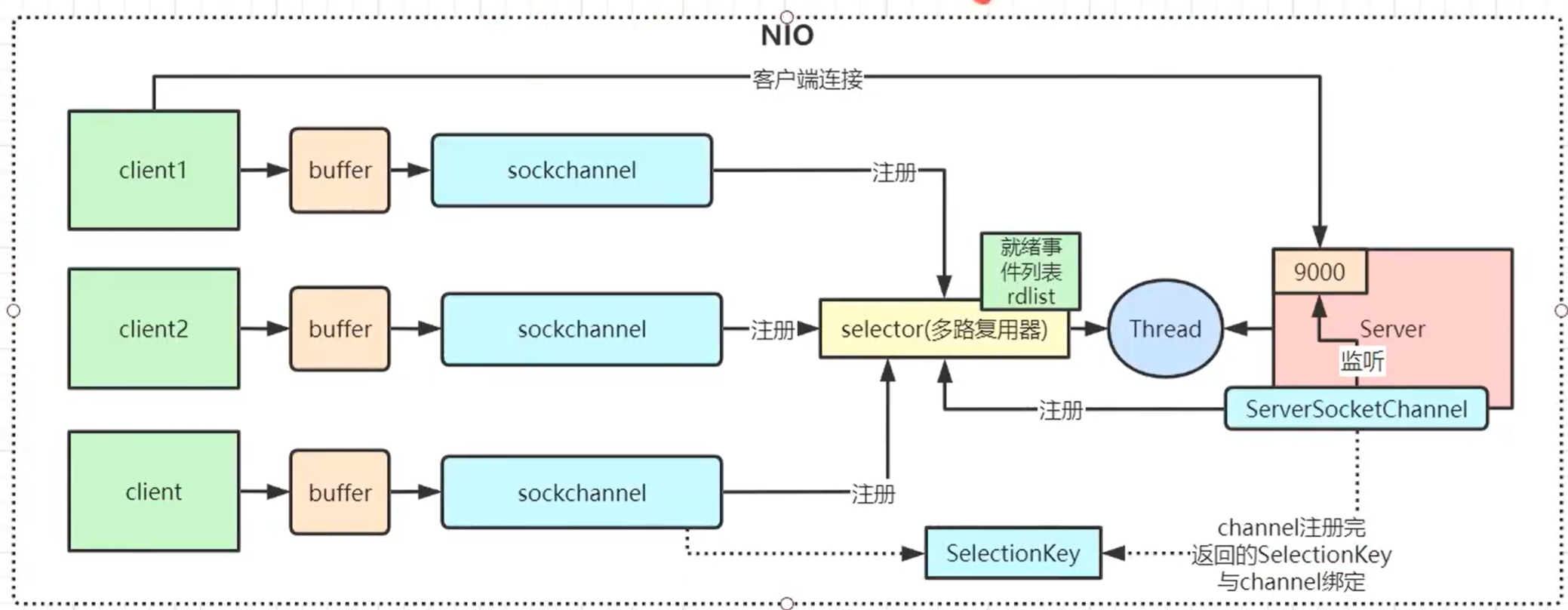
核心组件:
- Channel(通道):双向数据传输,类似流但可非阻塞
- Buffer(缓冲区):数据存储容器,所有数据都通过Buffer读写
- Selector(选择器):监听多个Channel的IO事件
适用场景: 高并发、连接数多、连接时间长的应用
完整代码示例:NIO服务器
import java.io.IOException;
import java.net.InetSocketAddress;
import java.nio.ByteBuffer;
import java.nio.channels.*;
import java.nio.charset.StandardCharsets;
import java.util.Iterator;
import java.util.Set;

// NIO服务器
public class NioServer {

    private static final int PORT = 8081;
    private static final int BUFFER_SIZE = 1024;

    private Selector selector;
    private ServerSocketChannel serverChannel;
    private ByteBuffer buffer;

    public NioServer() {
        try {
            // 创建选择器
            selector = Selector.open();

            // 创建服务器通道
            serverChannel = ServerSocketChannel.open();
            serverChannel.configureBlocking(false); // 设置为非阻塞模式
            serverChannel.bind(new InetSocketAddress(PORT));

            // 注册接受连接事件
            serverChannel.register(selector, SelectionKey.OP_ACCEPT);

            // 创建缓冲区
            buffer = ByteBuffer.allocate(BUFFER_SIZE);

            System.out.println("NIO服务器启动,监听端口: " + PORT);

        } catch (IOException e) {
            System.err.println("服务器初始化失败: " + e.getMessage());
            e.printStackTrace();
        }
    }

    public void start() {
        try {
            while (!Thread.currentThread().isInterrupted()) {
                // 阻塞等待事件,超时时间1秒
                int readyChannels = selector.select(1000);

                if (readyChannels == 0) {
                    continue;
                }

                // 获取所有就绪的SelectionKey
                Set<SelectionKey> selectedKeys = selector.selectedKeys();
                Iterator<SelectionKey> keyIterator = selectedKeys.iterator();

                while (keyIterator.hasNext()) {
                    SelectionKey key = keyIterator.next();
                    keyIterator.remove(); // 必须手动移除

                    if (key.isValid()) {
                        handleEvent(key);
                    }
                }
            }

        } catch (IOException e) {
            System.err.println("服务器运行异常: " + e.getMessage());
            e.printStackTrace();
        } finally {
            close();
        }
    }

    private void handleEvent(SelectionKey key) throws IOException {
        // 接受新连接
        if (key.isAcceptable()) {
            handleAccept(key);
        }
        // 读取数据
        else if (key.isReadable()) {
            handleRead(key);
        }
        // 写入数据
        else if (key.isWritable()) {
            handleWrite(key);
        }
    }

    private void handleAccept(SelectionKey key) throws IOException {
        ServerSocketChannel serverChannel = (ServerSocketChannel) key.channel();
        SocketChannel clientChannel = serverChannel.accept();
        clientChannel.configureBlocking(false);

        // 注册读取事件
        clientChannel.register(selector, SelectionKey.OP_READ);

        System.out.println("新客户端连接: " + clientChannel.getRemoteAddress());
    }

    private void handleRead(SelectionKey key) throws IOException {
        SocketChannel clientChannel = (SocketChannel) key.channel();
        buffer.clear();

        int bytesRead = clientChannel.read(buffer);

        if (bytesRead == -1) {
            // 客户端断开连接
            System.out.println("客户端断开连接: " + clientChannel.getRemoteAddress());
            key.cancel();
            clientChannel.close();
            return;
        }

        if (bytesRead > 0) {
            buffer.flip(); // 切换为读模式
            byte[] data = new byte[buffer.remaining()];
            buffer.get(data);

            String message = new String(data, StandardCharsets.UTF_8).trim();
            System.out.println("收到消息: " + message);

            // 准备响应
            String response = "NIO服务器收到: " + message;
            buffer.clear();
            buffer.put(response.getBytes(StandardCharsets.UTF_8));
            buffer.flip();

            // 注册写入事件
            key.interestOps(SelectionKey.OP_WRITE);

            // 将响应数据附加到key上
            key.attach(buffer);
        }
    }

    private void handleWrite(SelectionKey key) throws IOException {
        SocketChannel clientChannel = (SocketChannel) key.channel();
        ByteBuffer buffer = (ByteBuffer) key.attachment();

        if (buffer != null && buffer.hasRemaining()) {
            clientChannel.write(buffer);
        }

        if (!buffer.hasRemaining()) {
            // 写入完成,重新注册读取事件
            key.interestOps(SelectionKey.OP_READ);
            key.attach(null);
        }
    }

    public void close() {
        try {
            if (selector != null) selector.close();
            if (serverChannel != null) serverChannel.close();
            System.out.println("NIO服务器已关闭");
        } catch (IOException e) {
            e.printStackTrace();
        }
    }

    public static void main(String[] args) {
        NioServer server = new NioServer();
        server.start();
    }
}

// NIO客户端
public class NioClient {

    private static final String SERVER_HOST = "localhost";
    private static final int SERVER_PORT = 8081;
    private static final int BUFFER_SIZE = 1024;

    private SocketChannel channel;
    private Selector selector;
    private ByteBuffer buffer;

    public NioClient() {
        try {
            selector = Selector.open();
            channel = SocketChannel.open();
            channel.configureBlocking(false);
            buffer = ByteBuffer.allocate(BUFFER_SIZE);

            // 连接服务器
            channel.connect(new InetSocketAddress(SERVER_HOST, SERVER_PORT));
            channel.register(selector, SelectionKey.OP_CONNECT);

            System.out.println("NIO客户端启动,正在连接服务器...");

        } catch (IOException e) {
            System.err.println("客户端初始化失败: " + e.getMessage());
            e.printStackTrace();
        }
    }

    public void start() {
        try {
            while (!Thread.currentThread().isInterrupted()) {
                selector.select(1000);
                Set<SelectionKey> selectedKeys = selector.selectedKeys();
                Iterator<SelectionKey> keyIterator = selectedKeys.iterator();

                while (keyIterator.hasNext()) {
                    SelectionKey key = keyIterator.next();
                    keyIterator.remove();

                    if (key.isConnectable()) {
                        handleConnect(key);
                    } else if (key.isReadable()) {
                        handleRead(key);
                    }
                }
            }
        } catch (IOException e) {
            System.err.println("客户端运行异常: " + e.getMessage());
        } finally {
            close();
        }
    }

    private void handleConnect(SelectionKey key) throws IOException {
        SocketChannel channel = (SocketChannel) key.channel();
        if (channel.finishConnect()) {
            System.out.println("已连接到服务器");
            channel.register(selector, SelectionKey.OP_READ);

            // 发送测试消息
            sendMessage("Hello NIO Server!");
        }
    }

    private void handleRead(SelectionKey key) throws IOException {
        SocketChannel channel = (SocketChannel) key.channel();
        buffer.clear();

        int bytesRead = channel.read(buffer);
        if (bytesRead > 0) {
            buffer.flip();
            byte[] data = new byte[buffer.remaining()];
            buffer.get(data);
            System.out.println("服务器响应: " + new String(data, StandardCharsets.UTF_8));
        }
    }

    public void sendMessage(String message) {
        try {
            buffer.clear();
            buffer.put(message.getBytes(StandardCharsets.UTF_8));
            buffer.flip();
            channel.write(buffer);
            System.out.println("已发送: " + message);
        } catch (IOException e) {
            System.err.println("发送消息失败: " + e.getMessage());
        }
    }

    public void close() {
        try {
            if (selector != null) selector.close();
            if (channel != null) channel.close();
            System.out.println("NIO客户端已关闭");
        } catch (IOException e) {
            e.printStackTrace();
        }
    }

    public static void main(String[] args) {
        NioClient client = new NioClient();
        client.start();
    }
}
5.3 AIO(Asynchronous IO)—— 异步IO
原理说明:
AIO是Java 7引入的异步IO模型,基于事件和回调机制。IO操作由操作系统完成,完成后通知应用程序,实现真正的异步非阻塞。
┌─────────────────────────────────────────────────────────────┐
│                      AIO 模型架构                            │
├─────────────────────────────────────────────────────────────┤
│                                                             │
│  应用程序                    操作系统                        │
│  ┌─────────┐                ┌─────────────┐                │
│  │ 发起IO  │ ──────────────►│  内核处理   │                │
│  │  请求   │                │  IO操作     │                │
│  └─────────┘                └──────┬──────┘                │
│       ▲                           │                        │
│       │                           │                        │
│       │         完成通知          │                        │
│       │ ◄─────────────────────────┘                        │
│       │                                                    │
│  ┌────┴────┐                                               │
│  │  回调   │  ← 操作系统完成后回调应用程序                  │
│  │  处理   │                                               │
│  └─────────┘                                               │
│                                                             │
│  特点:真正的异步,应用程序无需等待IO完成                     │
└─────────────────────────────────────────────────────────────┘
适用场景: 连接数多且连接时间长,需要高吞吐量的应用
完整代码示例:AIO服务器
import java.io.IOException;
import java.net.InetSocketAddress;
import java.nio.ByteBuffer;
import java.nio.channels.*;
import java.nio.charset.StandardCharsets;
import java.util.concurrent.CompletionHandler;

// AIO服务器
public class AioServer {

    private static final int PORT = 8082;
    private static final int BUFFER_SIZE = 1024;

    private AsynchronousServerSocketChannel serverChannel;

    public AioServer() {
        try {
            serverChannel = AsynchronousServerSocketChannel.open();
            serverChannel.bind(new InetSocketAddress(PORT));
            System.out.println("AIO服务器启动,监听端口: " + PORT);

        } catch (IOException e) {
            System.err.println("服务器初始化失败: " + e.getMessage());
            e.printStackTrace();
        }
    }

    public void start() {
        // 异步接受客户端连接
        serverChannel.accept(null, new CompletionHandler<AsynchronousSocketChannel, Void>() {
            @Override
            public void completed(AsynchronousSocketChannel clientChannel, Void attachment) {
                System.out.println("新客户端连接: " + getClientAddress(clientChannel));

                // 继续接受下一个连接
                serverChannel.accept(null, this);

                // 处理客户端请求
                handleClient(clientChannel);
            }

            @Override
            public void failed(Throwable exc, Void attachment) {
                System.err.println("接受连接失败: " + exc.getMessage());
                exc.printStackTrace();
            }
        });

        // 保持主线程运行
        try {
            Thread.currentThread().join();
        } catch (InterruptedException e) {
            Thread.currentThread().interrupt();
        }
    }

    private void handleClient(AsynchronousSocketChannel clientChannel) {
        ByteBuffer buffer = ByteBuffer.allocate(BUFFER_SIZE);

        // 异步读取数据
        clientChannel.read(buffer, buffer, new CompletionHandler<Integer, ByteBuffer>() {
            @Override
            public void completed(Integer bytesRead, ByteBuffer readBuffer) {
                if (bytesRead == -1) {
                    // 客户端断开
                    System.out.println("客户端断开连接: " + getClientAddress(clientChannel));
                    try {
                        clientChannel.close();
                    } catch (IOException e) {
                        e.printStackTrace();
                    }
                    return;
                }

                readBuffer.flip();
                byte[] data = new byte[readBuffer.remaining()];
                readBuffer.get(data);
                String message = new String(data, StandardCharsets.UTF_8).trim();
                System.out.println("收到消息: " + message);

                // 准备响应
                String response = "AIO服务器收到: " + message;
                ByteBuffer writeBuffer = ByteBuffer.wrap(
                    response.getBytes(StandardCharsets.UTF_8));

                // 异步写入数据
                clientChannel.write(writeBuffer, writeBuffer,
                    new CompletionHandler<Integer, ByteBuffer>() {
                    @Override
                    public void completed(Integer bytesWritten, ByteBuffer writeBuf) {
                        if (writeBuf.hasRemaining()) {
                            // 继续写入
                            clientChannel.write(writeBuf, writeBuf, this);
                        } else {
                            // 写入完成,继续读取
                            ByteBuffer newReadBuffer = ByteBuffer.allocate(BUFFER_SIZE);
                            clientChannel.read(newReadBuffer, newReadBuffer, this);
                        }
                    }

                    @Override
                    public void failed(Throwable exc, ByteBuffer writeBuf) {
                        System.err.println("写入失败: " + exc.getMessage());
                        try {
                            clientChannel.close();
                        } catch (IOException e) {
                            e.printStackTrace();
                        }
                    }
                });
            }

            @Override
            public void failed(Throwable exc, ByteBuffer readBuffer) {
                System.err.println("读取失败: " + exc.getMessage());
                try {
                    clientChannel.close();
                } catch (IOException e) {
                    e.printStackTrace();
                }
            }
        });
    }

    private String getClientAddress(AsynchronousSocketChannel channel) {
        try {
            return channel.getRemoteAddress().toString();
        } catch (IOException e) {
            return "未知";
        }
    }

    public void close() {
        try {
            if (serverChannel != null) {
                serverChannel.close();
            }
            System.out.println("AIO服务器已关闭");
        } catch (IOException e) {
            e.printStackTrace();
        }
    }

    public static void main(String[] args) {
        AioServer server = new AioServer();
        server.start();
    }
}

// AIO客户端
public class AioClient {

    private static final String SERVER_HOST = "localhost";
    private static final int SERVER_PORT = 8082;
    private static final int BUFFER_SIZE = 1024;

    private AsynchronousSocketChannel clientChannel;

    public AioClient() {
        try {
            clientChannel = AsynchronousSocketChannel.open();
            System.out.println("AIO客户端启动,正在连接服务器...");

        } catch (IOException e) {
            System.err.println("客户端初始化失败: " + e.getMessage());
            e.printStackTrace();
        }
    }

    public void connect() {
        clientChannel.connect(new InetSocketAddress(SERVER_HOST, SERVER_PORT),
            null, new CompletionHandler<Void, Void>() {
            @Override
            public void completed(Void result, Void attachment) {
                System.out.println("已连接到AIO服务器");
                sendMessage("Hello AIO Server!");
            }

            @Override
            public void failed(Throwable exc, Void attachment) {
                System.err.println("连接失败: " + exc.getMessage());
            }
        });
    }

    public void sendMessage(String message) {
        ByteBuffer writeBuffer = ByteBuffer.wrap(
            message.getBytes(StandardCharsets.UTF_8));

        clientChannel.write(writeBuffer, writeBuffer,
            new CompletionHandler<Integer, ByteBuffer>() {
            @Override
            public void completed(Integer bytesWritten, ByteBuffer writeBuf) {
                if (writeBuf.hasRemaining()) {
                    clientChannel.write(writeBuf, writeBuf, this);
                } else {
                    System.out.println("已发送: " + message);
                    // 发送后读取响应
                    readResponse();
                }
            }

            @Override
            public void failed(Throwable exc, ByteBuffer writeBuf) {
                System.err.println("发送失败: " + exc.getMessage());
            }
        });
    }

    private void readResponse() {
        ByteBuffer readBuffer = ByteBuffer.allocate(BUFFER_SIZE);

        clientChannel.read(readBuffer, readBuffer,
            new CompletionHandler<Integer, ByteBuffer>() {
            @Override
            public void completed(Integer bytesRead, ByteBuffer readBuf) {
                if (bytesRead > 0) {
                    readBuf.flip();
                    byte[] data = new byte[readBuf.remaining()];
                    readBuf.get(data);
                    System.out.println("服务器响应: " + new String(data, StandardCharsets.UTF_8));
                }
            }

            @Override
            public void failed(Throwable exc, ByteBuffer readBuf) {
                System.err.println("读取失败: " + exc.getMessage());
            }
        });
    }

    public void close() {
        try {
            if (clientChannel != null) {
                clientChannel.close();
            }
            System.out.println("AIO客户端已关闭");
        } catch (IOException e) {
            e.printStackTrace();
        }
    }

    public static void main(String[] args) throws InterruptedException {
        AioClient client = new AioClient();
        client.connect();
        // 保持主线程运行以接收回调
        Thread.sleep(5000);
        client.close();
    }
}
5.4 BIO、NIO、AIO 对比总结
| 特性 | BIO | NIO | AIO |
|---|---|---|---|
| IO模型 | 同步阻塞 | 同步非阻塞 | 异步非阻塞 |
| 编程模型 | 流(Stream) | 通道+缓冲区(Channel+Buffer) | 通道+回调(Channel+Callback) |
| 线程模型 | 1连接1线程 | 1线程N连接(多路复用) | 操作系统异步处理 |
| 实现难度 | 简单 | 中等 | 较复杂 |
| 性能 | 低(连接数少时可用) | 高(高并发场景) | 最高(真正异步) |
| 适用场景 | 连接数少、短连接 | 高并发、长连接 | 超高并发、高吞吐 |
| Java版本 | Java 1.0 | Java 1.4 | Java 7 |
| 典型应用 | 简单应用、内部系统 | Netty、Mina | 高性能服务器 |
选择建议:
- BIO:连接数<100,简单应用,开发效率优先
- NIO:连接数>1000,高并发场景,推荐使用Netty等成熟框架
- AIO:超高并发场景,但生态不如NIO成熟,需谨慎选择
六、结语
Java IO是Java编程的基础核心,掌握其底层原理和最佳实践对于编写高效、稳定的程序至关重要。本文从基础概念到进阶应用,系统讲解了:
- IO流体系:字节流与字符流的区别与使用场景
- 避坑指南:六大常见陷阱及完整解决方案代码
- 场景选择:不同业务场景下的流类型选择指南
- 进阶模型:BIO、NIO、AIO的原理、代码及对比
核心建议:
- 始终使用
try-with-resources管理流资源 - 文本处理必须显式指定编码
- 文件读写务必使用缓冲流
- 大文件采用流式处理,避免内存溢出
- 高并发场景选择NIO(推荐Netty框架)
希望本文能帮助你系统掌握Java IO的核心知识点与实战技巧!
作者:架构师Beata
日期:2026年2月19日
声明:本文基于网络文档整理,如有疏漏,欢迎指正。转载请注明出处。
互动:如有任何问题?欢迎在评论区分享!

有“AI”的1024 = 2048,欢迎大家加入2048 AI社区
更多推荐

 15
15 0
0- 0


 已为社区贡献1条内容

所有评论(0)