服务器运维(四十一)日服务器linux-audit.log分析工具—东方仙盟
audit.log 是 Linux 系统安全的 “最后一道防线”,记录所有底层操作,是异常定位、安全溯源的核心依据;快速定位的关键是 “异常标识 + 维度统计”,通过 ANOM_、res=failed 等标识筛选异常,结合用户、事件类型维度交叉分析;工具化解析大幅提升效率,将非结构化的 audit.log 转化为可视化统计数据,降低分析门槛。
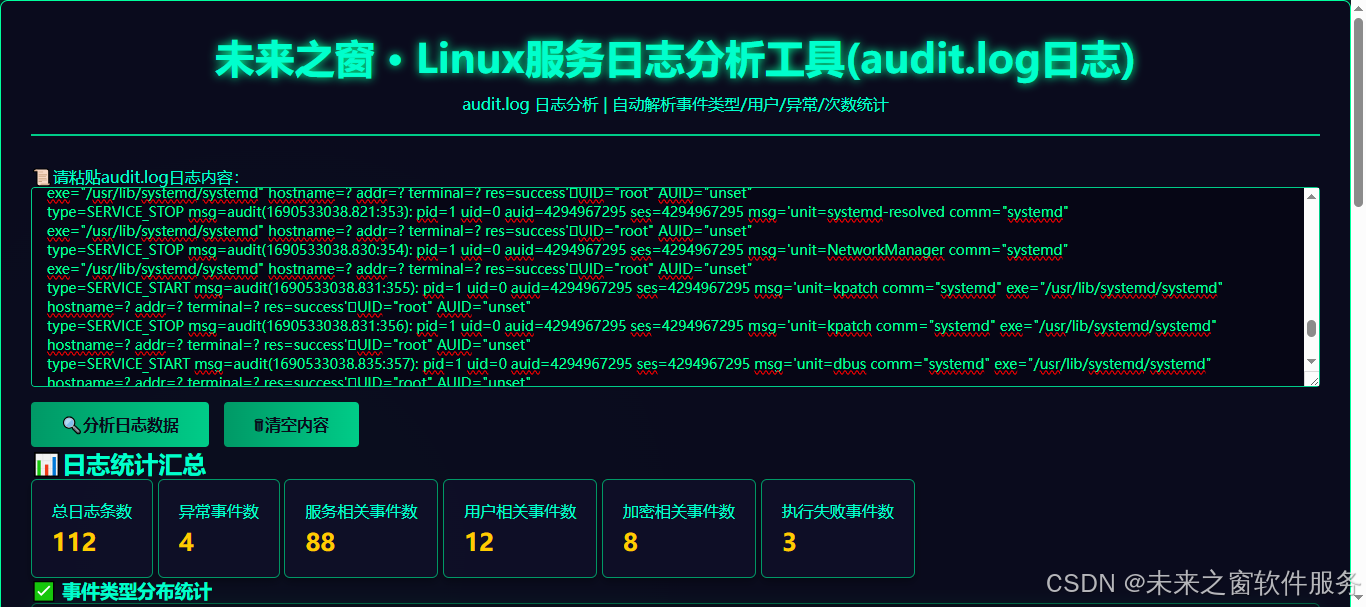
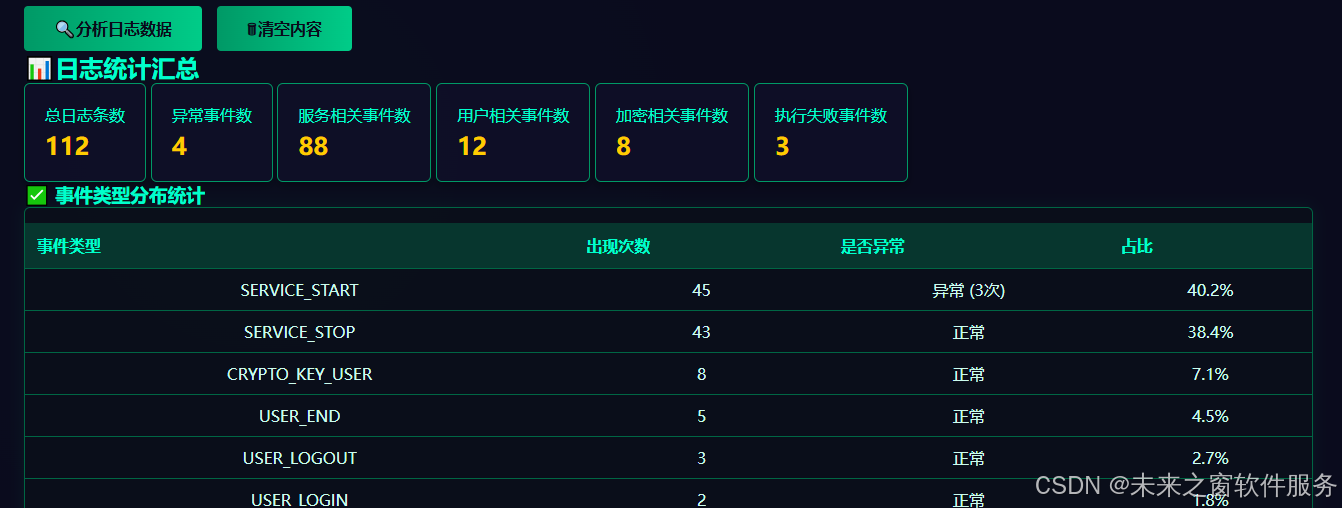
linux异常
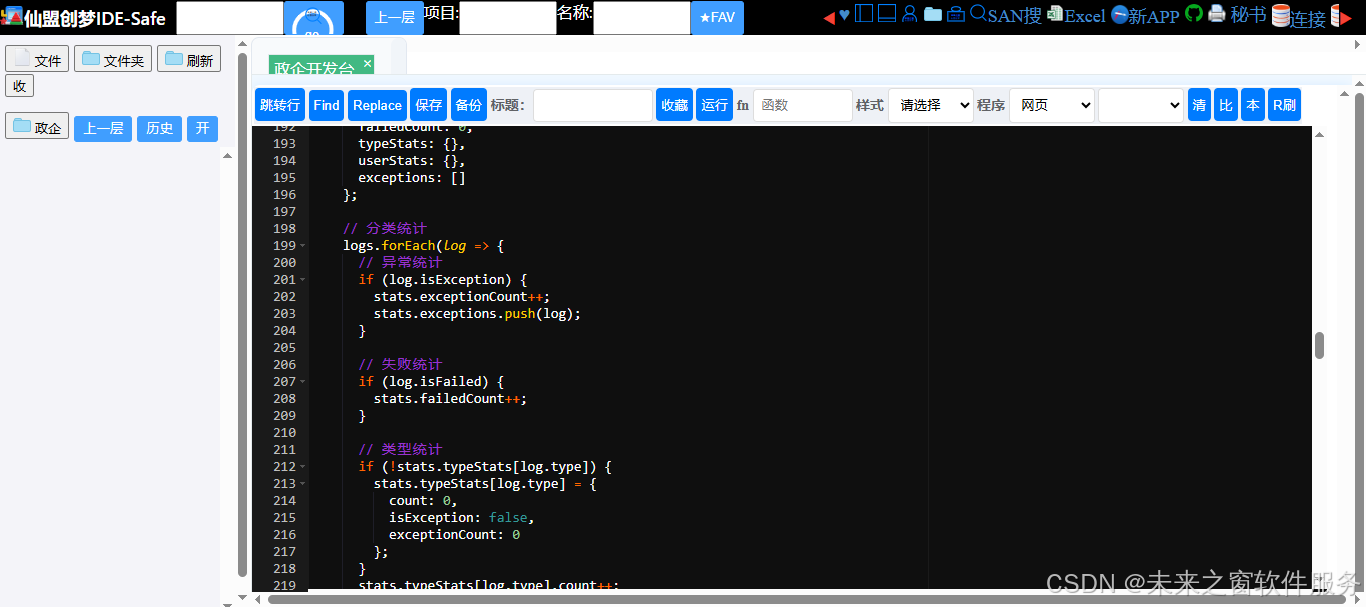
核心代码
未来之窗・Linux 服务日志分析工具 - audit.log 实战:精准捕捉系统安全异常
完整代码
<!DOCTYPE html>
<html lang="zh-CN">
<head>
<meta charset="utf-8">
<meta name="viewport" content="width=device-width, initial-scale=1.0">
<title>未来之窗 · Linux服务日志分析工具(audit.log日志)</title>
 </head>

<body>
<div class="container">
  <div class="header">
    <h1>未来之窗 · Linux服务日志分析工具(audit.log日志)</h1>
    <p>audit.log 日志分析 | 自动解析事件类型/用户/异常/次数统计</p>
  </div>

  <!-- 输入区域 -->
  <div class="input-area">
    <label for="auditInput"><span>fairyalli_strico_paper</span>请粘贴audit.log日志内容:</label>
    <textarea id="auditInput" placeholder="示例:
type=ANOM_ABEND msg=audit(1690533038.482:259): auid=4294967295 uid=0 gid=0 ses=4294967295 pid=783 comm="in:imjournal" exe="/usr/sbin/rsyslogd" sig=7 res=1AUID="unset" UID="root" GID="root"
type=SERVICE_START msg=audit(1690533038.509:260): pid=1 uid=0 auid=4294967295 ses=4294967295 msg='unit=systemd-coredump@0-40594-0 comm="systemd" exe="/usr/lib/systemd/systemd" hostname=? addr=? terminal=? res=success'UID="root" AUID="unset"
..." style="height:200px;"></textarea>
    <div class="btn-group">
      <button id="analyzeBtn" class="btn"><span>fairyalli_strico_search</span>分析日志数据</button>
      <button id="clearBtn" class="btn btn-clear"><span>fairyalli_strico_垃圾桶</span>清空内容</button>
    </div>
  </div>

  <!-- 统计汇总 -->
  <h2 class="section-title"><span>fairyalli_strico_stat</span>日志统计汇总</h2>
  <div class="stats-summary">
    <div class="stat-card">
      <div class="stat-label">总日志条数</div>
      <div class="stat-value" id="totalLogs">0</div>
    </div>
    <div class="stat-card warning">
      <div class="stat-label">异常事件数</div>
      <div class="stat-value" id="exceptionCount">0</div>
    </div>
    <div class="stat-card">
      <div class="stat-label">服务相关事件数</div>
      <div class="stat-value" id="serviceCount">0</div>
    </div>
    <div class="stat-card">
      <div class="stat-label">用户相关事件数</div>
      <div class="stat-value" id="userCount">0</div>
    </div>
    <div class="stat-card">
      <div class="stat-label">加密相关事件数</div>
      <div class="stat-value" id="cryptoCount">0</div>
    </div>
    <div class="stat-card error">
      <div class="stat-label">执行失败事件数</div>
      <div class="stat-value" id="failedCount">0</div>
    </div>
  </div>

  <!-- 事件类型统计 -->
  <h3 class="sub-title"><span>fairyalli_strico_ok</span>事件类型分布统计</h3>
  <div class="table-wrap">
    <table>
      <thead>
        <tr>
          <th>事件类型</th>
          <th>出现次数</th>
          <th>是否异常</th>
          <th>占比</th>
        </tr>
      </thead>
      <tbody id="typeTableBody">
        <tr>
          <td colspan="4" class="empty">请粘贴audit.log日志并点击分析按钮</td>
        </tr>
      </tbody>
    </table>
  </div>

  <!-- 用户统计 -->
  <h3 class="sub-title"><span>fairyalli_strico_stat</span>用户相关统计</h3>
  <div class="table-wrap">
    <table>
      <thead>
        <tr>
          <th>用户标识</th>
          <th>出现次数</th>
          <th>事件类型</th>
          <th>异常情况</th>
        </tr>
      </thead>
      <tbody id="userTableBody">
        <tr>
          <td colspan="4" class="empty">请粘贴audit.log日志并点击分析按钮</td>
        </tr>
      </tbody>
    </table>
  </div>

  <!-- 异常事件详情 -->
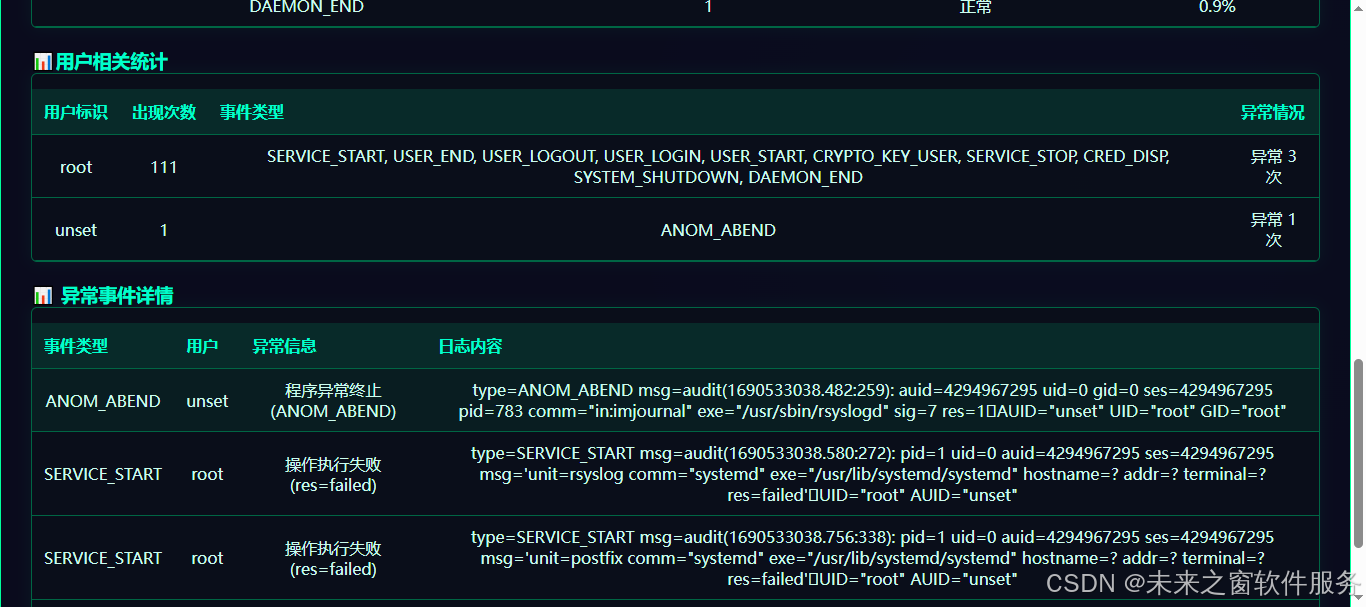
  <h3 class="sub-title"><span>fairyalli_strico_stat</span> 异常事件详情</h3>
  <div class="table-wrap">
    <table>
      <thead>
        <tr>
          <th>事件类型</th>
          <th>用户</th>
          <th>异常信息</th>
          <th>日志内容</th>
        </tr>
      </thead>
      <tbody id="exceptionTableBody">
        <tr>
          <td colspan="4" class="empty">暂无异常事件或请先分析日志</td>
        </tr>
      </tbody>
    </table>
  </div>
</div>

<script>
var AuditLogAnalyzer = (function() {
  // 解析audit.log日志行
  function parseAuditLine(line) {
    if (!line || line.trim() === '') return null;

    // 提取事件类型
    const typeMatch = line.match(/type=(\w+)/);
    const type = typeMatch ? typeMatch[1] : 'UNKNOWN';

    // 提取用户信息
    let uid = 'unknown';
    let auid = 'unknown';
    const uidMatch = line.match(/UID="([^"]+)"/);
    const auidMatch = line.match(/AUID="([^"]+)"/);

    if (uidMatch) uid = uidMatch[1];
    if (auidMatch) auid = auidMatch[1];

    // 判断是否异常
    let isException = false;
    let exceptionMsg = '';

    // 异常类型判断
    if (type === 'ANOM_ABEND') { // 异常终止
      isException = true;
      exceptionMsg = '程序异常终止(ANOM_ABEND)';
    } else if (line.includes('res=failed') || line.includes('res=1')) { // 执行失败
      isException = true;
      exceptionMsg = '操作执行失败(res=failed)';
    } else if (type.includes('ANOM_')) { // 其他异常类型
      isException = true;
      exceptionMsg = `异常事件(${type})`;
    }

    // 判断执行结果
    const isFailed = line.includes('res=failed');

    return {
      type: type,
      uid: uid,
      auid: auid,
      user: uid !== 'unknown' ? uid : auid,
      isException: isException,
      exceptionMsg: exceptionMsg,
      isFailed: isFailed,
      rawLine: line.trim()
    };
  }

  // 解析所有日志行
  function parseAuditLogs(text) {
    const lines = text.trim().split('\n');
    const logs = [];

    lines.forEach(line => {
      const parsed = parseAuditLine(line);
      if (parsed) logs.push(parsed);
    });

    return logs;
  }

  // 统计日志数据
  function calculateStats(logs) {
    const stats = {
      total: logs.length,
      exceptionCount: 0,
      serviceCount: 0,
      userCount: 0,
      cryptoCount: 0,
      failedCount: 0,
      typeStats: {},
      userStats: {},
      exceptions: []
    };

    // 分类统计
    logs.forEach(log => {
      // 异常统计
      if (log.isException) {
        stats.exceptionCount++;
        stats.exceptions.push(log);
      }

      // 失败统计
      if (log.isFailed) {
        stats.failedCount++;
      }

      // 类型统计
      if (!stats.typeStats[log.type]) {
        stats.typeStats[log.type] = {
          count: 0,
          isException: false,
          exceptionCount: 0
        };
      }
      stats.typeStats[log.type].count++;
      if (log.isException) {
        stats.typeStats[log.type].isException = true;
        stats.typeStats[log.type].exceptionCount++;
      }

      // 分类统计
      if (log.type.startsWith('SERVICE_')) {
        stats.serviceCount++;
      } else if (log.type.startsWith('USER_')) {
        stats.userCount++;
      } else if (log.type.startsWith('CRYPTO_')) {
        stats.cryptoCount++;
      }

      // 用户统计
      const userKey = log.user;
      if (!stats.userStats[userKey]) {
        stats.userStats[userKey] = {
          count: 0,
          types: new Set(),
          exceptionCount: 0
        };
      }
      stats.userStats[userKey].count++;
      stats.userStats[userKey].types.add(log.type);
      if (log.isException) {
        stats.userStats[userKey].exceptionCount++;
      }
    });

    return stats;
  }

  // 渲染统计卡片
  function renderStatsCards(stats) {
    document.getElementById('totalLogs').textContent = stats.total;
    document.getElementById('exceptionCount').textContent = stats.exceptionCount;
    document.getElementById('serviceCount').textContent = stats.serviceCount;
    document.getElementById('userCount').textContent = stats.userCount;
    document.getElementById('cryptoCount').textContent = stats.cryptoCount;
    document.getElementById('failedCount').textContent = stats.failedCount;
  }

  // 渲染类型统计表格
  function renderTypeTable(stats) {
    const tbody = document.getElementById('typeTableBody');
    const typeStats = stats.typeStats;

    if (Object.keys(typeStats).length === 0) {
      tbody.innerHTML = '<tr><td colspan="4" class="empty">暂无事件类型数据</td></tr>';
      return;
    }

    // 转换为数组并按次数排序
    const typeArray = Object.entries(typeStats).map(([type, data]) => ({
      type: type,
      count: data.count,
      isException: data.isException,
      exceptionCount: data.exceptionCount,
      percentage: ((data.count / stats.total) * 100).toFixed(1) + '%'
    })).sort((a, b) => b.count - a.count);

    let html = '';
    typeArray.forEach(item => {
      let typeClass = '';
      if (item.type.startsWith('ANOM_')) typeClass = 'type-anom';
      else if (item.type.startsWith('SERVICE_')) typeClass = 'type-service';
      else if (item.type.startsWith('USER_')) typeClass = 'type-user';
      else if (item.type.startsWith('CRYPTO_')) typeClass = 'type-crypto';

      let exceptionText = item.isException ?
        `<span class="exception">异常 (${item.exceptionCount}次)</span>` :
        `<span class="normal">正常</span>`;

      html += `<tr>
        <td class="${typeClass}">${item.type}</td>
        <td class="count-cell">${item.count}</td>
        <td>${exceptionText}</td>
        <td>${item.percentage}</td>
      </tr>`;
    });

    tbody.innerHTML = html;
  }

  // 渲染用户统计表格
  function renderUserTable(stats) {
    const tbody = document.getElementById('userTableBody');
    const userStats = stats.userStats;

    if (Object.keys(userStats).length === 0) {
      tbody.innerHTML = '<tr><td colspan="4" class="empty">暂无用户数据</td></tr>';
      return;
    }

    // 转换为数组并按次数排序
    const userArray = Object.entries(userStats).map(([user, data]) => ({
      user: user,
      count: data.count,
      types: Array.from(data.types).join(', '),
      exceptionCount: data.exceptionCount
    })).sort((a, b) => b.count - a.count);

    let html = '';
    userArray.forEach(item => {
      let userClass = item.user === 'root' ? 'user-root' :
                     (item.user === 'unset' ? 'user-unset' : '');

      let exceptionText = item.exceptionCount > 0 ?
        `<span class="exception">异常 ${item.exceptionCount} 次</span>` :
        `<span class="normal">无异常</span>`;

      html += `<tr>
        <td class="${userClass}">${item.user}</td>
        <td class="count-cell">${item.count}</td>
        <td>${item.types}</td>
        <td>${exceptionText}</td>
      </tr>`;
    });

    tbody.innerHTML = html;
  }

  // 渲染异常事件表格
  function renderExceptionTable(exceptions) {
    const tbody = document.getElementById('exceptionTableBody');

    if (exceptions.length === 0) {
      tbody.innerHTML = '<tr><td colspan="4" class="empty">未检测到异常事件</td></tr>';
      return;
    }

    let html = '';
    exceptions.forEach(exception => {
      let typeClass = exception.type.startsWith('ANOM_') ? 'type-anom' :
                     (exception.type.startsWith('SERVICE_') ? 'type-service' :
                     (exception.type.startsWith('USER_') ? 'type-user' : ''));

      let userClass = exception.user === 'root' ? 'user-root' :
                     (exception.user === 'unset' ? 'user-unset' : '');

      html += `<tr>
        <td class="${typeClass}">${exception.type}</td>
        <td class="${userClass}">${exception.user}</td>
        <td class="exception">${exception.exceptionMsg}</td>
        <td class="path-cell">${exception.rawLine}</td>
      </tr>`;
    });

    tbody.innerHTML = html;
  }

  // 分析按钮点击事件
  function analyze() {
    const inputText = document.getElementById('auditInput').value;
    const logs = parseAuditLogs(inputText);
    const stats = calculateStats(logs);

    // 渲染所有统计信息
    renderStatsCards(stats);
    renderTypeTable(stats);
    renderUserTable(stats);
    renderExceptionTable(stats.exceptions);
  }

  // 清空按钮点击事件
  function clearInput() {
    document.getElementById('auditInput').value = '';

    // 重置所有统计和表格
    renderStatsCards({
      total: 0,
      exceptionCount: 0,
      serviceCount: 0,
      userCount: 0,
      cryptoCount: 0,
      failedCount: 0,
      typeStats: {},
      userStats: {},
      exceptions: []
    });

    document.getElementById('typeTableBody').innerHTML = '<tr><td colspan="4" class="empty">请粘贴audit.log日志并点击分析按钮</td></tr>';
    document.getElementById('userTableBody').innerHTML = '<tr><td colspan="4" class="empty">请粘贴audit.log日志并点击分析按钮</td></tr>';
    document.getElementById('exceptionTableBody').innerHTML = '<tr><td colspan="4" class="empty">暂无异常事件或请先分析日志</td></tr>';
  }

  // 初始化
  function init() {
    document.getElementById('analyzeBtn').addEventListener('click', analyze);
    document.getElementById('clearBtn').addEventListener('click', clearInput);

    // 支持按Enter键分析
    document.getElementById('auditInput').addEventListener('keypress', function(e) {
      if (e.key === 'Enter' && e.ctrlKey) {
        analyze();
      }
    });
  }

  return { init: init };
})();

// 页面加载完成后初始化
window.addEventListener('load', AuditLogAnalyzer.init);
</script>

<script>
 const 东方仙盟图标替换 = new 东方仙盟_前端渲染_图标替换();
东方仙盟图标替换.替换整页();
 AuditLogAnalyzer.init();
</script>
</body>
</html>
在 Linux 系统安全防护体系中,audit.log是记录系统所有关键操作的 “安全黑匣子”—— 从用户权限变更、服务启停,到程序异常终止、操作执行失败,每一个可能影响系统安全的行为都会被 auditd 服务完整记录。掌握 audit.log 的分析方法,不仅是满足合规审计的基本要求,更是快速定位系统异常、追溯安全事件的核心能力。
一、为什么 audit.log 分析是 Linux 安全运维的必要能力?
1. 系统安全的 “全程监控摄像头”
Linux 系统的常规日志(如 syslog)仅记录基础操作,而 audit.log 会深度捕获系统级关键事件:
- 程序异常事件:ANOM_ABEND(程序异常终止)等标识,直接暴露进程崩溃、恶意程序运行等问题;
- 服务状态变更:SERVICE_START/SERVICE_STOP 等事件,记录关键服务(如 rsyslogd、systemd)的启停行为;
- 用户操作轨迹:UID/AUID 标识精准关联操作所属用户,追溯 root / 普通用户的敏感操作;
- 执行结果记录:res=failed/res=success 标识,判断操作是否成功执行,发现未授权访问尝试。
缺乏 audit.log 分析能力,就等于放弃了对系统底层操作的监控,无法发现隐藏的安全威胁。
2. 安全事件溯源的 “核心证据链”
当系统出现异常(如程序莫名崩溃、权限被篡改)时,audit.log 是最直接的溯源依据:
- 可快速定位异常事件的发生时间、触发用户、具体操作;
- 区分 “正常异常”(如服务正常重启)和 “恶意异常”(如程序被强制终止);
- 统计失败操作次数,识别暴力破解、未授权访问等攻击行为。
3. 合规审计的 “必备依据”
金融、政务等行业的合规要求中,明确要求留存系统操作审计日志。通过 audit.log 分析:
- 可统计特定用户的操作频次、事件类型,满足审计核查要求;
- 识别违规操作(如 root 用户异常执行命令、普通用户越权访问);
- 生成异常事件报告,作为安全审计的核心凭证。
二、audit.log 分析如何实现快速定位?
1. 精准识别异常事件类型
audit.log 的核心价值在于 “异常标记”,通过关键标识可快速筛选问题:
表格
| 事件类型 | 核心特征 | 问题定位方向 |
|---|---|---|
| ANOM_ABEND | 程序异常终止、sig=7 等 | 进程崩溃、恶意程序、系统库异常 |
| res=failed | 操作执行失败 | 未授权访问、权限配置错误 |
| SERVICE_STOP | 关键服务异常停止 | 服务被恶意终止、系统故障 |
| USER_* | 用户权限变更、登录操作 | 账号被盗、越权操作 |
2. 多维度统计提升分析效率
手动逐行分析 audit.log 效率极低,通过工具化解析可实现:
- 核心指标汇总:一键统计总日志数、异常事件数、失败操作数,快速掌握系统安全状态;
- 事件类型分布:按出现次数排序展示事件类型,聚焦高频异常(如 ANOM_ABEND 反复出现);
- 用户行为分析:统计各用户的操作次数、异常事件数,定位高危用户(如 root 用户频繁触发失败操作);
- 异常详情展示:提取异常事件的核心信息,无需翻阅原始日志即可定位问题。
3. 实战分析步骤(以程序异常终止为例)
问题现象
系统监控告警:rsyslogd 进程频繁崩溃,日志服务不可用。
排查步骤
- 提取 audit.log 中包含 “rsyslogd” 的日志行,通过工具解析发现 ANOM_ABEND 事件(程序异常终止);
- 查看事件关联用户:UID=root,确认是 root 用户所属进程;
- 统计该事件出现次数:5 分钟内触发 20 次,判定为非偶发异常;
- 结合异常信息(sig=7),定位到 rsyslogd 配置错误导致的进程崩溃;
- 修复配置后,ANOM_ABEND 事件消失,服务恢复正常。
三、audit.log 分析的核心价值
1. 从 “事后补救” 到 “事前预警”
通过持续分析 audit.log:
- 可发现 “失败操作次数骤增” 等攻击前兆,提前封堵漏洞;
- 识别 “程序异常终止频率升高” 等系统问题,避免服务彻底不可用;
- 监控 “敏感用户(如 root)的异常操作”,防范内部违规。
2. 降低安全事件排查成本
传统排查需翻阅海量原始日志,而 audit.log 分析工具可:
- 自动过滤无效信息,聚焦异常事件;
- 按维度分类展示数据,直观呈现问题核心;
- 生成结构化报告,无需专业审计知识也能快速定位。
3. 完善安全防护体系
audit.log 分析与防火墙、入侵检测系统(IDS)形成互补:
- 防火墙拦截外部攻击,audit.log 记录内部操作;
- IDS 识别已知威胁,audit.log 发现未知异常;
- 形成 “拦截 - 记录 - 分析 - 溯源” 的完整安全闭环。
总结
- audit.log 是 Linux 系统安全的 “最后一道防线”,记录所有底层操作,是异常定位、安全溯源的核心依据;
- 快速定位的关键是 “异常标识 + 维度统计”,通过 ANOM_、res=failed 等标识筛选异常,结合用户、事件类型维度交叉分析;
- 工具化解析大幅提升效率,将非结构化的 audit.log 转化为可视化统计数据,降低分析门槛。
掌握 audit.log 分析方法,能让运维人员从 “被动响应安全事件” 转向 “主动发现安全隐患”,显著提升 Linux 系统的安全防护能力,保障业务系统的稳定运行。
阿雪技术观
在科技发展浪潮中,我们不妨积极投身技术共享。不满足于做受益者,更要主动担当贡献者。无论是分享代码、撰写技术博客,还是参与开源项目维护改进,每一个微小举动都可能蕴含推动技术进步的巨大能量。东方仙盟是汇聚力量的天地,我们携手在此探索硅基生命,为科技进步添砖加瓦。
Hey folks, in this wild tech - driven world, why not dive headfirst into the whole tech - sharing scene? Don't just be the one reaping all the benefits; step up and be a contributor too. Whether you're tossing out your code snippets, hammering out some tech blogs, or getting your hands dirty with maintaining and sprucing up open - source projects, every little thing you do might just end up being a massive force that pushes tech forward. And guess what? The Eastern FairyAlliance is this awesome place where we all come together. We're gonna team up

有“AI”的1024 = 2048,欢迎大家加入2048 AI社区
更多推荐
 10
10 0
0- 0


 已为社区贡献31条内容

所有评论(0)