深入解析 nanobot-agent 核心引擎:AgentLoop 代码详解
AgentLoop 作为消息处理中枢,具备以下关键功能:1)从消息总线接收消息;2)构建提示上下文;3)调用 LLM 推理并执行工具调用;4)管理会话状态和记忆。文章详细介绍了其初始化过程、默认工具注册、MCP 动态扩展机制、主循环设计以及核心消息处理流程。通过精巧的架构设计,AgentLoop 在几百行代码内实现了完整的 Agent 能力,支持会话管理、工具调用、记忆整合等核心功能,展现了高度可
nanobot 是一个超轻量级的 AI 助理框架,其核心处理引擎 AgentLoop 位于 nanobot/agent/loop.py 中。本文将从架构设计、关键流程、模块交互等方面,逐段解析这个仅有几百行代码却支撑起完整 Agent 能力的核心模块。
一、AgentLoop 概述
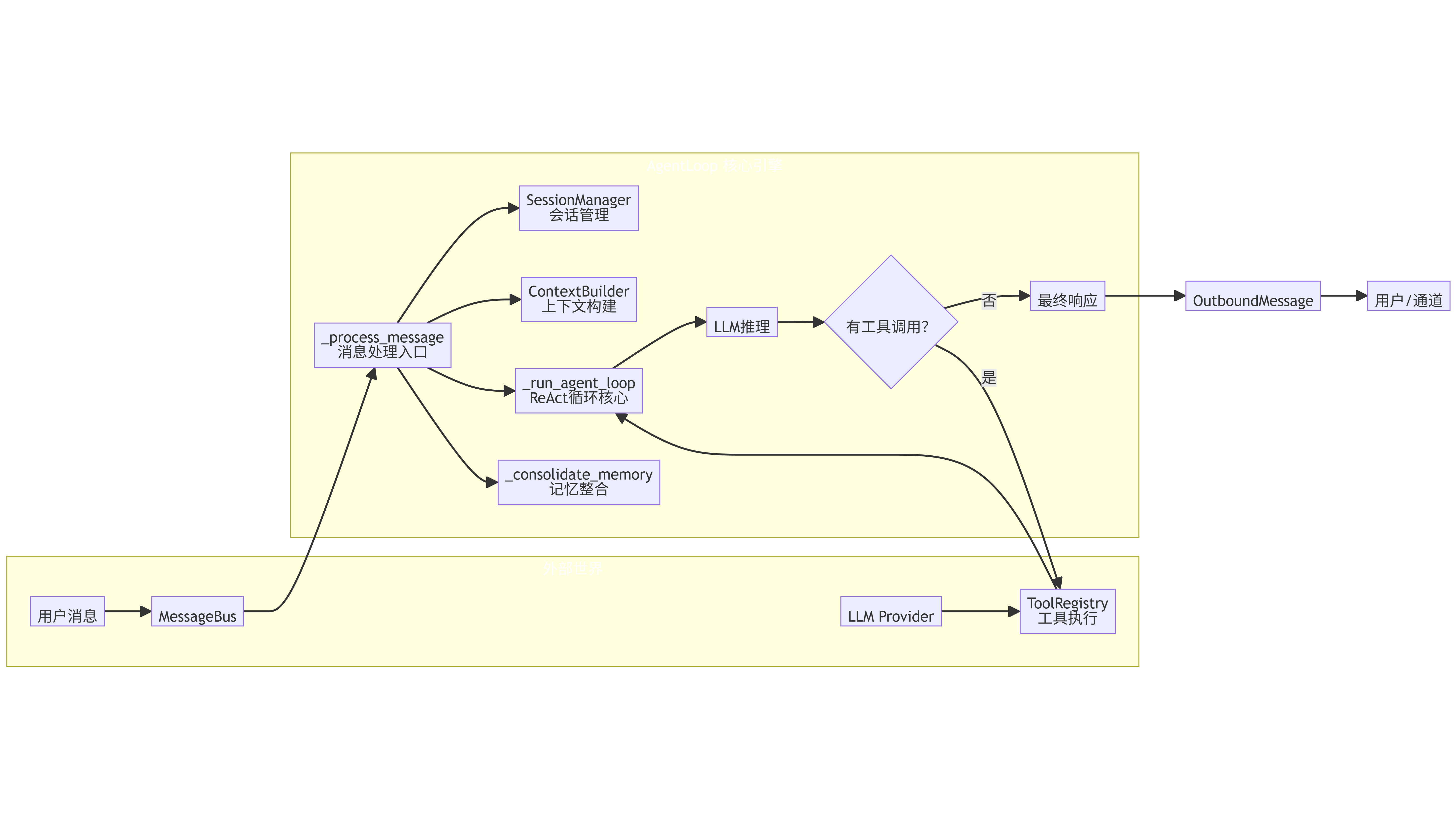
AgentLoop 是 nanobot 的消息处理中枢,负责:
- 从消息总线(
MessageBus)接收入站消息; - 结合会话历史、长期记忆、工具定义构建提示上下文;
- 调用 LLM 进行推理,解析工具调用并执行;
- 将最终响应发布回总线;
- 管理会话状态和记忆整合。
其设计遵循经典的“事件循环 + 工具调用”模式,但通过精巧的抽象实现了极简代码量和高度可扩展性。
二、初始化:参数与默认工具
def __init__(
    self,
    bus: MessageBus,
    provider: LLMProvider,
    workspace: Path,
    model: str | None = None,
    max_iterations: int = 20,
    temperature: float = 0.7,
    max_tokens: int = 4096,
    memory_window: int = 50,
    brave_api_key: str | None = None,
    exec_config: "ExecToolConfig | None" = None,
    cron_service: "CronService | None" = None,
    restrict_to_workspace: bool = False,
    session_manager: SessionManager | None = None,
    mcp_servers: dict | None = None,
):
构造函数接收大量配置参数,核心依赖包括:
bus:消息总线,用于消费入站消息和发布出站消息。provider:LLM 提供者(如 OpenAI、Claude 等),通过统一接口进行对话。workspace:工作目录,用于文件操作隔离。model:使用的模型名称。max_iterations:单次对话中允许的最大工具调用轮数,防止无限循环。memory_window:保留在会话中的最新消息数量,超出部分将触发记忆整合。restrict_to_workspace:是否限制文件操作在工作区内。mcp_servers:MCP 服务器配置,用于扩展工具集。
初始化过程中,还会创建一系列辅助组件:
ContextBuilder:负责构建发送给 LLM 的提示消息。SessionManager:管理会话状态(历史消息、最后整合索引等)。ToolRegistry:工具注册表,管理所有可用工具。SubagentManager:管理子 Agent(用于 spawn 工具)。- 最后调用
_register_default_tools()注册内置工具。
默认工具注册
def _register_default_tools(self) -> None:
    # 文件工具(受限目录)
    self.tools.register(ReadFileTool(allowed_dir=allowed_dir))
    ...
    # Shell 工具
    self.tools.register(ExecTool(...))
    # 网络工具
    self.tools.register(WebSearchTool(api_key=self.brave_api_key))
    self.tools.register(WebFetchTool())
    # 消息工具(用于发送消息)
    message_tool = MessageTool(send_callback=self.bus.publish_outbound)
    self.tools.register(message_tool)
    # 衍生子 Agent 工具
    spawn_tool = SpawnTool(manager=self.subagents)
    self.tools.register(spawn_tool)
    # 定时任务工具
    if self.cron_service:
        self.tools.register(CronTool(self.cron_service))
这些工具覆盖了文件操作、Shell 执行、网络搜索、消息发送、子 Agent 衍生、定时任务等常见需求,构成了 Agent 的“手脚”。
三、MCP 连接:动态扩展工具集
async def _connect_mcp(self) -> None:
    if self._mcp_connected or not self._mcp_servers:
        return
    from nanobot.agent.tools.mcp import connect_mcp_servers
    self._mcp_stack = AsyncExitStack()
    await self._mcp_stack.__aenter__()
    await connect_mcp_servers(self._mcp_servers, self.tools, self._mcp_stack)
MCP(Model Context Protocol)是 Anthropic 提出的标准化工具协议,nanobot 通过 connect_mcp_servers 将外部 MCP 服务器的工具动态注册到 ToolRegistry 中。AsyncExitStack 用于管理多个异步上下文,确保所有连接在退出时正确清理。
连接是懒加载的,只有在第一次处理消息前(run() 或 process_direct() 中调用)才会真正连接。
四、主循环:run() 方法
async def run(self) -> None:
    self._running = True
    await self._connect_mcp()
    while self._running:
        try:
            msg = await asyncio.wait_for(self.bus.consume_inbound(), timeout=1.0)
            try:
                response = await self._process_message(msg)
                if response:
                    await self.bus.publish_outbound(response)
            except Exception as e:
                await self.bus.publish_outbound(OutboundMessage(...))
        except asyncio.TimeoutError:
            continue
- 使用
asyncio.wait_for实现非阻塞消费,超时后继续检查_running标志。 - 对每条消息调用
_process_message处理,异常时返回错误信息。 - 响应通过
bus.publish_outbound发出。
这种设计使得 AgentLoop 可以独立运行,与消息总线解耦,易于集成到不同运行时(如 CLI、HTTP 服务器、IM 网关)。
五、核心处理:_process_message()
这是整个 Agent 的逻辑核心,负责将一条入站消息转化为响应。我们分步解析:
1. 系统消息的特殊处理
if msg.channel == "system":
    return await self._process_system_message(msg)
系统消息通常由子 Agent 或后台任务发起,其 chat_id 格式为 "origin_channel:origin_chat_id",用于将响应路由回原始会话。
2. 会话管理与命令处理
key = session_key or msg.session_key
session = self.sessions.get_or_create(key)

if cmd == "/new":
    # 清空会话,异步整合记忆
    ...
if cmd == "/help":
    return OutboundMessage(...)
- 会话由
session_key标识(默认格式channel:chat_id)。 - 支持
/new和/help两个内置命令:/new清空当前会话并将旧消息异步整合到长期记忆;/help显示帮助信息。
3. 触发记忆整合(后台)
if len(session.messages) > self.memory_window:
    asyncio.create_task(self._consolidate_memory(session))
当会话消息数超过 memory_window 时,触发后台记忆整合,避免阻塞主流程。
4. 设置工具上下文
self._set_tool_context(msg.channel, msg.chat_id)
某些工具(如 MessageTool、SpawnTool)需要知道当前会话的 channel 和 chat_id,以便发送消息或衍生子 Agent。此方法将上下文注入这些工具实例。
5. 构建初始消息
initial_messages = self.context.build_messages(
    history=session.get_history(max_messages=self.memory_window),
    current_message=msg.content,
    media=msg.media if msg.media else None,
    channel=msg.channel,
    chat_id=msg.chat_id,
)
ContextBuilder 将历史消息、当前用户输入、可能的媒体信息组合成一个符合 LLM 格式的消息列表,并注入系统提示词。
6. 运行代理循环
final_content, tools_used = await self._run_agent_loop(initial_messages)
这是实际与 LLM 交互并执行工具的过程,稍后详述。
7. 保存会话并返回响应
session.add_message("user", msg.content)
session.add_message("assistant", final_content, tools_used=tools_used)
self.sessions.save(session)

return OutboundMessage(...)
将本次交互存入会话,并通过总线返回响应。
8. 系统消息处理
_process_system_message 逻辑类似,但会从 chat_id 解析原始 channel 和 chat_id,并创建对应的会话。
六、代理循环:_run_agent_loop()
这是 Agent 的“大脑”,实现多轮工具调用:
messages = initial_messages
iteration = 0
final_content = None
tools_used = []

while iteration < self.max_iterations:
    response = await self.provider.chat(...)

    if response.has_tool_calls:
        # 添加 assistant 消息(包含工具调用请求)
        messages = self.context.add_assistant_message(...)

        for tool_call in response.tool_calls:
            tools_used.append(tool_call.name)
            result = await self.tools.execute(tool_call.name, tool_call.arguments)
            messages = self.context.add_tool_result(...)

        # 添加一条“反思”提示,让 LLM 决定下一步
        messages.append({"role": "user", "content": "Reflect on the results and decide next steps."})
    else:
        final_content = response.content
        break
关键点:
- 每次迭代调用 LLM,如果返回工具调用,则依次执行所有工具,并将结果以 tool 角色消息追加。
- 工具执行由
ToolRegistry负责,根据名称查找并调用对应的工具实例。 - 执行完工具后,添加一条固定用户消息
"Reflect on the results and decide next steps.",引导 LLM 继续推理(或结束)。 - 当 LLM 返回纯文本(无工具调用)时,结束循环。
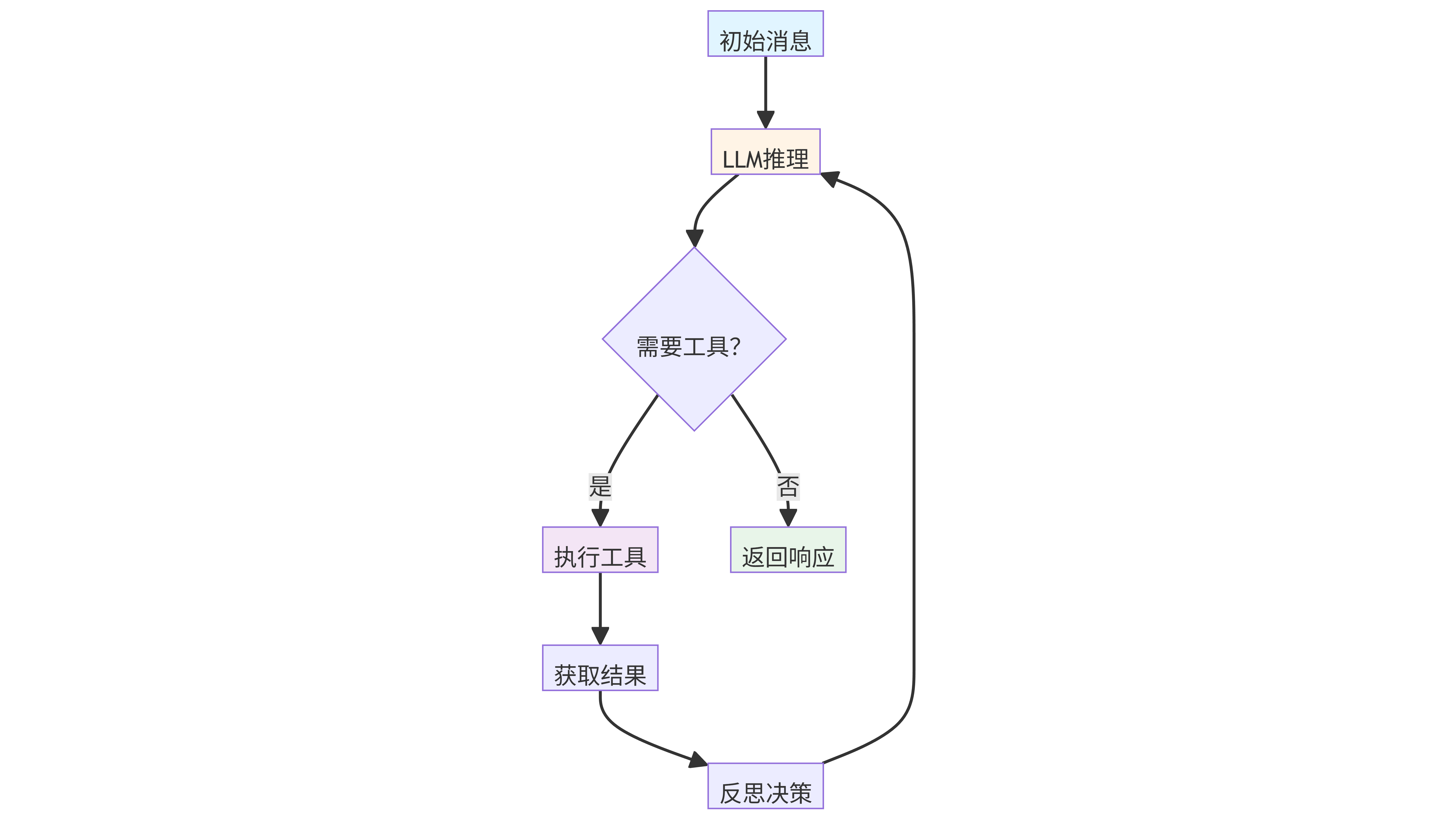
这种设计模仿了 Anthropic 的 Claude 工具调用模式,通过显式“反思”步骤让模型决定是否需要更多工具。
七、记忆整合:_consolidate_memory()
当会话消息超过窗口或用户执行 /new 时,调用此方法将旧消息压缩为长期记忆。
memory = MemoryStore(self.workspace)
# 提取待整合的消息
old_messages = session.messages[session.last_consolidated:-keep_count]
# 构建提示,调用 LLM 生成 history_entry 和 memory_update
prompt = f"""..."""
response = await self.provider.chat(...)
result = json_repair.loads(response.content)
# 更新历史文件和长期记忆文件
memory.append_history(entry)
memory.write_long_term(update)
- 使用
json_repair解析 LLM 返回的 JSON,即使输出有轻微格式问题也能恢复。 - 整合结果包含两条信息:
history_entry:一段摘要,追加到HISTORY.md。memory_update:更新后的长期记忆内容,写入MEMORY.md。
- 整合完成后更新
session.last_consolidated索引。
此机制实现了会话的无限上下文:超出窗口的消息被压缩为摘要和记忆,既节省 token,又保留了重要信息。
八、直接处理:process_direct()
async def process_direct(self, content: str, session_key: str = "cli:direct", ...) -> str:
    await self._connect_mcp()
    msg = InboundMessage(...)
    response = await self._process_message(msg, session_key=session_key)
    return response.content if response else ""
提供一种同步风格的接口,供 CLI、定时任务等场景直接调用。它内部创建 InboundMessage 并走相同的处理流程,但返回的是纯文本响应。
九、停止与清理
def stop(self):
    self._running = False

async def close_mcp(self):
    if self._mcp_stack:
        await self._mcp_stack.aclose()
stop()设置标志位,使主循环退出。close_mcp()关闭所有 MCP 连接,应在应用关闭时调用。
十、设计亮点与思考
-
极简核心:主循环不到 50 行,却完整支持多轮工具调用、会话管理、记忆整合,体现了“少即是多”的设计哲学。
-
异步驱动:全程使用
asyncio,从消息消费到工具执行都是非阻塞,为高并发打下基础。 -
工具上下文注入:通过
_set_tool_context在每次消息处理前更新工具的状态,避免了全局变量,保证了线程/协程安全。 -
记忆整合异步化:将耗时操作(如
/new后的记忆整合)放入后台任务,避免阻塞用户响应。 -
MCP 集成:通过
AsyncExitStack优雅管理外部工具连接,使扩展工具集变得非常简单。 -
错误处理:在
run()中捕获所有异常并返回友好错误,保证服务不崩溃。
十一、总结
AgentLoop 是 nanobot 的灵魂,它以不到 1000 行代码实现了生产级 Agent 所需的核心能力:消息驱动、多轮推理、工具调用、记忆管理、会话隔离、外部工具扩展。通过阅读其源码,我们可以学到如何用简洁的异步代码构建一个可扩展的 AI 助理引擎,也为开发者定制自己的 Agent 提供了绝佳的范本。
如果你也想打造自己的“贾维斯”,不妨从理解 AgentLoop 开始。

有“AI”的1024 = 2048,欢迎大家加入2048 AI社区
更多推荐

 28
28 0
0- 0


 已为社区贡献11条内容

所有评论(0)