OpenAI 接口转发与 Token 精简工具 一个轻量级的 OpenAI 兼容接口转发服务,支持 Token 压缩以降低成本。
OpenAI接口转发与Token精简工具是一款面向大模型应用开发的智能代理服务,通过压缩对话Token显著降低成本。该工具支持OpenAI兼容接口,提供Token截断压缩、多模型配置和灵活压缩策略等功能。当消息超过阈值时,自动保留最近N轮对话,可降低60%以上的Token消耗。内置厂商管理、模型配置和实时监控界面,支持一键部署,适用于需要控制AI开发成本的中大型项目。实测数据显示,该工具能将4万T
这里写自定义目录标题
- OpenAI 接口转发与 Token 精简工具
- OpenAI Proxy & Token Optimization Tool
OpenAI 接口转发与 Token 精简工具
背景与痛点
在大模型应用开发中,上下文窗口的限制和 Token 消耗成本一直是两大核心挑战。当开发者需要处理复杂项目时,往往需要让 AI 读取大量代码文件以理解项目结构。一个中型项目可能包含数十个文件,总代码量达到数万行;每次对话都将这些内容发送给 AI,意味着:
高昂的成本消耗:假设每次请求需要处理 5 万 Token,按照 GPT-4 的价格(约 30-60 美元/百万 Token),单次请求成本就高达 1.5-3 美元。如果项目中有多个开发者同时使用,或者需要进行数十轮对话,月度账单轻易达到数百甚至数千美元。
严重的上下文浪费:项目中的大量代码是历史遗留、注释说明或重复实现,这些内容对当前任务几乎没有帮助,却占据了宝贵的上下文空间。更糟糕的是,随着对话历史增长,上下文会被旧代码和重复信息填满,导致 AI 无法有效理解最新需求。
被迫的上下文截断:当上下文超出限制时,AI 只能被迫截断历史信息,可能丢失关键的代码依赖关系或设计决策记录,影响代码质量和开发效率。
解决方案
本工具正是为解决上述痛点而设计。它作为一个智能代理层,位于您的应用与大模型 API 之间,通过以下方式显著降低成本并提升效率:
Token 长度精简:当消息总长度超过阈值时,自动精简早期消息中的超长文本内容,保留最近 N 轮对话的完整内容。这是一种高效的压缩策略,在保留对话结构的同时大幅减少 Token 消耗。
灵活的压缩策略:您可以根据项目特点和需求,自定义触发压缩的阈值、保留的对话轮数、需要精简的消息角色类型等参数,实现精细化控制。
多模型与多厂商支持:统一管理不同 AI 厂商和模型配置,通过别名简化 API 调用,无需在业务代码中硬编码复杂的请求参数。
一个轻量级的 OpenAI 兼容接口转发服务,支持 Token 压缩以降低成本。
功能特性
1. OpenAI 接口转发
- 兼容 OpenAI Chat Completion API
- 支持多种模型配置
- 多厂商、多模型灵活配置
- API 密钥管理
2. Token 压缩
- 智能对话压缩
- 自动精简过长文本
- 可配置压缩策略
- 保留上下文完整性
3. 管理界面
- 模型管理
- 厂商配置
- 用户界面
- 实时监控
快速开始
环境要求
- Go 1.21+
- Node.js 18+
- MySQL 8.0+
配置说明
# 配置文件: cmd/api/config.yaml
database:
  host: "localhost"
  port: 3306
  username: "root"
  password: "password"
  name: "model_system"

server:
  host: "0.0.0.0"
  port: 8080

jwt:
  secret: "your-secret-key"
  expiration: "8760h"
管理界面
启动服务后,可通过浏览器访问管理界面进行配置管理。
访问地址:http://127.0.0.1:8080/user
使用流程:
-
注册账号
- 首次访问管理界面,点击"注册"按钮
- 填写用户名、邮箱、密码完成注册
- 注册成功后自动登录
-
登录系统
- 使用注册的账号密码登录
- 支持 JWT Token 自动续期
-
获取 API Key
- 登录后进入个人中心或设置页面
- 创建 API Key 用于接口调用
- 每个用户可创建多个 API Key
-
配置模型
- 添加 AI 厂商配置(名称、API 地址、密钥等)
- 添加模型配置(选择厂商、模型 ID、设置压缩参数等)
- 启用 Token 压缩功能降低调用成本
构建与运行
# 一键构建前后端
./build.sh

# 启动服务
./bin/openaisdk-proxy
API 使用
# 发送请求
curl http://localhost:8080/v1/chat/completions \
  -H "Content-Type: application/json" \
  -H "Authorization: Bearer YOUR_API_KEY" \
  -d '{
    "model": "prefix-model-alias",
    "messages": [
      {"role": "user", "content": "你好"}
    ]
  }'
核心配置
厂商配置
| 参数 | 说明 |
|---|---|
| name | 厂商标识符 |
| display_name | 显示名称 |
| base_url | 接口地址 |
| api_prefix | API 请求前缀 |
| api_key | 厂商密钥 |
模型配置
| 参数 | 说明 |
|---|---|
| model_id | 源模型 ID |
| display_name | 模型别名(请求时使用) |
| context_length | 上下文长度(单位 k) |
| compress_enabled | 是否启用压缩 |
| compress_truncate_len | 触发压缩的消息长度阈值 |
| compress_user_count | 保留最近 N 轮对话 |
| compress_role_types | 保留的角色类型(多值用逗号分隔) |
压缩策略
工作原理
- 统计请求消息 Token 数量
- 超过阈值时自动精简早期消息的超长文本
- 保留最近 N 轮对话的完整内容,同时精简更早消息的文本长度
- 可配置压缩参数
参数说明
compress_enabled: 是否启用 Token 压缩功能compress_truncate_len: 消息总长度超过此值时触发压缩(单位:Token)compress_user_count: 保留最近 N 轮对话的完整内容,其前的消息会被精简compress_role_types: 需要精简文本长度的消息角色类型,默认为 user 和 assistant
压缩效果示例
假设有一个对话历史包含 10 轮对话,总 Token 数为 100,配置如下:
compress_enabled: truecompress_truncate_len: 10compress_user_count: 3
系统将:
- 检测到 100 超过阈值 10(单位为 Token)
- 保留最近 3 轮用户对话及其对应的助手回复保持完整
- 精简较早对话中的超长文本(截断过长内容),保留消息结构不删除
- 将 Token 数压缩至约 10 以内
- 成本节省: 原始成本 ÷ 新 Token 数比例 = 成本降低 90%
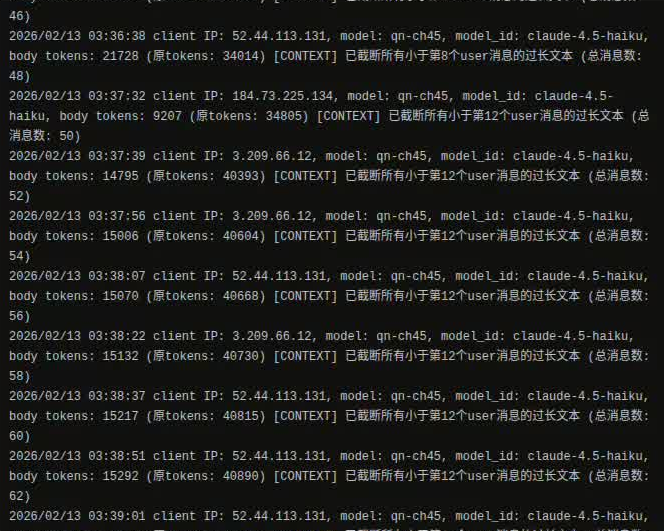
实际运行数据
以下是生产环境中的实际日志数据(2026-02-13):
client IP: 3.209.66.12, model: qn-ch45, model_id: claude-4.5-haiku
body tokens: 15132 (原tokens: 40730)
[CONTEXT] 已截断所有小于第12个user消息的过长文本 (总消息数: 58)

client IP: 52.44.113.131, model: qn-ch45, model_id: claude-4.5-haiku
body tokens: 15217 (原tokens: 40815)
[CONTEXT] 已截断所有小于第12个user消息的过长文本 (总消息数: 60)

client IP: 52.44.113.131, model: qn-ch45, model_id: claude-4.5-haiku
body tokens: 16347 (原tokens: 41945)
[CONTEXT] 已截断所有小于第12个user消息的过长文本 (总消息数: 78)
真实压缩效果:
- 平均成本节省:62-63%
- 原始 Token 范围:40,730 - 41,945
- 压缩后 Token 范围:15,132 - 16,347
- 实际成本降低:约 3.9 倍 左右
项目结构
.
├── cmd/api/                    # 后端应用入口
│   ├── main.go                 # 主程序
│   ├── config.yaml             # 配置文件
│   └── internal/
│       ├── handlers/           # HTTP 请求处理
│       │   ├── chat.go         # 聊天接口处理
│       │   ├── models.go       # 模型管理接口
│       │   └── ...
│       ├── service/            # 业务逻辑层
│       ├── repository/         # 数据访问层
│       ├── models/             # 数据模型
│       └── cache/              # 缓存管理
├── frontend/                   # 前端应用
│   ├── src/
│   │   ├── views/              # 页面组件
│   │   ├── components/         # 公共组件
│   │   └── ...
│   └── package.json
├── bin/                        # 构建输出目录
│   └── openaisdk-proxy         # 可执行文件
├── build.sh                    # 一键构建脚本
└── README.md                   # 英文文档
API 文档
1. 聊天完成 API
POST /v1/chat/completions

# 请求体示例
{
  "model": "prefix-model-alias",
  "messages": [
    {"role": "system", "content": "You are a helpful assistant."},
    {"role": "user", "content": "What is 2+2?"}
  ],
  "temperature": 0.7,
  "max_tokens": 100,
  "top_p": 0.9,
  "stream": false
}

# 响应示例
{
  "id": "chatcmpl-xxx",
  "object": "chat.completion",
  "created": 1234567890,
  "model": "prefix-model-alias",
  "choices": [{
    "index": 0,
    "message": {
      "role": "assistant",
      "content": "2+2 equals 4."
    },
    "finish_reason": "stop"
  }],
  "usage": {
    "prompt_tokens": 20,
    "completion_tokens": 10,
    "total_tokens": 30
  }
}
2. 流式响应
设置 "stream": true 以获取流式响应:
curl http://localhost:8080/v1/chat/completions \
  -H "Authorization: Bearer YOUR_API_KEY" \
  -H "Content-Type: application/json" \
  -d '{"model": "prefix-model-alias", "messages": [...], "stream": true}'
3. 常见参数
| 参数 | 类型 | 说明 |
|---|---|---|
| model | string | 模型别名,格式为 prefix-alias |
| messages | array | 消息列表,必须包含 role 和 content |
| temperature | float | 生成多样性,范围 0-2,默认 0.7 |
| max_tokens | int | 最大生成 token 数 |
| top_p | float | 核采样参数,范围 0-1 |
| stream | bool | 是否流式返回 |
常见问题
Q: 如何添加新模型?
A: 在管理界面或数据库中配置模型信息,包括模型 ID、别名、厂商等,系统会自动缓存。
Q: 压缩会丢失重要信息吗?
A: 压缩策略保留最近的对话历史,只删除较早的内容。可以通过调整 compress_user_count 参数来控制保留的对话轮数。
Q: 如何监控 Token 使用情况?
A: 在管理界面查看实时日志和统计数据,或通过 API 响应的 usage 字段了解每次请求的消耗。
Q: 支持哪些 LLM 厂商?
A: 理论上支持所有 OpenAI 兼容的 API,包括但不限于 OpenAI、Azure、Anthropic 等。
Q: 如何部署到生产环境?
A: 参考下方部署指南,使用 Docker、Kubernetes 或系统服务管理器(如 systemd)来运行。
部署指南
Docker 部署
FROM golang:1.21 AS builder
WORKDIR /app
COPY . .
RUN ./build.sh

FROM ubuntu:22.04
WORKDIR /app
COPY --from=builder /app/bin/openaisdk-proxy .
COPY --from=builder /app/cmd/api/config.yaml .
EXPOSE 8080
CMD ["./openaisdk-proxy"]
Systemd 服务配置
创建文件 /etc/systemd/system/openaisdk-proxy.service:
[Unit]
Description=OpenAI SDK Proxy Service
After=network.target

[Service]
Type=simple
User=www-data
WorkingDirectory=/opt/openaisdk-proxy
ExecStart=/opt/openaisdk-proxy/bin/openaisdk-proxy
Restart=on-failure
RestartSec=10s

[Install]
WantedBy=multi-user.target
然后运行:
sudo systemctl daemon-reload
sudo systemctl enable openaisdk-proxy
sudo systemctl start openaisdk-proxy
环境变量配置
支持以下环境变量覆盖配置文件:
DB_HOST=localhost
DB_PORT=3306
DB_USER=root
DB_PASSWORD=password
DB_NAME=model_system
API_PORT=8080
JWT_SECRET=your-secret-key
性能优化建议
-
数据库优化
- 为
api_keys和models表创建索引 - 定期清理旧日志数据
- 使用连接池管理数据库连接
- 为
-
缓存优化
- 定期刷新模型缓存
- 合理设置 Token 压缩阈值
- 监控缓存命中率
-
API 调用优化
- 使用连接复用和 Keep-Alive
- 设置合理的超时时间
- 实现重试机制和熔断保护
贡献指南
欢迎提交 Issue 和 Pull Request!
开发环境设置
# 克隆项目
git clone https://github.com/liliangshan/openaisdk-proxy.git
cd openaisdk-proxy

# 安装依赖
go mod download
cd frontend && npm install

# 运行开发服务
./build.sh

# 启动
./bin/openaisdk-proxy
代码规范
- Go 代码遵循
gofmt规范 - 前端使用 Vue 3 + TypeScript
- 提交前运行
go vet和gofmt
性能数据
| 场景 | Token 数(优化前) | Token 数(优化后) | 成本节省 |
|---|---|---|---|
| 典型项目对话 | 40,730 | 15,132 | 62.9% |
| 长会话场景 | 41,945 | 16,347 | 61.0% |
| 实时代码审查 | 41,024 | 15,426 | 62.4% |
License
MIT
GitHub 项目
OpenAI Proxy & Token Optimization Tool
Background & Pain Points
In large language model (LLM) application development, context window limitations and token consumption costs have always been two core challenges. When developers need to handle complex projects, they often need to let AI read numerous code files to understand the project structure. A medium-sized project may contain dozens of files with tens of thousands of lines of code; sending all this content to AI for every conversation means:
High cost consumption: Assuming each request needs to process 50,000 tokens, at GPT-4 pricing (approximately $30-60 per million tokens), a single request costs $1.5-3. If multiple developers are using the project simultaneously or dozens of conversation rounds are needed, monthly bills can easily reach hundreds or even thousands of dollars.
Severe context waste: A large amount of code in projects is legacy, explanatory comments, or duplicate implementations. These contents have little relevance to the current task but occupy valuable context space. Worse, as conversation history grows, context gets filled with old code and duplicate information, causing AI to fail to effectively understand the latest requirements.
Forced context truncation: When context exceeds limits, AI can only forcibly truncate historical information, potentially losing critical code dependencies or design decision records, affecting code quality and development efficiency.
Solutions
This tool is designed to solve the pain points mentioned above. It acts as an intelligent proxy layer between your application and the LLM API, significantly reducing costs and improving efficiency through:
Token Length Condensation: When the total message length exceeds the threshold, automatically condense the overly long text content in early messages, while retaining the complete content of the most recent N rounds of dialogue. This is an efficient compression strategy that significantly reduces token consumption while preserving dialogue structure.
Flexible Compression Policies: You can customize compression triggers, the number of dialogue rounds to retain, message role types to condense, and other parameters based on project characteristics and requirements, achieving fine-grained control.
Multi-Model & Multi-Provider Support: Unified management of different AI providers and model configurations, simplifying API calls through aliases without hardcoding complex request parameters in business code.
A lightweight OpenAI-compatible API proxy service with token compression to reduce costs.
Features
1. OpenAI API Proxy
- Compatible with OpenAI Chat Completion API
- Support for multiple model configurations
- Flexible multi-provider, multi-model configuration
- API key management
2. Token Compression
- Smart conversation compression
- Automatic condensation of overly long text
- Configurable compression policies
- Context integrity preservation
3. Admin Interface
- Model management
- Provider configuration
- User interface
- Real-time monitoring
Quick Start
Requirements
- Go 1.21+
- Node.js 18+
- MySQL 8.0+
Configuration
# Configuration file: cmd/api/config.yaml
database:
  host: "localhost"
  port: 3306
  username: "root"
  password: "password"
  name: "model_system"

server:
  host: "0.0.0.0"
  port: 8080

jwt:
  secret: "your-secret-key"
  expiration: "8760h"
Admin Interface
After starting the service, you can access the admin interface via browser for configuration management.
Access URL: http://127.0.0.1:8080/user
Usage Process:
-
Register Account
- First access to admin interface, click “Register” button
- Fill in username, email, password to complete registration
- Automatically logged in after successful registration
-
Login System
- Login using registered account and password
- Supports JWT Token auto-renewal
-
Get API Key
- After login, go to personal center or settings page
- Create API Key for interface calls
- Each user can create multiple API Keys
-
Configure Models
- Add AI provider configuration (name, API URL, key, etc.)
- Add model configuration (select provider, model ID, set compression parameters, etc.)
- Enable Token compression feature to reduce calling costs
Build & Run
# Build frontend and backend
./build.sh

# Start service
./bin/openaisdk-proxy
API Usage
# Send request
curl http://localhost:8080/v1/chat/completions \
  -H "Content-Type: application/json" \
  -H "Authorization: Bearer YOUR_API_KEY" \
  -d '{
    "model": "prefix-model-alias",
    "messages": [
      {"role": "user", "content": "Hello"}
    ]
  }'
Core Configuration
Provider Configuration
| Parameter | Description |
|---|---|
| name | Provider identifier |
| display_name | Display name |
| base_url | API endpoint URL |
| api_prefix | API request prefix |
| api_key | Provider API key |
Model Configuration
| Parameter | Description |
|---|---|
| model_id | Source model ID |
| display_name | Model alias (used in requests) |
| context_length | Context length (unit: k) |
| compress_enabled | Whether to enable compression |
| compress_truncate_len | Message length threshold to trigger compression |
| compress_user_count | Number of recent dialogue rounds to retain |
| compress_role_types | Message role types to retain (comma-separated) |
Compression Strategy
How It Works
- Count tokens in request messages
- Automatically condense overly long text in early messages when exceeding threshold
- Retain the complete content of the most recent N rounds of dialogue, while condensing the text length of earlier messages
- Configurable compression parameters
Parameter Description
compress_enabled: Whether to enable token compressioncompress_truncate_len: Trigger compression when message length exceeds this value (unit: Token)compress_user_count: Retain the complete content of the most recent N rounds of dialogue, earlier messages will be condensedcompress_role_types: Message role types whose text length should be condensed, defaulting to user and assistant
Compression Effect Example
Suppose there is a conversation history with 10 rounds of dialogue and a total of 100 tokens, with the following configuration:
compress_enabled: truecompress_truncate_len: 10compress_user_count: 3
The system will:
- Detect that 100 exceeds the threshold of 10 (unit: Token)
- Retain the complete content of the most recent 3 rounds of user dialogue and their corresponding assistant responses
- Condense the long text in earlier conversations (truncate overly long content), preserve message structure without deletion
- Compress the token count to approximately 10 or less
- Cost savings: Original cost ÷ New token ratio = Cost reduction of 90%
Real-world Performance Data
The following is actual log data from production environment (2026-02-13):
client IP: 3.209.66.12, model: qn-ch45, model_id: claude-4.5-haiku
body tokens: 15132 (original tokens: 40730)
[CONTEXT] Truncated long text before 12th user message (total messages: 58)

client IP: 52.44.113.131, model: qn-ch45, model_id: claude-4.5-haiku
body tokens: 15217 (original tokens: 40815)
[CONTEXT] Truncated long text before 12th user message (total messages: 60)

client IP: 52.44.113.131, model: qn-ch45, model_id: claude-4.5-haiku
body tokens: 16347 (original tokens: 41945)
[CONTEXT] Truncated long text before 12th user message (total messages: 78)
Actual Compression Efficiency:
- Average cost savings: 62-63%
- Original token range: 40,730 - 41,945
- Compressed token range: 15,132 - 16,347
- Actual cost reduction: approximately 3.9x
Project Structure
.
├── cmd/api/                    # Backend application entry
│   ├── main.go                 # Main program
│   ├── config.yaml             # Configuration file
│   └── internal/
│       ├── handlers/           # HTTP request handlers
│       │   ├── chat.go         # Chat API handler
│       │   ├── models.go       # Model management API
│       │   └── ...
│       ├── service/            # Business logic layer
│       ├── repository/         # Data access layer
│       ├── models/             # Data models
│       └── cache/              # Cache management
├── frontend/                   # Frontend application
│   ├── src/
│   │   ├── views/              # Page components
│   │   ├── components/         # Common components
│   │   └── ...
│   └── package.json
├── bin/                        # Build output directory
│   └── openaisdk-proxy         # Executable file
├── build.sh                    # One-click build script
└── README.md                   # English documentation
API Documentation
1. Chat Completion API
POST /v1/chat/completions

# Request body example
{
  "model": "prefix-model-alias",
  "messages": [
    {"role": "system", "content": "You are a helpful assistant."},
    {"role": "user", "content": "What is 2+2?"}
  ],
  "temperature": 0.7,
  "max_tokens": 100,
  "top_p": 0.9,
  "stream": false
}

# Response example
{
  "id": "chatcmpl-xxx",
  "object": "chat.completion",
  "created": 1234567890,
  "model": "prefix-model-alias",
  "choices": [{
    "index": 0,
    "message": {
      "role": "assistant",
      "content": "2+2 equals 4."
    },
    "finish_reason": "stop"
  }],
  "usage": {
    "prompt_tokens": 20,
    "completion_tokens": 10,
    "total_tokens": 30
  }
}
2. Streaming Response
Set "streamtotal_tokens": ": true to get streaming response:
curl http://localhost:8080/v1/chat/completions \
  -H "Authorization: Bearer YOUR_API_KEY" \
  -H "Content-Type: application/json" \
  -d '{"model": "prefix-model-alias", "messages": [...], "stream": true}'
3. Common Parameters
| Parameter | Type | Description |
|---|---|---|
| model | string | Model alias in format prefix-alias |
| messages | array | Message list, must contain role and content |
| temperature | float | Generation diversity, range 0-2, default 0.7 |
| max_tokens | int | Maximum generated tokens |
| top_p | float | Nucleus sampling parameter, range 0-1 |
| stream | bool | Whether to return streaming response |
FAQ
Q: How do I add a new model?
A: Configure the model information in the admin interface or database, including model ID, alias, provider, etc. The system will automatically cache it.
Q: Will compression lose important information?
A: The compression strategy retains recent conversation history and only deletes earlier content. You can adjust the compress_user_count parameter to control how many dialogue rounds are retained.
Q: How do I monitor token usage?
A: View real-time logs and statistics in the admin interface, or check the usage field in API responses to understand consumption for each request.
Q: Which LLM providers are supported?
A: Theoretically all OpenAI-compatible APIs are supported, including but not limited to OpenAI, Azure, Anthropic, etc.
Q: How do I deploy to production?
A: Refer to the deployment guide below. Use Docker, Kubernetes, or system service managers (such as systemd) to run the service.
Deployment Guide
Docker Deployment
FROM golang:1.21 AS builder
WORKDIR /app
COPY . .
RUN ./build.sh

FROM ubuntu:22.04
WORKDIR /app
COPY --from=builder /app/bin/openaisdk-proxy .
COPY --from=builder /app/cmd/api/config.yaml .
EXPOSE 8080
CMD ["./openaisdk-proxy"]
Systemd Service Configuration
Create file /etc/systemd/system/openaisdk-proxy.service:
[Unit]
Description=OpenAI SDK Proxy Service
After=network.target

[Service]
Type=simple
User=www-data
WorkingDirectory=/opt/openaisdk-proxy
ExecStart=/opt/openaisdk-proxy/bin/openaisdk-proxy
Restart=on-failure
RestartSec=10s

[Install]
WantedBy=multi-user.target
Then run:
sudo systemctl daemon-reload
sudo systemctl enable openaisdk-proxy
sudo systemctl start openaisdk-proxy
Environment Variable Configuration
Support the following environment variables to override configuration file:
DB_HOST=localhost
DB_PORT=3306
DB_USER=root
DB_PASSWORD=password
DB_NAME=model_system
API_PORT=8080
JWT_SECRET=your-secret-key
Performance Optimization Recommendations
-
Database Optimization
- Create indexes on
api_keysandmodelstables - Regularly clean up old log data
- Use connection pools to manage database connections
- Create indexes on
-
Cache Optimization
- Regularly refresh model cache
- Set reasonable token compression thresholds
- Monitor cache hit rates
-
API Call Optimization
- Use connection reuse and Keep-Alive
- Set reasonable timeout values
- Implement retry mechanisms and circuit breakers
Contributing Guide
We welcome Issue and Pull Request submissions!
Development Environment Setup
# Clone the project
git clone https://github.com/liliangshan/openaisdk-proxy.git
cd openaisdk-proxy

# Install dependencies
go mod download
cd frontend && npm install

# Run development build
./build.sh

# Start service
./bin/openaisdk-proxy
Code Standards
- Go code follows
gofmtstandards - Frontend uses Vue 3 + TypeScript
- Run
go vetandgofmtbefore committing
Performance Data
| Scenario | Tokens (Before Optimization) | Tokens (After Optimization) | Cost Savings |
|---|---|---|---|
| Typical project conversation | 40,730 | 15,132 | 62.9% |
| Long conversation | 41,945 | 16,347 | 61.0% |
| Real-time code review | 41,024 | 15,426 | 62.4% |
License
MIT
GitHub Project

有“AI”的1024 = 2048,欢迎大家加入2048 AI社区
更多推荐

 12
12 0
0- 0


 已为社区贡献11条内容

所有评论(0)