Spring AI 实现RAG
的全称是,中文叫做。
·
RAG概念
RAG 的全称是 Retrieval-Augmented Generation ,中文叫做检索增强生成。RAG 是一种结合了检索系统和生成模型的新型技术框架,其主要目的有:
- 利用外部知识库
- 帮助大模型生成更加准确、有依据、最新的回答
RAG解决的问题
通过使用 RAG,解决了传统 LLM(Large Language Model,大语言模型)存在的两个主要问题
- 知识局限性:LLM 的知识被固定在训练数据中,无法知道最新消息。
- 幻觉现象:LLM 有时候会编造出并不存在的答案。
RAG的技术基石
向量数据库 (Vector Database) 是一种以数学向量的形式存储数据集合的数据库,通过一个数字列表来表示维度空间中的一个位置。
向量数据库的功能是可以基于相似性搜索进行识别,而不是精准匹配。比如说在使用一个商城系统的向量数据库进行查询的时候,用户输入“北京”,其可能返回的结果会是 “中国、北京、华北、首都、奥运会” 等信息;
输入“沈阳”,其返回结果可能会是“东北、辽宁、雪花、重工业”等信息。
当然,返回的信息取决于向量数据库中存在的数据。用户可以通过参数的设置来限定返回的情况,进而适配不同的需求。
嵌入模型 (Embedding Model) 和向量数据库 (Vector Database/Vector Store) 是一对亲密无间的合作伙伴,也是 AI 技术栈中紧密关联的两大核心组件,两者的协同作用构成了现代语义搜索、推荐系统和 RAG(Retrieval Augmented Generation,检索增强生成)等应用的技术基础。
RAG 的使用场景
企业内部知识问答、业务系统知识系统问答Chatbot,各领域的定制化都可以用到RAG技术
RAG的工作流程
- 用户输入问题
- 帮我查下系统操作手册
- 问题向量化
- 调用 Embedding 模型,将问题转换为高维向量,文本转向量,[0.123, 0.582, ..., 0.001]
- 向量数据库检索
- 向向量数据库检索,检索要点是Top-k,检索最相关的 K 条记录,
- 相似度阈值:控制检索到内容的相关性
- 构建上下文
- 这一阶段需要组织提示词 (Prompt),让 LLM 更好地理解背景信息
- 系统提示词 (System Prompt):提前告诉 LLM 需要遵循的行为规范
- 构造最终输入 (Final Prompt):一般会结合以上内容,按照如下格式进行组织
- 携带检索内容,调用大模型进行回答
- 将构造好的 Prompt 提交给 LLM(比如 Deepseek、Qwen、GPT-4o、Claude 等
- 返回最终答案给用户
- 最终系统将生成的回答返回前端,展示给用户
RAG实战
POM文件
<?xml version="1.0" encoding="UTF-8"?>
<project xmlns="http://maven.apache.org/POM/4.0.0" xmlns:xsi="http://www.w3.org/2001/XMLSchema-instance"
         xsi:schemaLocation="http://maven.apache.org/POM/4.0.0 https://maven.apache.org/xsd/maven-4.0.0.xsd">
    <modelVersion>4.0.0</modelVersion>
    <parent>
        <groupId>org.springframework.boot</groupId>
        <artifactId>spring-boot-starter-parent</artifactId>
        <version>3.5.10</version>
        <relativePath/> <!-- lookup parent from repository -->
    </parent>
    <groupId>com.example</groupId>
    <artifactId>ragAIDemo</artifactId>
    <version>0.0.1-SNAPSHOT</version>
    <name>ragAIDemo</name>
    <description>ragAIDemo</description>
    <url/>
    <licenses>
        <license/>
    </licenses>
    <developers>
        <developer/>
    </developers>
    <scm>
        <connection/>
        <developerConnection/>
        <tag/>
        <url/>
    </scm>
    <properties>
        <java.version>17</java.version>
    </properties>
    <dependencies>
        <dependency>
            <groupId>org.springframework.boot</groupId>
            <artifactId>spring-boot-starter-web</artifactId>
        </dependency>

        <dependency>
            <groupId>com.alibaba.cloud.ai</groupId>
            <artifactId>spring-ai-alibaba-starter</artifactId>
            <version>1.0.0-M5.1</version>
        </dependency>

        <dependency>
            <groupId>org.springframework.boot</groupId>
            <artifactId>spring-boot-starter-test</artifactId>
            <scope>test</scope>
        </dependency>
    </dependencies>

    <repositories>
        <repository>
            <id>spring-milestones</id>
            <name>Spring Milestones</name>
            <url>https://repo.spring.io/milestone</url>
            <snapshots>
                <enabled>false</enabled>
            </snapshots>
        </repository>
    </repositories>

    <build>
        <plugins>
            <plugin>
                <groupId>org.springframework.boot</groupId>
                <artifactId>spring-boot-maven-plugin</artifactId>
            </plugin>
        </plugins>
    </build>

</project>
配置文件
spring.application.name=ragAIDemo
server.port=10010
spring.ai.dashscope.api-key = sk-0502963eaea9446899b49c6a
简要代码
package com.example.ragaidemo.controller;

import com.alibaba.cloud.ai.dashscope.chat.DashScopeChatOptions;
import lombok.RequiredArgsConstructor;
import org.springframework.ai.chat.client.ChatClient;
import org.springframework.ai.chat.client.advisor.MessageChatMemoryAdvisor;
import org.springframework.ai.chat.client.advisor.SimpleLoggerAdvisor;
import org.springframework.ai.chat.memory.InMemoryChatMemory;
import org.springframework.web.bind.annotation.GetMapping;
import org.springframework.web.bind.annotation.RestController;

@RestController
public class MyRagController {

    private static final String DEFAULT_PROMPT = "你是一个博学的智能聊天助手,请根据用户提问回答!";

    private final ChatClient dashScopeChatClient;

    public MyRagController(ChatClient.Builder chatClientBuilder) {
        this.dashScopeChatClient = chatClientBuilder
                .defaultSystem(DEFAULT_PROMPT)
                // 实现 Chat Memory 的 Advisor
                // 在使用 Chat Memory 时,需要指定对话 ID,以便 Spring AI 处理上下文。
                .defaultAdvisors(
                        new MessageChatMemoryAdvisor(new InMemoryChatMemory())
                )
                // 实现 Logger 的 Advisor
                .defaultAdvisors(
                        new SimpleLoggerAdvisor()
                )
                // 设置 ChatClient 中 ChatModel 的 Options 参数
                .defaultOptions(
                        DashScopeChatOptions.builder()
                                .withTopP(0.7)
                                .build()
                )
                .build();
    }

    @GetMapping("/simple/chat")
    public String simpleChat(String query) {
        return dashScopeChatClient.prompt(query).call().content();
    }
}
测试问答结果
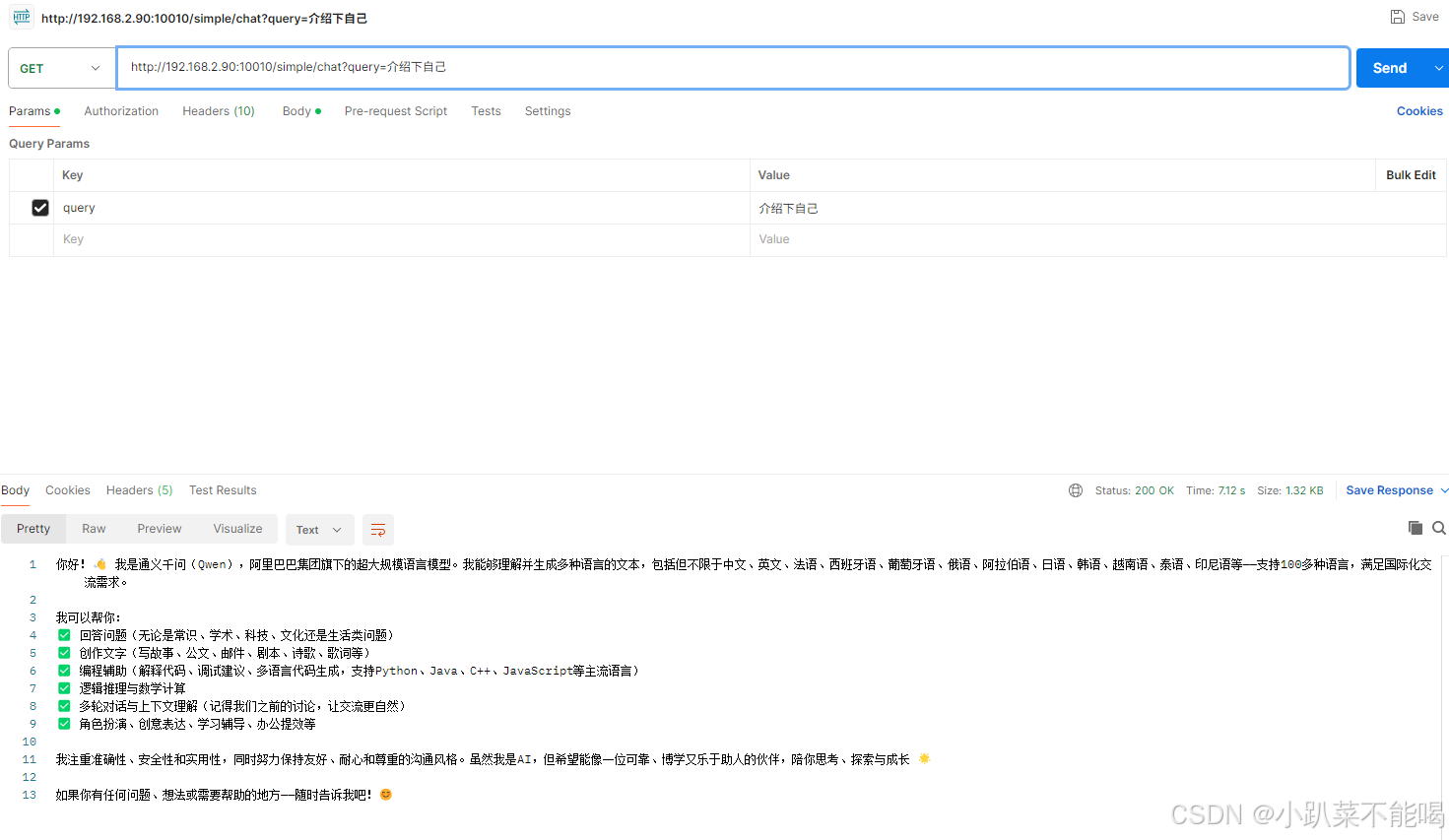
RAG配置
package com.example.ragaidemo.config;

import org.springframework.ai.chat.client.ChatClient;
import org.springframework.ai.document.Document;
import org.springframework.ai.embedding.EmbeddingModel;
import org.springframework.ai.vectorstore.SimpleVectorStore;
import org.springframework.ai.vectorstore.VectorStore;
import org.springframework.beans.factory.annotation.Qualifier;
import org.springframework.context.annotation.Bean;
import org.springframework.context.annotation.Configuration;

import java.util.List;

@Configuration
public class RagConfig {
    @Bean
    ChatClient chatClient(ChatClient.Builder builder) {
        return builder.defaultSystem("你将作为一名Java开发语言的专家,对于用户的使用需求作出解答")
                .build();
    }

    @Bean
    VectorStore vectorStore(@Qualifier("dashscopeEmbeddingModel") EmbeddingModel embeddingModel) {
        SimpleVectorStore simpleVectorStore = SimpleVectorStore.builder(embeddingModel)
                .build();

        //生成一个说明的文档
        List<Document> documents = List.of(
                new Document("产品说明:名称:Java开发语言\n" +
                        "产品描述:Java是一种面向对象开发语言。\n" +
                        "特性:\n" +
                        "1. 封装\n" +
                        "2. 继承\n" +
                        "3. 多态\n"));
        simpleVectorStore.add(documents);
        return simpleVectorStore;
    }
}
package com.example.ragaidemo.controller;

import jakarta.annotation.Resource;
import org.springframework.ai.chat.client.ChatClient;
import org.springframework.ai.chat.client.advisor.QuestionAnswerAdvisor;
import org.springframework.ai.vectorstore.VectorStore;
import org.springframework.web.bind.annotation.GetMapping;
import org.springframework.web.bind.annotation.RequestParam;
import org.springframework.web.bind.annotation.RestController;

@RestController
public class MyRagController {

    @Resource
    private ChatClient dashScopeChatClient;

    @Resource
    private VectorStore vectorStore;

    @GetMapping(value = "/chat", produces = "text/plain; charset=UTF-8")
    public String generation(@RequestParam("query") String query) {
        //发起聊天请求并处理响应
        return dashScopeChatClient.prompt()
                .user(query)
                // 通过添加 QuestionAnswerAdvisor 并提供对应的向量存储,可以将之前放入的文档作为参考资料,并生成增强回答
                .advisors(new QuestionAnswerAdvisor(vectorStore))
                .call()
                .content();
    }
}
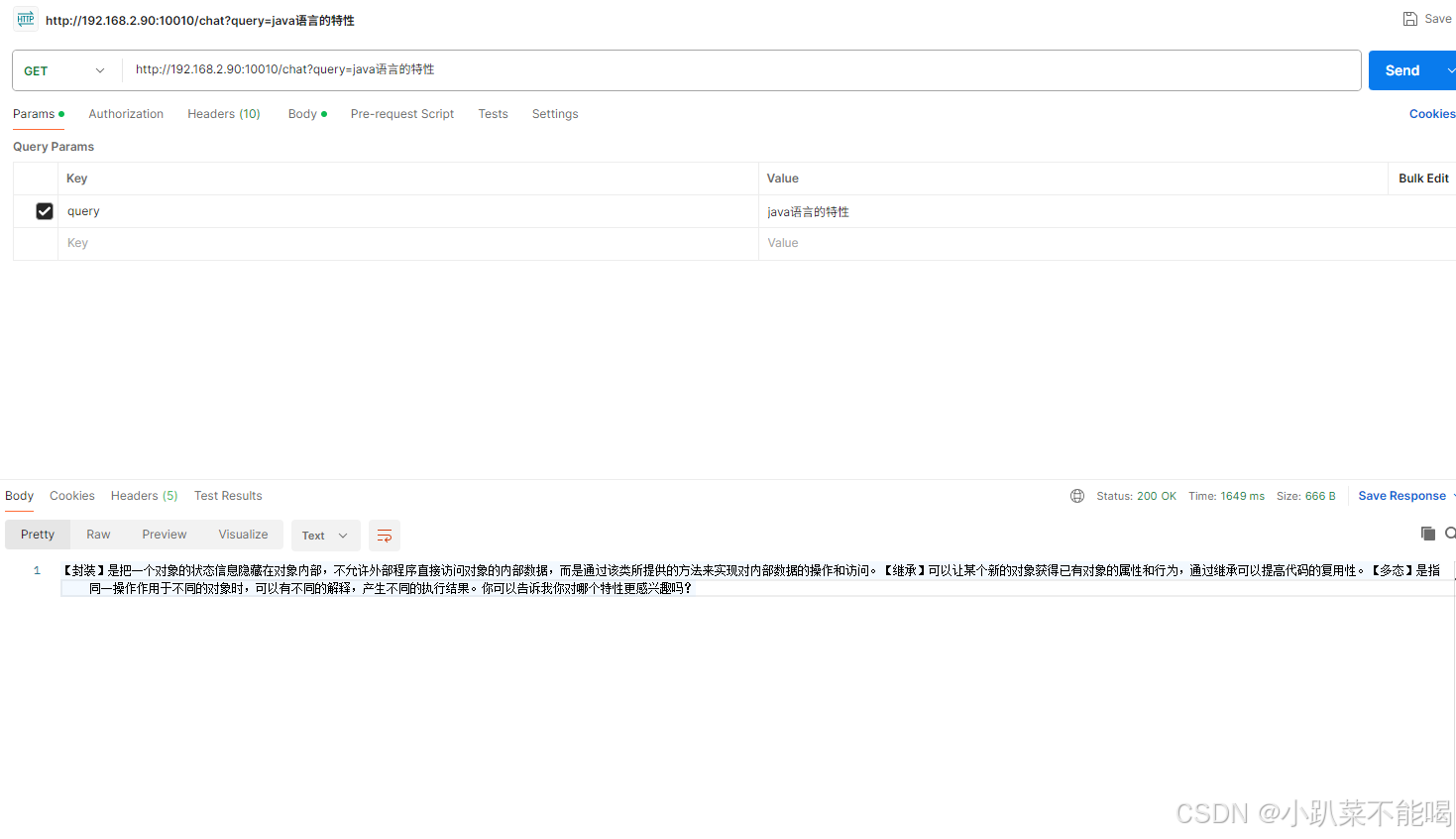
创建 RAG 知识库
建立rule.txt,为公司考勤打卡的规则
一、总则
1.  目的:为规范公司运营管理,维护正常办公秩序,保障公司和员工的合法权益,明确双方权利与义务,营造高效、有序、合规的工作环境,制定本规章制度。

2.  适用范围:本制度适用于公司全体在职员工(包括正式员工、试用期员工、实习生),涵盖公司各部门、各岗位,全体员工入职即视为知晓并自愿遵守本制度所有条款,违反制度将按对应规定处理。

3.  效力说明:本制度为公司核心管理准则,与员工劳动合同、保密协议、岗位说明书等相关文件配套执行;若本制度条款与国家法律法规冲突,以国家法律法规为准;公司可根据经营发展需要,对本制度进行修订,修订后将通过内部办公系统通知全体员工,修订版自通知之日起生效。

二、考勤管理制度

1.  工作时间:公司实行标准工时制,每日工作8小时,每周工作5天,具体工作时间为:上午9:00-12:00,下午13:30-18:00;午休时间12:00-13:30,不计入工作时长。

2.  考勤打卡:全体员工需通过公司指定考勤系统每日打卡,上午上班打卡时间为8:30-9:00,下午下班打卡时间为18:00-18:30;严禁代打卡、伪造打卡记录,代打卡者与被代打卡者均将受到处罚;忘记打卡需在当日内提交补卡申请,经部门负责人审批通过后有效,每月补卡次数不超过3次,超过次数按迟到/早退处理。

3.  迟到与早退:上班打卡时间晚于9:00视为迟到,下班打卡时间早于18:00视为早退;迟到/早退15分钟以内(含15分钟),每次扣罚当日绩效5%;迟到/早退15-30分钟(含30分钟),每次扣罚当日绩效10%;迟到/早退30分钟以上,按旷工半天处理;每月迟到/早退累计超过3次,额外扣罚当月绩效20%。

4.  旷工:未经审批擅自缺勤、请假逾期未归且未办理续假手续、伪造请假证明的,均视为旷工;旷工半天扣罚当日全额工资,旷工1天扣罚3日工资,旷工3天(含3天)以上,视为严重违反公司制度,公司有权解除劳动合同,并不予支付任何经济补偿。

5.  请假制度:员工请假需提前通过考勤系统提交申请,经部门负责人及相关领导审批通过后方可休假,严禁先休假后补申请;请假类型包括事假、病假、婚假、产假、丧假等,具体规定如下:

- 事假:员工因个人事务请假,每月事假不超过3天,全年累计不超过15天;事假期间无工资,请假超过规定天数,超出部分按旷工处理。

- 病假:员工因病或非因工负伤请假,需提供县级及以上医院出具的病历及病假证明;病假期间,工作满1年不满3年的,按本人工资的60%发放;工作满3年不满10年的,按本人工资的80%发放;工作满10年及以上的,按本人工资的100%发放;全年病假累计不超过90天,超出部分按事假处理。

- 婚假:员工结婚可享受婚假3天,符合晚婚条件(男年满25周岁、女年满23周岁)的,额外增加婚假7天;婚假期间工资全额发放,需一次性休完,不得分段休假,请假需提前15天提交申请。

- 产假:女员工生育可享受产假98天,难产的增加产假15天,多胞胎生育的每多生育1个婴儿增加产假15天;产假期间工资按公司最低工资标准的100%发放,产假结束后需及时返岗,逾期未返岗且未办理续假手续的,按旷工处理。

- 丧假:员工直系亲属(父母、配偶、子女)去世,可享受丧假3天;祖父母、外祖父母、岳父母、公婆去世,可享受丧假1天;丧假期间工资全额发放,需及时提交相关证明材料。
添加RAG配置
package com.example.ragaidemo.config;

import org.springframework.ai.chat.client.ChatClient;
import org.springframework.ai.document.Document;
import org.springframework.ai.embedding.EmbeddingModel;
import org.springframework.ai.reader.TextReader;
import org.springframework.ai.transformer.splitter.TokenTextSplitter;
import org.springframework.ai.vectorstore.SimpleVectorStore;
import org.springframework.ai.vectorstore.VectorStore;
import org.springframework.beans.factory.annotation.Qualifier;
import org.springframework.context.annotation.Bean;
import org.springframework.context.annotation.Configuration;

import java.util.List;

@Configuration
public class RagConfig {
    @Bean
    VectorStore vectorStore(@Qualifier("dashscopeEmbeddingModel") EmbeddingModel embeddingModel) {
        SimpleVectorStore simpleVectorStore = SimpleVectorStore.builder(embeddingModel)
                .build();
        //提取文本内容
        String filePath="rule.txt";
        TextReader textReader = new TextReader(filePath);
        textReader.getCustomMetadata().put("filePath",filePath);
        List<Document> documents = textReader.get();
        //文本切分段落
        TokenTextSplitter splitter = new TokenTextSplitter(1200, 350, 5, 100, true);
        splitter.apply(documents);
        //添加到向量数据库
        simpleVectorStore.add(documents);
        return simpleVectorStore;
    }
}
查询知识库构建提示词
package com.example.ragaidemo.controller;

import jakarta.annotation.Resource;
import org.springframework.ai.chat.client.ChatClient;
import org.springframework.ai.chat.messages.Message;
import org.springframework.ai.chat.messages.SystemMessage;
import org.springframework.ai.chat.prompt.Prompt;
import org.springframework.ai.chat.prompt.PromptTemplate;
import org.springframework.ai.document.Document;
import org.springframework.ai.vectorstore.VectorStore;
import org.springframework.web.bind.annotation.GetMapping;
import org.springframework.web.bind.annotation.RequestParam;
import org.springframework.web.bind.annotation.RestController;

import java.util.List;
import java.util.Map;

@RestController
public class MyRagController {

    @Resource
    private ChatClient.Builder chatClientBuilder;

    @Resource
    private VectorStore vectorStore;

    private ChatClient getChatClient() {
        return chatClientBuilder.build();
    }

    @GetMapping(value = "/chat", produces = "text/plain; charset=UTF-8")
    public String generation(@RequestParam("query") String query) {
        // 查询知识库
        List<Document> documents = vectorStore.similaritySearch(query);
        //提取信息
        String info = "";
        if (documents.size() > 0) {
            info = documents.get(0).getContent();
        }
        //构造系统 prompt
        String systemPrompt = """
                你是公司规章制度专业检索助手,核心职责是基于提供的公司规章制度文本(重点聚焦总则、考勤管理制度相关条款),为用户提供精准、简洁、合规的检索回复,严格遵循以下规则,不偏离、不新增、不篡改原文条款:
                                        1.  回复依据:仅基于选中的规章制度内容(总则、考勤管理制度)及整体文档逻辑,优先检索原文关键条款,原文有明确规定的,必须严格引用原文核心表述,不得主观推测、补充未提及的内容,严禁编造条款。

                                        2.  检索精准度:用户提问若涉及总则(目的、适用范围、效力说明)、考勤管理(工作时间、打卡规则、迟到早退、旷工、请假制度等),需精准定位对应条款,拆分关键信息,用简洁易懂的语言呈现,避免冗余;若用户提问超出选中范围(如办公规范、奖惩机制等),需明确告知“当前检索范围仅包含总则及考勤管理制度,该问题暂无对应检索内容”。

                                        3.  回复规范:语言正式、严谨,贴合公司管理制度调性,避免口语化;条款引用需准确,若涉及具体标准(如请假天数、绩效扣罚比例、工作时间等),必须精准呈现原文数值,不得遗漏、修改;用户提问模糊时(如“请假怎么申请”“旷工怎么处罚”),需全面检索选中条款中相关内容,逐一清晰说明,不遗漏关键要求。
                """;
        //构造用户 prompt
        String userPrompt = """
                给你提供一些数据参考:{info},请回答我的问题:{query}。
                请参考知识库信息回复用户的请求。
                """;

        // 构建提示词
        SystemMessage systemMessage = new SystemMessage(systemPrompt);
        PromptTemplate promptTemplate = new PromptTemplate(userPrompt);
        Message userMessage = promptTemplate.createMessage(Map.of("info", info, "query", query));
        Prompt prompt = new Prompt(List.of(userMessage, systemMessage));

        return getChatClient().prompt(prompt).call().content();
    }
}
调用结果
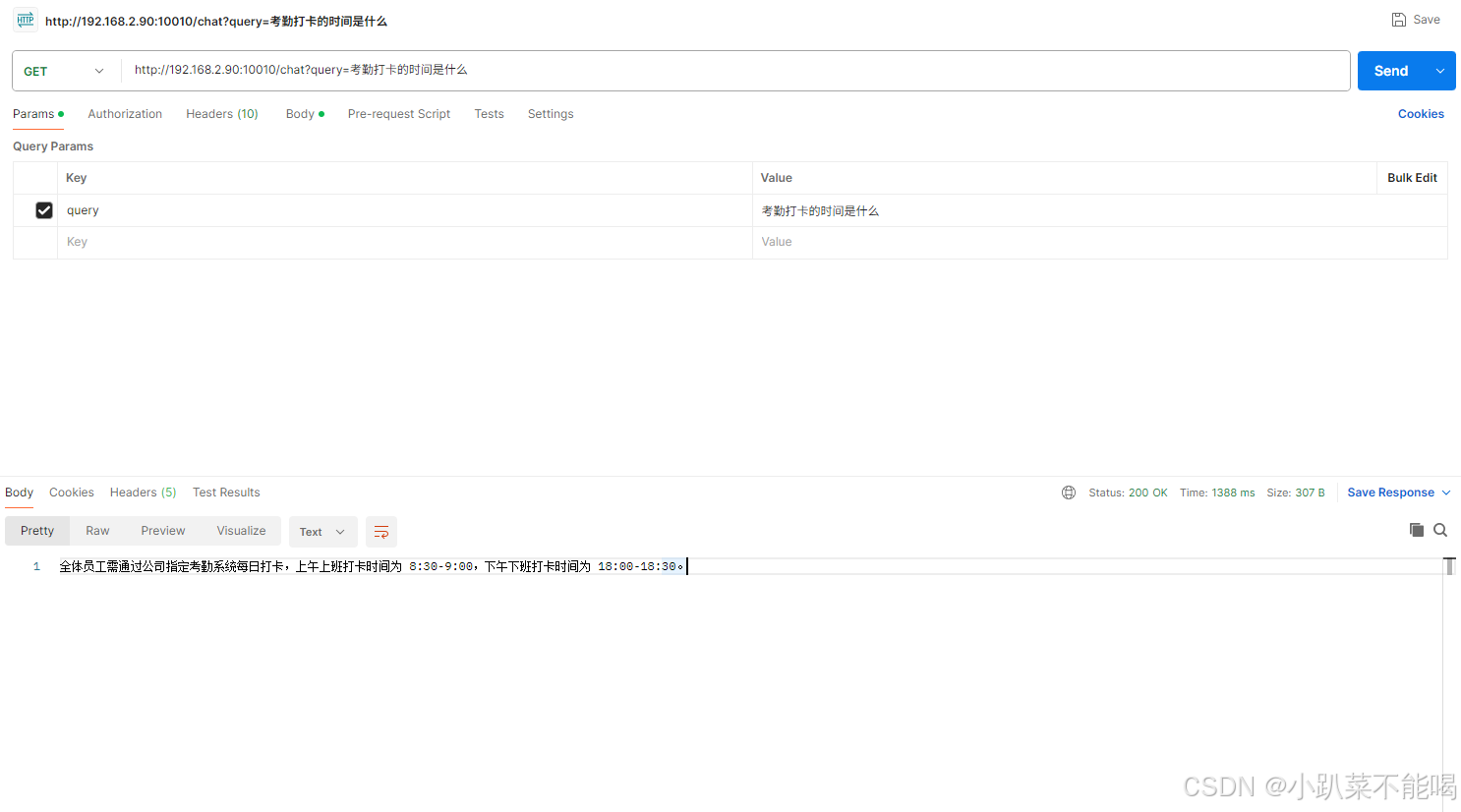

有“AI”的1024 = 2048,欢迎大家加入2048 AI社区
更多推荐
 11
11 0
0- 0


 已为社区贡献3条内容

所有评论(0)