八、IO流
本文主要介绍了C++中的IO流相关知识,包括标准IO流、文件IO流和string IO流。首先讲解了IO流状态的四种标志位(goodbit/eofbit/failbit/badbit)及其处理方法,如使用cin.clear()恢复流状态。其次详细说明了输出缓冲区的管理机制。在文件操作方面,介绍了二进制和文本文件的读写方法,比较了app和ate模式的区别,并指出了二进制读写中string成员可能导致
注:这个是博主复习使用的专题,仅适用于自己以及学习过C++知识点的同学
文章目录
2.2. 使用 cin.clear 恢复 cin 的状态为 goodbit
5.5. ios_base::out | ios_base::trunc 和 ios_base::out
前言
注:这个是博主复习使用的专题,仅适用于自己以及学习过C++知识点的同学。
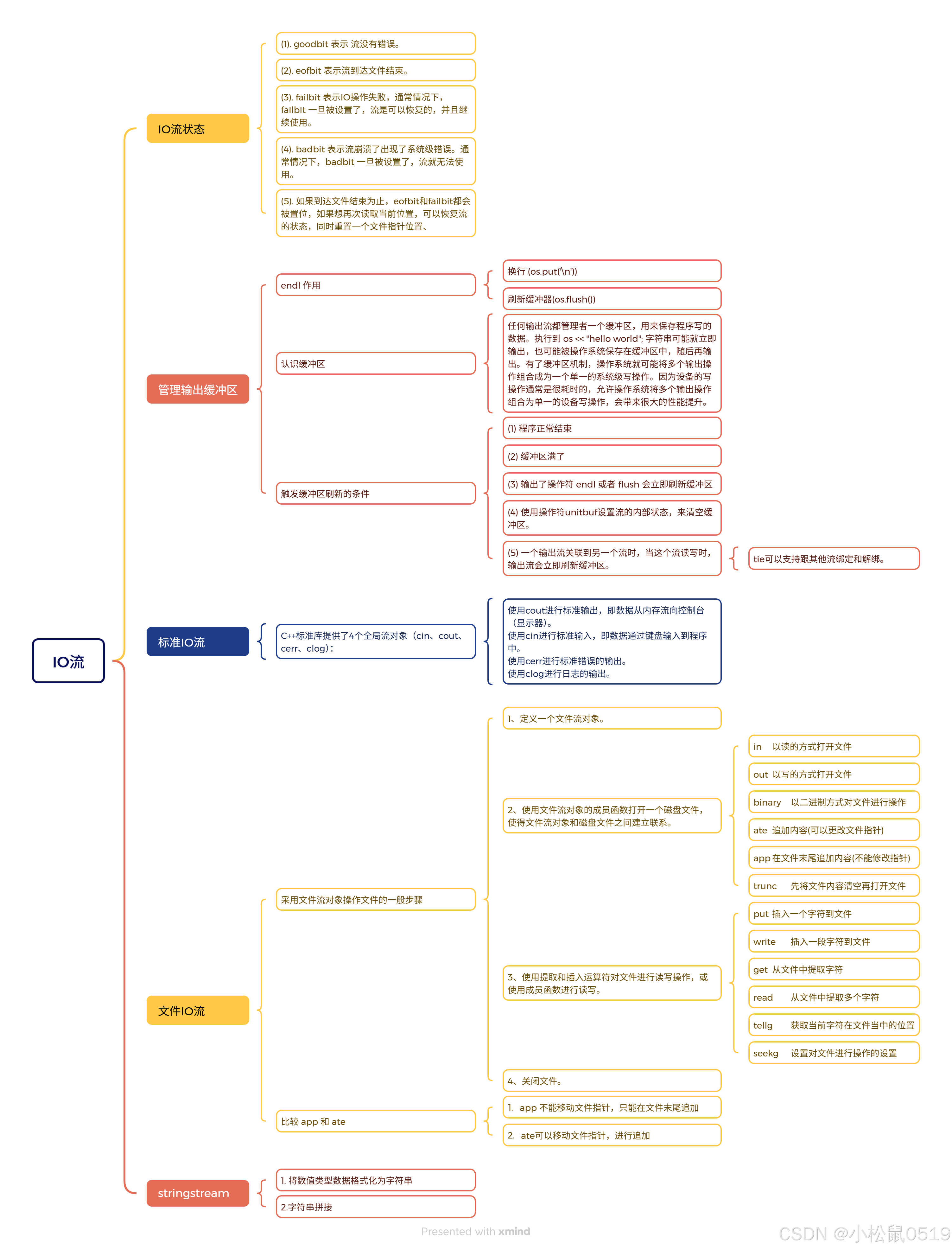
思维导图:
一、IO继承家族的认识
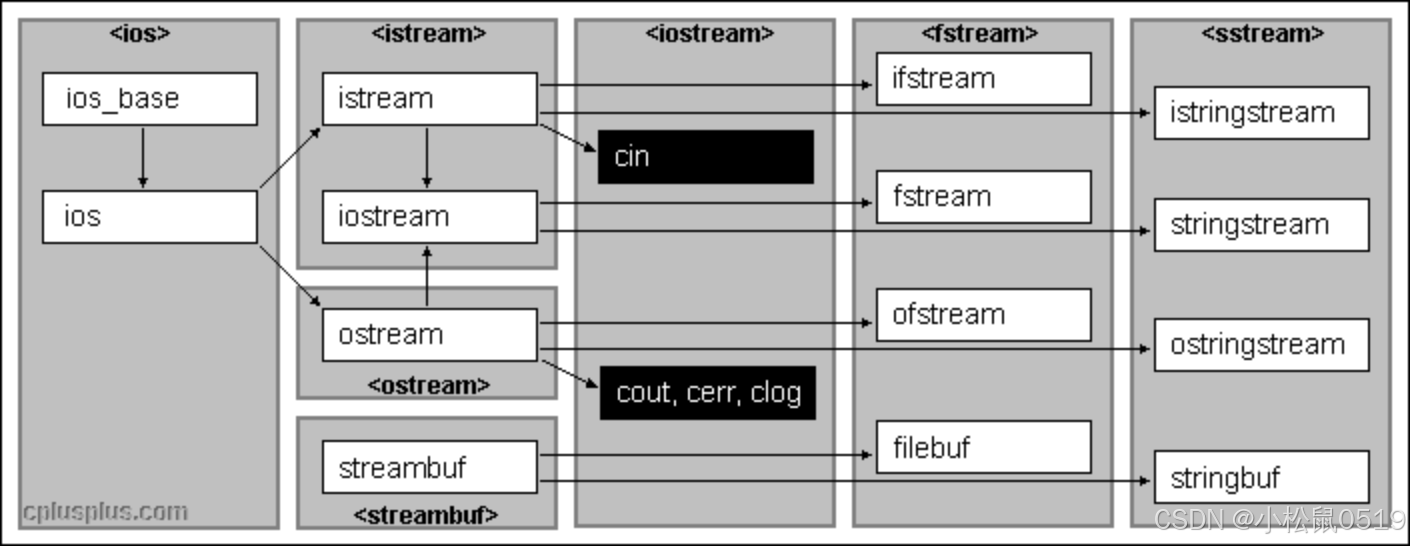
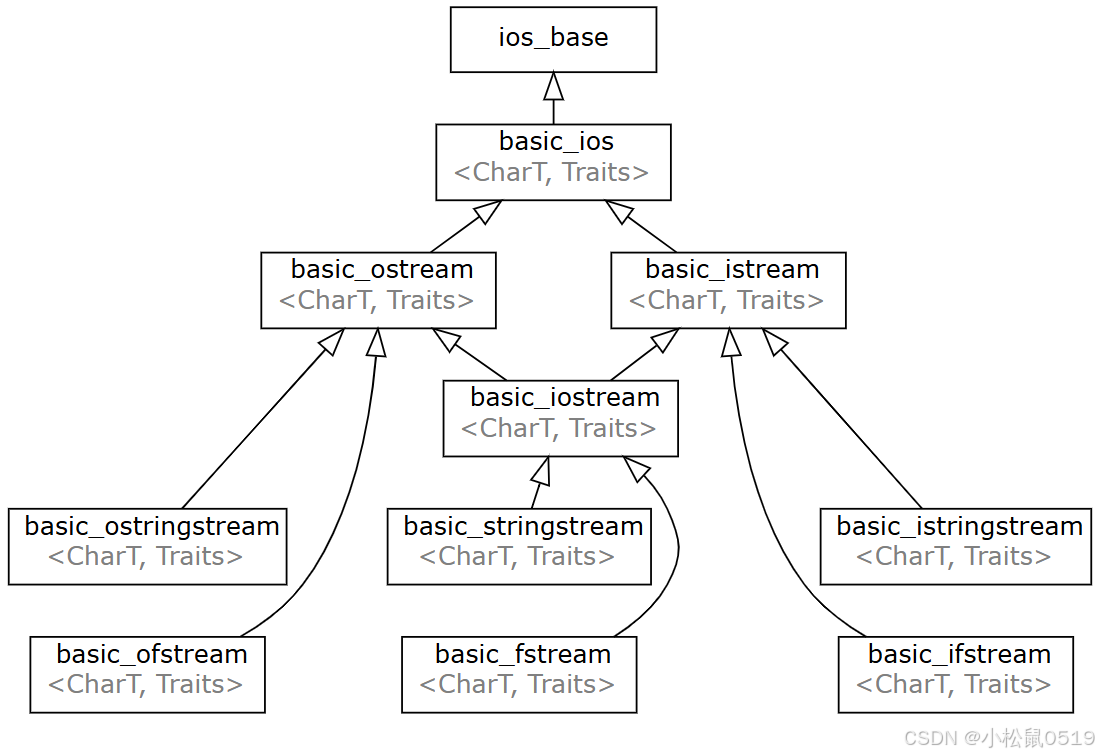
C语言是采用面向过程的方式,直接处理输入输出的;而C++语言是通过一族定义在标准库中的类型来处理IO。这些类型支持从设备中读取数据和向设备中写入数据的IO操作,设备可以是文件、控制台窗口等。
我们之前写的代码,都是使用IO类型和对象都是操作char数据的,默认情况下这些对象都是关联到用户的控制台窗口。但是实际中IO类不仅仅是从控制台窗口控制输入输出,还支持文件和string类的IO操作。其次IO类型是使用模版实现的,还支持对wchar_t 数据的输入输出。
二、IO流状态
2.1. IO 流对象的四种状态标志
(1). goodbit 表示 流没有错误。
(2). eofbit 表示流到达文件结束。
(3). failbit 表示IO操作失败,通常情况下,failbit 一旦被设置了,流是可以恢复的,并且继续使用。
(4). badbit 表示流崩溃了出现了系统级错误。通常情况下,badbit 一旦被设置了,流就无法使用。
(5). 如果到达文件结束为止,eofbit和failbit都会被置位,如果想再次读取当前位置,可以恢复流的状态,同时重置一个文件指针位置、

int main()
{
	cout << cin.good() << endl;	 // 1
	cout << cin.eof() << endl;	// 0
	cout << cin.bad() << endl;	// 0
	cout << cin.fail() << endl << endl;	//0
	return 0;
}
下面代码运行,输入 x ,此时就会报错。
int main()
{
	int i = 0;
	cin >> i;
	cout << cin.good() << endl;	 // 0
	cout << cin.eof() << endl;	 // 0
	cout << cin.bad() << endl;	 // 0
	cout << cin.fail() << endl << endl; // 1
    return 0;
}
2.2. 使用 cin.clear 恢复 cin 的状态为 goodbit
可以使用 clear() 将指定的 IO流的状态设置为 goodbit。
int main()
{
	int i = 0;
	cin >> i;
	cout << cin.good() << endl;	 // 0
	cout << cin.eof() << endl;   // 0
	cout << cin.bad() << endl;	// 0
	cout << cin.fail() << endl << endl; // 1

	cin.clear();
	cout << cin.good() << endl;    // 1
	cout << cin.eof() << endl;    // 0
	cout << cin.bad() << endl;    // 0
	cout << cin.fail() << endl << endl; // 0
    return 0;
}
但是我们在后面继续输入 cin >> i 这个指令,在打印这四个状态,我们会发现,failbit 还是1。
这是因为 之前写入到控制台的内容,没有丢弃。
解决方案一:丢弃 get()
解决方案二:读取下一个数据 peek()
2.3. 通过IO流状态,实现从控制台中将数字读取出来
int main()
{
	int i;
	// 要求从控制台中将数字读取出来
	// 控制台结束需要 Ctrl+z
	while (cin.peek()!=EOF)
	{
		cin >> i;// 用于从控制台(或输入流)读取数据并存储到变量 i
		if (cin.fail())
		{
			cin.clear();
			char ch = cin.peek();
			while (ch!=EOF && !(ch >= '0' && ch <='9'))
			{
				cin.get(); // 丢弃数据
				ch = cin.peek();  // 查看下一个字符
			}
		}
		else
		{
			cout << i << endl;
		}
	}
	return 0;
}
三、管理输出缓冲区
3.1. 讲解 endl
之前我们学习 endl,得知 是一个换行操作,这次我们在重新讲解,把内容写入文件,更加直观。
步骤一:写代码
#include<fstream>
void func(ostream& os)
{
	os << "hello world";
	os << "hello bit";
	system("pause"); // 暂停
	os << endl;
	system("pause"); // 暂停
}
int main()
{
	ofstream ofs("test.txt");
	func(ofs);
	return 0;
}
运行到 第一个 system("pause"); 新创建的 test.txt 文件中是没有数据的,然后第二个 system("pause"); ,就有数据了,并且有换行操作。
第二步,将 endl 改为 \n 。
void func(ostream& os)
{
	os << "hello world";
	os << "hello bit";
	system("pause"); // 暂停
	os << "\n";
	system("pause"); // 暂停

}
int main()
{
	ofstream ofs("test.txt");
	func(ofs);
	return 0;
}
运行到 第一个 system("pause"); 新创建的 test.txt 文件中是没有数据的,然后第二个 system("pause"); 两个都没有数据。说明 endl 不等同于 \n。
第三步:查官网
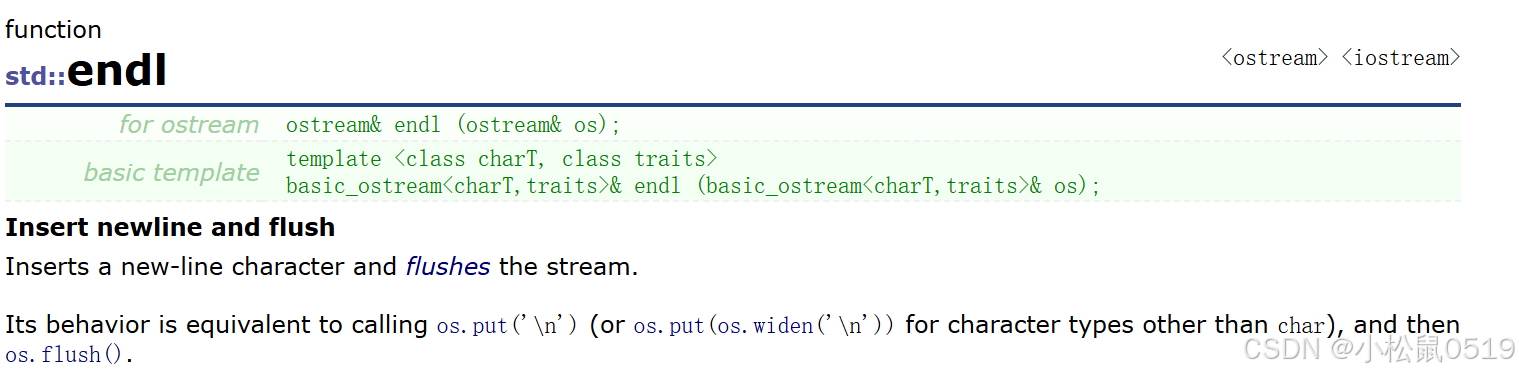
最后一行,写到 等价于 os.put('\n') 和 os.flush() 两个操作,而 os.flush() 的作用是 刷新缓冲区。
并且 endl 是一个函数,<< 重载了。
第四步:验证 os.flush()
#include<fstream>
void func(ostream& os)
{
	os << "hello world";
	os << "hello bit";
	system("pause"); // 暂停
	os << flush;
	system("pause"); // 暂停

}
int main()
{
	ofstream ofs("test.txt");
	func(ofs);
	return 0;
}最后的结果就是,只有刷新,没有换行。
3.2. 认识缓冲区
任何输出流都管理者一个缓冲区,用来保存程序写的数据。执行到 os << "hello world"; 字符串可能就立即输出,也可能被操作系统保存在缓冲区中,随后再输出。有了缓冲区机制,操作系统就可能将多个输出操作组合成为一个单一的系统级写操作。因为设备的写操作通常是很耗时的,允许操作系统将多个输出操作组合为单一的设备写操作,会带来很大的性能提升。
3.3. 触发缓冲区刷新的条件
(1) 程序正常结束
(2) 缓冲区满了
(3) 输出了操作符 endl 或者 flush 会立即刷新缓冲区 (上面的例子)
(4) 使用操作符unitbuf设置流的内部状态,来清空缓冲区。
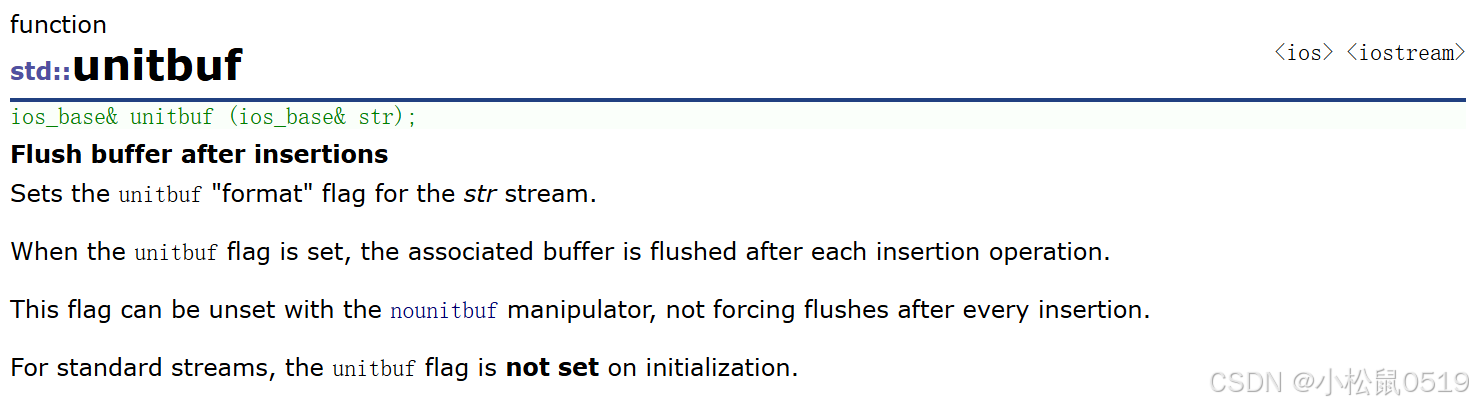
为 str 流设置 unitbuf 格式标志,被设置为,关联的缓冲区会在每次插入操作后被刷新;也可以通过 nounitbuf 不强制在每次插入后刷新缓冲区。
#include<fstream>
void func(ostream& os)
{
	os << "hello world";
	system("pause"); // 暂停
	os << "hello bit";
	system("pause"); // 暂停
}
int main()
{
	ofstream ofs("test.txt");
	ofs << unitbuf;
	func(ofs);
	return 0;
}
每次运行到 system("pause"); 就有数据。
(5) 一个输出流关联到另一个流时,当这个流读写时,输出流会立即刷新缓冲区。
tie可以支持跟其他流绑定和解绑。
绑定:cin.tie()
#include<fstream>
void func(ostream& os)
{
	os << "hello world";
	system("pause"); // 暂停
	os << "hello bit";
	system("pause"); // 暂停
	int i;
	cin >> i;
	os << "hello cat";
}
int main()
{
	ofstream ofs("test.txt");
	//cin绑定到ofs,cin进行读时,会刷新ofs的缓冲区
	cin.tie(&ofs);
	func(ofs);
	int i;
	cin >> i;
	return 0;
}
连续两次运行到 system("pause"); 都是没有数据的,运行到 cin>>i,才有数据。
#include<fstream>
void func(ostream& os)
{
	os << "hello world";
	system("pause"); // 暂停
	os << "hello bit";
	system("pause"); // 暂停
	int i;
	cin >> i;
	cin.tie(nullptr);
	os << "hello cat";
}
int main()
{
	ofstream ofs("test.txt");
	//cin绑定到ofs,cin进行读时,会刷新ofs的缓冲区
	cin.tie(&ofs);
	func(ofs);
	int i;
	cin >> i;
	return 0;
}
运行到 func 的 cin >> i,文件中有 "hello worldhello bit" func结束之后,不用到 main的 system("pause"); 就有数据。
四、标准IO流
C++标准库提供了4个全局流对象(cin、cout、cerr、clog):
- 使用cout进行标准输出,即数据从内存流向控制台(显示器)。
- 使用cin进行标准输入,即数据通过键盘输入到程序中。
- 使用cerr进行标准错误的输出。
- 使用clog进行日志的输出。
C++标准IO流前面已经使用得比较较多了,C++标准IO流默认是关联到控制台窗口的。cin是istream类型全局对象,cout/cerr/clog是ostream类型的全局对象,内置类型这两个类都直接进行了重载实现,所以可以直接使用,自定义类型就需要我们自己重载<<和>>运算符。
ostream和istream是不支持拷贝的,只支持移动(外部不能使用,因为是保护成员)。
istream的cin对象支持转换为bool值,进行条件逻辑判断,⼀旦被设置了badbit或failbit标志位,
就返回false,如果是goodbit就返回true。
ostream和istream还有不少其他接口,实践中相对用得比较少,需要时大家查查文档
#include<iostream>
#include<fstream>
#include<string>
using namespace std;
int main()
{
	int i = 0, j = 1;

	// 持续的输入,要结束需要输入Ctrl+Z换行,Ctrl+Z用于告诉程序输入已经完成,类似于在
	// 文件末尾添加一个标记。
	// istream& operator>>(int i),>>运算符重载的返回值是istream对象,istream对象可以
	// 调用operator bool转换为bool值
	// 本质在底层是将cin的eofbit和failbit标志位设置了,cin调用operator bool函数语法逻
	// 辑上实现转换为bool值
	while (cin >> i >> j)
	{
		cout << i << ":" << j << endl;
	}
	cout << cin.good() << endl;
	cout << cin.eof() << endl;
	cout << cin.bad() << endl;
	cout << cin.fail() << endl << endl;

	// 流一旦发生错误就不能再用了,清理重置一下再能使用
	cin.clear();
	string s;
	while (cin >> s)
	{
		cout << s << endl;
	}
}
五、文件IO流
5.1. 文件操作步骤
C++根据文件内容的数据格式将文件分为二进制文件和文本文件,采用文件流对象操作文件的一般步骤如下:
1、定义一个文件流对象。
操作文件的类有以下三个:
| 类 | 对应操作场景 |
| ofstream | 只写 |
| ifstream | 只读 |
| fstream | 读+写 |
2、使用文件流对象的成员函数打开一个磁盘文件,使得文件流对象和磁盘文件之间建立联系。
文件常见的打开方式如下:
| 打开方式 | 功能 |
| in | 以读的方式打开文件 |
| out | 以写的方式打开文件 |
| binary | 以二进制方式对文件进行操作 |
| ate | 追加内容(可以更改文件指针) |
| app | 在文件末尾追加内容(不能修改指针) |
| trunc | 先将文件内容清空再打开文件 |
3、使用提取和插入运算符对文件进行读写操作,或使用成员函数进行读写。
对文件进行提取和插入操作的常用成员函数:
| 成员函数 | 功能 |
| put | 插入一个字符到文件 |
| write | 插入一段字符到文件 |
| get | 从文件中提取字符 |
| read | 从文件中提取多个字符 |
| tellg | 获取当前字符在文件当中的位置 |
| seekg | 设置对文件进行操作的设置 |
| >>运算符重载 | 将数据形象地以“流”的形式进行输入 |
| <<运算符重载 | 将数据形象地以"流"的形式进行输出 |
4、关闭文件。
文件流打开后如果需要可以主动调用close函数关闭,也可以不关闭,因为流对象析构函数中会关闭。
5.2. 以二进制的形式操作文件
以二进制的形式对文件进行写入操作:
#include <fstream>
int main()
{
	ifstream ifs("C:\\Users\\Lenovo\\Desktop\\Reactor.png",
			ios_base::in | ios_base::binary);
	ofstream ofs("C:\\Users\\Lenovo\\Desktop\\Reactor-copy.png",
		ios_base::out | ios_base::binary);
	int n = 0;
	while (ifs && ofs)
	{
		char ch = ifs.get();
		ofs << ch;
		++n;
	}
	cout << n << endl; // 字节大小
	cout << ifs.good() << endl;
	cout << ifs.eof() << endl;
	cout << ifs.fail() << endl;
	cout << ifs.bad() << endl << endl;
	return 0;
}
5.3. 以文本的形式操作文件
以文本的形式对文件进行写入操作:
#include<fstream>
int main()
{
	ofstream ofs("test.txt");
	// 字符串和字符写入
	ofs.put('x');
	ofs.write("hello\nworld",8); // 还可以指定写入字符个数

	// 也可以使用 << 进行写入
	ofs << "222222" << endl;
	int x = 12;
	double y = 3.3;
	ofs << x << endl;
	ofs << y << endl;
    ofs.close();
	return 0;
}
以文本的形式对文件进行读取操作:
#include<fstream>
#include<string>
using namespace std;
int main()
{
	ifstream ifile; //定义文件流对象
	ifile.open("test.txt"); //以读取的方式打开test.txt文件
	ifile.seekg(0, ifile.end); //跳转到文件末尾
	int length = ifile.tellg(); //获取当前字符在文件当中的位置,即文件的字符总数
	ifile.seekg(0, std::ios_base::beg); //重新回到文件开头
	std::string data;
	data.resize(length);
	ifile.read(&data[0], length); //将文件当中的数据全部读取到字符串data当中
	cout << length << endl;
	cout << data.c_str() << endl;
	ifile.close(); //关闭文件
}
注意: 使用ofstream类对象的open函数时,若不指定打开方式,则默认以写的方式打开文件;使用ifstream类对象的open函数时,若不指定打开方式,则默认以读的方式打开文件;使用fstream类对象的open函数时,若不指定打开方式,则默认以写+读的方式打开文件。
5.4. 比较 app 和 ate
1. app 不能移动文件指针,只能在文件末尾追加
int main()
{
	ofstream ofs("test.txt");
	// 字符串和字符写入
	ofs.put('x');
	ofs.write("hello\nworld", 8); // 还可以指定写入字符个数

	// 也可以使用 << 进行写入
	ofs << "222222" << endl;
	int x = 12;
	double y = 3.3;
	ofs << x << endl;
	ofs << y << endl;
	// 关闭文件流
	ofs.close();

	cout << ofs.fail() << endl; // 0
	// app 不能移动指针,只能文件结尾追加
	ofs.open("test.txt", ios_base::out | ios_base::app);
	cout << ofs.fail() << endl; // 0
	ofs << "11111" << endl;
	// 换位置
	long pos = ofs.tellp(); // 返回输出流中当前字符的位置 -- 在末尾
	ofs.seekp(pos - 7);
	cout << ofs.fail() << endl; // 0
	ofs << x << endl;
	ofs << y << endl;
	return 0;
}
2. ate可以移动文件指针,进行追加
int main()
{
	ofstream ofs("test.txt");
	// 字符串和字符写入
	ofs.put('x');
	ofs.write("hello\nworld", 8); // 还可以指定写入字符个数
	// 也可以使用 << 进行写入
	ofs << "222222" << endl;
	int x = 66;
	double y = 3.3;
	ofs << x << endl;
	ofs << y << endl;
	// 关闭文件流
	ofs.close();

	// ate可以移动文件指针在文件尾部写入
	ofs.open("test.txt", ios_base::out | ios_base::ate);
	cout << ofs.fail() << endl; // 0
	ofs << "11111" << endl;
	// 换位置
	ofs.seekp(0, ios_base::beg); //  从起始位置开始,移动0个偏移量
	cout << ofs.fail() << endl; // 0
	ofs << x << endl;
	ofs << y << endl;
	return 0;
}
5.5. ios_base::out | ios_base::trunc 和 ios_base::out
两个没有任何区别,ios_base::out | ios_base::trunc 可以显式地、明确地告诉编译器你的意图。
六、观察下面的问题:
#include<fstream>
class Date
{
	friend ostream& operator << (ostream& out, const Date& d);
	friend istream& operator >> (istream& in, Date& d);
public:
	Date(int year = 1, int month = 1, int day = 1)
		:_year(year)
		, _month(month)
		, _day(day)
	{}
private:
	int _year;
	int _month;
	int _day;
};

istream& operator >> (istream& in, Date& d)
{
	in >> d._year >> d._month >> d._day;
	return in;
}

ostream& operator << (ostream& out, const Date& d)
{
	out << d._year << " " << d._month << " " << d._day << endl;
	return out;
}
// 客户端
struct ServerInfo
{
	// 二进制读写时,这里不能用string,否则写到文件中的是string中指向字符数组的指针
	// 若string对象析构后再去文件中读取string对象,string中读到是一个野指针。
	char _address[32];
	//string _address;
	int _port;
	Date _date;

};
struct ConfigManager
{
public:
	ConfigManager(const char* filename)
		:_filename(filename)
	{}

	// 二进制写
	// 内存中怎么存,囫囵吞枣,就怎么直接写出去
	void WriteBin(const ServerInfo& info)
	{
		ofstream ofs(_filename, ios_base::out | ios_base::binary);
		ofs.write((const char*)&info, sizeof(info));
	}

	// 二进制读
	// 将文件中的内容直接囫囵吞枣,直接读到内存中
	void ReadBin(ServerInfo& info)
	{
		ifstream ifs(_filename, ios_base::in | ios_base::binary);
		ifs.read((char*)&info, sizeof(info));
	}

	void WriteText(const ServerInfo& info)
	{
		ofstream ofs(_filename);
		ofs << info._address << " " << info._port << " " << info._date;
	}

	void ReadText(ServerInfo& info)
	{
		ifstream ifs(_filename);
		ifs >> info._address >> info._port >> info._date;
	}

private:
	string _filename; // 配置文件
};

void WriteBin()
{
	ServerInfo winfo = { "192.0.0.1111111111111111111111", 80, { 2025, 1, 10 } };

	// 二进制读写
	ConfigManager cf_bin("test.bin");
	cf_bin.WriteBin(winfo);
}

void ReadBin()
{
	// 二进制读写
	ConfigManager cf_bin("test.bin");
	ServerInfo rbinfo;

	cf_bin.ReadBin(rbinfo);
	cout << rbinfo._address << " " << rbinfo._port << " " << rbinfo._date << endl;
}

void WriteText()
{
	ServerInfo winfo = { "192.0.0.11111111111111111", 80, { 2025, 1, 10 } };
	// 文本读写
	ConfigManager cf_text("test.txt");
	cf_text.WriteText(winfo);
}

void ReadText()
{
	ConfigManager cf_text("test.txt");
	ServerInfo rtinfo;
	cf_text.ReadText(rtinfo);
	cout << rtinfo._address << " " << rtinfo._port << " " << rtinfo._date <<
		endl;
}

int main()
{
	WriteBin();
	ReadBin();

	//WriteText();
	//ReadText();

	return 0;
}
我们把ServerInfo类中的char _address[32] 改为 string _address 就会出现野指针的问题,这是为什么?
这是因为:
二进制直接读写对象内存 ≈ 最危险的浅拷贝
-
普通浅拷贝:至少原始数据还存在(在另一个对象中)
-
二进制读写浅拷贝:原始数据可能已经销毁,留下野指针。
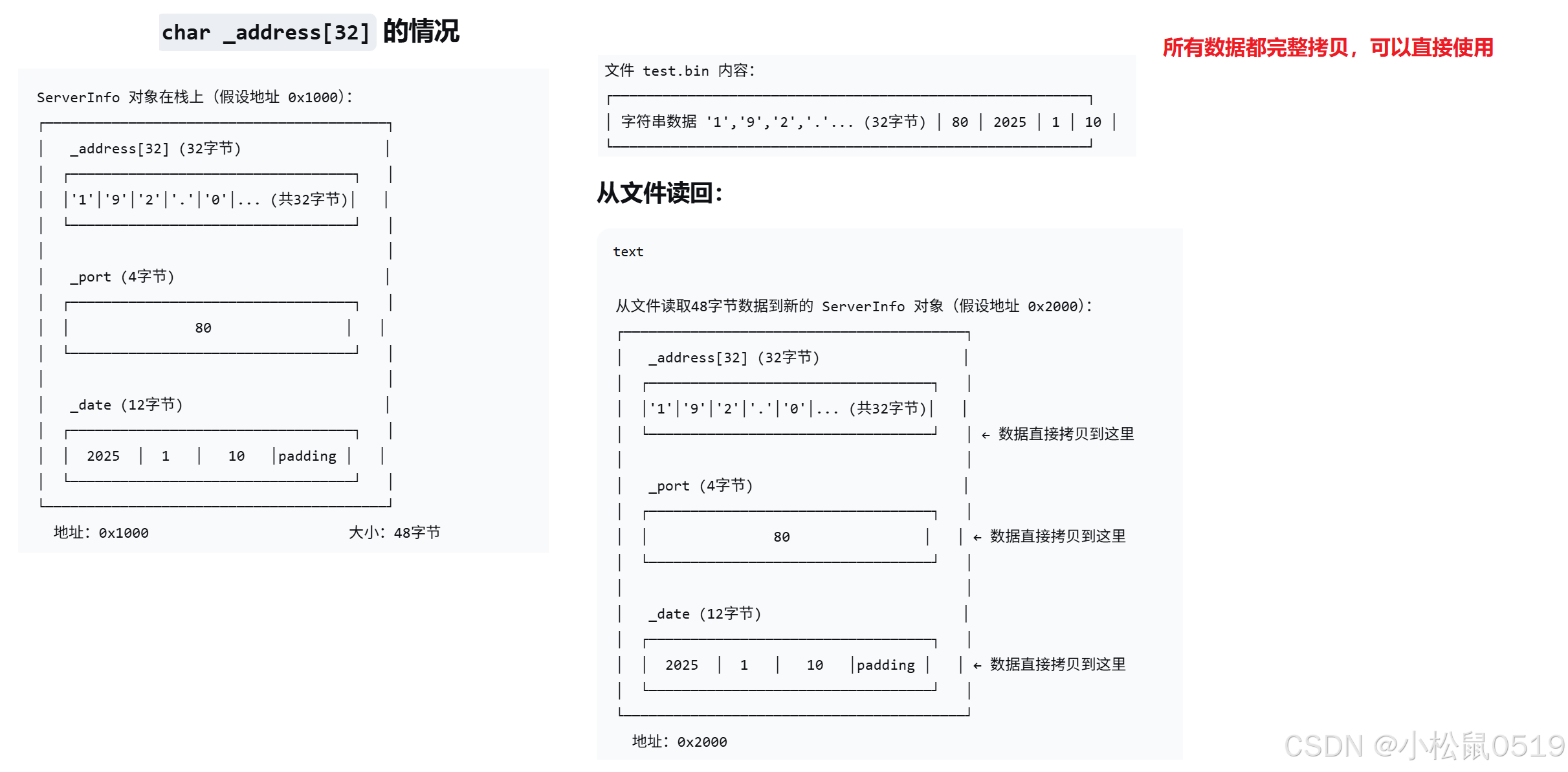
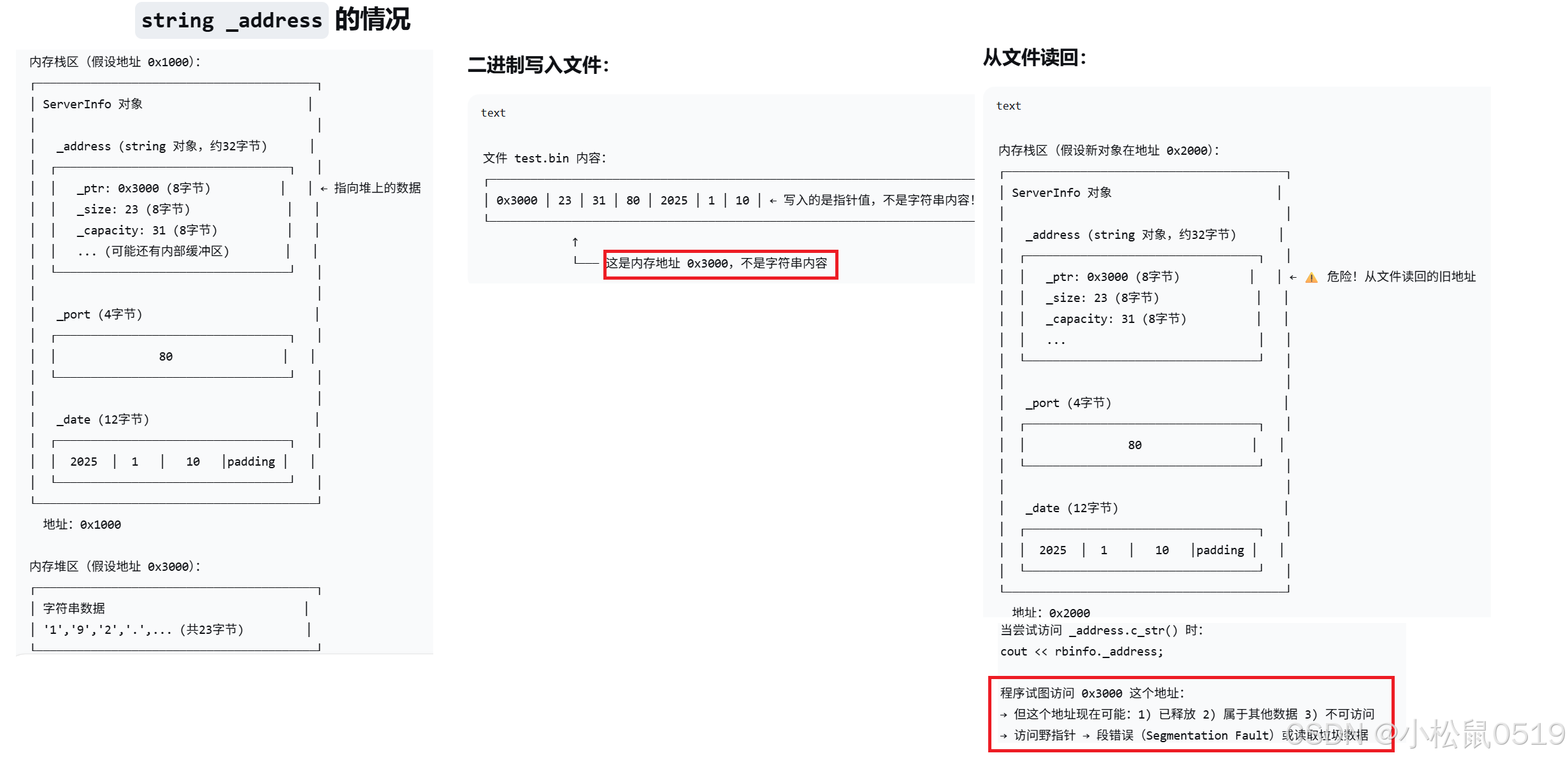
时间线:
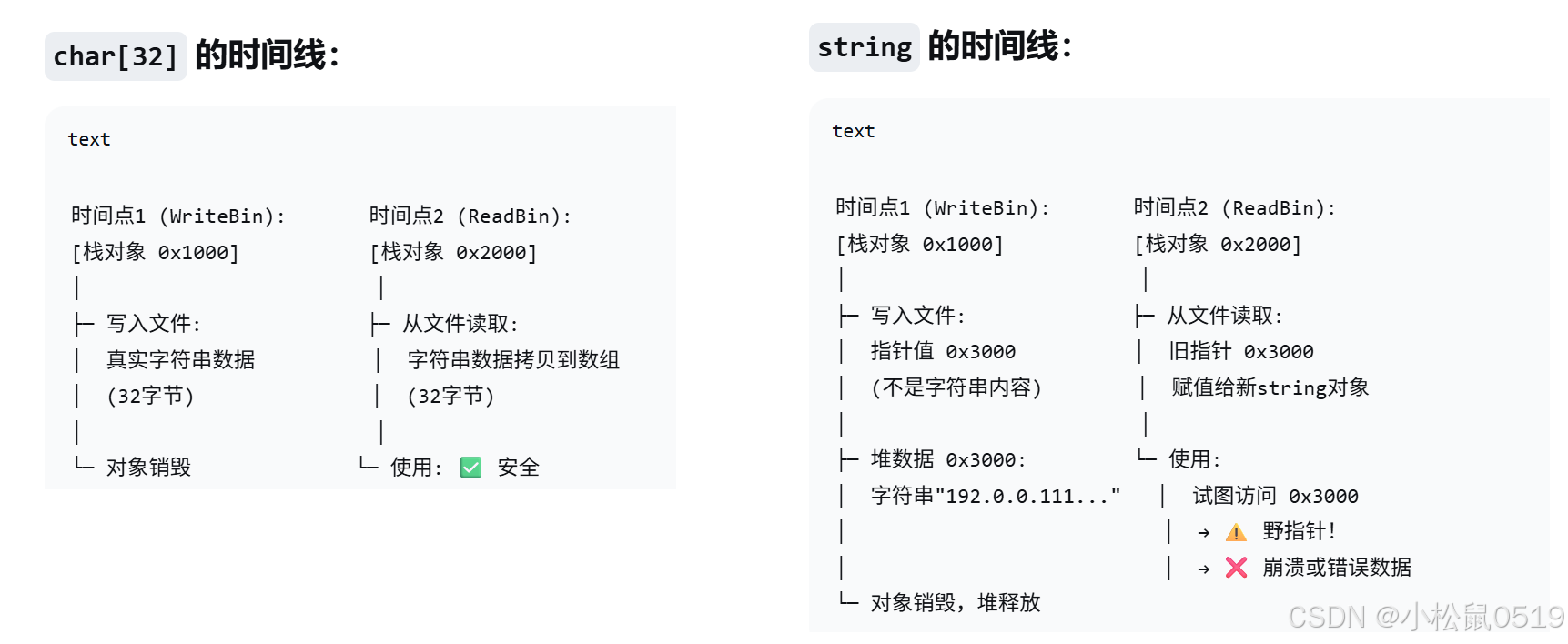
本身其实是,string 的指针指向的空间被释放了,从而造成的野指针。
七、string IO流
ostringstream是string的的写入流,ostringstream是ostream的派生类;istringstream是string的的读出流,istringstream是istream的派生类;stringstream是ostringstream和istringstream的派
生类,既可以读也可以写。这里使用stringstream会很方便。
stringstream系列底层维护了⼀个string类型的对象用来保存结果,使用方法跟上面的文件流类似,只是数据读写交互的都是底层的string对象。
stringstream最常用的方式还是使用<<和>>重载,进行数据和string之间的IO转换。
string流使用str函数获取底层的string对象,或者写入底层的string对象,具体细节参考下面代码理解。
1. 向 stringstream 写入数据
#include<sstream>
int main()
{
	int i = 123;
	Date d = { 2025, 4, 10 };
	//ostringstream oss;
	stringstream oss;
	oss << i << endl;
	oss << d << endl;
	string s = oss.str();
	cout << s << endl;
    return 0;
}
2. 向 stringstream 输出数据
int main()
{
    stringstream iss;
    iss.str("100 2025 9 9");
    int j;
    Date x;
    iss >> j >> x;
    cout << j << endl;
    cout << x << endl;
    return 0;
}
3. 关于自定义类型的操作
struct ChatInfo
{
	string _name; // 名字
	int _id;      // id
	Date _date;   // 时间
	string _msg;  // 聊天信息
};

int main()
{
	// 结构信息序列化为字符串
	ChatInfo winfo = { "张三", 135246, { 2022, 4, 10 }, "晚上一起看电影吧" };
	ostringstream oss;
	oss << winfo._name << " " << winfo._id << " " << winfo._date << " " <<
		winfo._msg;
	string str = oss.str();
	cout << str << endl << endl;

	// 我们通过网络这个字符串发送给对象,实际开发中,信息相对更复杂,
	// 一般会选用Json、xml等方式进行更好的支持
	// 字符串解析成结构信息
	ChatInfo rInfo;

	istringstream iss(str);
	iss >> rInfo._name >> rInfo._id >> rInfo._date >> rInfo._msg;
	cout << "-------------------------------------------------------" << endl;
	cout << "姓名:" << rInfo._name << "(" << rInfo._id << ") ";
	cout << rInfo._date << endl;
	cout << rInfo._name << ":>" << rInfo._msg << endl;
	cout << "-------------------------------------------------------" << endl;

	return 0;
}
完

有“AI”的1024 = 2048,欢迎大家加入2048 AI社区
更多推荐



 20
20 0
0- 0


 已为社区贡献2条内容

所有评论(0)