Python 异步抓取懂球帝数据
·
在做数据分析和资讯研究时,懂球帝是一个非常好的数据源,文章更新频繁、内容丰富。本文将详细介绍 如何通过学习研究的方式,使用 Python 异步爬虫抓取懂球帝的文章列表和内容,并对数据进行清洗和噪音过滤。
⚠️ 本文方法仅用于学习、研究和技术实践,不涉及商业用途,请合理控制请求频率,避免对网站造成负担。
一、理解懂球帝的 API 数据
懂球帝前端页面的文章数据,并不是直接写在 HTML 里的,而是通过 Ajax 接口请求 JSON 数据后渲染到页面。
因此我们不需要解析复杂 HTML,而是直接在js分析接口即可。
1.1 如何找到 API URL
步骤如下:
- 打开浏览器,访问懂球帝网站
- 打开 开发者工具 → Network(网络)
- 搜索关键词:
api、json、axios、fetch
1.2 尝试构造并发送请求
分析 JS 代码获取到接口结构:
https://www.dongqiudi.com/api/app/tabs/web/{tabId}.json?size=40
参数说明:
① tabId(分类 ID)
不同数字代表不同栏目,例如:
- 56 → 国内动态
- 57 → 更多赛事
- 3 → 英超动态
修改该数字即可切换分类数据。
② size(每页条数)
size=20→ 每页 20 条size=40→ 每页 40 条
用于控制单页返回数量。
你可以直接在浏览器访问该地址,或者使用:
- Postman
- curl
- Python requests
查看接口返回的 JSON 数据。
二、分析接口返回的 JSON 结构
接口返回数据为标准 JSON,核心字段如下:
2.1 articles
- 类型:Array
- 作用:当前页文章列表
每个元素通常包含:
id:文章 IDtitle:标题cover:封面图publish_time:发布时间
示例结构:
{
  "articles": [
    {
      "id": 123456,
      "title": "某场比赛精彩回顾",
      "cover": "https://xxx.jpg"
    }
  ]
}
2.2 next(分页字段)
- 类型:String
- 作用:下一页接口地址
如果存在 next,说明还有更多数据。
如果为空或不存在,说明已到最后一页。
分页逻辑:
- 请求第一页
- 获取
next - 请求
next - 直到
next为空
这就是“加载更多”的实现方式。
三、Python 异步爬虫实现
3.1 安装依赖
pip install aiohttp lxml
3.2 异步请求封装
import asyncio
import aiohttp

CRAWLER_TIMEOUT = 10
CRAWLER_HEADERS = {
    "User-Agent": "Mozilla/5.0"
}

async def fetch_json(session, url):
    try:
        async with session.get(url, timeout=CRAWLER_TIMEOUT, ssl=False) as resp:
            resp.raise_for_status()
            return await resp.json()
    except Exception:
        return None

async def fetch_text(session, url):
    try:
        async with session.get(url, timeout=CRAWLER_TIMEOUT, ssl=False) as resp:
            resp.raise_for_status()
            return await resp.text()
    except Exception:
        return None
四、抓取文章列表(支持分页)
BASE_URL = "https://www.dongqiudi.com"
TAB_ID = 57
PAGE_SIZE = 40
MAX_PAGES = 5

async def parse_article_list(session):
    articles = []
    seen = set()
    url = f"{BASE_URL}/api/app/tabs/web/{TAB_ID}.json?size={PAGE_SIZE}"

    for _ in range(MAX_PAGES):
        data = await fetch_json(session, url)
        if not data or "articles" not in data:
            break

        for item in data["articles"]:
            aid = str(item.get("id"))
            title = item.get("title", "").strip()
            if not aid or not title or aid in seen:
                continue
            seen.add(aid)

            articles.append({
                "article_id": aid,
                "title": title,
                "detail_url": f"{BASE_URL}/articles/{aid}.html"
            })

        next_url = data.get("next")
        if not next_url:
            break

        url = BASE_URL + "/api" + next_url.split("dongqiudi.com")[1]

    return articles
五、抓取文章详情并过滤噪音
目标:
- 仅保留近三天文章
- 过滤 logo / avatar 等图片
- 提取摘要
from lxml import html
from datetime import datetime, timedelta

SEM = asyncio.Semaphore(8)

async def parse_article_detail(session, article):
    async with SEM:
        html_text = await fetch_text(session, article["detail_url"])
        if not html_text:
            return None

        tree = html.fromstring(html_text)

        time_text = tree.xpath("//p[@class='tips']/text()")
        newstime = time_text[-1].strip() if time_text else ""

        try:
            pub_time = datetime.strptime(newstime, "%Y-%m-%d %H:%M")
        except:
            return None

        if pub_time < datetime.now() - timedelta(days=3):
            return None

        body_nodes = tree.xpath("//div[@style='display:none;']")
        if not body_nodes:
            return None

        node = body_nodes[0]

        # 过滤无效图片
        img_url = None
        for src in node.xpath(".//img/@src"):
            if any(x in src.lower() for x in ["logo", "avatar", "icon"]):
                continue
            img_url = src
            break

        first_p = node.xpath(".//p[normalize-space()]")
        smalltext = first_p[0].xpath("string(.)").strip() if first_p else ""

        return {
            "title": article["title"],
            "source_url": article["detail_url"],
            "newstime": newstime,
            "smalltext": smalltext,
            "img_url": img_url
        }
六、主程序整合
async def crawl_dongqiudi():
    async with aiohttp.ClientSession(headers=CRAWLER_HEADERS) as session:
        articles = await parse_article_list(session)
        tasks = [parse_article_detail(session, art) for art in articles]
        results = await asyncio.gather(*tasks)
        return [r for r in results if r]

if __name__ == "__main__":
    data = asyncio.run(crawl_dongqiudi())
    print(f"最终有效文章数:{len(data)}")
七、完整代码
import asyncio
import aiohttp
from lxml import html
from datetime import datetime, timedelta
from config import CRAWLER_HEADERS, CRAWLER_TIMEOUT

# ========================================
# 基础配置
# ========================================
BASE_URL = "https://www.dongqiudi.com"
TAB_ID = 57
PAGE_SIZE = 40
MAX_PAGES = 5

SEM = asyncio.Semaphore(8)

EXCLUDE_PREFIXES = (
    "懂球译站",
    "欧洲杯太太团C位争夺战",
    "女球迷采访",
)


# ========================================
# 通用请求
# ========================================
async def fetch_text(session, url):
    try:
        async with session.get(url, timeout=CRAWLER_TIMEOUT, ssl=False) as resp:
            resp.raise_for_status()
            return await resp.text()
    except Exception:
        return None


async def fetch_json(session, url):
    try:
        async with session.get(url, timeout=CRAWLER_TIMEOUT, ssl=False) as resp:
            resp.raise_for_status()
            return await resp.json()
    except Exception:
        return None


# ========================================
# API 列表(取 3 页)
# ========================================
async def parse_article_list(session):
    articles = []
    seen = set()

    url = f"{BASE_URL}/api/app/tabs/web/{TAB_ID}.json?size={PAGE_SIZE}"

    for page in range(1, MAX_PAGES + 1):
        data = await fetch_json(session, url)
        if not data or "articles" not in data:
            break

        for item in data["articles"]:
            aid = str(item.get("id"))
            title = item.get("title", "").strip()

            if not aid or not title:
                continue
            if title.startswith(EXCLUDE_PREFIXES):
                continue
            if aid in seen:
                continue

            seen.add(aid)
            articles.append({
                "article_id": aid,
                "title": title,
                "detail_url": f"{BASE_URL}/articles/{aid}.html"
            })

        next_url = data.get("next")
        if not next_url:
            break
        url = BASE_URL + "/api" + next_url.split("dongqiudi.com")[1]

    return articles


# ========================================
# 详情页解析(含三天过滤)
# ========================================
async def parse_article_detail(session, article, index, total):
    async with SEM:
        print(f"[{index}/{total}] 抓取:{article['title']}")

        html_text = await fetch_text(session, article["detail_url"])
        if not html_text:
            return None

        tree = html.fromstring(html_text)

        # 发布时间
        time_text = tree.xpath("//p[@class='tips']/text()")
        newstime = time_text[-1].strip() if time_text else ""

        try:
            pub_time = datetime.strptime(newstime, "%Y-%m-%d %H:%M")
        except Exception:
            return None

        # === 三天过滤 ===
        if pub_time < datetime.now() - timedelta(days=3):
            return None

        # 正文
        body_nodes = tree.xpath("//div[@style='display:none;']")
        if not body_nodes:
            return None

        node = body_nodes[0]

        # 图片处理
        for img in node.xpath(".//img"):
            src = (
                img.get("data-src")
                or img.get("data-original")
                or img.get("data-url")
                or img.get("data-lazy")
                or img.get("src")
                or ""
            )

            if src.startswith("//"):
                src = "https:" + src
            elif src.startswith("/"):
                src = BASE_URL + src

            img.set("src", src)
            for a in ["data-src", "data-original", "data-url", "data-lazy"]:
                img.attrib.pop(a, None)
            img.set("referrerpolicy", "no-referrer")

        newstext = "".join(
            html.tostring(child, encoding="unicode")
            for child in node
        )

        first_p = node.xpath(".//p[normalize-space()]")
        smalltext = first_p[0].xpath("string(.)").strip() if first_p else ""
        if len(smalltext) > 500:
            smalltext = smalltext[:400] + "..."

        img_url = None
        for src in node.xpath(".//img/@src"):
            if any(x in src.lower() for x in ["logo", "avatar", "icon"]):
                continue
            img_url = src
            break
        return {
            "title": article["title"],
            "source_url": article["detail_url"],
            "newstime": newstime,
            "smalltext": smalltext,
            "newstext": newstext,
            "img_url": img_url
        }


# ========================================
# 主流程
# ========================================
async def crawl_dongqiudi_zuqiu():
    async with aiohttp.ClientSession(headers=CRAWLER_HEADERS) as session:
        articles = await parse_article_list(session)
        tasks = [
            parse_article_detail(session, art, i + 1, len(articles))
            for i, art in enumerate(articles)
        ]
        results = await asyncio.gather(*tasks)
        return [r for r in results if r]


if __name__ == "__main__":
    data = asyncio.run(crawl_dongqiudi_zuqiu())
    print(f"\n✅ 最终保留近三天文章数:{len(data)}")
八、运行结果
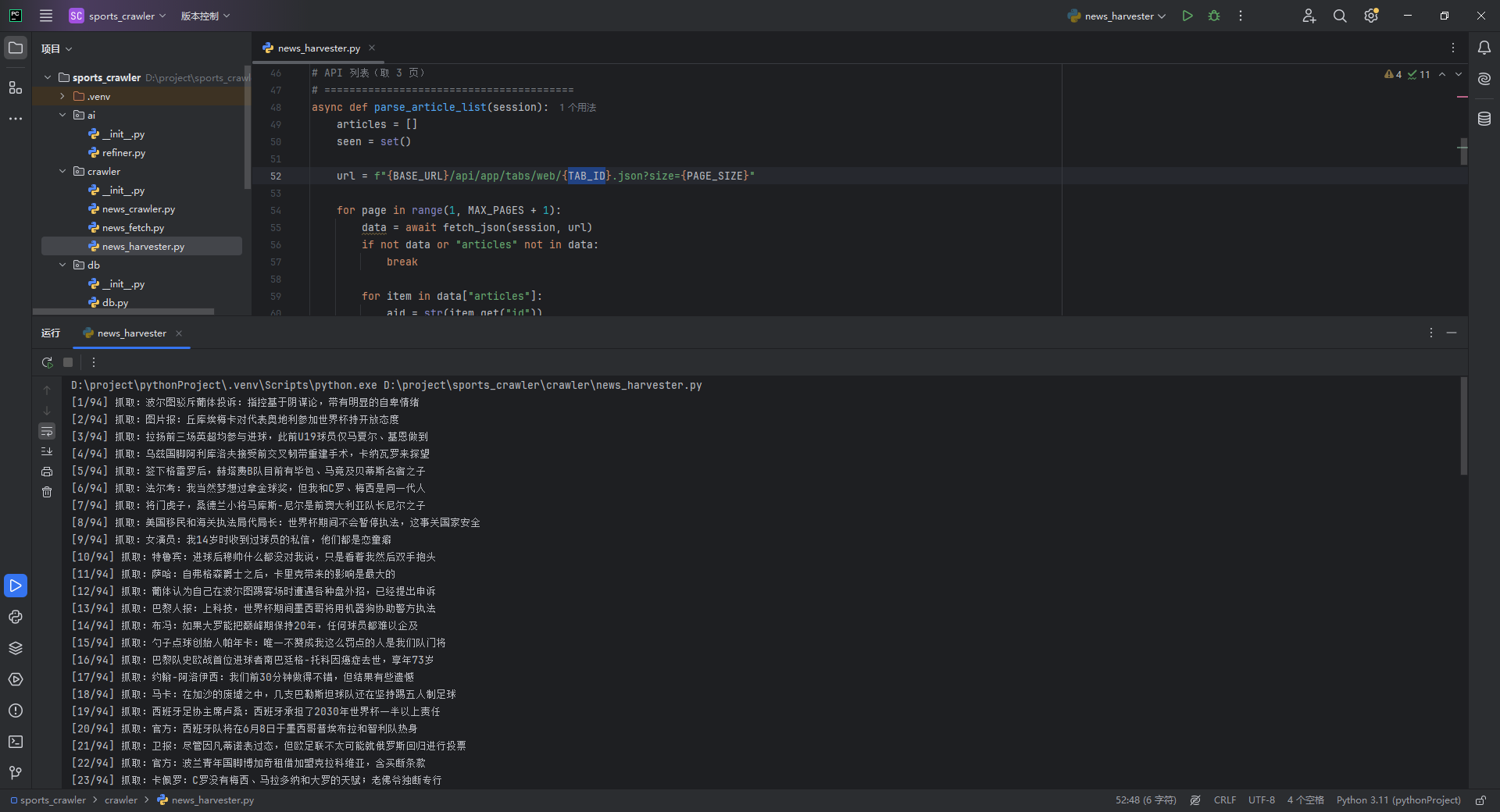
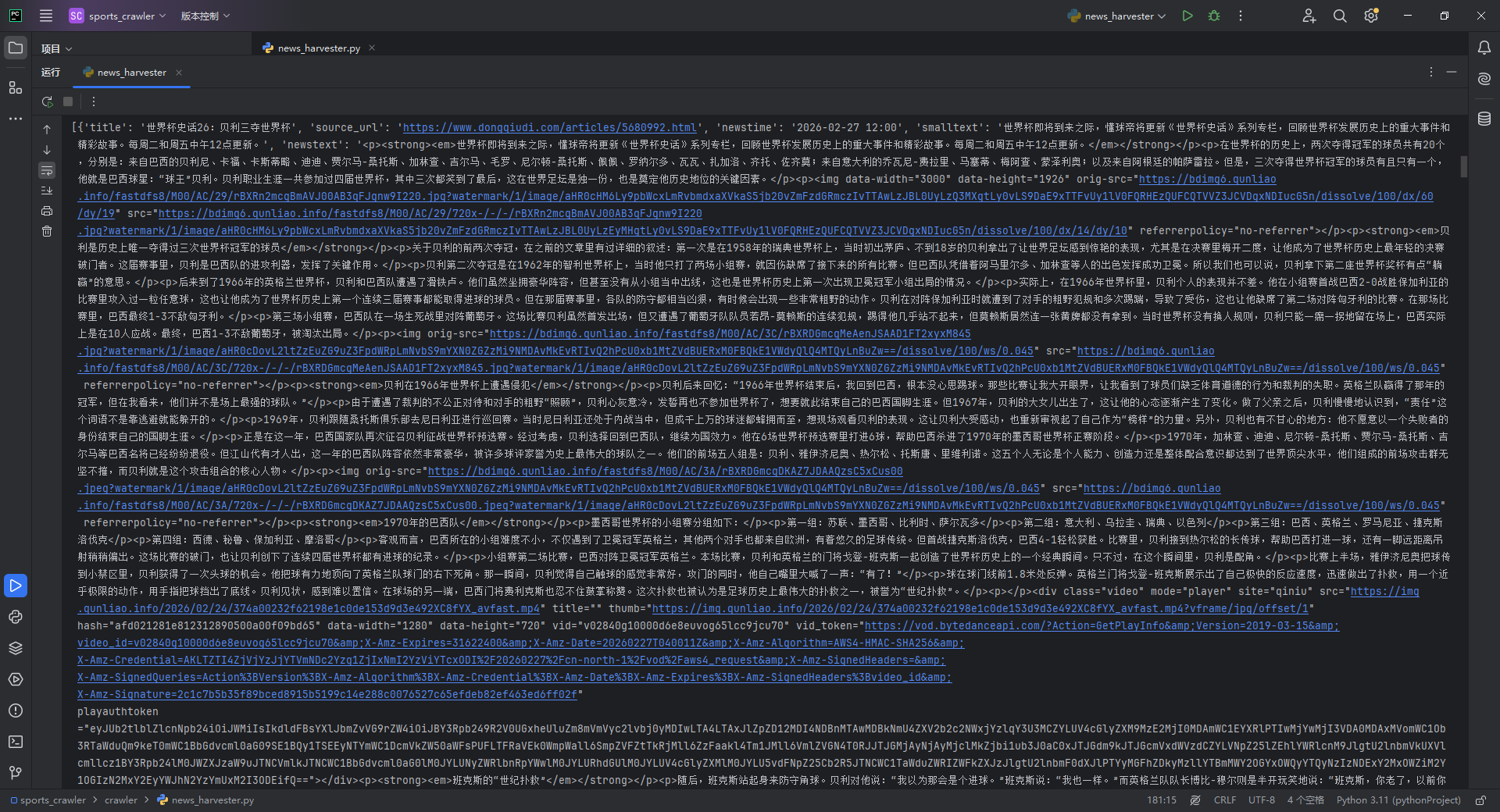
九、数据清洗与合规说明
在代码过程中,做了:
- ✅ 标题去重
- ✅ 时间过滤
- ✅ 图片过滤
- ✅ 分页控制
- ✅ 请求数量限制
建议:
- 控制请求频率
- 不进行大规模抓取
- 不做商业用途
- 不存储或传播完整版权内容

有“AI”的1024 = 2048,欢迎大家加入2048 AI社区
更多推荐

 18
18 0
0- 0


 已为社区贡献2条内容

所有评论(0)