Java语言后端SpringBoot框架+前端Vue框架实现上传文件功能
Vue 3 Composition API :使用 ref 、 reactive 等响应式API- Element Plus :使用 el-upload 组件实现文件夹上传- Axios :使用 request 函数调用后端API- Promise 和 Async/Await :处理异步操作。
## 整体流程
本文基于一个后台课程管理系统详细实现文件上传的功能,上传文件的功能实现采用了"选择文件后临时保存,点击保存时才上传"的方式,避免了用户选择文件后不保存导致的文件残留问题。
完整流程 :
1. 用户选择文件夹 → 前端临时保存文件对象
2. 用户填写课程信息并点击"保存" → 前端开始上传流程
3. 前端调用后端上传API → 后端保存文件到服务器
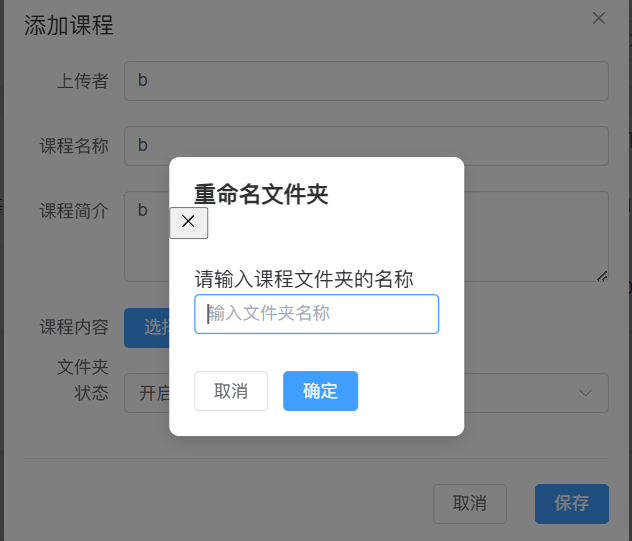
4. 前端弹出重命名对话框 → 用户输入文件夹名称
5. 前端调用后端重命名API → 后端重命名文件夹
6. 前端调用后端保存课程API → 后端保存课程信息到数据库
7. 前端刷新课程列表 → 显示新添加的课程
## 前端实现
### 1. 临时保存文件对象
// 临时保存的文件对象
const tempFiles = ref<any>(null)

// 处理文件夹上传
function handleFolderUpload(file: any) {
  try {
    console.log('File object:', file)
    console.log('File raw:', file.raw)

    // 临时保存文件对象
    tempFiles.value = file

    // 显示选择成功的提示
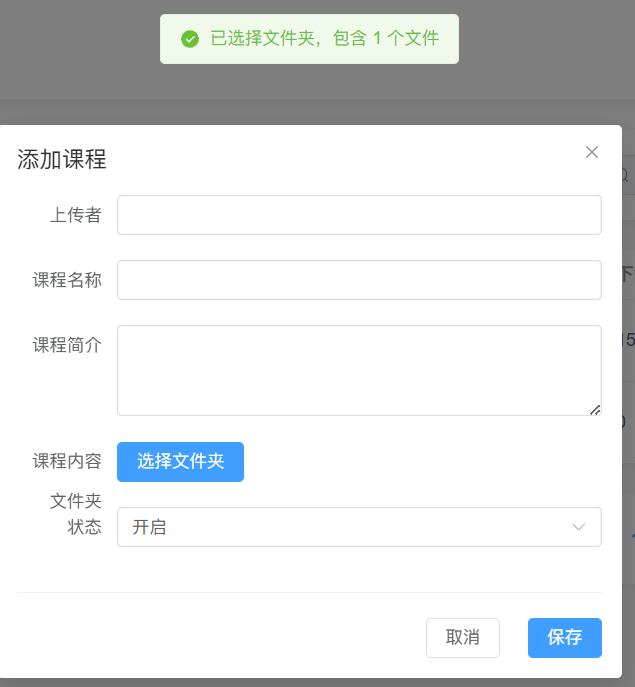
    ElMessage.success(`已选择文件夹,包含 ${Array.isArray(file.raw) ? file.raw.length : 1} 个文件`)
  } catch (error) {
    ElMessage.error("选择文件夹失败,请稍后重试")
    console.error(error)
  }
}
- 当用户选择文件夹时, handleFolderUpload 函数被调用
- 函数将文件对象临时保存到 tempFiles 变量中
- 此时文件并没有上传到服务器,只是保存在前端内存中
- 显示选择成功的提示信息
###2. 保存时的上传逻辑
// 保存课程
async function saveCourse() {
  if (!formData.adminname || !formData.course || !formData.introduce) {
    ElMessage.error("请填写完整的课程信息")
    return
  }

  if (!tempFiles.value && !editingId.value) {
    ElMessage.error("请选择课程内容文件夹")
    return
  }

  try {
    // 如果是添加课程且选择了文件夹,先上传文件夹
    if (!editingId.value && tempFiles.value) {
      ElMessage.info("正在上传文件夹,请稍候...")

      // 创建FormData对象
      const uploadFormData = new FormData()

      // 添加文件夹中的所有文件
      if (tempFiles.value && tempFiles.value.raw) {
        // 对于文件夹上传,tempFiles.value.raw是一个数组
        if (Array.isArray(tempFiles.value.raw)) {
          tempFiles.value.raw.forEach((f: any, index: number) => {
            const relativePath = f.webkitRelativePath || f.name
            uploadFormData.append(`files`, f, relativePath)
          })
        } else {
          uploadFormData.append(`files`, tempFiles.value.raw, tempFiles.value.raw.name)
        }
      }

      // 调用后端API上传文件夹
      const uploadResponse = await request<any>({
        url: "/api/files/upload-folder",
        method: "POST",
        data: uploadFormData,
        headers: {
          "Content-Type": "multipart/form-data"
        }
      })

      if (uploadResponse.success) {
        // 保存后端返回的文件夹路径
        const uploadedPath = uploadResponse.data.folderPath

        // 弹出输入框让用户输入想要的文件夹名
        const { value: newFolderName } = await ElMessageBox.prompt(
          '请输入课程文件夹的名称',
          '重命名文件夹',
          {
            confirmButtonText: '确定',
            cancelButtonText: '取消',
            inputPlaceholder: '输入文件夹名称',
            inputValidator: (value) => {
              if (!value || value.trim() === '') {
                return '文件夹名称不能为空'
              }
              return true
            }
          }
        )

        // 调用后端API重命名文件夹
        const renameResponse = await request<any>({
          url: "/api/files/rename-folder",
          method: "POST",
          data: {
            oldPath: uploadedPath,
            newName: newFolderName.trim()
          }
        })

        if (renameResponse.success) {
          // 更新前端的文件夹路径
          formData.content = renameResponse.data.newPath
        } else {
          ElMessage.error(renameResponse.message || "文件夹重命名失败")
          return
        }
      } else {
        ElMessage.error(uploadResponse.message || "文件夹上传失败")
        return
      }
    }

    // 保存课程信息
    if (editingId.value) {
      // 修改课程
      const response = await request<any>({
        url: "/api/courses",
        method: "PUT",
        data: {
          id: editingId.value,
          ...formData
        }
      })

      if (response.success) {
        ElMessage.success("修改成功")
        getCourses() // 重新获取课程列表
      } else {
        ElMessage.error(response.message || "修改失败")
      }
    } else {
      // 添加课程
      const response = await request<any>({
        url: "/api/courses",
        method: "POST",
        data: formData
      })

      if (response.success) {
        ElMessage.success("添加成功")
        getCourses() // 重新获取课程列表
      } else {
        ElMessage.error(response.message || "添加失败")
      }
    }

    dialogVisible.value = false
    // 清空临时文件
    tempFiles.value = null
  } catch (error) {
    if (error === 'cancel') {
      // 用户取消操作
      return
    }
    ElMessage.error("操作失败,请稍后重试")
    console.error(error)
  }
}
- 当用户点击"保存"按钮时, saveCourse 函数被调用
- 函数首先验证表单数据是否完整
- 如果是添加新课程且选择了文件夹,开始上传流程:
1. 创建 FormData 对象,添加所有文件
2. 调用后端上传API /api/files/upload-folder
3. 上传成功后,弹出重命名对话框
4. 调用后端重命名API /api/files/rename-folder
5. 重命名成功后,更新课程内容路径
- 最后调用后端保存课程API /api/courses
- 保存完成后清空临时文件并刷新课程列表
### 3. 前端模板实现
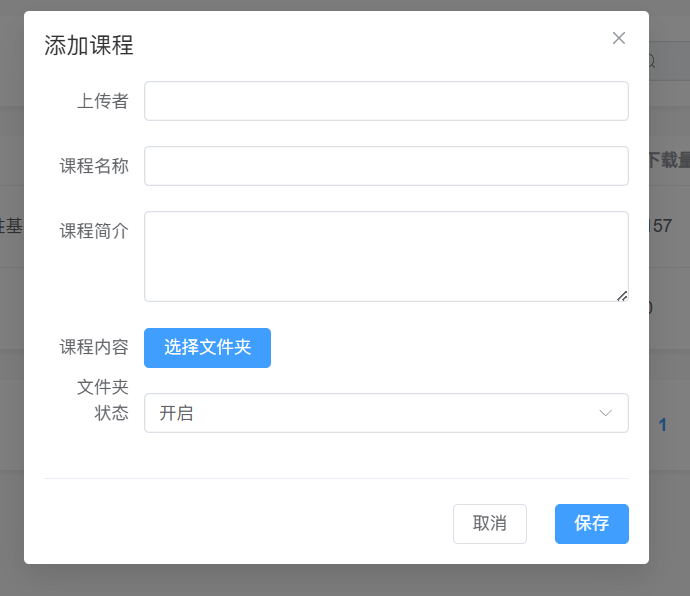
<el-form-item label="课程内容文件夹">
  <el-upload
    class="upload-demo"
    action="#"
    :auto-upload="false"
    :directory="true"
    :multiple="true"
    :on-change="handleFolderUpload"
    :show-file-list="false"
    :before-upload="beforeUpload"
  >
    <template #trigger>
      <el-button type="primary">
        选择文件夹
      </el-button>
    </template>
    <div v-if="formData.content" class="folder-path">
      {{ formData.content }}
      <el-button type="text" @click="formData.content = ''">
        移除
      </el-button>
    </div>
  </el-upload>
</el-form-item>
- 使用 Element Plus 的 el-upload 组件
- 设置 :auto-upload="false" 禁用自动上传
- 设置 :directory="true" 支持文件夹上传
- 设置 :on-change="handleFolderUpload" 当选择文件时调用处理函数
- 设置 :show-file-list="false" 隐藏文件列表
## 后端实现
### 1. 文件上传API
/**
 * 上传文件夹
 * @param files 文件夹中的所有文件
 * @return 上传结果和文件夹路径
 */
@PostMapping("/upload-folder")
public ResponseEntity<?> uploadFolder(@RequestParam("files") MultipartFile[] files) {
    try {
        // 构建基础路径
        String basePath = "d:\\biancheng\\project\\vue\\book";

        // 打印调试信息
        System.out.println("Files received: " + files.length);
        if (files.length > 0) {
            String originalFilename = files[0].getOriginalFilename();
            System.out.println("First file originalFilename: " + originalFilename);
        }

        // 生成有意义的文件夹名
        // 使用当前时间戳 + 随机数作为文件夹名
        long timestamp = System.currentTimeMillis();
        int random = (int)(Math.random() * 1000);
        String folderName = "course_" + timestamp + "_" + random;
        System.out.println("Generated folder name: " + folderName);

        // 构建文件夹路径
        String folderPath = basePath + "\\" + folderName;
        System.out.println("Folder path: " + folderPath);

        // 创建文件夹
        File folder = new File(folderPath);
        if (!folder.exists()) {
            boolean created = folder.mkdirs();
            System.out.println("Folder created: " + created);
        }

        // 保存所有文件
        for (MultipartFile file : files) {
            if (!file.isEmpty()) {
                // 获取文件的原始名称
                String originalFilename = file.getOriginalFilename();
                if (originalFilename != null) {
                    System.out.println("Processing file: " + originalFilename);

                    // 构建文件的完整路径
                    String filePath = folderPath + "\\" + originalFilename;
                    System.out.println("Full file path: " + filePath);

                    // 创建文件的父目录
                    File parentDir = new File(filePath).getParentFile();
                    if (!parentDir.exists()) {
                        boolean created = parentDir.mkdirs();
                        System.out.println("Parent dir created: " + created);
                    }

                    // 保存文件
                    file.transferTo(new File(filePath));
                    System.out.println("File saved: " + filePath);
                }
            }
        }

        // 构建返回的相对路径
        String relativePath = "book/" + folderName;
        System.out.println("Returning relative path: " + relativePath);

        // 返回成功响应
        JSONObject response = new JSONObject();
        response.put("success", true);
        response.put("message", "文件夹上传成功");
        JSONObject data = new JSONObject();
        data.put("folderPath", relativePath);
        response.put("data", data);

        return ResponseEntity.ok()
                .body(response.toString());
    } catch (Exception e) {
        e.printStackTrace();
        JSONObject response = new JSONObject();
        response.put("success", false);
        response.put("message", "文件夹上传失败:" + e.getMessage());
        return ResponseEntity.status(HttpStatus.INTERNAL_SERVER_ERROR)
                .body(response.toString());
    }
}
- 后端使用 @RequestParam("files") MultipartFile[] files 接收前端上传的文件数组
- 生成唯一的文件夹名(使用时间戳 + 随机数)
- 创建文件夹并保存所有文件
- 返回上传成功的响应,包含文件夹的相对路径
### 2.文件夹重命名API
/**
 * 重命名文件夹
 * @param request 请求体,包含旧路径和新名称
 * @return 重命名结果
 */
@PostMapping("/rename-folder")
public ResponseEntity<?> renameFolder(@RequestBody Map<String, String> request) {
    try {
        // 获取请求参数
        String oldPath = request.get("oldPath");
        String newName = request.get("newName");

        System.out.println("Rename folder request:");
        System.out.println("Old path: " + oldPath);
        System.out.println("New name: " + newName);

        if (oldPath == null || newName == null) {
            JSONObject response = new JSONObject();
            response.put("success", false);
            response.put("message", "参数不能为空");
            return ResponseEntity.badRequest()
                    .body(response.toString());
        }

        // 构建完整的旧路径
        String basePath = "d:\\biancheng\\project\\vue";
        String oldFullPath = basePath + "\\" + oldPath.replace('/', '\\');
        System.out.println("Old full path: " + oldFullPath);

        // 构建完整的新路径
        File oldFolder = new File(oldFullPath);
        if (!oldFolder.exists() || !oldFolder.isDirectory()) {
            JSONObject response = new JSONObject();
            response.put("success", false);
            response.put("message", "文件夹不存在");
            return ResponseEntity.badRequest()
                    .body(response.toString());
        }

        // 获取父目录
        File parentDir = oldFolder.getParentFile();
        if (parentDir == null) {
            JSONObject response = new JSONObject();
            response.put("success", false);
            response.put("message", "无法获取父目录");
            return ResponseEntity.badRequest()
                    .body(response.toString());
        }

        // 清理新名称中的特殊字符
        String cleanedNewName = newName.replaceAll("[\\/:*?\"<>|]", "_");
        System.out.println("Cleaned new name: " + cleanedNewName);
        newName = cleanedNewName;

        // 构建新的完整路径
        String newFullPath = parentDir.getAbsolutePath() + "\\" + newName;
        System.out.println("New full path: " + newFullPath);

        // 检查新名称是否已存在
        File newFolder = new File(newFullPath);
        if (newFolder.exists()) {
            JSONObject response = new JSONObject();
            response.put("success", false);
            response.put("message", "文件夹名称已存在");
            return ResponseEntity.badRequest()
                    .body(response.toString());
        }

        // 重命名文件夹
        boolean renamed = oldFolder.renameTo(newFolder);
        System.out.println("Folder renamed: " + renamed);

        if (!renamed) {
            JSONObject response = new JSONObject();
            response.put("success", false);
            response.put("message", "文件夹重命名失败");
            return ResponseEntity.internalServerError()
                    .body(response.toString());
        }

        // 构建新的相对路径
        String newRelativePath = "book/" + newName;
        System.out.println("New relative path: " + newRelativePath);

        // 返回成功响应
        JSONObject response = new JSONObject();
        response.put("success", true);
        response.put("message", "文件夹重命名成功");
        JSONObject data = new JSONObject();
        data.put("newPath", newRelativePath);
        response.put("data", data);

        return ResponseEntity.ok()
                .body(response.toString());
    } catch (Exception e) {
        e.printStackTrace();
        JSONObject response = new JSONObject();
        response.put("success", false);
        response.put("message", "文件夹重命名失败:" + e.getMessage());
        return ResponseEntity.status(HttpStatus.INTERNAL_SERVER_ERROR)
                .body(response.toString());
    }
}
- 后端使用 @RequestBody Map<String, String> request 接收前端传递的旧路径和新名称
- 构建完整的文件路径
- 检查文件夹是否存在
- 清理新名称中的特殊字符
- 使用 File.renameTo() 方法重命名文件夹
- 返回重命名成功的响应,包含新的文件夹路径
### 3. 保存课程API
/**
 * 创建课程
 * @param courseData 课程数据
 * @return 创建结果
 */
@PostMapping
public Map<String, Object> createCourse(@RequestBody Map<String, Object> courseData) {
    return courseService.createCourse(courseData);
}
课程服务实现:
@Override
public Map<String, Object> createCourse(Map<String, Object> courseData) {
    Map<String, Object> response = new HashMap<>();

    try {
        String adminname = (String) courseData.get("adminname");
        String course = (String) courseData.get("course");
        String introduce = (String) courseData.get("introduce");
        String content = (String) courseData.get("content");
        String status = (String) courseData.getOrDefault("status", "active");

        // 检查课程是否已存在
        Course existingCourse = courseRepository.findByCourse(course);
        if (existingCourse != null) {
            response.put("success", false);
            response.put("message", "课程名称已存在,请选择其他名称");
            return response;
        }

        // 创建新课程
        Course newCourse = new Course();
        newCourse.setAdminname(adminname);
        newCourse.setCourse(course);
        newCourse.setIntroduce(introduce);
        newCourse.setContent(content);
        newCourse.setStatus(status);
        newCourse.setDownload(0);

        // 保存课程到数据库
        courseRepository.save(newCourse);

        response.put("success", true);
        response.put("message", "课程创建成功");
        response.put("course", newCourse);
    } catch (Exception e) {
        response.put("success", false);
        response.put("message", "课程创建失败,请稍后重试");
        e.printStackTrace();
    }

    return response;
}
- 后端接收前端传递的课程数据
- 检查课程名称是否已存在
- 创建新课程对象并设置属性
- 保存课程到数据库
- 返回创建成功的响应
## 数据库实现
### 1.课程表结构
-- 创建课程表
CREATE TABLE IF NOT EXISTS courses (
    id BIGINT PRIMARY KEY AUTO_INCREMENT,
    adminname VARCHAR(50) NOT NULL,
    course VARCHAR(100) NOT NULL UNIQUE,
    introduce TEXT NOT NULL,
    content VARCHAR(255) NOT NULL,
    status VARCHAR(20) NOT NULL DEFAULT 'active',
    download INT NOT NULL DEFAULT 0,
    created_at DATETIME NOT NULL,
    updated_at DATETIME,
    created_at_timestamp TIMESTAMP DEFAULT CURRENT_TIMESTAMP,
    updated_at_timestamp TIMESTAMP DEFAULT CURRENT_TIMESTAMP ON UPDATE CURRENT_TIMESTAMP
);

-- 创建索引
CREATE INDEX IF NOT EXISTS idx_courses_course ON courses(course);
CREATE INDEX IF NOT EXISTS idx_courses_adminname ON courses(adminname);
CREATE INDEX IF NOT EXISTS idx_courses_status ON courses(status);
- id :课程ID,主键自增
- adminname :上传者名称
- course :课程名称,唯一
- introduce :课程简介
- content :课程内容路径(指向book目录下的文件夹)
- status :课程状态(active/inactive)
- download :下载量
- created_at :创建时间
- updated_at :更新时间
### 2.课程类实体
@Entity
@Table(name = "courses")
public class Course {
    @Id
    @GeneratedValue(strategy = GenerationType.IDENTITY)
    private Long id;

    @Column(nullable = false)
    private String adminname;

    @Column(nullable = false, unique = true)
    private String course;

    @Column(nullable = false, columnDefinition = "TEXT")
    private String introduce;

    @Column(nullable = false)
    private String content;

    @Column(nullable = false, columnDefinition = "VARCHAR(20) DEFAULT 'active'")
    private String status;

    @Column(nullable = false, columnDefinition = "INT DEFAULT 0")
    private int download;

    @Column(nullable = false)
    private LocalDateTime createdAt;

    @Column
    private LocalDateTime updatedAt;

    // Getters and Setters...

    // PrePersist and PreUpdate methods
    @PrePersist
    protected void onCreate() {
        createdAt = LocalDateTime.now();
    }

    @PreUpdate
    protected void onUpdate() {
        updatedAt = LocalDateTime.now();
    }
}
- 使用 JPA 注解定义实体类
- 对应数据库表结构
- 添加了创建和更新时间的自动设置
## 技术要点总结
### 1. 前端技术
- Vue 3 Composition API :使用 ref 、 reactive 等响应式API
- Element Plus :使用 el-upload 组件实现文件夹上传
- Axios :使用 request 函数调用后端API
- Promise 和 Async/Await :处理异步操作
### 2. 后端技术
- Spring Boot :使用 RESTful API 架构
- Spring MVC :处理 HTTP 请求
- MultipartFile :处理文件上传
- JPA :操作数据库
- JSON :前后端数据交换格式
### 3. 安全考虑
- 文件路径验证 :避免路径遍历攻击
- 文件类型验证 :(可选)限制上传的文件类型
- 文件大小限制 :(可选)限制上传的文件大小
- 特殊字符处理 :清理文件名中的特殊字符
### 4. 性能优化
- 临时文件保存 :避免不必要的文件上传
- 批量操作 :一次性上传整个文件夹
- 异步处理 :(可选)大文件上传可使用异步处理
## 常见问题及解决方案
1. 问题 :文件上传失败,提示"非本系统的接口" 解决方案 :检查后端响应格式,确保与前端预期一致
2. 问题 :文件夹重命名失败 解决方案 :检查文件夹是否存在,以及是否有重命名权限
3. 问题 :课程保存失败,提示"课程名称已存在" 解决方案 :使用不同的课程名称
4. 问题 :上传的文件夹名称是乱码 解决方案 :前端选择文件夹后,保存时会弹出重命名对话框,可输入正确的文件夹名称
5. 问题 :上传大文件夹时超时 解决方案 :(可选)增加前端和后端的超时时间,或使用分片上传
## 测试方法
1. 测试文件上传 :
- 选择一个包含多个文件和子目录的文件夹
- 填写课程信息并点击保存
- 检查上传是否成功,以及文件夹结构是否保持完整
2. 测试重命名功能 :
- 上传文件夹后,在重命名对话框中输入不同的名称
- 检查文件夹是否成功重命名
3. 测试课程保存 :
- 上传文件夹并保存课程
- 检查课程列表是否显示新添加的课程
- 检查数据库中是否存在相应的课程记录
4. 测试边界情况 :
- 选择空文件夹
- 输入已存在的课程名称
- 输入包含特殊字符的文件夹名称
## 相关图片
### 1.添加课程
### 2.选择文件
### 3.重命名后保存文件

有“AI”的1024 = 2048,欢迎大家加入2048 AI社区
更多推荐


 16
16 0
0- 0


 已为社区贡献1条内容

所有评论(0)